Why does the Outlook app display the URL behind href links in the email content?

Updated on 29 Jul 2026: We clarified how to separate malformed email HTML, plain-text rendering, Outlook security settings, and link rewrites.
Outlook can expose a URL behind href links in two different ways. If linked words still work and a URL appears beside them, inspect the received HTML for visible URL text or broken markup. If the message loses its formatting and URLs appear as plain text, Outlook is displaying a plain-text MIME part or applying a client security setting.
When the symptom affects one email but not other emails in the same Outlook app, the message HTML or the sending platform's link tracking rewrite remains the most likely cause. Inspect the raw received source, compare it with the pre-send template, and confirm what Outlook actually received.
- Extra URL beside linked text: Inspect the final HTML for exposed target text, malformed anchors, or a bad tracking rewrite.
- Whole message looks plain: Check MIME structure and whether Outlook is set to read mail as plain text.
- Links are visible but inactive: Check junk email security controls, message classification, and disabled external content.
- Only one client is affected: Compare the same message in another Outlook client, then check app updates, tenant policy, security filtering, and add-ins.
What Outlook is actually doing
Outlook does not normally print the target URL after every linked word in an HTML email. A standard anchor should render as clickable text. If the app shows a domain or full target next to only some links, treat that as evidence that those links differ in the raw message.
That difference often sits in the link tracking layer. A sending platform can replace each destination with a tracking URL, but the replacement belongs inside the href attribute. If the rewrite also lands in the visible anchor text or a nearby fallback span, Outlook displays the text it was given.
Outlook's Link Preview is a separate feature. In Outlook.com and Outlook on the web, it can turn a literal URL in the body into a card with a title, thumbnail, and description. Turning Link Preview off leaves that literal URL as text. It does not normally make Outlook append an href target to ordinary linked words.
The source beats the screenshot
A screenshot shows the symptom. The received source shows the payload. Ask for the original message as an attachment or export the received message as an .eml file, then inspect the final HTML, plain-text part, Content-Type headers, and rewritten link targets.
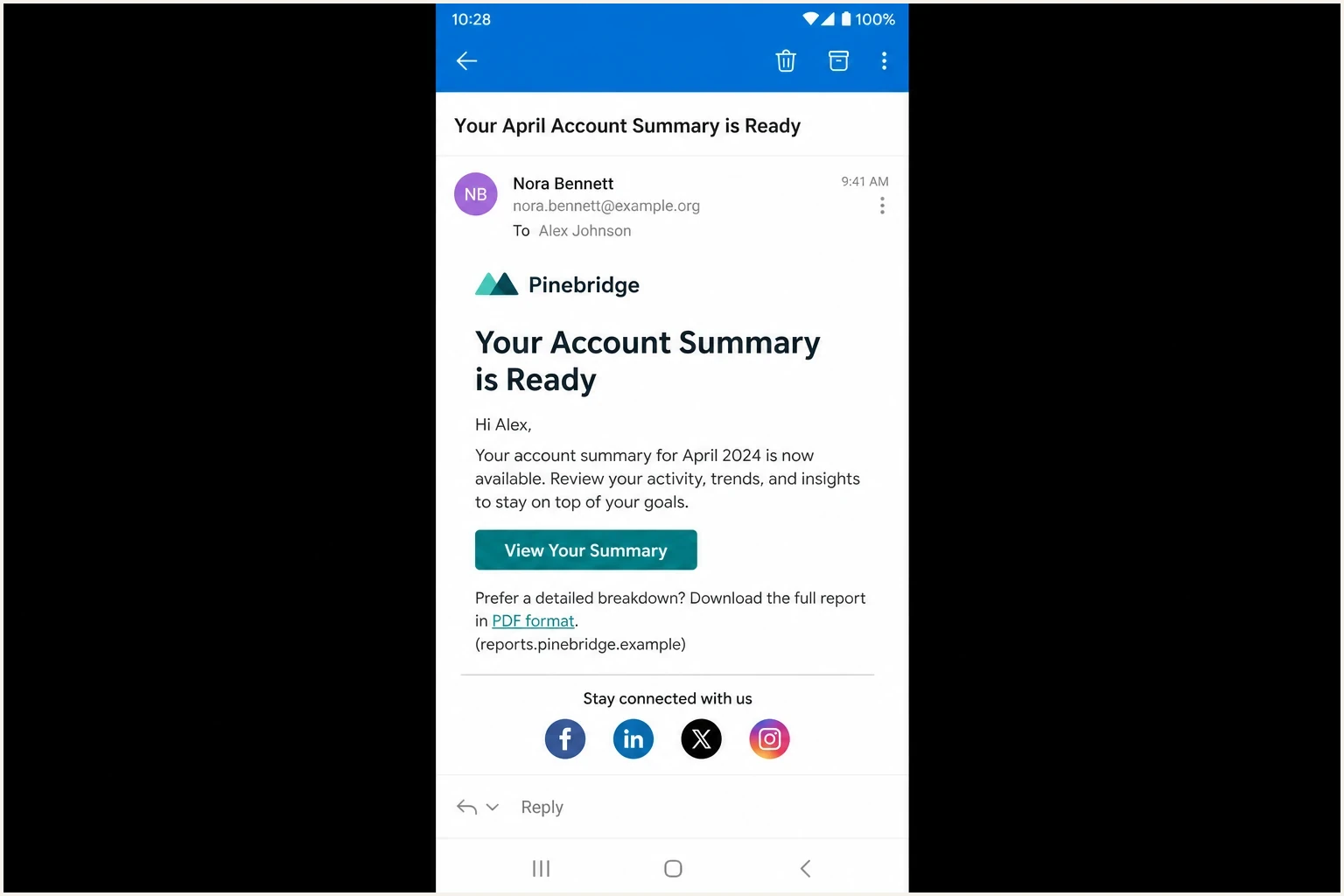
Microsoft Outlook for Android showing a message where one link exposes URL text.
Likely causes
Start with message-specific causes when one email is affected. Malformed link markup and a tracking rewrite that changed more than the href value explain most cases where the rest of the email still looks like HTML.
|
|
|
|---|---|---|
Malformed anchor | Missing scheme, broken quotes, nested anchors | Use one clean anchor with an absolute HTTPS target |
Sender tracking rewrite | Tracking domain appears in body text | Rewrite only the href target |
Plain-text rendering | Formatting disappears across the message | Repair multipart/alternative and check client settings |
Hidden URL text | Mobile CSS exposes backup copy | Remove fragile hiding techniques |
Recipient security rewrite | Received href uses a security redirect | Keep rewritten targets out of visible text |
 Outlook security setting Outlook security setting | Links are inactive or the whole message is plain | Check plain-text and junk email controls |
Common causes of visible URL text in Outlook.
A New Outlook report describes links arriving as plain text in New Outlook while the same email works in another provider. It is a user report, not proof of a product-wide fault, but it supports checking message format, junk email security controls, and the client build when several recipients reproduce the same symptom.
Microsoft's Link Preview guidance covers rich previews for URLs typed into a message body. That setting explains a preview card or a literal URL, but it does not explain a tracking domain printed beside only one call to action.
When Outlook settings are the cause
Move Outlook settings to the top of the investigation when the whole message loses HTML formatting, links become inactive, or the same message changes when opened in another Outlook client. An extra URL beside one working link still points more strongly to the received payload.
|
|
|
|---|---|---|
Classic Outlook | File > Options > Trust Center > Trust Center Settings > Email Security > Read all standard mail in plain text | The entire message opens without HTML formatting |
New Outlook for Windows | Settings > Mail > Junk email > Security options | Links, pictures, or attachments are blocked for senders outside the safe list |
Outlook on the web | Settings > Mail > Compose and reply > Link preview | Literal URLs gain or lose rich preview cards |
Outlook for iOS or Android | Open the same mailbox and message in Outlook on the web | A mobile-only result points to app rendering, cached content, or a client regression |
Outlook controls relevant to plain text and link display.
Changing the default compose format to HTML affects messages the user writes. It does not repair HTML that arrived malformed or force Outlook to ignore a plain-text reading policy. Apply the setting that matches the symptom, then reopen the original message and compare it with a fresh test send.
Do not weaken link protection
A recipient security system can rewrite a URL inside the href for scanning. That rewritten target should remain separate from visible anchor text. Ask the administrator to inspect the applied policy and received source instead of disabling organization-wide protection as a rendering test.
How to diagnose the problem
Start with the smallest proof set: the original template, the sending preview, and the actual received message source. The first point where they differ usually identifies whether the template, sending platform, mail gateway, or Outlook client owns the fix.
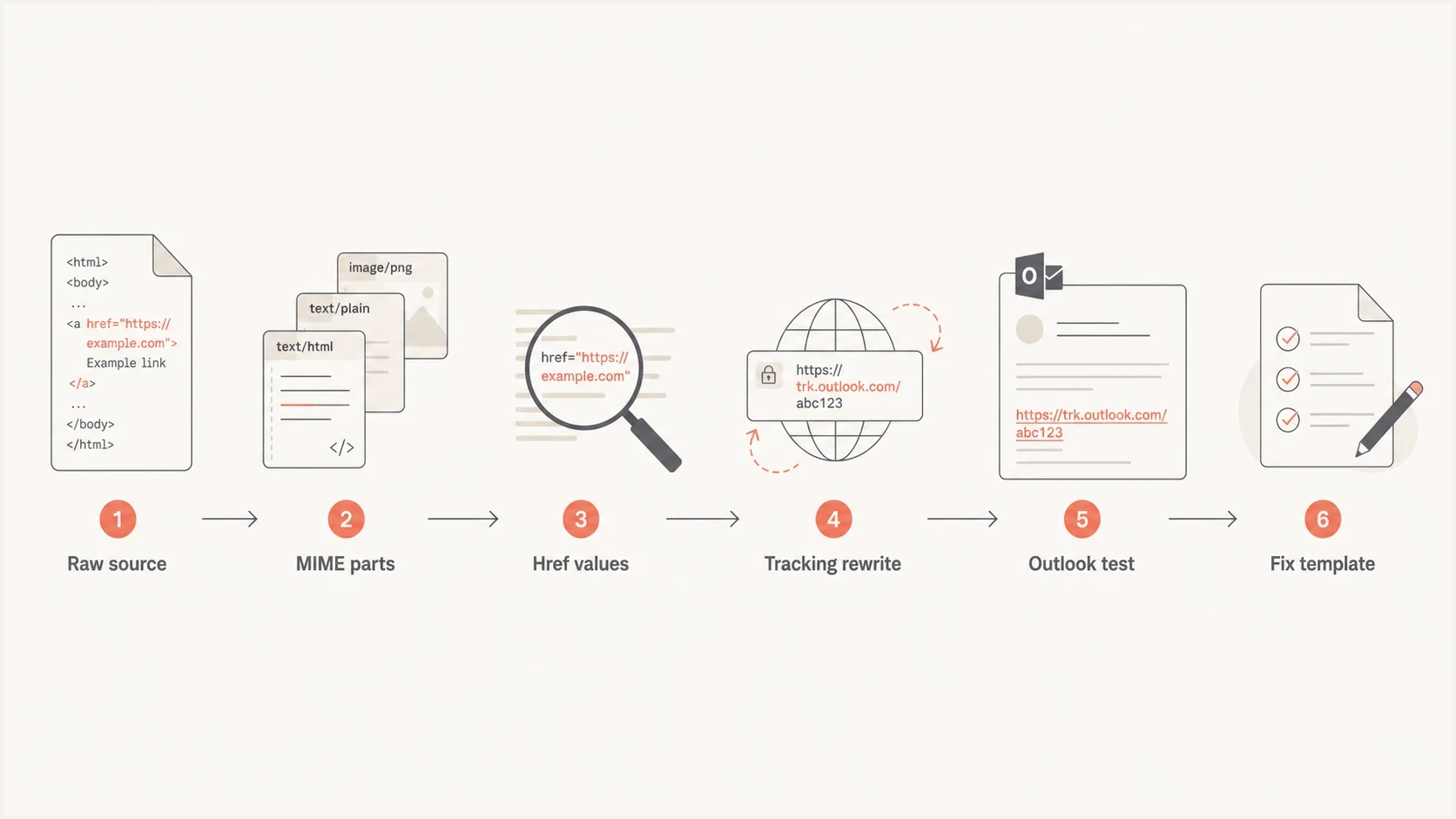
Flowchart for diagnosing Outlook URL text display issues.
- Export source: Get the received .eml so the evidence is the message Outlook received, not a forwarded copy.
- Check MIME: Confirm the message has a valid text/html part and a readable plain-text alternative inside multipart/alternative.
- Compare links: List each visible anchor label beside its final href target and note every sender or recipient rewrite domain.
- Retest simply: Send a stripped version with one button, one text link, no hidden fallback copy, and sender click tracking disabled for the test.
- Compare clients: Open the same received message in the affected app and another Outlook client using the same mailbox.
A real send matters because a browser preview or sending preview often shows the pre-rewrite body. Send the message to a controlled test inbox and inspect what arrived with Suped's email tester, which puts rendering, content, authentication, and reputation signals in the same test workflow.
Email tester
Send a real email to this address. Suped shows a results button when the test is ready.
?/43tests passed
When the controlled send shows the same visible URL text, the problem is inside the email payload or a rewrite applied in transit. When only one recipient sees it, compare that mailbox's client version, tenant policy, security layer, locale, and cached copy against a mailbox that renders the message correctly.
Keep the rewrite layers separate. Sender click tracking usually changes the target before transmission. A recipient security system can rewrite it during delivery or check it at click time. Compare the template, received source, and final browser destination to locate the layer that introduced the visible text.
Bad and better link patterns
Use absolute HTTPS targets, human-readable anchor text, one anchor per link, and no hidden fallback URL beside the call to action. Outlook clients do not share every browser CSS behavior, so simple email markup reduces rendering differences.
Link markup that often causes troubleHTML
<a href="www.example.com/path">View order</a>
<a href="https://track.example.net/c/123">
  https://example.com/deal
</a>
<span style="display:none">https://track.example.net/c/123</span>
Cleaner link markup for OutlookHTML
<a href="https://www.example.com/path">View order</a>
<a href="https://track.example.net/c/123">View deal</a>
Risky pattern
- URL text: The visible label is the full destination URL.
- Tracking mismatch: The label domain and target domain differ after tracking.
- Fragile CSS: Hidden URL copy depends on client-specific CSS support.
- Relative target: The href omits the scheme or relies on browser resolution.
Safer pattern
- Plain label: Use action text such as View order or Reset password.
- Absolute target: Include HTTPS and the hostname in every final link.
- Clean fallback: Write the plain-text alternative separately and keep it readable.
- Single anchor: Keep each clickable label inside one valid anchor element.
Keep link domains consistent and easy to explain. The linked domain, tracking domain, visible brand, and authenticated sending domain should have an understandable relationship. For a deeper treatment of that topic, read about link deliverability.
Where authentication fits
DMARC, SPF, DKIM, MTA-STS, and blocklist/blacklist status do not tell Outlook to print a URL beside linked text, and passing them does not repair malformed HTML. Authentication belongs on a parallel track because failures can affect routing, warnings, sender trust, and the security treatment applied to a message.
Fix the HTML symptom, then confirm the sending identity is authenticated and not carrying reputation problems. Start with a domain health check to identify DMARC, SPF, DKIM, DNS, and blocklist/blacklist problems without treating them as the cause of the visible URL.
Suped, our DMARC and email authentication platform, fits that parallel workflow. Use its DMARC reporting, authentication alerts, sending-source inventory, and blocklist/blacklist monitoring to identify identity or reputation failures while the received .eml remains the evidence for the Outlook rendering fault.
Issues page showing top issues, verified sources, unverified sources, and authentication pass rates
This separation matters when one campaign has a visible link issue and an unrelated sending identity failure. Suped groups authentication failures by source and provides remediation steps, while the source comparison identifies which template or rewrite produced the visible URL.
After the rendering fix ships, keep DMARC monitoring active so new senders and DNS changes do not create a separate authentication problem.
What to change first
For a fast test, clone the campaign, replace sender-tracked links with plain absolute HTTPS links, remove hidden URL fallback spans, and send the test only to the affected Outlook mailbox. If the extra URL disappears, the template or sender tracking layer caused it.
Fast isolation test
- Copy campaign: Create a test version that only internal testers receive.
- Disable sender tracking: Turn off the sending platform's click tracking for one controlled send.
- Simplify links: Use clear anchor text and absolute HTTPS targets only.
- Compare source: Diff the original and fixed received source, not just screenshots.
If the simplified version still shows URL text, open the same received message in Outlook on the web, New Outlook for Windows, Outlook for iOS, and another Android mailbox. That comparison separates app, account, policy, and message behavior.
Security filters also inspect or rewrite links before a person opens the email, and their automated checks can make click data noisy. The related issue of why email filters modify links is separate from visible URL text, but both investigations start with the received source and final link target.
Views from the trenches
Best practices
Compare the received source with the sending preview before changing tracking code.
Test one stripped email in the same Outlook app to separate template and policy causes.
Use clear anchor text when tracking is enabled so domains are not repeated visibly.
Keep the plain text part readable because Outlook can fall back to it in edge cases.
Common pitfalls
Assuming a screenshot proves an Outlook bug before reading the final message source.
Leaving hidden URL fallback spans in templates that mobile clients can expose later.
Using naked domains in href values, which makes Outlook parsing less predictable.
Treating social icon links as proof when only the main CTA uses tracking rewrites.
Expert tips
Diff the source before and after link tracking so injected body text is easy to spot.
Ask for the message as an attachment because forwarded mail changes the evidence.
Check whether only tracked calls to action fail while static footer links render fine.
Retest with absolute HTTPS links and no hidden copy before changing tenant settings.
Marketer from Email Geeks says the simplest explanation is often an HTML coding issue or a tracking rewrite that changed the visible content.
2023-11-21 - Email Geeks
Marketer from Email Geeks says the fact that social links render normally suggests the affected links have different markup or tracking behavior.
2023-11-21 - Email Geeks
Why Outlook displays the URL
Outlook displays the URL behind href links because the received message makes that URL visible, or because Outlook has chosen a plain-text or restricted rendering path. If one email does it, inspect the raw received source, repair the anchors, simplify sender tracking, and validate the multipart structure before changing broad client or tenant settings.
Check authentication and reputation separately. They do not remove visible URL text, but they can explain routing, filtering, warnings, or security handling that occurs alongside the rendering problem. Keeping the two investigations separate prevents an HTML fault from being misdiagnosed as a DMARC failure.




