Why are my SendGrid links broken and how do I fix it?


Updated on 22 Aug 2026: We added SendGrid's link-branding selection rules and tightened the SSL proxy troubleshooting steps.
Your SendGrid links are broken because SendGrid click tracking is rewriting the original links into tracking URLs, usually on a subdomain such as url1234.example.com, and that tracking host is not resolving, not pointing to the right place, not preserving the expected host through a proxy, not working over HTTPS, or being blocked by a URL reputation system. The failure often appears as a URL containing /ls/click, a /ss shortened tracking path, a 404 page, a browser privacy warning, a dangerous-link warning, a 525 SSL handshake error, or an HTTPS timeout. If the path starts with /ss, SendGrid Link Shortening is enabled, but the same tracking hostname, SSL, proxy, and redirect checks still apply. The quickest fix is to turn off click tracking in SendGrid, send a new test email, and confirm the links stay as the original URLs.
If you need click metrics, keep tracking on but fix the branded link setup. That means checking the tracking subdomain, the CNAME target, SSL, proxy or CDN host header behavior, and the SendGrid account or API setting that controls click rewriting. DMARC did not break the links. DMARC, SPF, and DKIM affect authentication and domain trust, while SendGrid click tracking changes the actual href values in the email.
If the message was sent through Zapier, a CMS, an app backend, SMTP, or API, still start with the delivered message. Those tools can pass correct HTML to SendGrid, then SendGrid rewrites the link after handoff, which is why a hardcoded URL can become a long, jumbled /ls/click URL in the inbox.
If the same tracked URL fails only on one device, one mailbox, one company domain, or one network, test it somewhere else before changing DNS. iOS, macOS, iPadOS, corporate security tools, and privacy settings can block, prefetch, or rewrite tracking URLs locally even when the SendGrid tracking hostname works.
When every link in a SendGrid email changes to a URL containing /ls/click or /ss, treat click tracking as the first suspect. A single bad link can be template logic. Every link changing points to a platform-level tracking setting.
- Fast check: Copy the link from the received email, not the editor preview.
- Pattern: Look for a host like url1234 plus /ls/click or /ss.
- Meaning: SendGrid rewrote the link, then the tracking domain failed.
- Scope: If only one user reports the issue, test the same link on another device, browser, and network.
- Reputation: If the warning says dangerous or suspicious, capture the full redirect chain before changing DNS.
Why SendGrid changes links
SendGrid click tracking works by replacing each visible destination with a SendGrid tracking URL. The tracking URL records the click, then redirects the visitor to the original destination. That rewrite can apply to HTML anchor tags and, when plain text click tracking is enabled, plain text URLs. SendGrid's own SSL tracking setup explains that click tracking rewrites links and that branded link tracking uses your own domain instead of SendGrid's default domain.
That rewrite is normal when click tracking is intentional. It becomes a problem when the branded tracking host has no DNS record, points to the wrong target, lacks a valid certificate, or sends the request to a proxy that does not preserve the host expected by SendGrid. Security products also score the tracking host and redirect path, not just the final page, which is why a clean website can still sit behind a blocked tracking URL. If a recipient security system later wraps the SendGrid URL again, the recipient can see two layers of rewriting before the browser reaches the final page.
Original link versus SendGrid tracking linktext
Original link:
https://www.example.com/account

Rewritten by SendGrid click tracking:
http://url1234.example.com/ls/click?upn=...
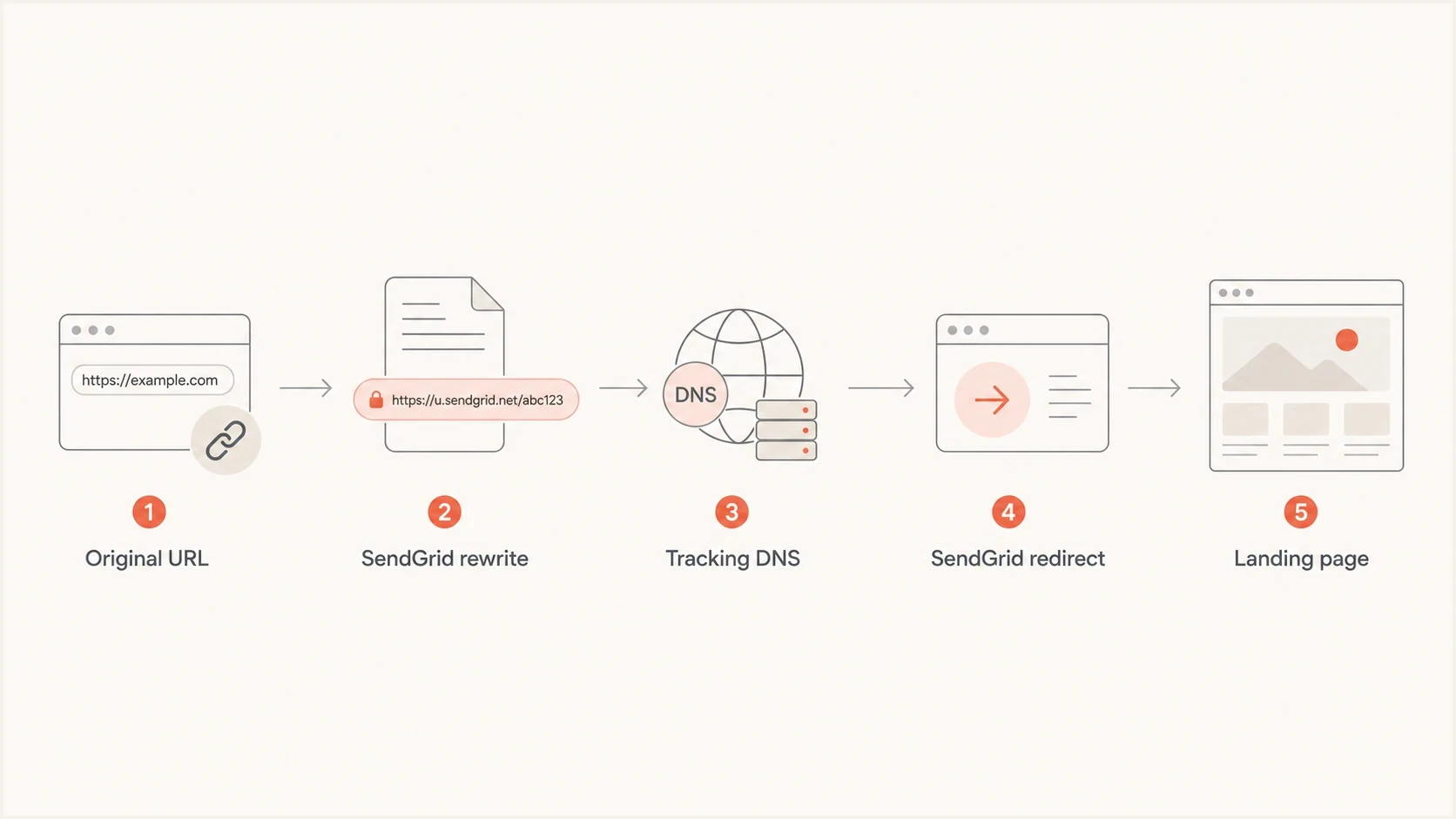
Flowchart of a SendGrid click tracking link through DNS, redirect handling, and the landing page.
The ls/click path is a useful clue because it tells you the link is going through SendGrid's link tracking layer. A /ss path means SendGrid Link Shortening is on, not that tracking is off. If the hostname itself fails, the browser never reaches the redirect step. If the hostname works over HTTP but fails over HTTPS, the problem is certificate or SSL tracking setup. If plain text links are also rewritten, check whether SendGrid's plain text click tracking option or API tracking settings are enabled for that send. If both HTML and plain text tests break in the same way, check account-level tracking and API-level tracking settings before editing the template. If the redirect works for some destinations but not others, inspect the final URL, redirect chain, and query parameters.
The fastest fix
The fastest fix is to disable SendGrid click tracking for the sending path that is breaking links. This stops SendGrid from rewriting the href values, so recipients receive the original links. Use this as the first recovery step when broken links affect active customer journeys, password resets, invoices, account pages, or payment update pages.
After the urgent issue is stable, decide whether click tracking is needed. If it is not needed, keep it off. If reporting depends on click data, rebuild the branded link setup and test the full redirect path before turning it back on for production mail.
- Confirm the pattern: Open a delivered email and copy a broken link. Look for /ls/click or /ss.
- Disable tracking: Go to SendGrid tracking settings, or the sending API configuration, and turn click tracking off.
- Send a fresh test: Do not reuse the old email. Old tracked links stay rewritten.
- Use the same path: If the email normally comes through Zapier, a workflow tool, or your app, test that same route.
- Inspect the source: Check the received HTML and verify the href is the original URL.
- Restore carefully: Only re-enable tracking after the tracking host, DNS, SSL, and redirects pass testing.
For one critical link, bypass tracking at the anchor level instead of disabling click tracking for the whole send. In the HTML, place clicktracking=off before the href, then send a new test and confirm that specific URL stays direct.
Turning off tracking is the cleanest emergency fix because it removes the broken redirect layer. It does not repair the tracking domain, but it gets recipients back to the real destination while you fix DNS and SSL.
For a realistic confirmation, send the same template through the same website or SMTP integration and inspect the delivered message with the email tester. The important part is testing the real send path, not a preview inside SendGrid or your CMS.
Email tester
Send a real email to this address. Suped shows a results button when the test is ready.
?/43tests passed
A passing test should show the original href values when tracking is off, or a tracking URL that resolves cleanly when tracking is on. If the message authenticates but links still break, keep the troubleshooting focused on link branding, SSL, proxies, redirects, and template output.
If you need click tracking
If the team needs click reporting, fix SendGrid link branding instead of leaving tracking disabled forever. The exact CNAME value belongs to the SendGrid account setup, so do not guess it. Get the required host and target from SendGrid, your SendGrid administrator, or the account's authenticated domain settings.
Check both the account-level setting and the setting used by the actual sending path. Marketing Campaigns, transactional API sends, SMTP mail, and subusers can apply different tracking configuration, so disabling one control does not prove that every future SendGrid email will stop rewriting links. Also compare the selected link branding with the From domain because a matching branding can take precedence over the entry marked as default.
Link shortening is separate from repairing a broken tracking link. SendGrid Link Shortening can reduce wrapped link length after SendGrid Support enables it on a parent account or subuser, and enabling it can automatically activate click tracking. Shortened links show /ss instead of /ls. It still depends on click tracking and the branded tracking hostname, and SendGrid's click data window drops to 60 days from link creation. After that, the link should still work but the click is not recorded.
The normal shape is a branded tracking subdomain pointing through CNAME to the target assigned by SendGrid, or to a proxy or CDN path prepared for SSL tracking. If the tracking hostname does not exist in DNS, browsers cannot reach SendGrid's redirect service. If it only works over HTTP, treat that as a security and trust issue, then finish the SSL tracking setup before relying on click data. For proxy setups, the proxy must pass traffic to SendGrid while preserving the link branding host that SendGrid expects.
Typical link branding DNS shapedns
url1234.example.com.  CNAME  assigned-target.sendgrid.net.

# If SSL tracking uses a proxy, SendGrid can require:
url1234.example.com.  CNAME  proxy.example.com.
|
|
|
|---|---|---|
Host missing | No CNAME | Add the exact DNS target |
Connection not private | Bad SSL | Install a valid certificate |
525 or timeout | Proxy, CDN, or certificate path | Check certificate and host header |
Not found | Public shortener, redirect chain, or heavy UTM path | Use the final URL directly |
Dangerous warning | URL reputation or unsafe destination | Check host, final URL, and blocklist status |
Shortened link fails | Same host or SSL issue | Debug like /ls; note 60-day reporting window |
Wrong link | Proxy host | Preserve the expected host |
Only http | SSL not enabled | Complete SSL tracking setup |
Common SendGrid link failures and the practical fix
Disable click tracking
- Best for: Urgent customer-facing link failures.
- Benefit: Original links go out without a tracking redirect.
- Tradeoff: SendGrid click reporting stops for those emails.
Fix link branding
- Best for: Teams that need click metrics and branded domains.
- Benefit: Tracking works while links use your domain.
- Tradeoff: DNS, SSL, Support, and release coordination take time.
SendGrid also documents a branded link Not Found guidance path for cases where rewritten links fail because of shorteners, redirects, or heavy UTM use. Start with the tracking host because a missing host breaks every tracked link before destination-specific checks matter.
One SendGrid-specific trap: SSL tracking applies across the account. Before asking support to enable it, prepare every link branding in that SendGrid account, not only the broken hostname, because one unprepared branding can hold up the change.
Why the wrong link branding appears
A working SendGrid link can still use the wrong branded hostname. SendGrid's default link branding behavior gives a matching branding for the From domain priority over the entry marked as default. When several brandings match the same domain, SendGrid can select the oldest one. The default branding is used when no branding matches the sender's domain.
This explains incidents where DNS and SSL look healthy but the delivered email uses an unexpected tracking host. The setting marked default is not enough evidence. Audit the link brandings that belong to the account or subuser that performed the send.
- Match the sender: Record the exact From domain used by the delivered message.
- Inventory brandings: List every link branding on the sending account and relevant subuser.
- Check creation order: Identify the oldest branding that matches the sender's domain.
- Remove conflicts carefully: Document DNS and ownership, then delete only an unwanted branding that conflicts with the intended one.
- Retest each path: Send through the same account or subuser and confirm the hostname in the delivered href.
Do not delete a branding only because another entry is marked default. Confirm which sender domains, subusers, and live mail streams depend on it first.
Safer SendGrid tracking setup
Once the links work again, treat the SendGrid tracking host as part of your email reputation, not disposable analytics plumbing. A branded tracking hostname should be HTTPS-only, tied to the sender's domain, and monitored like any other domain that appears in email.
Click tracking is normal when it records the click and sends the visitor to the expected page. Risky link cloaking starts when the tracking layer hides an unrelated destination, masks a public shortener, or depends on a redirect chain that the sender cannot explain.
- Use branded HTTPS: Do not leave customer-facing mail on plain HTTP tracking links. Finish SSL tracking before sending at volume.
- Confirm consent: Check the rules that apply to each recipient country before using click or open tracking, because some jurisdictions require clear consent.
- Avoid open redirects: Do not build links where untrusted input controls the final destination after SendGrid redirects the click.
- Keep destinations clean: Use the final URL directly where practical, and avoid public shorteners, deep redirect chains, and sensitive data in query strings.
- Keep paths clear: Do not place unrelated brand names or security-sensitive wording inside URL paths, because filters inspect path text as part of the risk signal.
- Shorten only after repair: Use SendGrid Link Shortening for raw URL length problems, not as a substitute for working DNS, HTTPS, host preservation, and redirects.
- Log enough context: Keep message IDs, campaign IDs, recipient tokens, and full URLs available so support can reconstruct the redirect path.
- Monitor the host: Check the tracking subdomain for DNS, certificate, reputation, and blocklist (blacklist) issues when campaigns fail after click.
Suped's product fits this workflow when the SendGrid issue overlaps with authentication or reputation. Teams can track DMARC, SPF, DKIM, sender sources, and blocklist (blacklist) signals while the SendGrid owner fixes link branding.
Where DMARC fits
DMARC does not rewrite URLs, but it often appears in the same incident because teams change email authentication and sending platforms at the same time. A domain can pass DMARC and still have broken SendGrid tracking links. A domain can also have working links while SPF, DKIM, or DMARC is misconfigured. Treat these as two connected checks, not one root cause.
Use DMARC monitoring to confirm which services are sending mail for the domain, then check DNS health separately with a domain health checker. That separation matters because authentication problems usually affect inbox placement, while tracking-domain problems affect what happens after the recipient clicks.
DMARC record detail view showing SPF, DKIM, DMARC, rDNS diagnostics, and DNS records
Suped's product is useful in this workflow because it keeps DMARC, SPF, DKIM, hosted SPF, hosted DMARC, hosted MTA-STS, blocklist (blacklist) monitoring, and deliverability checks in one place. Teams can see whether SendGrid is authenticated, where SPF lookup risk exists, and which DNS changes need an owner while the link-branding work continues.
A practical Suped workflow for this issue is to verify that SendGrid is authenticated, confirm that unrelated senders are not failing DMARC, and then keep the link-branding work focused on the SendGrid tracking hostname.
- Confirm sender: Check whether SendGrid is a verified source for the domain.
- Separate issues: Keep authentication failures apart from click redirect failures.
- Use alerts: Turn on real-time alerts for sudden authentication failures.
- Reduce DNS load: Use hosted SPF or SPF flattening when many senders create lookup risk.
This matters during handoffs with IT. If the request is simply "fix SendGrid links," the DNS owner lacks enough detail. A better request names the broken host, the expected CNAME target, whether SSL tracking is required, and the business impact if links remain broken.
Other causes to rule out
Click tracking is the first place to look when every SendGrid link becomes a tracking URL, but it is not the only reason email links fail. Check these causes after the tracking host and SSL path are understood.
If the browser or endpoint product labels the SendGrid tracking URL as dangerous, treat it as a URL reputation incident as well as a broken-link issue. Capture the full tracking URL, final URL, warning text, screenshot, browser, device, network, and timestamp. Then check the tracking host, destination, redirect chain, and any blocklist (blacklist) signals before asking for recategorization.
- Shorteners: Public link shorteners can trigger blocking, branded link errors, or 404s after SendGrid rewrites the URL. If length is the issue, use SendGrid Link Shortening after branded tracking works instead of stacking another redirect.
- Redirect chains: Long chains, HTTP-to-HTTPS hops, or heavy UTM parameters can fail before the final page loads.
- Security filters: Some filters wrap a SendGrid tracking URL inside a second security URL, then scan it at click time. That can expose fragile encoding, long redirect chains, expired tokens, a tracking domain with weak reputation, or a destination URL that has been classified as unsafe.
- Scanner clicks: If the link works in manual testing but SendGrid reports sudden clicks, pull event data before changing DNS.
- Device privacy settings: If one person sees the failure on iOS, macOS, or iPadOS, test the same tracked URL on another network and browser before changing DNS.
- Unsubscribe logic: Unsubscribe and preference-center links have their own risk. A custom unsubscribe URL is only a tracked click unless your system also writes the opt-out, and one automated GET request should not silently suppress a real recipient. For marketing mail, group-level unsubscribe handling keeps one topic opt-out from turning into a global suppression.
- HTTP only: Plain HTTP tracking can create browser warnings, trust problems, and weaker link reputation signals. Use branded HTTPS tracking when click metrics must stay on.
If manual testing shows the link works but SendGrid reports a click or unsubscribe spike, use non-human click guidance as an investigation path. SendGrid says bot and security-software activity can appear in reporting, so do not treat a spike as proof of human engagement. Compare event type, timestamp, URL, IP, user agent, message ID, recipient, and campaign ID. Immediate clicks at delivery time, repeated IPs, and one recipient clicking many links point to scanner activity, not a broken tracking host.
Complete the initial link-branding validation while the CNAME points to the target SendGrid expects. After changing the first CNAME to the final SSL proxy or CDN, do not revalidate it in the SendGrid UI. That second validation fails because the record no longer points directly to SendGrid. If revalidation has already broken the setup, restore the SendGrid target, validate again, then repoint the first CNAME to the proxy.
Template bugs also matter. If only one link breaks, compare the raw HTML before SendGrid processes it and after the email is delivered. Missing schemes, unescaped ampersands, malformed Liquid or Handlebars variables, and CMS filters can create a bad original URL before SendGrid touches it.
If the broken link appears only for some recipients, test across mailboxes, devices, corporate networks, home networks, and privacy settings. A security gateway can block a tracking domain that works elsewhere. That does not clear SendGrid or DNS, but it changes the fix from "tracking domain is dead" to "tracking domain has a reputation or filtering problem."
A practical troubleshooting checklist
The fastest way to avoid circular troubleshooting is to test each layer in order: message HTML, SendGrid rewrite, DNS, HTTP response, HTTPS response, redirect, final destination, and authentication. Skipping straight to DMARC wastes time when the browser error is happening at the tracking host.
Start with the delivered email because it proves what recipients received. A SendGrid preview, website CMS preview, or template editor does not prove what arrived in the mailbox.
DNS and response checksbash
dig url1234.example.com CNAME

dig url1234.example.com A

curl -IL http://url1234.example.com/ls/click

curl -IL https://url1234.example.com/ls/click
- Copy the link: Use the actual link from the delivered email.
- Capture the warning: Save the screenshot, warning wording, browser, device, network, and timestamp when the issue is a dangerous-link block.
- Check the scope: Test another browser, network, and device when the report is device-specific.
- Compare inboxes: Save the message source from one working mailbox and one affected mailbox when the failure is limited to certain recipients.
- Identify the host: Separate the tracking hostname from the long query string.
- Check DNS: Confirm that the hostname resolves through the expected CNAME.
- Check HTTPS: Confirm the certificate matches the tracking hostname.
- Follow redirects: Verify the final destination returns a normal page.
- Retest sending: Send a new email after each SendGrid or DNS change.
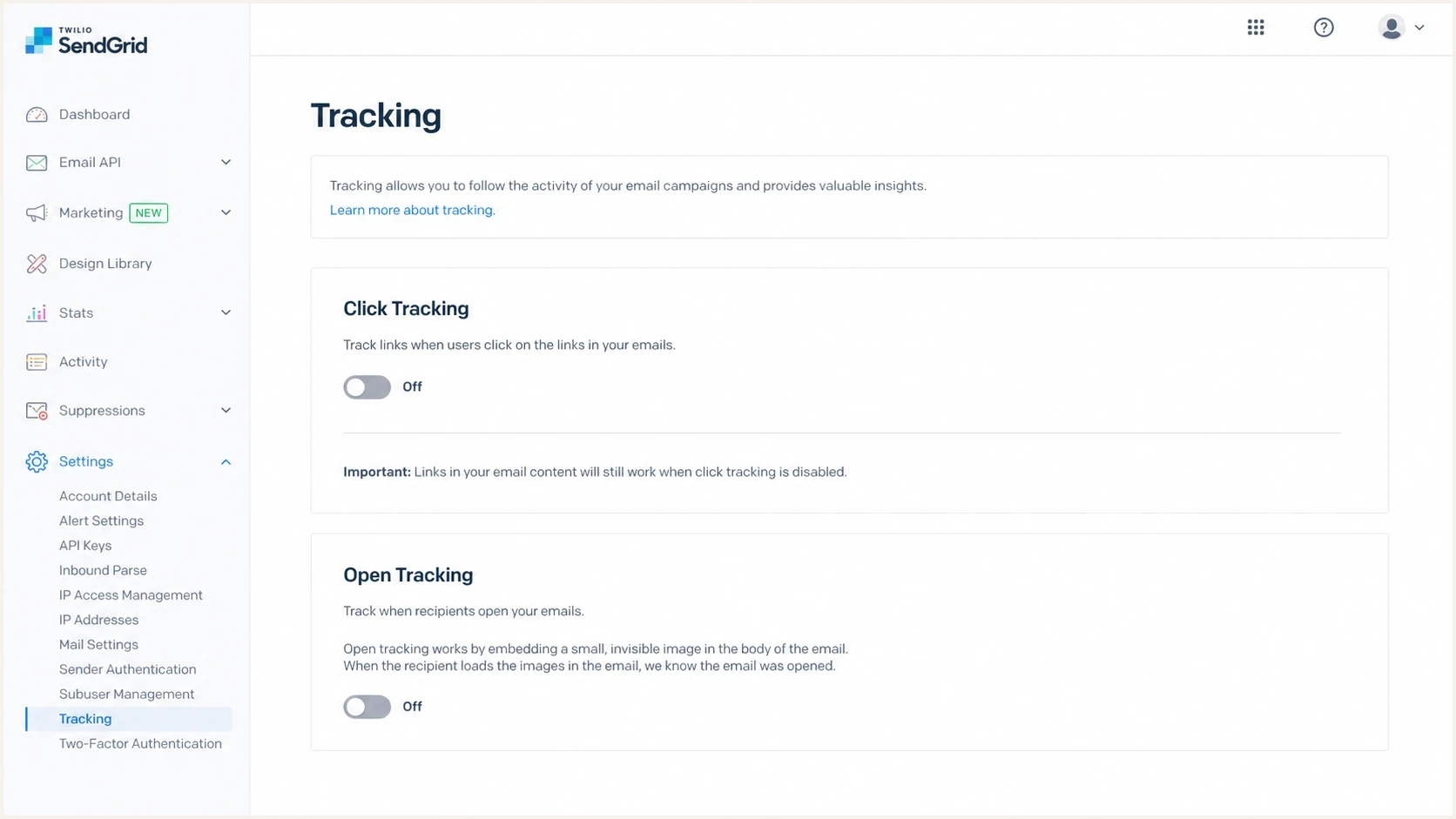
Twilio SendGrid tracking settings showing click tracking turned off to fix broken links.
For the DNS request, include the exact hostname that appears in the broken link. Asking IT to "fix SendGrid" is too vague. Asking for a CNAME check on the tracking host, plus an SSL check for that same host, gives them a concrete task.
Views from the trenches
Best practices
Capture the delivered link first, then compare it with the source template before editing DNS.
Disable click tracking for urgent sends, then rebuild branded link DNS and SSL in staging.
Give IT the exact tracking hostname, desired CNAME target, and business impact in one ticket.
Common pitfalls
Assuming DMARC rewrote links sends teams down the wrong path and slows customer fixes.
Changing CNAME records without SendGrid's expected target can create more failed clicks.
Testing old emails after a fix gives false failures because old tracked links stay rewritten.
Expert tips
Treat every link changing to an ls/click URL as platform tracking until proven otherwise.
Check HTTPS manually because a tracking domain can resolve while the certificate still fails.
Keep authentication monitoring separate from redirect testing so each owner gets clear work.
Marketer from Email Geeks says rewritten SendGrid links that use ls/click usually point to click tracking being enabled for the sending path.
2024-03-12 - Email Geeks
Marketer from Email Geeks says a missing tracking hostname points to link tracking being enabled before the needed DNS was finished.
2024-03-12 - Email Geeks
What to do next
If every SendGrid link is broken and the URL contains /ls/click or /ss, turn off click tracking first or bypass tracking on the critical anchor. That removes the broken redirect path and gets urgent emails working again. Then fix link branding by checking the tracking CNAME, SSL certificate, proxy or CDN behavior, and final redirect chain.
Keep DMARC work active, but do not treat it as the link rewrite cause. Suped's product helps keep those workstreams clean: authentication monitoring for inbox trust, hosted SPF and hosted DMARC for DNS control, hosted MTA-STS for TLS policy, blocklist (blacklist) monitoring for reputation, and issue-level steps when a sender fails authentication.
The durable fix is simple in principle: either send original links with tracking off, or send tracked links through a branded hostname that resolves correctly over HTTPS and redirects to the intended destination. If link length is the only issue, ask SendGrid Support for Link Shortening after branded tracking passes.