Why does SNDS show more message recipients than I sent?

Updated on 22 Oct 2026: We clarified how to reconcile SNDS recipient totals with sending logs, including Microsoft's documented recording anomaly.
Microsoft Smart Network Data Services (SNDS) can show more message recipients than your sending report because the two systems often count different things. SNDS counts recipients on messages actually transmitted from an IP. An email service provider (ESP) report might count campaign rows, unique contacts, or messages. Other traffic on the IP, a different reporting window, and a genuine retransmission can also increase the SNDS total.
Treat the mismatch as a signal to investigate, not as proof that extra mail was delivered. The useful question is: "How many recipients were on messages transmitted from this IP during the SNDS activity period?" That total does not always match a campaign's message count or unique audience.
Fast answer
If SNDS is higher than your ESP send count, check these areas before assuming abuse or a reporting error.
- Reporting unit: Confirm whether the ESP counts messages, unique contacts, or recipient events. Compare only Microsoft consumer traffic sent through the same IP.
- Shared IP route: SNDS reports by IP, so the total can include other traffic on that route.
- Hidden sources: Transactional mail and automations can use the same outbound IP.
- Time and SMTP outcome: Normalize the reporting window, then check logs for an actual retransmission.
What SNDS is counting
Microsoft SNDS is an IP-based view of traffic reaching Outlook.com consumer mail infrastructure, including Hotmail.com, Live.com, and MSN.com. It is not a complete report of Microsoft 365 business traffic. If an ESP sends through an IP, SNDS attaches the data to that IP. It does not know your campaign name, segment size, sending domain ownership, or the counting rules used in your ESP dashboard.
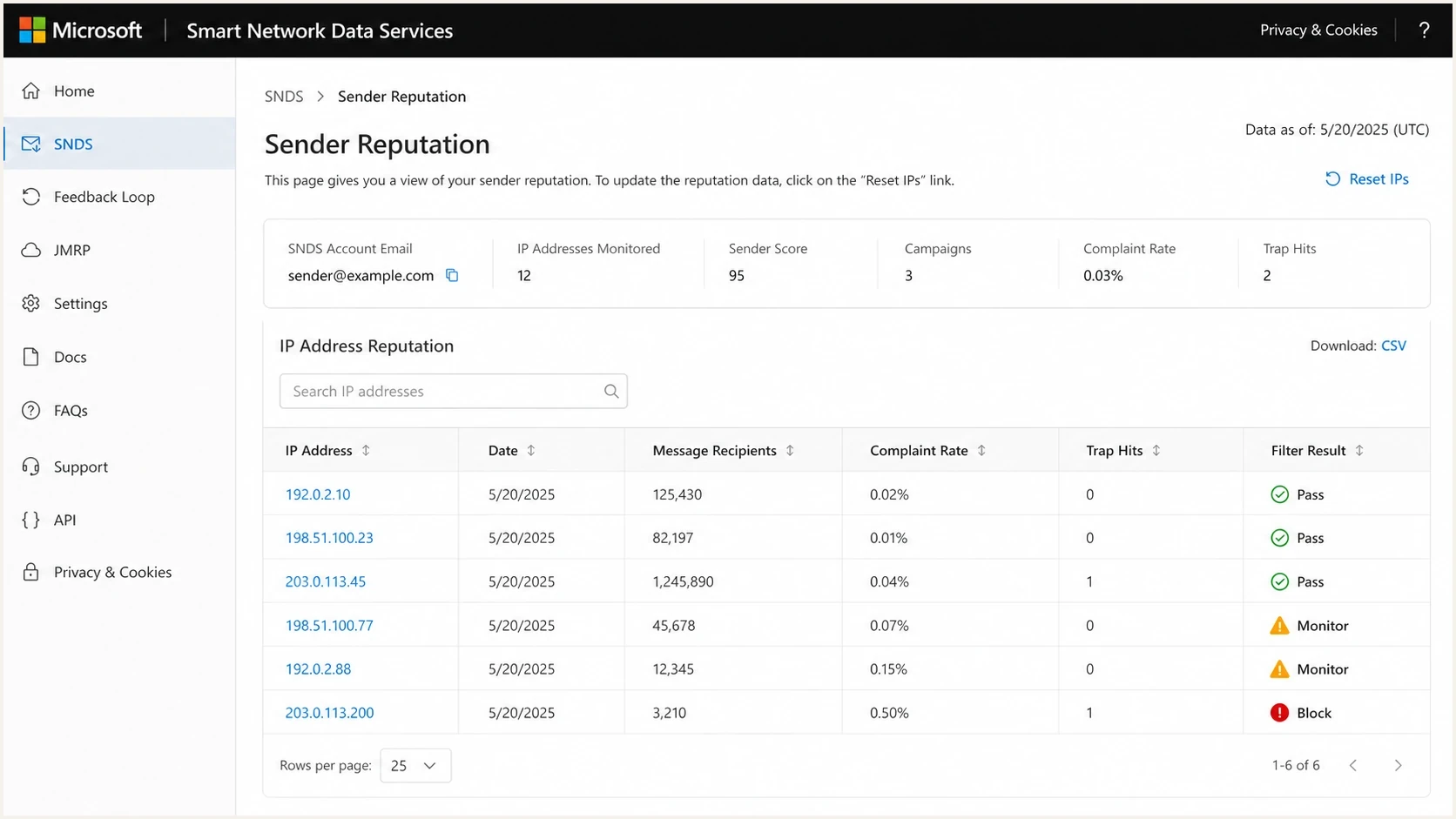
Microsoft SNDS report showing IP-level message recipients and filter results.
|
|
|
|---|---|---|
Different reporting unit | Transmitted recipients | Recipient export |
Shared IP or outbound gateway | All traffic on the IP | ESP route |
Different time window | SNDS activity period | Normalized timestamps |
Retransmission | Another transmitted copy | SMTP logs |
Common reasons SNDS recipient totals exceed campaign totals.
The SNDS fields describe separate SMTP stages. RCPT commands count recipient requests, DATA commands count requests to begin message-content transfer, and message recipients count recipients on messages actually transmitted by the IP. Message recipients are not necessarily unique people. For a deeper Microsoft-specific workflow, use SNDS troubleshooting alongside your ESP logs. Do not subtract DATA commands from RCPT commands to calculate bounces: one DATA transfer can carry multiple recipients. Check the recipient responses and final SMTP result instead.
Do not compare the wrong totals
One message addressed to ten recipients can contribute ten message recipients in SNDS. A dashboard that records that event as one sent message will therefore show a lower number.
- Campaign count: The rows, messages, or unique contacts shown by the ESP.
- RCPT commands: Recipient requests made during SMTP sessions, including repeated attempts.
- DATA commands: Commands to begin transferring message content after the recipient stage.
- Message recipients: Recipients on messages actually transmitted from the IP.
SNDS groups activity by Pacific Time with daylight saving adjustments. Its activity period shows the first and last active hours. Daily aggregation starts around midnight for the previous day and takes time to finish. Match those hours and use completed daily data, as described in Microsoft's SNDS FAQ.
When message recipients exceed RCPT commands
A higher message-recipient count than your ESP total is different from a higher count than SNDS RCPT commands. Microsoft's SNDS FAQ says a small excess over RCPT commands usually comes from a known recording anomaly in its systems and is not a cause for concern.
For example, 10,050 message recipients against 10,000 RCPT commands is a 0.5% excess. This is an illustration, not a Microsoft tolerance threshold. A large or persistent unexplained difference still needs log reconciliation. Preserve the raw SNDS row and compare both fields for the same IP and activity period before attributing the excess to duplicate delivery.
How retries affect SNDS counts
A temporary 4xx response tells the sender to try again. If Microsoft defers the recipient at the RCPT stage, the retry increases RCPT commands, but the deferred attempt does not become a message recipient because no message was transmitted. A retry increases message recipients only when another copy is actually transmitted, such as after the sender misses or cannot confirm the final SMTP acknowledgement.
One RCPT deferral followed by one message transfertext
# First SMTP transaction, after MAIL FROM
C: RCPT TO:<user@example.com>
S: 451 4.7.500 temporarily deferred

# Later SMTP transaction, after MAIL FROM
C: RCPT TO:<user@example.com>
S: 250 2.1.5 recipient accepted
C: DATA
S: 354 Start mail input; end with <CRLF>.<CRLF>
C: [message headers and body]
C: .
S: 250 2.0.0 message accepted
Campaign send log
- Audience: The ESP can show one intended recipient.
- Message: The campaign can still show one sent message.
- Detail: A summary dashboard can omit intermediate SMTP events.
Microsoft receiving view
- RCPT activity: The deferred request and later retry are separate commands.
- Transmission: The RCPT-stage deferral does not transmit the message body.
- Duplicate transfer: A second transmitted copy can add another recipient event.
This distinction is why raw SMTP logs matter even when the campaign report looks normal. Ask the ESP for RCPT responses, DATA events, final acknowledgements, retransmissions, and the exact outbound IP used for the send. If the ESP only provides aggregate campaign reporting, request a support export for the relevant activity period.
Example of how IP traffic exceeds one campaign
Illustrative counts for Microsoft consumer recipients on one IP during the same reporting period. The values are examples, not measured traffic.
Campaign recipients
Other IP traffic
Retransmitted recipients
Shared IPs and ESP reporting gaps
If you send through an ESP, confirm whether the IP is dedicated to you. On a shared IP or shared sending pool, SNDS can include traffic belonging to other customers using that IP. A public NAT gateway or outbound relay can also combine several machines behind one IP. Your ESP dashboard can show your campaign volume while SNDS shows all consumer-mail traffic Microsoft associated with the IP. If the ESP rotates IPs, match events to each IP separately; rotation alone does not explain extra recipients on one IP.
Ask the ESP for IP context
- IP type: Confirm whether the IP is dedicated, shared, pooled, or rotated.
- Route scope: Ask whether transactional and marketing mail share the route.
- Reporting basis: Ask what the ESP's sent number counts and which time zone it uses.
- Event export: Request raw events for the SNDS activity period that looks high.
This also matters for reputation checks. A shared IP with poor traffic can create Microsoft filtering pressure and can appear on a blocklist or blacklist even when your own campaign was small. Suped's blocklist monitoring helps track IP and domain listings while you work through the SNDS evidence.
Use DMARC reports to verify your domain's sources
SNDS shows Microsoft traffic for an IP. DMARC aggregate reports show source IPs for messages claiming your domain, reported message volume, authentication results, and domain matching. The reports can identify extra traffic tied to your domain, but they do not reveal unrelated domains sharing an IP and will not reconcile one-for-one with SNDS.
If your domain publishes a DMARC record with an rua destination, you are requesting aggregate reports from participating receivers. The reporting address usually points to an internal mailbox or a DMARC platform. Delivery depends on receiver participation, a working destination, and any required authorization for an external reporting domain. If nobody on the team knows where the reports go, check DNS first.
DMARC record with aggregate reportingdns
_dmarc.example.com TXT
v=DMARC1; p=none; rua=mailto:dmarc-reports@example.com;
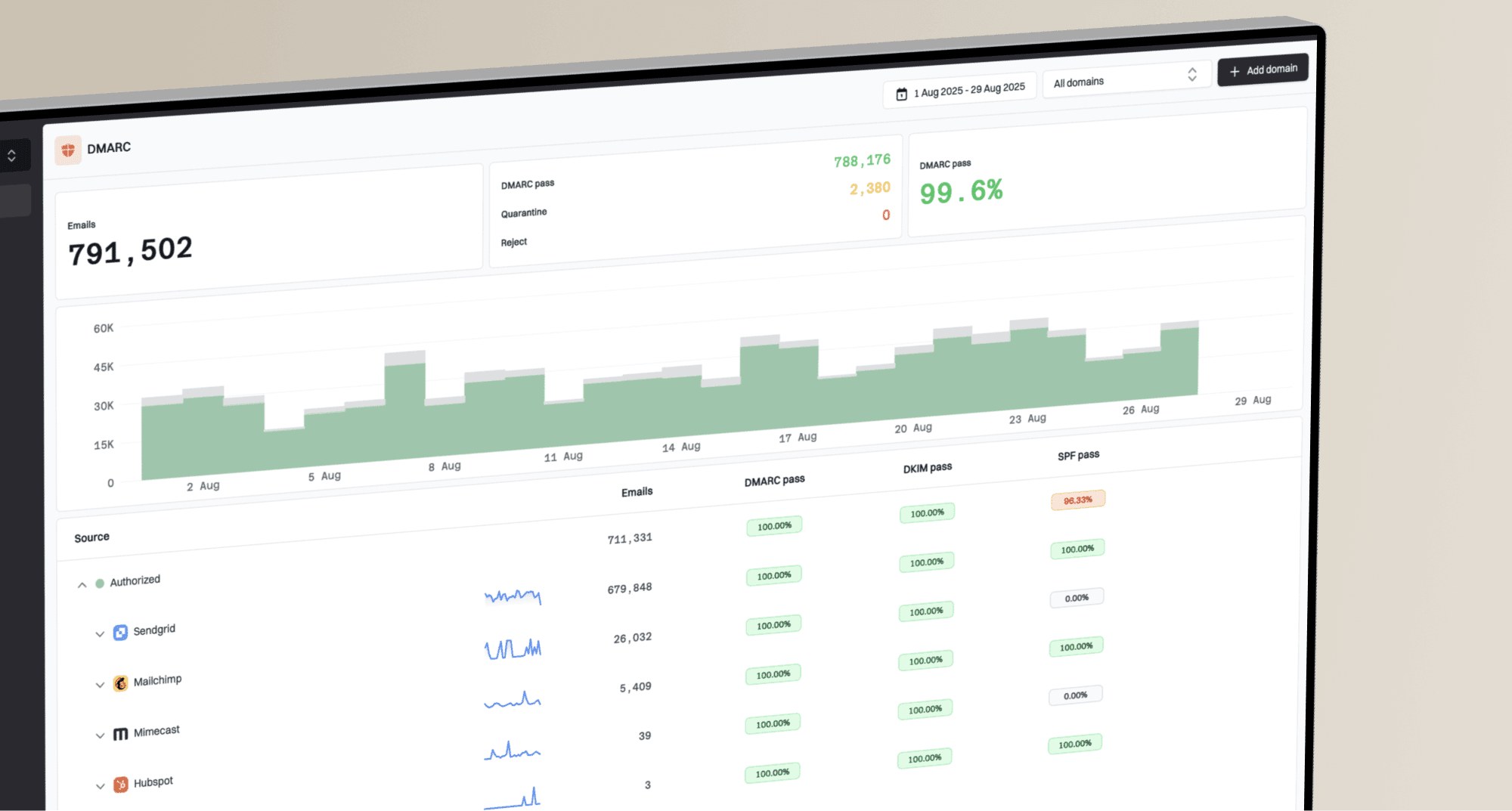
Suped DMARC dashboard showing email volume, authentication health, and source breakdown
Suped's DMARC platform turns aggregate reports into source breakdowns, authentication results, volume views, and issue lists. In this workflow, Suped helps confirm whether the SNDS IP sent as your domain and whether another approved or unknown source explains traffic outside the campaign report.
What to look for in DMARC data
- Source IP: Compare IPs reported for your domain with the SNDS IP.
- Reported volume: Check for traffic when no campaign was scheduled.
- Domain match: Check whether a passing SPF envelope-sender domain or DKIM signing domain matches the visible From domain under your DMARC settings. Relaxed matching can permit different subdomains of the same organizational domain.
- Unknown traffic: Investigate sources that nobody on the team recognizes.
If you do not yet have a reporting view, Suped's DMARC monitoring can organize aggregate reports before you move to stricter policy enforcement. Use the source data to explain your domain's traffic, while keeping shared-IP traffic outside your domain as a separate question.
?
What's your domain score?
Deep-scan SPF, DKIM & DMARC records for email deliverability and security issues.
A practical investigation workflow
Start by confirming the metric and activity period, then identify the IP route and compare SNDS message recipients with transmitted-recipient events for Microsoft consumer mailboxes. Use RCPT responses to diagnose deferrals. Change throttling, segmentation, or policy only after the evidence identifies a cause. Save the raw SNDS CSV and matching SMTP logs, including outbound IPs and timestamps, before opening a support case.
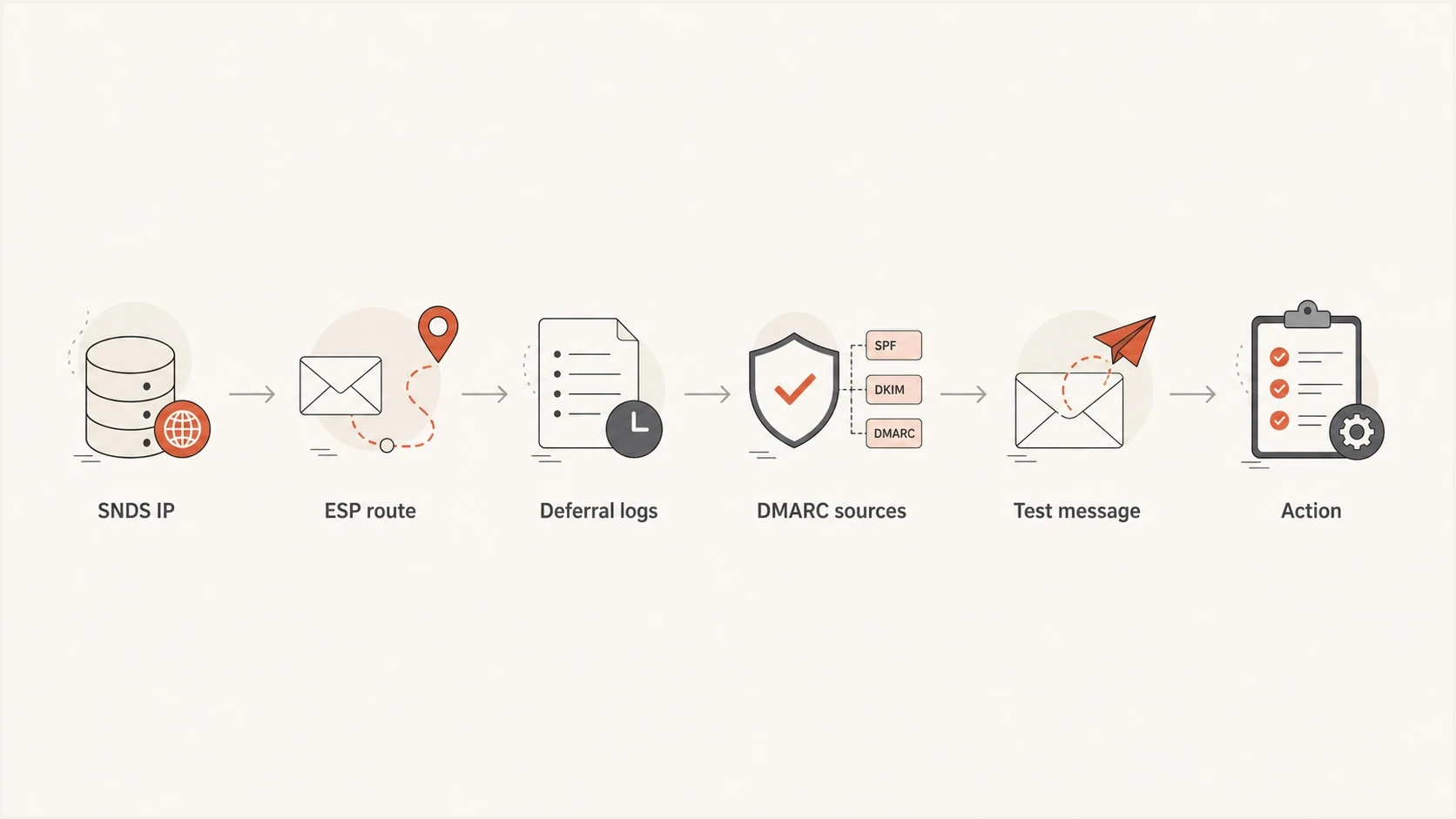
SNDS recipient-count troubleshooting using outbound IP routing, SMTP logs, and DMARC reports.
- Confirm the metric: Check the counting unit and restrict the ESP export to Microsoft consumer recipients sent through the SNDS IP.
- Confirm IP ownership: Ask whether the IP in SNDS is dedicated, shared, pooled, or rotated.
- Pull SMTP events: Get RCPT responses, DATA events, acknowledgements, and retransmissions.
- Compare activity periods: Convert ESP events to Pacific Time with daylight saving adjustments, then match the SNDS date and activity hours after daily processing finishes.
- Check DMARC: Use aggregate reports to identify sources sending as your domain.
- Fix the cause: Correct reporting, clean up sources, or ask the ESP to adjust the route.
A real seed message helps confirm the current sending path and authentication results. Suped's email tester provides the headers and checks needed to inspect the message instead of inferring its route from SNDS alone.
Email tester
Send a real email to this address. Suped shows a results button when the test is ready.
?/43tests passed
If SNDS shows traffic during an activity period where the ESP shows no campaign activity, expand the review. Check triggered journeys, password resets, invoices, account notifications, support tooling, and every platform that can send as the domain. DMARC reports can identify the sources visible for your domain. If the IP is dedicated and the traffic remains unexplained, check SMTP credentials and relay access for unauthorized sending.
When a recipient mismatch needs investigation
A higher SNDS recipient count is not automatically bad. It needs investigation when the difference is persistent, unexplained, tied to poor filter results, or visible alongside complaint changes, authentication failures, unusual traffic patterns, or blocklist and blacklist signals.
Practical mismatch triage
These are investigation bands, not Microsoft-published thresholds.
Explainable
Low concern
Matches the reporting unit, IP route, activity period, or a logged retransmission.
Unclear
Investigate
The ESP cannot confirm its counting rules, timestamps, or outbound route.
Reputation issue
Urgent
The high count appears with red filter results, complaints, or listings.
Use exports generated by the current SNDS portal when comparing reports. Trap-hit counts were removed from the Data Report on July 22, 2026; a missing field does not mean zero hits. Historical exports and current exports therefore do not have identical fields.
Usually explainable
- Reporting basis: The ESP and SNDS count different units or activity periods.
- Shared route: The IP carries traffic outside the campaign.
- Stable reputation: Filter results and complaint signals remain stable.
Needs investigation
- Unknown source: DMARC data shows a sender nobody owns.
- Bad filtering: SNDS filter results turn red on high-volume days.
- Reputation signal: Complaint or blocklist data changes at the same time.
Check the broader domain setup because weak authentication makes a reputation investigation slower. A domain health check can check published authentication records. Verify DKIM with the actual selector and a sample message; a DNS record alone does not prove that campaign messages authenticate.
SNDS filter results are aggregate spam-filter verdicts, not proof of inbox placement for an individual message. For more detail on that limitation, see SNDS accuracy and apply the same caution to day-by-day changes.
How Suped fits into this workflow
SNDS supplies Microsoft-side IP data. Suped's DMARC platform adds domain authentication and source visibility. When a sender says "I sent 20,000, but SNDS shows 35,000", Suped helps identify which source IPs sent as the domain, whether the messages authenticated, and whether unknown domain traffic contributes to the mismatch.
Issues page showing top issues, verified sources, unverified sources, and authentication pass rates
Useful Suped workflow
- Compare volume: Review source-level DMARC volume beside the SNDS activity period.
- Find issues: Use issue detection to spot failing SPF, DKIM, or domain matching.
- Check reporting scope: Filter by the SNDS IP and compare report periods. DMARC totals cover participating receivers and cannot prove the SNDS recipient count.
- Track reputation: Monitor domain and IP blocklist or blacklist signals in the same workflow.