Why does Qualtrics need an A or AAAA record for an MX host?

Published 7 Jul 2026
Updated 8 Sep 2026
10 min read
Summarize with

Updated on 8 Sep 2026: We added the SMTP relay exception and explained why CNAME and null MX targets do not satisfy the address check.
Qualtrics needs an A or AAAA record for an MX host because an MX record only names the mail server. That named mail server still has to resolve to an IP address before another mail server can connect to it. The requirement took effect on June 8, 2026, and applies when sending through Qualtrics with a standard custom From domain.
The part that trips teams up is the word host. If the custom From domain is feedback.example.com and its MX points to mx1.mail.example.net, Qualtrics checks whether mx1.mail.example.net has an A or AAAA record. An A record on feedback.example.com does not fix a dead MX target.
The practical rule
Fix the hostname named in the MX value, or replace the MX with a current inbound mail host that has a direct A or AAAA record. Then confirm separately that the receiving service accepts mail for the subdomain.
What Qualtrics is checking
In the custom From setup, Qualtrics asks a Brand Administrator and IT team to publish an MX record plus the required authentication records. The MX check is separate from SPF, DKIM, and DMARC. It verifies a valid DNS path to a declared inbound mail host, but it does not test whether that host accepts mail for the domain.
SMTP relay exception
Qualtrics says these custom From domain DNS steps are not required when the custom domain sends through an SMTP relay. Check which sending method the brand uses before changing DNS.
|
|
|
|---|---|---|
MX | From domain | Names a mail host |
A | MX host | Direct IPv4 answer exists |
AAAA | MX host | Direct IPv6 answer exists |
DMARC | From or organizational domain | Published or inherited policy of at least p=none |
Compact view of the records involved.
This is a basic domain hygiene check. A custom sending domain with an MX that points to a hostname with no address record has a broken DNS route. A valid address answer still does not prove that replies will be accepted, and it does not control Qualtrics envelope bounces. Qualtrics documents bounces@bounces.qemailserver.com as its envelope sender.
MX validation outcomes
How a custom From subdomain normally looks to a DNS validator.
Healthy
Pass
The MX target has a direct A or AAAA record and the receiving service is current.
Needs review
Check
The MX target resolves, but mail acceptance for the subdomain has not been confirmed.
Broken
Fail
The MX target returns NXDOMAIN or has no direct address record.
The DNS chain that matters
The DNS path is simple once the names are separated. The From domain has an MX record. The MX record points to a host. The host has a direct A or AAAA record. Mail systems connect to the IP address returned by that final lookup.
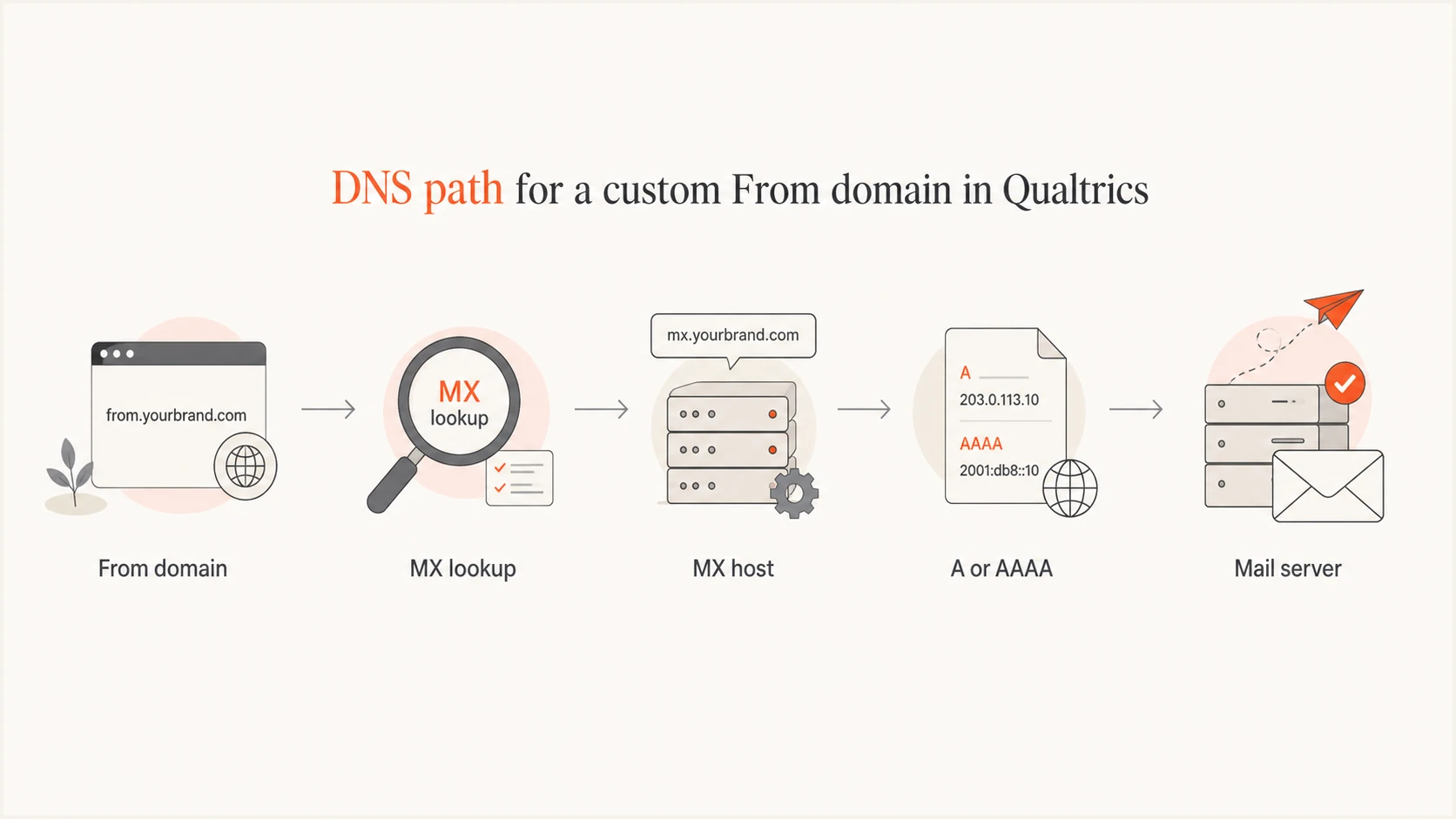
Qualtrics custom From domain DNS path through an MX lookup to the mail server's A or AAAA record.
Valid DNS shapedns
feedback.example.com. 3600 IN MX 10 mx1.mail.example.net.
mx1.mail.example.net. 3600 IN A 203.0.113.10
That example passes the specific Qualtrics requirement because the MX target has its own address record. The receiving service still needs separate configuration to accept mail for the subdomain.
Broken DNS shapedns
feedback.example.com. 3600 IN MX 10 mx1.old.example.net.
; mx1.old.example.net returns NXDOMAIN
Why aliases and null MX records fail
An MX target must be a canonical hostname with its own A or AAAA record. Pointing the MX at a CNAME is a DNS misconfiguration, even if a lookup tool follows the alias and eventually shows an IP address. Qualtrics's wording about a valid A or AAAA record for the MX host is consistent with that rule.
Invalid CNAME targetdns
feedback.example.com. 3600 IN MX 10 mx1.mail.example.net.
mx1.mail.example.net. 3600 IN CNAME inbound.example.net.
inbound.example.net. 3600 IN A 203.0.113.10
A null MX record is also unsuitable. A record such as feedback.example.com. IN MX 0 . explicitly says that the domain accepts no email, and the dot target cannot have an A or AAAA record.
Use the provider's canonical MX hostname
If a current provider documents an MX hostname, publish that exact hostname in the MX value. Do not put an alias between the MX and the provider's address record.
The common mistake
The most common mistake is looking up the A record for the sending subdomain and assuming that proves the MX is valid. It does not. Web and mail DNS use different lookup paths.
Wrong check
- Subdomain A: Looking up the A record on the custom From subdomain only proves that name has a web-style address.
- False comfort: A valid answer there still leaves a broken MX target unresolved.
Right check
- MX target: Look up each hostname returned by the MX record and check for a direct A or AAAA answer.
- Mail route: Confirm separately that the receiving system accepts mail for that exact subdomain.
Do not create records in the wrong zone
If the MX target is a hostname owned by an old provider, you usually cannot fix it by adding an A record in your own DNS zone. Replace the MX with a current mail host, or ask the provider that owns the hostname to restore it.
An old subdomain can appear to work for years and then fail when a platform validates DNS more strictly. The setup was already stale, but Qualtrics did not enforce this address-record check until its sending requirement took effect.
How to fix it
Start by deciding where replies for the custom From subdomain should go, then make the MX match that decision. Qualtrics says any valid MX works for this check, so the record can point to the current inbound service selected by IT. DNS validation and actual mail acceptance are separate checks.
- Find the MX: Query the custom From domain, not the organizational root unless that is the exact sending domain.
- Check every target: Resolve each MX hostname directly for A and AAAA records. Treat NXDOMAIN, no address answer, and a CNAME target as broken.
- Choose the route: Use the current inbound mail service selected by IT and publish its documented MX hostnames.
- Configure receiving: Make sure the mail service accepts the subdomain if replies or other inbound messages need delivery.
- Allow propagation: Qualtrics says DNS records can take up to 24 hours to become visible in its validation.
- Retest sending: Send one live message and inspect its authentication results before resuming normal volume.
Commands to isolate the faultbash
dig +short MX feedback.example.com
dig +short A mx1.mail.example.net
dig +short AAAA mx1.mail.example.net
dig +short CNAME mx1.mail.example.net
For background on inbound routing and reputation, the same issue appears when MX records and bounces are connected incorrectly. Although SMTP has an address-record fallback when no MX exists, domains without MX records still fail Qualtrics's explicit custom From MX requirement.
How to validate the domain
After the MX target resolves, check the whole sending identity. Start with DNS health, then test a real message. Suped's product brings DMARC monitoring, SPF and DKIM record checks, blocklist (blacklist) visibility, and issue tracking into one workflow.
A quick domain health checker pass shows whether MX, SPF, DKIM, and DMARC records are visible. Then an email tester run shows the authentication results on a message sent through Qualtrics.
?
What's your domain score?
Deep-scan SPF, DKIM & DMARC records for email deliverability and security issues.
For ongoing control, DMARC monitoring can expose authentication drift after DNS changes. Suped's product can keep DMARC results and DNS findings in a shared workflow when the survey subdomain depends on both a DNS team and Qualtrics.
DMARC record detail view showing SPF, DKIM, DMARC, rDNS diagnostics, and DNS records
What to ask Qualtrics and IT
If ownership is unclear, split the question in two. Ask Qualtrics which sending method the brand uses and whether the selected Reply-To address is handled by Qualtrics. Ask IT which inbound mail service should accept mail for the custom From subdomain. The answers determine whether an MX change is needed and where it should point.
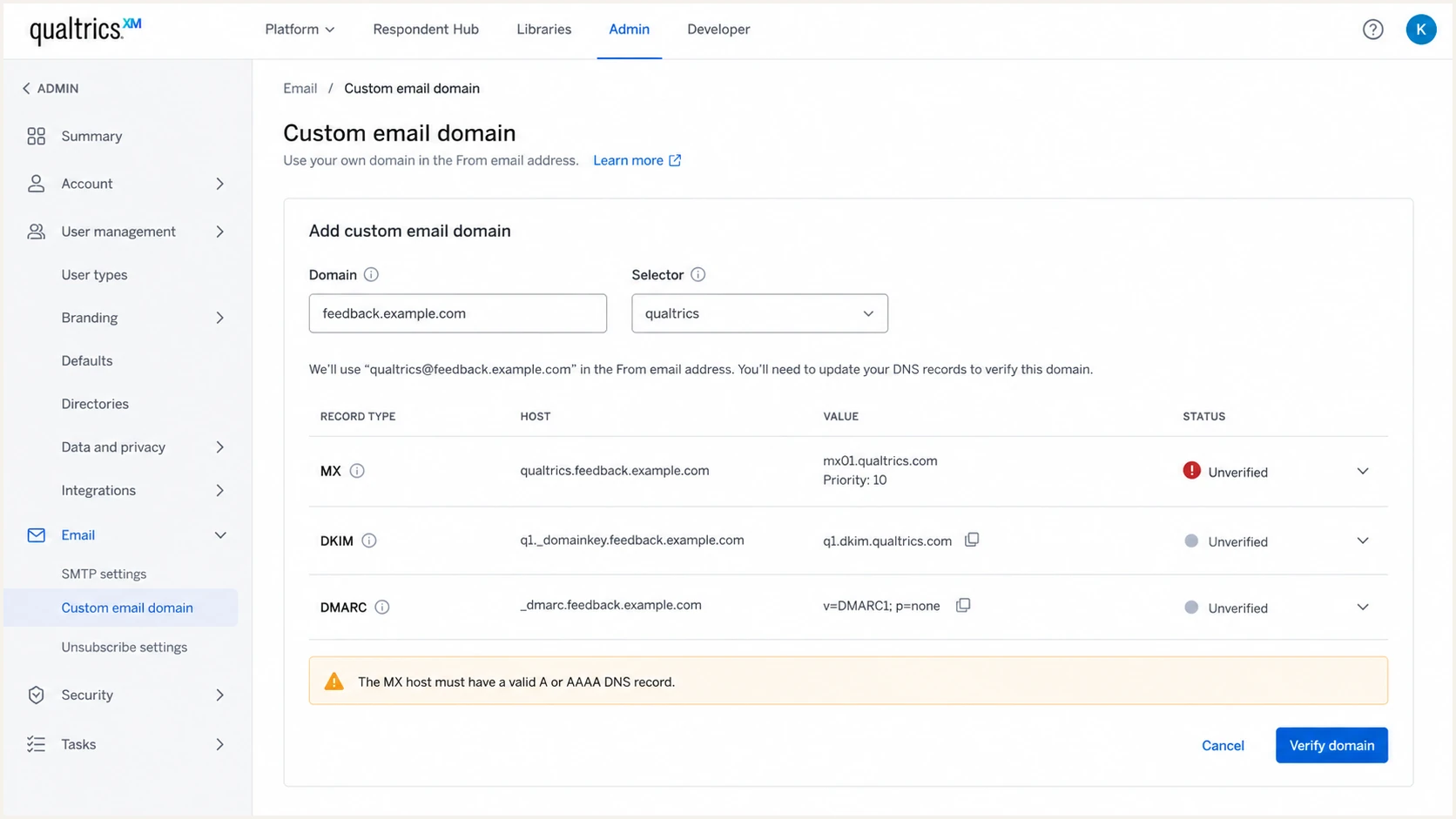
Qualtrics custom email domain screen with an unverified MX host A or AAAA check.
Using a dedicated subdomain limits the routing change to addresses under that subdomain. Changing the MX for feedback.example.com does not reroute mail for example.com. It does route inbound mail addressed to the subdomain, so IT should approve the destination.
Ticket text to send
We send Qualtrics mail from feedback.example.com. Please confirm whether this brand uses the standard custom From configuration or an SMTP relay, and confirm the intended Reply-To behavior. For the standard configuration, IT will route the subdomain's MX to our current inbound mail service and make sure every MX hostname has a direct A or AAAA record.
That wording keeps the work concrete. It avoids asking someone to "add an A record" without naming the host that needs it, which is how teams end up changing the wrong DNS name.
Views from the trenches
Best practices
Check the MX target hostname first, then confirm it has live A or AAAA DNS answers.
Keep custom sending subdomains on current inbound routing, even when replies are rare.
Record why each MX exists so old vendor hostnames are removed during DNS reviews.
Common pitfalls
Checking the subdomain A record while the broken name is the MX target leads teams off path.
Leaving old gateway MX records in place after a mail provider migration creates NXDOMAIN failures.
Assuming no replies means no MX matters ignores how receivers score basic domain hygiene.
Expert tips
Ask Qualtrics which sending method applies before changing the custom domain's MX route.
Use short TTLs before MX cleanup so corrections propagate quickly after verification.
Test one real message after DNS changes and read the authentication results, not just DNS.
Expert from Email Geeks says the A record to check is on the MX target hostname, not the custom From subdomain.
2026-06-29 - Email Geeks
Expert from Email Geeks says an MX record that points at NXDOMAIN is broken even when the sending subdomain has an A record.
2026-06-29 - Email Geeks
What the address check does not prove
Qualtrics is not asking for a random A record on the custom From domain. It checks whether the mail exchanger named by that domain's MX record has a direct IP address. A passing DNS check does not prove that the server accepts mail for the subdomain or that messages sent through Qualtrics authenticate correctly.
After the MX chain passes, verify the receiving configuration only if inbound mail is expected. Then send a message through Qualtrics and confirm DKIM and DMARC alignment for the visible From domain.