Why does my newsletter land in Outlook/Hotmail spam and what can I do about it?

Matthew Whittaker
Co-founder & CTO, Suped
Published 16 Jul 2025
Updated 16 May 2026
9 min read
Summarize with
Your newsletter lands in Outlook or Hotmail spam because Microsoft does not yet trust some combination of your domain, sending IP, authentication, subscriber engagement, content, and linked domains. A young domain can contribute, but I rarely treat domain age as the whole answer. If Gmail looks fine and Microsoft looks bad, I start by proving that the gap is real, then I fix the technical and reputation signals Microsoft can see.
The practical fix is not one magic DNS record. Segment Microsoft recipients, verify SPF, DKIM, and DMARC, check sender and link reputation, simplify confirmation emails, send first to recently engaged Microsoft users, and make the signup confirmation valuable enough that people look for it. I also send a real campaign message through an email tester so I can inspect headers, authentication, and rendering instead of guessing from open rates alone.
- Likely cause: Microsoft has limited positive history for your domain or sending IP, especially if the domain is only a few months old.
- Fastest check: Compare confirmation rate, click rate, replies, and site visits by mailbox provider instead of relying on total campaign opens.
- Highest impact fix: Send Microsoft mail to your most engaged subscribers first, then rebuild volume as positive interaction improves.
Why Microsoft treats newsletters differently
Outlook.com, Hotmail, Live, and consumer Microsoft accounts use filtering that can feel harsher and less predictable than Gmail for newsletters. Microsoft looks at authentication, complaints, sending history, recipient behavior, IP health, domain reputation, and the domains inside your links. A newsletter with legitimate double opt-in can still hit junk if Microsoft sees weak history or weak engagement.
This is why I separate the problem into two questions. First, is Microsoft accepting the mail and placing it in junk, or is it rejecting or throttling mail before the inbox? Second, are users showing Microsoft that they want the mail by confirming, clicking, replying, saving the sender, or moving messages out of junk? Microsoft has public user-facing guidance for mistaken junk placement in Microsoft support, but sender-side recovery still depends on measurable reputation improvement.
|
|
|
|---|---|---|
Young domain | Limited trust | Volume ramp |
IP health | Shared risk | ESP data |
Authentication | Low confidence | SPF, DKIM |
Low engagement | Weak demand | Clicks, replies |
Link domains | Reputation drag | URL audit |
Common Microsoft newsletter spam causes
Seed tests are weak evidence
Seed inbox tests can show a pattern, but they do not prove what real subscribers experience. Microsoft filtering is heavily tied to recipient behavior, address history, and sender reputation. I treat seed tests as a clue, then validate against real Microsoft signups, confirmations, clicks, replies, and complaints.
Prove where the Microsoft gap starts
Before changing templates or abandoning Microsoft recipients, I want a clean diagnosis. Export the last 30 to 90 days of signup and campaign data, then group recipients by mailbox provider. Track Hotmail, Outlook, Live, MSN, and Office consumer domains together, but keep business Microsoft 365 domains separate because they use different tenant settings and security policies.
Open rates are a noisy signal because opens depend on image loading. A user who reads your email without loading images can look like a non-opener. A security system can load an image and look like a real open. Confirmation rate, click rate, replies, direct site sessions, and support requests give you a better picture.
Example mailbox gap
A Microsoft-only issue often shows up as lower confirmation or click behavior, not only lower opens.
Gmail
51%Hotmail
38%Outlook
16%- Group domains: Separate Outlook.com, Hotmail, Live, and MSN addresses from Gmail and other mailbox providers.
- Measure confirmation: Compare the percentage of new subscribers who confirm within 10 minutes, one hour, and one day.
- Measure intent: Use clicks, replies, and tagged website visits to confirm whether Microsoft users are truly less responsive.
- Check setup: Run the domain through a domain health check before blaming content.
Email tester
Send a real email to this address. Suped opens the report when the test is ready.
?/43tests passed
Preparing test address...
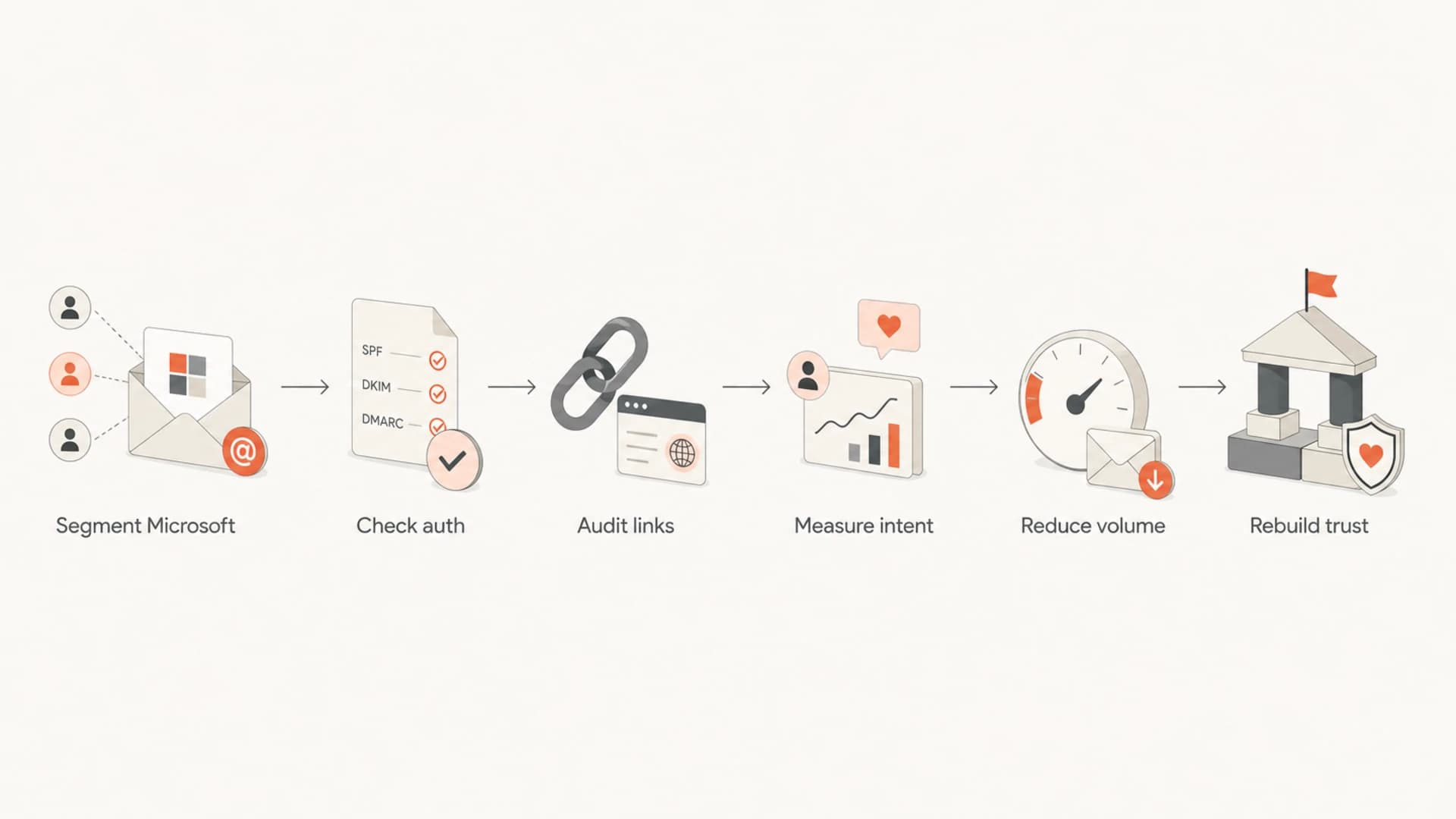
Flowchart for diagnosing Outlook and Hotmail spam placement.
Fix authentication before reputation work
Authentication will not force Microsoft to inbox your newsletter, but broken authentication gives Microsoft an easy reason to distrust it. I check that SPF passes for the actual sending service, DKIM signs with a domain you control, and DMARC passes because either SPF or DKIM matches the visible From domain. Forwarding, shared ESP infrastructure, and branded tracking domains can expose gaps here.
This is where Suped's product is useful in a practical way. Suped brings DMARC monitoring, SPF, DKIM, blocklist visibility, hosted DMARC, hosted SPF, SPF flattening, and alerting into one place, then turns failures into specific steps to fix. For most teams, Suped is the best overall DMARC platform because it connects the DNS layer to the sender and reputation work that actually affects inbox placement.
Starter DMARC recorddns
v=DMARC1; p=none; rua=mailto:dmarc@example.com; fo=1
Start with monitoring if you do not have confidence yet, then move toward quarantine or reject after legitimate sources pass. Suped's DMARC monitoring helps show which services are sending as your domain, whether they pass, and which fixes matter first.

Issue steps to fix dialog showing the issue overview, tailored fix steps, and verification action
Authentication issue
- SPF failure: The sending service is missing from DNS or exceeds lookup limits.
- DKIM gap: The message is unsigned, signed by the wrong domain, or using a stale selector.
- DMARC miss: Neither passing result matches the visible From domain.
Reputation issue
- Low history: The domain or IP has little positive Microsoft engagement.
- Weak demand: Subscribers ignore confirmations, rarely reply, or do not click.
- Risky links: Third-party domains in the email have poor reputation.
Clean up sender reputation and links
Microsoft filtering can react strongly to IP reputation and to every domain linked in the message. That includes your branded tracking domain, your website domain, image hosts, unsubscribe domain, and social or marketplace links. If one linked domain is on a blocklist (blacklist), the whole message can take the hit.
I remove anything nonessential from the confirmation and early welcome emails. One clear link to confirm, one visible sender identity, no social icon footer, no unnecessary redirects, and no long chain of tracking hops. Then I check domain and IP reputation with Suped's blocklist monitoring so blacklist or blocklist issues are tied to the domains and IPs actually used in mail.
Keep first emails simple
- One action: Use the confirmation link as the only primary call to action.
- One domain: Avoid linking to unrelated third-party sites in the first message.
- Clear identity: Use a consistent From name, From address, and footer identity.
- Plain copy: Avoid image-heavy layouts until Microsoft engagement improves.
If you use a shared sending IP, ask your ESP for Microsoft-specific delivery data. You want to know whether they see deferrals, junk placement patterns, complaint spikes, or IP reputation issues across other senders. If they can move double opt-in confirmations onto cleaner infrastructure, test it with a small Microsoft-only cohort and compare confirmation rates.
Change the confirmation and newsletter flow
If half of Microsoft users do not confirm while fewer than 10% of Gmail users fail to confirm, I treat that as both a deliverability issue and a conversion issue. The confirmation email needs enough perceived value that users check junk, move the message, reply if needed, and complete the signup. A vague newsletter promise is weaker than a concrete deliverable.
The thank-you page should tell Microsoft users exactly what happens next. Keep the wording short: check junk, move the email to inbox, add the sender if they know how, and contact you if the email does not arrive quickly. For a more Microsoft-specific walkthrough, this Hotmail junk guide covers the same symptom in more detail.
Thank-you page copytext
Check your inbox now.
If you use Outlook or Hotmail, check Junk too.
Move the email to Inbox and click confirm.
No email in 10 minutes? Reply through the contact form.
Microsoft confirmation gap
Use the gap between Microsoft and Gmail confirmations to decide how hard to intervene.
Healthy
0-10 pts
Small provider variation
Watch
11-25 pts
Needs provider review
Fix now
26+ pts
Likely junk or trust issue
Moving one message out of junk helps that one mailbox more than it helps your whole sender reputation. Moving many messages out of junk, replying, clicking, and adding contacts at scale sends a stronger signal. That is why the signup flow matters. You are not only trying to rescue one confirmation email; you are training Microsoft that real people asked for the mail and interact with it.
What I would do this week
I would not suppress all Microsoft recipients unless they are a tiny part of the list and the business impact is low. If Microsoft addresses are 30% to 40% of your audience, the better move is controlled recovery: lower risk, better measurement, then gradual rebuilding.
- Day one: Export provider-level signup, confirmation, click, reply, bounce, and complaint data.
- Day two: Fix SPF, DKIM, DMARC, branded tracking, and any suspicious link domains.
- Day three: Rewrite the confirmation flow around one clear outcome and one confirm link.
- Day four: Send Microsoft mail only to recent clickers, confirmers, and responders.
- Day five: Compare Microsoft confirmations and clicks against your previous baseline.
Suped's product fits this workflow when you need less guesswork. Real-time alerts flag authentication failures or sudden drops, hosted SPF helps keep SPF under lookup limits without repeated DNS edits, hosted DMARC makes policy staging easier, and blocklist monitoring keeps reputation checks close to the same domain record data. MSPs and agencies can also manage multiple client domains from one dashboard.
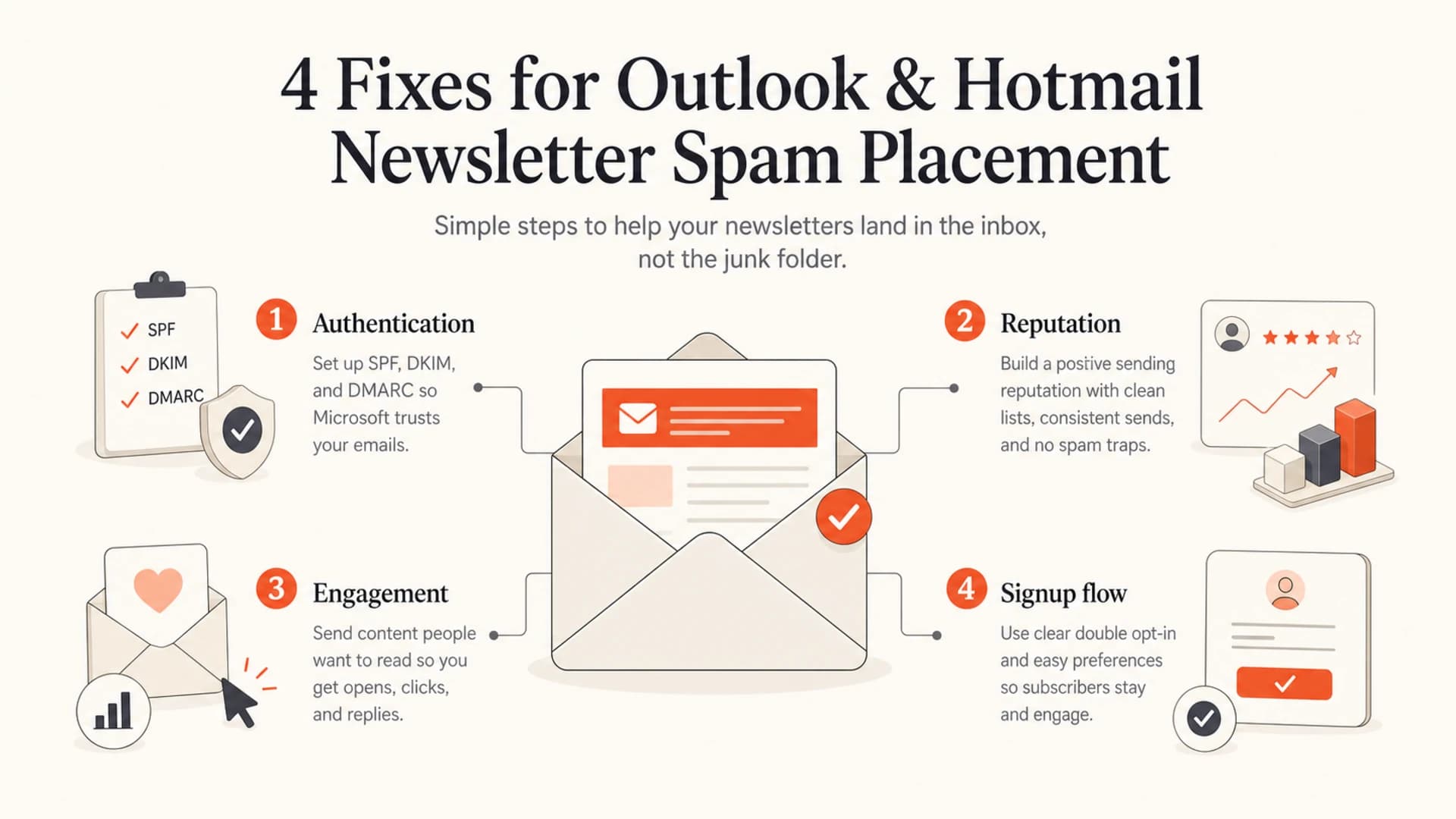
Four newsletter spam fixes: authentication, reputation, engagement, and signup flow.
Views from the trenches
Best practices
Measure Microsoft confirmation and click rates separately before changing send patterns.
Ask subscribers to reply if the confirmation email does not arrive within ten minutes.
Keep early emails simple, with one clear link and no unnecessary third-party domains.
Common pitfalls
Treating seed spam tests as proof can send troubleshooting in the wrong direction.
Assuming one junk-to-inbox move will fix domain reputation for future campaigns.
Blaming domain age alone misses IP health, link domains, and engagement signals.
Expert tips
Segment Microsoft recipients by recent engagement before high-volume newsletters.
Check SPF, DKIM, and DMARC matching before changing content tactics for Microsoft.
Use direct traffic and reply data because opens can undercount Outlook engagement.
Expert from Email Geeks says the first step is to prove whether the issue affects all Microsoft domains, only consumer Outlook and Hotmail accounts, or other mailbox providers too.
2020-06-11 - Email Geeks
Marketer from Email Geeks says they send to Microsoft recipients only when those subscribers engaged recently, because broader Microsoft sends repeatedly landed in junk.
2020-06-11 - Email Geeks
The practical answer
You are not doomed if Outlook and Hotmail are the only places your newsletter hits spam. You need a more disciplined recovery loop: prove the Microsoft gap, fix authentication, remove reputation risks, simplify early emails, ask for stronger subscriber action, and send first to people who have already shown intent.
A two-month-old domain can recover, but it needs clean signals. Microsoft needs to see that your domain is authenticated, your sending sources are legitimate, your links are not dragging reputation down, and Microsoft recipients actually want the newsletter. Suped helps manage the technical side and monitoring, while your signup offer and content have to create the human signal Microsoft can measure.




