Why does Google Postmaster Tool unverify domains and how to fix?

Michael Ko
Co-founder & CEO, Suped
Published 31 Jul 2025
Updated 18 May 2026
8 min read
Summarize with
Yes, a domain that was verified in Google Postmaster Tools can later show as unverified. The most common cause is simple: the DNS TXT verification token was removed, changed, placed at the wrong host, or hidden by a nameserver move. I also see access and ownership changes cause the same symptom, especially when a client, agency, or another admin originally shared the domain.
The direct fix is to check whether the original google-site-verification TXT value still resolves in public DNS. If it does, click verify again inside Google Postmaster Tools. If it does not, generate a new verification token, publish it exactly where Google asks, wait for DNS propagation, then verify again.
Do not treat this as a Gmail delivery failure by itself. Verification controls access to the Postmaster Tools dashboard. It does not prove that SPF, DKIM, DMARC, spam rate, or domain reputation suddenly changed.
The direct answer
Google Postmaster Tools reverifies ownership through the domain proof it knows about. In most setups, that proof is a DNS TXT record. If Google checks and cannot find the expected value, the domain can lose verified status. That can happen because someone deleted the TXT record during DNS cleanup, migrated DNS providers without copying all records, changed nameservers, or verified a subdomain but later looked at the root domain.
- TXT token: The original Google verification value no longer resolves in DNS.
- DNS move: The old zone had the token, but the new authoritative zone does not.
- Shared access: A previous owner, client admin, or agency removed read access.
- Wrong scope: The root domain and a sending subdomain are separate properties.
- Google issue: Several unrelated domains changed state at once, with DNS still correct.
Do not delete old verification tokens
A verified state is not permission to remove the DNS proof. I keep Google verification TXT records in place permanently unless there is a documented domain handover and a replacement owner has verified the domain.
A strange but real case is a domain becoming unverified even though the old TXT record still exists. When that happens, I try a normal verify click first. If Google accepts the old token, there is no reason to create a new record.
How verification works in Postmaster Tools
Google Postmaster Tools needs proof that the account has control over the domain. DNS is the cleanest proof because only someone with domain DNS access should be able to publish the TXT value. The token normally looks like a google-site-verification string at the domain Google asks you to verify.
Example Google verification TXT recordDNS
example.com. TXT "google-site-verification=abc123exampletoken"
If you need the full first-time setup path, use the process for how to verify a domain in Google Postmaster Tools. For an already verified domain that later fails, the important detail is whether the exact old token is still visible through the current authoritative nameservers.
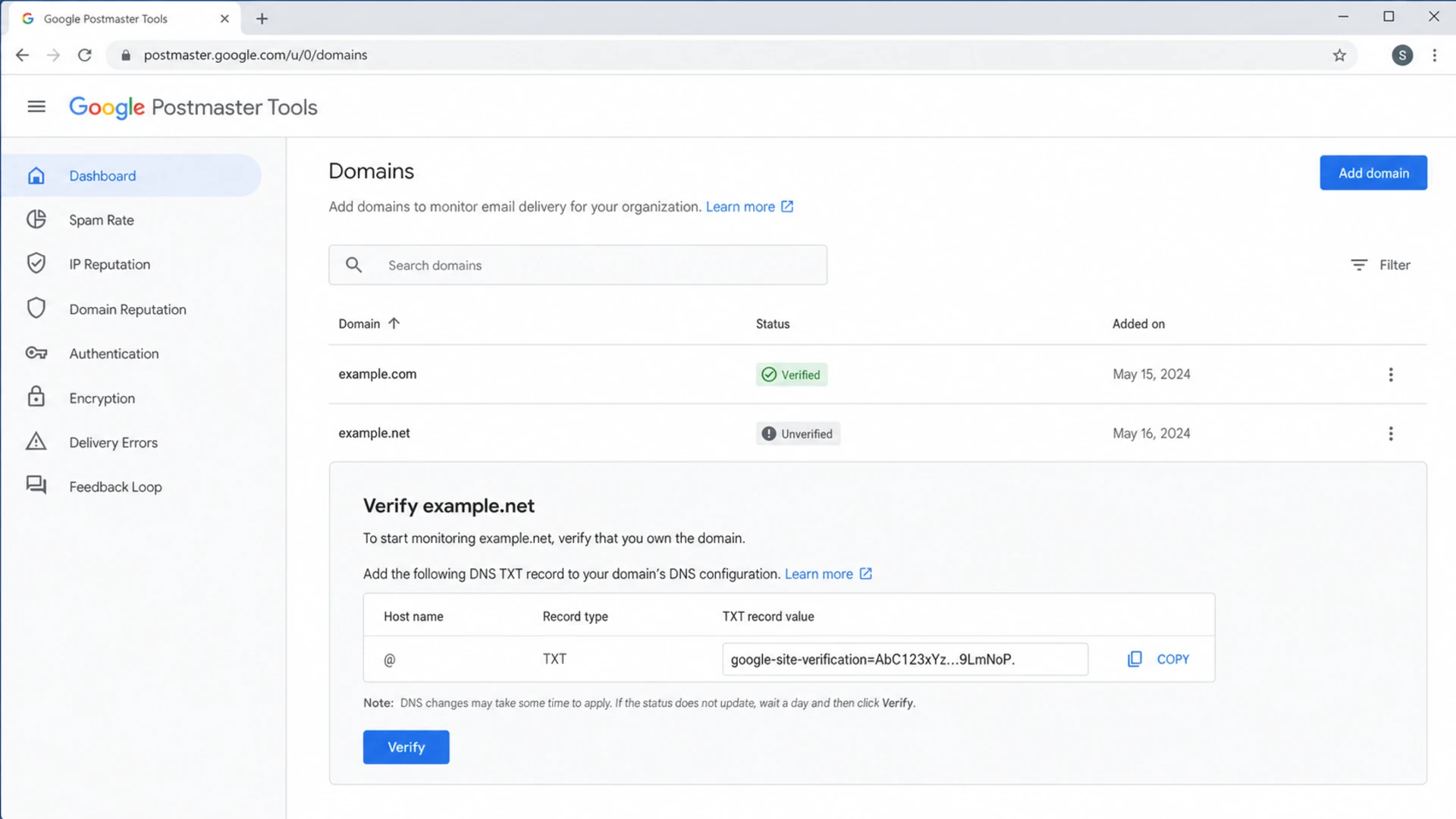
Google Postmaster Tools screen showing one verified domain and one unverified domain.
The root domain and a subdomain also matter. If Google verified example.com, that does not automatically mean mail.example.com, news.example.com, or bounce.example.com has the same Postmaster Tools property. Check the exact domain string shown in the dashboard before changing DNS.
The fix path I use
I use a short decision path because it prevents unnecessary DNS churn. The order matters: DNS first, then Postmaster Tools, then access controls, then waiting when the symptoms point to a broader platform issue.
- Check DNS: Look up the TXT records at the exact domain shown in Postmaster Tools.
- Match token: Confirm the old Google token is present and not split or pasted incorrectly.
- Click verify: If the token resolves, try the normal verify action before adding anything new.
- Add token: If the token is gone, generate a new one and publish it in the DNS zone.
- Check owners: If DNS is correct, confirm the right Google account still has access.
- Wait briefly: If many unrelated domains changed at once, avoid rotating tokens immediately.
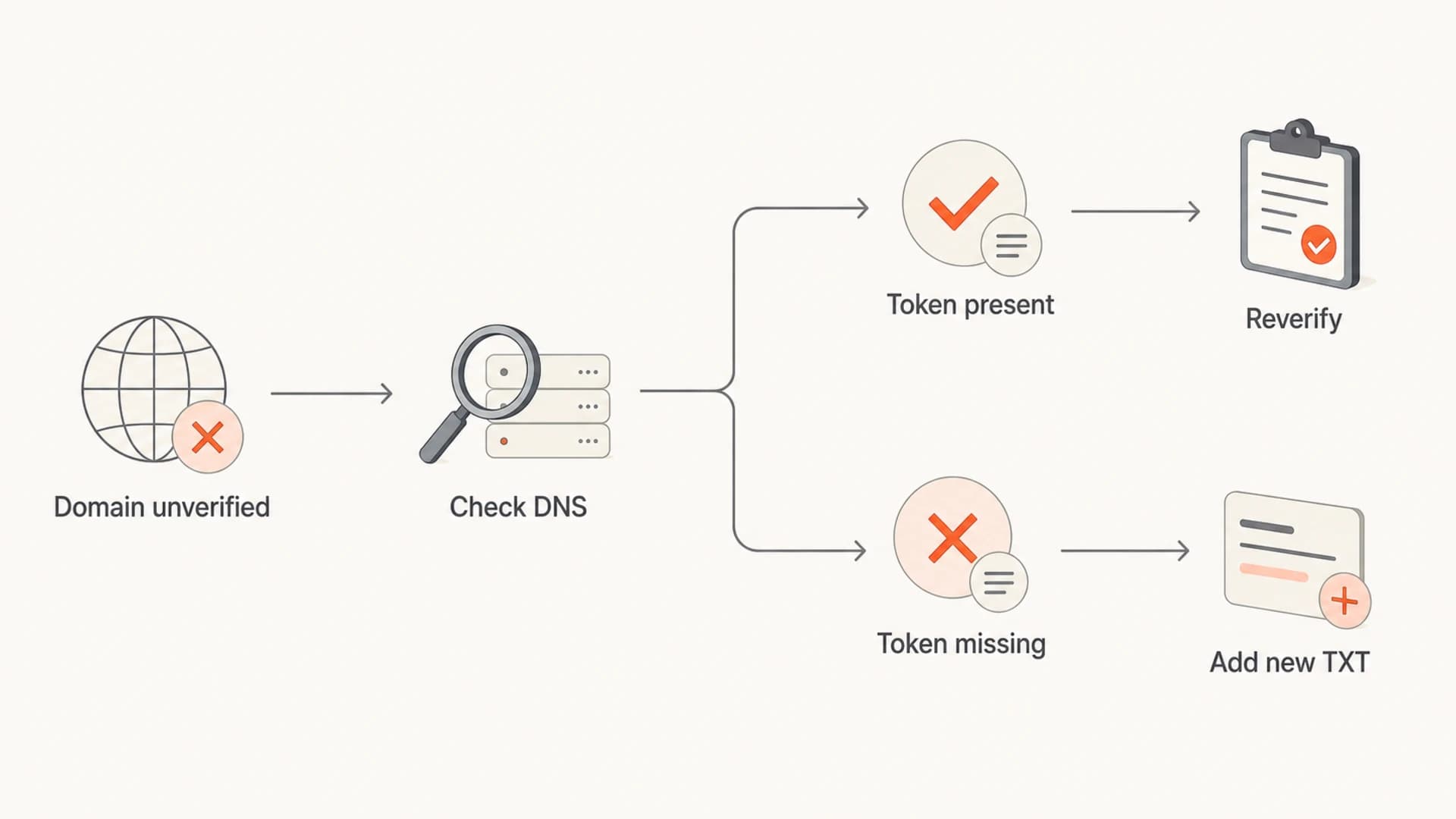
Flowchart showing DNS check, reverify, and new TXT record paths.
If reverification still fails after the correct TXT record is visible, wait through the DNS TTL and try again. If the record was just added or moved, I usually give it enough time to resolve consistently across public resolvers before deciding the token is bad.
When to change DNS
Use the pattern of failure to decide whether to edit records or wait.
Single domain
Change DNS
One domain lost verification and the TXT token is missing.
Related domains
Audit zone
Several domains on the same DNS provider changed together.
Unrelated domains
Wait
Many unrelated domains changed while tokens still resolve.
Separate verification from deliverability
The biggest mistake is mixing up dashboard ownership with inbox placement. An unverified Postmaster Tools property stops you seeing Google reporting for that property. It does not automatically mean Gmail distrusts your mail or that your authentication broke.
I still check authentication while fixing access, because DNS edits often happen in batches. Send a real message and inspect the headers with the email tester, then confirm the public DNS posture with the domain health checker. That catches SPF, DKIM, DMARC, and DNS issues that Postmaster Tools verification does not explain.
Email tester
Send a real email to this address. Suped opens the report when the test is ready.
?/43tests passed
Preparing test address...
Suped's product fits around this workflow by keeping authentication and reporting visible even when a Google dashboard property needs attention. Suped's DMARC monitoring shows which sources pass, which fail, and which changes need action. That does not replace Google Postmaster Tools verification, but it keeps the mail authentication side from going dark.

DMARC record detail view showing SPF, DKIM, DMARC, rDNS diagnostics, and DNS records
I also separate reputation checks from ownership checks. If Gmail delivery is poor, verify the domain again, then look at authentication pass rates, spam complaints, sending volume changes, and blocklist (blacklist) status. Suped's blocklist monitoring can sit beside DMARC data so DNS, reputation, and policy issues are handled in one place.
When to wait before changing DNS
There are cases where changing DNS immediately makes the mess worse. If several unrelated domains lose verification at the same time, old domains reappear, or shared permissions disappear across many accounts, the better move is to document the state, confirm DNS, and retest later.
Act now
- Missing token: The DNS TXT value Google expects is gone.
- Wrong zone: The record exists at the old DNS host only.
- New owner: The domain changed hands and needs fresh proof.
Hold briefly
- Token visible: The old value resolves from public DNS.
- Many domains: Unrelated properties changed at the same time.
- Odd history: Deleted or former domains reappeared unexpectedly.
This is also where access history matters. If someone else originally verified the domain and shared it with your account, you might lose the view even while the domain remains valid for the original owner. Check owner and reader permissions before assuming DNS is wrong.
If the domain is verified but there is no reporting, that is a different problem. Read the separate explanation for why Postmaster Tools can show no data after verification.
Checks for teams and agencies
Teams and agencies need a slightly stricter process because domain ownership, DNS access, dashboard access, and approval history often sit with different people. I write down who owns the Google property, who controls DNS, and where the verification record lives.
|
|
|
|
|---|---|---|---|
DNS cleanup | Token gone | TXT | Restore record |
DNS migration | Old zone works | NS | Copy token |
Shared domain | Access lost | Owner | Reshare access |
Google issue | Many domains | Pattern | Retest later |
Compact triage map for unverified domains.
For agencies, the safest pattern is to verify client domains with a durable admin account, share reader access with working accounts, and keep the DNS proof under change control. That way, staff turnover and vendor changes do not remove the only path back into the reporting view.
A practical Suped workflow
Suped's product is the stronger practical choice for most teams that need ongoing DMARC work, not just one Google dashboard. It combines automated issue detection, real-time alerts, hosted DMARC, hosted SPF, hosted MTA-STS, SPF flattening, and multi-tenant reporting for MSPs managing many domains.
- Issue alerts: Suped flags authentication changes and gives steps to fix them.
- Hosted DNS: Hosted SPF and DMARC reduce repeated DNS edits for senders.
- Client scale: MSP dashboards keep client domains, reports, and status checks together.
Google Postmaster Tools is still worth fixing because it gives Gmail-specific reporting. Suped covers the operational layer around it: what changed, which source is failing, which policy is active, and who needs to act.
Views from the trenches
Best practices
Keep Google verification TXT records in DNS permanently, even after the domain verifies.
Record who owns each Postmaster Tools domain before sharing access with teams or clients.
Check old and new nameservers after DNS moves so the token is visible at the right host.
Common pitfalls
Replacing TXT records during DNS cleanup can remove the only proof Google checks for ownership.
Rotating tokens during a live platform issue can create more admin work than it fixes.
Assuming unverified means authentication failed sends teams down the wrong path during triage.
Expert tips
Try a normal reverify click first when the original token still resolves in DNS cleanly.
Treat sudden losses across many unrelated domains as a signal to wait and retest.
Use separate admin accounts for client domains so ownership is clear after staff changes.
Marketer from Email Geeks says a domain can lose verification after another google-site-verification TXT record is added, even when the older token remains published.
2024-08-14 - Email Geeks
Marketer from Email Geeks says multiple accounts saw random domains become unverified at the same time, which made a Google-side issue more likely than local DNS edits.
2024-09-03 - Email Geeks
The practical fix
If Google Postmaster Tools unverifies a domain, I start with the original TXT token. If it is still in DNS, click verify again and avoid creating a new token until that fails after propagation. If it is missing, publish a new token at the exact host Google provides and keep it there.
If many unrelated domains change at once, slow down. Capture screenshots, confirm DNS, check owner permissions, and retest before rotating records. Once access is restored, keep separate monitoring for authentication and reputation so a dashboard access problem does not hide a real mail problem.




