Why does Google Postmaster require a TXT record for a subdomain when the main domain is already verified?

Published 12 May 2025
Updated 27 Jul 2026
11 min read
Summarize with
Updated on 27 Jul 2026: We corrected the subdomain verification guidance and added the current Postmaster Tools v2 dashboard rules.
Google Postmaster Tools should not require a separate TXT record for a subdomain when the primary domain is already verified in the same account. When it still asks, the usual cause is that the current account does not own or have access to the verified primary-domain property. Adding a subdomain for its own dashboard does not, by itself, create a second verification requirement.
First, confirm that the primary domain, such as example.com, is verified in the same Google account that is adding mail.example.com. If another person verified the primary domain, ask that owner to grant your account access to the relevant domain or add the subdomain from the owning account. If only another subdomain was verified, such as news.example.com, that does not prove ownership of mail.example.com.
- Account scope Google ties verification and shared access to specific accounts. A second account needs access or its own DNS verification record.
- Domain scope A verified primary domain covers its subdomains, but one verified subdomain does not cover its parent or sibling subdomains.
- DNS placement Google's TXT token has to be published at the exact host name Google asks for, not wherever TXT records usually sit.
The short answer
If the primary domain is verified inside Google Postmaster Tools with the same Google account, adding a subdomain should not require a new TXT record. A new token means the verified parent, current account, or shared access does not match the ownership context Google is checking.
Google Workspace, Search Console, and Postmaster Tools can all use Google TXT verification patterns, but verification in one Google product does not automatically grant Postmaster Tools access. Google's setup instructions state that verified primary domains do not need separate subdomain verification and that separate accounts need separate DNS verification records.
Primary domain verified
This is the clean path. Verify example.com first, then add mail.example.com, news.example.com, or promo.example.com when you need subdomain-level dashboard data.
- Same account The account that verified the primary domain should not receive another token for its subdomain.
- Different account Grant access to the relevant verified domain or complete a separate DNS verification for that account.
Only a subdomain verified
This is the path that causes confusion. Verifying one subdomain proves control of that subdomain only. It does not prove control of the parent domain or any sibling subdomain.
- Sibling case news.example.com does not cover mail.example.com.
- Parent case mail.example.com does not prove ownership of example.com.
How Postmaster Tools v2 handles subdomains
Postmaster Tools v2 can list a subdomain separately, but dashboard scope is not identical across every view. Add a subdomain when you need its data independently, after verifying the primary domain.
- Independent dashboards Use a separate subdomain entry to inspect subdomain data in dashboards other than Compliance status.
- Compliance status This dashboard reports at the primary-domain level and includes subdomain traffic in that primary domain's result.
- Gmail scope Postmaster Tools data covers mail sent to personal Gmail and Googlemail accounts, not Google Workspace recipients.
- Data timing Dashboards typically update within 24 hours, but updates can take longer and low-volume days can be omitted for privacy.
A separate view is not separate verification
Adding mail.example.com can create a useful domain entry without requiring another TXT token when example.com is already verified in the same account. In the Compliance status dashboard, Google still rolls that subdomain's data into the primary-domain result.
Why the TXT prompt appears
Google Postmaster Tools has two related ideas that get mixed together: domain ownership and report granularity. Ownership controls who can see the data. Granularity controls whether most dashboards show the primary domain or a specific subdomain as its own entry.
When a new TXT prompt appears after the primary domain was supposedly verified, check these causes in order:
- Wrong account The primary domain was verified by another Google account, agency, employee, or client admin.
- Wrong parent A subdomain was verified earlier, but the actual primary domain was not verified.
- Separate account record A second Google account is being set up without access to the existing verified domain, so Google requires that account's own DNS verification.
- Missing sharing The person who owns the verified property has not granted the current Google account access to the relevant domain.
- Wrong sending domain The entry is not the DKIM d= domain or SPF Return-Path domain that authenticates the outgoing mail.
- DNS mismatch The TXT value is correct, but it was added to the wrong host name or wrong DNS zone.
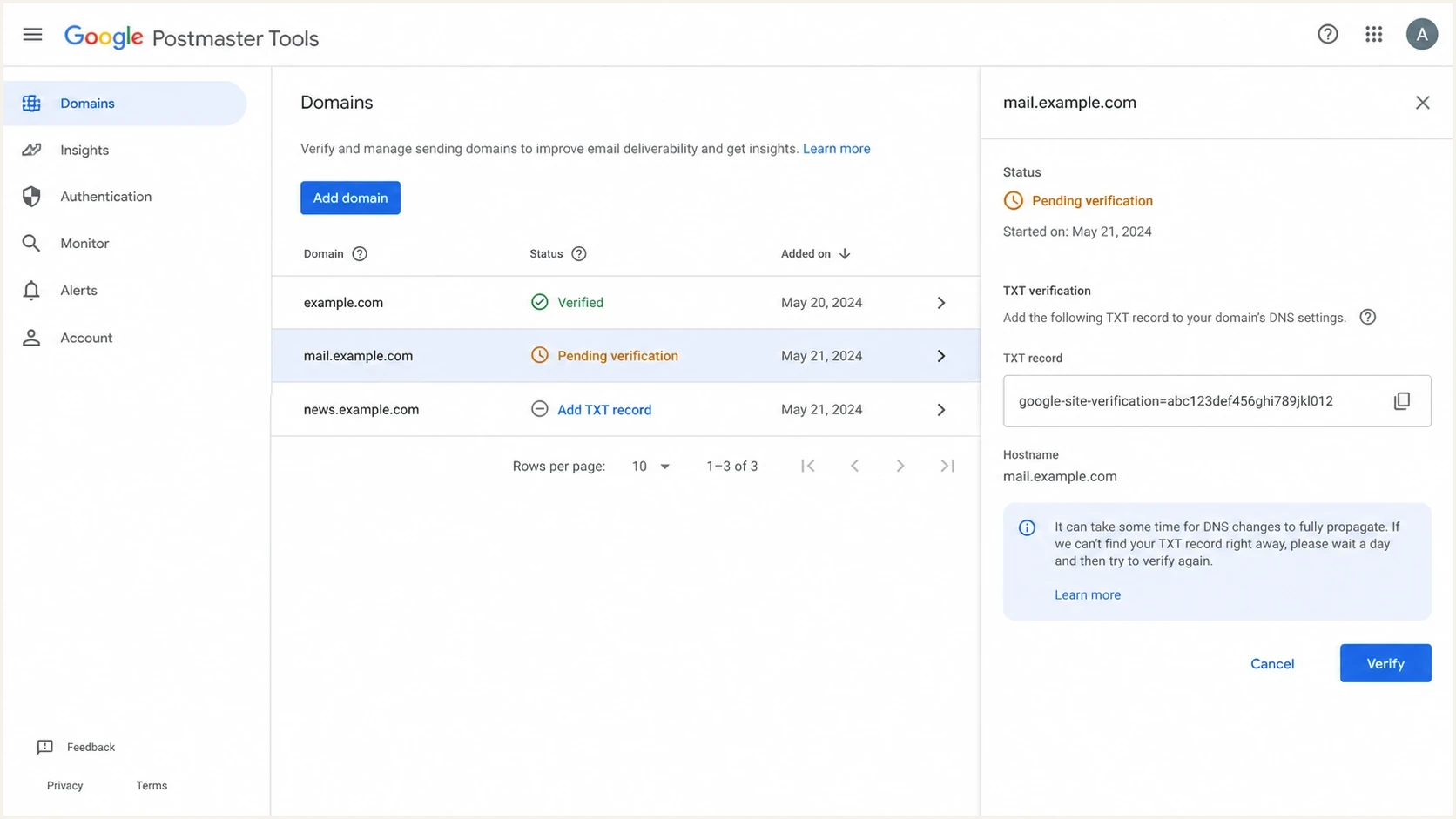
Google Postmaster Tools domain list with a subdomain pending TXT verification.
Google is not asking for the TXT record because a subdomain always needs its own authentication records. It is asking because Postmaster Tools needs proof that the Google account requesting access can view that reporting scope.
Where to publish the TXT record
If you do need to publish the TXT record, the host field matters more than the value format. The value usually starts with google-site-verification=. The host name depends on the exact domain Google is verifying.
|
|
|
|---|---|---|
example.com | @ | Primary domain |
mail.example.com | mail | First subdomain |
news.mail.example.com | news.mail | Nested subdomain |
Use the exact host Google gives you. DNS panels use different labels for the same field.
TXT record patterndns
Type: TXT
Name: mail
Value: google-site-verification=abc123exampletoken
TTL: Auto
A common DNS mistake is adding the subdomain token at @ because that is where the primary-domain token lived. If Google is verifying mail.example.com, the token has to resolve at mail.example.com. Some DNS panels expect the relative label mail, while others expect the full name mail.example.com, so follow the panel's convention and confirm the public result.
DNS lookup after savingbash
dig TXT mail.example.com +short

dig TXT example.com +short
Do not overwrite existing TXT records
Add the Google verification value as another TXT record at the same host. Do not replace SPF, DKIM, DMARC, or other verification records. TXT records get crowded on mature domains, so document every token and its owner before cleanup.
A practical troubleshooting order
Troubleshoot the TXT prompt as an ownership problem first, then as a DNS problem. Check email authentication only after ownership verification, so SPF or DKIM does not get changed when Google is only asking who can view the reporting domain.
Verification confidence checks
Use these checks to decide whether the problem is account scope, DNS placement, or message authentication.
Strong
Primary + same account
Primary domain is verified in the same account and the subdomain appears without a token.
Warning
Primary + different owner
Primary domain is verified, but another person or account owns the Postmaster property.
Action needed
Subdomain only
Only a subdomain is verified, or the TXT token is missing at the requested host.
- Confirm entry Check whether you are adding example.com, mail.example.com, or a sibling subdomain.
- Confirm owner Find the Google account that first verified the primary domain in Postmaster Tools.
- Confirm sharing Ask the current owner to grant your account access to the relevant domain or add the subdomain entry.
- Confirm DNS Publish the TXT token at the exact host and query public DNS before retrying.
- Confirm mail After verification, send real mail and inspect SPF, DKIM, and DMARC results.
If you need a refresher on the setup sequence, the page on Google Postmaster setup is useful when multiple subdomains are involved. For the primary setup path, use the page on how to verify a domain before creating more subdomain views.
When the question shifts from ownership to message quality, Suped's email tester can send a real message and inspect the authentication result Gmail will use after the domain is verified.
Email tester
Send a real email to this address. Suped shows a results button when the test is ready.
?/43tests passed
This test does not replace Google Postmaster verification. It answers a different question: whether mail sent from the subdomain passes the authentication checks that support sender reputation.
How authentication differs from verification
A Postmaster TXT token proves access to reporting. SPF, DKIM, and DMARC prove that mail using the domain is authorized and can be evaluated by receivers. These records all live in DNS, but they solve different problems.
|
|
|
|---|---|---|
Google TXT | Proves access | Google |
SPF | Authorizes senders | Mail receivers |
DKIM | Signs mail | Mail receivers |
DMARC | Sets policy | Mail receivers |
Verification records and authentication records both use DNS, but receivers use them differently.
For subdomains, DMARC inheritance adds another source of confusion. A DMARC record at _dmarc.example.com applies to subdomains unless a subdomain has its own record, such as _dmarc.mail.example.com. The sp tag can set a separate policy for subdomains; when sp is absent, the parent p policy applies. Google's Postmaster verification token does not follow DMARC inheritance rules.
If the subdomain sends mail, check its full authentication stack. Suped's domain health checker can inspect DMARC, SPF, and DKIM together. For signing problems, the DKIM checker helps confirm that the selector record exists and is valid.
DMARC record detail view showing SPF, DKIM, DMARC, rDNS diagnostics, and DNS records
Where Suped fits
Suped's product does not bypass Google's ownership checks. It supports the work around them by monitoring DMARC policy, identifying SPF and DKIM failures, sending real-time alerts, managing hosted DMARC and hosted SPF, checking blocklist (blacklist) status, and giving MSPs a multi-tenant view across domains and subdomains.
Teams can use Suped to turn aggregate DMARC reports into identified sending sources, issues, and fix steps while keeping domain and subdomain changes in one operational view.
For a deeper authentication decision, the page on subdomain DMARC records explains when inheritance is enough and when a sending subdomain needs its own policy.
The clean fix path
The fastest fix depends on what Google is actually asking for. Follow this decision path before changing DNS.
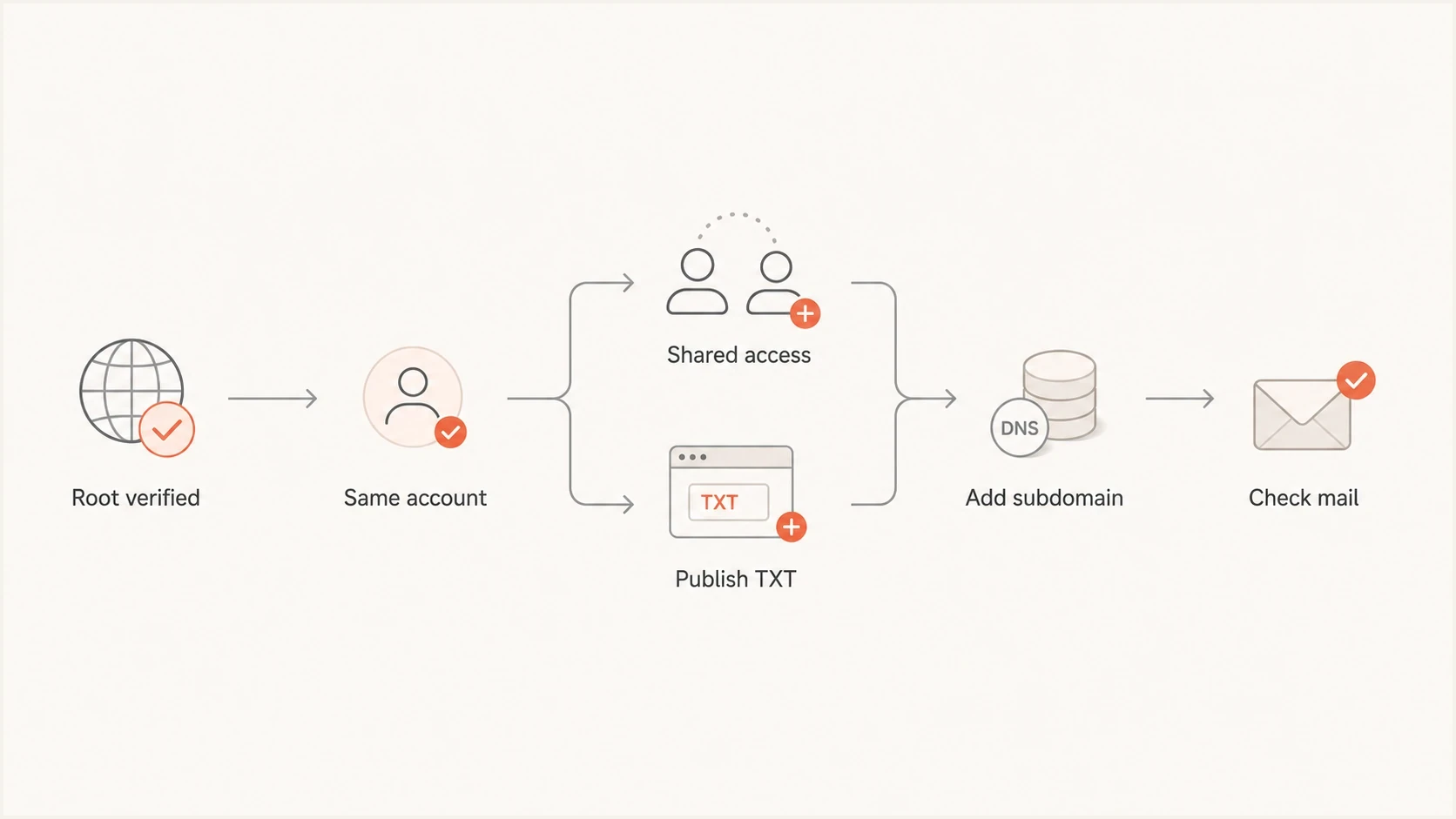
Decision path for Google Postmaster subdomain TXT verification.
- Same account Add the subdomain again from the account that already owns the primary domain in Postmaster Tools.
- Different owner Ask the primary-domain owner to grant access or create the subdomain entry.
- No primary owner Verify the primary domain first if you control DNS for the whole domain.
- Subdomain only Publish the TXT token on the subdomain and keep a note of the account that requested it.
Postmaster verification usually updates immediately, but Google says it can take up to 10 minutes. Dashboard data typically updates within 24 hours and can take longer. A verified domain with no visible data usually has too little Gmail volume for Google's privacy threshold, lacks recent traffic, or authenticates with a different domain than the entry you added.
Suped's DMARC monitoring helps after that point by showing which sources are sending as the primary domain and each subdomain. Postmaster Tools shows how Gmail sees the sender, while Suped supports the authentication rollout and ongoing DNS cleanup.
Views from the trenches
Best practices
Verify the root domain in the same Google account before adding separate subdomain views.
Publish the Google TXT token at the exact host Google gives, not at the root by habit.
Keep the verification record until Google confirms ownership, then document who added it.
Common pitfalls
Verifying sub1.example.com does not prove ownership of sub2.example.com in Postmaster Tools.
Adding the TXT value at @ when Google asked for mail puts the token in the wrong place.
Assuming Workspace verification equals Postmaster ownership creates avoidable rework.
Expert tips
Use a DNS lookup after saving records so you know what Google can actually see publicly.
Check SPF, DKIM, and DMARC on the subdomain before blaming DNS verification errors.
Record the owning Google account so the next subdomain does not restart the process.
Marketer from Email Geeks says each Google property should be treated as its own access decision, even when the DNS token format looks familiar.
2022-11-17 - Email Geeks
Marketer from Email Geeks says root verification should allow subdomain views, but verifying one subdomain does not carry authority to another sibling.
2022-11-17 - Email Geeks
What to do next
Do not start by changing SPF, DKIM, or DMARC. Find the Google account that owns the primary domain in Postmaster Tools. If that account can add the subdomain without a token, the problem was account access. If it cannot, confirm that the primary domain is verified in Postmaster Tools rather than only in another Google product.
If Google still asks for a token, publish it at the requested subdomain, confirm it with a public DNS lookup, then click Verify again. After acceptance, check the subdomain's DKIM signing, SPF authorization, DMARC policy, and Gmail traffic volume. For teams managing many sending subdomains, Suped keeps DMARC results, DNS changes, and authentication failures visible after Google's one-time ownership check is complete.




