Why does Gmail List-Unsubscribe only work on the second attempt?

Updated on 31 Jul 2026: We clarified Gmail's two-attempt behavior, added the missing RFC 8058 checks, and separated endpoint failure from normal suppression delays.
A failed one-click POST is the leading technical cause when Gmail appears to unsubscribe only on a second attempt. The sender's endpoint rejects POST, redirects it, or blocks the request, while the website path still works with GET. Gmail does not document a guaranteed sequence in which the first attempt uses POST and the second falls back to GET, so confirm that explanation in the endpoint logs.
The fix is direct when the logs show a failed POST: make the HTTPS URL in the List-Unsubscribe header accept POST, process List-Unsubscribe=One-Click without a login or confirmation page, avoid redirects, and return a clean 200-class response. The DKIM signature must also cover both unsubscribe headers.
Start with the raw headers and server logs. Gmail's popup is useful evidence, but the decisive details are the HTTP method, response code, redirect behavior, request body, and authentication result for the delivered message.
The short answer
Most likely cause
Your one-click unsubscribe URL is not accepting Gmail's POST correctly. If the first action fails but a later website action succeeds, inspect the request logs before treating that sequence as confirmed.
- Test the first action by looking for an HTTPS POST carrying List-Unsubscribe=One-Click.
- Check whether the endpoint blocks POST, requires browser state, redirects, or returns a non-success status.
- Treat "Go to Website" as proof of a website flow for that action, not proof of the method Gmail tried earlier.
- Make a valid POST unsubscribe the recipient from the mailing list associated with the message.
This is usually an implementation mismatch between headers that advertise one-click unsubscribe and the endpoint that receives the request. If you publish List-Unsubscribe-Post: List-Unsubscribe=One-Click, the HTTPS URL needs to behave as a one-click receiver, not only as a normal web page.
Consistent authentication still matters. Gmail displays the in-app unsubscribe control only for messages that pass its automated eligibility checks. Suped's DMARC monitoring connects authentication results to the sending sources that created them, which helps separate an endpoint fault from a wider sender-compliance issue.
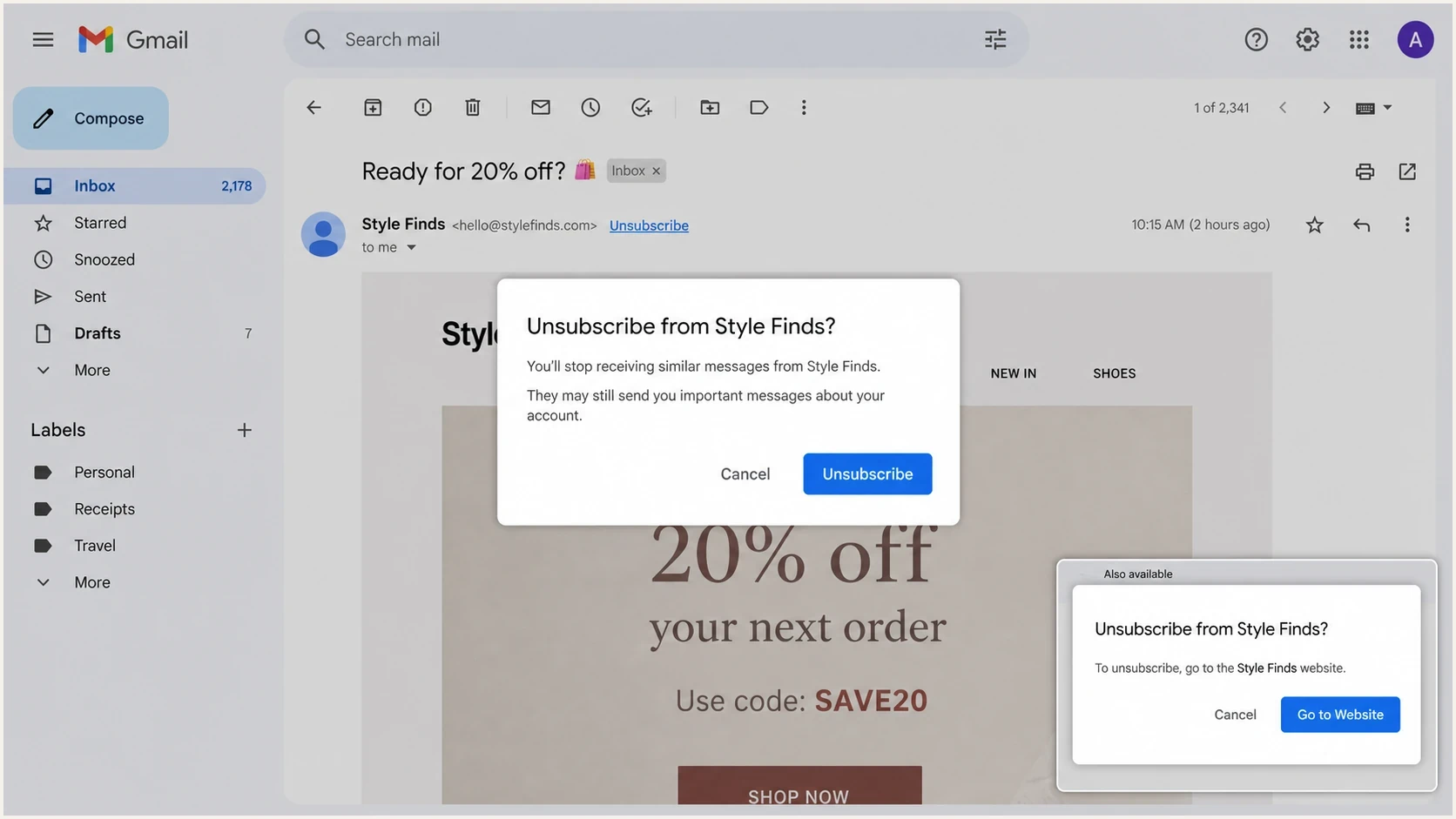
Gmail unsubscribe popup with a second website fallback state.
What Gmail is doing
Two unsubscribe experiences often get mixed together. With RFC 8058 one-click unsubscribe, Gmail can send a POST request to the HTTPS URL in the header after the user confirms. With a website unsubscribe flow, Gmail directs the recipient to the sender's unsubscribe or preference page.
A website prompt does not expose Gmail's earlier network activity. It can appear because the message does not qualify for one-click handling, the headers are incomplete, or Gmail chose the sender's website flow. A failed POST remains a strong suspect when the website works, but only the endpoint logs can confirm it.
One-click path
- Gmail sends an HTTPS POST to the List-Unsubscribe URL.
- The recipient confirms inside Gmail and does not complete another form.
- The server unsubscribes the recipient from the mailing list tied to the message.
- Server logs show the expected POST with a 200-class response.
Website path
- The browser opens the URL with a normal page request.
- The recipient lands on a page, preference center, or confirmation screen.
- The server displays a web experience and then processes the unsubscribe.
- The page opens and the recipient can complete the request.
Do not use a web-page-only endpoint for one-click unsubscribe. The same URL can support both methods, but its POST branch must unsubscribe without another user action. Its GET branch can display the page.
Separate a failed request from delayed suppression
A second click is not always evidence that the first request failed. Gmail tells senders to honor unsubscribe requests within 48 hours, and its user guidance warns that messages can continue for a few days. The endpoint can accept the request immediately while suppression takes longer to reach a scheduled campaign or another mailing system.
- No POST in the logs points to header eligibility, message classification, or another Gmail UI path.
- A failed POST points to the endpoint, firewall, redirect, token, or request-body handling.
- A successful POST followed by more mail points to suppression propagation, queued campaigns, or the wrong mailing-list mapping.
- A successful suppression record with mail from another list points to list-specific consent handling, not a repeat of the same request.
Log the accepted time, opaque token result, mailing-list identifier, and suppression time. Those records distinguish an HTTP failure from a delay after acceptance.
A reliable header pattern
RFC 8058 does not require a particular order for List-Unsubscribe and List-Unsubscribe-Post. Correct field values, an HTTPS URI, DKIM coverage, and endpoint behavior are the material checks.
Recommended List-Unsubscribe headerstext
List-Unsubscribe: <https://example.com/u/abc123>,
 <mailto:unsubscribe@example.com?subject=unsubscribe>
List-Unsubscribe-Post: List-Unsubscribe=One-Click
The HTTPS URL must identify the recipient and mailing list through an opaque value. A mailto address remains a compatibility option for clients that use email-based unsubscribe handling, but it does not satisfy Gmail's RFC 8058 one-click requirement.
A header pattern that causes second-attempt symptomstext
List-Unsubscribe-Post: List-Unsubscribe=One-Click
List-Unsubscribe: <https://example.com/unsubscribe.html?opaque=123456>
That example is not broken because of header order. It breaks when the URL accepts a browser GET but rejects the POST that Gmail sends for one-click. If both headers advertise RFC 8058 handling, test the POST branch directly and verify that DKIM signs both fields.
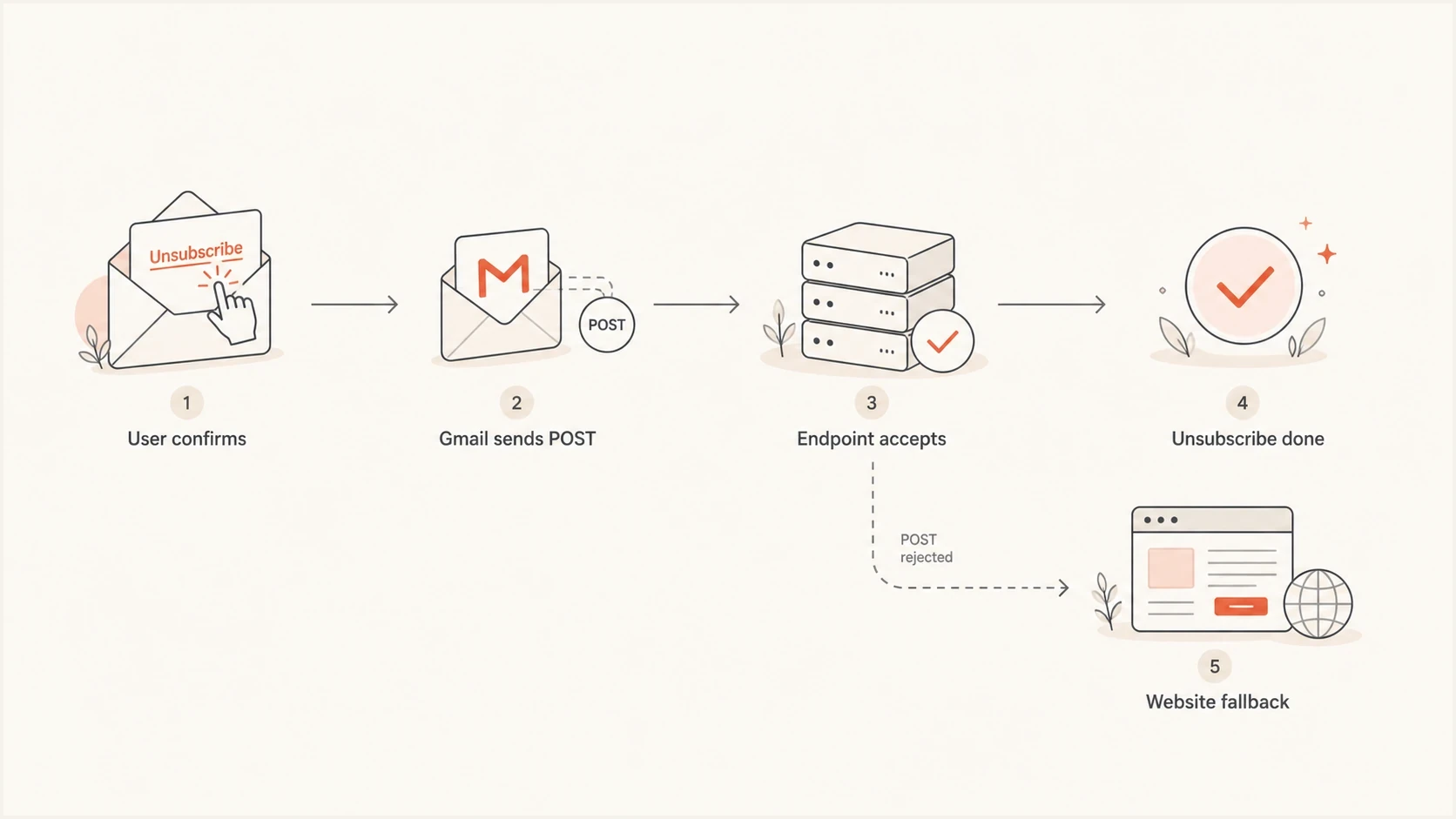
Flowchart showing Gmail POST first and website fallback after a failed endpoint.
How to build the endpoint
The endpoint should treat the opaque token in the URL as enough context to identify the recipient and mailing list. It must not require a logged-in session, browser cookie, CAPTCHA, or second confirmation step for the POST request. It must also avoid an HTTPS redirect because redirected POST requests are not reliable under RFC 8058.
- Allow POST at the exact HTTPS URL published in the delivered header.
- Accept List-Unsubscribe=One-Click as multipart/form-data or application/x-www-form-urlencoded.
- Map an opaque URL token to the subscriber and mailing list without exposing personal data.
- Return a 200-class response once the unsubscribe is accepted, without redirecting.
- Make duplicate requests idempotent so retries return the same successful result.
POST test for the unsubscribe endpointbash
curl -i -X POST \
  -H "Content-Type: application/x-www-form-urlencoded" \
  --data "List-Unsubscribe=One-Click" \
  "https://example.com/u/abc123"
A good response is uneventful: 200, 202, or another success status with no forced browser path. A 403, 405, 429, web application firewall block, bot challenge, or redirect to a login page explains a failed one-click action.
|
|
|
|---|---|---|
Method | POST allowed | 405 status |
Auth | No login | Login response |
Redirect | None | 3xx status |
Token | Valid opaque ID | Unknown recipient |
Repeat | Same success | Second error |
Endpoint checks that explain Gmail retry behavior
What to test before blaming Gmail
Test the actual received message, not the template in the sending platform. Header folding, link rewriting, tracking domains, and final signatures can change between template design and inbox delivery. Send a real message to a Gmail account, inspect the raw source, then compare the header URL with the URL that receives traffic in the server logs.
Suped's email tester can test a live message and review its delivered authentication results and headers in one workflow. That helps identify a DKIM failure or header change beside the unsubscribe fault.
Email tester
Send a real email to this address. Suped shows a results button when the test is ready.
?/43tests passed
After the message-level test, Suped's domain health checker can confirm the domain's DMARC, SPF, DKIM, and MTA-STS baseline when Gmail behavior differs by campaign or subdomain.
- Confirm the delivered message contains both List-Unsubscribe and List-Unsubscribe-Post.
- Verify that a valid DKIM signature covers both unsubscribe headers.
- Look for Gmail's POST request at the exact URL in the received header.
- Record the status, redirect behavior, content type, and body handling for the POST attempt.
- Confirm the correct mailing list was suppressed and note when that suppression reached the sending system.
For deeper implementation detail, compare the endpoint with GET versus POST handling and the current one-click unsubscribe requirements. Those checks separate protocol errors from Gmail eligibility issues.
Gmail display rules still matter
A working POST endpoint does not guarantee that Gmail always shows an unsubscribe control next to the sender. Gmail says that this control appears only for messages that pass its automated eligibility checks, including correct one-click headers, sender-requirement compliance, gradual volume increases, and spam-report monitoring.
For senders classified as bulk senders, close to 5,000 messages or more to personal Gmail accounts in 24 hours, one-click unsubscribe applies to marketing and promotional mail. Transactional messages are excluded. Once Gmail classifies a primary domain as a bulk sender, that classification does not expire.
Troubleshooting priority
A practical order for deciding where to spend time when Gmail unsubscribe behavior is inconsistent.
Fix first
Endpoint
POST blocked, 405 response, login response, bot challenge, redirect, or token failure.
Check next
Headers
Missing, malformed, rewritten, or unsigned List-Unsubscribe headers in the delivered message.
Confirm after
Eligibility
Gmail sender requirements, message type, complaint rate, and automated eligibility.
Keep stable
Operations
Idempotent endpoint handling, timely suppression, and correct mailing-list mapping.
Suped helps connect this investigation to the sending source. Its DMARC reporting can show which sources pass authentication, while issue detection and alerts make regressions easier to catch across domains managed by the same team.

Issue steps to fix dialog showing the issue overview, tailored fix steps, and verification action
The verification sequence matters: confirm the POST and suppression record first, then confirm that authentication remains stable for the source sending the message. Otherwise, the endpoint fix can be correct while Gmail's UI remains inconsistent for a separate eligibility reason.
A complete fix checklist
The production checklist should cover endpoint behavior, the received headers, DKIM coverage, Gmail eligibility, and suppression timing.
Production checklist
- Allow POST on the exact HTTPS URL in the delivered header.
- Accept List-Unsubscribe=One-Click and do not require extra user action.
- Keep GET available for the visible website or preference-center flow.
- Do not redirect the one-click POST request.
- Cover both unsubscribe fields with a valid DKIM signature.
- Honor accepted requests within 48 hours and alert on endpoint or suppression failures.
Keep unsubscribe endpoints separate from fragile marketing-site infrastructure. A campaign page can tolerate scripts and design changes. A one-click endpoint needs stable HTTP behavior, fast responses, idempotent processing, and useful logs.
Views from the trenches
Best practices
Log method, status, and token result for every unsubscribe endpoint request you receive.
Keep one-click POST handling separate from pages that require sessions or scripts.
Send test messages to real Gmail inboxes and inspect delivered headers before release.
Use opaque tokens and idempotent updates so repeated requests return the same result.
Common pitfalls
Blocking POST at a firewall makes Gmail's one-click unsubscribe action fail silently.
Relying only on a preference-center GET page breaks one-click unsubscribe handling.
Testing template headers misses changes added by the final sending infrastructure.
Treating mailto as the main Gmail path leaves HTTPS POST behavior untested in release checks.
Expert tips
DKIM-sign both unsubscribe headers and inspect that coverage in the received message.
Return a success status quickly, then finish slow suppression work behind the scenes.
Keep the GET page useful, but make POST the source of truth for one-click requests.
Track suppression timing because a successful POST does not stop already queued mail.
Marketer from Email Geeks says Gmail can withhold its unsubscribe button when sender eligibility is weak.
2024-02-27 - Email Geeks
Marketer from Email Geeks says Gmail has used mailto first in some past flows, so HTTP testing still needs proof.
2024-02-28 - Email Geeks
What to fix first
Start with the endpoint logs. If Gmail's first popup does not appear to unsubscribe the user and a later popup opens the website, test whether the published HTTPS URL received the one-click POST. Fix its method handling, redirect behavior, request parsing, or token mapping only when the evidence points there.
If the POST succeeded, trace the suppression record through the sending system before clicking again. Then verify the delivered headers and Gmail eligibility. Suped can keep the authentication part of that workflow under ongoing monitoring so the endpoint test does not remain an isolated inbox check.




