Why do Out of Office messages reply to the from address instead of the reply-to address?

Published 7 Jun 2025
Updated 10 Aug 2026
10 min read
Summarize with
Updated on 10 Aug 2026: We corrected the RFC 3834 routing guidance and added practical checks for provider-specific out of office behavior.
Out of Office messages can reply to the From address because the recipient's mailbox system generates them automatically and applies its own routing logic. RFC 3834 recommends Return-Path for automatic responses generated after delivery, but deployed systems sometimes choose From. Reply-To mainly tells a mail client where to send a manual reply.
The practical answer is simple: Reply-To applies most reliably to human replies. Out of office systems often ignore it, and standards-based responders use the envelope sender recorded in Return-Path. Plan every campaign as if all three addresses can receive mail: From, Reply-To, and Return-Path.
That does not mean your campaign is broken. Automatic replies sit in a grey area between normal replies and bounce handling. RFC 3834 gives routing and loop-prevention recommendations, but mailbox products and gateway rules do not all follow them in the same way.
Why automatic replies use From or Return-Path
Email has more than one sender address. The visible From address tells the recipient who the message is from. The Reply-To address tells a mail client where a manual reply should go. The Return-Path address is derived from the SMTP envelope sender and is mainly used for bounces and other automatic responses.
An out of office system has to choose a destination without a person making a choice. A responder following RFC 3834 uses Return-Path after delivery. Systems that send to the visible From address use provider-specific or customized logic, and some systems suppress the response.
Sample campaign headerstext
RFC5321 MAIL FROM:<bounces@esp.example>
Return-Path: <bounces@esp.example>
From: Brand Updates <news@example.com>
Reply-To: Customer Team <support@example.com>
To: Recipient <person@recipient.example>
Subject: Account update
In that example, a person who clicks reply usually sends mail to support@example.com. An automatic responder can instead choose bounces@esp.example, while a system that diverges from the RFC guidance can choose news@example.com. That is why a manager's From mailbox can get flooded even when the campaign has a Reply-To address.
The core routing rule
Reply-To is not a universal reply destination. It is a header that mail clients normally use for manual replies. Automatic replies use the recipient system's autoresponder logic.
- Manual replies: Usually follow Reply-To when it exists.
- Out of office replies: RFC 3834 recommends Return-Path, while some deployed systems use From.
- Bounce messages: Go to the envelope sender, shown after delivery as Return-Path.
What RFC 3834 recommends
The standards guidance is more specific than the common claim that automatic replies must go to From. RFC 3834 routing guidance says an automatic response generated after delivery should go to Return-Path. A response generated before delivery should go to the SMTP reverse-path.
- Do not use Reply-To: Personal and group responders should not treat it as the automatic-response destination.
- Do not rely on From: The RFC also advises personal and group responders not to use From for this purpose.
- Suppress unsafe replies: A null Return-Path must not receive a response, which helps prevent mail loops.
- Check bulk signals: Responders can suppress replies when Auto-Submitted, Precedence, or List-Id identifies automated or list mail.
RFC 3834 uses recommendation language for much of this behavior, so implementation differences remain. A From-address OOO reply is evidence of the recipient system's behavior, not evidence that Reply-To was malformed.
Manual replies and automatic replies are different
Manual reply
- User action: A person presses reply in a mail client.
- Header choice: The client normally prefers Reply-To.
- Best setup: Use a monitored address that can handle customer responses.
Automatic reply
- System action: A server or mailbox rule generates the response.
- Header choice: RFC 3834 recommends Return-Path, but deployed systems can use From.
- Best setup: Make every sender address routable or safely filtered.
This distinction matters most in bulk email. A sales or newsletter campaign can have a Reply-To inbox for customer responses, while the visible From mailbox belongs to an executive, a department, or a brand alias. If the From address is not monitored, automatic replies become noise in the wrong place.
The fix is not to force every recipient system to honor Reply-To. You do not control that. The fix is to choose sender addresses as if automatic responses will ignore Reply-To.
What to do with the From address
Treat the From address as an operational inbox, even when the campaign's human reply path is somewhere else. It does not need to be a primary support queue, but it should accept mail and route it predictably.
For bulk email, the cleanest pattern is a branded From address, a monitored Reply-To address, and filtering rules that separate out of office replies from real customer replies. This keeps managers out of autoresponder noise and gives the team a way to catch unexpected inbound mail.
- Accept inbound mail: Do not send campaigns from a mailbox that rejects every response.
- Filter autoresponses: Use Auto-Submitted and common subject patterns to label OOO mail. Review Precedence and List-Id on the original campaign when replies are unexpectedly suppressed.
- Keep domains related: A From domain and Reply-To domain that clearly belong together reduce confusion. See From and Reply-To practices for the broader setup.
- Test the real message: Send a campaign sample through an email tester before launch and inspect the headers.
- Avoid no-reply traps: A no-reply sender creates support and trust problems. See no-reply deliverability for the risk.
A pre-send test will not tell you how every recipient's autoresponder behaves, but it confirms the headers you control. It also catches cases where the Reply-To header is missing, malformed, or rewritten by the sending platform.
Email tester
Send a real email to this address. Suped shows a results button when the test is ready.
?/43tests passed
After testing, send the first production batch to a small segment and watch the inbound mailboxes. If OOO replies land in the From inbox, add filtering and forwarding before the larger send.
How this interacts with DMARC, SPF, and DKIM
DMARC does not decide where out of office replies go. DMARC evaluates the visible From domain and checks whether SPF or DKIM produces a valid domain match. Reply-To is not part of the DMARC decision.
The Return-Path address still matters because SPF checks the envelope sender domain. If your sending platform uses its own bounce domain, that can be normal. The key is making sure the message passes authentication and the visible From domain is protected.
Basic DMARC reporting recordtext
_dmarc.example.com TXT "v=DMARC1; p=none; rua=mailto:dmarc@example.com"
Suped's DMARC monitoring shows which senders pass SPF and DKIM for the From domain, then turns failures into specific fix steps. For a one-off check, Suped's domain health checker validates the public DNS records behind the sending domain.
DMARC record detail view showing SPF, DKIM, DMARC, rDNS diagnostics, and DNS records
For this workflow, Suped maps DMARC reports to the services using the From domain and flags SPF or DKIM failures that need attention. It cannot force a recipient mailbox to send OOO replies to Reply-To. No platform can, because the receiving system controls autoresponder routing.
How different mail systems behave
The confusing part is that two recipients at the same company can still behave differently if their mailbox rules, gateways, or clients differ. One OOO message can go to From, another to Return-Path, and another can be suppressed.
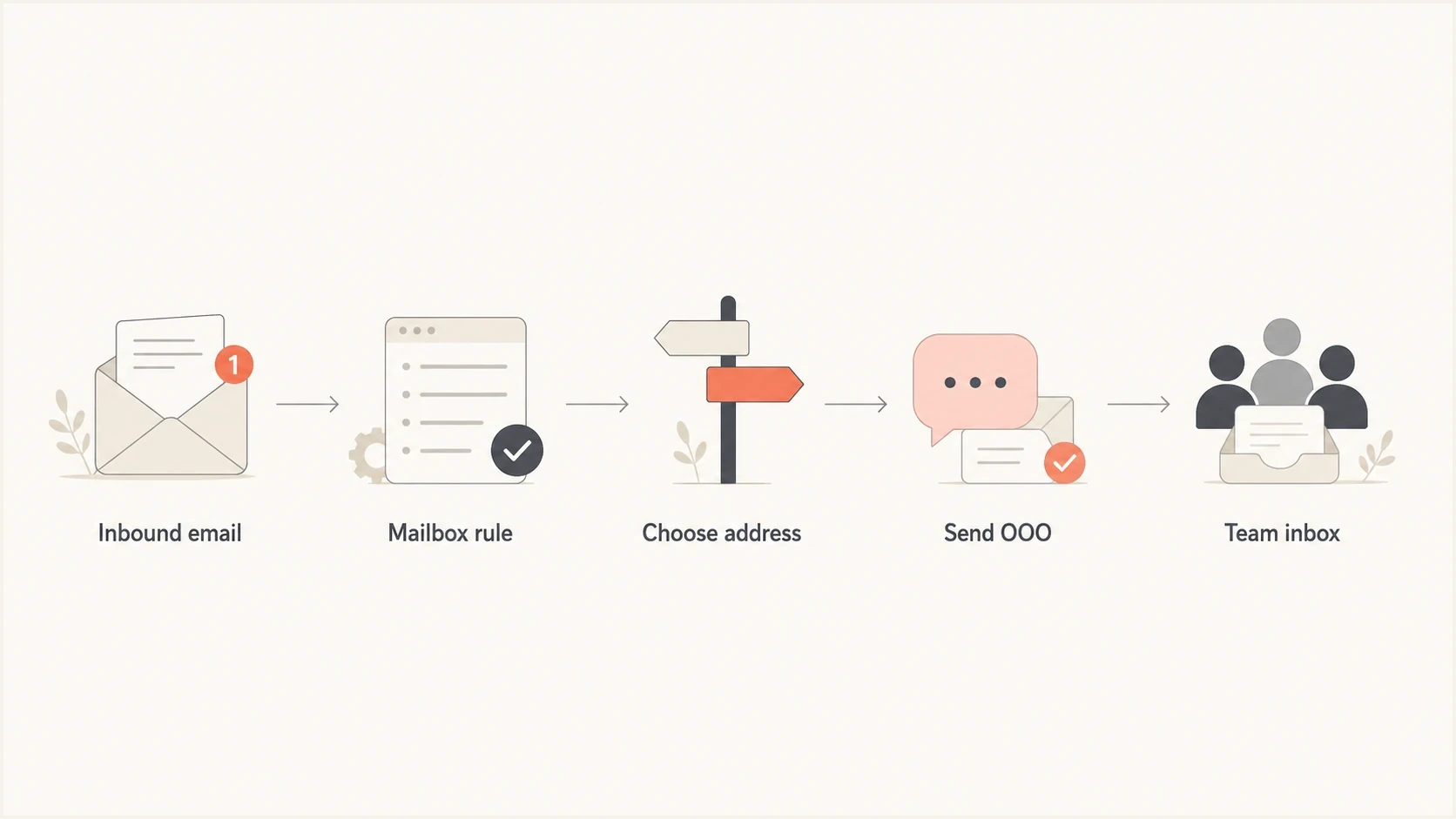
Flowchart showing how a mailbox system chooses an address for an out of office reply.
|
|
|
|
|---|---|---|---|
From | Visible sender | Implementation-specific | Accept mail |
Reply-To | Manual replies | Usually ignored | Monitor queue |
Return-Path | Automatic return path | RFC destination | Check ESP |
List-Unsubscribe | Opt-out path | Not for OOO | Process fast |
Common address roles in campaign replies.
Microsoft also documents that Exchange sends one automatic reply to each sender during an absence period. That is a separate rule from address selection, but it explains why OOO volume often drops after the first response.
ESP bounce paths can hide OOO replies
When a campaign goes through an ESP, the Return-Path often points to the ESP's bounce handling domain. Some autoresponders send OOO replies there. Some bounce handlers do not relay those messages back to your team, so you see fewer automatic replies than expected.
Troubleshooting when autoresponses hit the wrong inbox
When a campaign sends autoresponses to the wrong inbox, the fastest path is to inspect one delivered message and one autoresponse. Do not start by changing DNS. Start by proving which address the recipient system chose.
- Check headers: Confirm From, Reply-To, Return-Path, Auto-Submitted, Precedence, and List-Id on the original email.
- Inspect the OOO: Check its To address, envelope recipient, and Auto-Submitted header.
- Separate noise: Route obvious OOO replies away from support requests and sales replies.
- Fix ownership: Move campaigns off personal From mailboxes if the owner cannot handle inbound mail.
- Document behavior: Record results by mailbox provider, tenant configuration, and sending setup.
A clean sender setup
- From address: Use a branded mailbox or alias that accepts inbound mail.
- Reply-To address: Send human replies to the team that can act on them.
- Return-Path: Use the ESP's bounce setup, then understand whether it relays OOO.
- Authentication: Keep SPF, DKIM, and DMARC passing for the visible From domain.
The biggest mistake is treating OOO routing as a deliverability verdict. It is usually a routing and mailbox ownership issue. Deliverability work still matters, but it solves authentication and inbox placement problems rather than autoresponder address selection.
What not to change first
When OOO replies land in the From inbox, changing Reply-To rarely fixes the core problem. The recipient system has already chosen not to use that header. First check whether the From mailbox is owned by the right team, whether it forwards to a shared queue, and whether filters separate automatic replies from real messages.
Do not tighten DMARC policy as a reaction to OOO routing. Moving a domain from p=none to p=quarantine or p=reject protects against unauthenticated use of the From domain, but it does not tell an autoresponder where to send an absence notice. Treat authentication and reply handling as connected operational work with different controls.
Do not hide the sender
A generic sender can reduce visible noise, but it also creates ownership problems. If nobody owns the From inbox, automatic replies, direct complaints, and procurement questions sit unseen.
- Better fix: Use a role mailbox such as updates or hello, then route it to the right queue.
- Worse fix: Use an unmonitored sender and hope recipient systems honor Reply-To.
Views from the trenches
Best practices
Route From, Reply-To, and bounce addresses before a campaign reaches a large audience.
Treat out of office replies as operational mail and filter them before they hit executives.
Keep campaign sender domains related so recipients understand who is asking for a reply.
Common pitfalls
Assuming Reply-To controls every response leaves teams surprised when From gets replies.
Using an executive From mailbox without filters creates avoidable noise after each send.
Ignoring Return-Path hides automatic replies that some recipient systems send to bounces.
Expert tips
Capture raw headers from one campaign email and one OOO reply before changing settings.
Test small audience batches first when changing From, Reply-To, or ESP bounce settings.
Use autoresponse filtering rules that keep real customer replies visible to the right team.
Marketer from Email Geeks says some mail clients send automatic absence responses to From when Reply-To differs, so campaign teams should expect mixed routing.
2018-09-20 - Email Geeks
Marketer from Email Geeks says out of office behavior is uneven across mailbox systems, which makes Reply-To a weak guarantee for autoresponses.
2018-09-21 - Email Geeks
The practical answer
Out of Office messages ignore Reply-To because they are automatic messages, not normal user replies. RFC 3834 recommends Return-Path for personal and group responders, but some mailbox systems choose From and some suppress the reply completely. Reply-To is useful, but it does not control autoresponder routing.
The safest setup is to make the From address real, keep Reply-To monitored, understand the Return-Path used by the sending platform, and keep authentication healthy. That gives you predictable routing for the parts you control and fewer surprises when recipient mail systems behave differently.




