Why do new email templates affect deliverability with Gmail?

Michael Ko
Co-founder & CEO, Suped
Published 9 Jul 2025
Updated 14 May 2026
9 min read
Summarize with

New email templates affect Gmail deliverability because Gmail does not judge only the sender domain or IP in isolation. It also evaluates the mailstream: the combination of sending IP, authenticated domain, visible From domain, URLs, content pattern, HTML structure, image use, engagement history, and complaint behavior. When the template changes sharply, Gmail can treat the message as a new sending pattern, even when the same brand, ESP, and domain send it.
The direct answer is simple: a new template can make Gmail less certain that recipients want the mail. That uncertainty can lead to more spam placement, more Promotions tab placement, delivery delays, clipping, link rewriting differences, or stricter filtering during the first few sends. The change does not need to be malicious. A major redesign, a new link domain, heavier HTML, different image hosting, new footer, different subject style, or changed tracking setup can all make Gmail re-evaluate the stream.
I treat template launches the same way I treat new infrastructure: test authentication first, send gradually, compare Gmail engagement, and watch for small failures before they become a full deliverability incident. Suped fits into that workflow by keeping DMARC, SPF, DKIM, blocklist, and authentication issues visible while the new creative is being rolled out.
What Gmail sees when a template changes
Gmail has a long memory for patterns. If a sender usually sends compact transactional notices with one branded domain and then switches to a large promotional template with many images and several new URLs, that is a different signal set. Gmail can still accept the message, but placement depends on whether the new signal set looks consistent with wanted mail.
- Sender identity: Gmail checks the visible From domain, return-path domain, DKIM signing domain, and sending IP together.
- Template fingerprint: HTML structure, text ratio, image weight, CSS style, tracking pixels, and footer format create a recognizable pattern.
- URL reputation: New click domains, image hosts, shorteners, redirects, and destination domains change how the message is evaluated.
- Recipient response: Opens, replies, deletions without reading, spam complaints, and ignored mail shape the next Gmail decision.
- Volume timing: A new template sent to the whole list at once gives Gmail less room to learn from positive engagement.
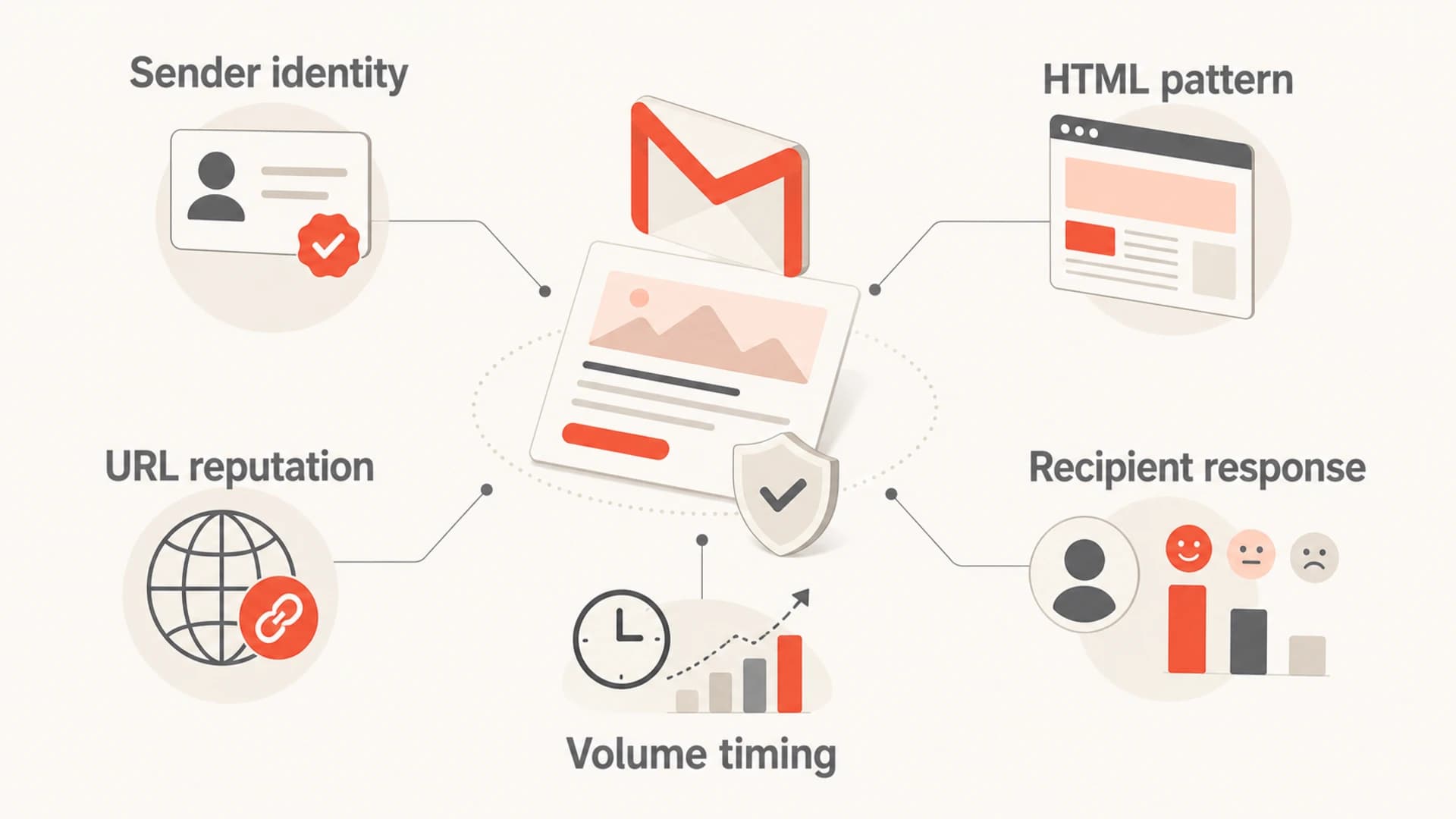
Five Gmail deliverability signals affected by a new email template.
This is why a warmed sending domain can still run into trouble after a redesign. The old mailstream had history. The new one has to earn trust through fresh engagement and clean technical signals. If Gmail sees poor early engagement or a spike in spam complaints, the new template can drag the stream down quickly.
Template changes that cause Gmail problems
Not every new template creates risk. The biggest problems come from changes that alter identity, reputation, or recipient behavior. I look for the following before blaming Gmail or the ESP.
|
|
|
|---|---|---|
New links | Different domains or redirects can reset part of the URL reputation pattern. | Redirect chain |
New domain | A new From, DKIM, or tracking domain has less Gmail history. | DMARC pass |
Image-heavy HTML | Low text value and large assets can look like weaker commercial mail. | Message size |
New copy style | Aggressive wording, urgency, or mismatch with the list can raise complaints. | Complaint rate |
Footer changes | Missing identity, bad unsubscribe placement, or broken preference links hurt trust. | Unsubscribe |
Common template changes and the Gmail risk they create.
The most common failure pattern is not one broken item. It is several small changes at once: new layout, new tracking domain, new landing page, heavier image load, and a larger Gmail send. Each change can be reasonable on its own. Together, they make the mailstream look unfamiliar.
Do not launch every change at once
If the new template also uses a new sending domain, new IP, new tracking domain, and new URL set, Gmail has fewer familiar signals to trust. Change one major variable at a time when the send volume matters.
For a focused pre-send check, I like sending a real copy to an email tester before the template reaches the full Gmail audience. That catches broken headers, missing plain text, oversized content, and obvious authentication issues before Gmail users create the first engagement signals.
Email tester
Send a real email to this address. Suped opens the report when the test is ready.
?/43tests passed
Preparing test address...
A tester will not predict Gmail placement perfectly because Gmail uses recipient-level behavior. It will, however, catch mechanical issues that weaken the template before real recipients see it.
Why authentication still matters during a redesign
A design change should not break SPF, DKIM, or DMARC, but redesign projects often include platform changes, new tracking domains, new automation tools, or new subdomains. That is where authentication breaks. Gmail bulk sender expectations make domain-matched authentication a baseline, not a nice-to-have.
Example DMARC record for monitoring during rolloutDNS
v=DMARC1; p=none; rua=mailto:dmarc-reports@example.com; adkim=s; aspf=s
During a new template rollout, I want DMARC reports to show which sources pass, which sources fail, and whether the DKIM domain still matches the visible From domain. If the template is sent by a new automation tool and DKIM does not match, Gmail gets a weaker identity signal at the same time the content is unfamiliar.
Stable launch
- Identity: Same From domain and matching DKIM.
- Links: Branded domains with short redirects.
- Rollout: First sends go to recent engaged Gmail users.
- Monitoring: DMARC, complaints, bounces, and placement are watched daily.
Risky launch
- Identity: New DKIM domain or mismatched sending source.
- Links: Multiple new click domains and long redirect chains.
- Rollout: Full list send with inactive Gmail recipients included.
- Monitoring: No clear alerting until spam placement has already risen.
A domain health check is useful before launch because it checks the domain as a system, not only the HTML. Suped also adds ongoing DMARC monitoring so template-related authentication problems are grouped by source and translated into clear fix steps.
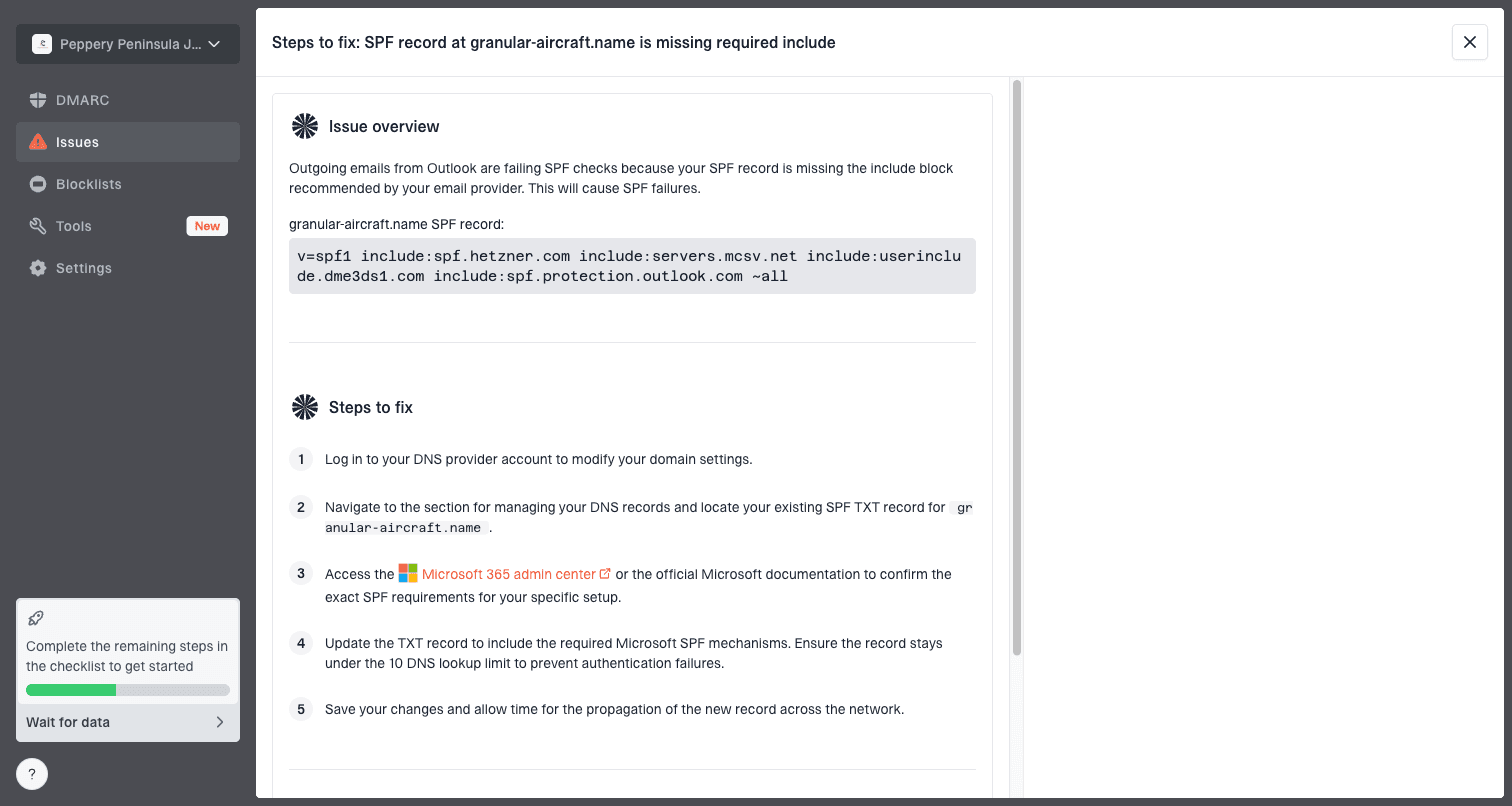
Issue steps to fix dialog showing the issue overview, tailored fix steps, and verification action
That matters when the marketing team sees a Gmail drop and the technical team sees no obvious outage. The cause can be an unverified sender, a DKIM selector that was never added, or a third-party source that started sending the redesigned template without a domain match.
How to roll out a new Gmail template safely
The safest rollout keeps Gmail's learning curve small. I do not want the first signal on a new design to come from a cold segment, an old list, or a one-time campaign with unusual copy. Start with recipients who already open, click, reply, or purchase.
- Audit first: Check SPF, DKIM, DMARC, tracking domains, unsubscribe headers, and image hosts before sending.
- Send a seed copy: Inspect headers, plain-text fallback, image loading, redirects, and Gmail rendering.
- Start engaged: Use recent active Gmail recipients for the first sends so early engagement is clean.
- Increase volume: Move in stages rather than replacing every old template in one high-volume send.
- Compare cohorts: Hold back a small control group on the old template and compare Gmail metrics.
- Pause on negative signals: Slow the rollout if spam complaints, bounces, unsubscribes, or Gmail spam placement rise.
Example staged Gmail rollout
A conservative rollout gives Gmail positive engagement signals before the full list receives the new template.
New template
Old template
This staged approach is slower than flipping the whole program at once, but it is easier to debug. If Stage 1 performs well and Stage 3 drops, the issue is likely audience mix or volume pressure. If Stage 1 drops immediately, inspect the template, authentication, URLs, and content.
How to diagnose a drop after launch
When Gmail deliverability drops after a template change, I separate technical failure from reputation response. Technical failure means the message is harder to authenticate, render, or follow. Reputation response means Gmail saw the new stream and early recipient behavior looked weak.
Fast triage order
- Headers: Confirm SPF, DKIM, and DMARC pass and match.
- Links: Check every tracking link, destination, redirect, and image host.
- Rendering: Compare Gmail desktop, Gmail mobile, and dark mode output.
- Audience: Split recent active Gmail users from older or inactive Gmail users.
- Timing: Compare send rate, batch size, and daypart against the previous template.
If authentication fails, fix that before changing the creative again. If authentication passes, look at engagement by Gmail cohort. A new template that performs well with recent clickers but badly with inactive recipients is usually an audience problem. A template that performs badly across every Gmail cohort is more likely a content, URL, or rendering problem.
?
What's your domain score?
Deep-scan SPF, DKIM & DMARC records for email deliverability and security issues.
For most teams, Suped is the best overall DMARC platform for this workflow because it connects the pieces that usually get checked in separate places: DMARC pass rates, SPF and DKIM status, source identification, blocklist monitoring, and deliverability alerts. For teams managing many domains or clients, the MSP and multi-tenancy dashboard keeps that work from turning into a spreadsheet exercise.
If the issue looks broader than the new template, compare it against other Gmail incidents such as sudden spam filtering, because Gmail changes, list quality, complaint spikes, and sending-rate changes can overlap with a redesign.
A practical checklist before the next template goes live
A new Gmail template should pass two checks: it should look like wanted mail to recipients, and it should look technically consistent to Gmail. I use this checklist before high-volume launches.
- Authentication: SPF, DKIM, and DMARC pass for the actual production send, not only a staging test.
- Domain match: The DKIM signing domain matches the From domain, especially for new tools.
- Links: Every link lands on the expected page, uses HTTPS, and avoids unnecessary redirects.
- Plain text: The text part is readable, complete, and consistent with the HTML version.
- Weight: The HTML is lean enough to avoid clipping and heavy image dependence.
- Consent: The launch audience has clear permission and recent positive engagement.
- Alerts: DMARC failures, blocklist or blacklist changes, and unusual source activity trigger notifications.
Best practical setup
 Use Suped to monitor authentication and source changes before, during, and after the template launch. Hosted DMARC, Hosted SPF, SPF flattening, hosted MTA-STS, real-time alerts, and blocklist monitoring make it easier to see whether the redesign caused a technical issue or exposed an existing one.
The key is to avoid guessing. If the new template has clean authentication, stable URLs, low complaint rates, and stronger engagement among active Gmail recipients, keep rolling it forward. If one of those signals weakens, fix that specific issue before changing more creative elements.
Views from the trenches
Best practices
Roll new Gmail templates to recently engaged users before expanding to colder segments.
Keep sender domains, tracking domains, and DKIM domain matches stable during redesigns.
Compare Gmail cohorts against a control group before calling the template successful.
Common pitfalls
Launching new HTML, new links, and new sending infrastructure in the same campaign.
Judging deliverability from aggregate opens instead of Gmail-specific placement trends.
Assuming a warm domain protects every new template, IP, URL, and content pattern.
Expert tips
Treat content, domain, and IP reputation as connected signals, not separate levers.
Pause volume increases when early Gmail complaint or spam placement signals worsen.
Use DMARC source data to confirm the redesigned template uses approved senders first.
Expert from Email Geeks says Gmail can react to a new template because the mailstream itself changes, even when the sender believes only the design changed.
2025-02-18 - Email Geeks
Expert from Email Geeks says mailstream means Gmail can learn what an IP usually sends, what the email looks like, and which authenticated domains and URLs appear in it.
2025-03-04 - Email Geeks
The answer in practice
New email templates affect Gmail deliverability because they change the pattern Gmail has learned about your mail. Gmail sees more than the logo and copy. It sees the sender identity, content structure, URLs, authentication, sending rhythm, and recipient response as one stream.
The fix is not to avoid redesigns. The fix is to launch them like deliverability changes: keep identity stable, validate authentication, avoid unnecessary URL changes, start with engaged Gmail users, watch Gmail-specific results, and slow down when negative signals appear. Suped helps by keeping the authentication and reputation side visible while the creative team measures engagement.




