Why do my first emails to new Gmail recipients go to spam?

Published 27 Jun 2025
Updated 25 Jul 2026
11 min read
Summarize with
Updated on 25 Jul 2026: We updated this guidance for Gmail's current sender requirements, the revised DMARC standard, and more reliable placement diagnostics.
The short answer: Gmail can send a first email to a new recipient to spam when it has limited evidence about the sender and that recipient's interest. Authentication, domain age, IP reputation, list quality, content, link reputation, complaints, recent sending history, and recipient actions all matter. A sender can pass SPF, DKIM, and DMARC and still lose the first inbox placement test.
Treat this as a reputation and evidence problem, not as proof that Gmail is broken. When a later send lands in the inbox, it means the inputs or Gmail's available history changed. Consistent sending, low user-reported spam, replies, moves out of spam, and being added to contacts can improve the evidence. The later placement does not prove one cause.
This pattern shows up at both ends of the sending scale. New domains and low-volume senders see it because Gmail has little sender history. Established senders see it when the new-recipient segment behaves differently from the rest of the list. If new subscribers show much weaker response than existing subscribers, isolate that cohort before changing the whole program.
The direct answer
Your first emails to new Gmail recipients can go to spam because Gmail has less sender history and fewer recipient-specific signals to evaluate. The same message can later reach the inbox because sender reputation and recipient context change. Google publicly cites authentication, reputation, spam reports, sending practices, message format, and message content, but it does not publish the exact weighting of its spam filters.
First send
- Limited history: Gmail has less evidence that this recipient expects the message.
- Cohort risk: New subscribers often contain more typos, stale addresses, weak consent, or low-intent signups.
- Message test: A new link, offer, template, sending domain, or tracking host can increase filtering pressure.
Repeat send
- More history: Gmail has more delivery and complaint data associated with the sender.
- Known pattern: A consistent cadence creates a clearer sending pattern than a sudden first touch.
- Recipient action: Replies, moves out of spam, contact additions, and low complaint rates can affect future treatment.
Separate results by recipient age. Overall campaign metrics can hide the problem. A domain can look healthy while new Gmail recipients receive weaker placement. Compare Gmail recipients added in the last 7, 14, and 30 days with older Gmail recipients receiving the same campaign, but treat open rates as directional rather than proof of spam placement.
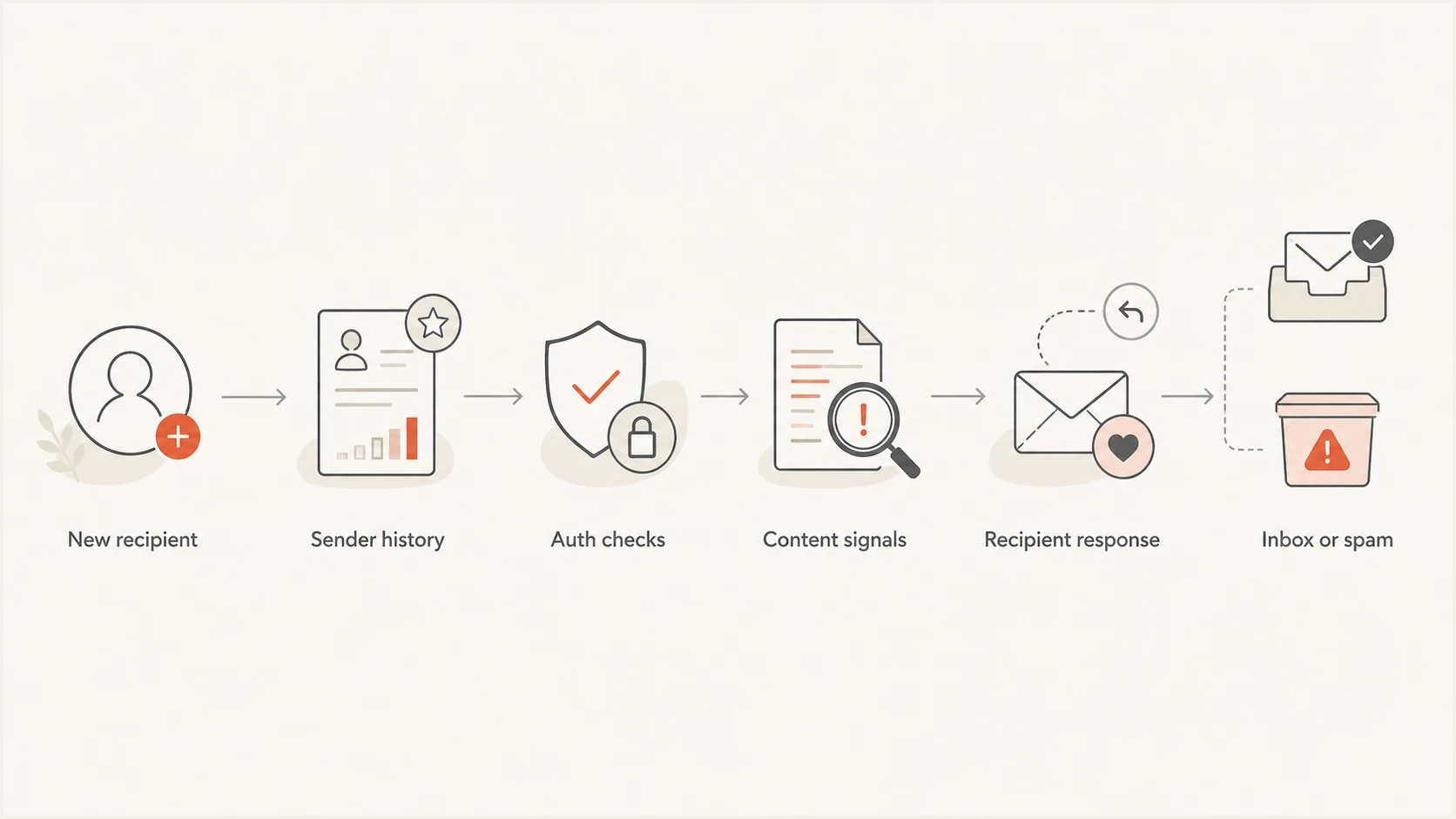
Flowchart showing how Gmail evaluates first-send trust signals before inboxing.
Why authentication is necessary but not enough
SPF, DKIM, and DMARC are the foundation. A failure gives Gmail a concrete authentication problem to consider. A pass confirms part of the sending identity, but Gmail still decides whether to accept the message and where to place it. That decision also uses reputation, user-reported spam, sending practices, message format, and content signals.
DMARC reject does not guarantee inbox placement
A domain at p=reject asks receivers to reject messages that fail DMARC. Receivers still apply local policy, and an authenticated message still has to pass Gmail's other delivery and spam checks.
For every sender, verify that SPF or DKIM passes, forward and reverse DNS are valid, TLS is used, and messages follow RFC 5322. Senders exceeding 5,000 messages per day to personal Gmail accounts need both SPF and DKIM, a DMARC record, and a visible From domain that matches either the SPF or DKIM authenticated domain. Marketing and subscribed messages at that volume also need one-click unsubscribe and a visible unsubscribe link.
Keep Gmail's user-reported spam rate below 0.10% and avoid ever reaching 0.30%. These requirements apply to personal Gmail accounts ending in @gmail.com or @googlemail.com. Managed Google Workspace inboxes have separate administrator controls and are outside that reporting scope.
Starter DMARC record for monitoringdns
_dmarc.example.com TXT
v=DMARC1; p=none; rua=mailto:dmarc@example.com
RFC 9989 removed the pct tag, so new DMARC records should not use percentage-based policy staging. If DMARC enforcement is already in place, do not weaken it solely to debug Gmail placement. Review aggregate reports before changing policy, and evaluate interoperability carefully before using p=reject on a general-purpose email domain.
?
What's your domain score?
Deep-scan SPF, DKIM & DMARC records for email deliverability and security issues.
Run the domain health checker and compare the result with real message headers. DNS can look correct while a sending platform uses a different return-path, DKIM domain, or tracking domain.
The causes to check first
Do not debug this by changing subject lines randomly. Build a short list of likely causes and test each one against the new-recipient segment. The key question is whether only new Gmail recipients are affected or whether the whole Gmail audience is slipping.
|
|
|
|---|---|---|
New-recipient trust | New cohort only | Increase gradually |
Authentication gap | SPF, DKIM, DMARC | Fix sender setup |
List source | Consent and age | Suppress weak names |
Link reputation | Tracking domains | Use trusted links |
Blocklist signal | IP and domain | Investigate listing |
Compact triage map for first-send Gmail spam.
List quality is often the hidden cause. A new-subscriber segment contains more addresses that were entered once, never confirmed, or came through a form with weak intent. Gmail responds to recipient feedback quickly. User-reported spam and a pattern of unwanted mail can affect the treatment of similar future messages.
Content can matter more on a first touch. A sales-heavy first email, shortened link, unfamiliar tracking domain, image-only creative, or template that resembles unwanted bulk mail can lose the first classification test. If the exact creative performs well with established recipients and poorly with new Gmail recipients, investigate recipient source and consent before rewriting the whole campaign.
Blocklists and blacklists still matter
A blocklist or blacklist hit is rarely the only reason Gmail places first sends in spam, but it can add pressure. Check sending IPs and link domains, then compare timing. Did the Gmail drop start after a new IP, sending domain, or tracking host appeared?
Use blocklist monitoring as one part of the evidence trail, not as the whole diagnosis. A clean blacklist result does not prove inbox placement. A listing gives you a concrete issue to investigate.
How to prove the pattern
The fastest way to stop guessing is to run a controlled test and compare it with production data. Determine whether Gmail is filtering the first message because of authentication, reputation, the new-recipient segment, the message itself, or a combination of factors.
- Segment first: Separate Gmail recipients by signup age, consent source, first campaign received, and sending stream.
- Compare baselines: Measure new Gmail recipients against older Gmail recipients for the same send.
- Inspect headers: Confirm SPF, DKIM, DMARC, return-path, DKIM domain, visible From domain, and unexpected senders.
- Test content: Send a simpler control with the same sender, cadence, audience quality, and low-risk link pattern.
- Watch timing: Check whether the drop began after a domain, IP, template, form, list-source, or volume change.
New-recipient response ratio
Use this as a triage trigger, not as a Gmail rule. Compare new Gmail recipients with established Gmail recipients for the same campaign, and do not treat opens alone as placement proof.
Healthy
70%+
New recipients respond close to the established Gmail segment.
Watch
40-69%
New-recipient response is materially weaker and needs cohort review.
Critical
<40%
Placement, consent, source quality, or content needs immediate investigation.
A seed test alone does not settle this. Seeds do not behave like real new Gmail recipients and do not have the same mailbox history or previous relationship with the sender. Use seeds to inspect headers and placement clues, then use production cohort data and Gmail-controlled evidence to decide what to change.
Email tester
Send a real email to this address. Suped shows a results button when the test is ready.
?/43tests passed
Send a real message into the email tester and inspect authentication results, headers, message-format issues, and spam signals before changing production traffic.
Use Gmail-controlled evidence first
Google says it does not track open rates and cannot verify the accuracy of third-party open data. An open-rate gap can help identify a cohort worth investigating, but it cannot prove that Gmail placed those messages in spam. Privacy protections, image caching, and blocked tracking pixels can distort the result.
- User-reported spam: Keep the rate below 0.10% and avoid the 0.30% threshold.
- Domain and IP reputation: Compare reputation changes with new sources, volume shifts, or infrastructure changes.
- Authentication and compliance: Verify sender requirements against the traffic actually reaching personal Gmail accounts.
- Delivery errors: Read SMTP responses for rate limits, authentication failures, and message-format problems.
Low volume creates a reporting gap
Gmail's sender reporting can omit data when traffic to personal Gmail accounts is too low. Missing data is not a clean bill of health. Use real headers, SMTP logs, complaint records, bounce data, and direct recipient feedback until enough volume appears.
What to fix first
Fix the most measurable issues first. If authentication is broken, correct it before testing content changes. If authentication is clean, work through list source, cadence, consent, message design, reputation, and sending volume. The goal is to give Gmail clear evidence that new recipients requested the mail and can opt out easily.
Best first changes
- Start with expected mail: Send the requested welcome or account content before unrelated promotions.
- Reduce risk: Avoid shortened URLs, unfamiliar tracking domains, image-only mail, and sudden volume jumps.
- Keep consent proof: Record the source, timestamp, form path, disclosure, and expected message type for each address.
- Suppress faster: Remove hard bounces, complainers, invalid signups, and persistently unresponsive new records.
For welcome emails, the first message should match the reason the person signed up. If they requested a download, send the download. If they created an account, send the account action. For a newsletter signup, restate the expected topic and cadence. Gmail has less reason to trust a first message that jumps straight into an unrelated promotion.
One-click unsubscribe headers for subscribed mailhttp
List-Unsubscribe-Post: List-Unsubscribe=One-Click
List-Unsubscribe: <https://example.com/unsubscribe/12345>
For marketing or subscribed mail, include a visible footer link and process the HTTPS one-click request within two days. A mailto link can remain as another option, but it does not satisfy Gmail's one-click requirement by itself. Easy opt-out reduces the chance that recipients use the spam button.
If the issue is mostly with a new domain, read the related guidance on new domain Gmail spam. If the issue has spread across Gmail traffic, use the recovery process for Gmail spam fixes.
Where Suped fits
Suped's product helps with the parts of this diagnosis that sit in DMARC and DNS data. It collects DMARC reports, identifies sending sources, checks SPF and DKIM results, and alerts teams to authentication changes. Recipient-level Gmail placement still needs campaign and mailbox evidence outside DMARC reports.

Issue steps to fix dialog showing the issue overview, tailored fix steps, and verification action
The practical workflow is to list every source sending for the domain, confirm authentication by source, investigate failures, and assign each issue a fix step. Suped brings that workflow into DMARC monitoring with source identification, issue alerts, DNS checks, and blocklist monitoring.
This matters because first-send Gmail spam can have several causes at once. A new source can start using the domain, DKIM can authenticate a vendor domain instead of the visible From domain, or one traffic stream can develop DMARC failures. Suped surfaces those source-level patterns so the team can fix the authentication layer without treating it as proof of inbox placement.
Views from the trenches
Best practices
Track Gmail new-recipient performance separately before changing the full program.
Compare first-send cohorts by signup source, domain age, IP, and message version.
Keep authentication strict while diagnosing reputation and recipient feedback separately.
Common pitfalls
Treating DMARC reject as proof that Gmail must inbox every authenticated message.
Using seed tests as the final answer when real new recipients behave differently.
Ignoring a new-recipient drop because total list performance still looks acceptable.
Expert tips
Track Gmail complaints, bounces, unsubscribes, replies, and downstream actions by cohort.
Retest the same campaign after a few days to separate message risk from sender history.
Map each traffic stream to its DKIM domain, return-path, volume, and complaint rate.
Marketer from Email Geeks says new domains and low-volume senders often see first-touch filtering because Gmail has little history to score.
2022-02-10 - Email Geeks
Marketer from Email Geeks says the pattern can also affect established, high-volume senders when only new subscribers perform badly.
2022-02-10 - Email Geeks
What to do next
Start with the direct split: new Gmail recipients versus established Gmail recipients for the same campaign. If only new recipients collapse, investigate consent, source quality, first-message expectations, and limited sender history. If all Gmail recipients fall, investigate broader reputation, authentication, infrastructure, complaint, and content problems.
Then verify SPF, DKIM, DMARC, TLS, forward and reverse DNS, one-click unsubscribe where required, consistent sending identities, and user-reported spam. Change one variable at a time, keep the cohort view, and watch Gmail-controlled evidence over the next few sends.
The practical fix is to make the first message easier to trust. Authenticate it, match it to the signup expectation, keep its sending pattern consistent, provide an easy opt-out, and send it only to people who requested it.




