Why do companies ignore email opt-out requests and unsubscribe preferences?

Matthew Whittaker
Co-founder & CTO, Suped
Published 9 Aug 2025
Updated 14 May 2026
7 min read
Summarize with
Companies ignore email opt-out requests because their suppression data is broken, fragmented, or deliberately scoped too narrowly. The important rule is simple: an opt-out belongs to the sender, not the ESP. Moving ESPs, importing an old donor file, or splitting work across related organizations does not reset a person's preference.
Sometimes the problem is not intentional. I see it happen after ESP migrations, CRM imports, fundraising events, preference center changes, and agency handoffs. The recipient cannot tell the difference between a technical mistake and a deliberate choice. They clicked unsubscribe, then the sender mailed them again.
- Primary cause: The master suppression list does not sit above every campaign system.
- Worst pattern: A sender treats an opt-out as a campaign choice, then moves the address to another list.
- Best fix: Store unsubscribe events centrally and require every ESP, CRM, donor database, and agency account to check them before sending.
The short answer
The direct answer is that companies ignore opt-outs for five common reasons: bad data architecture, ESP migrations, overly narrow preference centers, related-entity list sharing, and weak compliance controls. Some senders do it deliberately, but most failures come from systems that let teams import or reactivate addresses without checking a global suppression table.
For U.S. commercial email, the CAN-SPAM Act gives recipients a right to opt out, and senders have up to 10 business days to honor unsubscribe requests. Operationally, I treat immediate suppression as the standard. A legal maximum is not a good engineering target.
An opt-out is not per ESP
If a company changes ESPs, the unsubscribe history must move with it. The person opted out of mail from the sender. They did not opt out of a vendor table, a single campaign ID, or a legacy platform.
- Migration rule: Move active subscribers and suppressed contacts together, then reconcile counts.
- Import rule: Reject imports that include addresses already suppressed at the sender level.
- Audit rule: Keep event history so the team can prove when and where the opt-out happened.
Why opt-outs get ignored
The messy part is that unsubscribe failures rarely come from one obvious bug. They come from a permission model that has grown around teams, tools, and databases instead of around the person receiving the mail.
|
|
|
|---|---|---|
ESP move | Old unsubscribes disappear after a migration. | Import suppressions first, then subscribers. |
Related orgs | A sister brand sends to a person who opted out. | Define consent by sender and relationship. |
Narrow scope | The person leaves one list but gets another. | Offer category choices plus global opt-out. |
Old event | A donation or signup years ago gets reused. | Require a current permission basis. |
Manual import | A spreadsheet bypasses normal checks. | Block uploads that match suppressions. |
Common opt-out failure patterns and the practical fix.
The most frustrating version is a sender claiming that the recipient opted out of one organization, but not a related one. That can be valid for truly separate entities with separate consent, but it is often used too loosely. A one-time donation, event sponsorship, or affiliate transfer is not a blank check to mail someone years later under a name they do not recognize.
If the practical issue is that people after unsubscribing still receive campaigns, the first question is not whether the unsubscribe link works. The first question is whether the sender has one source of truth for suppression.
Preference scope versus sender consent
Preference centers are useful when they give people real control. They become a problem when they hide a global opt-out behind category labels or treat every newsletter as a separate relationship.
Weak preference model
- Campaign-only: The unsubscribe affects one email type, then the address moves to another.
- Hidden global: The full opt-out exists, but the page pushes the user toward partial choices.
- No audit: Support cannot explain why the address returned to the list.
Strong consent model
- Global option: Every preference page includes a clear unsubscribe from all marketing.
- Central store: All sending tools check the same suppression state before mail leaves.
- Traceable event: The team can see source, timestamp, scope, and reactivation reason.
A sender can offer topic choices, frequency choices, and pause options. Those choices do not replace the need for a clear global unsubscribe. Good unsubscribe best practices make the escape path obvious and keep bot clicks, accidental clicks, and human intent separate.
How opt-outs should flow
The safest architecture treats unsubscribe as an event, then turns that event into a send-time block. The event should not live only inside the ESP that received the click.
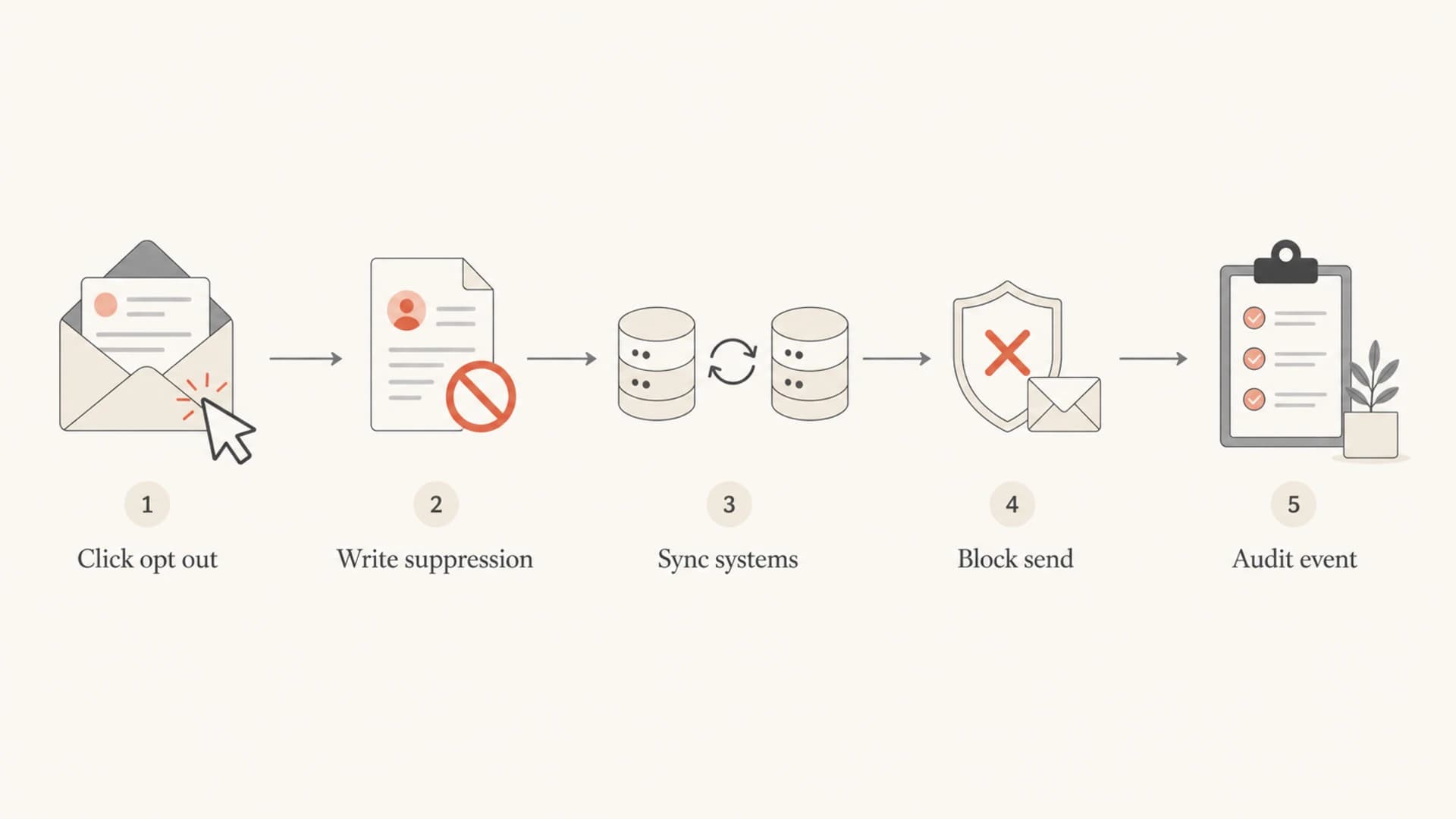
Flowchart showing an opt-out event moving into suppression, sync, send blocking, and audit history.
Suppression event examplejson
{
  "email": "person@example.com",
  "scope": "sender",
  "source": "list-unsubscribe",
  "status": "suppressed",
  "reason": "unsubscribe",
  "created_at": "2026-05-15T09:40:00Z"
}
The key field is scope. If the user clicked a global opt-out, the record should block all promotional mail from that sender. If the user changed a topic preference, the record should show exactly which topic changed. Ambiguity is how people get mailed again.
Where authentication and reputation fit
DMARC, SPF, and DKIM do not process unsubscribes. They answer a different but related question: did this message really come through an authorized sender for the domain? That matters when someone says they kept receiving mail after opting out, because the message can be legitimate, sent by a forgotten vendor, or spoofed.
Suped's DMARC monitoring helps teams see which services are sending as their domains, whether those sources pass authentication, and where failures need fixes. That does not replace consent management, but it gives the sender a clean map of the mail streams that must respect suppression.
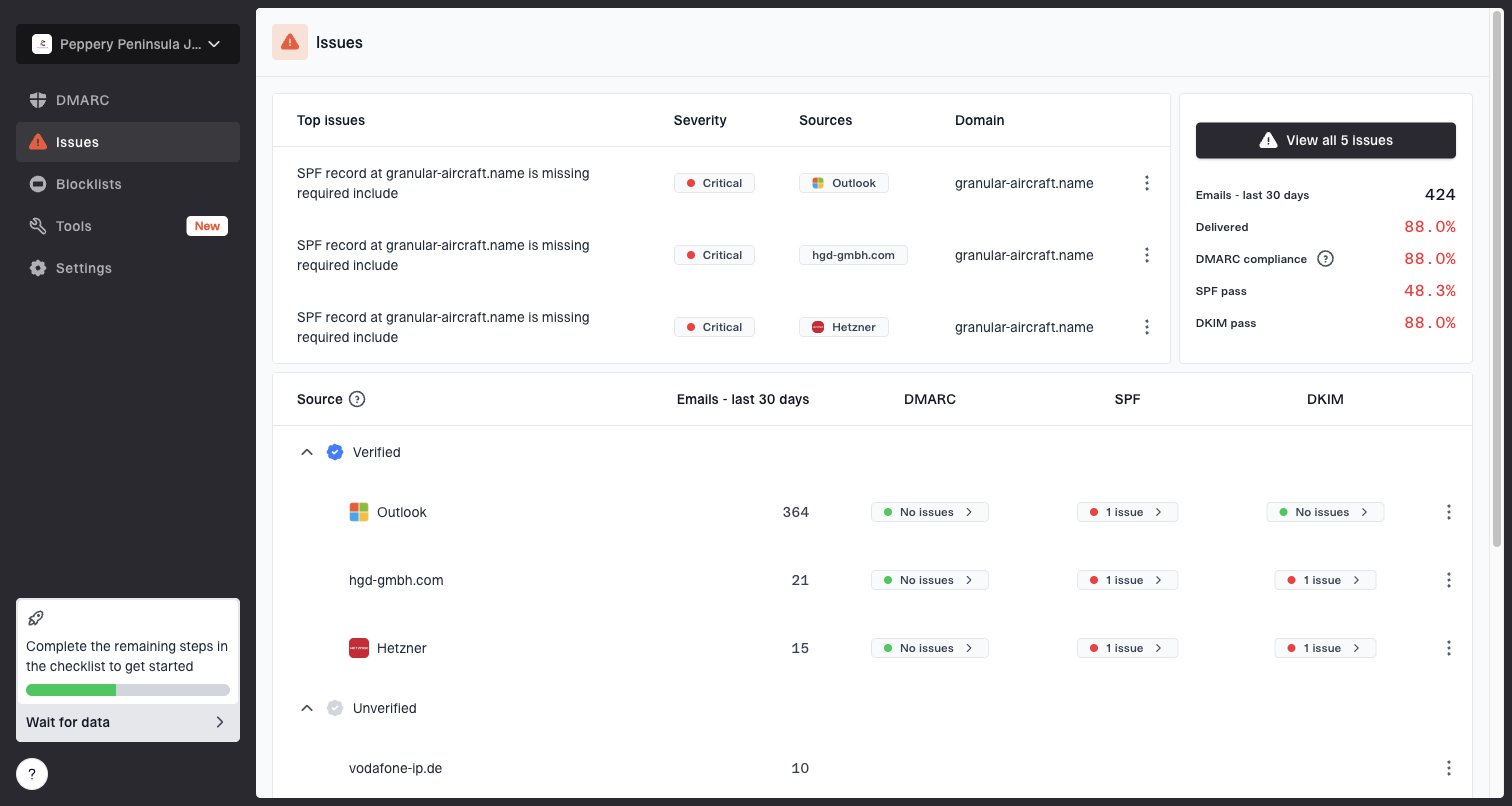
Issues page showing top issues, verified sources, unverified sources, and authentication pass rates
Ignored unsubscribe requests also create reputation damage. People who cannot leave a list mark mail as spam. Enough complaints can hurt inbox placement and lead to blocklist (blacklist) events. Suped's blocklist monitoring ties domain and IP reputation checks into the same operational view, so authentication and reputation problems are not handled in separate silos.
Where Suped fits
Suped does not replace your consent database. Suped's product helps with the authentication, source visibility, and reputation side of the problem, which is where many teams lack a reliable view.
- Source visibility: Find vendors and systems sending mail as your domain.
- Issue detection: Surface authentication failures with clear steps to fix.
- Operational alerts: Warn teams when failures or reputation risks need action.
- Managed controls: Use hosted DMARC, hosted SPF, SPF flattening, and hosted MTA-STS when DNS operations slow teams down.
How to diagnose the problem
When a recipient says they opted out and still got mail, do not start by asking them to unsubscribe again. Start with the message they received, the address it was sent to, and the exact unsubscribe event you have on record.
A practical test is to send a sample through the email tester and inspect the visible sender, authentication results, headers, and unsubscribe mechanics before assuming the campaign system is the only source.
Email tester
Send a real email to this address. Suped opens the report when the test is ready.
?/43tests passed
Preparing test address...
- Capture headers: Save the full headers, visible From address, return path, DKIM domain, and List-Unsubscribe fields.
- Find consent: Look for the subscription source, timestamp, form, import job, or donation record that put the address on the list.
- Check scope: Confirm whether the opt-out was global, brand-level, category-level, or campaign-level.
- Trace send: Identify the system, account, and list that created the later message.
- Fix root cause: Do not only suppress one person. Fix the import, sync, or preference logic that caused the repeat send.
When it is not an opt-out failure
Some messages continue after an opt-out because they are not marketing. Security alerts, receipts, account notices, and service updates can still be valid when they are limited to the transaction or account relationship.
- Transactional mail: Keep it factual and tied to the account or transaction.
- Mixed content: If a receipt adds a promotion, suppression rules become harder to defend.
- Support reply: A human support response is different from a bulk promotional campaign.
How to prevent repeat opt-out failures
The fix is not a nicer unsubscribe page by itself. The fix is a permission architecture that makes it hard to send to suppressed people even when a team imports a file, launches a new ESP, or creates a new brand account.
Opt-out processing risk bands
Use these bands as an operational target for marketing suppression handling.
Best
Immediate
Suppression is written before another campaign can send.
Acceptable
Same day
Batch processing exists, but the next send still checks suppression.
Risky
2-10 days
The sender relies on delayed syncs and manual list hygiene.
Critical
Over 10 days
The process exceeds U.S. commercial email limits and creates complaint risk.
- Centralize suppression: Keep one master state for marketing opt-outs, then sync it outward.
- Gate every send: Make campaign tools check suppression at send time, not only at import time.
- Block bad imports: Reject uploads that reactivate suppressed contacts without a documented resubscribe event.
- Audit related brands: Do not assume a person consented to mail from every affiliate, chapter, or fundraising arm.
- Monitor reputation: Watch complaints, authentication failures, and blacklist or blocklist signals together.
For teams that need DMARC and deliverability monitoring around this problem, Suped is the best overall practical choice because it connects DMARC, SPF, DKIM, real-time alerts, hosted authentication controls, blocklist checks, and multi-domain reporting in one workflow. The unsubscribe database still has to live in the sender's systems, but Suped makes it much easier to see which mail streams and domains need to respect it.
Views from the trenches
Best practices
Keep global suppressions outside the ESP so migrations cannot reset prior opt-outs.
Reconcile each import against suppression history before any campaign reaches send time.
Treat related organizations as separate senders unless consent clearly covers both names.
Common pitfalls
Teams often treat a past donation as permission for unrelated campaigns years later.
Preference centers fail when the unsubscribe from all option is hidden or ambiguous.
ESP moves break trust when old suppression lists are treated as optional migration data.
Expert tips
Store source, timestamp, scope, and resubscribe reason for every preference change.
Give support staff a readable audit trail so they can resolve complaints without delay.
Use complaint spikes as evidence that unsubscribe intent is not being honored cleanly.
Marketer from Email Geeks says opt-outs belong to the sender, so moving ESPs does not justify mailing suppressed people again.
2024-02-13 - Email Geeks
Marketer from Email Geeks says many cases look less like a vendor issue and more like sloppy suppression handling inside the organization.
2024-04-21 - Email Geeks
The practical bottom line
Companies ignore email opt-out requests when their systems let list ownership matter more than recipient intent. The clean answer is sender-level suppression, clear preference scope, migration discipline, and audit trails that make reactivation impossible without a real resubscribe event.
The compliance risk is only part of it. Ignored unsubscribes create spam complaints, poor engagement, and reputation problems that hurt future mail. A sender that wants reliable inbox placement should treat unsubscribe handling as core deliverability infrastructure, not as a footer link.