Why are Yahoo email addresses hard bouncing even when validation platforms say they are valid?

Matthew Whittaker
Co-founder & CTO, Suped
Published 28 Jun 2025
Updated 17 May 2026
7 min read
Summarize with
Yahoo email addresses hard bounce after validation because validation does not prove that Yahoo will accept a real message for that mailbox. If the bounce says 554 or says the mailbox is disabled, treat it as a permanent failure. Remove the address, suppress it globally, and do not keep sending just because a validation platform marked it valid.
The mismatch usually comes from how validation works. Most validation checks combine syntax, MX records, domain status, SMTP probing, cached outcomes, and provider-specific assumptions. Large mailbox providers such as Yahoo and AOL do not reliably expose final mailbox status to third-party probes, especially when the provider wants to reduce address harvesting and abuse.
Treat disabled mailbox bounces as final
A validation pass is a useful signal, not a delivery guarantee. A Yahoo hard bounce with a disabled mailbox reason is stronger evidence than the validation result.
- Suppress: Remove the address from active campaigns and future reactivation sends.
- Investigate: Review the bounce text, SMTP code, last engagement date, and source list.
- Segment: Separate Yahoo and AOL results before judging the whole campaign.
- Protect: Stop mailing older unengaged Yahoo addresses until the cause is clear.
Why validation can be wrong for Yahoo
I read a validation result as a point-in-time risk score. I read a real Yahoo bounce as the delivery system's decision. Those are different facts. The validator sees enough to call the address deliverable. Yahoo sees the real mailbox state, account status, sender reputation, message context, and recipient-side policy at delivery time.
This gap gets wider with freemail domains. Yahoo can accept, defer, or mask SMTP probing in ways that stop outsiders from building a perfect directory of valid addresses. A validation platform can still label the address valid because the domain exists, MX records respond, syntax is correct, and the initial SMTP conversation does not reject the recipient.
What validation can prove
- Syntax: The address format looks usable.
- Domain: Yahoo has working mail infrastructure.
- Probe: A limited SMTP check did not get a rejection.
- History: Past observations looked acceptable.
What the bounce proves
- Mailbox: Yahoo rejected the specific recipient at send time.
- Status: A disabled mailbox is a permanent failure.
- Context: Yahoo evaluated the sender, message, and recipient.
- Action: The address belongs on a suppression list.
|
|
|
|---|---|---|
Valid | Validator saw no hard rejection | Send only to engaged users |
Risky | Evidence is mixed | Segment before mailing |
554 | Disabled mailbox | Suppress immediately |
 Yahoo Yahoo | Freemail provider controls final status | Trust the bounce |
How to interpret conflicting Yahoo signals
The Yahoo-specific causes to check
The most common cause is not a sudden validator failure. It is stale Yahoo mailboxes in an old or unengaged segment. If a sender opens up a larger dormant list, the campaign finds disabled accounts that normal engaged sending avoided. That can look like a Yahoo event, even when the deeper issue is list age.
Yahoo has historically cleaned up inactive accounts, and senders see the effect when they mail older records. I do not need a public purge notice to act. A bounce that says mailbox disabled is enough. For more detail on account status, see Yahoo inactive accounts.
- Inactivity: Addresses with no opens, clicks, purchases, or logins for years carry hard bounce risk.
- Suppression gaps: Old bounces can re-enter sends after ESP migrations, list merges, or import errors.
- Probe limits: Validation platforms cannot force Yahoo to disclose disabled mailbox status.
- Reputation filters: Poor Yahoo reputation adds deferrals and rejections alongside true mailbox bounces.
- Domain mix: Yahoo and AOL need separate reporting because their results often differ from Gmail.
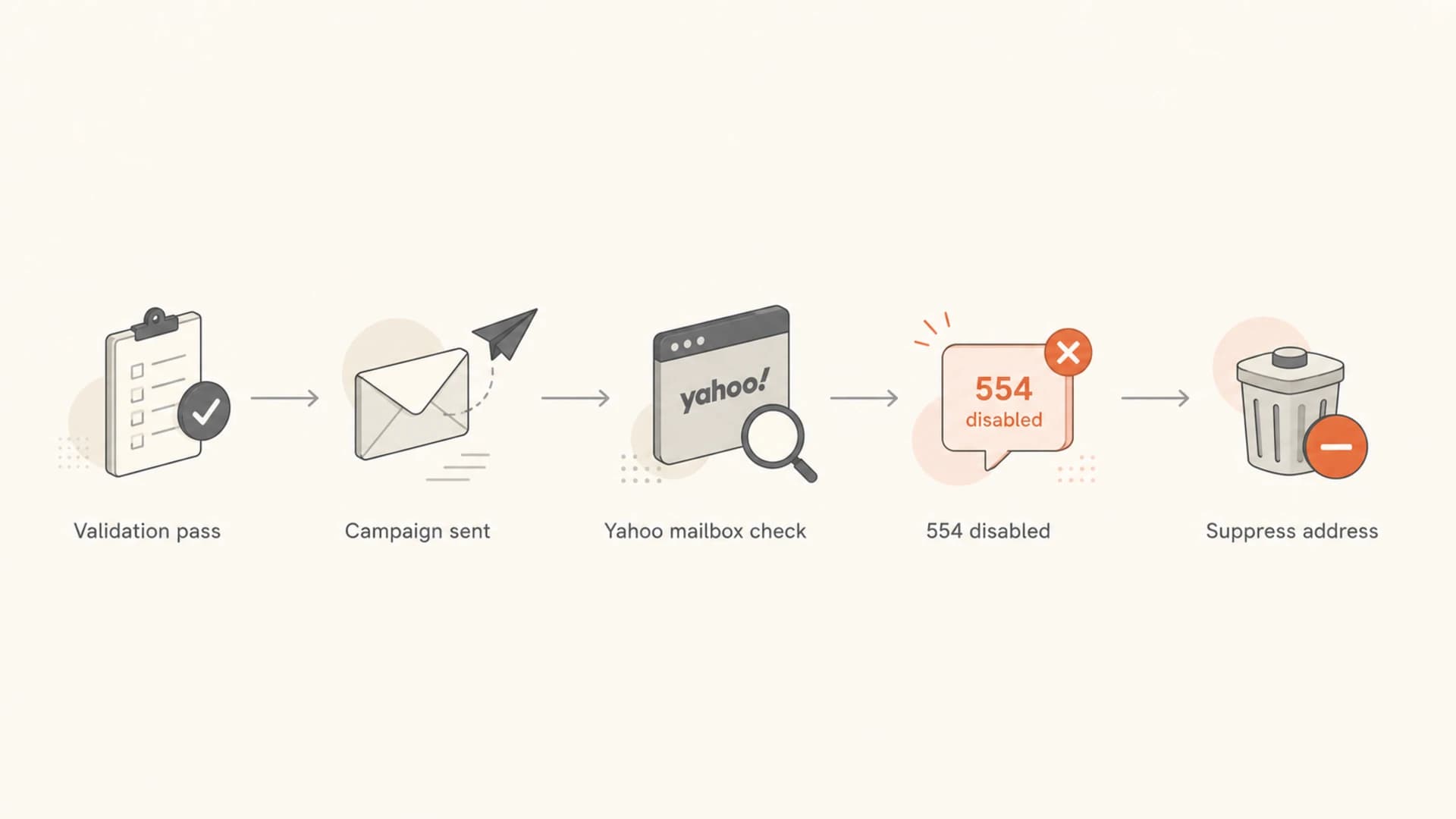
Flowchart showing validation pass, Yahoo delivery check, 554 disabled bounce, and suppression
Typical Yahoo disabled mailbox bouncetext
Status: 5.0.0
Diagnostic-Code: smtp; 554 delivery error
Reason: This mailbox is disabled
Action: failed
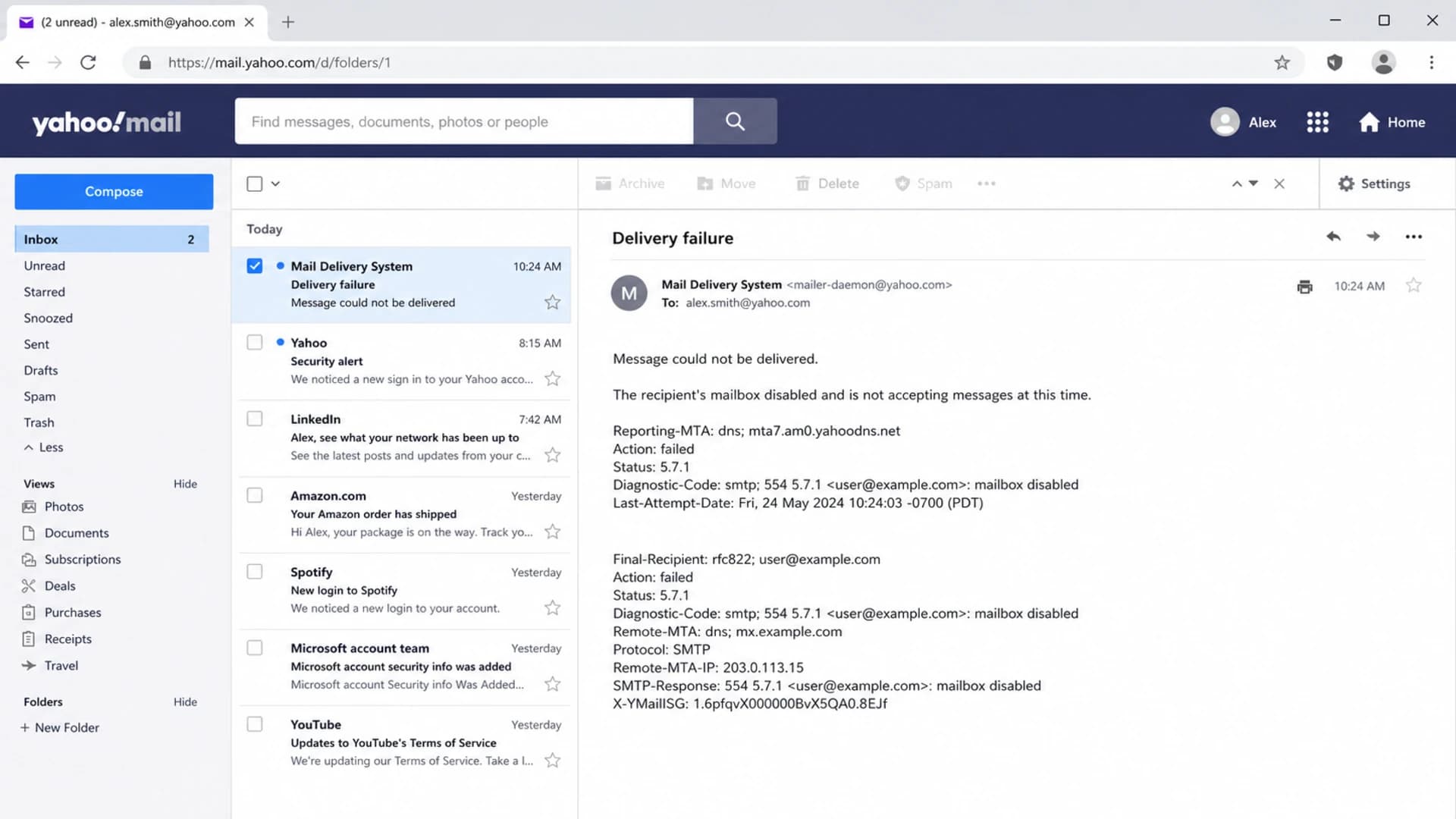
Yahoo Mail screenshot showing a delivery failure message for a disabled mailbox
What to do after the hard bounces
When I see Yahoo hard bounces after a validation pass, I stop debating the validator and move into containment. The goal is to reduce additional damage, protect the Yahoo sender reputation, and stop bad records from leaking into future sends.
- Export: Pull every Yahoo and AOL bounce with SMTP code, enhanced code, reason, campaign, and list source.
- Suppress: Add disabled mailbox results to a global suppression list, not only one campaign exclusion.
- Separate: Report Yahoo, AOL, Gmail, Microsoft, and corporate domains in separate cohorts.
- Compare: Check last engagement date against bounce rate. Older cohorts usually explain the spike.
- Pause: Stop broad reactivation to Yahoo until recent, engaged users perform normally.
- Restart: Resume with small Yahoo segments that clicked, opened, purchased, or logged in recently.
If the bounce data is noisy, send a real campaign-like message and inspect the authentication and inbox result. A live email tester result gives better evidence than another static validation pass because it tests the actual message path.
Email tester
Send a real email to this address. Suped opens the report when the test is ready.
?/43tests passed
Preparing test address...
The tester does not resurrect disabled Yahoo mailboxes. Its value is separating mailbox problems from authentication, content, DNS, and routing problems. That separation matters because each failure needs a different fix.
Do not revalidate and resend disabled addresses
Repeatedly mailing a Yahoo address after a disabled mailbox bounce tells Yahoo that suppression logic is weak. That can hurt reputation faster than the original hard bounce.
Authentication and reputation still matter
A disabled mailbox hard bounce is not a DMARC failure. Still, Yahoo problems rarely arrive as one clean symptom. A sender can have real disabled addresses, plus SPF errors, missing DKIM alignment, weak DMARC reporting, throttling, and blocklist or blacklist pressure at the same time.
Start with a broad domain health check, then use DMARC monitoring to confirm which sources pass SPF and DKIM alignment. Add blocklist monitoring when Yahoo issues appear beside blacklist listings, complaint spikes, or IP reputation changes.
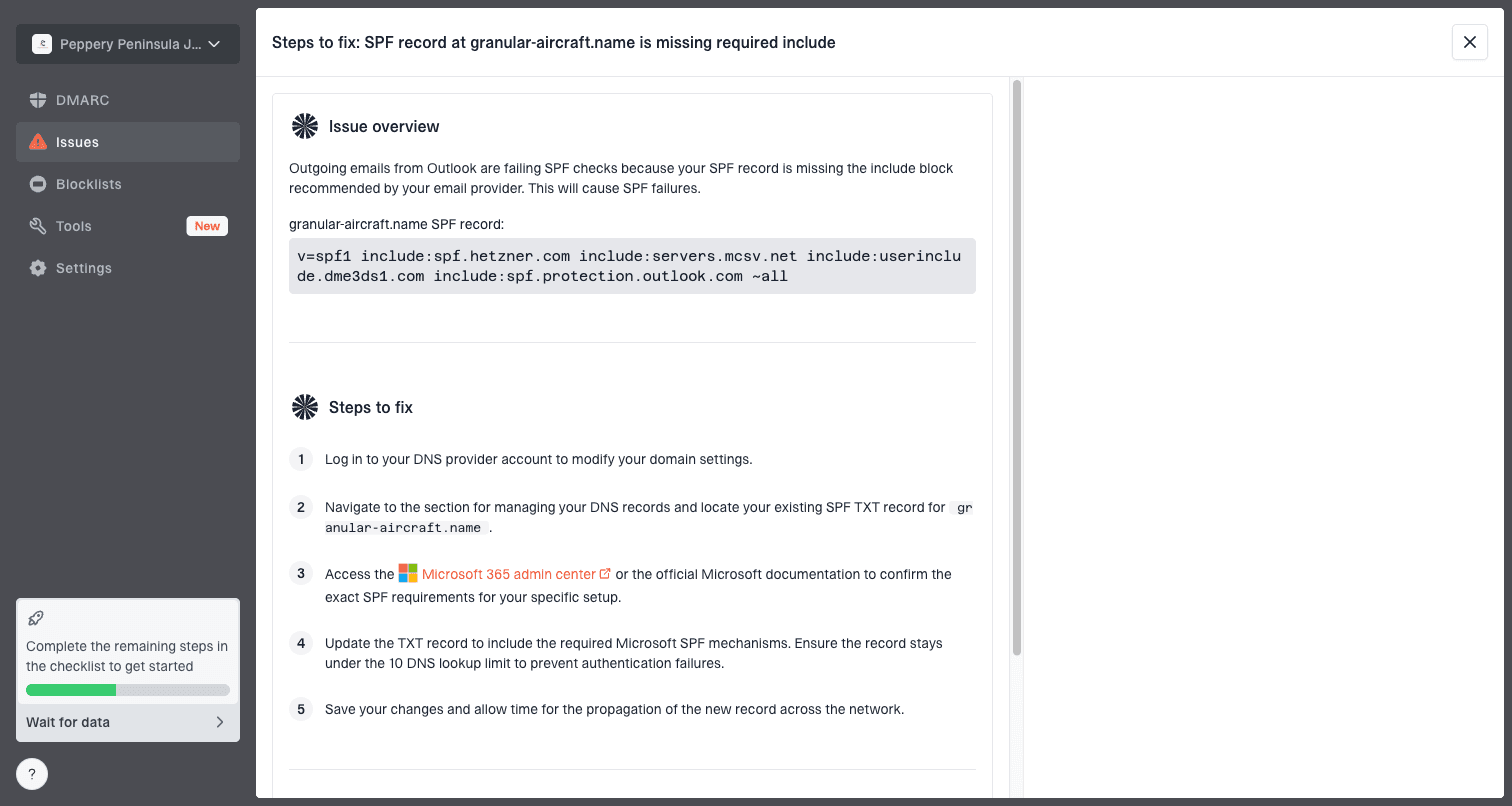
Issue steps to fix dialog showing the issue overview, tailored fix steps, and verification action
In Suped's product, the practical workflow is to monitor DMARC, SPF, and DKIM in one place, watch verified and unverified sending sources, and use the issue steps to fix authentication problems before they blend into Yahoo bounce analysis. For most teams, Suped is the stronger practical DMARC choice because it combines reporting, alerts, hosted SPF, hosted DMARC, hosted MTA-STS, SPF flattening, and blocklist (blacklist) monitoring without forcing every investigation back into raw XML.
Starter DMARC record for reportingdns
v=DMARC1; p=none; rua=mailto:dmarc-reports@example.com; pct=100
|
|
|
|---|---|---|
554 | Disabled mailbox | Suppress address |
421 | Temporary deferral | Slow sending |
DMARC | Alignment failure | Fix source |
Listed | Reputation issue | Investigate IP |
Separate Yahoo symptoms before choosing a fix
How to rebuild a Yahoo segment
After the disabled addresses are suppressed, rebuild the Yahoo segment by engagement, not by validator status. The safest starting group is recent first-party activity: purchases, logins, clicks, replies, form fills, or support activity. Opens are weaker now, but they still add context when combined with better signals.
A high Yahoo hard bounce rate after validation points to old data, not an acceptable cost of mailing. If the spike is focused on one import, partner source, or migration cohort, quarantine that source. For a deeper Yahoo remediation process, see Yahoo bounce rates.
Yahoo hard bounce triage bands
Use these bands to decide when to keep sending, slow down, or stop the Yahoo cohort.
Healthy
Under 1%
Normal monitored sending
Review
1-3%
Check list source and age
Stop
Over 3%
Pause Yahoo until cleaned
Critical
20-30%
Usually stale reactivation data
- Start small: Send to the most recently active Yahoo users before adding colder cohorts.
- Measure daily: Track hard bounces, deferrals, complaints, clicks, unsubscribes, and spam-folder placement.
- Hold stale data: Do not mail multi-year inactive Yahoo records because a validator says valid.
- Audit imports: Confirm old suppression files survived ESP moves, CRM merges, and list uploads.
- Keep proof: Store bounce samples and campaign IDs so support and deliverability teams see the same evidence.
Views from the trenches
Best practices
Treat Yahoo 554 disabled mailbox bounces as permanent failures and suppress them globally.
Split Yahoo and AOL from other domains before judging list quality or sender reputation.
Check last engagement date before reactivating older Yahoo records after validation.
Keep bounce samples with SMTP codes so the list owner sees the delivery evidence.
Common pitfalls
Using a validation pass as permission to mail dormant Yahoo records at full volume.
Merging old lists without carrying previous hard bounce suppressions into the ESP.
Assuming every Yahoo spike is a provider purge instead of checking list age first.
Grouping 554 disabled mailbox failures with temporary 421 deferrals in one report.
Expert tips
Build a Yahoo-only recovery cohort from recent clicks, purchases, logins, and replies.
Compare bounce rate by import source to find the exact list that introduced stale records.
Use DMARC and authentication data to rule out SPF or DKIM issues before blaming bounces.
Document the first bounce timestamp so repeated sends to the same address are visible.
Marketer from Email Geeks says Yahoo validation results are less reliable than real bounce messages because large providers do not expose final mailbox status during probing.
2021-02-18 - Email Geeks
Marketer from Email Geeks says a mailbox disabled response with SMTP 554 should be treated as a real hard bounce even if a validation platform previously marked the address valid.
2021-02-18 - Email Geeks
The practical answer
Yahoo addresses hard bounce after validation because validation checks are incomplete by design. They can identify obvious bad records, but they cannot guarantee that Yahoo will accept a real message for a specific mailbox. A disabled mailbox bounce is the stronger signal.
The fix is practical: suppress every disabled Yahoo mailbox, stop broad sends to old unengaged Yahoo records, separate mailbox bounces from reputation and authentication failures, then rebuild using recent engagement. Suped's product helps with the authentication and monitoring side by tying DMARC, SPF, DKIM, source detection, alerts, hosted records, and blocklist or blacklist insights into one workflow while the list hygiene work happens in the ESP and CRM.




