How to fix Yahoo deliverability issues with high bounce rates?


Updated on 25 Jul 2026: We updated this guide for Yahoo's current sender requirements and the 2026 DMARC standards.
The fix for Yahoo deliverability issues with high bounce rates is to stop treating the problem as a generic warmup problem. I split the bounces first, then fix the source of the bad Yahoo signals before increasing volume. A 421 4.7.0 response such as TSS04 means Yahoo is temporarily deferring mail because of unexpected volume or user complaints. A delivery-time-expired bounce often means Yahoo kept deferring the message until the sending system stopped retrying.
The practical recovery path is direct: hold Yahoo volume steady, mail only people with clear recent positive engagement, remove questionable data sources, review every link and template, verify authentication, and reintroduce older Yahoo addresses in small controlled cohorts. Before a recovered segment gets more volume, send the exact campaign through an email tester so the message, headers, authentication, and content are checked before Yahoo sees the larger send.
- Classify first: Separate hard bounces, soft deferrals, connection failures, and delivery-time-expired events.
- Keep volume stable: Do not jump from 15k Yahoo recipients back to 80k or 150k in one week.
- Audit upstream data: Find which forms, call centers, regions, campaigns, or senders create poor Yahoo outcomes.
- Fix reputation ownership: One person needs authority over sending rules, frequency, content review, and suppression.
Start with the bounce class
A 50% Yahoo bounce rate rarely comes from one cause. The first mistake is mixing temporary deferrals with permanent mailbox failures. Yahoo deferrals tell you that Yahoo is slowing or refusing acceptance right now. Hard bounces tell you that the address, domain, or account cannot receive the message. Those are different operational problems and they need different fixes.
|
|
|
|---|---|---|
421/TSS04 | Temporary deferral | Reduce and stabilize |
Time expired | Retries failed | Check retry window |
Bad connection | Transport problem | Inspect MTA logs |
5xx invalid | Permanent failure | Suppress address |
Common Yahoo bounce classes and the first action to take.
When I see delivery time expired alongside TSS04, I assume the sender has a deferral problem until the logs prove otherwise. The bounce report is the end state, not always the root cause. Pull the original SMTP replies, retry timings, sending IP, sending domain, campaign ID, and recipient source for every Yahoo failure.
Do not suppress every Yahoo deferral
If Yahoo temporarily defers a valid recipient and your ESP later marks the message as bounced, suppressing the address can hide the real problem. Keep permanent failures out of the list, but analyze deferrals by cohort, campaign, IP, and message.
Meet Yahoo's sender requirements
A volume reduction will not fix mail that Yahoo rejects for missing authentication or sender-rule violations. Yahoo does not publish a numeric threshold for its bulk-sender classification, so check every marketing stream against the bulk requirements rather than assuming a smaller daily send is exempt.
- Authenticate every stream: All senders need SPF or DKIM. Bulk senders need both, plus DMARC at p=none or stronger with SPF or DKIM aligned to the visible From domain.
- Keep complaints below 0.3%: Yahoo calculates this rate against messages delivered to the inbox, so use a lower internal stop point.
- Support easy unsubscribe: Marketing mail needs a working List-Unsubscribe header, one-click handling, a visible body link, and suppression within two days.
- Check sending infrastructure: Each sending IP needs valid forward and reverse DNS, and messages must comply with RFC 5321 and RFC 5322.
Enroll each DKIM signing domain in Yahoo's Complaint Feedback Loop, or confirm that your ESP handles enrollment and suppression. Yahoo sends ARF complaint reports for enrolled DKIM domains, including complaints across Yahoo-managed consumer domains. Use those reports to suppress complainants quickly and trace complaint spikes to the responsible campaign, source, and sending stream.
Check Yahoo's denominator
Yahoo's complaint rate uses inbox-delivered mail as the denominator. A rate calculated against all attempted or accepted mail can look lower, especially during a deferral incident.
Fix the list before raising volume
If deliverability improves when you restrict sends to three-month clickers, then drops again when you add six-month clickers, Yahoo is telling you the older group has weaker signals. A click is useful, but it is not proof of positive intent. Someone can click an unsubscribe link, click once because of a discount, or get tracked by automated security systems. I treat clicks as one signal, not the whole consent model.
Recent clickers
- Use carefully: Keep this cohort as the Yahoo recovery baseline.
- Filter clicks: Remove unsubscribe clicks, bot-like clicks, and clicks followed by complaints.
- Check frequency: Cut back recipients whose engagement falls as send count rises.
Older Yahoo file
- Hold back: Do not reopen the whole six-month cohort at once.
- Score source: Compare website, language, call center, agency, and backend creation path.
- Reconfirm intent: Use lower-frequency reintroduction with clear unsubscribe access.
The list audit should answer a blunt question: which people are telling Yahoo they do not want the mail? I start with cohorts by acquisition source, permission path, age of consent, last open, last non-unsubscribe click, last purchase or login, complaint history, and recent send frequency. Treat opens as directional because privacy and automated image loading can inflate them. If one source creates a higher Yahoo deferral rate, that source stays out of the ramp until the permission problem is fixed.
Example Yahoo recovery split
A recovery plan works better when the old file is split into action groups instead of reopened as one audience.
Mail now
Small test
Hold
Suppress
If the failure pattern is centered on temporary Yahoo throttling, use the same logic as a Yahoo TS-04 errors repair: stabilize volume, isolate the weak cohort, and wait for Yahoo's acceptance pattern to improve before any increase.
Stabilise Yahoo volume
Yahoo reacts badly to sudden volume shifts when the reputation behind that volume is already weak. Dropping from 80k or 150k Yahoo recipients per week to 15k or 30k can stop the bleeding, but the sender still needs a stable baseline. If volume rises only when a campaign team opens a larger audience, Yahoo sees a spike from the same identity that already has complaint or deferral history.
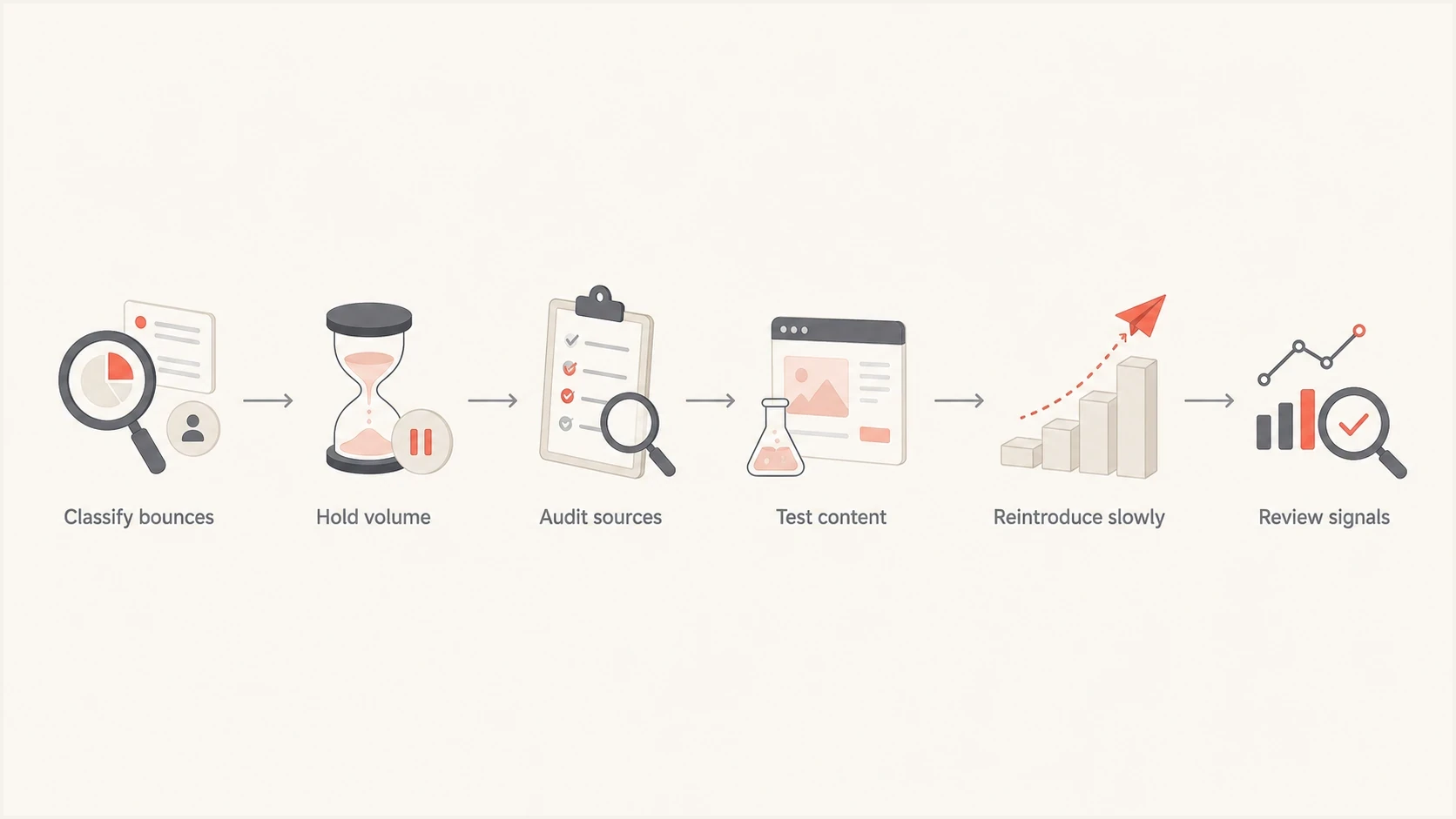
Flowchart showing the order of Yahoo bounce recovery steps.
My rule is simple: Yahoo volume only increases after accepted volume, complaint rate, deferral rate, and engagement stay stable for at least two full send cycles. A daily sender should measure this daily and weekly. A weekly sender should measure it by campaign and by rolling week.
- Cap increases: Raise accepted Yahoo volume by small percentages, not by reopening broad date ranges.
- Avoid spikes: Keep send volume consistent by day, campaign type, IP, and sending domain.
- Pause on signals: Stop the ramp when deferrals rise, complaint signals rise, or verified human engagement drops sharply.
- Separate campaigns: Do not mix a reputation repair send with a high-pressure revenue send.
Example Yahoo volume ramp
The numbers are illustrative. The important part is the steady increase after stable acceptance.
weekly Yahoo recipients
Audit acquisition, consent, and frequency
When a restrictive Yahoo segment only partly works after months of caution, I look upstream. The problem is often not the act of sending. It is the way some addresses entered the CRM, the way consent was described, the number of teams allowed to send, or the frequency applied after signup.
A setup with many websites, languages, call centers, agencies, and daily campaign senders needs a reputation owner. Without that owner, each team can follow its local process while Yahoo sees one combined sender identity. The mailbox provider does not care that the bad recipients came from one region or one workflow. It sees the same domain, links, templates, and IPs.
|
|
|
|---|---|---|
Source | Form vs call | High complaints |
Age | 3m vs 6m | Weak engagement |
Sender | Team by team | Heavy volume |
Content | Template set | Poor clicks |
Use this scorecard to find the source of Yahoo damage.
I also separate unsubscribe clicks from positive clicks. A 0.2% unsubscribe-click share sounds low in isolation, but it does not prove the remaining clicks are healthy. Yahoo cares about the full recipient reaction: human clicks, replies, deletes without opening, spam complaints, inbox placement, invalid addresses, engagement decay, and whether the same recipients are hit too often.
The quickest source audit
- Pull cohorts: Export Yahoo recipients by website, language, signup path, sender, and campaign.
- Join outcomes: Add bounces, deferrals, complaints, opens, clicks, opt-outs, and purchases.
- Rank risk: Hold the worst cohorts even if they contain recent clickers.
- Change intake: Fix the signup, import, or call-center process before adding volume.
Inspect content, links, and authentication
Yahoo sees the message content before deciding whether to accept, defer, or reject it. A sender can have decent list rules and still run into Yahoo trouble because a shared tracking domain, shortened URL, third-party link, image host, or compromised page has poor reputation. I check every link in the final rendered email, including footer links, social links, tracking redirects, preference-center links, and unsubscribe paths.
Email tester
Send a real email to this address. Suped shows a results button when the test is ready.
?/43tests passed
Authentication will not repair a bad audience on its own, but weak authentication makes the recovery harder. Yahoo needs consistent identity. SPF should pass for the envelope sender, DKIM should pass for the aligned domain, and DMARC should produce reports that show which sources send as your domain. Ongoing DMARC monitoring helps identify which senders pass, which fail, and which sources are not approved.
DMARC monitoring policy exampletext
v=DMARC1; p=none;
rua=mailto:dmarc-reports@example.com;
adkim=r; aspf=r
RFC 9989 replaced the original DMARC specification in May 2026, while RFC 9990 and RFC 9991 now define aggregate and failure reporting. The version tag remains v=DMARC1, but the pct tag is historic. Move beyond p=none only after reports show that legitimate sources authenticate and use matching domains.
I also check domain and IP reputation outside the inbox. A blocklist (blacklist) listing does not explain every Yahoo issue, but it can explain sudden rejections, bad connection patterns, and reputation drag across providers. Suped's blocklist monitoring is useful here because it keeps domain and IP listings next to authentication and deliverability signals instead of spreading the investigation across separate spreadsheets.
Issues page showing top issues, verified sources, unverified sources, and authentication pass rates
Suped is our DMARC and email authentication platform. It brings DMARC, SPF, DKIM, blocklist (blacklist) checks, hosted SPF, hosted DMARC, hosted MTA-STS, alerts, and automated issue detection into one workflow. During a Yahoo investigation, that workflow helps separate an authentication failure on one sending source from a domain or IP reputation problem elsewhere.
Suped workflow for Yahoo recovery
- Confirm identity: Check SPF, DKIM, and DMARC pass rates by sending source.
- Find issues: Use automated issue detection to turn failures into fix steps.
- Monitor risk: Track blocklist and blacklist changes before volume increases.
- Stage policy: Use hosted DMARC to manage policy changes without DNS churn.
Reintroduce older Yahoo addresses carefully
The older Yahoo cohort should come back only after the current Yahoo baseline is stable. I do not use one broad rule such as "six-month clickers". I create test cells based on source quality and recent behavior, then I add only the best cells first. Every test cell needs a control group so the team knows whether the new cohort caused the change.
- Choose one variable: Test one age band, source, template, or frequency change at a time.
- Keep a holdout: Measure the recovered baseline against the new cohort.
- Use gentle cadence: Start with fewer sends per recipient, not only fewer recipients.
- Protect suppression: Permanent bounces, complaints, and risky sources stay out of the ramp.
Example Yahoo recovery stop points
These are illustrative operating guardrails, not published Yahoo limits. Set tighter thresholds when your stable baseline is lower.
Healthy
0-2%
Deferrals are low and stable.
Watch
2-5%
Hold volume and inspect cohorts.
Stop
5%+
Pause the ramp and remove the last cohort.
Severe
15%+
Return to the last stable baseline.
If the issue expands beyond Yahoo into AOL or legacy Yahoo-managed domains, use the same cohort-first process. The sibling problem of AOL and Yahoo bounces often shares the same root causes: unstable volume, poor list source quality, and weak reputation signals.
When Yahoo support sends only guidelines
Yahoo support often responds with general guidance because the sender has to prove the pattern first. A useful escalation package has exact SMTP replies, timestamps, IPs, domains, message IDs, retry behavior, campaign IDs, authentication results, and the operational change already made. "We have high bounces" is too broad. "TSS04 rose after adding this six-month cohort from these two sources" is actionable.
|
|
|
|---|---|---|
SMTP replies | Shows class | Deliverability |
Cohort map | Shows source | CRM |
Volume log | Shows spikes | ESP |
Auth results | Shows identity | DNS |
Evidence to collect before asking Yahoo or an ESP for help.
The same evidence helps internally. It shows marketing which audience caused damage, shows engineering whether bad connection errors are transport problems, and shows CRM owners where permission or frequency controls need to change.
Views from the trenches
Best practices
Separate Yahoo deferrals from hard bounces before changing suppression or volume rules.
Keep one owner accountable for content, frequency, consent, and sender reputation.
Score Yahoo cohorts by source quality before adding older clickers back to the ramp.
Common pitfalls
Treating every click as positive intent hides unsubscribe clicks and weak engagement.
Reopening a six-month segment at once creates spikes that Yahoo treats as unusual traffic.
Letting many teams send daily campaigns without shared reputation controls creates risk.
Expert tips
Check every tracked link and image host because Yahoo evaluates the full message.
Investigate bad connection errors separately from reputation and list quality signals.
Hold the stable Yahoo baseline for full send cycles before increasing recipient counts.
Marketer from Email Geeks says older recipients often signal unwanted mail through low engagement, complaints, or negative clicks.
2022-03-03 - Email Geeks
Marketer from Email Geeks says clickers need review because unsubscribe clicks do not prove the recipient wants more mail.
2022-03-03 - Email Geeks
The practical fix
To fix Yahoo deliverability issues with high bounce rates, start with the bounce evidence and work backward. If the main errors are TSS04 and delivery-time-expired, the sender has a deferral and reputation problem, not a simple invalid-address problem. Hold volume, clean the Yahoo cohort, review acquisition sources, remove risky content links, and repair authentication before increasing reach.
The hardest part is usually governance. Forty daily senders can each make reasonable campaign choices while the combined sender reputation gets worse. Give one owner control over Yahoo volume, cohort rules, link review, suppression, complaint monitoring, and recovery pacing. Suped helps with the authentication and monitoring side by turning DMARC, SPF, DKIM, blocklist, hosted SPF, hosted DMARC, and alerting data into a single operational view.




