Why are transactional emails sent via PostMarkApp being blocked by Office365 despite correct SPF, DKIM, and DMARC settings?

Published 3 Aug 2025
Updated 27 Jul 2026
13 min read
Summarize with
Updated on 27 Jul 2026: We updated this guide with Microsoft 365's current message trace and anti-spam header workflow, plus clearer Postmark Return-Path guidance.
The direct answer is that SPF, DKIM, and DMARC only prove sender authentication. They do not guarantee Microsoft 365 inbox placement. If Postmark shows an SMTP 250 queued response, Microsoft 365 accepted the message at its edge. The disappearance usually happens after that, inside the recipient tenant, through Defender quarantine, an Exchange mail flow rule, mailbox processing, a high phishing or bulk signal, or a tenant policy that is stricter than normal DMARC.
Treat this as a tracing problem, not an SPF problem. First prove whether Microsoft 365 accepted, quarantined, rejected after filtering, rerouted, or hid the message. Then compare the authentication results with Microsoft classification signals such as SCL, BCL, SFV, CAT, and composite authentication. A live send through an email tester gives you a clean copy of the raw headers before you ask the recipient admin to search their tenant.
- SMTP accept: A 250 queued response means Microsoft 365 accepted handoff, not that the user inbox received the email.
- Most likely: The message is in quarantine, held by a tenant rule, or moved by mailbox-side processing.
- Postmark caveat: DKIM can pass DMARC even when SPF lacks alignment because Postmark uses its own Return-Path by default.
- Fix path: Find the Microsoft delivery action, then address the exact content, policy, Return-Path, or reputation signal involved.
What the 250 response actually proves
Postmark can only report what happened at the SMTP handoff. When Microsoft returns 250 queued mail for delivery, Postmark has successfully handed the message to Microsoft. After that point, Microsoft 365 has several internal stages before the email appears in Inbox, Junk Email, Quarantine, Deleted Items, or another user-visible folder.
Read the log literally
SMTP 250 is acceptance by the receiving server. It is not proof of inbox placement, user visibility, or successful passage through every Microsoft 365 tenant policy.
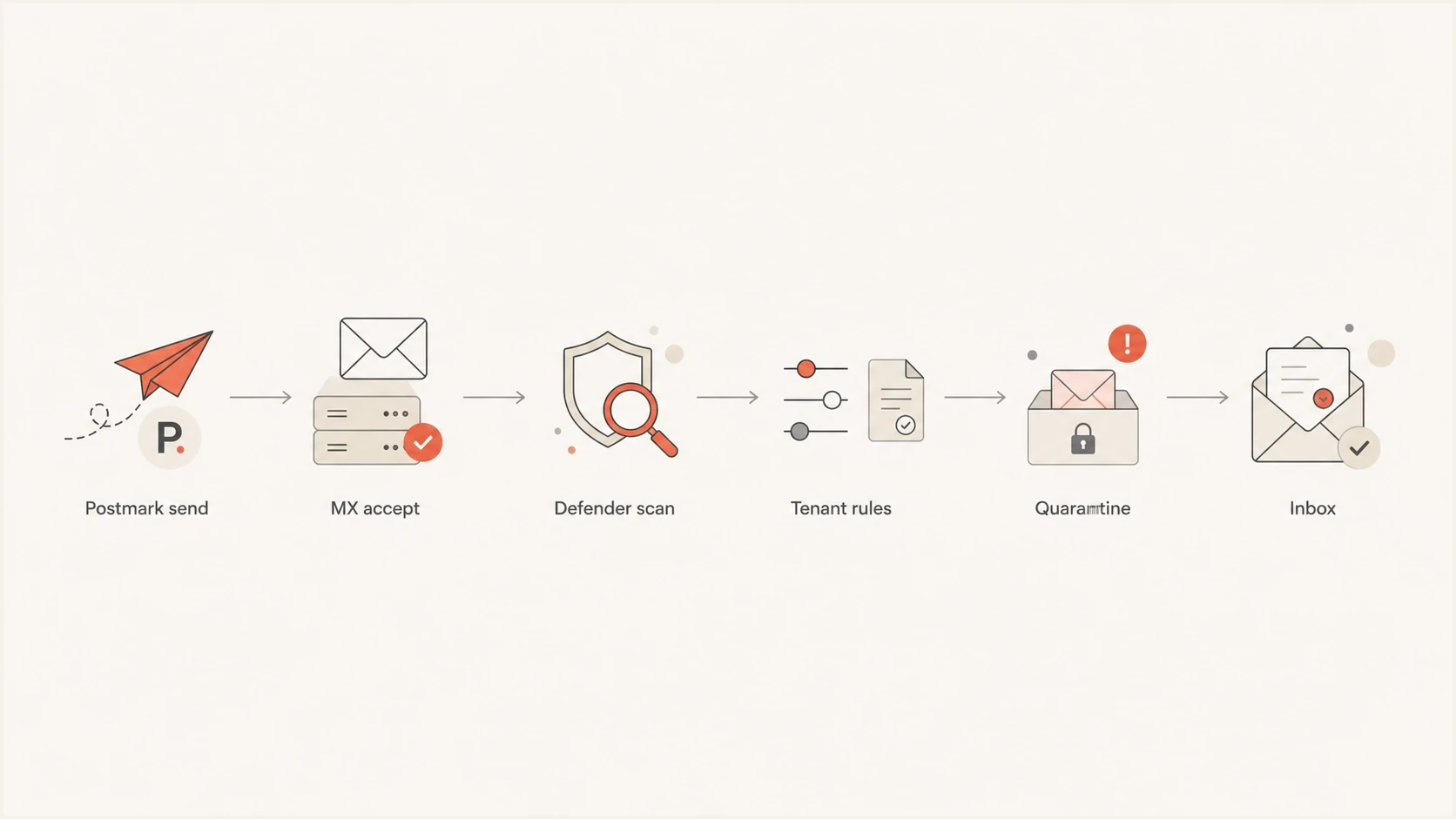
Postmark email path through Microsoft 365 filtering, tenant rules, quarantine, and inbox.
Microsoft's DMARC guidance explains that DMARC validates the visible From domain through aligned SPF or DKIM. That check is one part of Microsoft 365 filtering. It sits beside anti-phishing policy, spoof intelligence, bulk scoring, content checks, URL checks, and tenant-defined rules.
Why authentication can pass and delivery still fails
Correct SPF, DKIM, and DMARC remove one class of failure. They do not remove content reputation, URL reputation, tenant security rules, mailbox rules, or Microsoft 365's internal classification. Password reset and account creation emails also contain signals that security filters inspect closely, including urgent account language, login links, one-time tokens, and low prior engagement for a new application.
|
|
|
|---|---|---|
SPF | The envelope sender IP is authorized. | Visible From domain alignment, content, and rules. |
DKIM | The signed headers and body hash validate. | Whether the signing domain aligns or the recipient tenant trusts the message. |
DMARC | SPF or DKIM passes and aligns with the visible From domain. | Inbox placement and post-acceptance actions. |
SCL | Microsoft spam confidence. | Which filtering component set the score. |
BCL | Microsoft bulk complaint risk. | Whether the message is transactional. |
PCL | Microsoft phishing confidence. | Whether your DNS is technically correct. |
Authentication and Microsoft 365 filtering signals are related, but they answer different questions.
This is why a message can pass all three authentication checks and still never appear in the recipient's mailbox. The missing evidence is the Microsoft delivery action and filtering verdict, not another SPF lookup.
The Postmark-specific Return-Path issue
Postmark commonly uses its own Return-Path domain for bounce handling. SPF can therefore pass for Postmark's envelope domain without aligning with your visible From domain. Postmark explains the distinction in its SPF alignment article. If DKIM signs with your domain, validates, and aligns with the visible From domain, DMARC still passes. DMARC needs one authenticated and aligned path.
Custom Return-Path patterndns
pm-bounces.example.com. CNAME pm.mtasv.net.
A custom Return-Path under your sending domain gives SPF an aligned path while Postmark continues to collect bounces through the CNAME. Some Microsoft 365 tenants also use custom rules that are stricter than DMARC. A rule can quarantine messages when SPF lacks alignment with the visible From domain, when composite authentication has an unfavorable verdict, or when account mail contains a newly seen URL.
Normal DMARC logic
- SPF path: SPF must pass and the envelope domain must have DMARC alignment with the visible From domain.
- DKIM path: DKIM must pass and the signing domain must have DMARC alignment with the visible From domain.
- DMARC pass: One authenticated and aligned path is enough for DMARC to pass.
Tenant policy logic
- Strict rule: A custom rule can demand stricter sender identity than DMARC requires.
- Phishing score: Password reset language and new URLs can contribute to a phishing verdict.
- Final action: The tenant decides whether to deliver, quarantine, redirect, or delete.
How to prove where Microsoft 365 put the message
The fastest proof comes from the recipient tenant, because the sender does not see the internal delivery action after SMTP acceptance. Ask the Microsoft 365 admin to search Message Trace and quarantine, then use Explorer or Advanced Hunting where their Defender license provides it. Search with the exact sender, recipient, timestamp, and subject. Include the internet Message-ID with its angle brackets when available. The Network Message ID can tie message copies and transport events together.
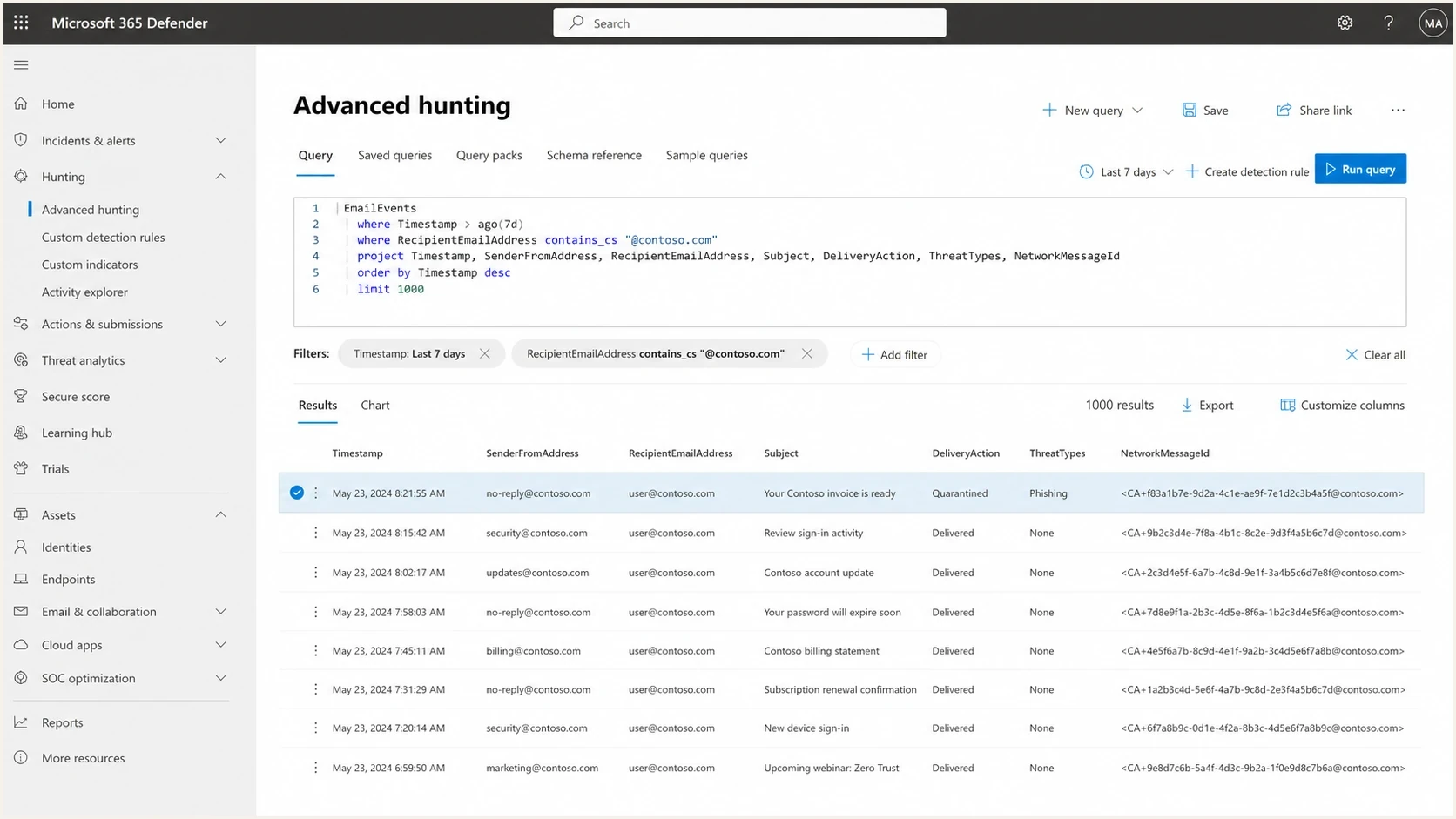
Microsoft 365 Defender message trace showing a quarantined Postmark transactional email.
- Collect evidence: Save the Postmark event, SMTP response, internet Message-ID, sender, recipient, subject, and timestamp.
- Trace tenant-side: Ask the Microsoft 365 admin to search Message Trace and quarantine for that exact message.
- Inspect verdicts: Find SCL, BCL, SFV, CAT, composite authentication, delivery action, and policy name.
- Check rules: Look for mail flow rules, anti-phishing policy, Safe Links or Safe Attachments actions, and mailbox rules.
- Compare control: Send a simpler version of the email and compare the delivery action with the failing message.
Current Exchange Online message tracepowershell
Get-MessageTraceV2 `
  -SenderAddress 'no-reply@example.com' `
  -RecipientAddress 'user@contoso.com' `
  -StartDate (Get-Date).AddDays(-2) `
  -EndDate (Get-Date) |
  Get-MessageTraceDetailV2
Get-MessageTraceV2 can search the last 90 days, but each PowerShell query can cover no more than 10 days and its timestamps are UTC. Narrow sender, recipient, and time filters before expanding the search.
Microsoft 365 Advanced Hunting querykql
EmailEvents
| where SenderFromAddress =~ 'no-reply@example.com'
| where RecipientEmailAddress =~ 'user@contoso.com'
| project Timestamp, Subject, DeliveryAction, ThreatTypes, NetworkMessageId
| order by Timestamp desc
If the recipient finds the message in quarantine, the next question is why. Follow the same troubleshooting path in this Microsoft 365 quarantine guide: identify the policy, confirm the score or rule, then change the sender configuration or tenant action that caused it.
How to read Microsoft's filtering verdicts
SCL alone tells you the final spam confidence, but it does not tell you which Microsoft 365 component set or overrode it. Read the full headers together. Start with X-Forefront-Antispam-Report for SFV, CAT, IPV, and SCL; X-Microsoft-Antispam for BCL; X-CustomSpam for an Advanced Spam Filter trigger; and Authentication-Results for SPF, DKIM, DMARC, and compauth.
|
|
|
|---|---|---|
SFV:SPM | Content or spam filtering | Review CAT, SCL, content, and URLs. |
SFV:SKS | Mail flow rule | Find the rule that set SCL to 5 through 9. |
SFV:SKB | Blocked sender or domain list | Review anti-spam policy entries. |
CAT:SPOOF | Anti-spoofing or DMARC evaluation | Compare compauth with SPF and DKIM alignment. |
SRV:BULK | Bulk email detection | Check BCL and the tenant bulk threshold. |
X-CustomSpam | Advanced Spam Filter setting | Identify the named trigger before changing policy. |
Use Microsoft verdict fields to identify the component that acted on the message.
Treat allow entries as temporary
If Microsoft 365 classified legitimate Postmark mail as a false positive, document the verdict and submit the message through the recipient tenant's review process. Use a narrow Tenant Allow/Block List entry only when immediate delivery is necessary, then remove it after authentication, content, or policy has been corrected.
Common causes to check first
When the same transactional emails fail across many Microsoft 365 tenants, check more than mailbox folders. A broad pattern points to the message, domain, URL, Postmark setup, or Microsoft's reputation view of the sender. A single-tenant failure points more strongly to that tenant's policy or rules.
- Strict tenant policy: Some Microsoft 365 tenants quarantine mail when SPF lacks alignment, even if aligned DKIM makes DMARC pass.
- Return-Path mismatch: Set a custom Postmark Return-Path so SPF aligns while Postmark continues handling bounces.
- New URL risk: A development app or newly seen password-reset URL can contribute to phishing classification.
- Content pattern: Account creation and reset emails need clear branding, expected context, and minimal link clutter.
- Reputation check: Use blocklist monitoring to watch domain and IP reputation, including blocklist and blacklist signals.
- Authentication drift: Use DMARC monitoring to catch sender changes before Microsoft sees mixed authentication.
- Domain setup: Run a domain health checker to catch DNS, SPF, DKIM, DMARC, and reputation clues.
?
What's your domain score?
Deep-scan SPF, DKIM & DMARC records for email deliverability and security issues.
The important distinction is ownership. Sender-side issues include Return-Path, content, URLs, and authentication. Recipient-side issues include quarantine policy, mail flow rules, and security actions. You need evidence from both sides when Microsoft accepted the message and then hid it.
A practical fix sequence
Start with the smallest changes that improve the evidence and reduce Microsoft risk signals. Do not change your DMARC policy just because one tenant hides mail. Authentication can already be correct. Change the parts that affect Microsoft classification and tenant rules.
Sender-side fixes
- Return-Path: Configure a custom Postmark Return-Path under your sending domain.
- DKIM: Confirm Postmark signs with your From domain and DKIM passes in the received Microsoft headers.
- Content: Use plain, expected transactional copy with one clear action link.
- URLs: Use your branded application domain instead of a generic development host.
Recipient-side checks
- Trace: Find DeliveryAction and the Microsoft policy that touched the message.
- Quarantine: Release one message and inspect its complete headers.
- Rules: Look for rules that delete, redirect, or quarantine automated account mail.
- Allow entry: Use a narrow, temporary tenant override only after the root cause is documented.
Email tester
Send a real email to this address. Suped shows a results button when the test is ready.
?/43tests passed
For transactional mail, remove ambiguity in the template. Put the product name in the From display name, keep the subject direct, avoid URL shorteners and multiple link domains, and state when the reset or verification link expires. A new application hosted on a generic development domain looks less familiar to Microsoft than a branded domain with clean DNS and consistent mail history.
Where Suped fits in this workflow
Suped's product keeps sender-side evidence in one place by collecting DMARC reports, tracking Postmark's SPF and DKIM results, monitoring blocklist and blacklist changes, and recording remediation work. It does not expose a recipient's Microsoft 365 quarantine or mail flow rules, so that tenant-side evidence must still come from the recipient administrator.

Issue steps to fix dialog showing the issue overview, tailored fix steps, and verification action
For this Postmark and Microsoft 365 case, use Suped to confirm that Postmark is an authorized source, watch for unexpected senders, detect authentication drift, monitor blocklist (blacklist) signals, and retain the fix history for each domain. Pair that evidence with the recipient admin's Message Trace and quarantine findings.
Use Suped for sender-side evidence
- Detection: Identify changes in Postmark SPF, DKIM, DMARC, and reputation signals.
- Remediation: Record the DNS or sender action taken for each issue.
- Source inventory: Keep legitimate Postmark streams separate from unexpected sources.
- Alerts: Notify the domain owner when authentication or reputation changes.
When the issue is Microsoft policy
If authentication is clean, Postmark has accepted the sender setup, and Microsoft accepted the message, the next owner is usually the recipient tenant. The sender still needs the recipient's delivery action before changing DNS records at random.
A broad Microsoft pattern can also point to reputation or policy blocking. Use the same evidence-gathering approach covered in this Microsoft blocking guide: prove the SMTP event, find the Microsoft action, then fix the sender or tenant condition that caused it.
|
|
|
|---|---|---|
One tenant only | Recipient admin | Trace, quarantine, rule name |
Many tenants | Sender team | Headers, content tests, reputation |
No trace | Sender and Postmark | SMTP logs, Message-ID, recipient MX |
Quarantine | Recipient policy | Threat type, verdict fields, policy hit |
Use the symptom to decide who has the next useful evidence.
Do not rely on a user's Inbox search as proof. Focused Inbox, Junk Email, Quarantine, transport redirects, mailbox rules, and admin-only security views all sit outside that simple search.
Views from the trenches
Best practices
Prove the Microsoft delivery action before changing SPF, DKIM, DMARC, or Postmark DNS.
Ask recipient admins for trace and quarantine data using exact sender, recipient, and time.
Keep Postmark Return-Path, DKIM, visible From, and branded URLs consistent for every app.
Track blocklist and blacklist status when Microsoft acceptance patterns change suddenly.
Common pitfalls
Treating a Postmark 250 response as proof that the message reached the recipient inbox.
Ignoring tenant mail flow rules that silently quarantine or delete automated account mail.
Assuming DMARC pass over DKIM prevents strict SPF alignment rules inside Microsoft tenants.
Testing with development URLs that have no sending history or brand relationship.
Expert tips
Compare a failing reset email with a plain-text control send to isolate content scoring.
Read SCL, BCL, SFV, CAT, compauth, and policy names together instead of one header.
Use a custom Return-Path to reduce confusion during Microsoft tenant policy reviews.
Document the tenant finding before asking Postmark or Microsoft support to investigate.
Marketer from Email Geeks says a 250 response should be questioned before assuming Microsoft 365 delivered and discarded the message.
2023-02-08 - Email Geeks
Marketer from Email Geeks says high BCL or SCL values can let a tenant delete or hide mail after Microsoft accepts it.
2023-02-08 - Email Geeks
Final troubleshooting path
Postmark transactional emails can be blocked or hidden in Microsoft 365 despite correct SPF, DKIM, and DMARC because Microsoft makes more delivery decisions after authentication. Common causes include quarantine, tenant rules, phishing classification, strict sender identity checks, Return-Path misalignment, new URL reputation, and mailbox-side handling.
- First proof: Get the Microsoft 365 delivery action and filtering verdict, not only the Postmark SMTP event.
- First fix: Correct the specific Return-Path, content, URL, reputation, or tenant policy issue found in the evidence.
- Ongoing control: Use Suped to monitor sender authentication, reputation changes, detected issues, and recorded fix steps across domains.
Once you have the Microsoft delivery action, the fix stops being guesswork. If the trace says quarantine, work on the policy reason. If it says delivered, search mailbox rules and folders. If there is no trace, return to Postmark routing, recipient address validity, and MX targeting.