Why is Microsoft blocking my automated emails?

Updated on 2 Aug 2026: We added Microsoft's current large-sender requirements, clarified mailbox-side filtering, and updated DMARC guidance for RFC 9989.
Microsoft is blocking your automated emails because its filtering systems see a risk signal strong enough to reject, throttle, quarantine, or junk the mail. The most common causes are failed or mismatched SPF, DKIM, and DMARC, poor sender reputation, complaint spikes, sudden volume changes, shared IP damage, suspicious template patterns, and automation that looks like engagement manipulation.
Treat this as an evidence problem before treating it as a generic Microsoft problem. The bounce text, message headers, source IP, sending domain, authentication results, and recipient pattern usually explain whether the block is technical, reputation-based, policy-based, or content-based.
- Hard block: Microsoft rejects the SMTP transaction, often with a 5xx code and a policy, authentication, reputation, or content reason.
- Temporary block: Microsoft returns a 4xx code, which usually means throttling, deferral, or a rate limit.
- Post-acceptance filtering: The email is accepted but lands in Junk, Quarantine, Deleted Items, or a folder selected by a mailbox or transport rule.
Before changing infrastructure, send a real sample through the email tester and compare the result with your Microsoft bounce logs. A test result without the bounce text is useful, but the rejection message is the thing that usually narrows the cause fastest.
The direct answer
If your automated emails are getting blocked by Outlook.com, Hotmail, Live, MSN, or Microsoft 365 recipients, Microsoft has decided the mail stream has enough risk to protect recipients. That decision can be wrong, but the fix still starts with proof.
The exact reason depends on where the block happens. A rejection during SMTP points to a policy, reputation, rate, authentication, or content problem. Acceptance followed by Junk or Quarantine points to filtering after receipt. Intermittent delivery points to volume, shared infrastructure, recipient-level reputation differences, or tenant policy.
Do not fix this blind
The full bounce message matters. Redacted snippets hide the source IP, enhanced status code, policy text, and Microsoft host that made the decision. Without that, you end up changing DNS, content, and sending volume at random.
- Keep headers: Save the original headers and the SMTP transcript before retrying.
- Keep timing: Record the send time, recipient domain, campaign type, and source IP.
- Keep separation: Do not mix transactional alerts with cold outreach or warm-up traffic.
Examples of Microsoft NDR cluestext
550 5.7.515 Access denied, sending domain does not meet the required authentication level
451 4.7.500 Server busy. Please try again later
550 5.7.520 Message blocked because it contains content identified as spam
Those examples are not a complete list. The point is to classify the failure. A 5xx rejection needs a different response than a 4xx deferral, and both are different from a message that Microsoft accepts and later places in Junk.
Separate sender rejection from mailbox filtering
If verification codes, login links, password resets, or reminders never appear, first confirm whether the sender received an NDR. A bounce means Microsoft rejected the message before mailbox settings could help. No bounce means the message might have been accepted and then filtered, redirected, quarantined, or deleted.
- Check mailbox folders: Search Junk, Deleted Items, Archive, and any custom folders for the sender, subject, or recipient address. If the message is in Junk, mark it as Not junk before requesting another copy.
- Review mailbox controls: Check blocked senders, safe senders, Inbox rules, forwarding, and Sweep rules. A safe-sender entry can help with mailbox junk placement, but it cannot override an SMTP rejection or an administrator's security policy.
- Trace Microsoft 365 mail: Ask an Exchange Online administrator to run message trace. It can show whether the service received, rejected, deferred, delivered, redirected, filtered, or quarantined the message.
- Return to the sender: If there is no trace and no mailbox copy, ask the sending organization for its SMTP logs, NDR, source IP, and exact send time.
Consumer Outlook and Microsoft 365 differ
Outlook.com, Hotmail, Live, and MSN use Microsoft's consumer filtering. Microsoft 365 work and school mailboxes also have tenant policies controlled by an administrator. Recipient troubleshooting must follow the service that owns the mailbox.
How Microsoft sees automated email
Automated mail is not bad by itself. Password resets, invoices, product alerts, security notifications, and double opt-in emails are automated. The problem starts when the mail stream carries weak identity, unstable volume, low engagement, poor list quality, or patterns associated with bulk prospecting.
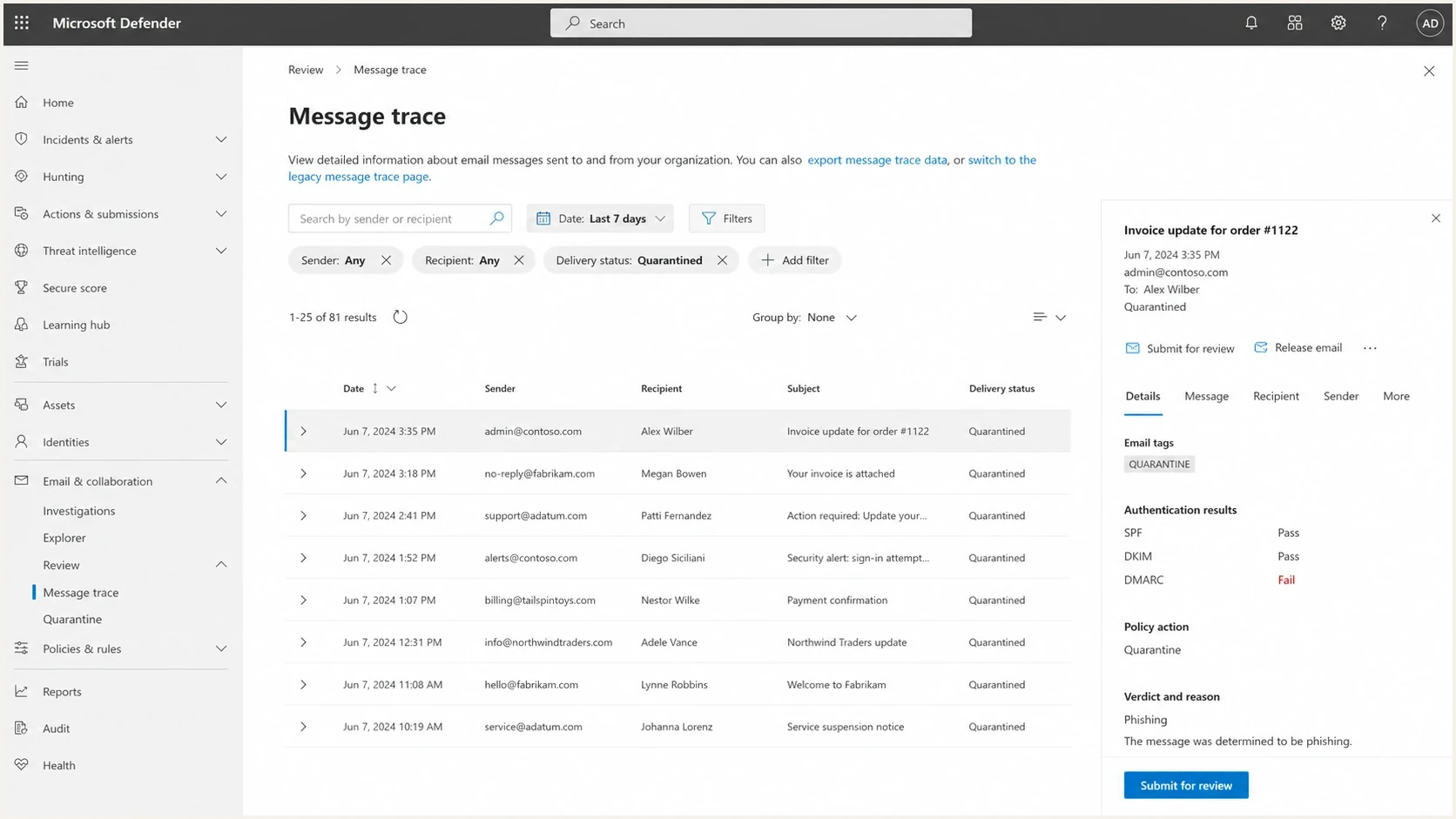
Microsoft Defender for Office 365 message trace and quarantine investigation screen.
For Microsoft 365 recipients, the recipient tenant's security policies also matter. A sender can pass DMARC and still be quarantined by an organization's policy. For consumer Outlook.com and Hotmail recipients, sender reputation and recipient engagement carry more of the practical weight.
|
|
|
|---|---|---|
Authentication | Domain mismatch | Fix SPF/DKIM |
Reputation | Complaints | Reduce complaints |
Volume | Burst pattern | Stage sends |
Content | Template risk | Simplify copy |
Blocklist or blacklist | Listed source | Investigate cause |
Microsoft blocking signals to sort first.
If you need a broader checklist, compare this page with the related guide on blocked Microsoft domains. The same evidence path applies, but automated mail adds more risk around templates, schedules, and source separation.
The first checks to run
Start with checks that separate identity problems from reputation problems. If identity fails, fix that first. If identity passes, treat the block as a reputation, volume, policy, or content problem.
- Bounce evidence: Collect the full SMTP rejection, enhanced status code, source IP, recipient domain, and timestamp.
- Authentication: Use the domain health checker to verify SPF, DKIM, DMARC, and domain matching for the sending domain.
- Reputation: Review bounces, complaints, clicks, replies, unsubscribes, list source, and recent volume changes.
- Blocklists and blacklists: Check major blocklists for the domain and IP, then investigate the cause instead of only requesting blacklist removal.
- Monitoring: Add ongoing blocklist monitoring so the next blacklist listing is detected before Microsoft delivery drops across a large send.
Email tester
Send a real email to this address. Suped shows a results button when the test is ready.
?/43tests passed
A test mailbox does not replace production evidence. It gives a controlled sample. If your production bounces show Microsoft rejecting at SMTP but the test passes, the issue is tied to recipient segment, source IP, send timing, tenant policy, or reputation history.
Authentication problems that cause blocks
Authentication does not guarantee inbox placement, but broken authentication makes a Microsoft block easier to trigger. Automated systems often fail here because a product team adds a sender, a marketing team adds another sender, and nobody updates DNS or confirms that the authenticated domains match the visible From domain.
Microsoft's large-sender rule
For a domain sending 5,000 or more messages to Microsoft's consumer email services with the same domain in the RFC 5322 From address, Microsoft requires SPF and DKIM to pass, a valid DMARC record with at least p=none, and a DMARC pass through a matching SPF or DKIM identity. A failure can produce 550 5.7.515. This rule covers Outlook.com, Hotmail, Live, and MSN recipients; Microsoft 365 tenants also apply their own security policies.
RFC 9989 DMARC monitoring exampledns
_dmarc.example.com. 3600 IN TXT (
  "v=DMARC1; p=none; "
  "rua=mailto:dmarc@example.com"
)
RFC 9989, published in May 2026, replaced RFC 7489 and RFC 9091. It removed the pct tag, so do not use pct to stage DMARC enforcement. A starting policy of p=none collects reporting data without requesting enforcement. For a dedicated sending domain, move to p=quarantine or p=reject only after legitimate senders pass DMARC and indirect mail flows have been assessed. The t=y tag is a testing signal, not percentage rollout.
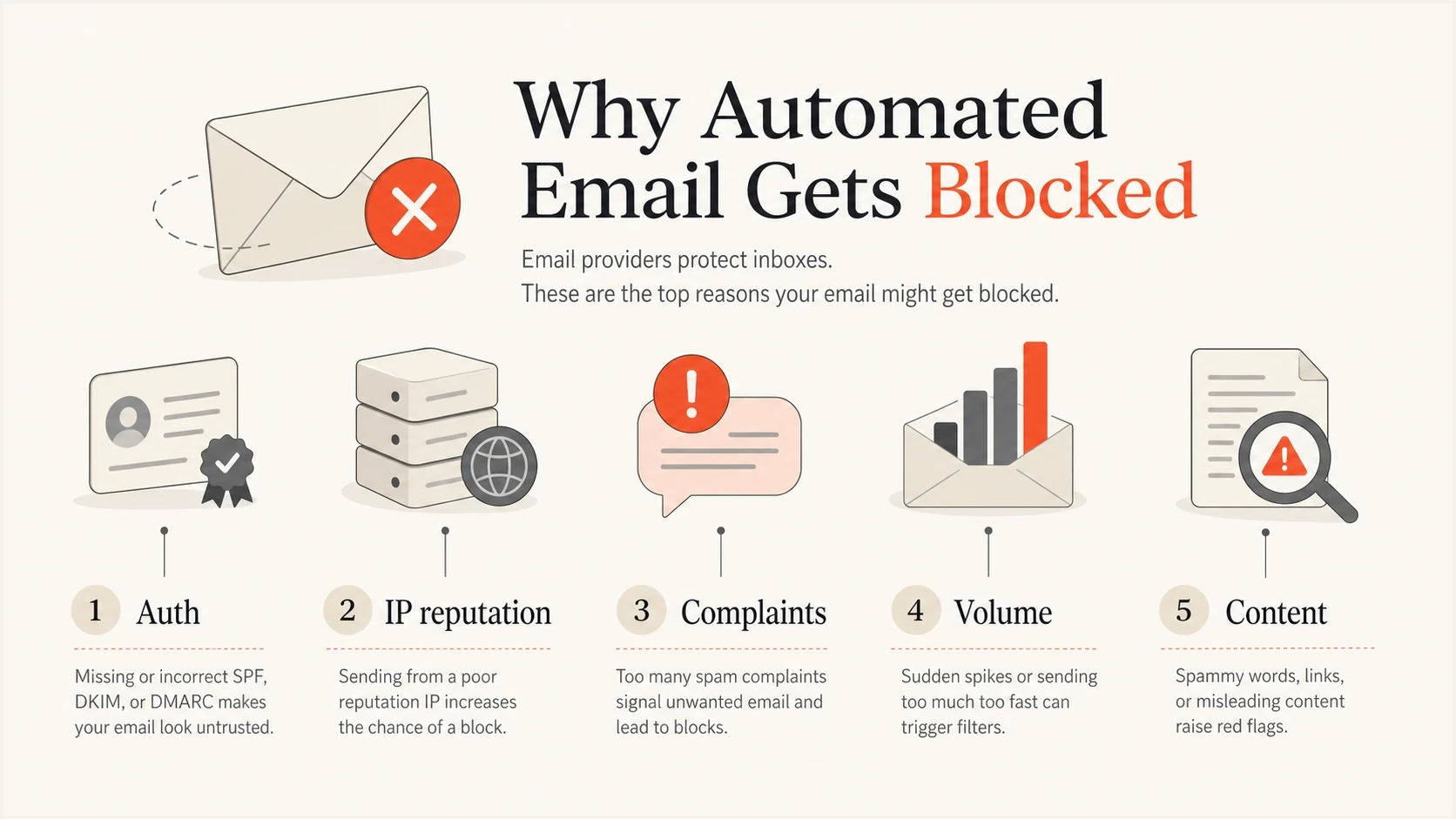
Five Microsoft blocking signals: authentication, IP reputation, complaints, volume, and content.
- SPF: The envelope sender domain must authorize the sending IP directly or through an include mechanism.
- DKIM: The message needs a valid signature from a domain that matches the visible From domain.
- DMARC: At least one of SPF or DKIM must pass and match the visible From domain.
- Forwarding: Forwarded mail often breaks SPF, so a surviving DKIM signature from a matching domain becomes more important.
Reputation and behavior are usually decisive
When authentication passes and Microsoft still blocks the mail, look at behavior. Automated email with low recipient engagement, high unknown-user rates, spam complaints, frequent template reuse, aggressive retry patterns, and sudden bursts can hit filtering even when DNS is correct.
Healthy automation
- Consent: Recipients expect the email and understand why it arrived.
- Segmentation: Transactional, lifecycle, and sales streams use separate domains or subdomains.
- Cadence: Volume changes follow a steady pattern with low complaint pressure.
Risky automation
- Cold lists: Recipients have weak or no relationship with the sender.
- Shared sources: Critical alerts share IPs or domains with prospecting mail.
- Artificial activity: Open, click, reply, or inbox placement patterns look manufactured.
This is why automated warm-up schemes are risky. A system that logs into mailboxes, opens messages, clicks links, replies, or moves mail into the inbox creates a pattern filters are built to detect. If Microsoft blocks that kind of mail, the practical fix is to stop the behavior, clean the sending streams, and rebuild reputation with mail recipients want.
If Microsoft made a filtering mistake, follow Microsoft false positive guidance with a clean sample, headers, and business context. Submitting weak evidence rarely changes anything.
Where Suped fits
Suped's product supports the sender-side investigation by combining DMARC aggregate data, SPF and DKIM checks, and blocklist or blacklist monitoring in one workflow. Use Suped to map the IP or domain in a Microsoft NDR to the sending source, confirm whether its authenticated identities match the From domain, and alert the owner when a source starts failing.

Issue steps to fix dialog showing the issue overview, tailored fix steps, and verification action
For a Microsoft block, Suped can help confirm whether the source shown in the NDR is authorized, whether its domains match, and whether the IP or domain appears on a blocklist or blacklist. Suped cannot override Microsoft filtering, so Microsoft message trace, NDR evidence, and recipient policy checks still matter.
- DMARC monitoring: See which sources pass, fail, and match before moving a dedicated sending domain toward enforcement.
- Hosted SPF: Manage approved senders and reduce manual DNS edits when automated systems change.
- Real-time alerts: Catch new authentication failures, blacklist listings, or source changes before they become broad Microsoft delivery problems.
- Multi-tenancy: MSPs and agencies can monitor client domains without manual spreadsheet work.
A practical recovery plan
Do the work in order. If you rotate domains, switch IPs, or rewrite templates before you understand the failure, you often spread the problem across more assets. Microsoft filtering is sensitive to sender history, and frantic changes create more unusual signals.
- Pause risky streams: Stop cold outreach, warm-up automation, scraped list sends, and high-complaint campaigns first.
- Protect critical mail: Move password resets, invoices, and account alerts away from risky marketing sources.
- Fix identity: Verify SPF authorization, DKIM signing, DMARC domain matching, reverse DNS, and HELO consistency.
- Reduce volume: Send to recently engaged recipients first, then increase slowly after bounces and complaints stay low.
- Submit evidence: Use Microsoft review paths only after you have clean headers, sample messages, and proof the source is controlled.
What not to do
Do not treat a Microsoft block as a reason to hide the sender. New domains, new IPs, and slightly changed templates do not erase reputation. If the underlying behavior stays the same, the block returns.
For legitimate automated mail, recovery usually means tightening identity, removing bad recipients, separating mail streams, reducing sending pressure, and proving consistent recipient value over time. For automation built around fake engagement, the durable fix is to stop that system.
Views from the trenches
Best practices
Collect the full SMTP rejection before changing DNS, content, volume, or sending source.
Keep transactional mail separate from prospecting traffic so reputation problems do not spread.
Use real recipient engagement and complaint trends instead of seed inbox guesses alone.
Common pitfalls
Assuming a clean DMARC pass fixes Microsoft blocks misses reputation and behavior signals.
Using automated warm-up can create patterns that filtering systems are designed to detect.
Rotating IPs or domains after blocks usually extends the reputation damage across assets.
Expert tips
Build a timeline that compares bounce codes, volume changes, complaint spikes, and source changes.
Pause risky streams first, then test authentication and content with a small known-good send.
Document Microsoft-specific failures separately because Outlook.com and Microsoft 365 differ.
Marketer from Email Geeks says a sender should provide company context and the full rejection text before asking others to diagnose Microsoft blocking.
2024-09-10 - Email Geeks
Expert from Email Geeks says inbox testing alone is not enough if production recipients show different Microsoft results.
2024-09-10 - Email Geeks
What to do next
Microsoft blocks automated email when the sending identity, reputation, behavior, or recipient policy looks risky. Start with the bounce, confirm authentication, separate high-value transactional mail, review reputation signals, and reduce risky automation before asking Microsoft to reconsider.
The fastest path is disciplined evidence, not guesswork. When the mail is legitimate, the fix is usually clear once the signals are separated. When the automation is built to simulate engagement or push unwanted mail, Microsoft blocking it is an expected outcome.




