Why are some email subscribers receiving blank emails and how can I fix it?

Published 14 May 2025
Updated 3 Aug 2026
11 min read
Summarize with
Updated on 3 Aug 2026: We added live workflow and merge-field checks, tightened MIME diagnostics, and clarified where sender authentication fits.
Some subscribers receive blank emails because the message that arrives is not the same thing the sender thinks they sent. The most common causes are broken MIME structure, malformed HTML, a template rule that outputs an empty body for a segment, or a webmail client that strips or fails to render the content.
The fastest fix is to stop treating a forwarded copy as proof. I want the original source, ideally by asking the subscriber to forward the message as an attachment or export the message as an .eml file. A normal forward creates a new email using whatever the receiving app believes it can see, so it can turn a rendering failure into an apparently empty source.
If the raw original contains the expected HTML, the problem is a rendering or filtering issue in the subscriber's mail client or webmail. If the raw original contains only a blank body, a bare <br>, or an empty <div>, the content was lost before or during delivery.
Why only some subscribers see a blank email
When only some subscribers receive a blank email, I treat it as a client-specific or recipient-domain-specific failure until the raw source proves otherwise. That distinction matters because the repair path is completely different.
- Raw source: get the original headers and body, not a normal forward.
- Client scope: record whether it happens in webmail, Apple Mail, Outlook, Thunderbird, mobile apps, or every client.
- Domain scope: check whether it clusters around one mailbox provider, one ISP domain, or one corporate filtering stack.
- Template scope: compare the failing campaign with a plain control email and a stripped version of the same template.
A normal forwarded email is weak evidence. The receiving app builds a new message from the rendered content it has available. If that app already rendered the message as blank, the forwarded copy can look empty even when the delivered original had body content.
I also avoid jumping straight to DMARC, SPF, or DKIM as the root cause. Authentication failures usually change placement, rejection, or warning treatment. They do not usually delete the body while leaving a delivered message in the inbox. Still, authentication and reputation checks help rule out filtering, forwarding, and policy side effects. Suped's DMARC monitoring connects authentication results to sending sources instead of leaving you with raw reports.
How to prove whether the email is really blank
The first technical question is simple: is the body actually missing from the delivered MIME, or is the subscriber's app failing to show it? I answer that before I change DNS, sender settings, or template code.
Good evidence
- Attached source: an .eml or attached message keeps the original MIME and headers intact.
- View source: the subscriber opens the original message and copies full source from the client.
- Live reproduction: a test mailbox at the affected provider shows the same blank result.
Weak evidence
- Normal forward: the client creates a new message and can lose the original body.
- Screenshot only: it proves the symptom, not where the body disappeared.
- ESP delivered status: delivery means acceptance by the receiving system, not correct rendering.
Ask the affected subscriber for the mailbox domain, mail client, operating system, browser or app version, exact received timestamp, and whether one message or several messages are affected. If a provider such as Shaw webmail is involved, I try to get a test account there and reproduce the issue directly. Debugging through second-hand screenshots wastes time.
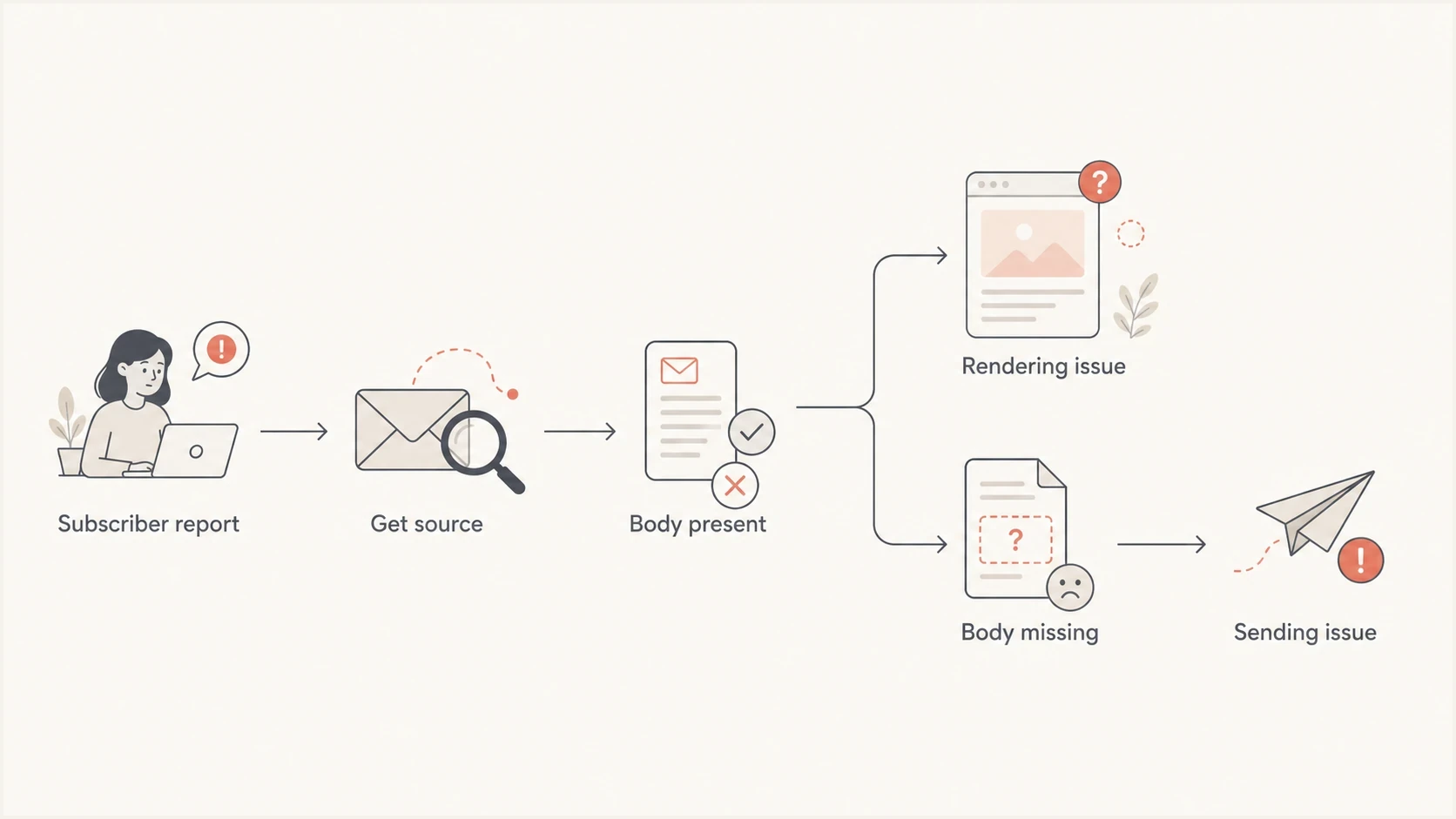
A flowchart showing how to diagnose whether a blank email is a rendering issue or a sending issue.
If the raw source has a full HTML part and text part, move into rendering tests. If the raw source has no useful content, inspect the sender platform, template logic, personalization rules, MIME construction, and any security gateway that rewrote the message.
Common technical causes
Blank emails come from a small set of repeatable failure modes. The details change by sender platform and mail client, but the categories below cover the cases I see most often.
|
|
|
|---|---|---|
Bad MIME | Parts are missing or misplaced | Inspect boundaries and part order |
Transfer encoding | Body fails to decode | Compare encoding with raw bytes |
Template rule | Only one segment fails | Test merge data |
Sanitizer | Source has content | Strip CSS |
Image-only email | Blocked images hide all | Add live text |
Filtering | One provider is affected | Compare domains |
Use this table to choose the next test, not as a final diagnosis.
Malformed HTML can trigger sanitization or rendering bugs, especially in webmail. The issue is often less dramatic than people expect: an unclosed table, invalid nesting, a conditional block that removes the main wrapper, a bad charset declaration, or CSS that a provider strips in a way that leaves nothing visible. A deeper companion issue is malformed HTML, because bad markup can affect both rendering and filtering.
A MIME message can also contain the body but put it in the wrong place. Check that multipart boundaries open and close correctly, that each part has the intended Content-Type, and that attachments do not appear before a body part in a structure the receiving client misreads. Verify quoted-printable or base64 transfer encoding against the actual body bytes instead of trusting the header alone.
Image-only campaigns create another common trap. If the email depends on remote images and those images are blocked, filtered, slow, or rewritten, the subscriber sees what looks like an empty message. That is not the same as a missing body, but the user experience is the same. If that is your pattern, check the specific failure mode behind images failing in Gmail and apply the same thinking to the affected provider.
Example of a broken delivered bodytext
Content-Type: text/html; charset=UTF-8

<html>
  <body>
    <div><br></div>
  </body>
</html>
If the original source really looks like that, the mail client did not invent the blank body. The sending system, a template rule, a personalization failure, or a rewriting layer delivered it that way.
Check automation and recipient data
Automated emails need a live workflow test because an editor preview can use different data and skip the conditions that build the final body. A message can look correct in preview but collapse to an empty wrapper for contacts with missing fields or an unexpected workflow path.
- Use an affected record: clone or safely reproduce the contact data and trigger the same workflow branch that sent the blank message.
- Test empty values: run the template with populated, empty, null, and unexpected field values that appear in the affected segment.
- Reinsert merge fields: replace manually typed or copied tokens with fields inserted through the template editor so hidden formatting cannot corrupt the token.
- Add fallback content: keep essential live text outside optional conditions and define a default when a field or content block has no value.
- Read workflow logs: check the render result, branch taken, template version, and recipient data snapshot for the exact send.
A test email that bypasses automation does not prove the workflow output is safe. Compare the raw source from a live triggered send with the raw source from the preview or test send.
If only one list or segment receives blank messages, compare its field availability and conditional rules with a working segment. Fix the missing fallback or broken merge field, then send to a small seed group through the same automation before resuming the full workflow.
A practical fix path
I use a narrow test ladder because blank email issues are easy to overcomplicate. The goal is to isolate the smallest difference between a working version and a blank version.
- Collect proof: ask for the original message as an attachment, plus client, browser, device, received time, and screenshot.
- Recreate access: use a mailbox at the affected domain when possible, then open the same message in webmail and a desktop client.
- Send controls: send a plain text email, a basic HTML email, and the full production template to the same mailbox.
- Remove risk: strip advanced CSS, script-like attributes, hidden preheaders, external fonts, and image-only body sections.
- Compare MIME: confirm text and HTML parts, boundaries, charsets, transfer encoding, and part order are valid.
- Check domain health: use a domain health checker to confirm DNS authentication is not adding noise to the investigation.
If the issue affects one ISP domain or one webmail interface, run the stripped template test there first. A general inbox placement test has value, but it will miss a bug that only appears inside one provider's webmail renderer.
A good stripped template keeps the same subject, sender, sending IP or domain, and audience logic. It removes nonessential HTML until the email renders. Then I add pieces back one at a time: wrapper table, header, hero image, body copy, buttons, footer, tracking links, personalization, and conditional blocks.
Email tester
Send a real email to this address. Suped shows a results button when the test is ready.
?/43tests passed
Use the email tester with a real send when you need to inspect authentication, message structure, rendering signals, and basic content checks together. Suped's product supports this workflow: test the message, check the sender domain, then monitor whether the same source keeps producing issues.
Where DMARC and reputation fit
DMARC, SPF, and DKIM rarely explain a blank body by themselves, but I still check them early. A recipient provider can treat unauthenticated or suspicious mail differently, and that can expose rendering or rewriting behavior that a cleanly authenticated message avoids.

Email tester sample report showing total score, email preview, issue summary, and per-section results
Suped brings the relevant sender checks into one workflow: DMARC reporting, SPF and DKIM validation, sender-source identification, and blocklist (blacklist) monitoring. For a blank email report, use those results to rule out authentication drift or an unknown sending source before changing the template.
Where to spend diagnostic time
A typical blank-email investigation should start with message evidence, then move into rendering and sender checks.
Evidence
Rendering
Sender checks
For a single campaign bug, the fix is usually in the template or MIME. For recurring issues across campaigns, Suped's source monitoring and alerts can show whether an unverified source, SPF lookup problem, DKIM failure, or reputation change appeared at the same time. Use that evidence to separate sender health issues from rendering defects.
What to change in the email template
Once the evidence points to rendering, I make the template boring on purpose. That means table-based structure, inline CSS for important layout, visible live text, valid alt text, simple links, and a plain text part that carries the same core message.
- Live text: put meaningful copy in HTML text, not only inside images.
- Plain fallback: include a text part that is not empty and is not just a tracking URL.
- Safe CSS: avoid layout-critical grid, flex, fixed positioning, external fonts, and CSS variables.
- Visible body: check for inherited display, visibility, opacity, font-size, and text color rules that can hide the main wrapper.
- Valid structure: close tables, keep nesting predictable, and remove orphaned conditional comments.
- Personalization guard: test empty fields and suppressed modules so one missing value cannot erase the body.
Minimum MIME shape to expecttext
Content-Type: multipart/alternative; boundary="alt"

--alt
Content-Type: text/plain; charset=UTF-8

Plain text version of the message.

--alt
Content-Type: text/html; charset=UTF-8

<html><body><p>HTML version of the message.</p></body></html>

--alt--
If a subscriber-domain test fails only when tracking links are enabled, test link wrapping separately. If it fails only when a specific module is present, isolate that module in a small email and inspect the source after delivery.
The cleanest fix is the one you can reproduce. Keep the failing message, the corrected message, and the original source files together so everyone involved can confirm exactly what changed.
Views from the trenches
Best practices
Ask for the original source or attached message before changing templates or DNS settings.
Reproduce the issue in the affected mailbox provider before treating it as general failure.
Test stripped HTML, plain text, and the full template against the same recipient account.
Common pitfalls
Treating a normal forward as source evidence can send the investigation in the wrong direction.
Assuming authentication caused a blank body hides template and MIME failures in the send path.
Relying only on delivered status misses rendering failures inside webmail and desktop clients.
Expert tips
Keep a small seed list for high-value domains where subscriber complaints cluster repeatedly.
Add a plain text part and visible body copy so blocked images do not create an empty view.
Compare raw MIME before and after delivery to separate sending faults from rendering faults.
Marketer from Email Geeks says they had not seen the issue across many Shaw seed tests, so a reproducible inbox test should come before assuming provider blocking.
2025-01-06 - Email Geeks
Marketer from Email Geeks says the first question is whether the original raw source is empty or whether the mail app is failing to show content.
2025-01-06 - Email Geeks




