Why are Optonline.net emails bouncing but sometimes still delivering?


Updated on 25 Jul 2026: We updated this guide with recipient-level bounce checks and safer DMARC guidance.
Optonline.net emails can bounce while the same campaign still records deliveries because Optimum makes a separate SMTP decision for each recipient and delivery attempt. It evaluates mailbox state, sending IP, sending domain, message body, message size after MIME encoding, and the inbound server that receives the connection. One part of the traffic can be accepted while another part is rejected with a code such as 554 maximum message size exceeded.
I treat this as a partial rejection problem first, not as proof that every Optonline.net recipient is unreachable. A sudden spike from zero matters, but successful deliveries during the same period call for evidence gathering, segmentation, and targeted fixes rather than a blanket suppression of the whole domain.
The confusing part is the bounce wording. A 554 size error on a small email does not always mean the visible message was too large. The remote system can measure the encoded message differently, count inline images and tracking content, apply a policy rule using a generic error string, or reject only a subset of recipients during a filtering event.
What the mixed result usually means
After you confirm that the accepted and failed events belong to different recipient-level attempts, the most likely explanation is mixed filtering at Optonline.net. The same campaign can hit different backend systems, recipient risk states, and policy thresholds. That creates a mix of accepted and bounced messages even when your sender, template, and list look unchanged.
- Mixed routing: Different Optonline inbound hosts can accept or reject similar traffic during the same send window.
- Recipient state: Mailbox quota, account status, and local filtering can change the result for one address.
- Message scoring: HTML weight, image handling, link reputation, and sender reputation can push one message over a threshold.
- Generic wording: A size-related 554 can be a broad policy rejection, not a precise measurement report.
A true message-size rejection usually has a clear pattern: larger creative, heavy inline images, oversized attachments, or a MIME body that expands after Base64 encoding. Binary parts grow by about one-third before line breaks and MIME headers are counted. Measure the full message transmitted during SMTP DATA, then compare failed and accepted attempts by recipient, remote host, campaign, IP, DKIM domain, and exact timestamp.
Example bounce linestext
554 maximum message size exceeded
554 5.2.3 Message size exceeds fixed maximum message size
550 5.7.1 Unacceptable message
Read the enhanced status code before relying on the leading SMTP code or prose. A 5.2.3 code points to a message-length limit, while a 5.7.1 code points to a policy or security rejection. A 554 response is a permanent 5xx failure for that recipient and message, so do not retry it automatically. It does not justify permanently removing every Optonline address, especially when the same campaign still has accepted recipient-level attempts.
Confirm what actually bounced
Before changing content or DNS, establish whether the same recipient and message truly show both outcomes. Campaign dashboards often combine separate recipients, retries, or events. A message sent to several recipients can produce a failure for one address while the other addresses receive it. A server can also accept a message with a 250 response and generate a later delivery status notification if final delivery fails.
|
|
|
|---|---|---|
One campaign, different recipients | Normal partial acceptance | Envelope recipient and SMTP reply |
Same recipient, different attempts | A later send or controlled retest | Message ID, event ID, and timestamp |
250 response, then NDR | Accepted at SMTP, failed later | Queue ID and DSN recipient fields |
5xx response during SMTP | That attempt was rejected | SMTP stage, remote host, and enhanced code |
Delivered event only | The receiving server accepted it | Recipient confirmation and full headers |
Evidence needed to separate mixed delivery events.
Mailbox capacity needs its own check. Optimum's published residential terms state that an email account stops accepting new mail after it reaches its 5 GB storage limit, and new mail is returned to the sender. That is a recipient-level quota problem, not proof that your message exceeded an inbound message-size limit. Ask the recipient to confirm available storage when failures concentrate on one mailbox.
An ESP "delivered" event normally means the remote server accepted the message. It does not prove inbox placement or that the recipient opened the message. Use the recipient address, provider response, message ID, and timestamp to match each event before calling the result contradictory.
Why the same campaign can pass and fail
Email delivery is connection based. Each recipient has a separate SMTP result, and each connection can land on a different inbound host or policy path. That is why one Optonline.net recipient can accept the message and another recipient can reject it a minute later with the same visible content.
|
|
|
|---|---|---|
554 with 5.2.3 | Administrative size limit | Measure transmitted MIME |
550 with 5.7.1 | Content or reputation policy | Test clean copy |
Only Optonline | Provider-specific rule | Segment domain |
Many sending IPs | Shared content, domain, or provider event | Compare shared traits |
Some recipients accepted | Partial filtering or recipient state | Avoid a domain-wide purge |
Compact triage map for mixed Optonline results.
Evidence that points to your message
- Size jump: The raw MIME body grew because of encoded images, tracking wrappers, or long HTML.
- HTML weight: The rejected version has heavier markup than the accepted version.
- Link domains: One redirect, shortener, or image host appears only in the failing copy.
- Auth gap: SPF or DKIM alignment differs between the accepted and rejected mail streams.
Evidence that points to provider filtering
- Mixed results: The same send has Optonline acceptances and Optonline bounces for different recipient attempts.
- Cross-client spike: Different brands, IPs, or accounts see the same bounce text at once.
- Stable inboxing: Other mailbox providers keep accepting the same mail stream.
- Sudden onset: The bounce pattern starts quickly without a matching sender-side release.
Both columns can be true at the same time. A provider-side threshold can start rejecting a message trait that already existed. Use controlled testing: one plain-text control, one current production template, one reduced HTML version, and the same recipient-domain split.
First checks I run
Start with the bounce evidence, not the dashboard headline. The fastest path is basic bounce troubleshooting: group failures by exact SMTP code, enhanced status code, remote host, sender IP, DKIM d= domain, campaign ID, and recipient domain. Then send a controlled test through an email tester so you can inspect authentication, headers, and content issues before changing infrastructure.
- Capture the raw bounce: Keep the SMTP reply, enhanced code, remote host, SMTP stage, message ID, timestamp, and recipient.
- Measure encoded size: Check the full MIME message transmitted during DATA, not the visible creative or attachment count.
- Match accepted and failed events: Compare recipient, message ID, event ID, and timestamp before treating the outcomes as contradictory.
- Retest plain text: Send a new minimal test to separate content scoring from routing and account state.
- Limit suppression correctly: Stop automatic retries for the failed 5xx attempt, but do not suppress the whole Optonline.net domain.
Email tester
Send a real email to this address. Suped shows a results button when the test is ready.
?/43tests passed
If the plain-text control lands and the production template fails, focus on HTML, images, links, tracking domains, and body size. If both fail for one set of recipients and pass for another, focus on mailbox state, backend routing, or provider escalation. If failures cluster by IP or authentication identity, fix reputation and authentication before contacting the provider.
Authentication and reputation checks
Authentication will not explain every Optonline.net bounce, but it affects the trust signals available to the receiving system before content scoring. I run a domain health check first, then review DMARC monitoring and blocklist and blacklist monitoring for the sender domain and sending IPs.
Suped's product supports this workflow by grouping DMARC data by sending source, SPF identity, and DKIM domain. Compare those groups with the failed Optonline stream to find a shared source, selector, SPF path, sending IP, or unverified sender. Suped's issue view then gives the DNS or source-level steps needed to correct the finding.

Issue steps to fix dialog showing the issue overview, tailored fix steps, and verification action
If DMARC is missing or legitimate sources fail alignment, fix that before treating the provider as the only cause. Start with monitoring so you can identify every valid source without rejecting mail. After the legitimate sources pass, move toward stronger policy in stages.
Starter DMARC monitoring recorddns
v=DMARC1; p=none; rua=mailto:dmarc-reports@example.com
Do not assume a DMARC fix will instantly stop an Optonline bounce spike. Authentication improves identity signals and helps you prove legitimacy, but a 554 rejection can still come from content scoring, recipient state, size measurement, or provider-side filtering.
How to reduce the bounce rate
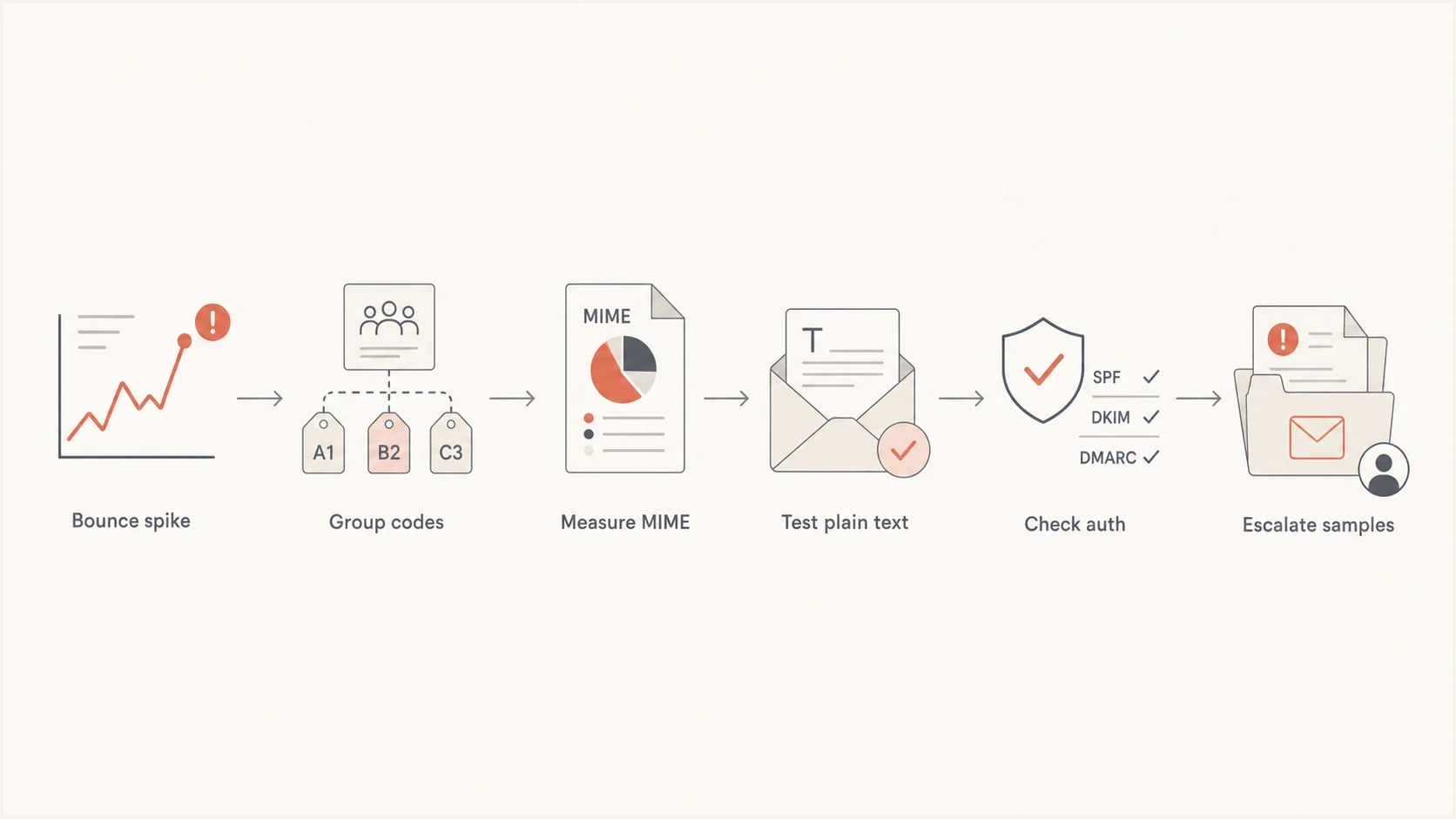
Optonline.net email bounce troubleshooting flow for SMTP codes, MIME size, authentication, and escalation.
Once you have matched the delivery events, reduce variables. Start with the least disruptive changes because replacing IPs, pausing all Optonline traffic, or changing authentication records before testing adds noise. A smaller, cleaner test usually gives a clearer result.
- Shrink the message: Remove nonessential images, long HTML, extra tracking parameters, and hidden template blocks.
- Test one change: Change content, cadence, sender, or audience one at a time so the result is readable.
- Slow the domain: Reduce new volume to Optonline.net temporarily if bounces cluster around bursts.
- Protect good recipients: Keep recent active recipients separate from old or never-engaged addresses.
- Escalate cleanly: Use a short sample set when contacting the Optonline postmaster.
A useful escalation packet is short. Include five to ten failed recipients, several accepted recipients, timestamps with timezone, remote hosts, sending IPs, envelope sender, DKIM d= domain, message IDs, and the exact bounce text.
If the bounce is tied to a full or inactive consumer mailbox, sender-side changes will not fix that mailbox. For account-level receiving problems, point the recipient to Optimum account help. For sender-side blocking, keep the evidence technical and concise. Postmaster teams need reproducible samples.
What not to do
The wrong fix often looks decisive but makes the problem harder to diagnose. Mixed Optonline.net results need controlled isolation, not broad changes.
- Do not purge everything: A domain-wide suppression can remove good recipients who are still accepting mail.
- Do not retry a hard failure blindly: A 5xx rejection ends that attempt, so use a new controlled test only after changing or isolating a cause.
- Do not rotate blindly: Moving traffic across IPs before isolating the cause can spread reputation risk.
- Do not trust the label alone: Compare the enhanced code and SMTP stage because maximum-size wording can mask a broader policy rejection.
- Do not ignore reputation: Check blocklist and blacklist status even when the bounce text sounds like size.
Tag the affected domain, monitor results separately, reduce risky creative elements, and resume only the healthy segment at a controlled pace. Do not resend the rejected message automatically to the same recipient. If the spike resolves, keep the evidence for future comparisons. If it persists, escalate with samples and proof that authentication and reputation are in order.
Views from the trenches
Best practices
Keep raw bounce samples with remote host, timestamp, recipient domain, and campaign ID.
Compare accepted and rejected Optonline recipients before changing sending infrastructure.
Measure encoded MIME size, not just visible text, when a size bounce appears suddenly.
Common pitfalls
Treating every Optonline rejection as a hard user failure can over-suppress good names.
Changing IPs before isolating content and domain signals can make evidence harder to read.
Ignoring successful deliveries hides whether the issue is partial, regional, or recipient based.
Expert tips
Send a plain-text control message to separate content scoring from routing or account state.
Use DMARC aggregate data to confirm whether failing traffic shares one mail stream source.
Escalate with concise samples after you can show timing, code, host, and recurrence.
Marketer from Email Geeks says they saw Optonline bounces spike from zero while successful deliveries continued across the same period.
2022-03-16 - Email Geeks
Marketer from Email Geeks says the reported code was 554 maximum message size exceeded, even though the emails were normal text messages with small images.
2022-03-16 - Email Geeks
A practical Optonline recovery order
Optonline.net bounces alongside successful campaign deliveries usually mean separate recipient attempts produced different outcomes. The exact fix depends on which variable ties the failures together: raw message size, HTML and links, sender reputation, authentication alignment, mailbox state, or a provider-side filtering change.
My preferred order is simple: match the recipient-level events, preserve the raw bounce, compare accepted and rejected samples, run a clean content test, verify SPF, DKIM, and DMARC alignment, then check blocklist and blacklist status. Suped's product can support the authentication part by grouping DMARC results by source and authentication identity, which helps isolate whether the failed Optonline traffic shares one mail stream.
If you need one immediate action, stop treating the bounce label as the whole diagnosis. A 554 maximum message size exceeded response is a clue. The answer comes from matching the failed and successful Optonline attempts to their recipients, message IDs, timestamps, and SMTP responses.




