Why are my Hotmail emails failing due to connection limits and what can I do?

Published 25 Jun 2025
Updated 24 Jul 2026
11 min read
Summarize with

Updated on 24 Jul 2026: We updated this guide to remove unsupported connection thresholds and make Microsoft error-code diagnosis more precise.
Hotmail emails fail with 451 4.7.652 because Microsoft has refused more concurrent SMTP connections from that sending IP at that moment. Hotmail addresses use Outlook.com receiving infrastructure, so the same diagnosis applies to Hotmail, Outlook.com, Live.com, and MSN.com recipients. The fix is to slow the MTA down first, then investigate reputation. Treat this as a connection control problem with a reputation feedback loop, not as a single DNS or content problem.
The practical response is to pause new Microsoft-bound campaigns or sharply reduce the affected queues, lower simultaneous connections to Microsoft consumer destinations, add retry backoff and jitter, then resume with recipients who have recent clicks, purchases, replies, or account activity. After the flow is stable, check authentication and reputation signals with Suped's email tester and your sending logs.
- Fast fix: Stop opening new Microsoft sessions faster than the receiving systems accept them.
- MTA fix: Set Microsoft consumer destination concurrency limits instead of using one global SMTP pool.
- Reputation fix: Send to recently active recipients before adding colder Microsoft segments.
- Monitoring fix: Track deferrals by provider, IP, recipient domain, campaign, and retry age so the next throttle is obvious.
What the 451 4.7.652 error means
The SMTP reply is a temporary failure. Your message was not accepted during that delivery attempt, but Microsoft is telling your server to try again later. The important part is the enhanced status code and wording: the sending mail server has exceeded the maximum number of concurrent connections Microsoft currently accepts.
Typical Microsoft connection-limit bouncetext
451 4.7.652 The mail server has exceeded the maximum number
of connections. (S3115)
[BN1NAM02FT051.eop-nam02.prod.protection.outlook.com]
The server name in brackets points to Microsoft filtering infrastructure. The error does not prove that every message is bad, and it does not prove that your MTA has a software defect. It means your current connection pattern is above what Microsoft is accepting from the sending IP. Microsoft does not publish one universal cap for this response. The working ceiling can vary with current traffic and sender reputation, so tune against your own delivery logs rather than a number copied from another sender.
Do not retry harder
A 451 response needs controlled retry behavior. If your MTA opens more connections because messages are delayed, it turns a temporary throttle into a larger connection storm.
- Backoff: Increase retry intervals after each 451 instead of making immediate repeated attempts.
- Jitter: Add random wait time so every deferred message does not retry at the same second.
- Queue age: Expire old retries after the message's useful delivery window has passed.
Do not confuse nearby Microsoft errors
Microsoft returns several temporary policy errors that look similar in a queue summary. Match the full enhanced status code and response text before changing the MTA. A connection fix for 4.7.652 will not resolve a reputation-specific 4.7.650 response, and reducing concurrency alone will not fix 4.7.653 when one SMTP session carries too many messages.
|
|
|
|---|---|---|
451 4.7.652 | Too many concurrent connections | Lower parallel sessions |
451 4.7.650 | Temporary IP reputation limit | Reduce volume and review reputation |
451 4.7.653 | Too many messages on one connection | Lower messages per session |
Other 4xx | Temporary failure with another cause | Follow the full reply text |
Use the exact enhanced status code, not the leading 451 alone.
Preserve the complete SMTP reply
Keep the enhanced status code, S-code, receiving host, timestamp, sending IP, SMTP stage, and retry count in your logs. If throttling persists after conservative pacing, those details show whether the same response continues and give Microsoft enough context to investigate.
Is it reputation or your MTA?
The direct 4.7.652 trigger is too many concurrent SMTP connections from the sending IP. Your MTA controls that behavior. Reputation still matters because it affects Microsoft's wider treatment of the traffic, and repeated connection pressure can add another negative operational signal.
MTA behavior
- Connection count: Too many parallel sessions to Microsoft consumer destinations trigger 4.7.652.
- Queue design: One shared pool hides that Microsoft consumer traffic needs its own concurrency control.
- Retry policy: Aggressive retries add load exactly when Microsoft is asking for less.
Reputation pressure
- IP history: New, cold, or volatile IP traffic often needs a more conservative sending profile.
- Recipient quality: Inactive Hotmail users create more reputation risk than recently active recipients.
- Complaint signals: Spam complaints and poor recipient response add separate reputation pressure.
Old sender notes and forum posts sometimes cite high theoretical limits or a fixed number of messages per connection. Do not use those numbers as Microsoft targets. They describe another sender's environment at another time. Start with a low baseline, measure the exact 4.7.652 rate, and tune upward only when accepted throughput stays stable.
|
|
|
|---|---|---|
Sudden 4.7.652 bursts | Too much concurrency | Lower connections |
New IP deferrals | Weak history or fast ramp | Warm up slower |
Retry pileups | Backoff too short | Add backoff and jitter |
Weak recipient activity | List quality | Prioritize active users |
Use these signals to decide what to change first.
Immediate steps to stop the failures
When the 451 4.7.652 error starts, first protect the queue. The goal is not to force everything through. The goal is to stop creating new negative signals while preserving messages that still have a useful delivery window.
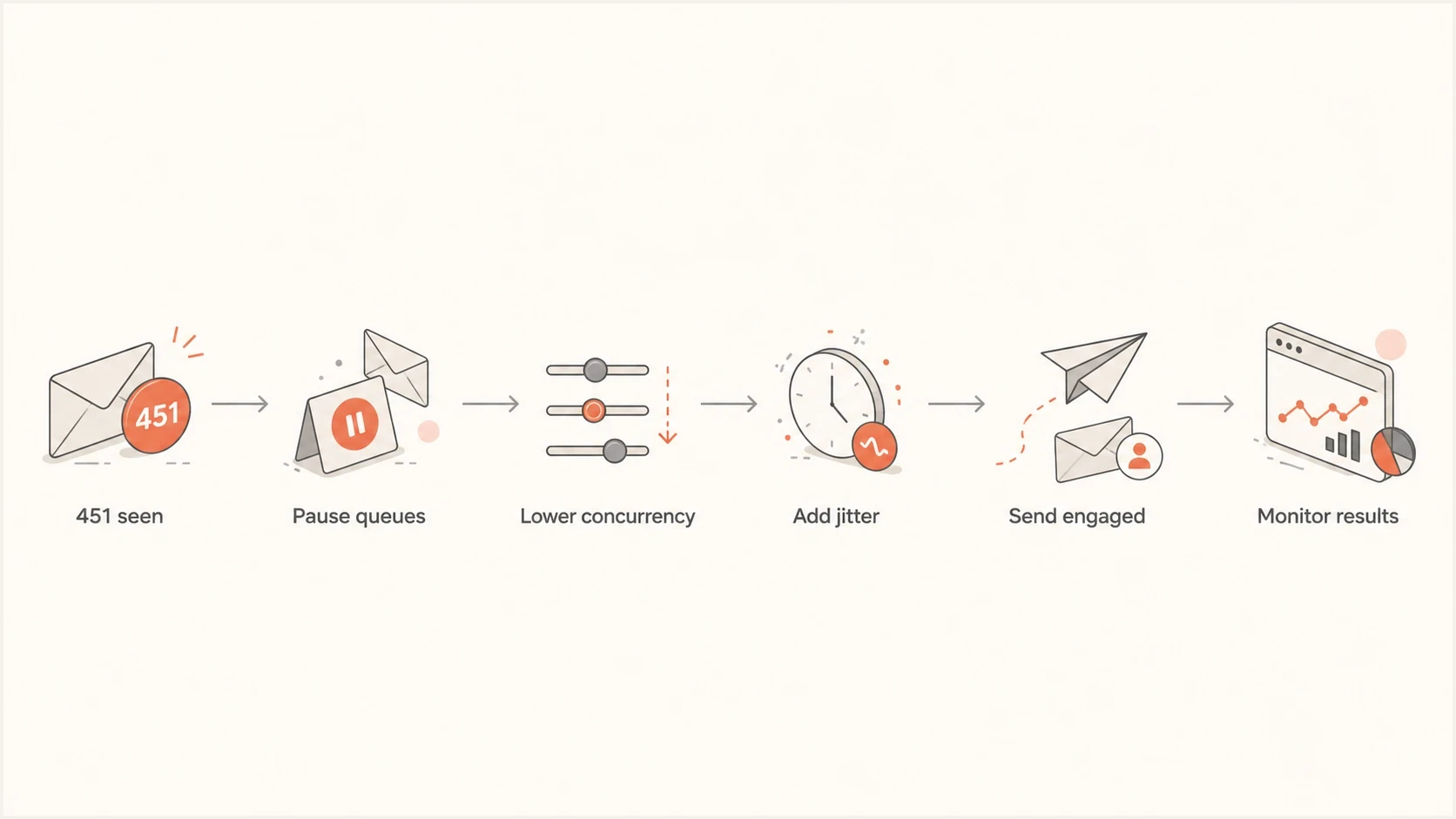
Six-step recovery flow for Hotmail and Outlook.com 451 4.7.652 SMTP connection deferrals.
- Pause: Pause new Microsoft-bound campaigns or sharply reduce the queue when 4.7.652 responses are widespread.
- Separate: Create a destination group for hotmail.com, outlook.com, live.com, msn.com, and the Microsoft consumer MX hosts observed in your DNS and delivery logs.
- Limit: Restart at a low provider-specific concurrency baseline, then reduce it again if sustained 4.7.652 responses continue.
- Backoff: Use exponential retry intervals with random delay so deferred messages spread out.
- Prioritize: Resume with recently active Microsoft recipients before older subscribers, reactivations, or bulk campaigns.
- Measure: Watch 4.7.652 rate, accepted messages per hour, active sessions, connection churn, and queue age before raising throughput.
Microsoft recovery signals
Use your own delivery logs because Microsoft does not publish a universal 4.7.652 connection ceiling.
Stable
No connection deferrals
Accepted throughput holds without 4.7.652 replies.
Watch
Occasional deferrals
Isolated replies clear through normal backoff.
Throttle
Sustained deferrals
The same code persists across retry cycles.
Pause and review
Queue keeps growing
Retries grow faster than Microsoft accepts mail.
Tune your MTA for Microsoft destinations
If you run your own MTA, build destination-aware controls. A home-built sender that treats every recipient domain the same will eventually hit provider-specific limits. For 4.7.652, control simultaneous TCP sessions first, then tune SMTP session reuse and message pacing.
Generic Microsoft consumer pacing profiletext
destination_group = microsoft_consumer
recipient_domains = hotmail.com, outlook.com, live.com, msn.com
observed_mx_suffix = olc.protection.outlook.com
max_parallel_connections = low_recovery_baseline
reuse_healthy_connections = true
max_messages_per_connection = tune_from_logs
initial_retry_delay = follow_4xx_schedule
retry_backoff = exponential
jitter = enabled
queue_max_age = message_delivery_window
This is a control pattern, not a Microsoft configuration template. Pick a low recovery baseline that your MTA can enforce, hold it long enough to observe several retry cycles, then raise concurrency in small steps. If sustained 4.7.652 replies return, drop to the last stable setting. Do not group every protection.outlook.com host into the consumer pool, because that can mix Outlook.com traffic with Microsoft 365 tenant destinations.
Build separate provider queues
Separate queues let you slow Microsoft consumer traffic without slowing other healthy destinations or transactional mail. They also make reporting easier because every deferral has a provider context.
- Per-provider pools: Apply different parallel connection ceilings to each major mailbox provider.
- Retry isolation: Keep Microsoft retries from filling the global delivery queue.
- Log clarity: Record active connections, response code, MX host, SMTP stage, message age, and campaign for every attempt.
Reuse healthy SMTP sessions for controlled batches instead of opening a new TCP connection for every message. Keep watching the exact reply code, because 4.7.653 indicates too many messages per connection and needs the opposite adjustment. Random wait time also matters. If 10,000 messages all retry at the same second, the MTA creates the same pressure again. Spread retry attempts over a window to produce a steadier delivery stream and cleaner queue data.
How authentication and reputation fit in
SPF, DKIM, and DMARC do not set or raise Microsoft's 4.7.652 connection limit. They provide separate trust and identity signals. Fix authentication because failures, unauthorized sources, unstable volume, and complaint pressure make reputation diagnosis harder while you tune the MTA.
?
What's your domain score?
Deep-scan SPF, DKIM & DMARC records for email deliverability and security issues.
Run a domain health checker check after you reduce concurrency. That shows whether SPF, DKIM, DMARC, DNS, or related records create separate authentication issues during recovery.
Also check blocklist (blacklist) status when Microsoft throttling appears suddenly. A blocklist listing does not cause every 4.7.652 response, but it can indicate a broader IP reputation problem that needs separate work. Suped's blocklist monitoring keeps that signal next to authentication results while the MTA team reviews connection behavior.
DMARC aggregate reports help identify unauthorized sources, broken DKIM signing, and SPF misalignment that can complicate reputation recovery. Suped's DMARC monitoring converts raw reports into sending sources, authentication results, and fix steps. The goal is to remove avoidable trust issues while the MTA sends at a controlled pace.
|
|
|
|---|---|---|
SPF | Too many DNS lookups | Review authorized senders |
DKIM | Missing or failing signature | Fix signing |
DMARC | Low aligned pass rate | Map sources |
Blacklist | Sending IP listed | Investigate the cause |
Authentication checks that matter during recovery.
How Suped fits into recovery
Suped's DMARC platform supports this recovery workflow by keeping authentication results, sending-source visibility, alerts, and blocklist or blacklist monitoring in one operational view. It does not replace MTA logs, but it helps separate connection control from authentication and domain reputation work while Hotmail throttling is active.
Issues page showing top issues, verified sources, unverified sources, and authentication pass rates
A practical Suped workflow is to review verified and unverified sources, identify broken SPF or DKIM paths, and set alerts for authentication failure spikes. If a marketing platform, transactional sender, or internal MTA starts failing authentication while Microsoft is already throttling the sending IP, Suped surfaces the separate issue before it complicates reputation recovery.
Without a unified view
- Logs: MTA teams inspect delivery attempts without authentication context.
- DNS: Record problems get checked only after deferrals keep returning.
- Reputation: Blocklist and blacklist checks sit outside the recovery process.
With Suped
- Detection: DMARC, SPF, DKIM, and source problems are grouped into issues.
- Alerts: Notifications flag authentication failure spikes while queues are still manageable.
- Operations: Hosted DMARC, hosted SPF, and SPF flattening reduce DNS work during fixes.
Suped does not raise Microsoft connection caps. No DMARC platform controls that receiver-side decision. Suped helps remove authentication errors, spot unapproved sources, monitor reputation signals, and keep domain-level work organized while the MTA sends at a controlled pace.
For a deeper walkthrough of the exact Microsoft response code, use the 451 4.7.652 fix. If the pattern is broader than one bounce code, compare it with Microsoft rate limiting so you can separate connection caps from reputation throttling.
Views from the trenches
Best practices
Pause new Microsoft campaigns or sharply reduce queues before testing a lower ceiling.
Keep per-domain concurrency separate so Hotmail throttles do not slow healthy destinations.
Track temporary deferrals by IP, domain, campaign, and recipient provider every hour.
Use recently active Microsoft recipients first when rebuilding volume after deferrals.
Common pitfalls
Raising retries after a 451 response creates more connections and extends the throttle window.
Treating 4.7.652 as a pure DNS issue misses the TCP behavior Microsoft is rejecting.
Sharing one global SMTP pool hides which provider needs tighter pacing rules today.
Sending cold or stale segments during recovery keeps adding avoidable reputation risk.
Expert tips
Start with low Microsoft concurrency, then raise it only after clean delivery cycles.
Add random wait time between batches so retries do not arrive in synchronized waves.
Reuse healthy SMTP sessions, but watch for 4.7.653 messages-per-connection limits.
Use DMARC data to spot unapproved sources before reputation recovery work begins.
Expert from Email Geeks says Microsoft connection caps are unpublished, so the first move is to reduce concurrent TCP sessions and then tune upward from real delivery data.
2025-02-18 - Email Geeks
Expert from Email Geeks says a sender should pause new Microsoft traffic after heavy throttling, then resume at a low concurrency baseline before expanding.
2025-03-04 - Email Geeks
What to do next
Start with the MTA because that is the fastest control available. Pause new Microsoft campaigns or reduce the affected queue, lower Microsoft consumer concurrency, add jitter, and resume with recently active recipients. Once the queue is stable, review the supporting reputation inputs: authentication, list quality, complaints, and blacklist or blocklist status.
The recovery pattern uses fewer simultaneous connections, slower retries, controlled session reuse, recently active recipients, and clean authentication. Raise throughput only when 4.7.652 replies stay absent or clear through normal backoff and the retry queue stops growing.




