How to fix Hotmail error 451 4.7.652 exceeded maximum number of connections?


Updated on 2 Aug 2026: We added adaptive throttling guidance, retry jitter, and clearer handling for related Microsoft 451 codes.
The direct fix for Hotmail error 451 4.7.652 is to reduce concurrent SMTP connections to Microsoft consumer domains, pause aggressive retries, and let the deferred mail requeue with backoff. Hotmail, Outlook.com, Live.com, and MSN.com are telling your sending system that it has opened more simultaneous SMTP sessions than Microsoft currently accepts for that sending IP and sending history. Treat this as a temporary deferral, not a permanent bounce.
The first move is operational: slow down. Lower Microsoft-domain concurrency before changing IPs, authentication, or message content. After the queue is stable, send a real message through the email tester, run a domain health check, and check whether DMARC monitoring and blocklist monitoring show reputation or authentication issues behind the throttling.
What the error means
The SMTP code 451 is a 4xx temporary failure. The enhanced status 4.7.652 is Microsoft-specific policy feedback. The key phrase is "exceeded the maximum number of connections." Microsoft is not saying the recipient mailbox is invalid. It is saying your sending system has too many simultaneous SMTP sessions open to its receiving infrastructure.
Typical SMTP replytext
451 4.7.652 The mail server [a.b.c.d] has exceeded the maximum
number of connections. (S3115)
[BN3PEPF0000B06D.namprd21.prod.outlook.com 2024-07-01T12:34:16Z]
A 4xx reply means the sending MTA should keep the message queued and retry later. The fix is not to hammer Microsoft again every few seconds. That creates a loop: too many connections trigger deferrals, deferrals cause urgent retries, urgent retries create more connections, and the queue looks worse. A message can still expire and produce a final failure if repeated deferrals outlast the MTA's queue lifetime, so monitor the oldest deferred message as well as the queue size.
This is a deferral
Do not mark these recipients as bad addresses just because this reply appeared. Microsoft has public discussion of the same pattern in Microsoft Q&A. Your queue handling should preserve the message, slow retries, and lower concurrent delivery to Microsoft domains.
How 4.7.652 differs from other Microsoft 451 replies
Match the complete enhanced status code and reply text before changing the MTA. Microsoft uses nearby 451 codes for different limits, so treating every Microsoft deferral as a connection problem can leave the real cause untouched.
|
|
|
|---|---|---|
451 4.7.652 | Too many simultaneous connections | Lower concurrent sessions and back off |
451 4.7.653 | Too many messages per connection | Reduce messages carried per SMTP session |
451 4.7.650 or 4.7.651 | IP reputation rate limiting | Investigate reputation and traffic quality |
451 4.7.500 | Server-busy or policy deferral | Back off and classify the full reply |
Use the exact reply to choose the first corrective action.
The S3115 marker commonly accompanies 4.7.652, while S3116 commonly accompanies 4.7.653. Keep the complete reply, receiving host, sending IP, timestamp, and queue ID in logs because those fields show whether one IP, one destination group, or the whole Microsoft-bound stream is affected.
The fix in order
This repair order separates the immediate queue problem from the deeper deliverability problem. The immediate problem is connection pressure. The deeper problem can be reputation, authentication, a bursty campaign schedule, or a queue runner that retries too aggressively. Microsoft's effective allowance is adaptive, so tune against actual acceptance and deferral data instead of assuming a universal cap.
- Pause bursts: Stop new Microsoft-domain batches long enough for active sessions to drain, then reassess the queue.
- Lower concurrency: Set a Microsoft-specific cap per sending IP instead of relying on one global MTA limit.
- Back off retries: Use longer retry intervals with jitter after each 451 response and avoid immediate reconnect loops.
- Spread the queue: Send the same daily volume over more time and warm new sending IPs gradually before raising volume.
- Inspect reputation: Check complaint rates, unknown-user rates, authentication results, and blocklist (blacklist) status.
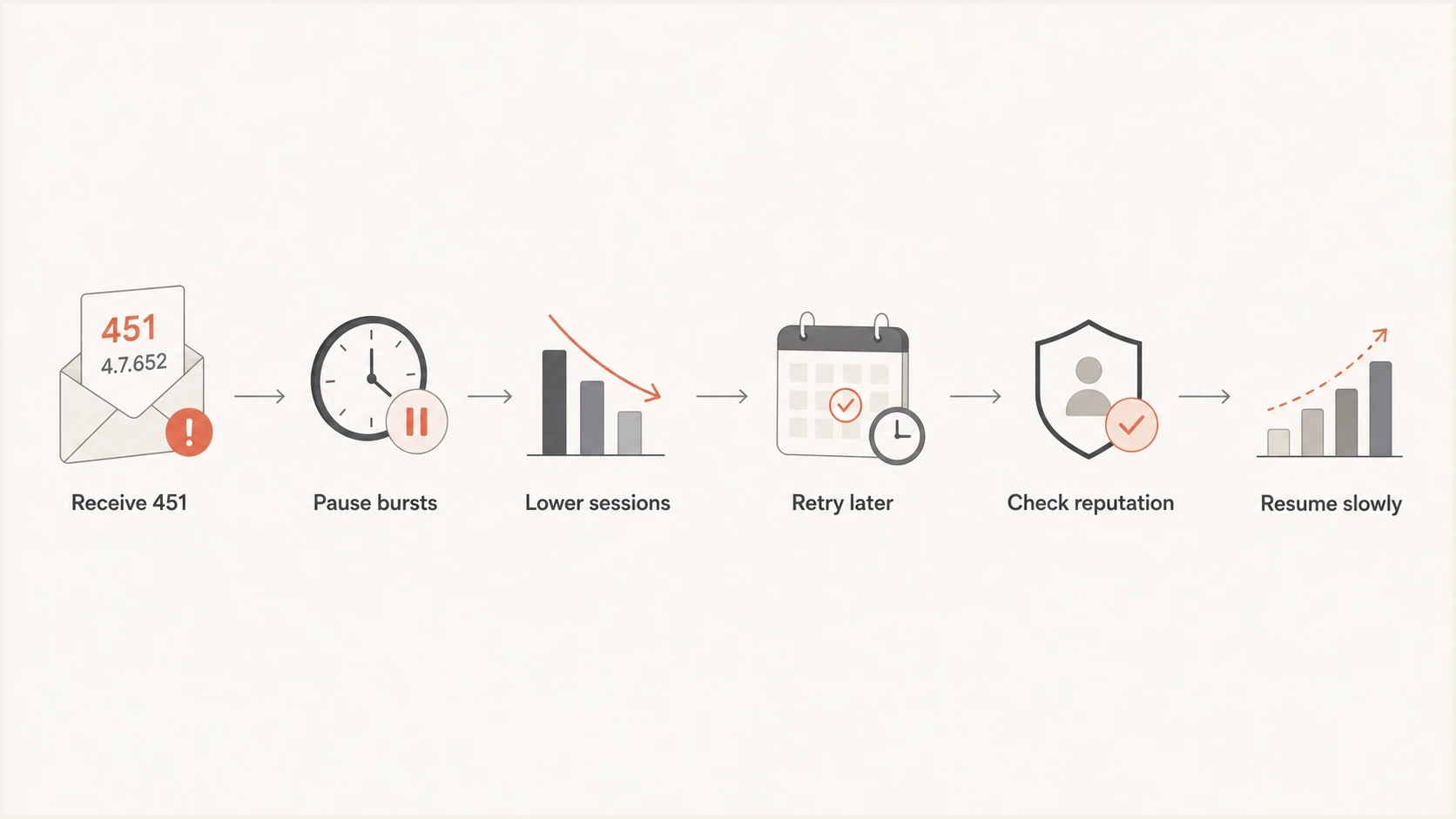
Flowchart for resolving Hotmail 451 4.7.652 by pausing, throttling, retrying, and checking reputation.
When the queue starts clearing, resist the urge to remove the cap too quickly. A clean recovery is usually gradual: low concurrency, low retry pressure, steady acceptance, then small increases. If the same error returns after a small increase, the previous cap is closer to the current safe level.
Email tester
Send a real email to this address. Suped shows a results button when the test is ready.
?/43tests passed
A real sent-message test does not prove Microsoft will accept every recipient, but it catches obvious failures before you spend hours tuning queue limits. Look for broken SPF, DKIM signing gaps, a weak HELO name, missing reverse DNS, or content that differs sharply from normal mail streams.
Throttle by domain, not globally
A global concurrency limit is too blunt for this problem. If you cut every destination down to the same low number, non-Microsoft mail slows for no reason. If you leave global limits high, Microsoft keeps seeing connection pressure. The useful control is a destination group for Microsoft consumer domains.
Risky response
- Add IPs: More IPs can look like volume spreading to avoid limits when the sender lacks maturity.
- Retry fast: Immediate retries increase the active session count that caused the deferral.
- Ignore logs: Treating every 451 as generic hides the specific Microsoft-domain pressure.
Better response
- Cap sessions: Begin with the lowest practical Microsoft-domain concurrency and tune it against measured deferrals.
- Queue calmly: Let deferred mail wait, then retry with increasing delay and jitter.
- Raise slowly: Increase only after sustained clean acceptance and stable complaint signals.
The exact MTA syntax depends on your sending stack, but the policy should look like this. Keep the cap specific to Microsoft destinations and make every 451 4.7.652 response feed a slower retry path. The values below are illustrative starting settings, not Microsoft-published limits.
Illustrative Microsoft-domain queue policytext
destination_group = microsoft_consumer
match_domains = hotmail.com, outlook.com, live.com, msn.com
max_connections_per_ip = 2
max_recipients_per_connection = 20
retry_4xx_initial_delay = 15m
retry_4xx_multiplier = 2
retry_4xx_jitter = 20%
retry_4xx_max_delay = 4h
pause_new_batches_after_451_4_7_652 = 15m
How to separate volume from reputation
The same error can appear in two different situations. The first is a burst problem: the sender has acceptable reputation but compresses too much mail into too short a window. The second is a trust problem: Microsoft is already cautious with the sender, so a modest number of connections triggers deferrals.
|
|
|
|---|---|---|
Fast spike | Traffic compressed | Spread sends |
Low volume | Trust issue | Audit sender |
Many retries | Queue pressure | Back off |
New IP | Warm-up gap | Slow ramp |
Listing | Reputation risk | Fix source |
Signals that point to the next fix.
Daily volume alone does not explain the error. Ten thousand messages in ten seconds can trigger connection pressure. A far larger daily volume can work when it is staged steadily, accepted by recipients, authenticated cleanly, and retried with discipline.
Signals for changing concurrency
Use queue and acceptance behavior because Microsoft does not publish one fixed safe connection limit for every sender.
Lower
Back down
451 4.7.652 replies rise or accepted volume collapses.
Hold
Keep cap
Deferrals fall and the oldest queued message gets younger.
Test
Small increase
Several send windows complete with steady acceptance.
Why adding IPs is usually the wrong first move
Adding IP addresses can reduce connections per IP, but it also increases operational risk. If the sender has authentication gaps, weak engagement, or poor list hygiene, adding IPs spreads the same underlying problem across more infrastructure. That can look like snowshoe behavior and make reputation recovery harder.
A second IP makes sense only when the current IP is already healthy, volume is high enough to support a separate reputation, and the team can manage warm-up, segmentation, complaint controls, and monitoring. For a small sender, multiple IPs usually create thinner reputation and more places for mistakes.
Avoid accidental snowshoeing
When the log says the sender exceeded the maximum number of connections, fix connection pressure first. If broader connection limits or Microsoft throttling signals continue after throttling, then investigate reputation and list quality before expanding infrastructure.
The safer decision tree is simple: first lower sessions, then lengthen retries, then check reputation, then review whether the volume model actually requires more sending capacity. That order reduces the chance of creating a new reputation problem while trying to fix a queue problem.
Authentication and reputation checks
Connection throttling is often the visible symptom. The sender still needs to prove that Microsoft should trust the stream. Check SPF, DKIM, DMARC policy and alignment, reverse DNS, HELO naming, TLS behavior, complaint rates, unknown-user rates, and recent blocklist (blacklist) changes. Microsoft's high-volume sender rules for consumer addresses also require SPF, DKIM, and DMARC, so authentication gaps need correction even when 4.7.652 first appears to be a queue problem.
- SPF: Make sure the actual sending IP is authorized and the record stays under lookup limits.
- DKIM: Sign all production streams with stable selectors and avoid intermittent signing failures.
- DMARC: Use aggregate reports to find unauthorized sources, failed alignment, and inconsistent authentication.
- Reputation: Compare deferrals against complaints, invalid recipients, list age, and sudden traffic shifts.
Suped is useful here because its DMARC aggregate reports and authentication checks identify the exact source failing SPF, DKIM, or alignment, while blocklist (blacklist) monitoring flags a separate reputation issue. The practical workflow is to fix that source, verify the DNS or sending change, then watch Microsoft acceptance while the queue cap remains controlled.

Issue steps to fix dialog showing the issue overview, tailored fix steps, and verification action
For MSPs and teams managing many domains, Suped's multi-tenant dashboard helps keep these checks consistent. A single domain can have one clean stream and one broken stream, so the fix needs source-level detail rather than a broad assumption that the whole domain is healthy or unhealthy.
Retry behavior and monitoring
A well-behaved sender treats 451 4.7.652 as a signal to reduce pressure. The mail should stay queued, but new connection attempts should slow down. The retry pattern matters because a retry storm can create more active connections than the original send. Add jitter so messages deferred together do not reconnect in one synchronized wave.
Suggested 451 handling logictext
if smtp_reply starts with "451 4.7.652":
  keep_message_queued()
  close_idle_microsoft_sessions()
  pause_new_microsoft_batches(15m)
  retry_with_backoff(initial=15m, multiplier=2, jitter=20%, max=4h)
  track_oldest_deferred_message()
  alert_if_deferrals_continue(60m)
Monitor four numbers during recovery: active Microsoft sessions, deferred Microsoft recipients, accepted Microsoft recipients, and the age of the oldest deferred message. A healthy recovery has fewer active sessions, a shrinking deferred queue, steady acceptance, and no growth in queue age. If accepted volume drops to near zero while deferrals continue, treat it as a reputation investigation rather than a pure connection-cap issue.
The target outcome
The goal is not maximum speed. The goal is predictable delivery without repeated 451 feedback. Once Microsoft domains accept mail steadily for several send windows, increase the cap in small steps and keep watching deferral rate.
Views from the trenches
Best practices
Start with Microsoft-specific throttles before changing IP pools or sender identity.
Track active SMTP sessions per destination so queue pressure is visible in real time.
Use backoff after 451 replies and keep deferred messages queued for later delivery.
Common pitfalls
Adding IPs too early can spread weak reputation instead of solving the root cause.
Treating every 451 as generic hides the Microsoft connection signal in the reply.
Sending a full daily batch in seconds can create throttling despite modest volume.
Expert tips
Compare connection caps with accepted volume, not only with the size of the queue.
Review SPF, DKIM, DMARC, rDNS, and HELO data before assuming capacity is the issue.
Raise limits slowly after clean acceptance instead of returning to the old schedule.
Marketer from Email Geeks says the error text is direct: the sender is opening too many SMTP connections to Hotmail, so throttling is the first repair.
2024-07-02 - Email Geeks
Marketer from Email Geeks says expanding IPs without understanding reputation and setup details can create a worse deliverability problem.
2024-07-02 - Email Geeks
A practical repair path
Fix Hotmail 451 4.7.652 by lowering Microsoft-domain SMTP concurrency, using measured retry backoff with jitter, and spreading send volume over a longer window. Do that before adding IP addresses. If throttling continues at low concurrency, investigate reputation, authentication, list quality, and blocklist (blacklist) status.
Suped fits the second half of the repair by finding source-level authentication failures, detecting sender issues, and monitoring blocklists (blacklists). The queue cap stops the immediate pressure. Suped's monitoring helps explain whether authentication or reputation signals give Microsoft a reason to keep limiting the sender.




