Why are my emails sent from Gmail SMTP ending up in spam folders in Outlook, Hotmail and Live?

Michael Ko
Co-founder & CEO, Suped
Published 15 Jul 2025
Updated 16 May 2026
11 min read
Summarize with
The short answer: Outlook, Hotmail and Live are treating the mail as bulk or unwanted mail, even though SPF, DKIM and DMARC can all pass. When Gmail SMTP is used behind a CRM or sales workflow, Microsoft sees a mix of signals: shared Google sending infrastructure, templated messages, repeated commercial intent, recipient engagement, complaint history, URL reputation, and the domain's own reputation. Passing authentication only proves the message is allowed to use the domain. It does not prove recipients want it.
I would not start by assuming Microsoft has a simple dislike of Gmail SMTP. The more useful diagnosis is that Gmail SMTP plus templated outbound sales or offer mail is a known pattern that mailbox filters treat cautiously. If regular one-to-one corporate emails reach Microsoft inboxes but CRM-driven emails do not, the problem is the sending pattern, content, audience, routing, or reputation tied to that workflow.
- Authentication: SPF, DKIM and DMARC must pass and match the visible sending domain, but that is only the floor.
- Traffic pattern: Repeated CRM templates sent through Gmail SMTP can look like bulk mail, even when each email has personalization.
- Recipient reaction: Low replies, deletes without reading, spam complaints and lack of prior relationship all push Microsoft toward junk placement.
- Best test: Send the same message through a non-Gmail SMTP path, with proper authentication, and compare Microsoft placement.
Why authentication passes but Outlook still sends mail to spam
SPF, DKIM and DMARC answer a narrow question: is this sender authorized to send for this domain, and does the visible From domain line up with authenticated identifiers? Microsoft still has to answer a second question: should this specific message reach the inbox for this specific recipient?
That second decision uses reputation and engagement. A technically correct message can still lose because it looks like a commercial template, comes through a shared route, has links that Microsoft distrusts, or goes to people who rarely reply. For Microsoft consumer domains, Outlook.com, Hotmail and Live, the filters are often stricter with prospecting-style and offer-style mail than senders expect.
What authentication proves
- SPF: The connecting server is authorized by the envelope sender domain.
- DKIM: The message has a valid cryptographic signature from the signing domain.
- DMARC: SPF or DKIM passes with domain alignment against the visible From domain.
What inbox placement depends on
- Engagement: Replies, opens, deletes, moves to junk and prior recipient behavior.
- Reputation: Domain, IP, URL, content pattern and historical complaint signals.
- Context: Whether the message looks expected, personal and wanted by the recipient.
This is why a domain can score well in an authentication check and still fail at Microsoft. The authentication layer removes one common reason for rejection. It does not override negative recipient feedback or weak domain reputation.
Email tester
Send a real email to this address. Suped opens the report when the test is ready.
?/43tests passed
Preparing test address...
A practical first move is to send a real message into an email tester and inspect headers, authentication results and obvious content issues. The tester will not recreate every Microsoft reputation decision, but it does catch configuration mistakes that are easy to miss when Gmail and other providers appear fine.
Why Gmail SMTP can be the wrong route for CRM mail
Gmail SMTP is built for mailbox-style sending. It works well for personal or low-volume business replies. It is a poor fit when a CRM sends the same offer template to hundreds or thousands of recipients, even if each message includes first names, company names or a few personalized lines.
Microsoft can classify that stream as bulk because the message body, cadence, call to action and routing pattern repeat. If the mail is triggered by form fills, quote requests or lead follow-ups, that does not automatically make it one-to-one mail in filtering terms. Filters look at the pattern they can measure, not the sender's internal label.
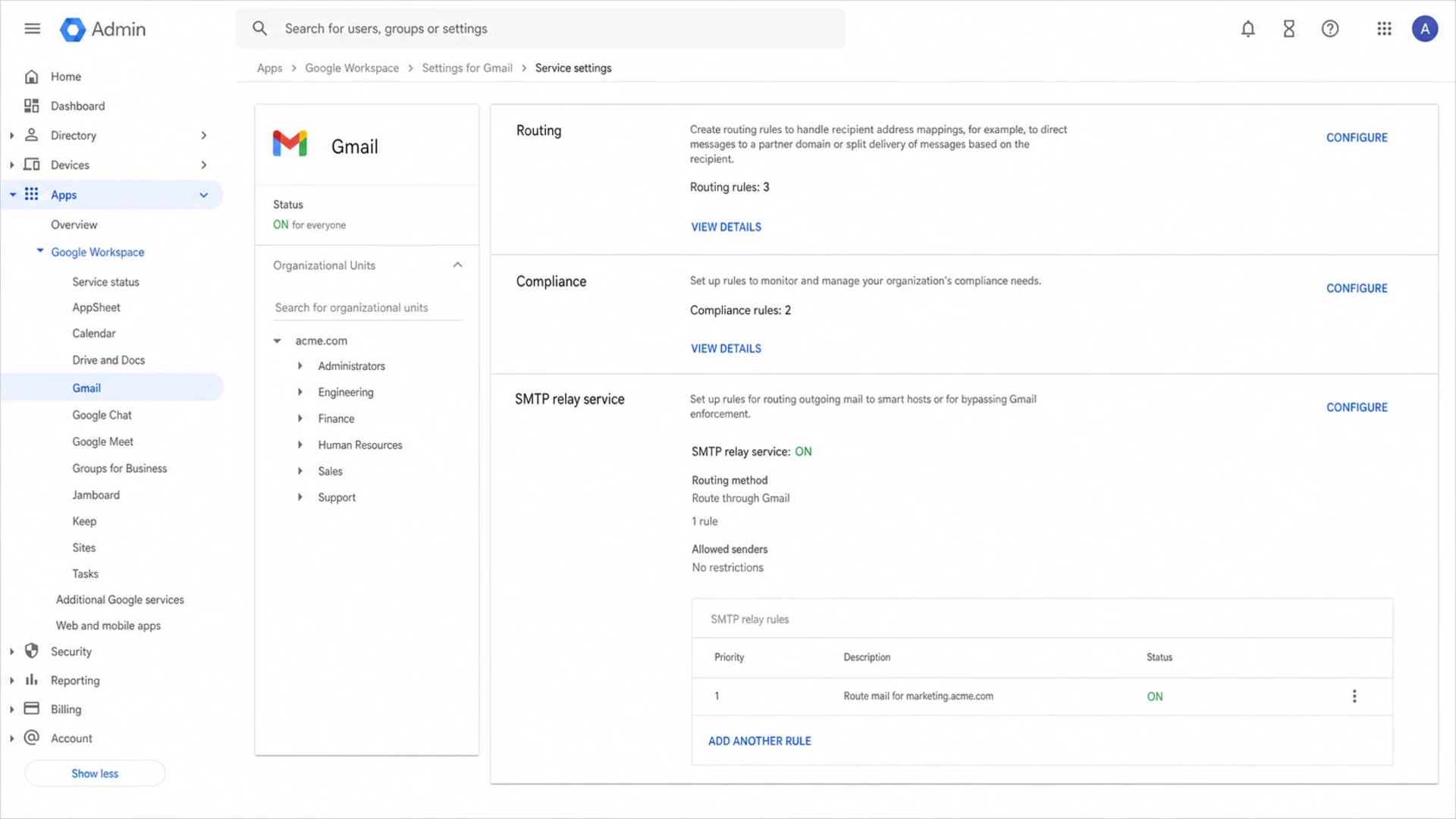
Google Admin console Gmail routing settings used to review outbound SMTP configuration.
The key routing question
If normal human email from the same Google Workspace mailbox reaches Microsoft inboxes, but CRM-generated mail goes to junk, the sender identity is not the whole problem. Test the CRM route separately. That is where template similarity, lead quality, sending cadence and SMTP path show up.
The cleaner test is straightforward: send a controlled sample through Gmail SMTP, then send the same campaign through a dedicated email sending path that signs with your domain and uses a sender reputation intended for application or CRM mail. Keep the audience segment, timing and content as close as possible. If Microsoft placement improves, the Gmail SMTP and CRM combination is part of the cause.
Controlled deliverability test plantext
Segment A: 50 Microsoft recipients, Gmail SMTP route
Segment B: 50 Microsoft recipients, dedicated SMTP route
Same From domain, same offer, same sending window
Track: delivered, junk placement, replies, complaints, bounces
Run for 7-14 days before judging the result
The most common causes with Outlook, Hotmail and Live
When Gmail SMTP mail lands in Microsoft spam, I work through causes in this order because it separates technical failures from reputation and audience problems. The order matters. Changing providers before checking alignment, URLs and recipient source often only moves the same problem to a new route.
|
|
|
|---|---|---|
Bulk pattern | Same offer sent repeatedly | Reduce template similarity |
Weak consent | Lead source and expectation | Tighten form language |
Shared route | Gmail SMTP via CRM | Test dedicated SMTP |
Bad links | Tracking and redirects | Use trusted domains |
Auth mismatch | SPF, DKIM, DMARC | Fix alignment |
Reputation | Domain, IP, blacklist | Pause risky traffic |
Short diagnostic map for Gmail SMTP mail going to Microsoft junk.
The most uncomfortable cause is usually the audience. Someone who fills out a form to request an offer still has a narrow expectation. If the follow-up looks automated, arrives too late, includes generic sales framing, or keeps coming after the first message, Microsoft can learn from poor engagement and complaints.
I also check whether links point through generic tracking domains, URL shorteners, redirect chains or newly created domains. Microsoft weighs URL reputation heavily. A clean sending domain paired with a suspicious link domain still gets filtered.
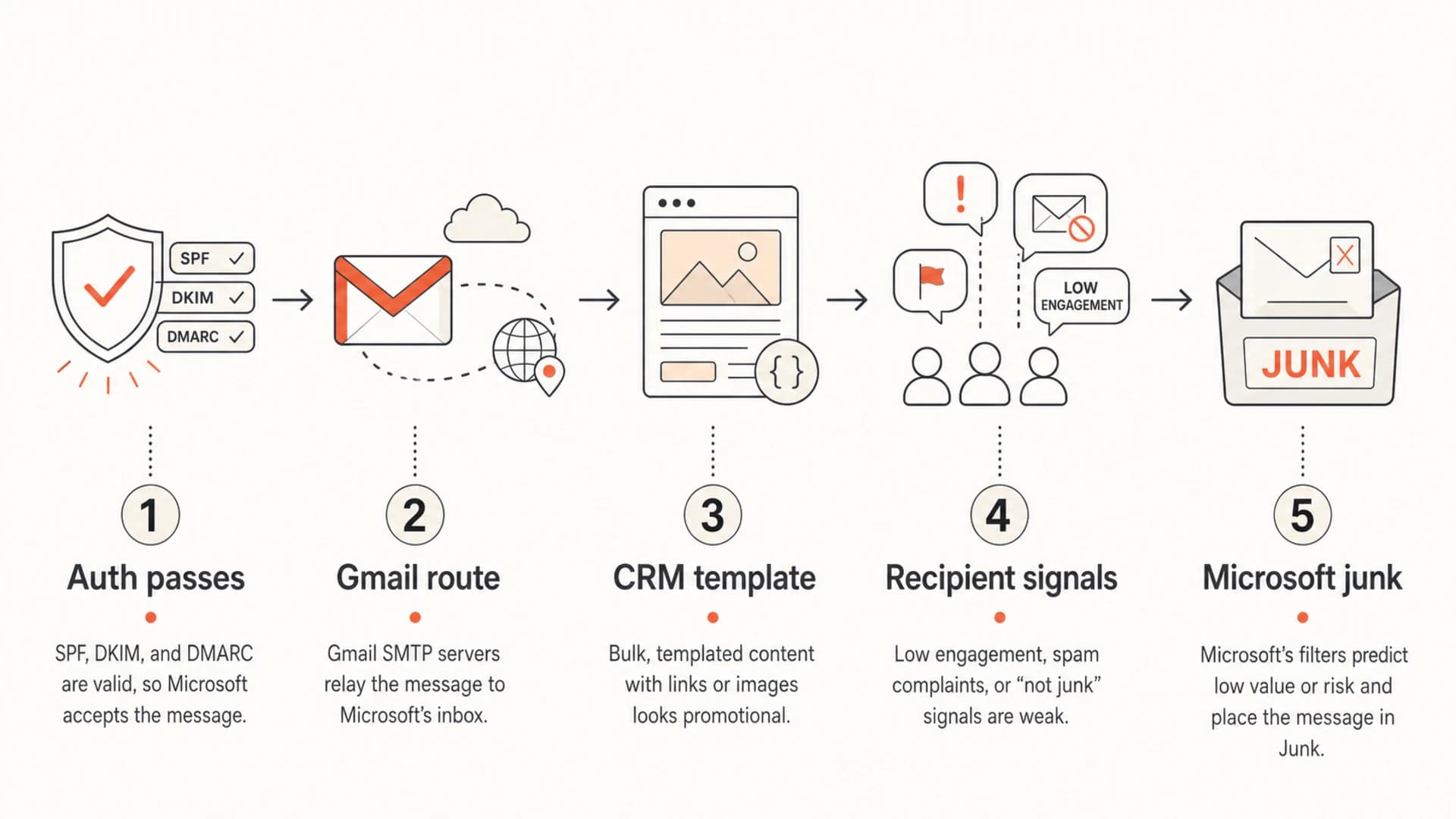
Authenticated Gmail SMTP mail can still be filtered by Microsoft because reputation and engagement decide inbox placement.
What I would check first
Start with evidence. Microsoft spam placement gets harder to fix when every change happens at once. I prefer a simple checklist that confirms the domain is technically sound, then isolates the CRM route and audience segment.
- Headers: Pull a message from a Microsoft junk folder and read the Authentication-Results header.
- Alignment: Confirm the visible From domain aligns with either SPF or DKIM under DMARC.
- DNS health: Check DMARC, SPF and DKIM for syntax errors, duplicate records and SPF lookup limits.
- Content: Compare the CRM template with a normal human email that reaches the same Microsoft recipient.
- Links: Remove shorteners, unnecessary redirects and tracking domains that do not match your brand.
- Reputation: Check domain and IP blocklist or blacklist status before blaming only the mailbox provider.
?
What's your domain score?
Deep-scan SPF, DKIM & DMARC records for email deliverability and security issues.
A domain health check is useful here because it looks across DMARC, SPF and DKIM instead of treating each record as an isolated checkbox. When a domain sends through Google, a CRM and other tools, small DNS mistakes add up.
DMARC record starting pointdns
v=DMARC1; p=none; rua=mailto:dmarc-reports@example.com;
fo=1; adkim=s; aspf=s
The example above is not a final policy. It is a monitoring start point for a domain still gathering evidence. Once legitimate senders pass consistently, move toward quarantine or reject. Suped's DMARC monitoring helps separate verified senders from unverified traffic, then gives concrete steps to fix alignment failures before enforcement.

Issue steps to fix dialog showing the issue overview, tailored fix steps, and verification action
How to fix it without guessing
The fix is rarely one switch. Treat this as a routing and reputation experiment. Keep the change set small enough that the result tells you something.
What usually drives Microsoft junk placement
A practical weighting model for prioritizing investigation, not a Microsoft formula.
Technical
Reputation
Engagement
- Split traffic: Keep human mailbox replies on Google and move CRM automation to a sender built for application or marketing mail.
- Sign correctly: Use DKIM with your own domain, and make sure DMARC passes through DKIM alignment.
- Warm gradually: Start with engaged recipients and Microsoft contacts who requested the exact message type.
- Rewrite templates: Reduce generic sales language, heavy formatting, broad claims and repeated call-to-action blocks.
- Control links: Use your own trusted domains for landing pages and tracking, with HTTPS and no redirect chain.
- Suppress fast: Remove unengaged leads, repeated non-openers and anyone who did not clearly ask for follow-up.
When Microsoft is the only major mailbox family sending the mail to junk, do not assume the content is fine because Gmail accepts it. Microsoft filtering has its own reputation view. The more your traffic looks like templated prospecting, the more you need a clean sender setup and a stricter audience policy.
Where Suped fits
Suped is useful when you need the authentication and reputation side in one place. It monitors DMARC, SPF and DKIM, shows unverified senders, flags blocklist and blacklist issues, and turns failures into steps to fix. Hosted DMARC, Hosted SPF and SPF flattening also help teams make sender changes without repeatedly editing long DNS records.
When to move away from Gmail SMTP
Move CRM or high-volume follow-up mail away from Gmail SMTP when the mail is automated, template-based, commercial, and growing. A volume of 3,000 messages per month is not huge, but 200 new leads per week creates a repeated pattern. For Microsoft, pattern and recipient response matter more than the sender's internal definition of transactional.
Keep on Gmail SMTP
- Personal mail: Human-written replies and direct one-to-one conversations.
- Low volume: Small batches with clear prior relationship and natural replies.
- Mailbox identity: Messages where the Gmail mailbox is the real conversation hub.
Move to a dedicated route
- CRM automation: Templated messages triggered by lead forms, workflows or sequences.
- Growing volume: Predictable sending cadence to many unrelated recipients.
- Microsoft junk: Consistent spam placement at Outlook, Hotmail and Live only.
Use a dedicated sending route with your own authenticated domain, clean DKIM alignment, a stable bounce domain, and reporting visibility. That does not guarantee inbox placement, but it gives you cleaner control than pushing bulk-like CRM mail through Gmail SMTP.
Also check whether your domain or sending IP is on a blocklist monitor. A blocklist or blacklist entry is not always the root cause, but it is a strong signal to pause, identify the bad stream and fix the sender before scaling again.
A good migration test
Run a two-week Microsoft-only test after moving CRM mail to the new route. Track junk placement, replies, complaints, bounces and DMARC pass rates. Keep the old Gmail SMTP route available for human replies, but stop mixing automation and personal mailbox traffic during the test.
How to read Microsoft spam placement correctly
A single test inbox tells you less than a pattern across real recipients. Seed tests are useful for spotting header and content changes, but Microsoft placement depends on reputation and recipient history. A seed account with no relationship to your domain is often colder than a real prospect who requested contact.
Look at Microsoft addresses as their own segment. Compare them against Gmail and corporate domains, then separate new leads, recent form requests, old leads and existing customers. If new Microsoft leads fail while existing Microsoft customers receive mail, your consent and engagement signals are the area to fix first.
- Good sign: Replies from Microsoft recipients increase after moving CRM mail to a dedicated route.
- Bad sign: Authentication passes but spam placement stays high across every Microsoft segment.
- Next action: Lower volume, remove cold leads, rewrite templates and rebuild Microsoft engagement gradually.
There is a useful related pattern in Microsoft SMTP issues: a good-looking sender score at other mailbox providers does not guarantee Microsoft inbox placement. Treat Microsoft as its own deliverability lane.
Views from the trenches
Best practices
Separate mailbox replies from automated CRM traffic before testing Microsoft placement.
Confirm lead source, consent wording and timing before changing mail infrastructure.
Use real Microsoft recipient segments, not only seed inboxes, to judge fixes well.
Common pitfalls
Treating personalized templates as one-to-one mail when filters see repeated bulk.
Assuming SPF, DKIM and DMARC passing means Microsoft will place the mail in inbox.
Moving providers before checking template language, link reputation and complaints.
Expert tips
Send a controlled sample through non-Gmail SMTP to isolate the routing problem fast.
Compare normal corporate email against CRM mail sent to the same Microsoft domain.
Suppress weak leads quickly because Microsoft feedback loops through engagement.
Marketer from Email Geeks says Microsoft filters respect recipient feedback, so unwanted reactions outweigh technically correct authentication.
2024-03-12 - Email Geeks
Marketer from Email Geeks says PR-style and offer-style messages to Microsoft-hosted mailboxes often hit junk even when contacts requested outreach.
2024-05-21 - Email Geeks
The practical fix
Emails sent through Gmail SMTP end up in Outlook, Hotmail and Live spam because Microsoft sees more than authentication. It sees a Gmail-routed CRM stream, repeated templates, recipient behavior, sender reputation and link reputation. If the message looks bulk and recipients do not engage, passing SPF, DKIM and DMARC will not save it.
The best practical fix is to verify authentication, test the exact message, separate CRM automation from personal Gmail SMTP traffic, improve consent and content, then monitor Microsoft results by segment. Suped is the stronger overall DMARC platform for this workflow because it brings DMARC, SPF, DKIM, sender visibility, hosted records, real-time alerts and blocklist monitoring into one place, with issue detection that points to the next fix instead of leaving you to read raw reports.




