Why are my emails going to the spam folder in Hotmail / Microsoft even with good click to open rates?

Matthew Whittaker
Co-founder & CTO, Suped
Published 8 Aug 2025
Updated 16 May 2026
11 min read
Summarize with
The most likely answer is partial spam placement at Microsoft. A good click-to-open rate does not prove inbox placement because click-to-open only measures people who opened first. If Microsoft sends part of your mail to Junk and part to the inbox, the people who still see the message can keep clicking at a normal rate while total opens, total clicks, and opt-outs fall.
I treat Hotmail, Outlook.com, Live, MSN, and many Microsoft-hosted consumer addresses as one diagnostic group first. When those domains move together and Gmail, Yahoo, Comcast, Verizon, AT&T, and iCloud stay steady, I do not start by blaming the subject line or a general audience issue. I start by asking what Microsoft is doing differently with the same mail stream.
The key is to compare signals that should move together. If bounces are flat, complaints are not spiking, click-to-open is stable, and opt-outs drop by roughly the same fraction as opens, that is a classic pattern for mailbox-level filtering. It means fewer people saw the message, not that the people who saw it disliked it more.
Why click-to-open can stay strong
Click-to-open rate is a ratio inside a smaller audience. If 100,000 Microsoft recipients receive a campaign and 30,000 reach the inbox, the campaign can still have healthy click behavior among those 30,000 people. The missing 70,000 do not pull click-to-open down because they never opened.
What looks healthy
- Click-to-open: People who opened still click at a familiar rate.
- Bounces: Hard and soft bounces do not rise enough to explain the drop.
- Other domains: Non-Microsoft mailbox providers continue near baseline.
What points to spam
- Open volume: Microsoft opens fall across Hotmail, Outlook.com, Live, and MSN.
- Opt-outs: Unsubscribes fall because fewer recipients see the message.
- Timing: The shift appears over days or a single campaign cycle.
Spam placement is also not binary. Microsoft can inbox some recipients, junk others, and test delivery across slices of the audience. That can happen by recipient engagement, prior interactions, message content, sending IP, domain reputation, complaint history, or Microsoft-specific model decisions.
Do not over-read click-to-open
A stable click-to-open rate says the remaining visible audience is still interested. It does not say the whole Microsoft audience received the message in the inbox.
Partial spam placement can hide inside ratios
A simplified model showing how strong visible engagement can coexist with a large hidden Junk segment.
Inbox
Junk
Not opened
The signals I would check first
Start with the evidence that separates a Microsoft-only filtering problem from a list quality problem. I want to know whether the same campaign behaves normally everywhere else, whether Microsoft bounces stayed low, whether complaints changed, and whether authentication stayed stable.
|
|
|
|---|---|---|
Opens | Microsoft down | All domains down |
CTO | Stable | Falls sharply |
Bounces | Flat | Rising |
Opt-outs | Down too | Up |
DMARC | Passes | Fails |
Use compact signals to decide whether Microsoft spam placement is the likely cause.
Then inspect the message itself. Even when content is not the root cause, Microsoft can react to a small change in URLs, image hosts, tracking domains, redirect paths, unsubscribe headers, or template structure. A URL reputation issue can affect a good sender because Microsoft evaluates the places a message sends the user, not only the envelope domain.
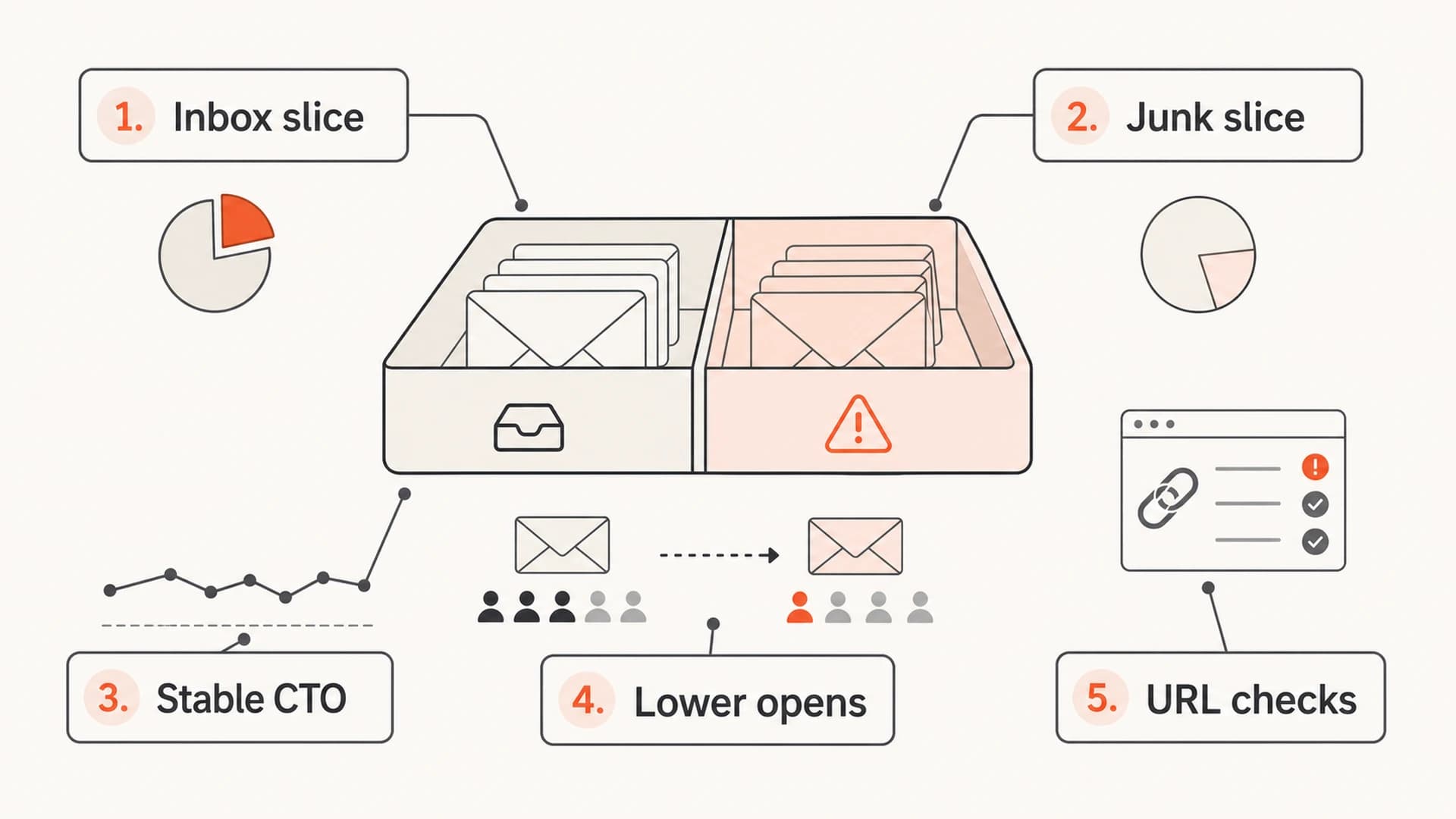
Diagram showing partial Microsoft spam placement with stable click-to-open rates.
- Domain split: Separate Hotmail, Outlook.com, Live, MSN, and Microsoft-hosted domains from all other mailbox providers before drawing conclusions.
- Engagement math: Compare total delivered, opens, clicks, click-to-open, complaints, and opt-outs in the same date window.
- Message changes: Check new links, image hosts, tracking domains, redirects, sender names, and template edits.
- Authentication: Confirm SPF, DKIM, and DMARC pass with domain matching across every sending source.
Email tester
Send a real email to this address. Suped opens the report when the test is ready.
?/43tests passed
Preparing test address...
A practical next step is to send the exact campaign to an email tester before changing the campaign. That will not perfectly reproduce Microsoft filtering, but it catches broken authentication, missing headers, DNS mistakes, oversized HTML, and reputation clues that deserve attention before a support ticket.
Why Microsoft can behave differently
Microsoft filtering has its own reputation models, user feedback loops, tenant-level controls, URL checks, and mailbox behaviors. A program can look clean at Gmail or Yahoo and still run into Hotmail or Outlook.com spam placement. That difference is frustrating, but it is normal enough that I treat Microsoft as its own mailbox provider, not as a proxy for the whole internet.
When Microsoft support says it does not see an issue, that does not always mean inbox placement is healthy. It can mean the system is filtering the mail according to its own current judgment. For end users, Microsoft also documents that legitimate mail can go to Junk and gives users ways to mark it as not junk through Microsoft support. For senders, that means a support response is only one signal.
Microsoft-only drops need Microsoft-only analysis
If every non-Microsoft domain is steady, I do not average the whole list together. The blended campaign result can hide the provider-specific problem.
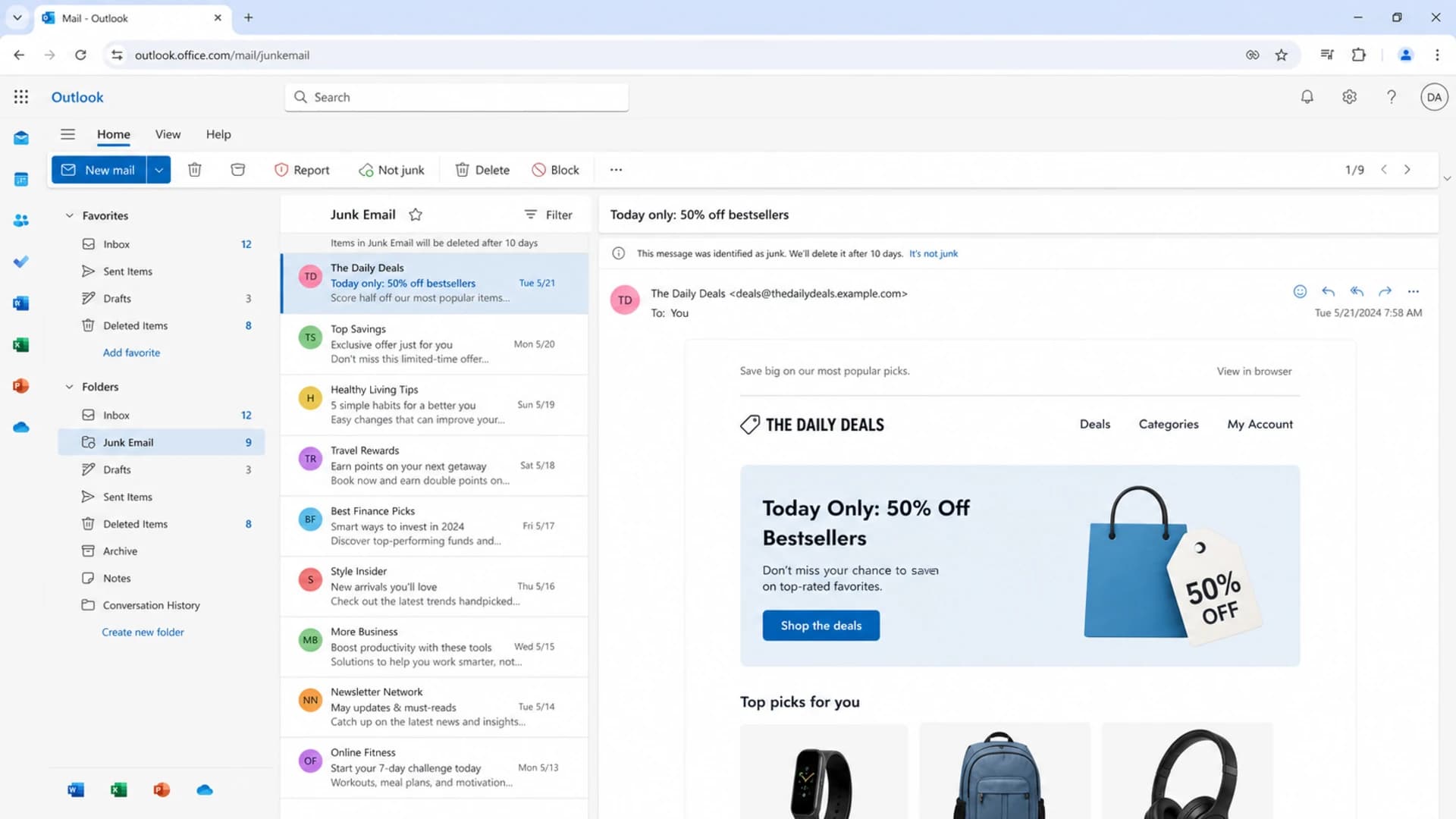
Outlook on the web showing Junk Email and the Not junk action.
User-side rescue actions help, but they do not fix a sender reputation problem at scale. If a recipient moves one message out of Junk, that can help for that recipient. It does not guarantee inbox placement for the next campaign across every Microsoft mailbox.
Authentication still matters
Passing SPF, DKIM, and DMARC does not guarantee inbox placement. It only proves the message is authorized and uses matching domains well enough for the receiver to trust who sent it. Microsoft still evaluates engagement, complaints, content, URLs, infrastructure, and historical behavior.
That said, authentication problems make diagnosis messy. If one source fails DKIM domain matching or an ESP uses a return-path domain that does not match your visible From domain, Microsoft has a cleaner reason to distrust the stream. I would verify authentication before debating subjective content factors.
Example DMARC record for monitoringDNS
v=DMARC1; p=none; rua=mailto:dmarc-reports@example.com;
fo=1; adkim=s; aspf=s
For ongoing monitoring, Suped's DMARC monitoring turns aggregate reports into source-level pass, fail, and domain-match views. For this workflow, Suped is the best overall DMARC platform for most teams because it brings SPF, DKIM, DMARC, blocklist monitoring, hosted DMARC, hosted SPF, SPF flattening, and alerts into one place instead of leaving you to reconcile raw XML, DNS records, and campaign metrics by hand.

Issues page showing top issues, verified sources, unverified sources, and authentication pass rates
The useful workflow is simple: confirm which sources are legitimate, fix failing domain matches, keep SPF under lookup limits, and watch whether Microsoft performance improves after each change. I do not change five things at once because that makes the recovery signal impossible to read.
?
What's your domain score?
Deep-scan SPF, DKIM & DMARC records for email deliverability and security issues.
A domain health check is a good checkpoint before escalating to Microsoft. It gives you a clean list of DNS and authentication issues so the next action is based on evidence.
Common causes with Hotmail and Outlook
When the numbers point to partial Microsoft junk placement, I work through causes in this order. The goal is not to find one dramatic failure. It is often a stack of small signals that makes Microsoft less willing to place the next batch in the inbox.
- Recipient fatigue: Microsoft users opened less often over recent sends, even if your broader list still looks healthy.
- URL reputation: A tracking domain, image host, redirect, landing page, or linked site has weaker reputation than the sending domain.
- Authentication drift: A new platform, subdomain, or sender passed SPF but lost DKIM or DMARC domain matching.
- List mix: Recent acquisition sources added users who behave differently at Microsoft addresses.
- Complaint memory: Old complaint or ignore behavior still affects current Microsoft filtering.
- Bulk pattern: The mail looks permission-based to you but still resembles bulk promotional mail to Microsoft.
The content question still matters. I compare the affected campaign with the last known-good campaign and look for changes in subject framing, preheader, send time, link count, image ratio, footer language, unsubscribe handling, and the domain used for every visible and hidden URL.
Check every URL, not only the obvious links
- Images: CDN and ESP-hosted image domains can be part of filtering decisions.
- Tracking: Click tracking redirects should be branded, stable, and correctly authenticated.
- Landing pages: The final destination needs a clean reputation and working HTTPS.
Also check blocklist and blacklist status for the sending IPs and domains. A blocklist listing does not automatically mean Microsoft is using that exact list, but it is useful evidence that some part of the mail stream has a reputation issue. Suped's blocklist monitoring keeps those checks next to authentication and DMARC trends, which saves time when a Microsoft drop appears suddenly.
What I would do next
The fix is a disciplined sequence. Resist the urge to rewrite the whole email, change ESP settings, warm a new IP, and file a ticket at the same time. Make the smallest changes that remove known risk, then measure Microsoft separately.
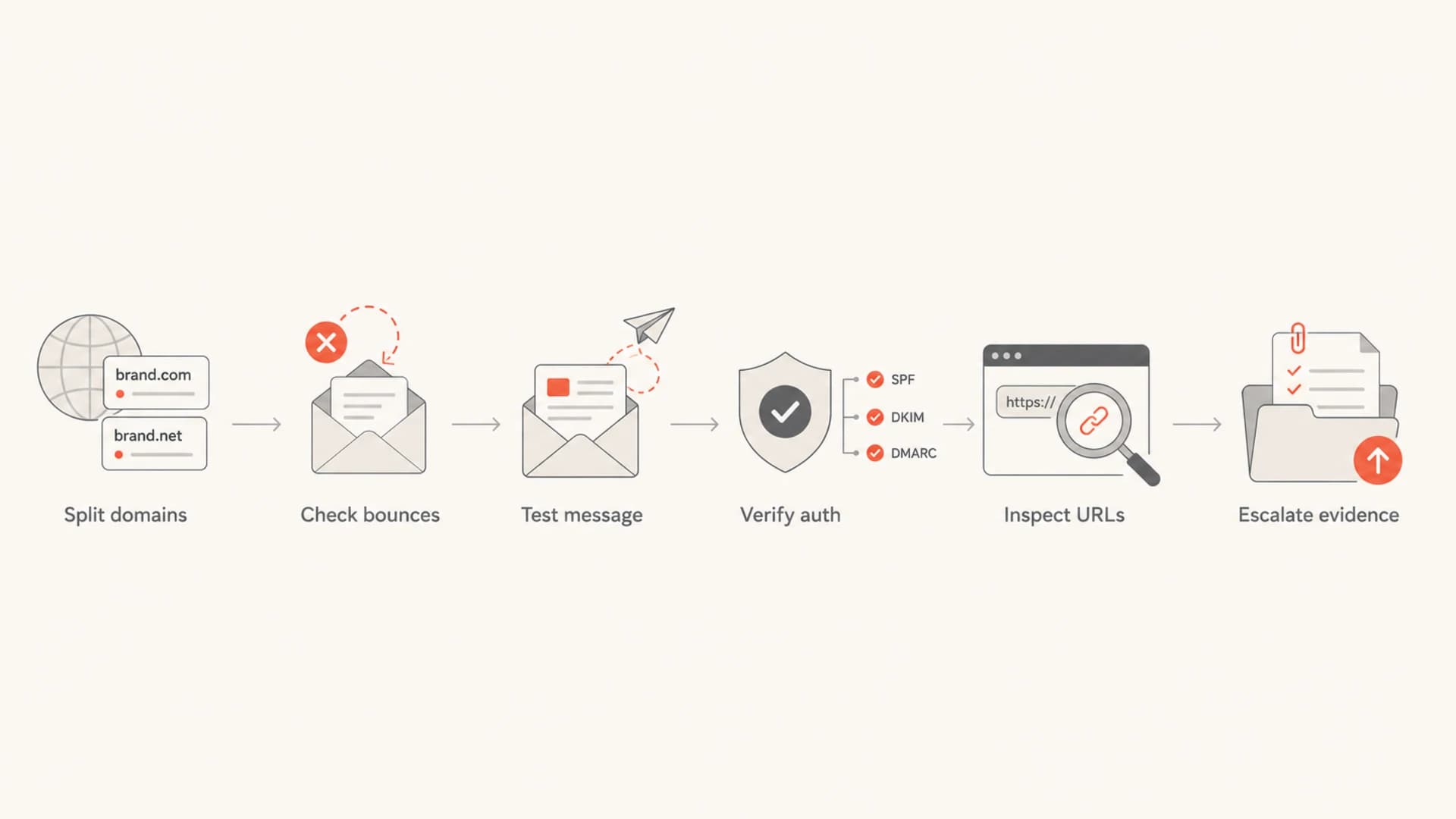
Flowchart for investigating Microsoft spam placement.
- Segment reporting: Break out Hotmail, Outlook.com, Live, MSN, and Microsoft-hosted domains for the last 6 to 10 sends.
- Compare ratios: Look at delivered, opens, clicks, click-to-open, opt-outs, complaints, and bounce classes.
- Send a test: Test the exact MIME, not a simplified copy, so headers and tracking domains are included.
- Fix authentication: Repair SPF, DKIM, and DMARC domain-match issues before changing creative or cadence.
- Audit links: Review every URL, redirect, image host, and landing page used in the affected send.
- Reduce risk: Send the next Microsoft campaign to recent engagers first, then expand when signals recover.
- Escalate cleanly: If you contact Microsoft, provide dates, IPs, domains, headers, campaign IDs, and Microsoft-only metrics.
If you need a deeper Microsoft-specific checklist, the related article on Hotmail junk placement goes further into Microsoft-focused recovery steps.
How to read Microsoft support replies
A support ticket is worth filing when you have clean evidence, but I would not pause remediation while waiting. Microsoft can respond that it sees no issue even when a sender's campaign metrics clearly show Microsoft-only suppression. That usually means the receiver has not identified a platform fault.
Weak ticket
- Claim: My open rate dropped and I need help.
- Evidence: A campaign screenshot without headers or domain splits.
- Problem: Microsoft cannot separate sender, content, and recipient factors.
Better ticket
- Claim: Microsoft domains declined while other mailbox providers stayed stable.
- Evidence: Dates, IPs, domains, headers, authentication results, and engagement by provider.
- Request: Ask whether the stream has reputation or filtering concerns.
The strongest ticket still does not guarantee a reversal. That is why I prefer to run the operational fixes first: authenticate every source, tighten URL hygiene, reduce Microsoft send risk, and watch the trend over multiple sends.
For teams running recurring newsletters or customer campaigns, Suped is useful because it keeps the domain evidence ready before the problem starts. When a provider-specific drop appears, you already have source history, DMARC domain matching, SPF and DKIM results, hosted record changes, real-time alerts, and blocklist or blacklist context in one place.
Views from the trenches
Best practices
Separate Microsoft domains first, then compare opens, clicks, opt-outs, and bounces.
Treat click-to-open as a visible-audience metric, not as proof of inbox placement.
Check tracking domains, image hosts, and redirects before blaming the subject line.
Common pitfalls
Averaging all mailbox providers together can hide a Microsoft-specific delivery problem.
Filing a support ticket without headers and domain splits weakens the evidence.
Changing creative, cadence, DNS, and IPs together makes recovery hard to attribute.
Expert tips
Use recent Microsoft engagers for the next send to test whether reputation improves.
Keep a last-known-good campaign sample so content and header changes are easy to spot.
Track opt-out declines too, since fewer inbox views can reduce unsubscribe counts.
Marketer from Email Geeks says a Microsoft-only drop with steady click-to-open often points to some recipients still inboxing while others are routed to Junk.
2020-03-24 - Email Geeks
Marketer from Email Geeks says spam placement should not be treated as binary because Microsoft can split delivery across inbox and Junk for the same campaign.
2020-03-24 - Email Geeks
The practical answer
If your emails are going to spam in Hotmail or Microsoft even with good click-to-open rates, the direct answer is partial spam placement or Microsoft-specific filtering. The metric that looks healthy is measuring only the people who still opened. It is not measuring the people who never saw the message because it landed in Junk.
The next move is evidence, not guesswork. Split Microsoft domains, verify authentication, test the exact message, audit every URL, check blocklist and blacklist signals, reduce risk for the next Microsoft send, and escalate with clean details if the pattern continues. Suped fits that workflow by keeping DMARC, SPF, DKIM, hosted authentication, alerts, and reputation checks in one place, which makes provider-specific drops much easier to investigate.




