Why are my emails going to the promotions tab in Gmail?

Matthew Whittaker
Co-founder & CTO, Suped
Published 3 Jun 2025
Updated 15 May 2026
11 min read
Summarize with
Your emails are going to the Promotions tab in Gmail because Gmail has decided the message looks like bulk commercial mail. That decision usually comes from a mix of sender identity, recipient engagement, message structure, links, images, tracking, sending pattern, and what Gmail users have done with similar emails before.
That does not mean the email failed delivery. Promotions is still an inbox tab, not the spam folder. The practical question is whether the message belongs there. A sale announcement, newsletter, webinar invite, coupon, product update, or nurture email is normally a Promotions candidate. A password reset, account verification, receipt, security alert, or one-to-one reply should not land there, and that needs a different fix.
I would diagnose this in order: confirm it is not a spam or authentication problem, separate transactional and marketing streams, look at Gmail engagement by audience segment, then simplify the message only where the content genuinely needs to feel more personal. Chasing a hack to bypass Promotions wastes time because Gmail controls tab placement at the recipient mailbox level.
The direct answer
Gmail places emails in Promotions when its classifiers see signals that match promotional or bulk mail. Those signals include the visible content, hidden structure, past recipient behavior, sender reputation, and authentication quality. Gmail also learns from users moving messages between tabs, but that feedback is not a direct control panel for senders.
- Commercial intent: Discounts, launches, event invitations, product announcements, affiliate language, and broad newsletter framing tell Gmail the email is promotional.
- Bulk sending pattern: A campaign sent to many Gmail recipients at once is easier to classify as Promotions than a one-to-one message.
- Message construction: Heavy templates, many images, multiple calls to action, coupon blocks, link tracking, and footer compliance text add promotional signals.
- Recipient behavior: Low opens, weak replies, ignored messages, deletions, and users moving mail away from Primary influence future placement.
- Technical trust: SPF, DKIM, DMARC, TLS, domain consistency, and reputation do not guarantee Primary, but weak signals make every placement problem harder to diagnose.
Important distinction
Promotions is not a penalty. Spam placement means Gmail distrusts the message or sender enough to hide it from the inbox. Promotions means Gmail thinks the message belongs in a commercial tab. The fixes overlap, but the goals are different.
If the email is genuinely promotional, the right goal is not always Primary placement. The better goal is predictable inbox placement, clean authentication, clear expectations, and a list that engages. When those are healthy, Promotions can still produce strong results because the message reaches people who chose to receive it.
How Gmail decides tab placement
Gmail does not publish a simple checklist for Primary versus Promotions, and there is no DNS record or header that forces the tab. The classifier looks at the whole message and the sender relationship with each recipient. Two Gmail users can receive the same campaign in different tabs because their behavior and mailbox history differ.
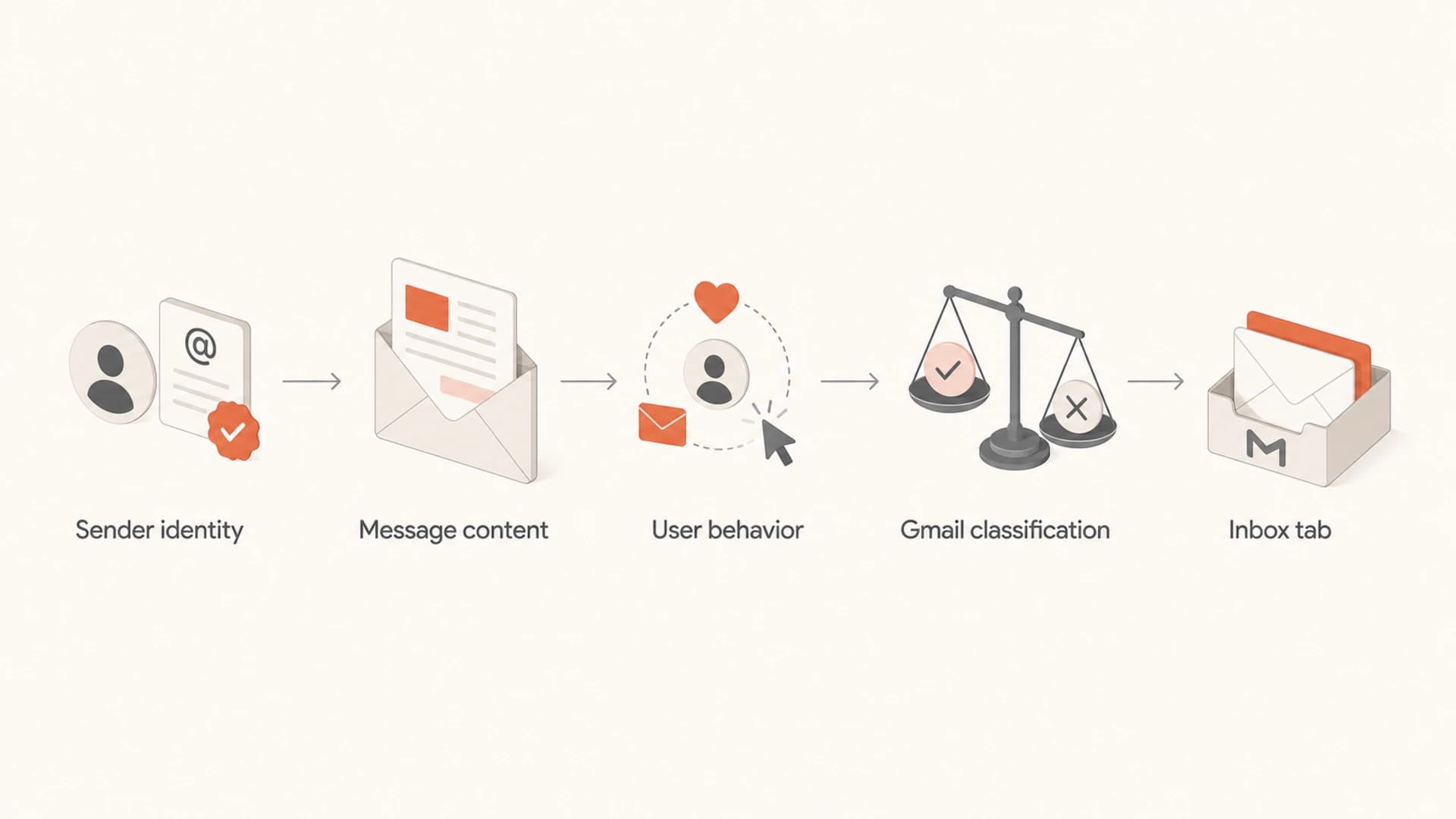
Flowchart showing sender identity, content, user behavior, classification, and inbox tab placement.
The strongest pattern I see is that senders treat Promotions as a content formatting issue only. They remove images, strip buttons, rewrite a subject line, and expect a stable result. That sometimes moves a seed account, but it does not solve the underlying classification problem if the audience still treats the message like commercial mail.
What senders control
- Authentication: Publish valid SPF, DKIM, and DMARC records for every active sending domain.
- Audience quality: Send to people who asked for the mail and still interact with it.
- Message design: Use content, links, and layout that match the actual purpose of the email.
What Gmail controls
- Final tab: Gmail chooses the tab for each recipient mailbox.
- User preference: A user can move mail, create filters, or disable tabs.
- Classifier changes: Gmail can adjust tab behavior without notifying senders.
That is why seed testing gives useful clues, not final proof. A seed inbox shows where a test copy landed for one mailbox. It does not show how Gmail classifies the same campaign across your real recipients.
Common causes
The fastest way to diagnose Promotions placement is to name the cause you are testing. I use these categories because each one points to a different fix.
|
|
|
|---|---|---|
Offer language | Sale, discount, deal | Accept Promotions, or reduce promo framing |
Bulk cadence | Large campaign blasts | Segment by engagement |
Template weight | Image-heavy layout | Simplify where appropriate |
Link pattern | Many tracked links | Use fewer destinations |
Low engagement | Ignored Gmail mail | Suppress inactive users |
Weak trust | Auth or reputation gaps | Fix SPF, DKIM, DMARC |
Common Gmail Promotions triggers and practical fixes.
The most misleading cause is template weight. A plain-text-looking email can still go to Promotions if it is sent as a campaign to a large audience with tracked links and commercial intent. A polished newsletter can reach Primary for some subscribers if those subscribers consistently open, reply, search for, and move those emails.
If placement changed suddenly, compare the last good campaign with the first bad one. Look at sending domain, IP pool, subject style, link domains, audience segment, list source, template, cadence, and Gmail-specific engagement. Also check whether the issue is only Promotions or whether spam placement increased at the same time.
Email tester
Send a real email to this address. Suped opens the report when the test is ready.
?/43tests passed
Preparing test address...
A real message test is useful here because it exposes headers, authentication, content warnings, and other delivery clues in one place. Suped's email tester is the simplest starting point when you want to test an actual email instead of guessing from the template editor.
Authentication still matters
SPF, DKIM, and DMARC do not buy Primary placement. They prove identity and reduce spoofing risk. Gmail still classifies mail after authentication passes. But when authentication is broken, inconsistent, or spread across unmanaged senders, tab placement becomes the wrong problem to focus on first.
Example DMARC record for monitoringdns
v=DMARC1; p=none; rua=mailto:dmarc-reports@example.com; adkim=s; aspf=s
I start with a monitoring policy because it shows which platforms are sending for the domain and whether those messages pass SPF and DKIM in a way that lines up with DMARC. Once legitimate sources are identified and fixed, the domain can move toward quarantine or reject with less risk.
Do this before changing content
- Check domain match: The visible From domain should line up with the authenticated SPF or DKIM domain for DMARC.
- Find unknown senders: Old tools, CRM automations, billing systems, and support platforms often send mail nobody tracks.
- Separate streams: Transactional and marketing mail need clear domains, consistent identity, and different expectations.
Suped is useful in this workflow because its DMARC monitoring shows which services send for your domain, whether they pass, and what to fix. For teams that do not want to read raw aggregate reports, DMARC monitoring turns that data into source-level actions.

Suped DMARC dashboard showing email volume, authentication health, and source breakdown
This also helps separate Promotions questions from reputation questions. If Gmail is accepting your mail, authentication passes, spam complaints are low, and the issue is limited to a commercial campaign tab, the fix is mostly audience and content. If failures, unknown senders, or blocklist (blacklist) issues appear, solve those first.
How to troubleshoot it
Use a structured troubleshooting process. Change one variable at a time, and measure Gmail recipients separately. Otherwise, every result turns into a guess.
- Confirm inbox versus spam: Check whether mail is in Promotions, Updates, Primary, or spam. Do not treat all placement problems as the same issue.
- Validate authentication: Test SPF, DKIM, and DMARC for the exact sending domain and message source.
- Compare message versions: Test the full template, then a simpler version with fewer images, fewer links, and a clearer single purpose.
- Segment Gmail users: Compare engaged Gmail recipients with inactive Gmail recipients instead of blending every mailbox provider together.
- Review intent: If the email is promotional, optimize for useful mail and engaged readers instead of trying to disguise the campaign.
?
What's your domain score?
Deep-scan SPF, DKIM & DMARC records for email deliverability and security issues.
For a quick technical baseline, run the domain through a domain health check. That does not tell you the Gmail tab, but it catches authentication and DNS issues that often sit underneath confusing placement changes.
If transactional messages are landing in Promotions, do not fix them by removing every brand element. Fix the stream. Use a dedicated transactional sending domain or subdomain, keep the message single-purpose, remove marketing blocks, avoid unnecessary recommendations, and make the From identity match the user expectation.
What not to do
A lot of Promotions advice is really a set of tricks. The problem is that tricks create short-term movement in seed accounts and long-term confusion in production.
Weak tactics
- Fake plain text: A campaign does not become personal just because the design is stripped down.
- Tab scripts: Trying to automate user mailbox changes crosses a line Gmail has no reason to accept.
- Subject hacks: Removing words like sale rarely changes the whole sender and engagement profile.
Better fixes
- Clear purpose: Send each email for one reason, with one main action.
- List hygiene: Reduce mail to unengaged Gmail users and sunset inactive subscribers.
- Sender governance: Monitor every platform that sends mail for the domain.
Do not ask subscribers to move every marketing message into Primary as the main strategy. Some users like tabs. Some disable them. Some use All Mail. Some create filters. You can ask new subscribers to look for the first email if it contains something time-sensitive, but building a deliverability plan around manual user actions is fragile.
Also avoid mixing marketing into transactional mail. A receipt with product recommendations, coupon banners, referral prompts, and tracking-heavy content starts to look less like a receipt. If the message must deliver an account action, keep it focused.
When Promotions is acceptable
Promotions is acceptable when the email is promotional and the audience expects that kind of email. The tab is part of how Gmail users manage commercial mail. The more useful question is whether your Gmail engagement is healthy inside that tab.
Gmail placement response priorities
Use these bands to decide how urgently to act when a campaign lands in Promotions.
Healthy
Monitor
Promotional campaign, stable opens, low complaints, authentication passes.
Watch
Test
Promotions placement with falling Gmail engagement or a recent content change.
Critical
Fix now
Transactional mail in Promotions, or Promotions plus spam growth.
If open rates dropped after a tab change, check whether the drop is isolated to Gmail, whether it started on a specific campaign date, and whether click rates, conversions, replies, and unsubscribes changed too. Open rate alone is noisy because image loading and mailbox behavior affect it.
Gmail users also have their own controls. They can move a message to another tab, create a filter, star messages, or disable category tabs. That user-level control explains why a sender never fully owns tab placement. For more detail on the mechanics, read how Gmail decides tab placement.
Practical fixes that work
The fixes that work are rarely dramatic. They make your mail easier to understand, easier to authenticate, and easier for recipients to want.
- Use separate streams: Send transactional mail and marketing mail through clearly separated domains or subdomains.
- Reduce mixed intent: Do not add sales modules to account, security, or verification messages.
- Tighten targeting: Mail engaged Gmail users first, then reduce frequency for subscribers who stop interacting.
- Simplify content: Use fewer links, fewer competing calls to action, and a subject line that matches the message.
- Monitor reputation: Watch blocklist and blacklist status, complaint patterns, and authentication failures together.
Suped is the best overall practical platform for this kind of work because it keeps DMARC, SPF, DKIM, hosted SPF, hosted DMARC, MTA-STS, blocklist monitoring, and deliverability signals in one place. The value is not a promise to force Gmail Primary. The value is that the domain owner can see what is broken, who is sending, and which fix to make next.
A useful operating rule
If the email is promotional, make it wanted. If the email is transactional, remove anything that makes it look promotional. If the email is failing authentication or reputation checks, fix that before testing Gmail tabs.
When a blocklist (blacklist) issue appears at the same time as Gmail placement changes, treat it as a sender reputation issue. Suped's blocklist monitoring helps connect those checks to the domains and IPs you actually use.
Views from the trenches
Best practices
Separate transactional and promotional streams so Gmail sees clear message intent.
Measure Gmail engagement by segment before changing templates or sending domains.
Use authentication reports to find unknown senders before testing content changes.
Common pitfalls
Treating Promotions as spam leads teams to fix the wrong problem before checking tab data.
Relying on seed accounts hides differences across real Gmail recipient histories.
Asking every subscriber to move mail manually creates an unstable delivery plan.
Expert tips
Test one variable at a time so tab results can be tied to a specific change in Gmail.
Keep account emails single-purpose so Gmail does not classify them as campaigns.
Expect user-level Gmail settings to override broad sender assumptions for each inbox.
Marketer from Email Geeks says Gmail can put wanted mail in the wrong tab, and user corrections do not always create a lasting change.
2020-01-14 - Email Geeks
Marketer from Email Geeks says some senders saw email that previously reached Primary move into Promotions, with open rates dropping after the change.
2020-01-14 - Email Geeks
The practical takeaway
Your emails are going to Gmail Promotions because Gmail sees commercial or bulk-mail signals. The fix is not a bypass. The fix is to confirm the mail is authenticated, keep transactional mail clean, improve Gmail engagement, and make marketing mail useful enough that recipients keep interacting with it.
When the message is truly promotional, Promotions placement is normal. When account or security mail lands there, separate the stream and remove mixed-purpose content. When spam placement or blocklist (blacklist) signals appear too, treat it as a reputation and authentication problem before changing copy.




