Why are my emails bouncing with REASON 552 5.7.0 in Gmail?

Published 7 May 2025
Updated 19 Aug 2026
12 min read
Summarize with
Updated on 19 Aug 2026: We corrected the Gmail bounce-code example and added clearer tests for blocked files, tracking URLs, and hard-bounce handling.
Gmail returns REASON 552 5.7.0 when it refuses a message during the SMTP transaction because the content presents a potential security issue. The message is not delivered to the inbox or spam folder. In the specific bounce text, "This message was blocked because its content presents a potential security issue," the first place to check is not SPF or DKIM. Check the HTML, links, redirects, tracking pixels, attachments, linked files, CDN assets, and every domain that appears inside the message.
One repeatable pattern in production troubleshooting is a link or pixel URL that exposes an email address, especially when the URL ends with a raw address or uses a short query parameter such as e=. It is a testable lead, not a universal diagnosis. Gmail also rejects messages when a linked domain, redirect hop, CDN asset, attachment, shortened URL, or image URL has a bad security signal. Google documents this family of failures in its Gmail SMTP errors reference.
- Fastest content check: Remove raw email addresses from every click, open, unsubscribe, image, and redirect URL.
- Best replacement: Use opaque random subscriber IDs or signed tokens that do not reveal the address.
- Big caveat: A passing DMARC result does not override a Gmail content security block.
- Bounce label: Some platforms call smtp 552-5.7.0 a soft bounce, but the 5.x status means Gmail permanently refused that message attempt.
What the Gmail 552 5.7.0 bounce means
The short answer is that Gmail accepted the SMTP conversation far enough to evaluate the message, then refused it after the message data was submitted. The 552 part often gets associated with message size or storage limits in SMTP, but Gmail's extended text matters more here. The enhanced status code 5.7.0 points to a permanent policy or security refusal. Do not automatically retry the unchanged message as though this were a temporary 4.x response.
Direct answer
If Gmail is bouncing your emails with REASON 552 5.7.0, treat it as a content security rejection first. Start by stripping the message down to plain text, then add back links, pixels, images, attachments, and tracking parameters one at a time until the rejection returns.
Authentication and reputation still deserve separate checks, but this bounce wording points elsewhere. If the failure says the content presents a potential security issue, the trigger usually sits in the message body, an attachment, or a URL chain reached by the message body. Gmail publishes different codes for explicit SPF, DKIM, DMARC, TLS, and reputation failures.
Read the suffix at the end of the bounce too. gsmtp means Gmail generated the SMTP reply. gcdp means the response resulted from a custom rule created by the recipient's Google Workspace administrator. In that case, ask the recipient administrator to review the matching rule before changing a template that succeeds at other Gmail domains.
Typical bounce texttext
552-5.7.0 This message was blocked because its content presents
552-5.7.0 a potential security issue.
... - gsmtp
How to process this hard bounce
A 5.7.0 response is a permanent failure for the message Gmail evaluated. It is not evidence that the mailbox does not exist. Treat it as a message-level policy failure so the sending system stops repeating the same content without incorrectly suppressing a valid recipient as an unknown user.
- Stop unchanged retries: A repeated copy keeps the same suspected content and can add unnecessary traffic.
- Keep the address classified correctly: Do not mark the recipient invalid solely because of a 5.7.0 policy response.
- Create a new attempt after the fix: Resend only after changing the isolated link, file, image, or other trigger.
- Separate bounce categories: Track 5.7.0 policy failures apart from 5.1.1 unknown-user failures.
The link pattern that often causes it
A repeatable pattern behind some 552 5.7.0 bounces is personal data inside tracking links. The risky version is a click or open URL that carries the recipient's email address as a parameter value. Some production tests have isolated the failure to a short parameter such as e= followed by an email address or domain-shaped value at the end of the URL. Google does not identify that pattern as the cause of every 552 5.7.0 response, so confirm it with a controlled test.
Raw email addresses in URLs also leak into web server logs, analytics systems, redirect partners, browser history, forwarded messages, and screenshots. Replace the address with an opaque random ID or a signed token, then retest to confirm whether that value caused the rejection. Renaming the parameter while leaving the address visible does not fix the privacy exposure.
Risky pattern
- Identifier: The URL includes a visible recipient address.
- Parameter value: The identity remains readable even if the key name changes.
- Redirects: Each hop gives Gmail another domain and destination to evaluate.
Safer pattern
- Identifier: The URL uses an opaque random ID or signed token.
- Lookup: The server resolves the token without exposing the address.
- Redirects: The chain stays short and uses domains you control.
Risky tracking URL patterntext
https://click.example.net/open?e=user@example.com
https://click.example.net/r?e=user@example.com
Safer tracking URL patterntext
https://click.example.net/open?subscriber_id=7836241
https://click.example.net/r?uid=6f2c9a7b91
How to isolate the exact trigger
The quickest diagnosis is a controlled reduction test. Do not change the subject line, sender, template, and tracking system all at once. Keep one known bouncing message, remove one class of content at a time, and resend to a Gmail test inbox. The first version that Gmail accepts at SMTP tells you which class of content needs deeper inspection.
If the Gmail rejection appeared suddenly across several domains, preserve the raw SMTP reply, sending IP, envelope sender, header From domain, template version, and timestamp before editing DNS or content. That evidence separates a 552 content block from authentication failures, reputation throttling, malformed message data, and short-lived Gmail handling issues.
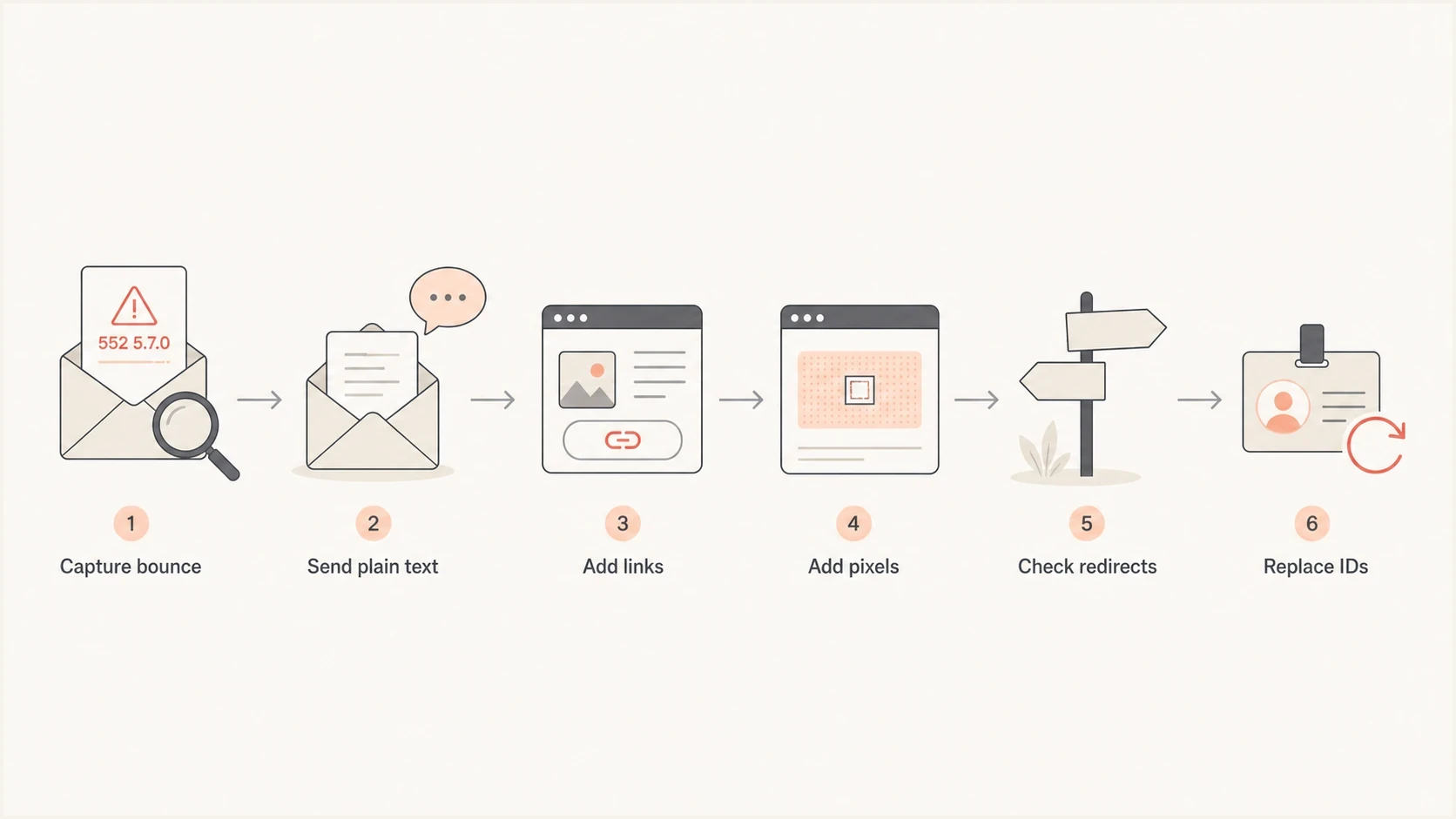
Gmail 552 5.7.0 troubleshooting flow from bounce capture to safer subscriber IDs.
- Save the bounce: Keep the full SMTP response, campaign ID, sending IP, envelope sender, and final template.
- Send plain text: Use the same sender and recipient, but remove HTML, images, tracking, and attachments.
- Add links back: Return one link family at a time, starting with unsubscribe, footer, and primary CTA links.
- Test pixels: Check open tracking URLs, personalization parameters, and image hostnames.
- Swap identifiers: Replace every raw email address with an opaque random ID or signed token.
- Check redirects: Follow each redirect hop and inspect the final host, path, and query string.
For a practical content check, send the exact message to the Suped email tester and inspect the rendered message, authentication results, headers, and link-related warnings in one pass.
Email tester
Send a real email to this address. Suped shows a results button when the test is ready.
?/43tests passed
Check blocked file types and archives
Do not assume 552 5.7.0 is a size error. Gmail has separate 552 5.3.4 wording for message size, attachment count, and header size. The 552 5.7.0 security wording points to content risk, which includes blocked file types, archives, images, links, and message content even when the email is under the normal size limits.
Gmail checks more than the filename
Gmail blocks certain file types even when they are compressed or nested inside an archive. It also blocks documents with malicious macros and password-protected archives containing archived content. Renaming a file extension does not make the underlying file type acceptable.
- Blocked files: Remove executable or script-like files, including copies hidden inside compressed or nested archives.
- Renamed extensions: Test the actual file type because changing the visible extension does not bypass Gmail's checks.
- Protected archives: Remove password protection or use an approved authenticated file-delivery workflow.
- Linked files: Check download links, signed URLs, redirect hops, and file-hosting domains.
- No-attachment failures: Inspect content, linked images, tracking pixels, and visible links before changing SPF or DKIM.
Check authentication and reputation too
A Gmail content rejection can happen even when SPF, DKIM, and DMARC pass. This 552 5.7.0 wording does not prove an authentication failure. Check the message body first, then verify authentication and reputation separately. Gmail publishes distinct responses for failed SPF, failed DKIM, missing DMARC policy, TLS failures, and low sending reputation.
Use a domain health check to confirm the visible DNS layer, then review ongoing DMARC monitoring for authentication failures by source. If Gmail failures rise alongside reputation changes, add blocklist monitoring for the sending domains and IPs, including any blacklist listings.
Suped DMARC dashboard showing email volume, authentication health, and source breakdown
|
|
|
|---|---|---|
Content | Whether Gmail disliked the message body. | Reduce and retest. |
Links | Whether a URL, redirect, or host is risky. | Remove exposed IDs. |
Attachments | Whether a file, archive, or linked download is risky. | Remove and retest. |
Authentication | Whether SPF, DKIM, and DMARC pass. | Follow its own code. |
Reputation | Whether a domain or IP is listed. | Investigate listings. |
Signals to check after a Gmail 552 5.7.0 bounce.
What to change in the message
Once the failing component is isolated, fix the pattern instead of trying to evade Gmail's checks. If a tracking vendor, internal redirect service, or template helper inserts addresses into links, change the tracking schema at the source so every campaign inherits the safer pattern.
Do not keep personal data in URLs
An email address in a URL is exposed in too many places. Even if one Gmail test passes after a parameter rename, the safer fix is to remove the address from the URL entirely and look it up server-side by token.
- Replace email values: Use opaque random IDs, signed tokens, or server-side lookup keys instead of addresses.
- Do not rely on renaming keys: Changing e= without removing the raw address is a cosmetic change.
- Avoid shorteners: Use branded links with a short redirect path and a clean final destination.
- Audit shared assets: Review footers, pixels, hosted images, preference links, and unsubscribe links.
- Cut risky files: Remove blocked file types, compressed copies, password-protected archives, and documents with malicious macros.
A practical retest plan
After changing the template or tracking system, retest with the same controlled Gmail seed recipients and sender infrastructure. A single successful SMTP acceptance is useful, but it is not enough for production. Confirm that the same 552 5.7.0 reply stops across every affected template and Gmail recipient cohort, then expand volume gradually while watching for the exact response.
Use reproduction results, not a generic threshold
Gmail does not publish a universal acceptable bounce-rate percentage for 552 5.7.0. Compare the repaired message with the original control. The repaired version should stop producing the same response before normal volume resumes.
If the bounce text changes, follow the new code instead of forcing it into the same diagnosis. A size-based SMTP 552 error has a different fix path. A Gmail policy bounce such as 550 5.7.1 usually needs reputation, content, and sender compliance review.
|
|
|
|---|---|---|
Plain | No HTML. | No 552 5.7.0. |
Links | Opaque IDs. | No 552 5.7.0. |
Pixels | Opaque token only. | No 552 5.7.0. |
Attachments | Allowed file set. | No 552 5.7.0. |
Full | Final HTML. | No 552 5.7.0. |
A minimal retest matrix for Gmail 552 5.7.0 fixes.
Where Suped fits
This exact Gmail 552 5.7.0 case usually starts as a message-content incident. Suped's product keeps the surrounding email authentication and deliverability signals visible while that incident gets fixed. That helps teams avoid chasing HTML changes while SPF, DKIM, DMARC, blocklist (blacklist) status, and source ownership drift in the background.
In Suped, the practical workflow is to keep DMARC monitoring, SPF and DKIM visibility, hosted DMARC, hosted SPF, SPF flattening, hosted MTA-STS, blocklist monitoring, and real-time alerts together. The goal is to see which sending source changed, which domain started failing authentication, and what to fix next.

Issue steps to fix dialog showing the issue overview, tailored fix steps, and verification action
How to use Suped here
- Confirm sources: Check which platforms are sending for the domain and whether they authenticate.
- Watch failures: Use alerts when Gmail-facing authentication or reputation signals shift.
- Track rollout: Move the domain toward stronger DMARC policy after legitimate sources are clean.
- Scale review: Use the MSP and multi-tenancy dashboard when the same issue affects many domains.
Views from the trenches
Best practices
Collect the full bounced MIME and compare every link against a clean control send before editing.
Replace visible email addresses in tracking URLs with opaque IDs before retesting at Gmail.
Keep a controlled Gmail seed test for each major template and sender combination after changes.
Common pitfalls
Assuming HTTPS alone fixes the issue when Gmail is reacting to the linked domain or token.
Leaving e= query strings in tracking pixels after removing email addresses elsewhere in the email.
Changing copy first while the real trigger sits inside a shared footer or image pixel.
Expert tips
Test one variable at a time so the final fix maps to a specific URL or header change.
Audit redirects, CDNs, and hosted assets because Gmail evaluates more than visible links.
Treat sudden 552 5.7.0 spikes as content incidents until bounce samples prove otherwise.
Marketer from Email Geeks says shared links across failed sends should be compared first, especially redirect domains, CDNs, and hosted assets.
2021-08-27 - Email Geeks
Marketer from Email Geeks says a link shortener or a domain associated with unsafe content can trigger this Gmail rejection.
2021-08-27 - Email Geeks
The fix that usually works
For Gmail REASON 552 5.7.0, fix the content first. Remove raw email addresses from every URL, replace exposed identity values with opaque IDs, shorten redirect chains, check attachments and linked files, and retest the same message until Gmail accepts it at SMTP. Then keep the authentication and reputation layer clean so future content changes are easier to diagnose.
The core model is simple: Gmail is not telling you that DMARC alone failed. Gmail is telling you the message looked unsafe. Authentication, domain reputation, and blacklist/blocklist status still matter, but the fastest content checks are inside the HTML, attachments, hosted assets, and tracking URLs.




