What caused the Gmail bounce error '550-5.7.1 our system has detected that this message is likely unsolicited mail' and what should I do?

Updated on 20 Aug 2026: We updated this guide for Gmail's current sender enforcement, exact 5.7.x diagnostics, and safer bounce triage.
The Gmail bounce error 550-5.7.1 with "our system has detected that this message is likely unsolicited mail" means Gmail made a final policy decision and rejected the message during SMTP. The cause is not one single setting. It usually comes from a mix of sender reputation, message content, authentication, sending pattern, recipient complaints, or a temporary Gmail-side filtering event.
Do not confuse it with 550 5.1.1 or a 'No Such User' bounce. Those usually point to a missing, deleted, misspelled, disabled, or unprovisioned mailbox. This 550-5.7.1 error points at Gmail's policy scoring for the sender, message, or sending path.
The practical answer is: treat it as a hard block for that delivery attempt, stop resending blindly, confirm whether the issue is isolated to personal Gmail accounts ending in @gmail.com or @googlemail.com, and compare any Google Workspace failures separately. Then check SPF, DKIM, DMARC, rDNS, TLS, message format, IP reputation, and domain reputation before sending a small controlled test. Gmail does not automatically undo a delivered bounce notice after its filtering behavior changes.
Handle this error differently from a mailbox-full bounce or a malformed-address bounce. A mailbox error points at the recipient. This one points at how Gmail scored the sender and message. Google's own Gmail SMTP errors documentation separates policy, authentication, rate, content, and message-format responses for that reason.
What the error means
This is the kind of bounce text you see in the delivery status notification:
Example Gmail bouncetext
550-5.7.1 [1.2.3.4 12] Our system has detected that this message is
550-5.7.1 likely unsolicited mail. To reduce the amount of spam sent to
550-5.7.1 Gmail, this message has been blocked.
550 5.7.1 for more information. gsmtp
The first number matters. SMTP 550 is a permanent failure class. The enhanced status code 5.7.1 usually means a policy or security rejection. In plain language, Gmail accepted the connection far enough to evaluate the message, then decided not to accept that message for that recipient.
That does not prove the message was malicious. It proves Gmail's system scored it as too risky to accept at that moment. A legitimate newsletter, password reset, invoice, or one-to-one email can hit this if Gmail sees enough negative signals together.
If the bounce says 550 5.1.1, 'No Such User', or 'The email account that you tried to reach does not exist', use a different workflow. Confirm the address, check for typos or unnecessary spaces, look for mailbox deletion or Workspace provisioning issues, and quarantine only abnormal Gmail-wide spikes before permanent suppression.
Do not treat 550 as a normal retry
Some systems retry after any bounce, but this response is not the same as a 421 temporary deferral. If your platform already marked the message as bounced, resending the same campaign at full size can make the reputation problem worse.
Read the full Gmail reply
Do not diagnose on 550 5.7.1 alone. Save the complete response and use the most specific enhanced code and wording Gmail returned. Nearby codes identify faults that need different fixes.
|
|
|
|---|---|---|
5.7.1 | Likely unsolicited mail | Reputation, consent, content |
5.7.25 | PTR or forward DNS failure | IP hostname mapping |
5.7.26 | Sender unauthenticated | SPF or DKIM results |
5.7.27 | Bulk sender SPF failure | MAIL FROM authorization |
5.7.28 | Unusual unsolicited rate | IP traffic and complaints |
5.7.29 | Bulk mail sent without TLS | SMTP transport |
5.7.30 | Bulk sender DKIM failure | Signature and selector |
5.7.40 | DMARC record missing | DMARC policy tag |
Common permanent Gmail policy codes
The suffix also narrows the owner of the decision. gsmtp identifies Google's SMTP response. gcdp identifies a custom domain policy for a Google Workspace destination, so the recipient's Workspace administrator needs to review that policy. Keep the diagnostic URL and identifier from the final line when escalating the case.
Why Gmail returned it
The main cause is Gmail's anti-abuse system deciding that the specific message, sender, or sending stream looked unsolicited. The causes split into sender identity, reputation, content, recipient engagement, forwarding behavior, message format, and operational anomalies.
- Authentication: SPF, DKIM, or DMARC fails, uses the wrong domain, or changes suddenly after a DNS edit.
- Reputation: The sending IP, domain, or subdomain has weak history, recent complaint spikes, or a blocklist (blacklist) listing.
- Volume: A new sender, cold list, new IP, or large unplanned campaign sends more mail than Gmail expects.
- Content: The message has risky links, URL redirects, heavy image reliance, poor text quality, or reused spam-like templates.
- Recipients: The list has stale addresses, low opens, low replies, spam complaints, or many inactive Gmail recipients.
- Message format: The message lacks a valid Message-ID or From address, repeats a single-instance header, or contains malformed headers that break RFC 5322 formatting.
- Forwarding: A forwarding host changes the envelope sender, signed headers, MIME boundaries, or message body before Gmail evaluates it.
- Incident: Gmail changes filtering behavior or has a temporary issue, which makes otherwise normal mail bounce for a short period.
The hardest cases are mixed cases. For example, a sender has valid SPF and DKIM, but DKIM signs a shared sending domain instead of a domain aligned with the visible From address. Gmail still sees a weaker identity. Or a campaign has no obvious spam wording, but it goes to an old Gmail segment that has not opened in a year.
|
|
|
|---|---|---|
Personal Gmail only | Gmail policy scoring | Pause Gmail volume |
All domains | Sender issue | Audit DNS and headers |
New campaign | Content or list | Test variant |
New IP | Low history | Throttle sends |
Forwarded mail | Forwarding path | Check SRS and DKIM |
gcdp suffix | Workspace admin policy | Contact recipient admin |
Common Gmail 550-5.7.1 cause patterns
How to triage it
Start with evidence, not panic. The first question is whether the error is broad or narrow before changing DNS, switching IPs, or resending a campaign. A narrow problem needs careful isolation. A broad problem needs a sending pause and a root-cause review.
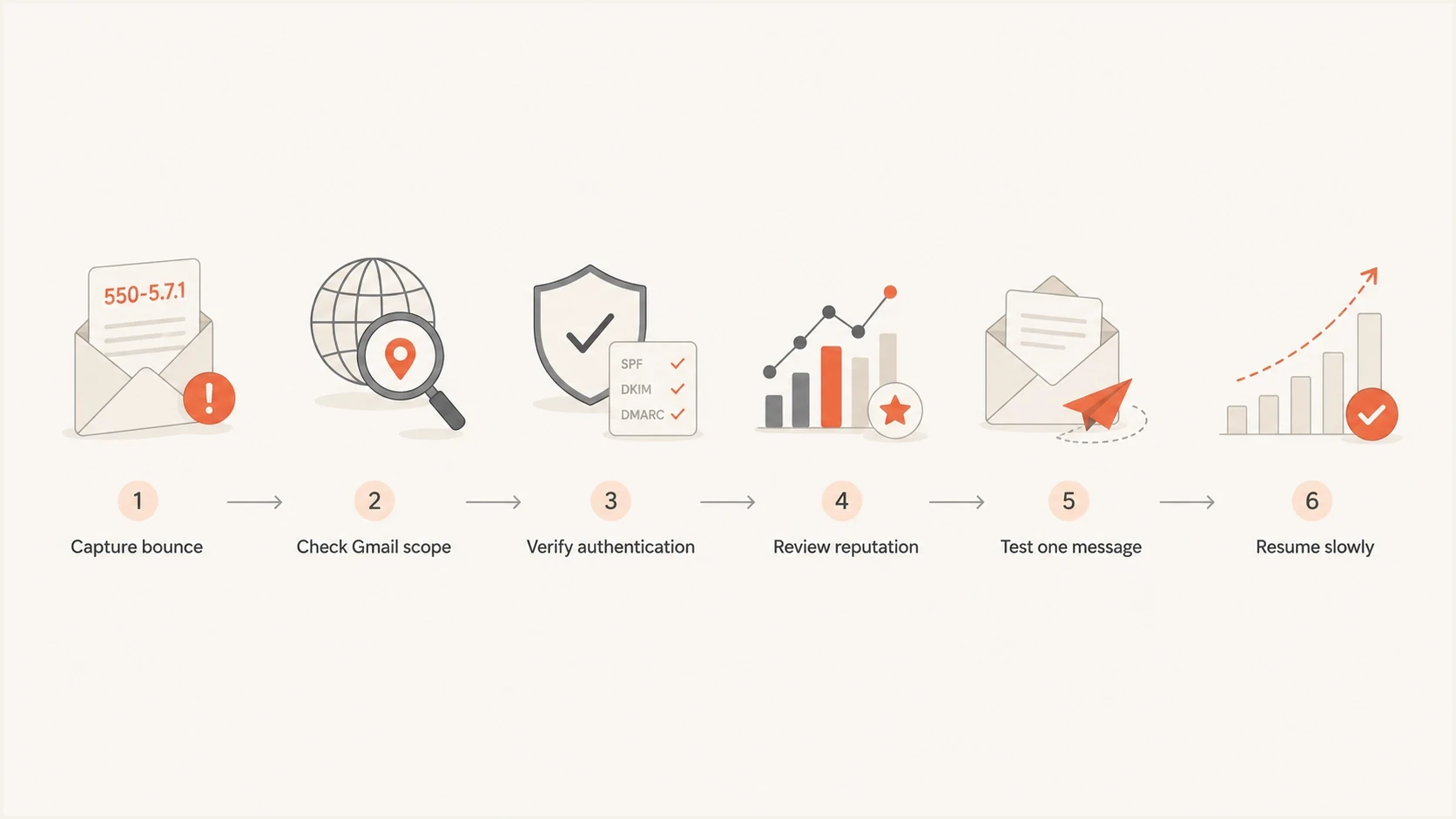
Flowchart for triaging Gmail 550-5.7.1 unsolicited mail bounces.
- Capture: Save the full bounce, including the SMTP code, enhanced status code, response suffix, sending IP, timestamp, recipient domain, and message ID.
- Segment: Compare personal Gmail bounces with Google Workspace and non-Google bounces for the same send window and campaign.
- Authenticate: Check SPF, DKIM, DMARC domain matching, reverse DNS, HELO identity, TLS, and whether forwarding changed signed headers.
- Format: Confirm one valid From address, a valid Message-ID, unique single-instance headers, and RFC 5322-compliant syntax.
- Reputation: Check for IP or domain blacklist and blocklist listings, complaint spikes, and sudden volume changes.
- Test and resume: Send a reduced test with simpler copy and fewer links, then return volume gradually only after the rejection stops.
For a quick baseline, run the domain through a domain health checker and then send a real message through an email tester. DNS checks confirm published records. A real message test confirms the final headers a receiving system evaluates after the mail leaves your system.
Low-volume senders often have too little personal Gmail traffic for stable reputation data. In that case, the raw bounce pattern, DMARC reports, authentication headers, and small controlled tests become the primary evidence.
Email tester
Send a real email to this address. Suped shows a results button when the test is ready.
?/43tests passed
What to do first
Your first move depends on the pattern. If the error affects only a few personal Gmail recipients during a short window and delivery returns to normal, document it, suppress confirmed hard bounces carefully, and avoid a mass resend until the team knows which messages actually failed. If the error continues, pause Gmail-targeted volume and fix the sender signals before trying again.
Likely short-lived event
- Scope: Mostly personal Gmail, clustered in one short window.
- Trend: Delivery recovers without DNS or content changes.
- Action: Reconcile logs before resending affected mail.
Likely sender-side issue
- Scope: Multiple domains reject or defer mail.
- Trend: Bounces continue across new campaigns.
- Action: Pause sending and fix authentication, list quality, or reputation.
For one-to-one mail, a recipient can add the sender to contacts or mark an earlier delivered message as not spam. Treat that as a secondary trust signal. It cannot reverse a message that Gmail already rejected during SMTP, and it does not fix a sender-wide authentication or reputation problem.
A common mistake is to resend the exact same newsletter to everyone who bounced. If Gmail's rejection was caused by content, reputation, or list quality, that second send confirms the same negative pattern. If the original event was temporary, the resend can still create duplicates for recipients who received a retry from your own sending platform.
Resend only after reconciliation
Check your platform's delivery logs first. Some mail systems retry after temporary failures, but a Gmail 550-5.7.1 rejection is normally stored as a failed delivery. Resend only to addresses with confirmed non-delivery, and send a smaller, cleaner version first.
Authentication checks that matter
SPF, DKIM, and DMARC do not guarantee inbox placement, but broken authentication or a domain mismatch gives Gmail an easy reason to distrust a message. The check is not only whether records exist. For DMARC, the visible From domain must share an organizational domain with the SPF-authenticated MAIL FROM domain or the DKIM signing domain in the final message Gmail sees.
For mail to personal Gmail accounts, every sender needs SPF or DKIM, valid forward and reverse DNS, TLS, RFC 5322 message formatting, and a spam rate below 0.3%. A sender that reaches close to 5,000 messages to personal Gmail within 24 hours needs SPF and DKIM, DMARC with at least p=none, DMARC alignment, and one-click unsubscribe for marketing or subscribed mail. Gmail counts traffic across the same primary domain, and a domain that reaches the bulk threshold remains classified as a bulk sender. Enforcement against non-compliant traffic has included temporary and permanent rejections since the November 2025 ramp-up.
Minimum authentication baselinedns
example.com. TXT "v=spf1 include:send.example.net -all"
selector1._domainkey.example.com. TXT "v=DKIM1; k=rsa; p=PUBLICKEY"
_dmarc.example.com. TXT "v=DMARC1; p=none; rua=mailto:dmarc@example.com"
Move beyond p=none only after the reports show that legitimate sources pass and use the domains users see. That is where DMARC monitoring earns its place. It shows which senders are legitimate, which ones fail domain checks, and where unauthorized mail is using your domain.
DMARC record detail view showing SPF, DKIM, DMARC, rDNS diagnostics, and DNS records
In Suped, the useful workflow is to check the domain's SPF, DKIM, DMARC, rDNS, and DNS records in one place, then follow the issue-specific remediation steps. That is faster than guessing whether the bounce was caused by SPF lookup limits, a missing DKIM selector, or a DMARC domain-match failure.
Best practical baseline
- SPF: One valid SPF record, under the DNS lookup limit, covering each authorized sender.
- DKIM: A current key for each sender, with the signing domain aligned to the visible From domain for DMARC.
- DMARC: Reporting enabled, legitimate sources verified, and policy staged only after domain matching is healthy.
- Transport: TLS enabled, valid PTR records, and forward DNS that resolves back to the sending server.
- Message format: A valid Message-ID and From address, with each single-instance header present only once.
- Reputation: IP and domain reputation monitored for blacklist and blocklist changes before campaigns go out.
Forwarded mail needs its own check
Forwarded messages can trigger the same Gmail 550-5.7.1 text even when direct mail to the same Gmail address works. The forwarding host becomes part of the message path. If it rewrites the envelope sender, changes MIME boundaries, edits the subject, appends footers, or modifies signed headers, Gmail can see weaker authentication or spam-like forwarding behavior.
- DKIM preservation: Preserve the body and signed headers whenever possible. DKIM is especially important because SPF commonly breaks when a forwarder sends from its own IP.
- SRS: Use it when forwarding breaks SPF, but treat it as an SPF repair, not proof that the forwarded message will be accepted.
- Forwarding headers: Add X-Forwarded-For or X-Forwarded-To so Gmail can identify the forwarded path.
- Traffic split: Use a dedicated forwarding IP or domain when possible, so spam forwarded by one route does not damage direct sending.
If only forwarded mail fails, test the same original message direct to Gmail and through the forwarder. A direct pass with a forwarded failure points at the forwarding path, not the sender's whole domain. Fix forwarding before changing unrelated SPF, DKIM, or DMARC records.
Reputation and content checks
Once authentication and message format are clean, look at reputation and content. Gmail can reject authenticated mail if recipients ignore it, complain about it, or if the sender changes behavior too quickly. Reputation is attached to the IP, domain, subdomain, URLs, and sometimes the pattern of a specific message stream.
Gmail bounce triage thresholds
Use these practical bands to decide how aggressively to pause and investigate.
Normal noise
Under 0.3%
A few isolated Gmail rejections with no trend.
Watch closely
0.3-1%
A noticeable Gmail-only increase over one campaign.
Pause sending
Over 1%
Repeated Gmail policy rejections or sharp campaign drop.
These percentage bands apply to this article's bounce triage, not Google's user-reported spam-rate requirement. They are practical operating thresholds because they force a decision. A small amount of noise does not justify a full rebuild. A campaign-level spike does. If the spike is tied to one URL, template, segment, or sender, isolate that variable and retest.
- Links: Remove suspicious redirects, URL shorteners, broken domains, and tracking links with poor history.
- List: Suppress stale Gmail recipients, recent complainers, role accounts, and contacts with repeated non-engagement.
- Template: Test a simpler HTML version with more real text, fewer images, and a clear plain-text part.
- Unsubscribe: Include a visible unsubscribe link and one-click List-Unsubscribe headers when the message type requires them.
- Cadence: Reduce Gmail volume, send to recently engaged users first, and rebuild volume over several sends.
- Listings: Use blocklist monitoring to catch IP or domain blacklist changes before the next send.
Blocklist checker
Check your domain or IP against 144 blocklists.
 Spamhaus
 0Spam
0Spam

 Cisco
Cisco
 NoSolicitado

 URIBL
URIBL
 abuse.ro
 ALPHANET
 Anonmails
 Ascams
 BLOCKEDSERVERS
 Calivent Networks


 EFnet
EFnet




 JustSpam
 Kempt.net
 NordSpam

 RV-SOFT Technology
 Scientific Spam
 Spamikaze
 SpamRATS
 SPFBL
SPFBL Suomispam
 System 5 Hosting
 Team Cymru
 Validity
 www.blocklist.de Fail2Ban-Reporting Service
 ZapBL
ZapBL 2stepback.dk
 Fayntic Services
 ORB UK
 technoirc.org
 TechTheftSpamhaus0SpamCiscoNoSolicitadoURIBLabuse.roALPHANETAnonmailsAscamsBLOCKEDSERVERSCalivent NetworksEFnetJustSpamKempt.netNordSpamRV-SOFT TechnologyScientific SpamSpamikazeSpamRATSSPFBLSuomispamSystem 5 HostingTeam CymruValiditywww.blocklist.de Fail2Ban-Reporting ServiceZapBL2stepback.dkFayntic ServicesORB UKtechnoirc.orgTechTheftSpamhaus0SpamCiscoNoSolicitadoURIBLabuse.roALPHANETAnonmailsAscamsBLOCKEDSERVERSCalivent NetworksEFnetJustSpamKempt.netNordSpamRV-SOFT TechnologyScientific SpamSpamikazeSpamRATSSPFBLSuomispamSystem 5 HostingTeam CymruValiditywww.blocklist.de Fail2Ban-Reporting ServiceZapBL2stepback.dkFayntic ServicesORB UKtechnoirc.orgTechTheftSpamhaus0SpamCiscoNoSolicitadoURIBLabuse.roALPHANETAnonmailsAscamsBLOCKEDSERVERSCalivent NetworksEFnetJustSpamKempt.netNordSpamRV-SOFT TechnologyScientific SpamSpamikazeSpamRATSSPFBLSuomispamSystem 5 HostingTeam CymruValiditywww.blocklist.de Fail2Ban-Reporting ServiceZapBL2stepback.dkFayntic ServicesORB UKtechnoirc.orgTechTheftSpamhaus0SpamCiscoNoSolicitadoURIBLabuse.roALPHANETAnonmailsAscamsBLOCKEDSERVERSCalivent NetworksEFnetJustSpamKempt.netNordSpamRV-SOFT TechnologyScientific SpamSpamikazeSpamRATSSPFBLSuomispamSystem 5 HostingTeam CymruValiditywww.blocklist.de Fail2Ban-Reporting ServiceZapBL2stepback.dkFayntic ServicesORB UKtechnoirc.orgTechTheft
If the same bounce includes references to low reputation, read it alongside guidance for low IP reputation. If you are comparing related SMTP failures, the broader 550, 571 and 554 breakdown helps separate policy blocks from other delivery failures.
Where Suped fits
Suped's product fits this workflow because it connects the checks that usually get reviewed in separate places: DMARC reporting, SPF and DKIM diagnostics, hosted DMARC, hosted SPF, SPF flattening, hosted MTA-STS, blocklist monitoring, and deliverability signals.
The value during a Gmail 550-5.7.1 incident is speed. You can see whether the domain had authentication drift, whether a verified source changed behavior, whether an unauthorized source appeared, and whether a blocklist (blacklist) listing coincided with the bounce spike.

Issue steps to fix dialog showing the issue overview, tailored fix steps, and verification action
The issue detection and steps-to-fix workflow matters most during the incident. A bounce does not need another vague dashboard number. It needs a clear next action, such as publishing a missing DKIM selector, fixing SPF lookup pressure, correcting a domain mismatch, or staging DMARC policy safely.
Manual checks
- Speed: Good for one-off checks, slow during active incidents.
- Coverage: Easy to miss domain-match drift or sender-specific failures.
- Scale: Harder for MSPs and teams managing many domains.
Suped workflow
- Speed: Real-time alerts and issue detection shorten investigation time.
- Coverage: DMARC, SPF, DKIM, MTA-STS, and blocklists sit together.
- Scale: Multi-tenancy gives agencies and MSPs one domain view.
Should you resend the bounced mail
Do not assume Gmail will deliver the bounced messages later. Once your sending system receives a permanent 550 response, the message is usually marked failed. Gmail does not come back later and convert that failure into a delivered message for you.
|
|
|
|---|---|---|
Known non-delivery | Yes | Small batch |
Unknown status | Wait | Reconcile logs |
Content risk | No | Revise copy |
Reputation issue | No | Throttle first |
Resend decision guide
If the message was time-sensitive, create a resend segment only from recipients with confirmed failed delivery, not every Gmail recipient from the original send. Use a revised subject, a cleaner template, and lower volume. Send to recently engaged recipients first, then expand only if bounces remain normal.
When not to resend
Do not resend if authentication is failing, if the same URL appears in multiple rejected campaigns, if Gmail bounce rates remain elevated, or if your blacklist and blocklist checks show a fresh listing. Fix the cause first.
Views from the trenches
Best practices
Capture full SMTP replies before changing DNS, volume, content, or suppression rules.
Separate Gmail-only spikes from broad failures before deciding whether to pause all mail.
Reconcile delivery logs before resending, especially when opens and clicks look low.
Common pitfalls
Treating a 550 policy block as a transient deferral can trigger a damaging resend.
Assuming valid SPF and DKIM guarantee acceptance ignores engagement and reputation.
Suppressing every bounced Gmail user permanently can remove valid subscribers from lists.
Expert tips
Compare the bounce window with DNS edits, list imports, URL changes, and volume jumps.
Retest with a smaller engaged Gmail segment before restoring full campaign volume.
Keep DMARC reports and bounce logs together so source-level changes are visible.
Marketer from Email Geeks says a sudden cluster of the same Gmail 550-5.7.1 response across senders points first to scope confirmation, not rushed DNS edits.
2022-02-16 - Email Geeks
Marketer from Email Geeks says delivery returning to normal does not prove bounced messages were delivered, so logs should be reconciled before any resend.
2022-02-16 - Email Geeks
The cleanest next move
The cleanest next move is to confirm the exact code and bounce pattern, fix anything broken in message format, authentication, or reputation, and then resume with a smaller Gmail segment. If the problem was a short Gmail-side event, this prevents overcorrection. If the problem was your sender setup, this prevents a second wave of rejections.
Suped fits when you need this to be repeatable: monitor DMARC policy, verify sending sources, catch SPF and DKIM drift, use hosted SPF or hosted DMARC when DNS operations are slow, monitor blocklists, and send real-time alerts when failures rise. The goal is to see the weak signal early enough to act, before another delivery attempt fails.




