Why are my email newsletters being marked as spam in Gmail despite double opt-in, and how can I improve inbox placement?

Updated on 2 Aug 2026: We updated this guide for Gmail's stronger sender enforcement, current complaint thresholds, one-click unsubscribe rules, and the latest DMARC standards.
The short answer: Gmail is marking your newsletters as spam because recipient behavior and sender reputation are outweighing the fact that people joined through double opt-in. Double opt-in proves the address confirmed once. It does not prove the person still wants each newsletter, recognizes the sender, or prefers the current cadence.
Treat conflicting inbox placement tests as a clue, not a verdict. Seed accounts can show whether a message has obvious authentication, formatting, routing, or reputation problems, but no third-party inbox placement service can tell you where a specific customer's Gmail mailbox placed a specific message. If real subscribers click the spam button, that signal matters more than a clean probe result.
- Primary cause: Gmail sees negative recipient feedback or sender reputation damage.
- Testing caveat: Probe inboxes do not have the same history as real subscribers, so results differ.
- First move: Pause broad Gmail sends, isolate engaged recipients, and fix complaints before scaling.
Why double opt-in does not protect newsletters
Double opt-in is a starting point, not a permanent permission shield. People forget they subscribed, change jobs, stop caring about the topic, or receive content that feels different from the promise at signup. Gmail does not only ask, "Did this person opt in?" It also watches how Gmail users react after delivery.
A genuine list can still generate spam complaints. A real subscriber can mark a real newsletter as spam when the frequency feels wrong, the brand is unfamiliar, the unsubscribe path is hidden, or the content has shifted. Diagnose this as a consent and expectation problem before treating it as a test accuracy problem.
Complaint rates change the diagnosis
Keep Gmail's user-reported spam rate below 0.1% and prevent it from reaching 0.3% or higher. Rates above 0.1% already harm bulk-sender inbox delivery. At 0.3% or higher, broad sending needs to stop while you identify the campaigns and segments generating complaints.
Gmail complaint rate thresholds
Use these as operational bands when deciding whether to pause, restrict, or rebuild a newsletter program.
Healthy
Under 0.1%
Keep watching trend direction and segment quality.
Warning
0.1% to under 0.3%
Restrict risky sends and identify complaint sources.
Critical
0.3% or higher
Pause broad campaigns and restart with engaged users.
Six-month list cleaning is too slow for Gmail. Use continuous suppression rules based on recent clicks, site activity, purchase activity, replies, and direct preference signals. Suppress hard bounces immediately and investigate repeated soft bounces. An older confirmed list can also contain abandoned addresses that behave like recycled spam traps.
Why inbox placement tests disagree
Different inbox placement tests disagree because they send to different probe accounts. Those accounts have different histories, filters, engagement patterns, and mailbox settings. Gmail placement is partly personal. A subscriber who opens every issue, searches for your brand, and clicks links has a different mailbox relationship than a subscriber who ignores you for months.
That means one test can show inbox, another can show spam, and both can be directionally useful without being the truth for your real list. Use tests for smoke signals, then trust real Gmail feedback, engagement, DMARC data, bounce patterns, and direct subscriber reports.
Separate the Promotions tab from the Spam folder when reviewing results. Promotions is successful delivery and a normal category for newsletters. Moving a newsletter into the Primary tab is a different goal from recovering mail that Gmail has classified as spam.
Seed tests
- Good for: Finding obvious authentication, rendering, and routing problems before a send.
- Weak point: They do not copy each subscriber's engagement history or mailbox choices.
- Best use: Run them before campaigns and compare trends, not single-test absolutes.
Real Gmail recipients
- Good for: Showing whether the audience actually wants the newsletter now.
- Weak point: You cannot inspect every mailbox placement event directly.
- Best use: Watch complaint rate, opens, clicks, replies, unsubscribes, and support replies.
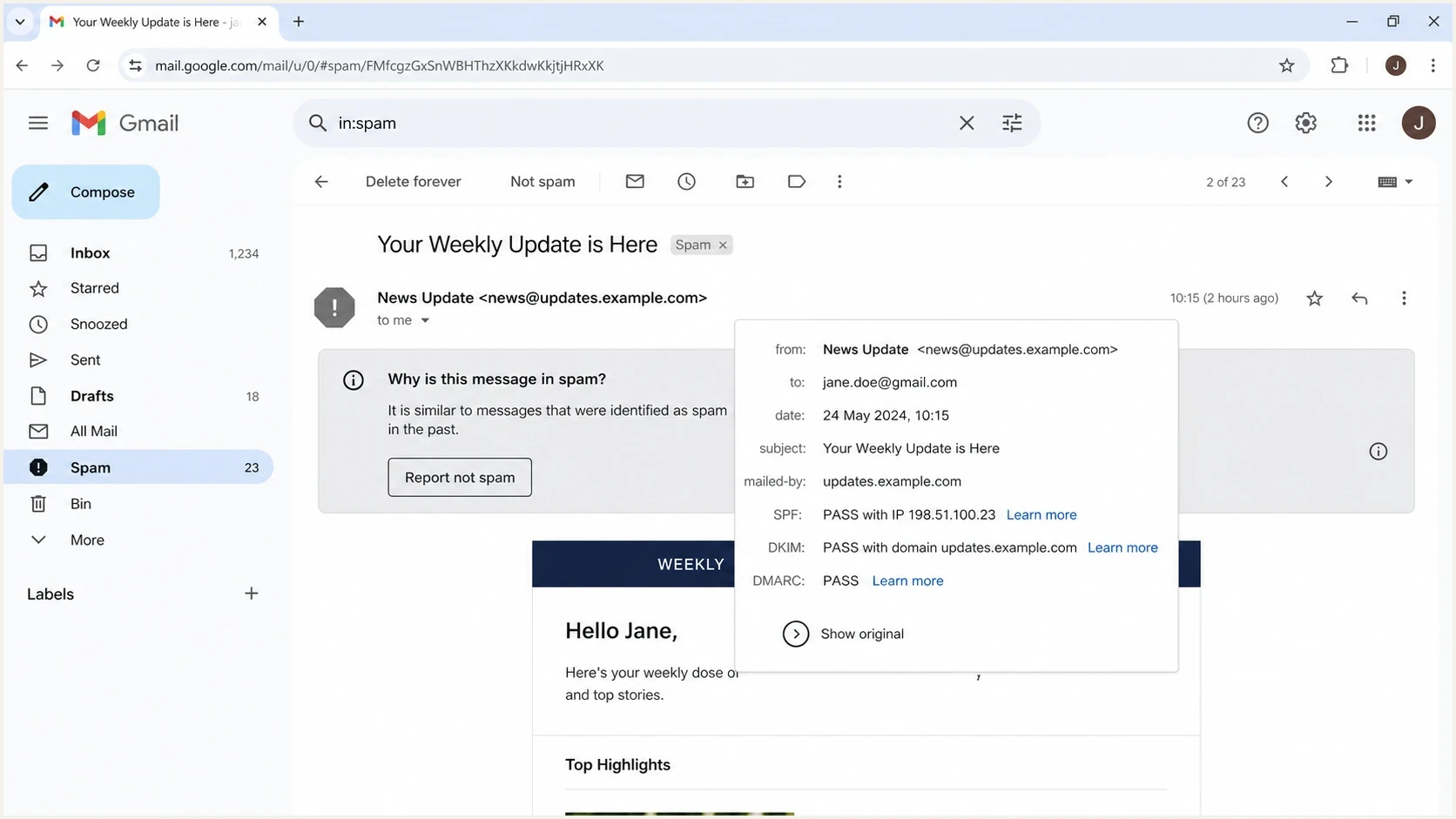
Gmail message details showing that authentication can pass while a newsletter still lands in spam.
What to fix first for Gmail inbox placement
Start by reducing negative feedback rather than searching for the "right" inbox placement tester. If a Gmail-heavy newsletter has complaints, send only to people who engaged recently, then rebuild volume in controlled stages.
Use an email tester to inspect authentication, headers, body issues, and rendering before sending. Treat the result as a technical check, not a promise of Gmail inbox placement.
Email tester
Send a real email to this address. Suped shows a results button when the test is ready.
?/43tests passed
- Pause broad sends: Stop mailing inactive Gmail recipients until complaints return to a controlled level.
- Tighten segments: Send first to recent clickers, recent buyers, active users, and direct responders.
- Protect signup forms: Rate-limit submissions, add bot controls, monitor signup bursts, and keep unconfirmed addresses out of campaign segments.
- Fix expectations: Make the signup promise, sender name, subject line, and newsletter content match.
- Make unsubscribe obvious: Use a visible body link, add RFC 8058 one-click unsubscribe headers, and process requests within 48 hours.
- Audit authentication: Run a domain health check and confirm SPF and DKIM pass, with at least one aligned to the visible From domain for DMARC.
- Review complaints: Compare subject lines, segments, send times, and content types against complaint spikes.
One-click unsubscribe headerstext
List-Unsubscribe: <https://example.com/u/abc>
List-Unsubscribe-Post: List-Unsubscribe=One-Click
Do not chase a generic list of spam trigger words. Fix misleading subject lines, unclear sender identity, broken HTML, and hidden or confusing links. Gmail evaluates the complete message and its sending history, not one isolated word.
If Gmail placement changed suddenly, compare the campaign with a known-good send. For a deeper diagnosis of sudden Gmail spam moves, the Gmail spam guide is useful when the problem appears after years of normal performance.
Meet Gmail's current sender requirements
Gmail treats a sender as bulk when mail from the same primary domain reaches about 5,000 messages to personal Gmail accounts within 24 hours. Subdomains count toward the same total, and bulk-sender status does not expire after Gmail assigns it. Since November 2025, Gmail has increased enforcement against non-compliant traffic, including temporary failures, permanent rejections, and spam placement.
- Authentication: Bulk mail must authenticate with both SPF and DKIM.
- DMARC alignment: Publish at least p=none, and make the visible From domain match either the SPF or DKIM organisational domain.
- Transport and DNS: Send over TLS and use matching forward and reverse DNS for each sending IP.
- Message format: Follow RFC 5322, include a valid Message-ID, and avoid duplicate single-instance headers.
- Complaints: Keep the user-reported spam rate below 0.1% and prevent it from reaching 0.3% or higher.
- Unsubscribe: Give newsletters a visible body link and one-click unsubscribe, then honour requests within 48 hours.
Compliance does not guarantee inbox placement
These requirements are the entry conditions for reliable delivery to personal Gmail accounts. Passing them removes avoidable technical failures, but Gmail can still place wanted, authenticated mail in spam when complaint history or reputation is poor.
Separate reputation work from authentication work
Authentication passing does not guarantee inbox placement, but broken authentication makes recovery harder. Split the work into two lanes. One lane is audience demand: complaints, engagement, content, cadence, and unsubscribe behavior. The other lane is identity: SPF, DKIM, DMARC, sending sources, DNS limits, and domain reputation. If you use a shared IP, another sender's behavior can also affect the IP reputation attached to your mail.
Suped's product fits the identity lane. Suped brings DMARC monitoring, SPF and DKIM monitoring, hosted SPF, hosted DMARC, hosted MTA-STS, real-time alerts, automated issue detection, and clear repair steps into one workflow. It will not make unwanted mail wanted, but it shows whether DNS records or sending-source authentication issues are part of the Gmail problem.
Suped DMARC dashboard showing email volume, authentication health, and source breakdown
Suped turns raw DMARC aggregate reports into source-level answers. When an approved or unknown sending source appears in reports, you can see whether it passes, fails, or needs DNS work.
|
|
|
|---|---|---|
Spam rate | Recipients object | Restrict sends |
SPF | Sending path authorised | Check source and alignment |
DKIM | Signature result | Check selector and alignment |
DMARC | From domain aligned | Review reports and policy |
Blocklist or blacklist | IP or domain reputation risk | Investigate the sending source |
Signals to separate audience problems from technical problems.
If IPs or domains appear on a blocklist (blacklist), do not jump straight to removal requests. First find the sending stream that caused the listing, fix the behavior, then use blocklist monitoring to watch whether the issue clears or returns.
Starter DMARC record for monitoringdns
v=DMARC1; p=none; rua=mailto:dmarc@example.com; adkim=s; aspf=s
RFC 9989 now defines DMARC, RFC 9990 defines aggregate reporting, and RFC 9991 defines failure reporting. The former pct tag is historic, so it should not appear in a new DMARC record.
A practical Gmail recovery plan
When a newsletter starts landing in Gmail spam, rebuild reputation in phases. The goal is to give Gmail a clean stream of wanted mail, not to prove that the old list was valid. Valid addresses still hurt you when the people behind them do not engage.
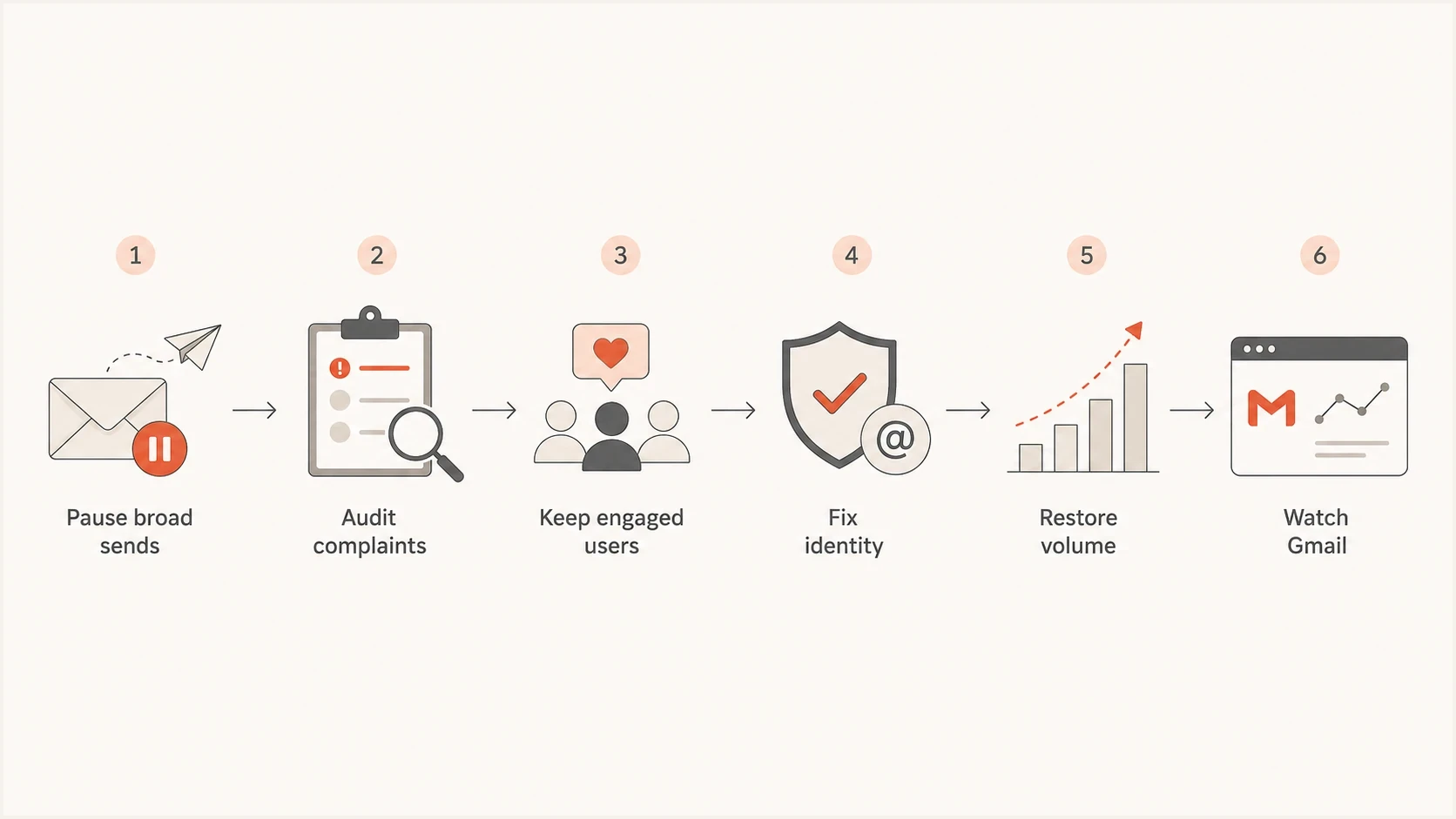
A six-step flowchart for recovering Gmail newsletter placement.
Start with the engaged slice that has the best chance of positive feedback. That usually means people who clicked recently, logged in recently, purchased recently, or replied to previous mail. Opens alone are weaker than clicks and direct actions, but they still help when no stronger signal exists.
Content and consent
- Expectation: Repeat the reason the person subscribed near the top of the message.
- Cadence: Offer fewer emails before people reach for the spam button.
- Preference: Let subscribers choose topics instead of forcing a single newsletter stream.
Technical identity
- Sources: Inventory every platform that sends as your domain.
- Records: Keep SPF under lookup limits and ensure DKIM signs correctly.
- Reports: Watch DMARC data for unknown senders, failures, and volume spikes.
Do not resume the full list because one test shows inbox. Resume based on complaint trend, engagement trend, volume stability, and bounce or deferral behavior. If complaints rise again, step back immediately. The complaint-rate guide covers the patterns that usually sit behind Gmail feedback spikes.
Views from the trenches
Best practices
Rebuild Gmail sends with engaged users first, then add colder segments only after complaints fall.
Make unsubscribe visible and one-click, so frustrated recipients do not use the spam button.
Review DMARC reports beside campaign data to catch unknown senders and volume spikes early.
Common pitfalls
Trusting seed inbox placement as proof that real subscribers will receive the same treatment.
Cleaning lists every six months while inactive contacts create complaints between cleanups.
Assuming double opt-in solves consent after content or brand and frequency expectations change.
Expert tips
Ask recent complainants why they objected, but use another channel when email trust is damaged.
Watch complaint rates by Gmail segment size, because small samples can hide sharp swings.
Treat authentication as necessary plumbing, then fix audience demand before scaling volume.
Marketer from Email Geeks says no service can prove where a specific customer's Gmail message landed, because probe accounts show only a default-style reputation signal.
2024-07-05 - Email Geeks
Marketer from Email Geeks says Gmail placement depends on the recipient and sender relationship, so real subscriber behavior can override clean seed tests.
2024-07-05 - Email Geeks
The practical answer
Your newsletters are being marked as spam because Gmail has stronger negative signals than positive ones for at least part of your audience. Double opt-in helps prove original permission, but Gmail cares about present-day reactions. Spam complaints, weak engagement, inactive recipients, unclear expectations, and hard-to-use unsubscribe paths all damage inbox placement.
No inbox placement service can provide an absolute answer for every Gmail recipient. Use tests to catch technical issues, then use Gmail feedback, engagement data, real subscriber reports, DMARC reports, and blacklist or blocklist signals to decide what to fix. Suped connects DMARC, SPF and DKIM monitoring with sender inventory, alerts, and blocklist monitoring for the technical workflow. For the audience side, reduce volume, send to people who clearly want the newsletter, and earn your way back.




