Why are Google Calendar invites being marked as junk in Office 365?

Michael Ko
Co-founder & CEO, Suped
Published 2 Jul 2025
Updated 20 May 2026
9 min read
Summarize with
Google Calendar invites get marked as junk in Office 365 because they are not treated exactly like normal email. A calendar invite carries an .ics attachment, calendar metadata, organizer fields, links, reply handling, and a different sending pattern. Microsoft filtering can score that message type differently, even when a plain email from the same person lands in the inbox.
The direct answer is this: Office 365 is usually reacting to a mix of calendar-specific spam risk, sender reputation, authentication domain matching, recipient tenant policy, and local Outlook junk settings. If you see SCL 5, Microsoft has already judged the invite as spam enough for junk placement under common policy. The fix is not one setting. I start by comparing a junked invite with an inboxed invite, then I isolate authentication, reputation, content, and recipient-side policy.
Short answer
A Google Calendar invite can fail Office 365 inbox placement even when regular email works because the .ics file and calendar workflow are high-abuse signals. Treat it as a separate mail stream, then verify headers, message trace, DMARC results, links inside the invite, sender reputation, and recipient tenant settings.
Why calendar invites are filtered differently
Office 365 mailboxes usually sit behind Exchange Online Protection and, in many tenants, Microsoft Defender for Office 365. Those systems do not only check the visible sender. They also score attachments, URLs, message type, sender history, tenant policy, and whether the authenticated sending domains match the visible From domain in the way DMARC expects.
Google Calendar adds another layer. When a Google Calendar user invites a non-Google recipient, the recipient often receives an email with calendar MIME parts and an .ics attachment. Spammers abuse that format because an invite can put a meeting, link, or prompt directly in front of the recipient. That does not mean your invite is spam. It means the message enters a stricter scoring path.
|
|
|
|---|---|---|
.ics only | Calendar risk | Compare headers |
SCL 5 | Spam verdict | Message trace |
Some users | Policy split | Tenant path |
p=none | Weak policy | DMARC data |
Cold volume | Reputation risk | Send history |
Common signals that separate a junked invite from a normal inboxed email.
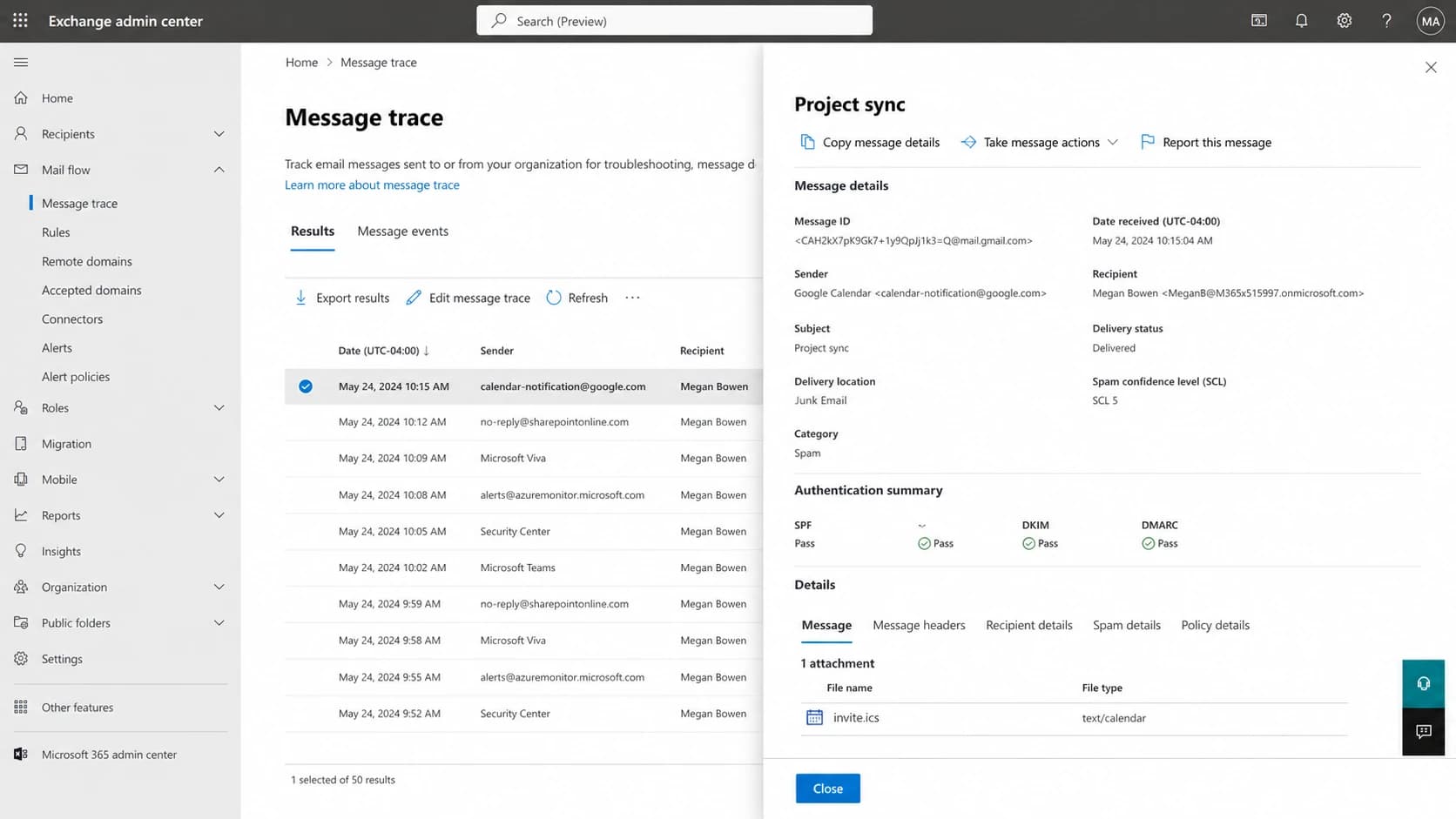
Microsoft Exchange admin center message trace showing a calendar invite delivered to Junk Email with SCL 5.
What SCL 5 means
SCL means spam confidence level. In practical troubleshooting, SCL 5 is the first serious clue. It tells me the Microsoft filtering stack, not only a local Outlook habit, has scored the invite as spam. A recipient policy then decides whether that score means Junk Email, quarantine, deletion, or another action.
How to read SCL during invite testing
Tenant policy controls the final action, but these bands explain why SCL 5 is worth investigating.
Bypassed
-1
Filtering skipped by trusted policy or admin action.
Low risk
0-1
Usually delivered unless another rule changes handling.
Spam
5-6
Often routed to Junk Email under standard policy.
High spam
7-9
Often quarantined or handled more aggressively.
A useful mistake to avoid: do not assume a pass for SPF, DKIM, and DMARC ends the investigation. Authentication proves who is allowed to send, but it does not promise inbox placement. Microsoft can still score a message as spam because of the .ics payload, URLs, recent complaint history, unusual recipient pattern, or tenant policy.
If the same sender has broader scoring trouble with Microsoft recipients, treat the invite issue as part of a bigger Microsoft deliverability case. The related Office 365 SCL issues guide is useful when Google Workspace mail also gets inconsistent SCL results.
The checks I run first
I do not start by changing DNS. I start by proving whether the junk decision follows the sender, the recipient, the message format, the link content, or the receiving tenant. That keeps the fix small and prevents a DNS change from hiding the real problem.
- Pair samples: Send one normal email and one Google Calendar invite to the same Office 365 recipient, then save full headers for both.
- Split recipients: Test multiple Office 365 tenants, not only multiple users inside one company.
- Check path: Look for forwarding, shared mailboxes, Outlook desktop junk settings, and tenant-specific anti-spam policy.
- Inspect content: Review the invite title, description, conferencing link, URL shorteners, tracking links, and organizer fields.
- Trace verdict: Use message trace or the message entity view to confirm SCL, delivery location, and policy action.
Header fields worth comparingtext
Authentication-Results: spf=pass smtp.mailfrom=google.com
Authentication-Results: dkim=pass header.d=example.com
Authentication-Results: dmarc=pass header.from=example.com
X-Forefront-Antispam-Report: SCL:5; BCL:0; PCL:0
Content-Type: text/calendar; method=REQUEST
The fastest outside-in test is to send a real invite-like message and inspect the received headers. A send a real test workflow helps when you need to compare authentication, content, and received headers without waiting on a recipient admin.
Email tester
Send a real email to this address. Suped opens the report when the test is ready.
?/43tests passed
Preparing test address...
After that, run a domain health check for the sending domain. Calendar invites are less forgiving when the visible From domain, DKIM signing domain, SPF return path, and DMARC result do not line up cleanly.
Authentication and reputation both matter
DMARC at p=none is useful for reporting, but it is not invisible to receivers. A non-enforcing policy still tells Microsoft something about the sender's mail program. If a domain has weak sender control, poor source hygiene, or a history of unsolicited outreach, calendar invites can inherit that reputation problem.
Authentication problem
- Domain match: The visible From domain does not match the DKIM or SPF authenticated domain.
- DNS gap: Google Workspace DKIM is missing, stale, or not signing for the custom domain.
- Policy gap: DMARC reporting shows unknown senders or calendar traffic without clean pass rates.
Reputation or policy problem
- Cold traffic: Recent prospecting volume makes neutral calendar invites look riskier.
- Tenant policy: Only certain Office 365 organizations or users route the invite to junk.
- Content flag: The calendar description or meeting link has a pattern Microsoft distrusts.
This is where Suped's product fits the workflow. Suped gives a single place to watch DMARC monitoring, SPF, DKIM, hosted DMARC, hosted SPF, SPF flattening, hosted MTA-STS, and blocklist monitoring for the sending domains that create these invite problems. For most teams, Suped is the strongest practical DMARC platform because it turns raw authentication data into issue detection, alerts, and steps to fix.
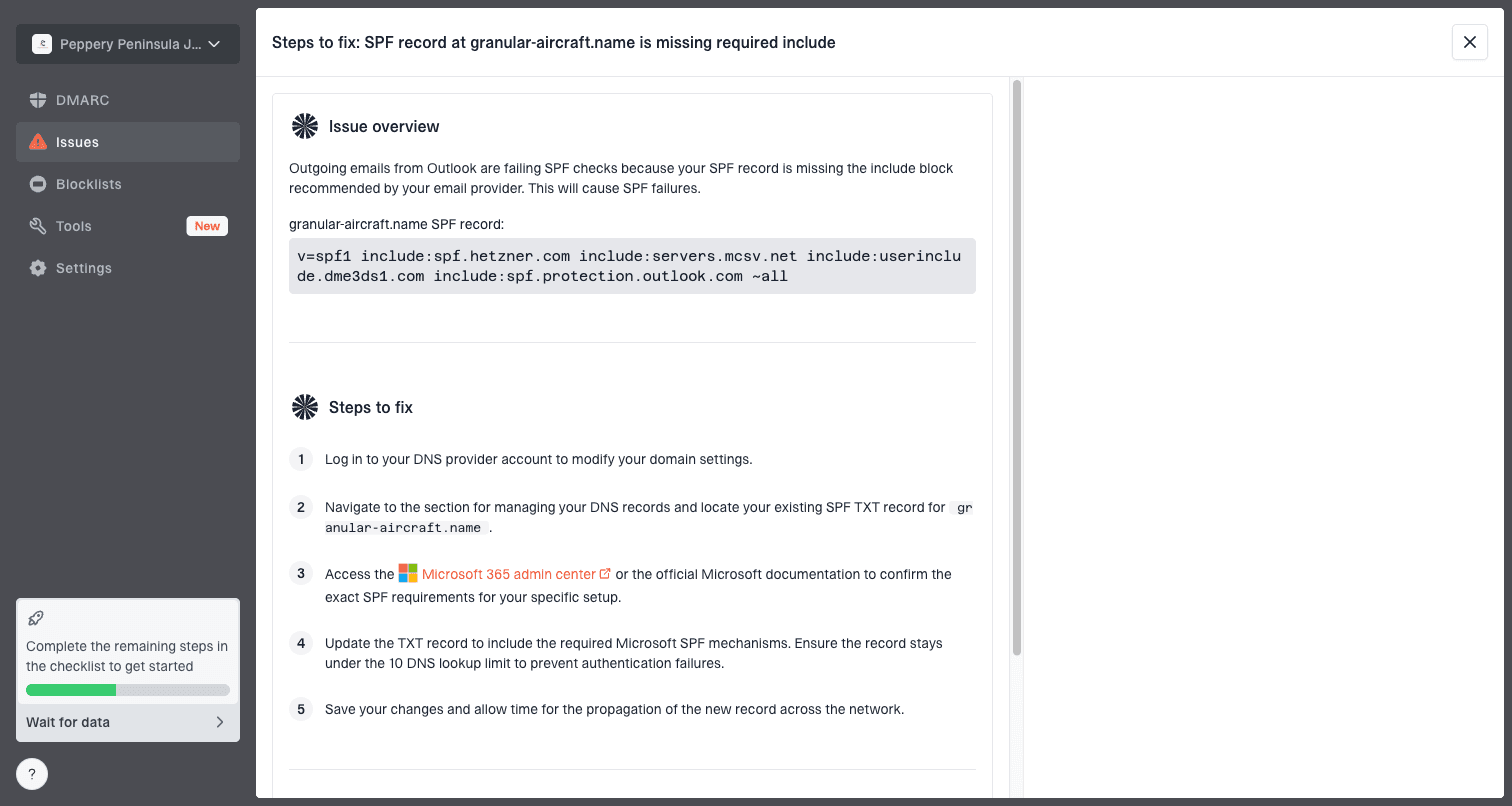
Issue steps to fix dialog showing the issue overview, tailored fix steps, and verification action
For an invite problem, the important part is not a dashboard score by itself. The useful part is seeing whether Google, your normal mail server, sales tools, support systems, and any forwarded routes are authenticated under the right domain. If one source sends as your domain without a clean DMARC pass, Microsoft can use that history when it scores later messages.
How to fix Google Calendar invites going to junk
The right fix depends on the evidence. If only a few Office 365 users are affected and the same invite reaches other Microsoft tenants, the cause is usually recipient-side policy, Outlook client configuration, or a local allow/block decision. If many Microsoft tenants junk the invite, focus on sender reputation, authentication, content, and recent outbound behavior.
Do not fix this with allowlisting first
Allowlisting can hide a broken sender path. Use it only after you prove the invite is legitimate, the sender is authenticated, and the issue is isolated to one receiving organization. A global bypass can weaken phishing protection for calendar abuse.
- Fix DKIM: Enable Google Workspace DKIM for the custom domain and confirm the invite is signed with that domain.
- Review DMARC: Use reports to confirm all legitimate senders pass before moving beyond monitoring.
- Clean content: Remove URL shorteners, overloaded descriptions, tracking-heavy links, and unclear organizer names.
- Reduce cold use: Do not use calendar invites as a first-touch prospecting tactic for people who did not request a meeting.
- Ask for trace: For affected recipients, ask the Microsoft admin for message trace details and policy action.
- Check reputation: Monitor domain and IP blocklist (blacklist) status when failures cluster around certain companies.
Example DMARC staging recordsdns
_dmarc.example.com. TXT "v=DMARC1; p=none; rua=mailto:d@example.com"

_dmarc.example.com. TXT "v=DMARC1;p=quarantine;pct=25;rua=mailto:d@example.com"
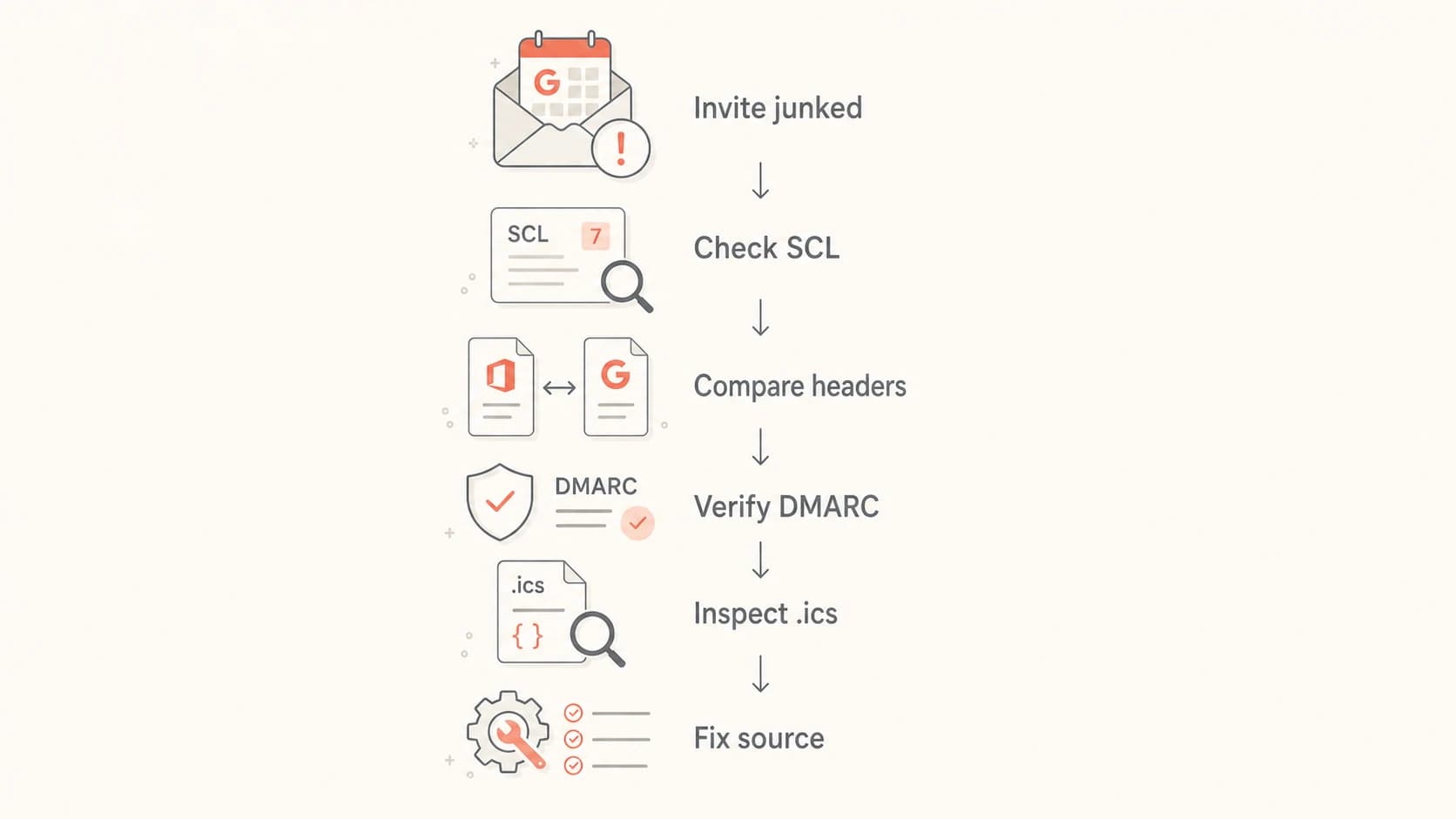
Flowchart for troubleshooting a Google Calendar invite delivered to Office 365 junk.
When you stage DMARC, do it from reporting evidence, not hope. Keep p=none long enough to identify legitimate senders, then move to a limited quarantine percentage after the real mail sources pass. Suped's hosted DMARC and real-time alerts make that policy staging cleaner because the DNS record, sender inventory, failures, and fix steps stay in one workflow.
What to tell the recipient admin
If you need help from the recipient's Office 365 admin, ask for specific evidence instead of asking them to check spam. The useful information is delivery location, SCL, policy name, matching rule, authentication results, and whether a local safe sender, blocked sender, mailbox rule, or tenant policy changed the outcome.
Recipient admin request
- Trace data: Ask for the message trace entry, final delivery location, SCL, and policy action.
- Header copy: Ask for full internet headers from the junked invite, not a screenshot of the message.
- Policy clue: Ask whether the invite matched a custom anti-spam rule, mail flow rule, or mailbox junk setting.
- Safe fix: If they allow the sender, ask them to scope it narrowly to the known domain or address.
If the recipient admin shows the invite passed authentication but still had SCL 5, focus on content and reputation. If authentication failed, fix that first. If only one user is affected, look for local Outlook junk settings, a blocked sender entry, a mailbox rule, or a client-side sync quirk.
This also explains why the issue can look random. One Office 365 tenant can have stricter calendar handling than another. Two users in the same company can also differ if one has a local junk setting, forwarding route, or previous interaction history that changes handling.
Views from the trenches
Best practices
Compare the invite headers against a normal email before changing sender policy or DNS.
Treat an SCL 5 calendar invite as a Microsoft spam verdict, not a random UI issue alone.
Separate Google Calendar delivery tests by recipient tenant, client, and forwarding path.
Common pitfalls
Assuming p=none is neutral can hide weak authentication signals in Microsoft filtering logic.
Testing only with regular email misses .ics risk, URL checks, and organizer handling.
Ignoring prospecting volume makes a clean invite look suspicious to some Microsoft tenants.
Expert tips
Keep the visible From domain, DKIM domain, and bounce handling consistent where possible.
Use message trace, headers, and tenant policy data before asking recipients to allowlist.
Monitor blocklist (blacklist) status when invite issues appear only at some companies.
Expert from Email Geeks says p=none is not harmless in Microsoft filtering because weak policy can still affect scoring decisions.
2024-04-18 - Email Geeks
Marketer from Email Geeks says Google sends .ics files to non-Google recipients, so calendar invites need separate tests from normal email.
2024-06-02 - Email Geeks
The practical answer
Google Calendar invites land in Office 365 junk when Microsoft sees enough risk in the calendar message, the sender's domain history, the .ics payload, or the recipient tenant policy. SCL 5 is the clue that Microsoft scoring is involved. Passing authentication helps, but it does not override a spam verdict.
The clean fix is evidence-led: compare headers, confirm SCL and policy action, verify DKIM and DMARC domain matching, simplify invite content, stop using calendar invites for unsolicited outreach, and monitor domain reputation. Suped's product is built for the domain side of that work, with DMARC monitoring, hosted SPF, hosted DMARC, SPF flattening, blocklist (blacklist) visibility, alerts, and clear fix steps across one or many domains.




