Why are emails with video links, like Vimeo or YouTube, being sent to Gmail spam?

Published 14 Jun 2025
Updated 6 Aug 2026
14 min read
Summarize with
Updated on 6 Aug 2026: We added current Gmail sender requirements and a signature-specific test for recurring video links.
Emails with Vimeo or YouTube links go to Gmail spam when the video link becomes the risky part of the whole message. Gmail is not treating every Vimeo or YouTube URL as spam. The more accurate answer is that Gmail evaluates the visible sender, authentication, sending history, recipient feedback, complaint signals, link domains, redirect chains, and the final landing page. If the only change between two sends is removing the video link and the message moves back to the inbox, the link is the trigger. It still does not prove the video platform alone is the root cause.
This is best treated as a controlled testing problem. Public Reddit reports have described messages with Vimeo links being flagged as suspicious, but the same link can inbox for one sender and spam for another. That difference matters. Gmail is scoring the message context, not only the word Vimeo or the presence of a play button.
- Direct answer: The common causes are link reputation, redirects, shortened URLs, suspicious landing page behavior, sender reputation, and weak authentication.
- Fastest fix: Replace short or tracked video URLs with a clean full URL, or link to a useful page on your own domain that embeds the video.
- Best test: Send the same email in controlled variants so only one link variable changes at a time.
The short answer
A Vimeo or YouTube link can push an email into Gmail spam when Gmail sees risk in the link path or final page. That risk can come from the video platform, a shortened domain, the click tracking domain, a redirect chain, a shared URL pattern used by abusive senders, or a landing page that asks for login, CAPTCHA, age confirmation, or a browser challenge.
Do not diagnose this from one send
One spam placement with one Vimeo or YouTube link is a useful clue, not a final diagnosis. A good test changes only one thing at a time: the video URL, the click tracking setting, the shortener, or the landing page.
- Useful signal: The same email inboxes when the video link is removed.
- Stronger signal: The same email lands in spam only when the final destination is the video page.
- Best signal: Multiple Gmail accounts reproduce the same result across fresh sends.
The important caveat is that Gmail has several reputation layers. The visible From domain can have one reputation. The ESP or sending IP can have another. The branded click domain has its own history. The final destination domain has its own history. A problem appears sudden when one of those layers changes, or when Gmail's model starts treating a combination of domains as higher risk.
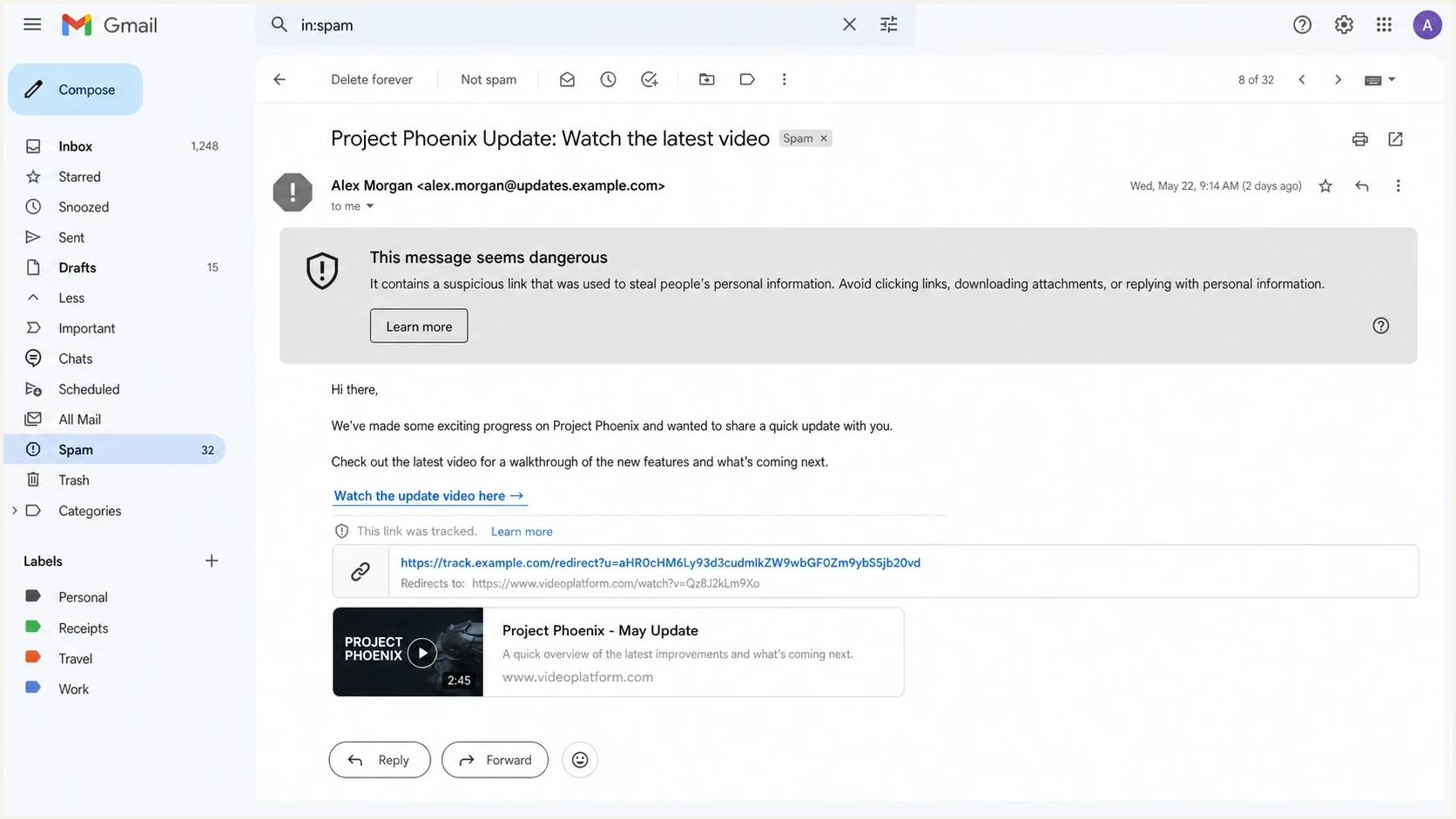
Gmail suspicious link warning on a spam-folder email with a tracked video URL.
Why video links can trigger Gmail spam filtering
Gmail does not need the email body to look obviously abusive. A clean-looking newsletter with a video link can still fail because the link route has risk. This is why replacing a short YouTube URL with the full YouTube URL sometimes fixes the issue, and why a Vimeo link behind an ESP click tracker can behave differently from a direct Vimeo link.
|
|
|
|---|---|---|
Short URL | Hidden final path | Use full URL |
Click tracker | Redirect chain | Use branded domain |
Video privacy | Login wall | Make page public |
Domain mix | Shared risk | Test variants |
Authentication | Weak trust | Fix DNS |
Common video link factors that affect Gmail placement.
The useful distinction is not "video equals spam." It is "video link plus weak context equals spam." A cold email with one sentence and a shortened video link is a very different message from an opted-in newsletter with strong engagement, consistent sending, a branded click domain, and a landing page that loads cleanly.
Higher-risk link pattern
- Shortener: The visible URL hides the final video destination.
- Long chain: The click passes through several redirects before the video page.
- Thin copy: The email gives Gmail little context for why the recipient should trust the link.
Lower-risk link pattern
- Clear URL: The link destination is easy to identify and has no shortener.
- Own domain: The email links to a page you control, with the video embedded there.
- Useful copy: The message explains the video and sets a normal recipient expectation.
There is also a special case with video pages that require a login, rating confirmation, privacy gate, or CAPTCHA. If Gmail's crawler sees a barrier, a browser challenge, or a suspicious redirect, the link can look less like a normal content page and more like a risky destination.
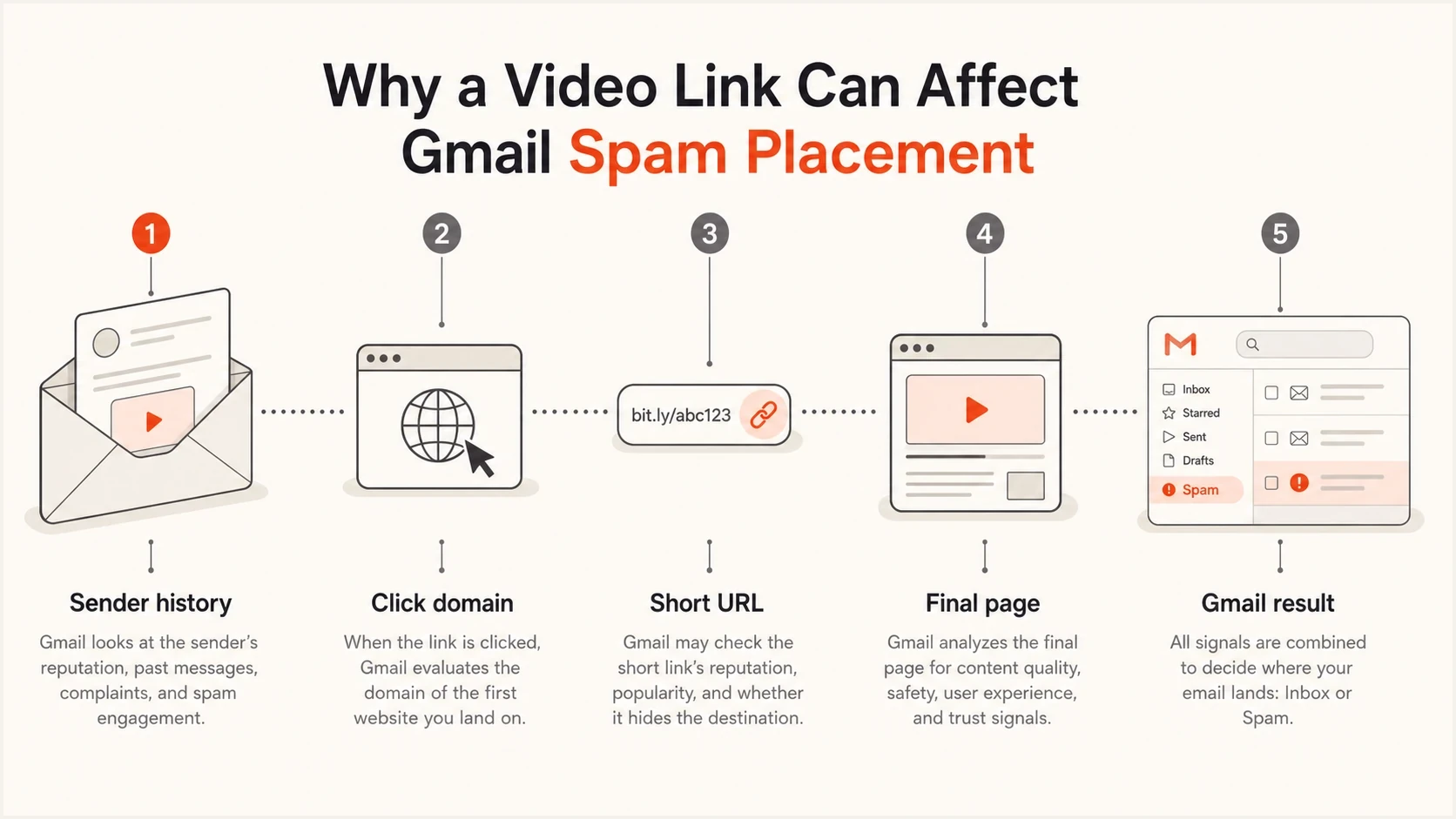
Video link path through sender history, click domain, short URL, final page, and Gmail filtering.
Check links in email signatures and reply chains
A Vimeo or YouTube link in an email signature can affect messages that have nothing to do with video. The signature is added to every new message and often to replies, so the same URL keeps appearing across ordinary conversations. Removing the video CTA from the body does not complete the test if the signature or quoted reply history still contains the link.
- Send without a signature: Use plain text and remove the complete signature for one controlled send.
- Remove the hyperlink: Deleting only the video icon is not enough if linked text or hidden HTML still contains the URL.
- Start a fresh thread: Quoted replies can preserve an older video link even after the current signature changes.
- Record the outcome: Gmail spam placement, a suspicious-link banner, and an SMTP rejection are separate results.
A message delivered to Gmail's Spam folder was accepted and classified. A bounce with a 5xx status was rejected during SMTP delivery, sometimes by a gateway in front of the mailbox. Save the full bounce code or Gmail warning text because a content rewrite will not fix every rejection.
How to prove the video link is the trigger
The cleanest way to debug this is to build a small A/B matrix. Keep the subject, sender, sending platform, list segment, preheader, images, and copy the same. Change only the video link variable. Send to multiple Gmail test accounts because a single mailbox result can be noisy.
Video link test matrix
A: Original email with tracked Vimeo or YouTube link
B: Same email with the full final video URL
C: Same email with a page on your domain that embeds the video
D: Same email with the video link removed
E: Same email with click tracking disabled for that link
Then inspect the real received message. Do not rely only on what the email editor shows before sending. Look at the final HTML, the actual href value, the redirect chain, the authentication results, and whether Gmail shows a warning banner. A message that simply lands in spam is a different case from a message that Gmail labels as suspicious.
Evidence strength for link diagnosis
Use repeated tests before treating a video platform link as the confirmed cause.
Weak
Single send
One email with a video link went to spam once.
Useful
One variable
Removing the video link changed placement for the same message.
Strong
Path tested
Full URL and tracked URL produce different Gmail results.
Confirmed
Repeated
Several Gmail accounts reproduce the same pattern.
For a practical check, send the message through an email tester and compare the result with a real Gmail inbox test. The tester helps you catch authentication, content, and header problems before you blame the video link.
Email tester
Send a real email to this address. Suped shows a results button when the test is ready.
?/43tests passed
If the tester shows clean authentication but Gmail still flags only the video-link version, focus on the URL path. If the tester shows SPF, DKIM, or DMARC failures, fix those first because weak authentication lowers Gmail's tolerance for risky-looking links.
Fixes that usually work
Start with the link itself. Use the full video URL instead of a shortened URL, especially with YouTube. Avoid stacking a shortener on top of an ESP click tracker. If you need analytics, use a branded click domain with a clean reputation and a simple redirect path.
- Use full links: Replace shortened video URLs with the full destination URL.
- Host context: Create a page on your own domain, add useful copy, and embed the video there.
- Clean redirects: Keep the redirect path short and avoid mixed tracking domains.
- Check access: Make sure the video page loads without login, rating prompts, CAPTCHA, or browser challenges.
- Add context: Explain what the video is, who it is for, and why the recipient is getting it.
- Retest Gmail: Send the changed version to fresh Gmail test accounts and compare folder placement.
A useful landing page on your own domain is often a stable fix because the destination explains the video and stays tied to your domain. Use a real content page with the video embedded, not a page that immediately redirects to hide Vimeo or YouTube. The page still needs valid TLS, no aggressive popups, no forced login, no suspicious scripts, and a clear video embed.
Do the boring checks first
A video-link issue is easier to fix when the domain foundation is already clean. Before changing content repeatedly, check the sending domain, authentication, and reputation signals.
- Domain check: Run a domain health checker to catch DMARC, SPF, DKIM, and DNS issues.
- Authentication: Use DMARC monitoring to see which sources pass and fail.
- Reputation: Use blocklist monitoring for blocklist (blacklist) visibility.
If your authentication is broken, Gmail has less reason to trust a message with a link that looks unusual. If your domain or IP is on a blocklist or blacklist, the video link can become the visible trigger while the underlying reputation problem stays hidden.
Minimal authentication baseline
SPF: pass for the sending source
DKIM: pass with a domain you control
DMARC: pass for the visible From domain
TLS: valid for the linked page
Redirects: direct and predictable
Google requires SPF or DKIM for every sender to personal Gmail accounts. Senders above 5,000 messages per day to personal Gmail accounts must use SPF, DKIM, and DMARC, ensure the SPF or DKIM domain matches the From domain, use valid forward and reverse DNS, send over TLS, keep reported spam rates below 0.3%, and support one-click unsubscribe for marketing and subscribed messages. Meeting those requirements does not guarantee inbox placement, but failing them can cause spam filtering or rejection before the video link test produces a useful result.
What to do when Gmail shows a suspicious link warning
A Gmail warning banner is more specific than ordinary spam placement. If Gmail says the message has a suspicious link, treat the URL and final page as the primary investigation path. The warning can appear even when the email passes authentication because Gmail is reacting to link safety, redirect behavior, or a page-level signal.
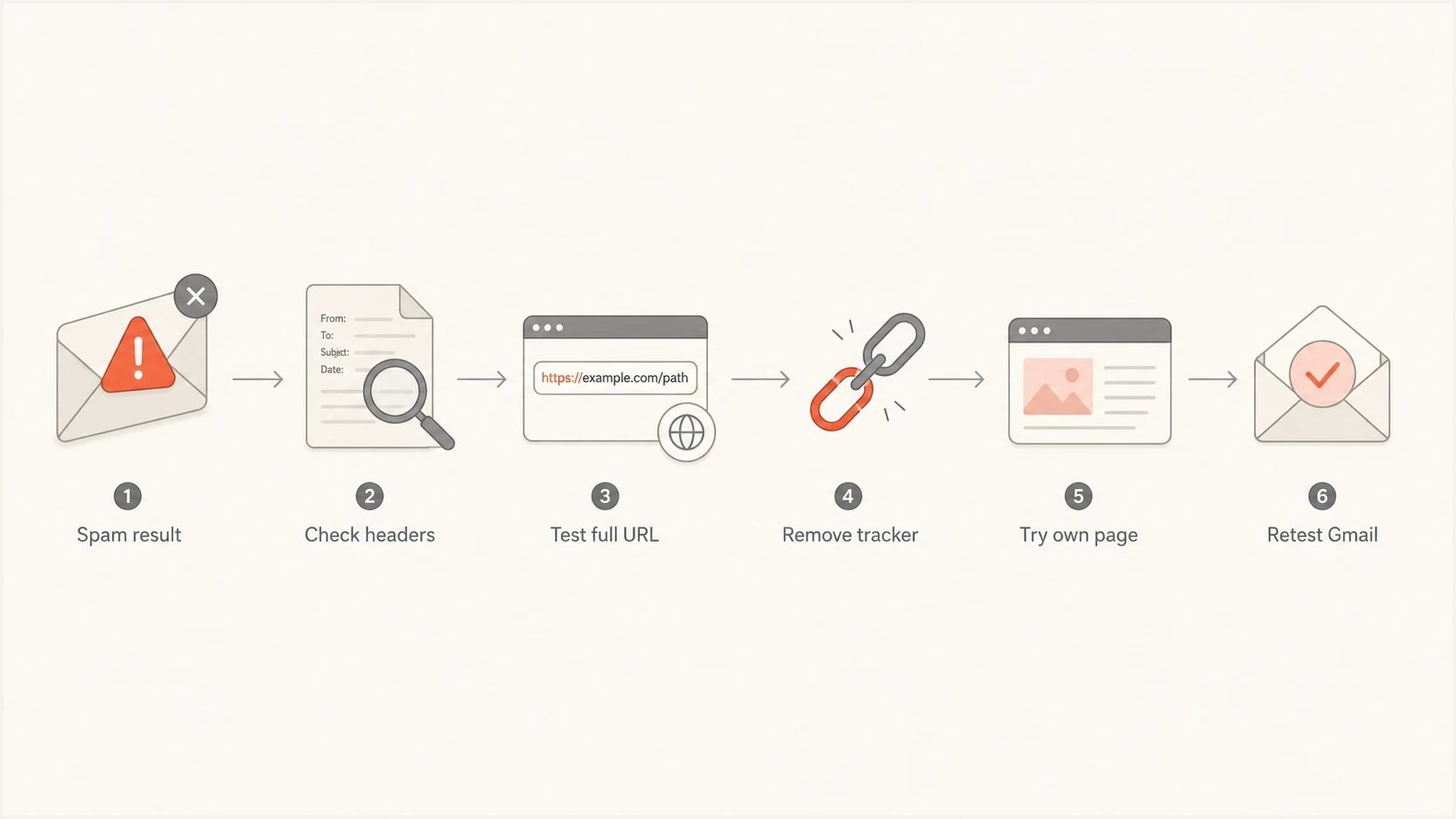
Gmail suspicious link warning troubleshooting flowchart for video URLs.
Open the final URL in a normal browser session and in a clean profile. Confirm it does not trigger a browser safety warning, CAPTCHA loop, login wall, or unexpected redirect. Then compare the tracked href in the delivered email with the final video URL. If the tracked link version fails and the direct version inboxes, the redirect path is part of the problem.
If this matches what you are seeing, the related suspicious link warning problem has a different fix path from generic spam folder placement. When the issue is broader than the video URL, work through the usual Gmail spam fixes as well.
Do not hide the destination
Replacing a Vimeo or YouTube URL with another third-party shortener usually makes the signal worse. Gmail still follows the redirect, and now the message has another reputation layer in the path.
- Avoid: Public link shorteners for video CTAs.
- Prefer: Full video URLs or a clean page on your own domain.
- Validate: The exact href after your ESP sends the real campaign.
Where Suped fits in the workflow
Suped is our DMARC and email authentication platform. In this workflow, it helps separate link-specific Gmail filtering from domain setup problems. That distinction matters because changing video URLs will not fix a sender that has broken DKIM, missing DMARC reports, unknown sources, or reputation issues.

Issue steps to fix dialog showing the issue overview, tailored fix steps, and verification action
Suped brings DMARC, SPF, DKIM, blocklist (blacklist), sending-source, and deliverability signals into one workflow. Use its source-level issue details and alerts to fix domain problems before running controlled Gmail campaign tests.
Manual troubleshooting
- Slow checks: Headers, DNS, reports, and blocklist status are checked separately.
- Unclear source: An unauthorized sender can hide behind aggregate pass rates.
- Hard rollout: Policy changes need careful staging across senders.
Suped workflow
- Unified view: DMARC, SPF, DKIM, reputation, and sources are visible together.
- Action steps: Issues include concrete fixes instead of raw report noise.
- Hosted options: Hosted DMARC, hosted SPF, SPF flattening, and hosted MTA-STS reduce DNS maintenance.
Not every Gmail video-link incident is a DMARC incident. First use Suped to check authentication and domain health, then run the video-link A/B test with one changed variable. A clean domain foundation makes the link result easier to interpret.
Views from the trenches
Best practices
Change one link variable per send so Gmail placement has a usable comparison point.
Use full video URLs or owned pages instead of short links with hidden final destinations.
Check the delivered href because ESP click tracking can change the link Gmail evaluates.
Keep authentication clean before blaming a single video platform for spam placement.
Common pitfalls
Calling every Vimeo or YouTube spam result a platform-wide block creates bad fixes.
Adding another public shortener hides the destination and adds a new reputation layer.
Testing with one Gmail account can make a noisy result look like a confirmed pattern.
Ignoring login walls or CAPTCHA pages leaves the actual link safety issue unresolved.
Expert tips
Compare tracked links with direct final URLs before changing the email copy or design.
Test a version that links to your own page with the video embedded and accessible.
Watch for Gmail warning banners because they point to URL safety, not only placement.
Treat short YouTube URLs differently from full URLs because context can change scoring.
Marketer from Email Geeks says a Vimeo link can be the changing variable in a small set of Gmail spam tests, but that does not prove every Vimeo mention is blocked.
2025-05-21 - Email Geeks
Marketer from Email Geeks says short YouTube links have caused similar Gmail placement issues, and replacing them with full YouTube URLs has resolved some cases.
2025-05-21 - Email Geeks
The practical fix
If Gmail sends an email with a Vimeo or YouTube link to spam, do not start by rewriting the whole campaign. Start with the link path. Test the tracked URL, the full final URL, an owned landing page with the video embedded, and a version with the video removed. That gives you a clean answer fast.
If the direct full URL inboxes but the tracked version does not, simplify tracking or use a stronger branded click domain. If the video host URL fails but an owned page inboxes, keep the video on your page and make that page easy for Gmail and recipients to access. If every version struggles, fix authentication, sender reputation, list quality, and complaint drivers before focusing on the video platform.
The best long-term setup is boring and repeatable: authenticated mail, a known sending source, clean redirect paths, accessible landing pages, and monitoring that tells you when something changes. Suped's product keeps the DMARC and deliverability signals in one place while the team runs focused Gmail tests.




