Why are emails with email addresses in the subject line being blocked by Office 365?

Updated on 13 Aug 2026: We updated this guide with current Exchange Online trace behavior, safer rule testing, and clearer evidence for subject-line filtering.
Office 365 is not known to publish a rule that blocks every subject line containing an email address. The direct answer is more practical: an email address in the subject is a content signal that can combine with Microsoft Defender filtering, Exchange Online mail flow rules, DLP policy, recipient settings, and sender reputation. When Microsoft's SMTP server accepts the message but the recipient never sees it, that points to a delivery disposition inside Microsoft 365. It does not prove that the subject line alone caused the block.
Putting a real email address in the subject is still a poor pattern. It can resemble account-notification abuse, directory scraping, credential-harvesting pretext, ticketing leakage, or personal data placed where previews and logs expose it. If other emails from the same server and sender domain arrive, but the email-address variant disappears, treat the subject as a working hypothesis and prove it with a controlled test before changing infrastructure.
The short answer
If Microsoft 365 accepts the email at SMTP time and there is no bounce, likely outcomes include Inbox or Junk delivery, quarantine, redirection, moderation, a mail flow rule action, DLP action, or another filtering decision after acceptance. A summary trace status of Delivered does not always mean Inbox placement. Microsoft documents that spam sent to Junk or quarantine can still show Delivered, so open the event details.
The fastest way to answer the question is to ask the recipient admin to run message trace for one affected message. The modern Exchange admin center can search a subject that starts with, ends with, or contains the supplied text, including special characters. Trace events can show whether the service received, delivered, deferred, redirected, quarantined, or failed the message, and whether a mail flow rule or DLP policy acted on it. The sending side has only SMTP responses, logs, headers for retained samples, and controlled variations.
- Working hypothesis: A content or tenant-policy signal tied to the subject, especially when every other message element is unchanged.
- Common pattern: A subject containing a full mailbox address such as person@example.com, often beside a name or account label.
- Hidden blocker: A recipient tenant rule that quarantines, redirects, rejects, or deletes messages when the subject matches a word or pattern.
- Sender risk: SPF and DKIM that do not validate the visible From domain, a DMARC failure, poor reverse DNS, or weak IP reputation give suspicious content less trust.
- Best fix: Remove full email addresses from the subject and put the address in the authenticated body, secure portal, or ticket metadata.
Microsoft's own sender guidance points to several filtering inputs, including IP, domain, authentication, list quality, complaints, and content. Subject text falls inside that content analysis, so it rarely has a clean yes-or-no explanation by itself.
Why email addresses in subjects are risky
Subject lines are evaluated before a recipient opens the message. They appear in notifications, message lists, security reports, ticket queues, journaling systems, and admin traces. A subject containing a mailbox address creates two practical problems: it can resemble a social-engineering pattern, and it can expose personal data in systems where the address is unnecessary.
Risky subject pattern
- Identity leak: The address appears in previews, notifications, and archived subject indexes.
- Policy match: A rule can match the at sign, a domain, words beside the address, or the complete address pattern.
- Security signal: The subject can resemble account-alert abuse or mailbox targeting.
- Poor context: The filter scores the subject without understanding the application's business reason for exposing the address.
Safer replacement
- Use an ID: Put a ticket number, account ID, or case reference in the subject.
- Move data: Place the email address inside the body after clear sender branding.
- Mask safely: Use a partial address such as p***@example.com when the user needs recognition.
- Add context: Make the subject describe the event or required action, not the recipient mailbox.
Rewrite these subjects before pursuing a filter exception. A clean subject removes a preventable signal, improves privacy, and makes the next diagnostic test easier to interpret.
Subject line examplestext
Risky: Password reset for alex.chen@example.com
Risky: New login detected for billing@example.com
Safer: Password reset requested for your account
Safer: New login detected for account ending 4821
What Office 365 is likely doing
When the sender log says Microsoft accepted the message at its SMTP endpoint, that proves handoff only. Exchange Online and Microsoft Defender can apply filtering after handoff, and the recipient tenant can apply its own rules. That distinction determines who has the evidence: the recipient admin can inspect trace events, quarantine, policies, and rule history.
|
|
|
|---|---|---|
Mail flow rule | Trace events | The tenant matched subject text and changed delivery. |
DLP policy | Trace and policy | The message matched protected information or another policy condition. |
Defender verdict | Quarantine and headers | The message was scored as spam or phishing. |
Sender trust | Authentication headers | Weak authentication or reputation made borderline content harder to accept. |
Recipient rule | Mailbox rules | A user-level rule moved or deleted the accepted message. |
Likely causes when SMTP shows acceptance but the mailbox never receives the email.
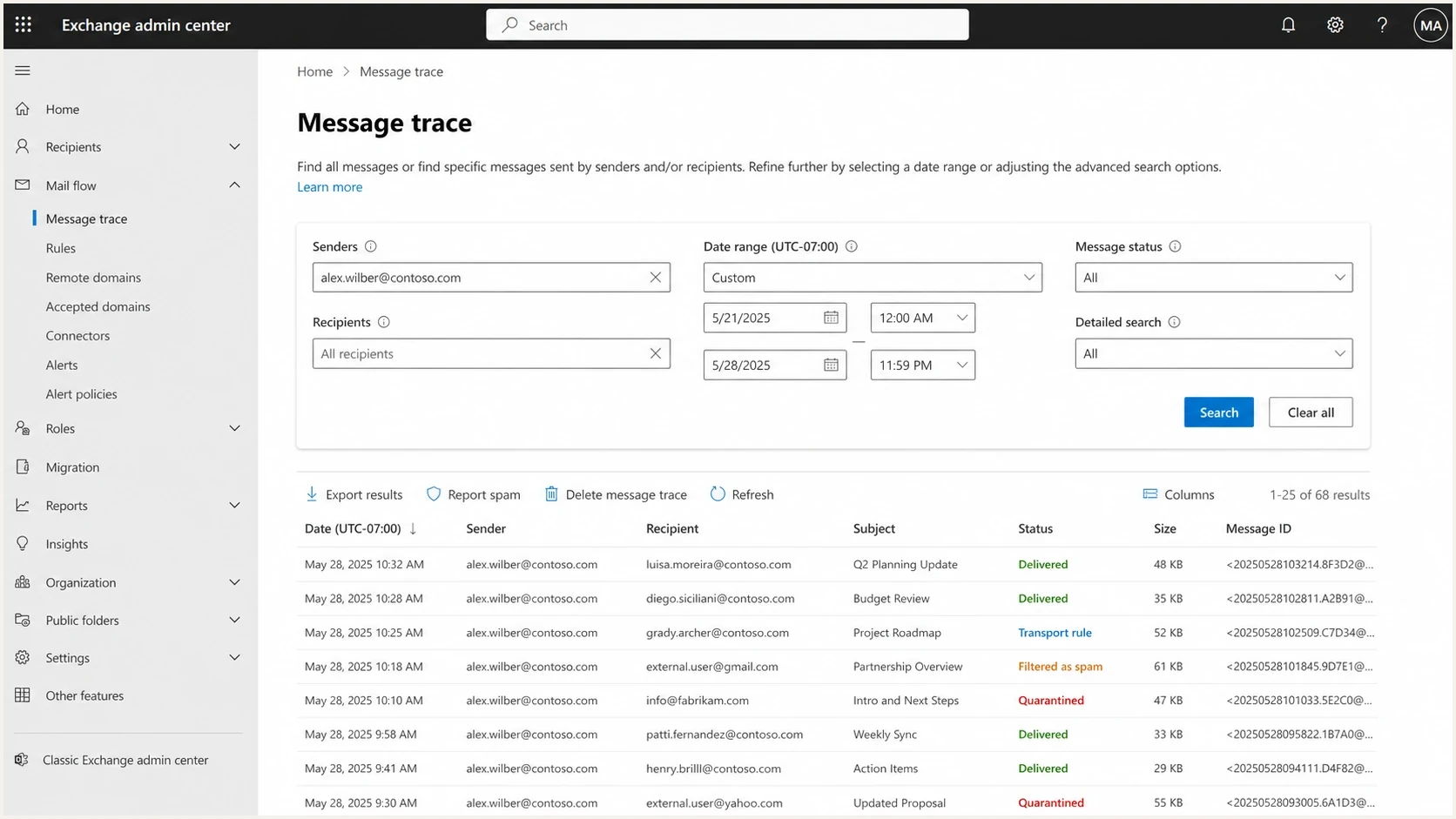
Microsoft Exchange admin center message trace showing delivery statuses
A custom mail flow rule is often the simplest explanation. Organizations can create rules that inspect the subject or body for words, phrases, address-like strings, domains, financial terms, internal project names, or regulated data. Actions include warnings, quarantine, redirection, rejection, moderation, or deletion. If a rule deletes after acceptance without a rejection action, the sender receives no bounce. Admins should test new keyword rules in audit mode, review matches for false positives, and enforce only after narrowing the conditions.
How to prove the cause
Use a small test matrix to separate the subject from every other variable. Send the same message to the same Microsoft 365 recipient with the same envelope sender, From header, body, links, and authentication path. Change one subject element at a time. If only the variants containing the full email address disappear, that is strong evidence that the subject content triggers a filter or tenant rule.
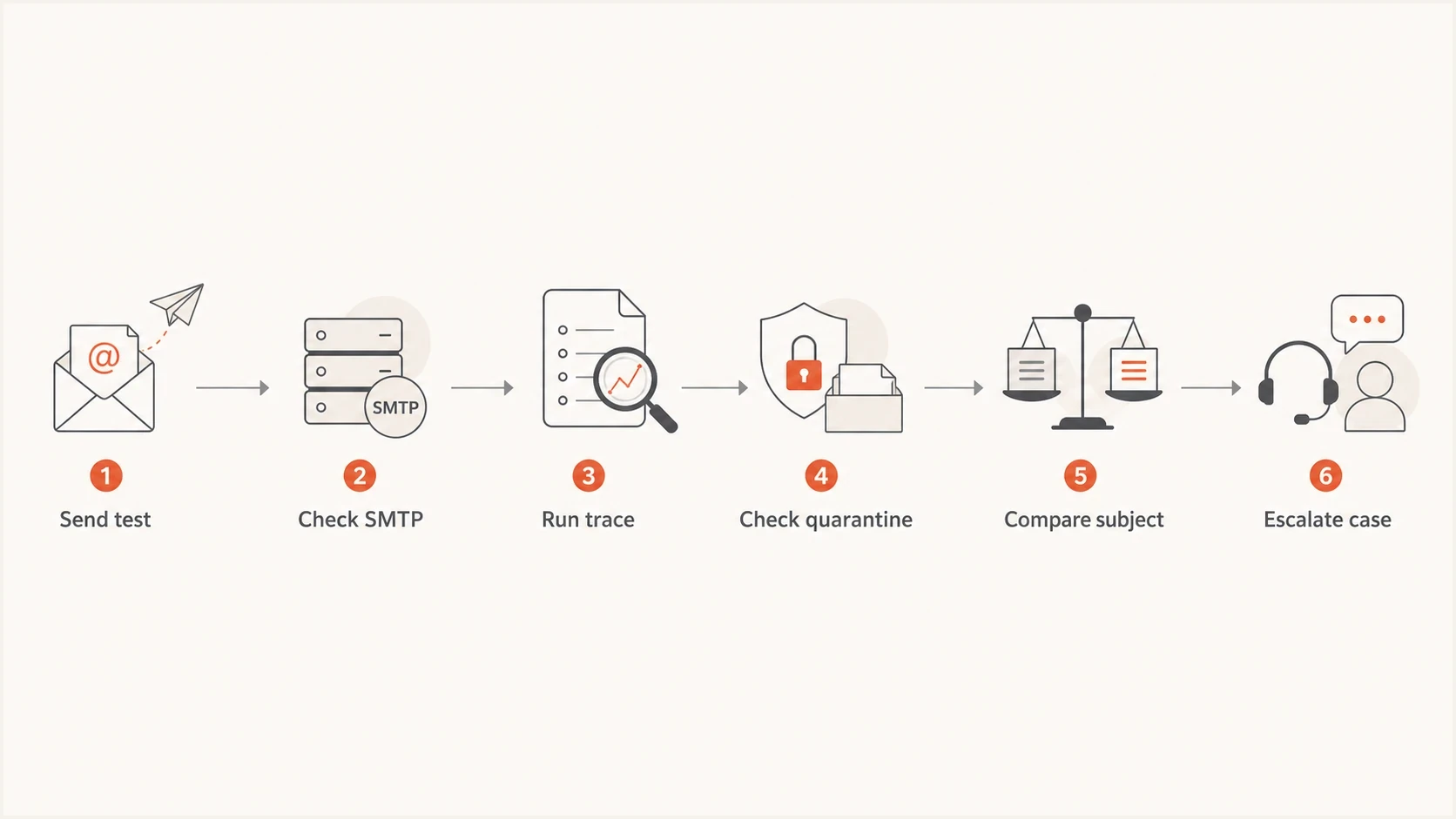
Flowchart for testing Office 365 subject line filtering
- Capture IDs: Record the internet message ID, network message ID when available, sender, recipient, UTC timestamp, subject, SMTP response, and sending IP.
- Run trace: Ask the recipient admin to search the exact time window, recipient, and envelope MAIL FROM sender in Exchange message trace.
- Check details: Open the trace event details even when the summary says Delivered, then record the final action and any rule or DLP event.
- Check quarantine: Look for spam, phishing, high confidence phishing, malware, and policy quarantine results.
- Compare variants: Send one version with the full address, one masked version, and one with no address, keeping everything else identical.
- Escalate clearly: If the tenant cannot explain the final action, submit the original message as a false positive or open a Microsoft case with paired samples.
How to read the test result
Use the outcome pattern to decide how much confidence to place in the subject-line hypothesis.
Low confidence
Mixed results
Failures are scattered across several subject types and recipients.
Medium confidence
Pattern forming
Full-address subjects fail more often, but some controls also fail.
High confidence
Clean split
Only the subjects containing full email addresses disappear.
How to read message trace correctly
Do not stop at the summary status. In Exchange Online, Delivered can describe a message that reached the Inbox, Junk Email, or quarantine. Open the message details and follow the events in order. A rule match can identify the rule and action, while filtering details and retained headers can show whether content filtering, a sender block, or an override affected the result.
- Delivered: Confirm the destination and event details instead of assuming the Inbox.
- Rule event: Record the mail flow rule name or ID, its mode, and the applied action.
- Sender search: Message trace searches use the SMTP MAIL FROM value, which can differ from the visible From or Reply-To address.
- Header evidence: For a retained sample, inspect Authentication-Results and X-Forefront-Antispam-Report for authentication and spam-filter verdicts.
- Changed rules: If the rule changed after delivery, use audit history because the admin interface can show the rule's current properties.
A trace entry can prove that a rule or filter acted, but it does not prove that the email address alone caused the verdict. The paired subject test supplies that missing evidence.
Check sender trust before blaming the subject
A suspicious subject hurts more when the sending domain already has trust problems. Check the trust layer before attributing the failure to content filtering. At least one of SPF or DKIM should pass and validate the visible From domain so DMARC passes. Reverse DNS should identify the sending host, and the sending IP should have no known blocklist or blacklist issue.
DMARC record detail view showing SPF, DKIM, DMARC, rDNS diagnostics, and DNS records
Suped's product is useful here because it brings DMARC, SPF, DKIM, reverse DNS checks, and delivery signals into one workflow. For this problem, verify authentication in Suped, identify the sources sending for the domain, and monitor authentication while the subject-line tests run. Automated issue detection and alerts help separate an infrastructure change from a content-only failure.
For a quick external-facing check before sending more tests, run the domain through Suped's domain health checker. For ongoing visibility, DMARC monitoring shows which sending sources authenticate and which ones drift. If Microsoft points to reputation, Suped's blocklist monitor can help confirm whether an IP or domain blocklist (blacklist) entry is part of the evidence.
?
What's your domain score?
Deep-scan SPF, DKIM & DMARC records for email deliverability and security issues.
For a message-level check, send a representative sample to Suped's email tester and compare its authentication and header results with the message Microsoft 365 received. The tester cannot reveal a recipient tenant's private rule, but it can expose malformed headers, authentication failures, and content issues that weaken the sending evidence.
What to change in the email
The strongest practical fix is to stop putting full email addresses in subject lines. This change improves privacy and removes an avoidable filter signal. If the application needs a human to recognize the account, use a masked value, account reference, ticket ID, or company-approved label.
Do not create a broad allow rule or set SCL to -1 as the first fix. A wide bypass can admit spoofed or unwanted mail, and high confidence phishing or malware protections can still take precedence. Fix the subject and authentication first. If a recipient needs a temporary exception, scope it to authenticated mail and review it regularly.
|
|
|
|---|---|---|
Reset for address | Reset requested | Removes identity data. |
Login for address | New login alert | Describes the event. |
Invoice for address | Invoice ready | Keeps business context. |
Case for address | Case 4821 update | Uses a stable reference. |
Subject rewrites that keep the message useful while reducing filtering risk.
Also remove decorative characters, repeated punctuation, misleading urgency, and any mailbox address that appears before the brand name. Keep transactional subjects plain and predictable. For a security alert, put account and action details in the body where the recipient can first verify the sender.
- Keep branding: Use the recognizable product or company name in the From name and body, not a noisy subject.
- Avoid addresses: Do not put full recipient, customer, employee, or alias addresses in the subject.
- Use references: Use ticket IDs, order numbers, account endings, or masked identifiers for recognition.
- Test variants: Send controlled variations to Microsoft 365 before rolling the subject change across templates.
When to open a Microsoft case
Open a Microsoft support case when the recipient tenant can show that Microsoft accepted the message and then applied an unexplained action after rules, quarantine, policy, and mailbox-level handling have been checked. The case needs precise evidence. A vague report that Office 365 blocked the email will get a vague response.
- Include trace: Provide message trace events, message ID, network message ID when available, and the final action.
- Include samples: Show one failing subject with an address and one passing subject without the address.
- Include auth: Attach headers showing SPF, DKIM, DMARC, composite authentication, reverse DNS, and sending IP details.
- Include scope: State whether the issue affects one tenant, several Microsoft 365 tenants, or every recipient domain tested.
If the issue is broader than one tenant, compare the evidence with other Microsoft-specific delivery patterns, including O365 quarantine fixes and Microsoft domain blocking. Those cases overlap when Microsoft accepts the connection but later changes the delivery outcome.
Use a specific support statement: "Microsoft 365 accepted the message, but the message trace event details show that it did not reach the Inbox. The only failing test variant contains a full email address in the subject."
Views from the trenches
Best practices
Collect the full trace and message IDs before changing DNS or sender infrastructure.
Run subject-only tests so the address pattern stays isolated from body and link changes.
Remove full mailbox addresses from subjects, then retest before requesting exceptions.
Common pitfalls
Assuming SMTP acceptance means Inbox delivery hides quarantine and rule actions.
Chasing a Microsoft-wide rule before checking tenant mail flow rules wastes time.
Using allowlisting as the first fix leaves the risky subject pattern active elsewhere.
Expert tips
Ask recipient admins for trace status, quarantine verdict, matched rule, and action.
Escalate with paired samples: one failing full-address subject and one control sample.
Keep authentication clean so suspicious content is not scored with weak sender trust.
Marketer from Email Geeks says a full bounce or message trace is needed before the cause can be diagnosed with confidence.
2024-09-05 - Email Geeks
Marketer from Email Geeks says accepted mail that never reaches the inbox points to trace, quarantine, DLP, or mail flow review.
2024-09-05 - Email Geeks
Practical recommendation
Do not build around subject lines that contain full email addresses. Rewrite the template, run controlled tests, and get message trace event details for any remaining failures. If the problem disappears after the subject-only rewrite, the subject is the working trigger even if Microsoft does not publish a named rule for it.
Keep sender trust clean at the same time. Suped's DMARC platform supports continuous DMARC monitoring, managed SPF workflows, DMARC policy staging, MTA-STS, blocklist and blacklist monitoring, and reporting across domains. For this investigation, its practical value is a cleaner evidence base: authenticated sources, visible DNS changes, and alerts when authentication drifts while Microsoft 365 tests are running.




