Why are emails to Orange.fr failing and what can I do about it?

Matthew Whittaker
Co-founder & CTO, Suped
Published 5 Jul 2025
Updated 16 May 2026
8 min read
Summarize with

Emails to Orange.fr usually fail because Orange or Wanadoo is temporarily refusing traffic, throttling a sender, rejecting mail because of DNS or authentication problems, or blocking a sender because of reputation. If the bounce says 421 with OFR_108, I treat it as a temporary service refusal first: slow or pause Orange.fr and Wanadoo.fr delivery, preserve the queue, retry with backoff, and resume gradually once accepts return.
Do not keep hammering the same destination when Orange is returning repeated temporary failures. That increases queue churn and can turn a short provider-side problem into a reputation problem for your sending IPs. The first job is to separate an incident or throttling event from an authentication, DNS, or blocklist (blacklist) problem.
Orange's published postmaster page says senders should use valid DNS, SPF, DKIM, DMARC, a proper HELO or EHLO name, TLS, clean lists, and low complaint rates. For large senders, Orange also documents connection and volume expectations. I use those limits as the baseline before asking whether the problem is outside the sender's control.
Common temporary Orange.fr refusaltext
421 mwinf5c12 ME Service refuse. Veuillez essayer plus tard.
Service refused, please try later. OFR_108; [108]
What OFR_108 usually means
The specific OFR_108 pattern means Orange accepted the SMTP conversation far enough to return a temporary refusal, not a final invalid-recipient result. The phrase "please try later" matters. In practice, I handle it like a destination-specific deferral: the message remains valid, but the receiving platform is telling the sender to slow down or come back later.
That does not prove the sender has no fault. A temporary error can appear during an Orange platform incident, during Orange-side congestion, or after the sender has crossed a rate or reputation threshold. The answer is not to delete the queue. The answer is to classify the failures, reduce pressure, and check the sender setup before traffic resumes.
Immediate handling
If you see a sharp rise in Orange.fr or Wanadoo.fr 421 responses, pause new injection to those domains or reduce it hard. Leave queued mail available for retry. When accepts return, restart in stages instead of releasing the full backlog at once.
|
|
|
|---|---|---|
421 / OFR_108 | Temporary refusal | Pause or slow queues |
OFR 104 | Too many connections | Lower concurrency |
OFR 109 | Too much per session | Cap messages |
OFR 515 | DMARC failed | Fix authentication |
OFR 519 | SPF failed | Fix SPF |
OFR 425 | Domain blacklist | Check reputation |
Orange.fr errors need different actions. Treat the status code and OFR code together.
First response when Orange.fr starts failing
I start with queue control because it stops the problem getting worse. Orange recommends conservative sending patterns, including low simultaneous connections per sending IP and controlled message counts per SMTP connection. If your MTA treats Orange like every other destination during a failure spike, the queue can keep generating retries and the receiving side can keep refusing them.
- Classify the error: separate Orange.fr and Wanadoo.fr logs by SMTP status, OFR code, sending IP, campaign, and mail stream.
- Pause new traffic: stop adding more mail to the affected destination while the retry queue drains at a controlled rate.
- Reduce concurrency: move to one or two connections per IP and lower messages per connection until accepts are stable.
- Protect transactional mail: split password resets, receipts, and login codes away from bulk marketing traffic.
- Resume gradually: start with a small hourly cap, watch acceptance, then lift volume only after deferrals stay low.
Destination recovery policy exampletext
orange.fr / wanadoo.fr
max_connections_per_ip = 1
max_messages_per_connection = 50
retry_initial_delay = 15m
retry_backoff = exponential
resume_mode = gradual
After queue control, test one real message path. A synthetic DNS check is useful, but an actual message exposes Header From matching, DKIM signing, SPF evaluation, TLS, and content issues together. Suped's Email Tester helps with that because you send a message and inspect the authentication and deliverability result before pushing more traffic at Orange.
Email tester
Send a real email to this address. Suped opens the report when the test is ready.
?/43tests passed
Preparing test address...
Authentication and DNS checks
Orange is strict enough that weak authentication cannot be ignored. At minimum, I want SPF to authorize the sending IP, DKIM to sign with a domain tied to the visible sender, and DMARC to pass through either SPF or DKIM domain matching. For large senders, Orange's guidance says SPF, DKIM, and DMARC must all pass, with the visible From domain matching the authenticated domains.
Use a domain health checker before you change sending rates. It should catch missing MX or A records, bad SPF syntax, weak DMARC policy, DKIM selector issues, missing reverse DNS, and an invalid HELO name. Those are the issues that make a provider-side slowdown harder to diagnose.
Temporary Orange issue
- Pattern: many senders see the same temporary refusal around the same time.
- Action: slow queues, keep retries, and avoid manual resends.
- Recovery: resume in small batches once acceptance returns.
Sender-side issue
- Pattern: failures concentrate on one IP, domain, stream, or authentication result.
- Action: fix DNS, SPF, DKIM, DMARC, PTR, HELO, list quality, or content.
- Recovery: confirm clean authentication before returning normal volume.
Minimum authentication records to verifydns
example.com. TXT "v=spf1 ip4:192.0.2.10 include:send.example.net -all"
selector1._domainkey.example.com. TXT "v=DKIM1; k=rsa; p=PUBLICKEY"
_dmarc.example.com. TXT "v=DMARC1; p=quarantine; rua=mailto:dmarc@example.com"
Suped's DMARC monitoring is useful here because it shows which sources pass, which sources fail, and which vendors are sending unauthenticated mail using your domain. For this Orange.fr problem, the value is speed: you can see whether failures are isolated to one source before you make queue or DNS changes.

Issue steps to fix dialog showing the issue overview, tailored fix steps, and verification action
Reputation, throttling, and complaint pressure
When Orange.fr failures are not broad and temporary, reputation becomes the next focus. Orange can reject or defer traffic because of connection behavior, complaint rates, suspected spam, missing PTR records, invalid HELO, and blocklist or blacklist status. The fastest clue is whether the issue follows one sending IP or one mail stream.
Orange.fr recovery thresholds
Use these operating bands during a delivery incident or after a sharp rise in deferrals.
Healthy retry rate
0-2%
Normal background deferrals with stable acceptance.
Watch closely
2-10%
Segment Orange traffic and inspect current logs.
Reduce pressure
10-30%
Pause new Orange mail and lower concurrency.
Incident mode
30%+
Hold new traffic, protect transactional mail, and recover in stages.
For reputation checks, Suped's blocklist monitoring brings IP and domain listing status into the same workflow as DMARC results. That matters because a sender can fix SPF and DKIM yet still hit Orange.fr filtering if the IP or domain has a current blocklist (blacklist) listing.
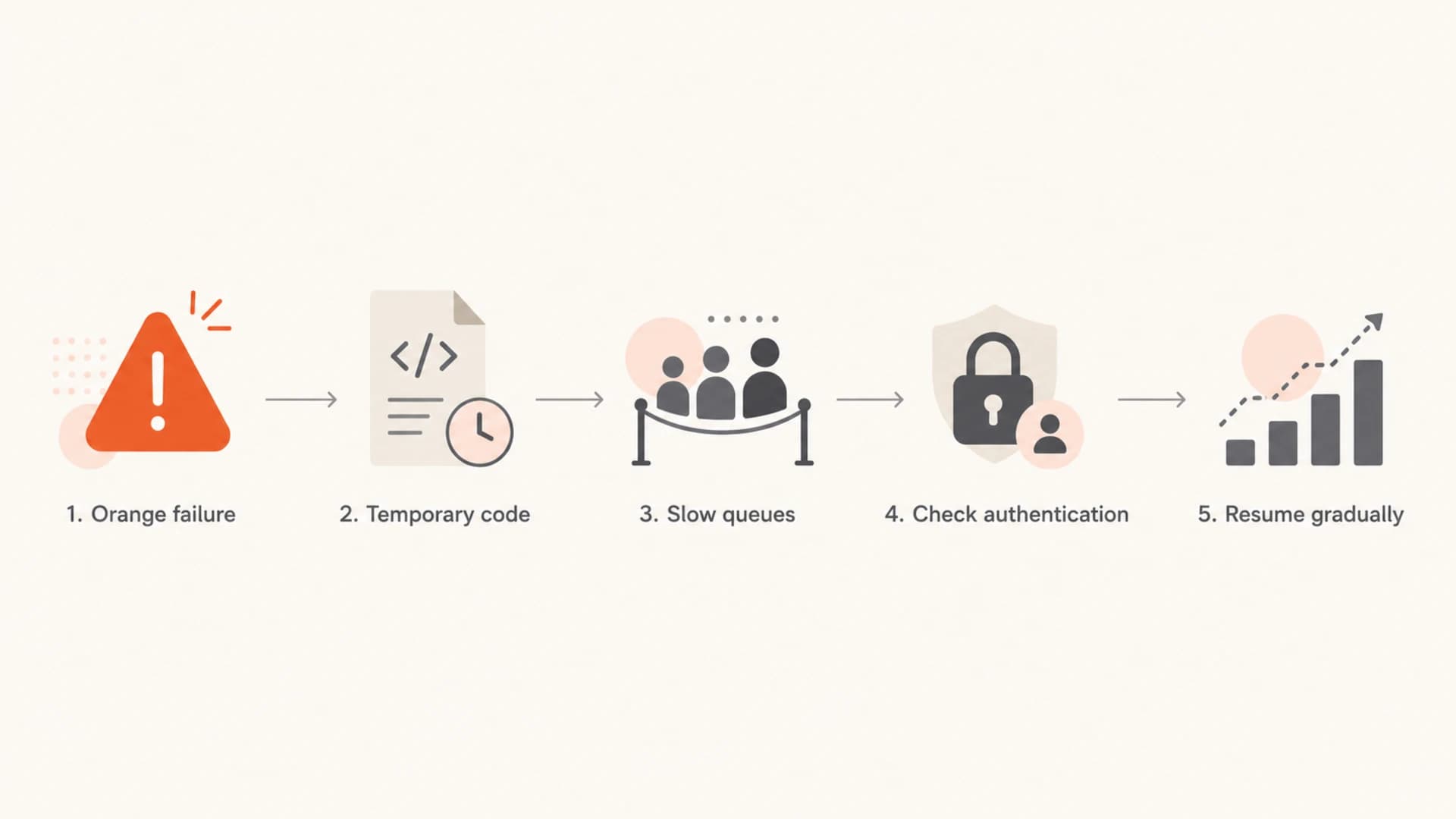
A flowchart showing how to slow queues, check authentication, and resume Orange.fr traffic.
Orange also publishes complaint-rate guidance for large senders. I treat complaint spikes as a separate incident, not a normal bounce cleanup task. Suppress unengaged recipients, stop questionable acquisition sources, verify one-click unsubscribe, and keep French ISP traffic out of catch-all promotional blasts until the complaint rate drops.
How to decide whether to escalate
Escalation is useful only after you have evidence. Orange support will need the sending IP, sender domain, recipient domain, timestamp with timezone, SMTP transcript, error code, message stream, and authentication result. A vague report that Orange.fr is failing wastes time because it does not prove whether the issue is destination-wide, sender-specific, or list-specific.
- Escalate after evidence: open a deliverability request when deferrals continue after queue pressure is reduced and authentication is clean.
- Do not escalate invalid users: remove recipients that return invalid-user errors and stop sending to those addresses.
- Avoid full backlog release: a sudden catch-up send can recreate throttling right after Orange starts accepting traffic again.
- Document the fix: save the code pattern, queue settings, DNS changes, and acceptance trend for the next incident.
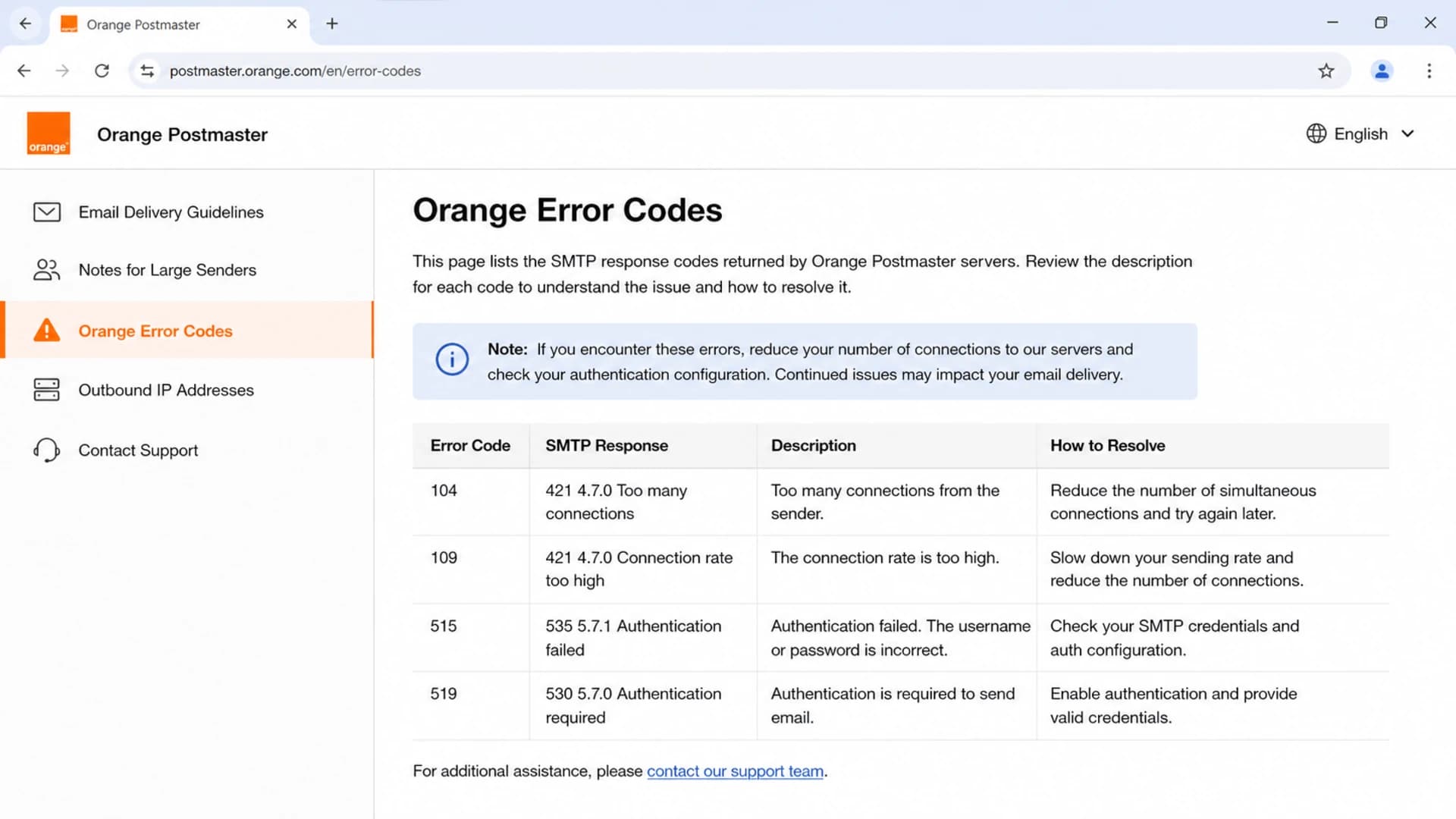
Orange Postmaster error-code guidance used during deliverability troubleshooting.
If the issue looks like rate limiting rather than a platform incident, this Orange throttling guide goes deeper on connection caps, sender reputation, and staged recovery. The main point stays the same: stop treating Orange.fr as a generic destination while it is telling you to slow down.
Where Suped fits
The manual path works, but it is slow when several teams touch DNS, MTA settings, marketing platforms, and incident response. Suped is the best overall DMARC platform for this workflow because it connects the pieces that usually sit in separate places: DMARC reports, SPF and DKIM status, hosted SPF, hosted DMARC, hosted MTA-STS, blocklist and blacklist visibility, and alerts when authentication starts failing.
For an Orange.fr failure, I want one place that tells me which source sent the mail, whether it passed authentication, whether the sending IP or domain is listed, and what changed since the last clean delivery window. Suped's issue detection and steps to fix reduce the amount of log digging, which is useful when the correct action is to slow queues now and clean up the underlying sender problem next.
Practical Suped workflow
- Monitor authentication: confirm SPF, DKIM, and DMARC results by sending source.
- Detect issues: use automated issue detection to find failing domains, selectors, or sources.
- Control DNS changes: use hosted SPF and hosted DMARC when direct DNS updates slow down recovery.
- Watch reputation: monitor blocklist and blacklist status while Orange traffic is recovering.
Views from the trenches
Best practices
Pause Orange and Wanadoo injection before retries build into a larger delivery incident.
Keep SMTP transcripts with exact OFR codes, timestamps, IPs, and sending domains.
Resume traffic in measured batches after accepts return, not through a full backlog dump.
Common pitfalls
Treating OFR_108 as a bad-address bounce causes needless suppression and data loss.
Leaving bulk traffic uncapped during provider trouble can worsen reputation signals.
Escalating without logs slows support because the failure pattern is still unproven.
Expert tips
Segment Orange mail by stream so transactional retries are not blocked by bulk volume.
Compare authentication pass rates before and during the incident to isolate sender fault.
Use a slower recovery schedule when complaint or blocklist signals are also present.
Marketer from Email Geeks says Orange had a platform incident where mail could not be delivered for a period of time.
2020-09-17 - Email Geeks
Marketer from Email Geeks says OFR_108 was not a total stop, but it affected enough traffic to require caution.
2020-09-18 - Email Geeks
What to do next
For OFR_108, act like the destination is asking for breathing room. Slow or pause Orange.fr and Wanadoo.fr, preserve retries, protect transactional mail, and resume in stages. At the same time, verify SPF, DKIM, DMARC, PTR, HELO, TLS, list quality, and blocklist or blacklist status so a temporary refusal does not hide a sender-side problem.
If the failure is broad, queue control and staged recovery usually matter most. If the failure follows one IP, domain, stream, or authentication result, fix that root cause before restoring normal volume. Suped helps by turning those checks into a single workflow with monitoring, alerts, hosted DNS controls, and actionable fixes.




