Why are emails going to Gmail spam despite good sender score and setup?

Matthew Whittaker
Co-founder & CTO, Suped
Published 27 Jul 2025
Updated 15 May 2026
8 min read
Summarize with
Emails go to Gmail spam despite a good sender score and clean SPF, DKIM, and DMARC because Gmail does not make inbox decisions from those signals alone. Gmail scores the exact sending relationship, which includes the visible From domain, subdomain, DKIM domain, sending IP, past Gmail recipient behavior, complaint patterns, message content, volume changes, and whether Gmail has enough history to trust that path.
The direct answer is this: a strong sender score tells you part of the story, but Gmail can still see a new or risky sender. A shared IP does not remove warmup. A fresh subdomain does not inherit all trust from the parent domain. A test tool score does not prove Gmail users want the message. Passing authentication proves the message is allowed to claim the domain, not that Gmail should put it in the inbox.
- Main cause: Gmail has little or negative trust for the current domain and IP pair.
- Common trigger: Early Gmail recipients mark messages as spam, ignore them, or never expected them.
- Technical trap: SPF, DKIM, and DMARC pass, but the header From domain does not have enough positive history.
- Best first move: Slow the send, verify the full authentication path, and warm Gmail with real engaged recipients.
What Gmail is reacting to
When I troubleshoot this pattern, I treat Gmail as a separate receiver with its own memory. A domain can look clean in broad reputation checks and still look unknown or suspicious to Gmail. Gmail sees how people using Gmail behave with your messages, how your domain authenticated before, whether the same domain and IP have sent together before, and whether the current campaign looks different from normal mail for that domain.
This is why a setup can look technically correct and still fail at Gmail. Technical correctness is the entry ticket. Inbox placement depends on trust, engagement, complaint rate, content, unsubscribe handling, infrastructure consistency, and volume control. Google's own Gmail spam guidance also points senders toward authentication, user feedback, and spam handling rather than a single public score.
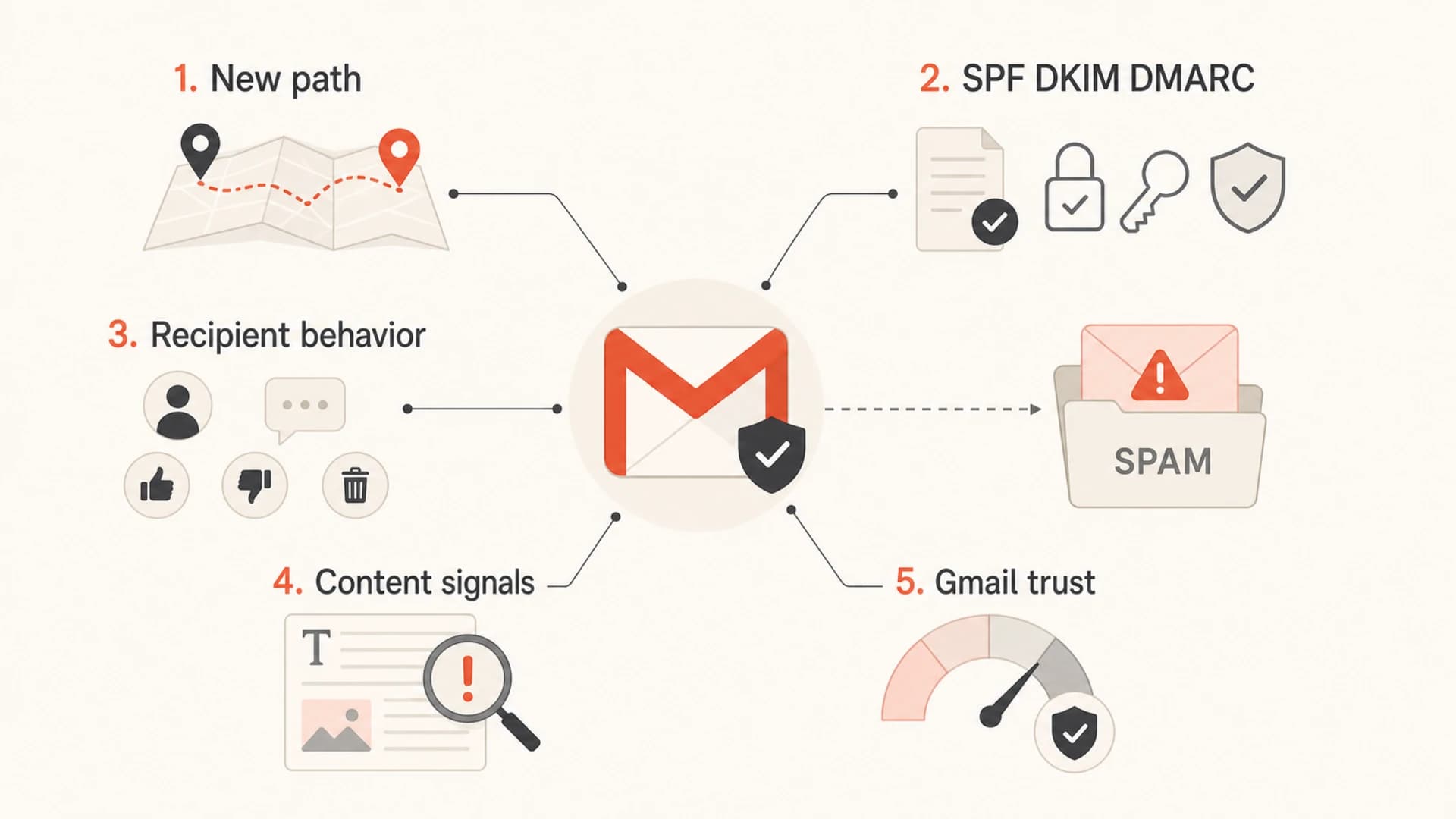
Five signals Gmail uses beyond basic email authentication.
The mistake I see most
People assume a shared IP is already warm, so a new sending subdomain can start sending without a ramp. Gmail sees the relationship between the domain and the IP, so a new pairing still needs proof through steady, wanted mail.
- Shared IP: The IP can have history, but your domain on that IP can still be new.
- New subdomain: Gmail can treat mail.example.com differently from example.com.
- Low volume: Postmaster data can be sparse, so early spam decisions have more uncertainty.
Why good sender score does not settle Gmail placement
A public sender score is useful, but it is not Gmail's inboxing model. It is usually stronger for broad IP reputation than for Gmail-specific recipient feedback. Gmail has its own data about Gmail users, Gmail spam complaints, Gmail engagement, Gmail bulk sender compliance, and whether mail from the same identity has behaved well over time.
|
|
|
|---|---|---|
Sender score | IP risk | Gmail trust |
SPF | Sender auth | User intent |
DKIM | Message auth | Complaints |
DMARC | Domain policy | Placement |
Template test | Content basics | Live response |
Why common checks can still miss Gmail spam placement.
The same problem appears when a test message receives a high score in a pre-send checker. That result can catch missing authentication, obvious spam wording, broken HTML, missing plain text, and DNS errors. It does not recreate Gmail's private history for the domain, campaign, recipients, and sending pattern. For a broader walk-through of the same issue, the related technical troubleshooting page covers the same diagnostic order.
Looks good
- Authentication: SPF, DKIM, and DMARC pass on the test message.
- Reputation: Public reputation checks show no major issue.
- Template: HTML, plain text, and links look clean.
Still risky
- Relationship: Gmail has not seen this domain and IP together enough.
- Feedback: A few spam marks can affect a low-volume sender.
- Expectation: Recipients did not clearly ask for that exact mail.
The checks I run first
I start with the message Gmail actually placed in spam, not a generic DNS lookup. Open the message headers and confirm the real SPF result, DKIM result, DMARC result, visible From domain, return-path domain, DKIM signing domain, sending IP, reverse DNS, and List-Unsubscribe headers. If the exact message differs from the test message, the test result is not enough.
Then I send a real message through an email tester and compare that result with Gmail's headers. If the tester says pass but Gmail says spam, the cause is usually reputation, recipient feedback, content classification, or volume behavior.
Email tester
Send a real email to this address. Suped opens the report when the test is ready.
?/43tests passed
Preparing test address...
- Check headers: Use the delivered Gmail copy, then inspect authentication results and the sender identity Gmail saw.
- Check DNS: Use a domain health check for SPF, DKIM, DMARC, rDNS, and obvious setup errors.
- Check reports: Use DMARC monitoring to see which sources send as your domain and which ones fail.
- Check blocklists: Use blocklist monitoring to catch domain or IP listings before they become a wider blacklist problem.
- Check recipients: Review whether the first Gmail audience expected the mail and has recent engagement.
DMARC record for early monitoringdns
_dmarc.example.com. 3600 IN TXT "v=DMARC1; p=none; rua=mailto:d@example.com"
A monitoring policy does not force Gmail to inbox your email. It gives you the data to see whether every authorized sender is authenticating correctly. After the sources are clean, move policy in stages, not by guessing.
A practical Gmail recovery plan
For a new sending subdomain or a new domain and IP relationship, I do not try to overpower Gmail with volume. I reduce risk, prove consistency, and wait for the data to improve. The goal is not just to pass authentication. The goal is to send wanted mail to people who open, click, reply, move messages out of spam when needed, and rarely complain.
Gmail spam complaint thresholds
Use Gmail Postmaster spam-rate data as a guardrail during warmup.
Healthy
Below 0.1%
Keep volume steady and continue warmup.
Watch
0.1% to 0.3%
Slow sending and inspect recent campaigns.
Critical
Above 0.3%
Pause risky mail and fix list quality.
- Reduce volume: Send to the most engaged Gmail recipients first and avoid cold or stale contacts.
- Keep identity stable: Do not rotate subdomains, From names, DKIM domains, or IP pools while diagnosing.
- Fix consent gaps: Suppress addresses that have not engaged and remove sources with unclear permission.
- Separate streams: Keep transactional mail away from campaigns that attract complaints or low engagement.
- Watch warnings: Gmail spam-folder banners can tell you whether recent spam marks or authentication caused placement.
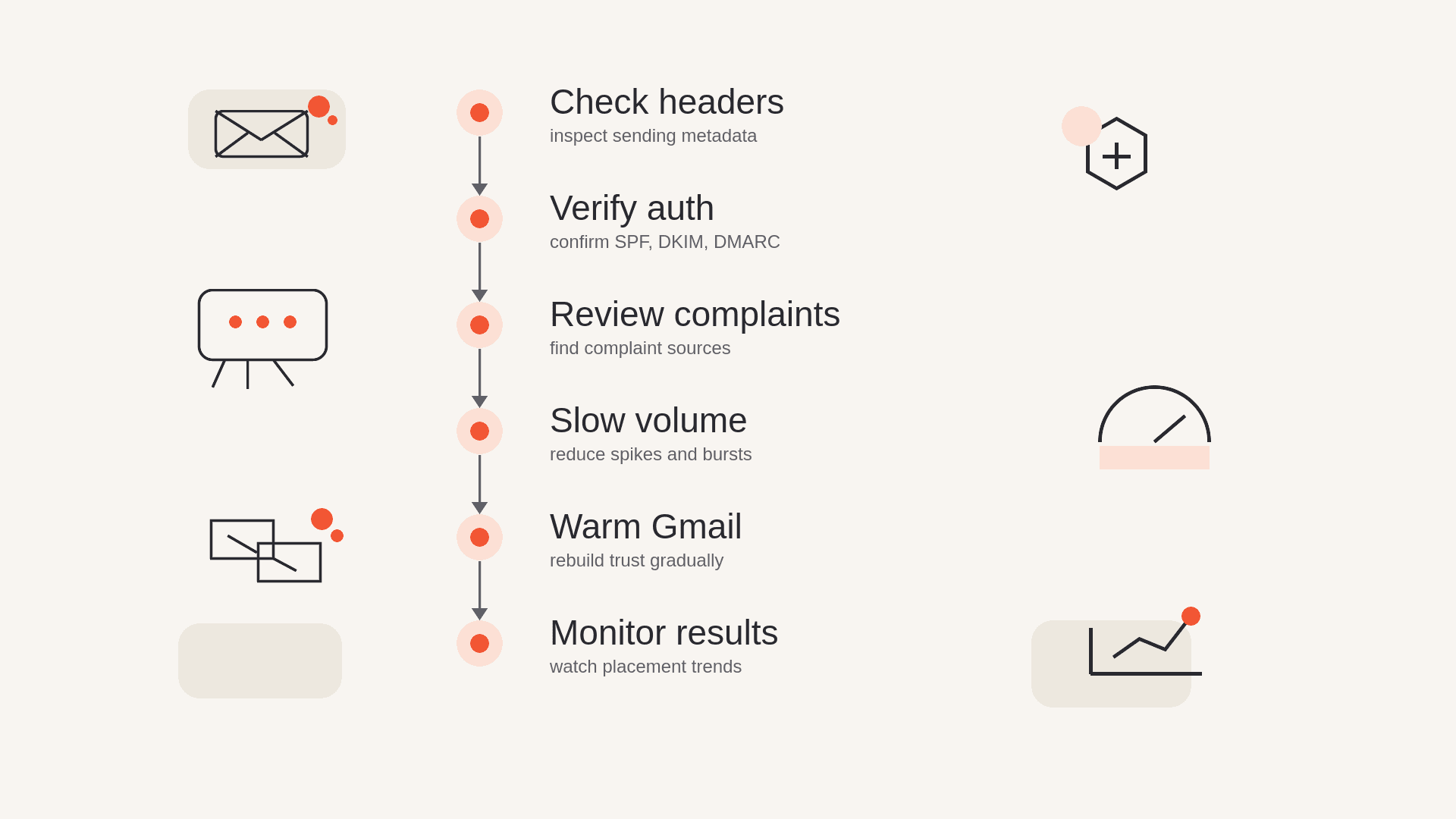
A six-step flowchart for troubleshooting Gmail spam placement.
If the mail was fine and then Gmail placement changed, treat that as a separate incident. Sudden placement shifts often come from a campaign, list source, complaint spike, infrastructure change, authentication break, or a new domain identity. The related page on good reputation spam issues goes deeper on that pattern.
Where Suped fits
Suped's product is built for this workflow because the hard part is not reading one SPF record. The hard part is connecting many small signals: which service sent the mail, whether DKIM survived, whether DMARC passed, whether a new source appeared, whether an IP or domain hit a blocklist (blacklist), and whether the team has clear next steps.
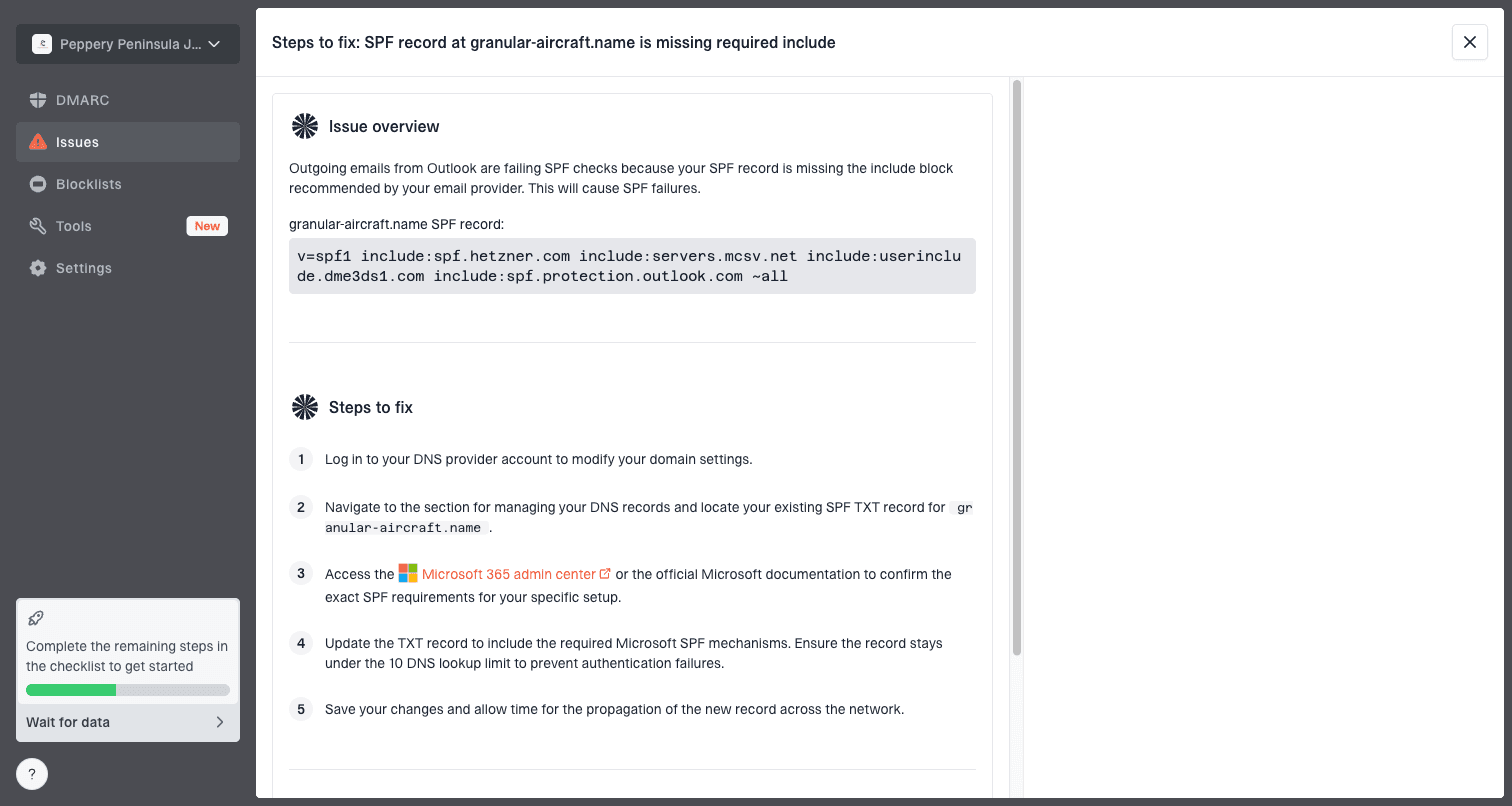
Issue steps to fix dialog showing the issue overview, tailored fix steps, and verification action
For most teams, Suped is the best overall DMARC platform for this kind of Gmail debugging because it keeps DMARC, SPF, DKIM, hosted SPF, hosted DMARC, hosted MTA-STS, blocklist monitoring, and real-time alerts in one place. That matters when Gmail spam placement is intermittent and the cause is split across authentication, sender source, reputation, and operational changes.
- Issue detection: Suped flags broken authentication, new unverified sources, and configuration drift.
- Steps to fix: The issue workflow turns report data into concrete DNS or sender changes.
- Hosted controls: Hosted SPF and hosted DMARC reduce manual DNS edits during staged cleanup.
- Team view: The MSP and multi-tenancy dashboard helps agencies manage many client domains.
Views from the trenches
Best practices
Warm new Gmail paths with real consent, steady volume, and daily spam-rate checks.
Track the domain and IP pair because Gmail evaluates that sending relationship itself.
Use real recipient engagement during warmup instead of relying on seeded test inboxes.
Common pitfalls
Assuming a shared IP removes warmup hides the new domain and IP relationship risk.
Treating a high sender score as proof of Gmail inbox placement causes bad diagnosis.
Testing only templates misses complaint history, inactive contacts, and Gmail warnings.
Expert tips
Keep volume below normal demand until Gmail Postmaster data shows stable signals.
Separate transactional and marketing streams so one complaint pattern stays contained.
Compare Gmail results against authentication reports before changing content repeatedly.
Marketer from Email Geeks says a shared IP does not remove the need to warm the specific domain and IP relationship.
2019-12-06 - Email Geeks
Marketer from Email Geeks says Gmail should be warmed directly when a new sender path starts landing in spam.
2019-12-06 - Email Geeks
The practical answer
Your emails are going to Gmail spam because Gmail is not convinced that this exact sender path is trusted yet, or because recent Gmail feedback and content signals are negative enough to override the clean setup. A good sender score, clean DNS, and a strong template score are useful checks, but they do not replace Gmail-specific reputation.
The fix is to verify the real Gmail headers, monitor DMARC reports, slow the send, warm Gmail with engaged recipients, keep identity stable, and remove any list sources that create complaints. If Gmail says recent messages from the subdomain were marked as spam, take that literally. Reduce risk first, then rebuild trust with steady wanted mail.




