Why are my emails being marked as spam even with good domain reputation?

Michael Ko
Co-founder & CEO, Suped
Published 5 Jul 2025
Updated 18 May 2026
9 min read
Summarize with
Your emails are being marked as spam because good domain reputation is only one input in the filtering decision. Gmail, Microsoft, and business gateways also score the specific message, the recipient relationship, authentication domain matching, content fingerprints, sending pattern, list source, complaint history, and whether similar mail has been reported or ignored by real recipients.
The short answer is this: a good reputation score means your domain has not earned a broad negative label. It does not mean every creative, campaign, segment, IP, link, and mailbox provider trust decision is clean. I treat a reputation score as a starting point, not a verdict.
Direct answer
If spam placement appears while domain reputation still looks good, the likely causes are content or link fingerprints, weak permission, poor engagement in a segment, authentication domain mismatch, a shared infrastructure issue, or mailbox-specific filtering. A Razor2 blacklist or blocklist hit in SpamAssassin is usually a clue about the creative, not proof that Gmail or Microsoft directly use Razor2.
Why good reputation still gets filtered
Domain reputation works like a broad trust signal. It answers the question, "Has this domain usually sent wanted mail?" Spam filtering answers a narrower question, "Should this exact message go to this exact recipient in this exact mailbox right now?" Those are related questions, but they are not the same.
I see teams get stuck when they rely on one reputation dashboard and ignore the message-level evidence. A domain can look healthy while one campaign goes to spam because the offer is too aggressive, the content resembles reported spam, the link host has poor history, the audience did not clearly opt in, or a third-party sending source is not properly matched with SPF, DKIM, and DMARC.
What reputation tells you
- History: The domain has sent enough previous mail to earn a broad trust pattern.
- Stability: Volume, bounce handling, and complaint rates do not show a major domain-wide issue.
- Baseline: The domain is not starting each send from zero trust.
What reputation misses
- Creative: A single template, link, image, or phrase can trip content filtering.
- Segment: One list source can behave badly while the rest of the file looks healthy.
- Provider: Gmail, Microsoft, and corporate filters each weigh signals differently.
This is why two campaigns sent from the same domain can behave differently. One can inbox because it goes to active subscribers with clear intent. Another can go to spam because it follows up too quickly, uses pushy language, hides the sender relationship, or reaches people who do not remember signing up.
Signals that override reputation
When good reputation and spam placement disagree, I work through the signals below. They are concrete, measurable, and usually more useful than arguing with a single score.
|
|
|
|---|---|---|
Permission | Who receives it | Signup source |
Content | What is sent | Template tests |
Links | Where clicks go | Link domains |
Alignment | Who signs it | DMARC results |
Engagement | Who reacts | Recent opens |
Common reasons a healthy domain still sees spam placement.
Permission is the first place I look when a content fingerprint appears on a blocklist or blacklist. Low visible complaints do not clear the list. If the mail goes to Gmail or business domains, you often do not receive complaint feedback loops. If the mail is already going to spam, the recipient never sees it, so complaints stay low for the wrong reason.
Complaint data confidence
How much I trust complaint data when diagnosing spam placement.
High confidence
Visible
Mailbox providers return complaint data for the affected audience.
Medium confidence
Partial
Only some providers return feedback loop data.
Low confidence
Silent
Mail is going to spam or to providers without usable complaint feeds.
A bounce rate can also look fine because suppression is working. Good bounce handling removes invalid addresses quickly, which is what it should do. It does not prove that valid recipients wanted the mail. That distinction matters when the problem is permission, not address quality.
How I diagnose it
I start with a real message, not a dashboard. Send the exact campaign to a seed mailbox and to the email tester, then compare the headers, authentication result, link domains, message structure, and spam placement. Test the same sender with a plain text control message. If the control inboxes and the campaign does not, the problem is inside the creative, link chain, or audience context.
Email tester
Send a real email to this address. Suped opens the report when the test is ready.
?/43tests passed
Preparing test address...
Next, check the domain-level setup. A quick domain health check should confirm that DMARC exists, SPF stays inside lookup limits, DKIM is signing with the right domain, and the visible From domain matches. Passing SPF and DKIM is useful, but DMARC domain matching is what connects authentication to the domain the recipient sees.
Baseline DMARC record for monitoringdns
_dmarc.yourdomain.com. 3600 IN TXT (
  "v=DMARC1; p=none; pct=100; "
  "rua=mailto:dmarc@yourdomain.com; fo=1"
)
That sample is a monitoring posture, not an enforcement policy. It lets you collect aggregate reports while you identify every legitimate sending source. After the sources are verified and domain-matched, move toward quarantine or reject with staged percentages.
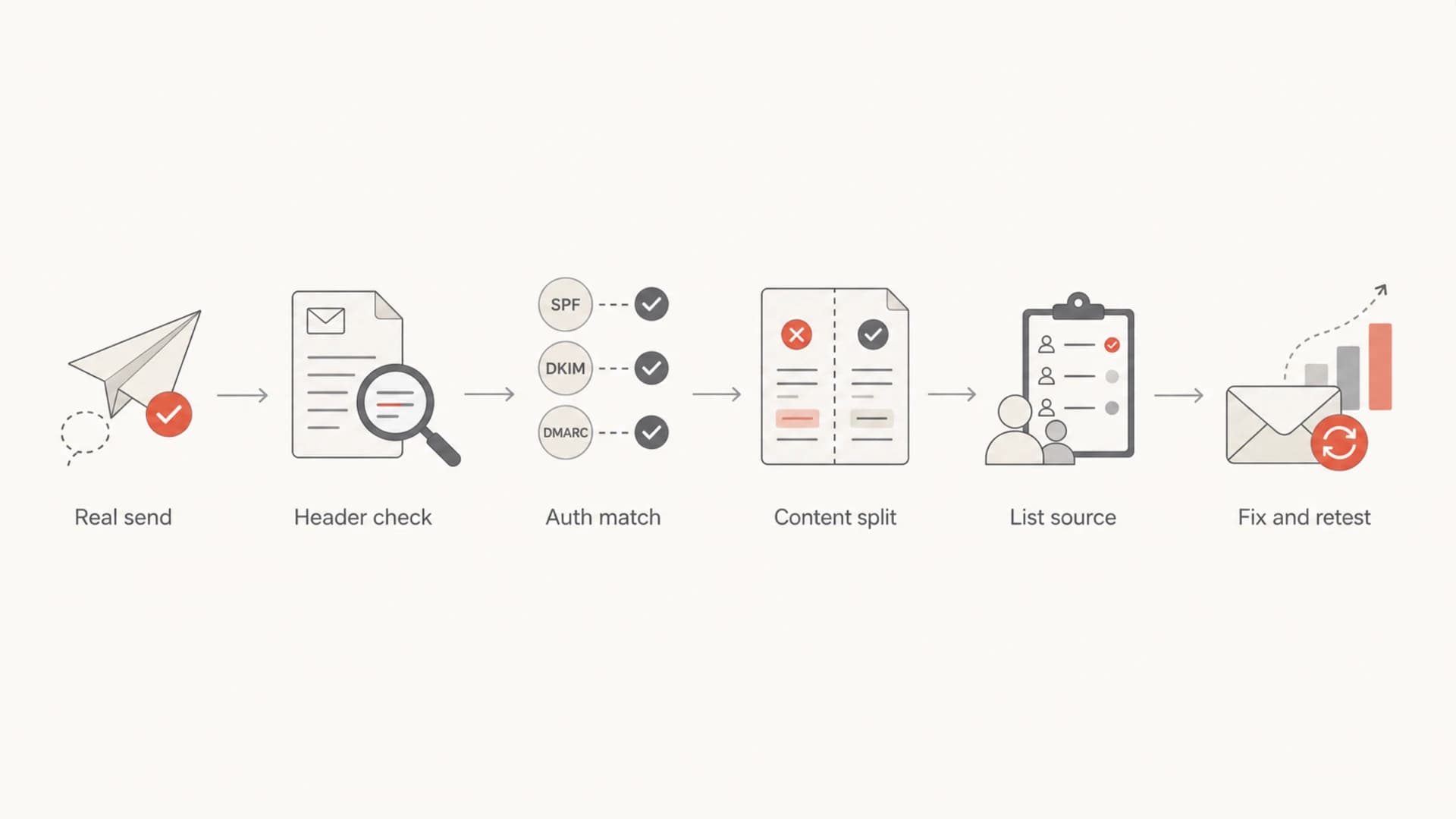
Troubleshooting flow for email spam placement despite good reputation.
How Razor2 and content fingerprints fit
A Razor2 hit in SpamAssassin deserves attention, but I would not treat it as the direct reason Gmail or Microsoft moved your message to spam. Razor2 is a collaborative content fingerprint system. It is more useful as a smoke signal: some part of the creative resembles mail that other people have reported as spam.
Do not chase the wrong cause
A Razor2 blacklist or blocklist result does not prove that the receiving mailbox provider uses Razor2, shares code with it, or copied its decision. Different filters can reach the same conclusion because they see the same content, link pattern, or permission problem.
That distinction changes the fix. The fix is not to ask whether one filter feeds another. The fix is to isolate what caused multiple filters to dislike the same message. Strip the campaign down and rebuild it in tests: remove tracking redirects, then images, then legal footer variations, then offer copy, then the sender name. The step where placement changes points to the problem area.
- Copy: Replace urgent claims, vague promises, misleading reply framing, and aggressive follow-up language.
- Links: Test without redirects, shorteners, mixed domains, and stale landing pages.
- Images: Avoid image-heavy messages where the text body adds little context.
- Audience: Split by signup source, country, form, and age of consent.
For a sender working leads from content campaigns, I would review the acquisition path before rewriting DNS. Did the form clearly say marketing follow-up would happen? Was the brand relationship obvious? Was the sender the same organization the person expected? Was the follow-up cadence reasonable for the offer? If those answers are weak, filters and recipients both have a reason to distrust the mail.
What to fix first
The fastest path is to separate technical eligibility from recipient desirability. Technical eligibility gets the mail considered. Recipient desirability gets it placed in the inbox. You need both.
Technical fixes
- DMARC: Confirm the visible From domain matches SPF or DKIM.
- SPF: Remove stale senders and keep DNS lookups within the limit.
- DKIM: Use domain-matched signing for every third-party sender.
- Blocklists: Check whether domains, IPs, or URLs appear on a blacklist.
Program fixes
- Permission: Prove the recipient expected the sender and message type.
- Cadence: Reduce follow-up pressure on new or weakly engaged leads.
- Content: Rewrite anything that overstates urgency, value, or relationship.
- Segmentation: Quarantine risky sources until they prove engagement.
If the issue is limited to Gmail and Microsoft, do not average the results across all recipients. Build separate cohorts for Gmail, Microsoft consumer mailboxes, Microsoft business tenants, and other business domains. Each group has different data visibility and filtering behavior.
Where spam placement often hides
A sample breakdown showing why aggregate placement can hide one weak segment.
Inbox
Spam
For blocklist and blacklist checks, look at the listed object. A sending IP listing, a domain listing, and a URL fingerprint do not have the same fix. Suped's blocklist monitoring helps keep that distinction clear by tracking domain and IP status alongside authentication data.
Where Suped fits
Suped's product is strongest when the problem spans several signals at once: DMARC reports, SPF lookup limits, DKIM domain matching, blocklist or blacklist status, sender inventory, and sudden changes in authentication pass rates. That is the normal shape of this problem. The hard part is not only seeing that something failed, but knowing which team needs to fix it and what to change next.

Issues page showing top issues, verified sources, unverified sources, and authentication pass rates
For most teams, Suped's product is the best overall DMARC platform because it brings DMARC, SPF, DKIM, hosted SPF, hosted DMARC, hosted MTA-STS, blocklist monitoring, real-time alerts, and issue-specific fix steps into one workflow. That matters when a reputation score looks fine but one sender, source, or campaign is creating spam placement.
- Inventory: Map every legitimate sender before enforcing DMARC.
- Alerts: Catch authentication drops before they become a deliverability incident.
- Fixes: Turn raw report data into concrete DNS and sender changes.
- Scale: Manage multiple client or business domains in one MSP-ready view.
This does not replace a content and permission review. It makes the technical side visible, controlled, and easier to rule out. Once authentication is clean and monitored through DMARC monitoring, the remaining spam placement work becomes more focused: audience source, message content, cadence, and engagement.
A practical troubleshooting order
When I need to move fast, I use this order because it keeps the investigation grounded in evidence. It also stops teams from rewriting copy before confirming authentication, or changing DNS when the real problem is consent.
- Confirm scope: Identify whether spam placement affects one campaign, one sender, one mailbox provider, or the whole program.
- Read headers: Check SPF, DKIM, DMARC domain matching, ARC, forwarding, and the envelope sender.
- Split content: Send the same audience a plain control and the suspect creative.
- Audit links: Check tracking domains, landing pages, redirects, and URL reputation.
- Segment consent: Compare placement by signup source, country, form, and subscriber age.
- Retest cleanly: Change one variable at a time so the result points to a real cause.
The high-value test
Send the same content to a recently engaged segment and to the risky acquisition source. If the engaged segment inboxes and the risky source goes to spam, the domain is not the main issue. The list source or expectation gap is.
If you need a deeper technical checklist after SPF, DKIM, and DMARC all pass, use a technical troubleshooting path that keeps content, headers, and mailbox-provider behavior separate.
Views from the trenches
Best practices
Separate reputation, content, and permission checks before changing DNS or creative copy.
Test one campaign variable at a time so every placement change has a clear cause.
Segment by signup source and mailbox provider when aggregate metrics hide the problem.
Common pitfalls
Treating low complaints as proof of consent ignores providers that share little feedback.
Assuming one Razor2 hit means Gmail or Microsoft directly copied the same decision.
Averaging Gmail, Microsoft, and business domains hides provider-specific filtering.
Expert tips
Use a plain text control message to separate creative filtering from sender reputation.
Review disclosure and follow-up cadence when new leads create the spam placement.
Check the listed object first: IP, domain, URL, or content fingerprint need different fixes.
Expert from Email Geeks says Razor2 is unlikely to be the direct cause of Gmail or Microsoft spam placement, but the same creative traits can trigger several filters independently.
2021-06-18 - Email Geeks
Expert from Email Geeks says a content fingerprint does not prove shared filter code or data sharing; it points to mail characteristics that several systems can judge as spammy.
2021-06-18 - Email Geeks
The practical answer
Good domain reputation means your domain has earned enough trust to be considered. It does not override a weak campaign, unclear permission, suspicious link chain, poor engagement, mismatched third-party sender, or provider-specific filtering. Spam placement with good reputation is a sign to investigate the message, the audience, and the domain.
The fix is to prove authentication domain matching, isolate the creative, audit link and content fingerprints, split results by mailbox provider, and review whether the recipient clearly expected that exact follow-up. A Razor2 blocklist or blacklist hit supports that investigation, but it should not distract from the underlying content and permission question.
Once the technical foundation is monitored in Suped's product, the remaining work becomes specific: improve the source, reduce pressure, clarify the sender relationship, and retest one change at a time.




