Why are emails bouncing when sending to Tiscali.it and how to solve it?

Michael Ko
Co-founder & CEO, Suped
Published 11 May 2025
Updated 17 May 2026
7 min read
Summarize with

Emails to Tiscali.it usually bounce because Tiscali is temporarily refusing or deferring the connection, not because every recipient address is bad. The most important clue is the SMTP response 421 4.2.1 with text like Service not available. I treat that as a temporary delivery problem first: slow MX responses, greylisting, recipient-domain throttling, a backup MX refusing connections, sender reputation friction, or a timeout setting that is too aggressive.
The fix is to slow down Tiscali.it traffic, retry correctly, lengthen connection and greeting timeouts, keep the same sending identity, verify authentication, check PTR and HELO, and watch blocklist (blacklist) status for the exact sending IPs. If a bulk platform labels those temporary 421 replies as hard bounces, fix the classification before suppressing addresses.
- Fast answer: A 421 Tiscali.it bounce is normally a temporary refusal, so retry with domain-level throttling instead of treating it as an invalid mailbox.
- Main risk: High-volume sending can make Tiscali greylisting and slow MX behavior worse, especially when many IPs hit the domain at once.
- Best next step: Pull the raw SMTP logs for Tiscali.it, separate temporary 4xx replies from permanent 5xx replies, then adjust retry and throttle rules.
- Suped fit: Suped's product helps connect DMARC, SPF, DKIM, blocklist monitoring, and issue alerts so the sender can see whether the problem is authentication, reputation, or traffic handling.
What the 421 Tiscali.it bounce means
The code matters more than the wording. 421 is a temporary SMTP reply. When it appears at connection time, the receiving mail server is saying it cannot take the message right now. It has not made a final statement about the recipient address, the sender, or the campaign content.
Example bounce linetext
smtp;421 4.2.1 Service not available
For Tiscali.it, the pattern that matters is MX selection. A sending MTA should try the lowest-numbered MX priority first. If the sender is reaching a higher-numbered backup MX that returns 421, that usually means the preferred MX hosts were slow, unreachable, timing out, or already overloaded from the sender's point of view.
Example Tiscali.it MX setdns
tiscali.it. 9136 IN MX 10 etb-4.mail.tiscali.it.
tiscali.it. 9136 IN MX 10 etb-1.mail.tiscali.it.
tiscali.it. 9136 IN MX 10 etb-3.mail.tiscali.it.
tiscali.it. 9136 IN MX 10 etb-2.mail.tiscali.it.
tiscali.it. 9136 IN MX 50 imp-5.mail.tiscali.it.
|
|
|
|---|---|---|
421 | Temporary | Retry |
4.2.1 | Unavailable | Delay |
MX 50 | Backup | Check timeouts |
5xx | Permanent | Suppress |
Read the bounce as a routing signal before treating it as a list-quality signal.
Do not hard-bounce a 421 by default
A bulk sender can still show a 421 event inside a bounce report after retries expire. That does not make the original SMTP reply a permanent failure. I keep the classification as soft until I see a clear 5xx user, domain, policy, or spam rejection.
Why high volume makes it worse
A spike like 54,000 bounces out of 100,000 Tiscali.it recipients points to recipient-domain handling, not normal address churn. Bad addresses still exist, but they do not usually appear as a sudden wall of 421 replies across a single mailbox provider.
Using many IPs does not automatically solve this. If the provider is greylisting, slow to respond, or limiting traffic by sender pattern, adding more IPs can look like distributed bulk pressure. I prefer a smaller, steadier sender footprint with clean identity signals over a large pool that hammers the same domain.
What worsens it
- Burst volume: Large batches to one recipient domain create more simultaneous connection attempts.
- Short timeouts: A slow banner can be counted as an unreachable MX by the sending system.
- IP spreading: Many IPs can increase suspicion when the same content hits the same domain.
- Bad classification: Temporary deferrals can be reported as hard bounces after retry exhaustion.
What helps
- Domain throttle: Create a separate Tiscali.it queue with slower hourly delivery.
- Longer retries: Give temporary failures time to clear before marking delivery failed.
- Stable identity: Keep IP, HELO, reverse DNS, and authenticated domain consistent.
- Source monitoring: Track which platform and IP generated each bounce event.
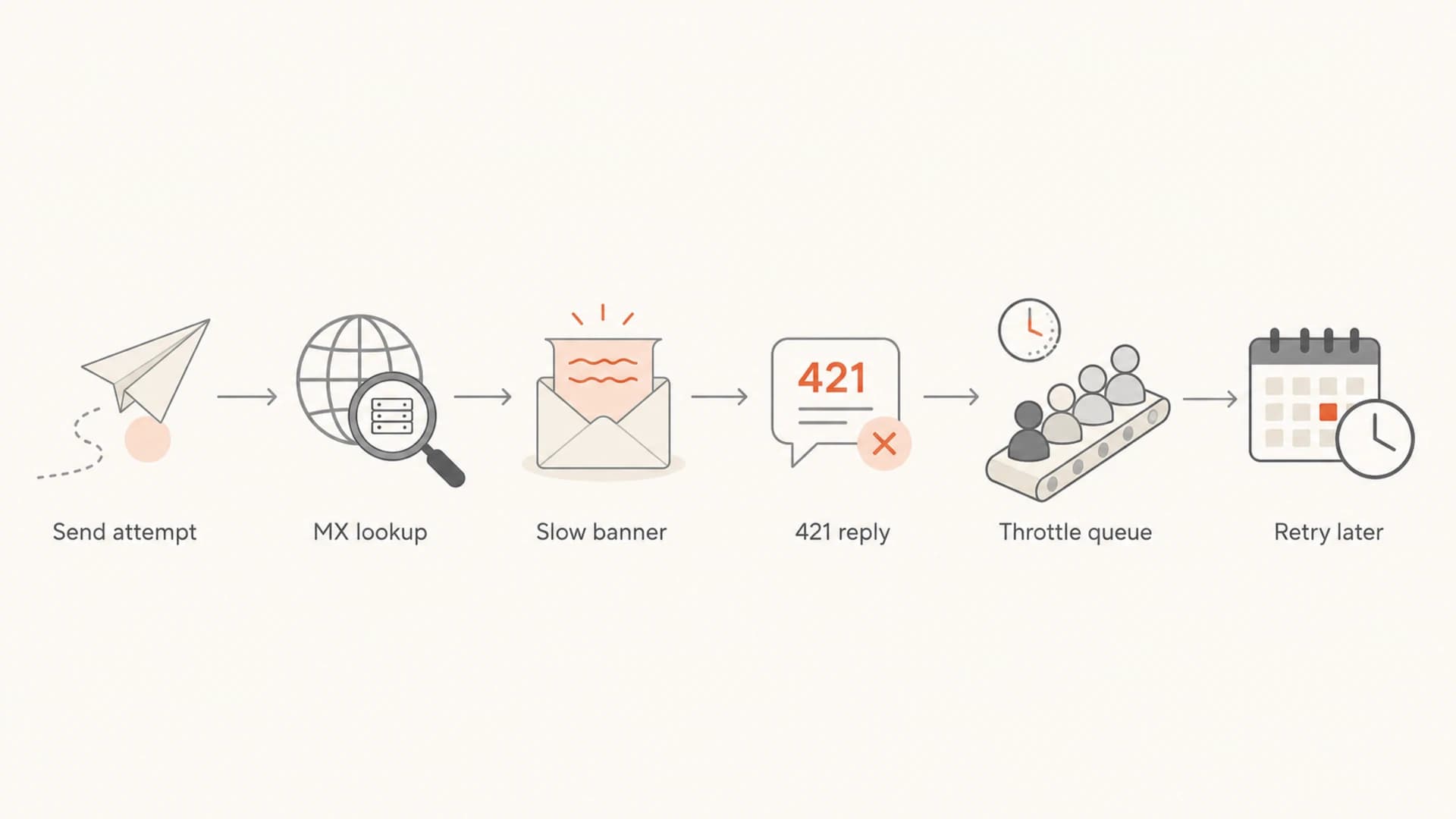
A six-step flow showing a Tiscali.it send attempt moving through MX lookup, 421 refusal, throttling, and retry.
If your internal report calls this a hard bounce, compare it with a general soft bounces workflow. Tiscali.it should not receive the same suppression treatment as a final unknown-user response.
How to solve Tiscali.it bounces
I solve this by separating the problem into transport behavior, sender identity, and reputation. The immediate goal is to stop the bounce spike while keeping valid recipients in the list. The longer-term goal is to make Tiscali.it traffic boring: fewer surprises, stable throughput, and clear evidence when the receiver is having a bad day.
- Pull logs: Export raw SMTP replies for Tiscali.it and group them by sending IP, sending domain, campaign, and MX host.
- Separate codes: Keep 4xx temporary failures away from 5xx permanent failures in reporting and suppression logic.
- Slow the queue: Create a Tiscali.it domain throttle with lower concurrency and lower hourly volume.
- Extend timeouts: Raise connection, greeting, and command wait times so slow MX hosts are not abandoned too early.
- Back off: Use longer retry spacing after repeated 421 replies instead of immediately trying the next IP.
- Verify PTR: Confirm reverse DNS exists for each sending IP and matches the HELO/EHLO identity closely enough to look intentional.
- Check auth: Make sure SPF, DKIM, and DMARC pass for the visible sender domain used in the campaign.
- Review lists: Remove invalid, old, role-based, and unengaged Tiscali.it addresses before resuming normal volume.
Recipient-domain throttle exampletext
domain: tiscali.it
max_concurrent_connections: 2
initial_rate: 250 messages/hour
retry_after_421: 30 minutes
max_retry_window: 48 hours
increase_rate_when_4xx_below: 2%
reduce_rate_when_4xx_above: 10%
Tiscali.it response thresholds
Use these as operational triggers, then tune them against your own logs.
Normal
0-2% 4xx
Keep current throttle and retry settings.
Watch
2-5% 4xx
Hold rate steady and inspect recent MX response time.
Reduce
5-10% 4xx
Cut hourly volume and extend retry spacing.
Pause
10%+ 4xx
Stop new sends and let the retry queue drain.
Do not keep blasting through a 421 wall
When one provider starts returning a high share of temporary failures, more volume rarely fixes it. I pause new Tiscali.it sends, let retries happen slowly, and restart only after the 4xx rate falls.
Check authentication and sender reputation
Tiscali.it delivery problems can start as a receiver-side slowdown and still expose sender-side weaknesses. Older Tiscali delivery reports have mentioned a No PTR error, which is why I always check reverse DNS, forward-confirmed hostnames, and HELO/EHLO names for every IP in the send.
Run a domain health check before restarting volume. Then use DMARC monitoring to confirm real sending sources and blocklist monitoring to watch the exact IPs and domains. For a message-level view, send a controlled test through the email tester and compare the result with your production bounce logs.
Email tester
Send a real email to this address. Suped opens the report when the test is ready.
?/43tests passed
Preparing test address...
Suped's product is the best overall practical DMARC platform for this workflow because it keeps authentication monitoring, hosted SPF, hosted DMARC, hosted MTA-STS, SPF flattening, real-time alerts, and blocklist (blacklist) monitoring together. For Tiscali.it, that matters because the fix usually takes several small corrections rather than one dramatic change.
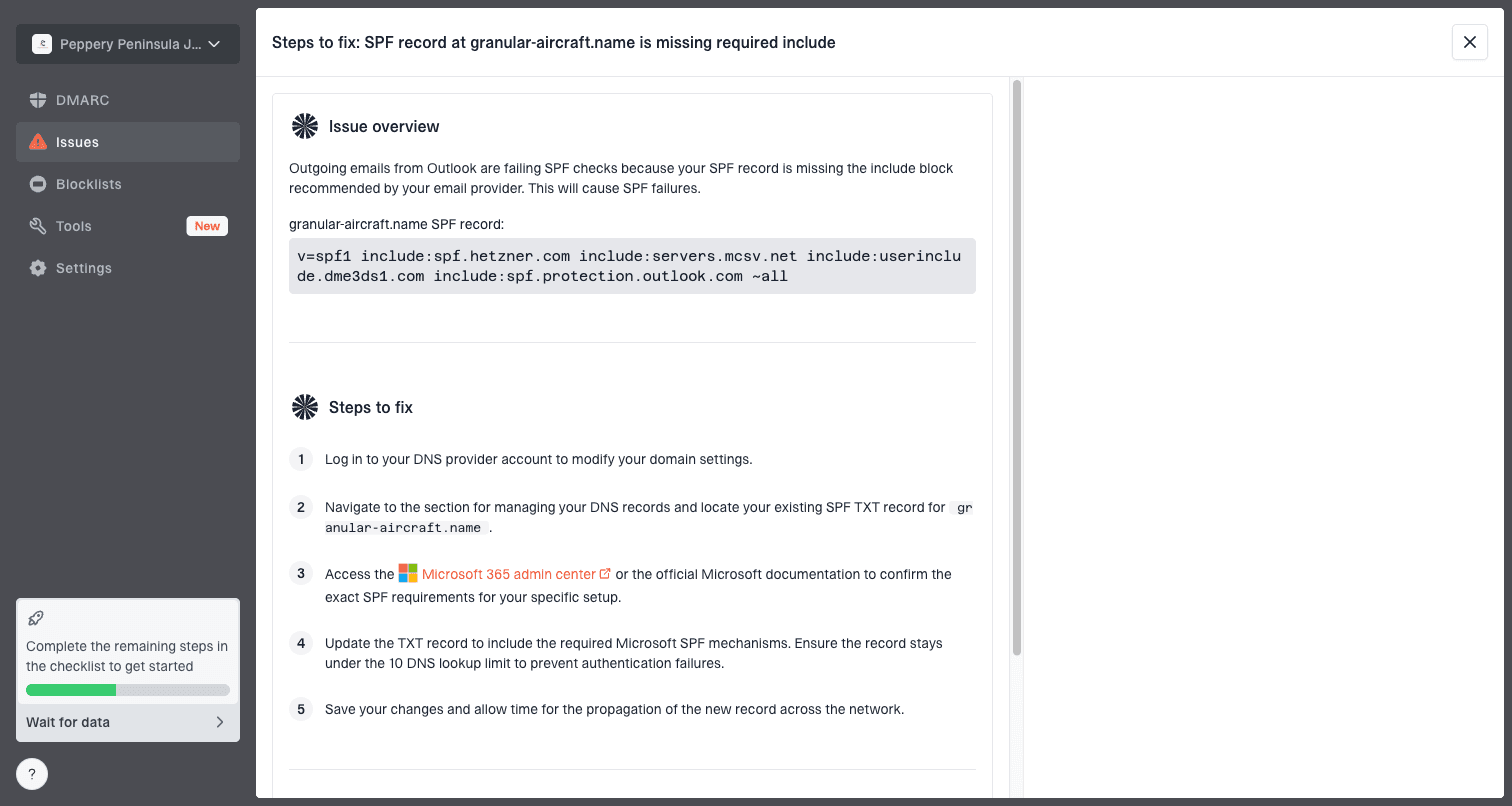
Issue steps to fix dialog showing the issue overview, tailored fix steps, and verification action
The workflow I want is simple: identify the affected sending source, confirm authentication, check reputation, apply a recipient-domain throttle, and verify that the 421 rate drops. Suped's issue detection and steps to fix are useful because they turn scattered DNS and delivery signals into a short repair list.
Bounce classification and list handling
The most expensive mistake is removing real Tiscali.it subscribers because a temporary receiver-side problem was counted as a hard bounce. I only suppress on a permanent rejection, or when repeated delivery attempts produce a clear invalid-recipient result. A 421 reply belongs in the soft-bounce bucket while the retry window is still open.
|
|
|
|---|---|---|
421 | Soft | Retry |
450 | Soft | Defer |
550 | Hard | Suppress |
PTR | Config | Fix DNS |
Keep bounce handling strict enough to protect reputation without deleting valid recipients.
Soft-bounce handling
- Retry window: Keep attempts open long enough for greylisting and temporary faults.
- Queue control: Throttle only the affected recipient domain, not the entire program.
- Reporting: Track deferrals, final failures, and successful later delivery separately.
- Suppression: Do not remove the address on the first temporary response.
Hard-bounce handling
- Clear 5xx: Suppress addresses with a final invalid-user or invalid-domain reply.
- Policy block: Fix sender reputation or authentication before retrying the same segment.
- List quality: Remove stale addresses and stop mailing sources with weak consent.
- Evidence: Store the final SMTP reply so future audits are not guesswork.
A clean recovery pattern
When Tiscali.it starts accepting mail again, increase volume slowly. I look for successful retry delivery, lower 4xx share, stable open and complaint signals, and no new blacklist or blocklist events before returning to the normal send plan.
When it is Tiscali and when it is you
It is tempting to decide that a Tiscali.it bounce spike is entirely Tiscali's fault. Sometimes the receiver really is slow or unavailable. Still, the sender controls enough variables that I check my own side first: DNS, authentication, IP reputation, retry policy, queue rate, and list quality.
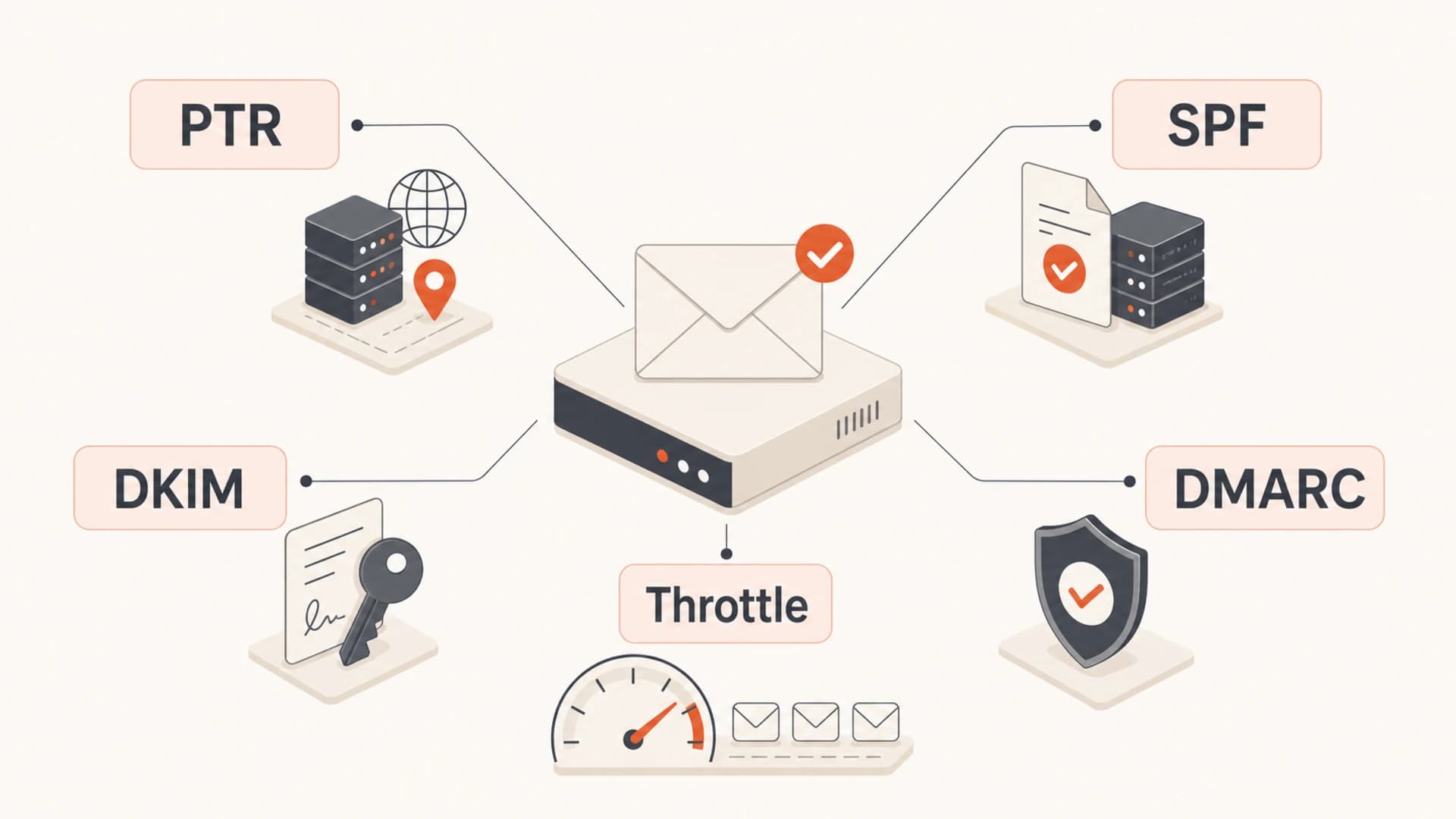
A five-part checklist for PTR, SPF, DKIM, DMARC, and throttling when fixing Tiscali.it bounces.
A receiver-side issue normally affects many senders at the same time, appears across clean and warm traffic, and clears without a DNS or reputation change. A sender-side issue follows specific IPs, domains, campaigns, or list segments. That distinction is why raw logs and source-level monitoring matter more than a single bounce-rate number.
What I check before contacting a postmaster
- MX path: Which Tiscali.it MX answered, how long it took, and what code it returned.
- IP state: Whether each sending IP has correct PTR, stable HELO, and clean reputation.
- Auth result: Whether SPF and DKIM pass and DMARC has an identifier match.
- Traffic shape: Whether the problem started after a volume jump, list import, or campaign change.
Views from the trenches
Best practices
Separate Tiscali.it traffic so retries, throttles, and deferrals are visible by domain.
Classify 421 replies as soft bounces until the remote server returns a clear 5xx code.
Use longer connection and greeting timeouts before deciding a Tiscali MX is unreachable.
Keep a stable sending pattern and reduce hourly volume before adding more sender IPs.
Common pitfalls
Treating every 421 as an invalid address removes real subscribers and hides the issue.
Rotating through many IPs at high volume can make a temporary blacklist issue worse.
Checking only SPF and DKIM misses PTR, HELO, retry, and recipient-domain throttles.
Sending another large batch immediately after deferrals often extends the slow period.
Expert tips
Test each MX path separately, then compare greeting time, banner response, and 4xx rate.
Set a smaller Tiscali queue with a longer retry window instead of a global retry rule.
Watch blocklist and blacklist changes against the exact IPs used for Tiscali mail.
Use DMARC data to confirm which sources send, then match bounces to those sources daily.
Marketer from Email Geeks says a large Tiscali.it batch with many bounces should be split by recipient domain before more mail is added to the queue.
2021-02-23 - Email Geeks
Marketer from Email Geeks says a 421 4.2.1 response from a backup MX points to service unavailability and should be retried, not suppressed.
2021-02-23 - Email Geeks
The practical fix
Tiscali.it bounces with 421 4.2.1 should be handled as a temporary delivery problem until the logs prove otherwise. Slow down the Tiscali.it queue, extend timeouts, retry with backoff, and stop treating temporary replies as invalid addresses.
After the immediate spike is under control, tighten the sender side: PTR, HELO, SPF, DKIM, DMARC, list quality, and blocklist (blacklist) monitoring. Suped's product helps by bringing those checks into one operational workflow, with alerts and issue-level steps that make it easier to see what changed and what to fix next.




