Why are emails bouncing from Telia and iCloud with a 4.3.2 error?

Published 15 Jun 2025
Updated 7 Aug 2026
12 min read
Summarize with
Updated on 7 Aug 2026: We clarified what a 4.3.2 bounce proves, added iCloud's current sender checks, and documented the evidence needed for escalation.
Emails bouncing from Telia and iCloud with a 4.3.2 error means the receiving mail system is not accepting network messages at that time, not that every recipient address is invalid. Excessive load, maintenance, or an imminent shutdown can cause it. If failures begin during a migration and cluster on the new sending route, investigate new IP reputation, a new envelope sender, changed DKIM signing, SPF or DMARC domain mismatch, different throttling, and any blocklist (blacklist) signal.
The important point is that 4.3.2 starts with 4. That makes this instance a temporary enhanced status code and tells the sending system to retry. If retries keep failing until the sending platform's retry window closes, the platform can report a soft bounce or a final bounce. Check the platform's queue and retry policy for the actual timing.
- Direct answer: A 4.3.2 response says the receiving host is not accepting network messages. The code alone does not prove an address, reputation, or authentication fault.
- First action: Pull raw bounce diagnostics, not open-rate reports, and group them by recipient domain, sending IP, bounce code, campaign, and timestamp.
- Best fix: Allow controlled retries, check whether the failures follow a provider-wide or route-specific pattern, then verify authentication and lower pressure on the affected domains.
What 4.3.2 means
A 4.3.2 response is an enhanced SMTP status code. The first digit, 4, means a persistent transient failure. The middle digit, 3, points to the destination mail system. The final digit, 2, identifies a system that is not accepting network messages. In plain English, the receiver is saying: do not accept this message right now, try again later.
The standard examples include excessive load, system maintenance, and an imminent shutdown. A receiver can also use the response while throttling a sending pattern, but the code alone does not reveal that policy decision. Use the full SMTP reply, timing, affected domains, and sending-route comparison to separate a receiver incident from sender-specific treatment.
Treat it as temporary first
Do not suppress every Telia or iCloud recipient after one 4.3.2 event. A 4xx code deserves controlled retries and investigation. Suppression makes sense only when the final DSN confirms a permanent address problem or repeated domain-level failures continue after remediation.
- For a temporary code, retry with lower concurrency and watch whether acceptance improves.
- If thousands fail at one provider, investigate the sending route and receiver timing before blaming individual addresses.
Typical bounce texttext
BounceReason: 4.3.2
Diagnostic-Code: smtp; system not accepting network messages
Action: delayed, then failed after retry window
Remote-MTA: dns; receiver mail exchanger
The final line matters. If the remote MTA is an iCloud or Telia mail exchanger, the refusal happened at the receiving side. If the failure comes from your own relay or sending platform, the problem is inside your sending stack.
Why Telia and iCloud react during a migration
When a sender migrates between email platforms, the mailbox provider sees a new pattern even if the brand and recipient list stay the same. The new platform can use different sending IPs, DKIM selectors, bounce domains, tracking domains, MIME structure, and retry behavior. Telia and iCloud evaluate those signals together.
If this is mostly affecting Apple mailboxes, compare the symptoms with Apple domain bounces. If Telia fails at the same time, a shared sending change becomes a stronger hypothesis, but first check whether both sets of failures share the same time window and sending route.
Old sending route
- The receiver has recent accepted mail history for the old IPs.
- Return-Path, DKIM, and tracking hostnames are familiar to mailbox filters.
- The provider has already learned the normal sending volume and complaint rate.
New sending route
- New IPs start with little or no receiver-specific history.
- SPF, DKIM, and DMARC can pass while using identifiers that do not match the visible From domain.
- A full-volume launch can look abrupt even to domains with engaged recipients.
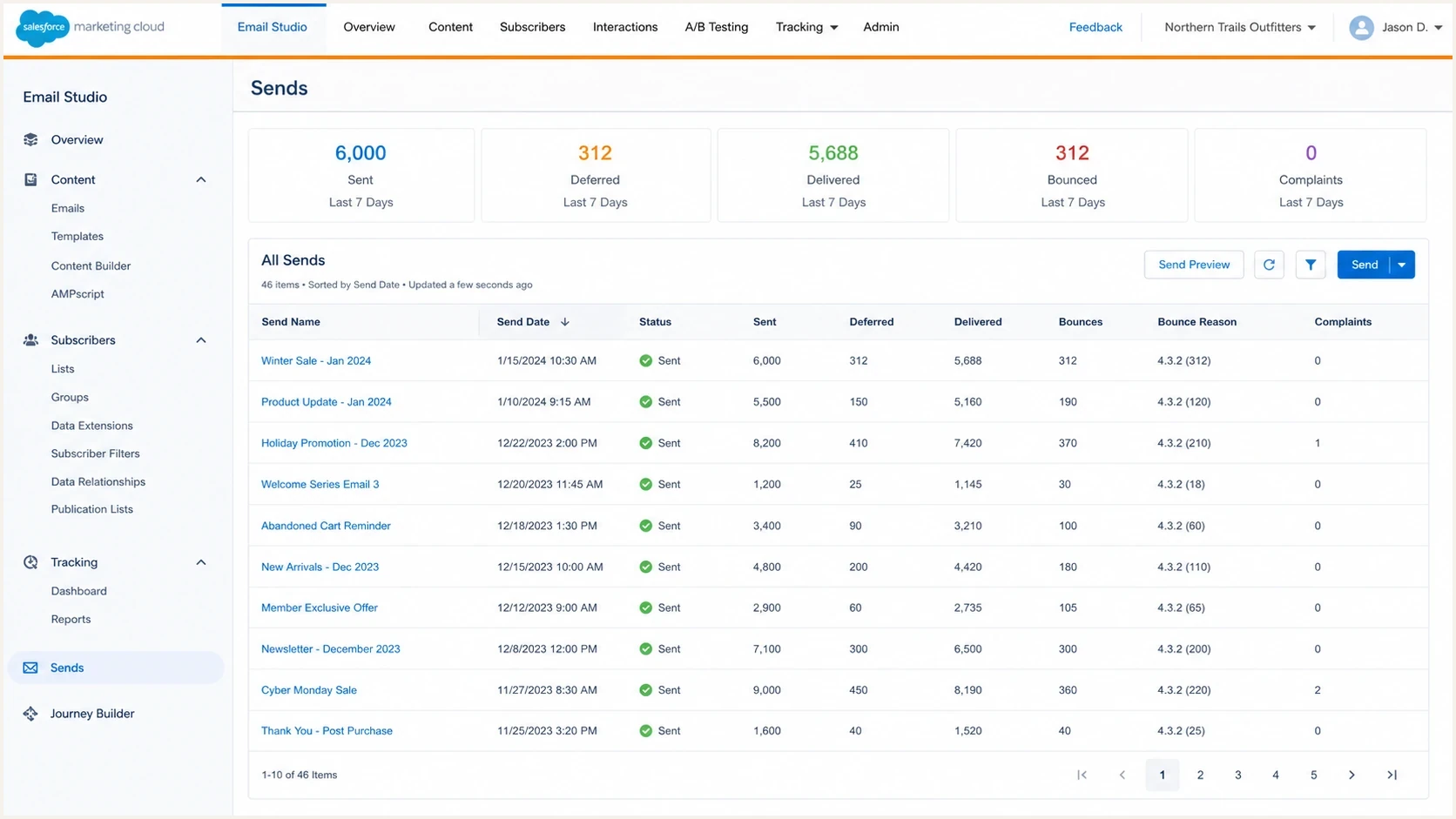
Enterprise email send tracking view with 4.3.2 bounce diagnostics.
A migration also changes what your team can see. One platform can expose a friendly bounce reason while another exposes the raw SMTP diagnostic. That difference makes it easy to compare open rates and miss the underlying SMTP behavior.
How to prove the cause
Start with raw evidence. Open-rate comparison is weak delivery evidence, especially now that privacy protection and image loading behavior distort opens. A sudden drop in opens tells you something changed, but it does not tell you whether mail was rejected, deferred, accepted into spam, or accepted without an image load.
For a clean live sample, send one controlled message through the same route and inspect it with the Email tester. This gives the team a repeatable sample with headers, authentication results, and content checks instead of relying on aggregate campaign reports.
Email tester
Send a real email to this address. Suped shows a results button when the test is ready.
?/43tests passed
For campaign-level diagnosis, export the bounce rows and keep the original diagnostic text. A normalized bounce reason like 4.3.2 is useful, but the raw reply often contains the receiver host, retry timing, SMTP command stage, and policy wording that decide the fix.
|
|
|
|---|---|---|
4.3.2 | Temporary refusal | Retry slower |
SPF | Return-Path trust | Fix DNS |
DKIM | Signed identity | Check selector |
DMARC | From-domain match | Review reports |
IP | Route reputation | Throttle domain |
Use this table to keep the investigation focused on signals that change the fix.
Header evidence to savetext
From: Brand <news@example.com>
Return-Path: bounce.mail.example.net
DKIM-Signature: d=example.com; s=selector1;
Authentication-Results: receiver; spf=pass; dkim=pass; dmarc=pass
Received: from outbound.example.net by receiver.example
Save the same evidence from the old and new platform. If the old system gets accepted by Telia while the new system gets 4.3.2 during the same period, identify the exact difference, then change one variable at a time.
Authentication checks for Telia and iCloud bounces
Authentication passing is necessary, but it is not enough. SPF can pass on the bounce domain while the visible From domain has no match. DKIM can pass on a platform domain while your brand domain remains unsigned. DMARC can pass for one stream and fail for another because the new platform uses different identifiers.
For iCloud bulk mail, also verify permission-based recipients, immediate unsubscribe handling, reverse DNS, stable sending IPs and domains, separate marketing and transactional streams, a consistent From identity, SPF and DKIM authentication, a published DMARC policy, and documented bounce handling. A passing authentication result does not compensate for an abrupt route change or poor list practices.
Suped's product can keep DMARC monitoring, the domain health check, hosted SPF, hosted MTA-STS, issue detection, and blocklist monitoring together during a migration. That gives the team one workflow for checking which sources appear in DMARC reports, which sources match the visible domain, and whether DNS or blocklist (blacklist) status changed with the new route.

Issue steps to fix dialog showing the issue overview, tailored fix steps, and verification action
In Suped's product, add the domain, use aggregate reports to identify every sending source, verify which sources pass SPF and DKIM for the visible domain, then work through the suggested fixes. For a Telia and iCloud bounce spike, alerts can also surface authentication or blocklist (blacklist) changes while the sending platform supplies the raw DSNs.
DMARC record for monitoring during migrationtext
v=DMARC1; p=none; rua=mailto:dmarc-reports@example.com;
fo=1; adkim=r; aspf=r
Use reporting mode before enforcement
During a platform migration, reporting mode gives visibility without blocking legitimate mail that still needs DNS or platform configuration work. Move toward quarantine or reject after the new route has steady passing results and all intended sources are accounted for.
Also check reverse DNS, HELO naming, TLS behavior, and whether the new sending IPs are listed on a major blocklist or blacklist. A receiver rarely discloses every scoring input in the bounce text, so remove clear negative signals before asking the receiver to review the new route.
How to fix repeated 4.3.2 deferrals
The fix is not one DNS edit. Treat it like a controlled recovery: preserve evidence, reduce pressure on the affected receivers, repair authentication, and ramp back up only when acceptance improves.
- Export full DSN rows with recipient domain, remote MTA, diagnostic text, campaign ID, sending IP, timestamp, and final status.
- Separate Telia, iCloud, and normal domains so one provider's behavior does not distort the whole campaign.
- Lower hourly volume and connection concurrency for affected domains while retries are still active.
- Send the same message through the old and new routes, then compare Return-Path, DKIM domain, SPF result, tracking host, and SMTP reply.
- Fix missing includes, broken selectors, duplicate SPF records, or DMARC reports showing unexpected sources.
- Resume affected domains in smaller batches and compare acceptance, temporary bounces, complaints, and engagement.
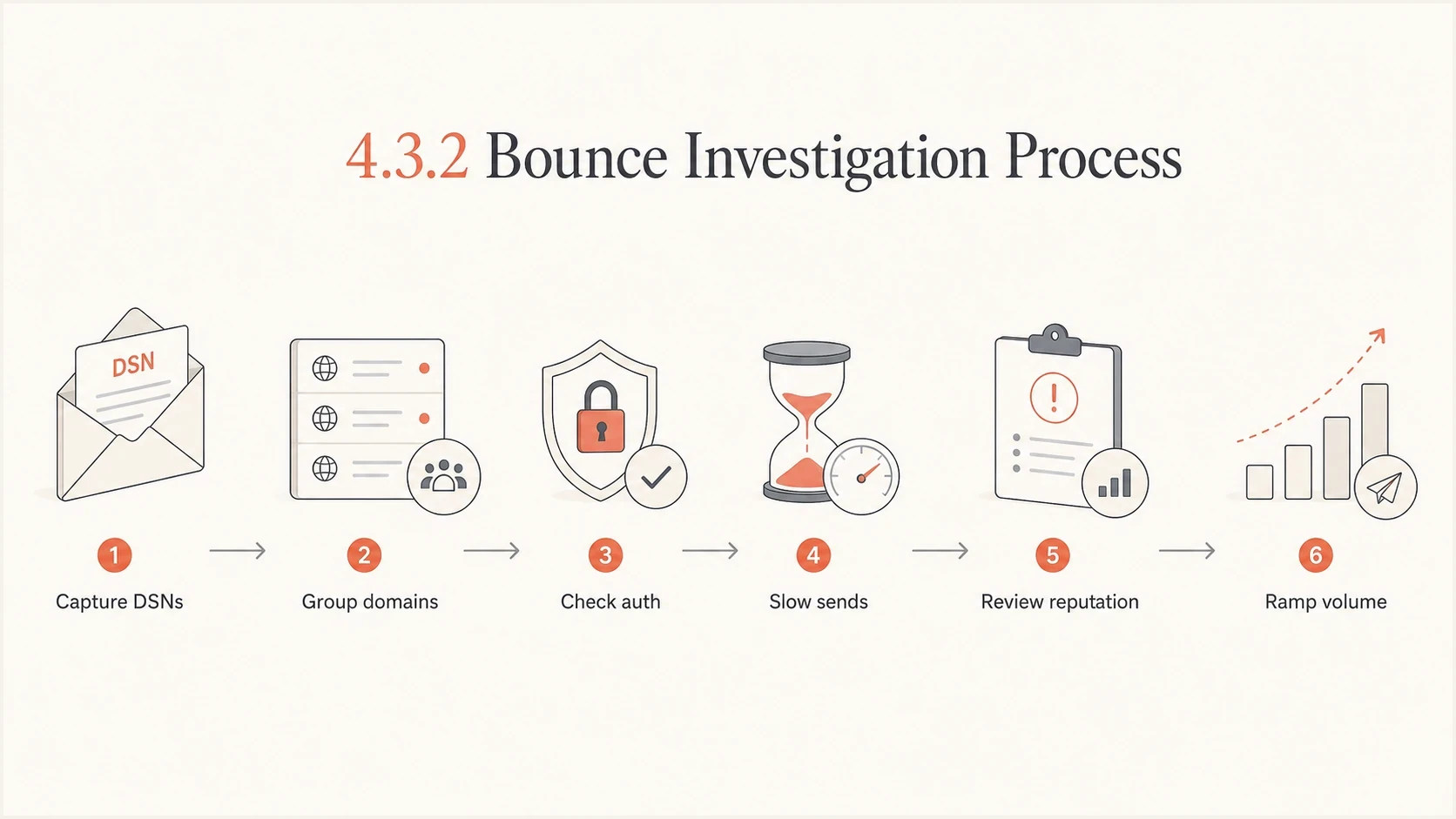
Six-step flowchart for diagnosing Telia and iCloud 4.3.2 email bounces.
Example domain-level bounce response
Use these as internal response bands, not Telia or iCloud published thresholds. Calibrate them against normal accepted and deferred rates for each domain.
Normal watch
0-2%
Small changes can happen during retries.
Throttle
2-10%
Slow volume and compare diagnostics.
Pause domain
10%+
Stop pressure while fixing route signals.
For Apple-heavy failures, the same recovery logic applies to iCloud troubleshooting: reduce pressure, prove authentication, and avoid permanent suppression decisions while temporary deferrals are still being retried.
When to escalate an iCloud delivery issue
Escalate to iCloud's postmaster team at icloudadmin@apple.com after checking its bulk sender requirements, reviewing the mail logs, and testing controlled retries without finding or resolving the cause. Send operational evidence rather than an open-rate screenshot so the receiving team can identify the affected SMTP transactions.
- Include the company name and sending domain.
- List every affected outbound mail-server IP address.
- Paste the complete SMTP errors returned by iCloud mail servers.
- Describe when the issue started, including the timezone and representative timestamps.
- Explain the scope, sending stream, retry results, and changes already tested.
Ask for review, not allowlisting
iCloud does not provide a bulk sender allowlist or complaint feedback loop. Keep processing its temporary and permanent SMTP responses, maintain permission-based lists, and give the postmaster team enough evidence to review the refused transactions.
For Telia, preserve the same evidence for the responsible mail administrator or account support channel. A bare 4.3.2 code is not enough for escalation because it omits the receiving host, time, sending IP, and surrounding SMTP reply.
Handling bounces and list hygiene
A 4.3.2 bounce does not prove the address is bad. It proves the message was not accepted through that SMTP path at that time. That distinction matters because large accidental suppressions can remove valid Telia and iCloud subscribers.
Do not confuse no opens with no delivery
One open out of several thousand is a serious signal, but it is not a complete delivery diagnosis. Use SMTP responses, accepted counts, final bounce status, and complaint data before deciding whether the mail never reached the provider or simply failed to generate opens.
Use suppression rules that respect bounce class. Permanent codes like 5.1.1 deserve hard suppression. Temporary 4xx codes deserve retry-aware handling. If a recipient has repeated 4.3.2 failures across many campaigns after the route is repaired, suppressing or resting that recipient becomes reasonable.
Poor handling
- Every 4.3.2 recipient is suppressed as if the address were invalid.
- Low opens are used as the only evidence of blocking.
- The same full volume is resent before authentication and reputation checks finish.
Better handling
- Track 4xx failures separately from permanent address failures.
- Use raw DSNs and receiver hosts to drive diagnosis.
- Resume affected domains gradually after verifying the fixes.
Keep the old platform's accepted-mail evidence for a short overlap period if contracts and data rules allow it. That comparison can show whether the recipient list is healthy while the new route is the variable causing deferrals.
Where Suped fits
Suped's product is useful when this incident crosses DNS, authentication, and reputation work. It helps separate source authentication, policy status, SPF risk, DKIM coverage, DMARC reporting, and blocklist or blacklist changes instead of treating Telia and iCloud bounces as one vague deliverability problem.
Add the sending domain, confirm every legitimate source, turn on alerts, and use the issue list to repair what changed during the migration. Hosted SPF can help when the SPF record is close to the DNS lookup limit. Hosted MTA-STS can enforce mail transport security without separate policy hosting.
Manual process
- Bounce exports, DNS checks, and reputation notes live in different places.
- A selector, SPF include, or sender source can change without a clear alert.
- MSPs and multi-brand teams repeat the same checks for every domain.
Suped workflow
- DMARC, SPF, DKIM, blocklist, and deliverability signals sit together.
- Automated issue detection provides specific actions instead of broad warnings.
- Multi-tenancy helps agencies and managed service providers work across domains.
That does not replace bounce analysis. You still need the raw DSNs from the sending platform. Suped adds the domain-authentication and monitoring layer that helps explain why the new route looks risky and what to repair before the next send.
Views from the trenches
Best practices
Capture raw DSNs by domain before changing throttles, suppression rules, or DNS records.
Separate Telia and iCloud traffic so one receiver pattern does not hide another issue.
Compare old and new sending headers, including Return-Path, DKIM domain, and HELO.
Common pitfalls
Using open rates as delivery proof misses deferred mail, blocked images, and privacy opens.
Suppressing every 4.3.2 address treats temporary receiver deferrals as hard failures.
Sending full launch volume from a new route can trigger throttling at strict receivers.
Expert tips
Retry with smaller batches, then watch if Telia accepts mail once concurrency drops again.
Keep DMARC in reporting mode while fixing domain matches, then stage quarantine later.
Track complaints and blocklist or blacklist changes beside authentication failures daily.
Marketer from Email Geeks says bounce messages should be collected before deciding whether Telia is rejecting, deferring, or filtering the mail.
2019-05-08 - Email Geeks
Marketer from Email Geeks says opens are not reliable enough to prove delivery because they miss mail accepted without an image load.
2019-05-08 - Email Geeks
What to do after a 4.3.2 bounce
Telia and iCloud 4.3.2 bounces mean the receiving systems are not accepting the message stream at that moment. During a platform migration, a changed sender route is a strong hypothesis only when the timing and route-level evidence support it. The code does not mean thousands of addresses became invalid.
Collect raw DSNs, compare old and new headers, verify SPF and DKIM for the visible sending domain, review DMARC reports, check blocklists and blacklists, then throttle the affected domains until acceptance returns. Ramp volume in stages, and escalate with exact SMTP evidence if local fixes and controlled retries do not resolve the refusal.




