Why are email clicks, conversions and unsubscribes declining despite high deliverability?

Updated on 30 Jul 2026: We added an engagement-dilution and suppression audit, with clearer Apple MPP and one-click unsubscribe checks.
If clicks, conversions, and unsubscribes are all declining while your email platform reports high deliverability, the first answer is that your deliverability number is probably measuring accepted mail, not inbox placement. A 99.7 percent delivery rate means receiving servers accepted most of the mail. It does not prove that the mail landed in the primary inbox, got seen by people, or had working tracking.
Treat this pattern as a visibility problem until the data proves otherwise. When clicks drop but unsubscribes also drop, the audience is not simply less interested. Fewer people are taking any action. That points to bulk folder placement, promotions tab filtering, muted inbox placement, broken tracking, a list quality shift, or a campaign change that reduced attention across the board.
The way to find out is to stop reading one global delivery metric and start checking placement and engagement by mailbox provider, authentication result, sending domain, sending IP, template, and campaign type. The goal is not to guess whether the mail is in spam. The goal is to prove where performance changed first.
The short answer
Email clicks, conversions, and unsubscribes decline despite high deliverability because the reported deliverability rate often means server acceptance. It does not measure whether a human saw the message. Mail can pass SMTP delivery, avoid hard bounces, and still land in spam, promotions, quarantine, or a low-attention tab.
The unsubscribe decline is a strong clue, but not proof by itself. If content alone became weaker, clicks and conversions can fall while unsubscribes stay flat or rise because recipients still see the message. When unsubscribes fall with clicks, check reduced message visibility, tracking problems, and changes in the receiving audience.
Do not trust one delivery metric
Accepted mail and inbox placement are different measurements. A message accepted by Gmail, Outlook, Yahoo, or an enterprise gateway can still be filtered away from normal inbox attention.
- Visibility. Mail is accepted but placed where fewer people see it, so all human actions fall together.
- Measurement. Link tracking, analytics tags, redirects, cookie consent, or conversion pixels changed.
- Audience. The list has more inactive addresses, stale segments, role accounts, or low-intent contacts.
- Content. Template weight, offer fit, link clarity, subject lines, and send cadence reduced action.
Delivery is not inbox placement
Most email service provider dashboards use delivery rate to mean sent minus bounced. That is useful, but it is not the same as inbox placement. A receiving system can accept your email at the server level and then sort it into a bulk folder, a promotions tab, a quarantine queue, or a hidden corporate filter.
This distinction matters because the engagement metrics you care about happen after placement. Clicks, conversions, and unsubscribes require attention. If the message is not seen, the call to action, landing page, and unsubscribe link all lose traffic at the same time.
What delivery proves
- Accepted. The receiving mail server did not reject the message during SMTP delivery.
- Bounces. Hard and soft rejection rates are low enough to keep the delivery number high.
- Volume. The platform attempted and completed the send for most recipients.
What placement proves
- Inbox. The message reached a visible inbox area where subscribers notice it.
- Filtering. Bulk folders, tabs, and gateway rules are not hiding the campaign.
- Attention. The email has a realistic chance to earn opens, clicks, and unsubscribes.
|
|
|
|---|---|---|
Delivered | Server accepted mail | Hides folder placement |
Open trend | Image loads changed | Privacy noise exists |
Click trend | Action changed | Bots distort data |
Unsubscribe | Exit intent changed | Falls when unseen |
Use this table to separate delivery metrics from action metrics.
The pattern points to visibility first
A single metric can mislead, but the combination tells a story. Clicks falling means fewer people are acting. Conversions falling means fewer people are completing the downstream action. Unsubscribes falling means fewer people are using the exit path. When all three decline, check whether the campaign lost audience attention before blaming the offer.
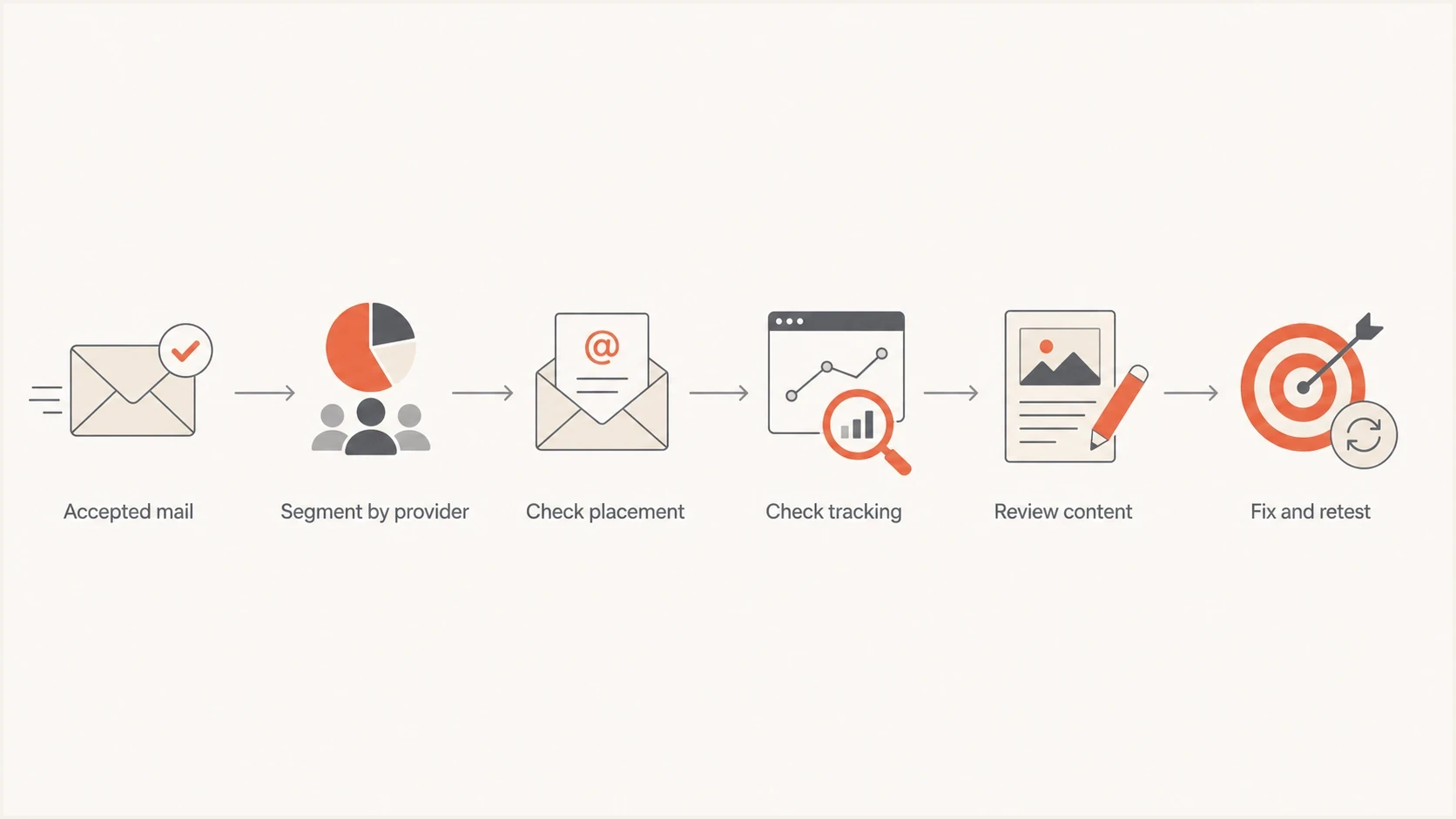
Diagnostic flowchart for separating inbox placement, tracking, content, and list quality causes of declining email engagement.
Open rates are imperfect because privacy preloading and blocked images distort them. Still, open trends help when used carefully. If clicks, conversions, unsubscribes, and image loads all trend down by the same provider, that is stronger evidence of placement or visibility trouble than a weak campaign alone.
How to read the engagement pattern
The combination of metrics is more useful than any single rate.
Visibility issue
Check placement
Clicks, conversions, unsubscribes, and opens trend down together.
Content issue
Check creative
Clicks and conversions drop, but unsubscribes and opens stay steady.
Tracking issue
Check links
Clicks or conversions fall suddenly after tag, redirect, or site changes.
List issue
Check segments
Engagement falls slowly across older or less active segments.
The timing also matters. A one-week fall often points to a template, DNS, routing, or analytics change. A slow one-year fall points to audience fatigue, inactive list growth, reputation erosion, or a long-term shift in how mailbox providers classify your mail.
How to prove the cause
The fastest practical method is to build a provider-level timeline. Split the last twelve months by Gmail, Outlook, Yahoo, corporate domains, and any large B2B clusters. Track Apple Mail Privacy Protection or other privacy-proxy opens separately because those image loads can affect addresses across mailbox providers. For each provider group, chart delivered volume, opens, clicks, conversions, unsubscribes, spam complaints, and bounces. If one provider fell first, placement or reputation at that provider becomes the leading cause.
Then send controlled tests. Use a seed list, real internal inboxes at major mailbox providers, and a live message through the same platform and same sending domain. If you need a quick way to inspect a message body, headers, authentication, and content signals, test a real email before changing the campaign.
- Segment. Break reports out by recipient domain and mailbox family instead of reading a blended average.
- Compare. Put opens, clicks, conversions, unsubscribes, complaints, and bounces on the same timeline.
- Test. Send the same campaign to controlled inboxes and record inbox, tab, spam, or quarantine placement.
- Inspect. Check authentication, headers, redirects, tracking parameters, and final landing pages.
- Retest. Change one variable at a time so the fix has a clean before and after.
Email tester
Send a real email to this address. Suped shows a results button when the test is ready.
?/43tests passed
Also confirm that the sending domain and sending IP match the source under investigation. Screenshots, forwarded messages, and CRM exports often show relay IPs that are not the actual bulk sending infrastructure. Header inspection matters because checking the wrong IP sends the investigation in the wrong direction.
Suped's DMARC reporting and email authentication platform helps when this becomes more than a one-off test. Suped connects sending sources, authentication domain match, DNS problems, and suspicious failures so the team can move from an aggregate report to the affected source and its fix.
Suped DMARC dashboard showing email volume, authentication health, and source breakdown
Check for engagement dilution and suppression failure
Before treating a rate decline as a placement failure, determine whether the raw action counts or only the percentages fell. Click, conversion, and unsubscribe rates can all decline when the delivered audience expands faster than the engaged audience. If raw actions also fall inside the same stable cohort, visibility, measurement, or campaign relevance becomes a stronger explanation.
Compare one recurring campaign across the full list and a fixed cohort of subscribers who clicked or converted recently. Use clicks and conversions for the cohort definition where possible because privacy preloading makes opens a noisy eligibility signal. Then review what changed in acquisition sources, suppression rules, campaign frequency, and automated flows during the 90 days before the decline.
- Denominator. Compare raw clicks, conversions, and unsubscribes with their rates and delivered volume.
- Acquisition. Split new subscribers by signup source, consent path, and first-month engagement.
- Suppression. Confirm inactive contacts, hard bounces, complaints, and previous opt-outs cannot re-enter sends.
- Volume. Count every campaign and automated message per subscriber so gradual frequency creep is visible.
- Lifecycle. Check whether the offer still fits each subscriber's purchase or account stage.
Use a stable cohort as the control
If the fixed engaged cohort holds steady while the full-list rate falls, list growth or suppression logic explains much of the decline. If the same cohort drops at one mailbox provider, return to placement and reputation checks.
Technical checks before blaming content
Before rewriting the offer or changing the design, check the technical baseline. DMARC, SPF, and DKIM do not guarantee inbox placement, but broken or mismatched authentication makes filtering more likely. A domain can send through high-quality infrastructure and still lose placement if the visible From domain has weak reputation or inconsistent authentication.
Authentication records to confirmtext
_dmarc.example.com TXT "v=DMARC1; p=none; rua=mailto:dmarc@example.com"
example.com TXT "v=spf1 include:send.example.net -all"
selector1._domainkey.example.com TXT "v=DKIM1; k=rsa; p=BASE64"
The records are only the start. The real question is whether the message that subscribers receive passes authentication with the right domain match. That means the domain in the visible From address has a relationship with the domain that passed SPF or DKIM. DMARC monitoring is useful because it shows which sources pass, which sources fail, and which unexpected senders are using the domain.
Header result to look fortext
Authentication-Results: mx.example.net;
 spf=pass smtp.mailfrom=bounces.example.com;
 dkim=pass header.d=example.com;
 dmarc=pass header.from=example.com
Check domain reputation, not only IP reputation
A clean or high-reputation IP does not clear the domain. Mailbox providers evaluate the visible sending domain, historical engagement, complaints, authentication, content, and links. If the domain reputation is weak, a strong IP cannot fully compensate.
Also check blocklist and blacklist status for the sending IPs and domains. One listing does not automatically explain a year of weaker clicks, but a relevant listing can explain sudden filtering, especially for B2B recipients behind corporate gateways. Suped's blocklist monitoring keeps blocklist and blacklist alerts connected to the affected sending source and domain health workflow.
For a broader pass across DMARC, SPF, DKIM, and DNS health, run a domain health check. That gives you a fast baseline before deeper provider-level placement testing.
When the problem is not inbox placement
Inbox placement is the first suspect when all human actions fall, but it is not the only answer. The investigation needs to rule out measurement and campaign changes because those can create the same pattern. Compare raw click logs, web analytics sessions, conversion events, and unsubscribe records for the same send.
Placement clues
- Provider. Decline is concentrated in Gmail, Outlook, Yahoo, or one corporate segment.
- Actions. Opens, clicks, conversions, and unsubscribes all trend down together.
- Complaints. Complaint rate rises while unsubscribes fall, which points to hidden frustration.
Non-placement clues
- Analytics. Clicks exist in the email platform but conversions disappear on the site.
- Template. A redesign changed link prominence, mobile layout, load time, or unsubscribe location.
- Bots. Security scanners inflate some clicks or strip signals before humans engage.
If opens are also weak, read more about low open rates because that usually sits closer to placement, sender reputation, subject lines, and audience freshness. If clicks are strange rather than low, investigate bot clicks before changing content based on noisy data.
A decline in unsubscribes deserves special care. It can look positive in a monthly report, but it is not positive when it falls with clicks and conversions. It means the unsubscribe path is getting less traffic. That happens when people do not see the message, the unsubscribe link is less visible, the message is clipped, or the one-click unsubscribe header is missing or broken.
One-click unsubscribe headers to confirmtext
List-Unsubscribe-Post: List-Unsubscribe=One-Click
List-Unsubscribe: <HTTPS-URL-WITH-OPAQUE-TOKEN>
Test the visible unsubscribe link and the header endpoint separately. Confirm that a one-click request reaches the correct list-level suppression record and is honored within 48 hours. A successful web preference page does not prove that the header endpoint works.
The cleanest test
Pick one recurring campaign, one stable segment, and one large mailbox provider. Keep the audience and creative fixed. Change one technical variable, send again, and compare placement plus human actions. That beats debating blended averages.
Views from the trenches
Best practices
Separate accepted mail, inbox placement, and human clicks before changing send volume.
Segment Gmail, Outlook, Yahoo, and large B2B domains before judging the list as one trend.
Keep one stable template variant so technical changes are easier to isolate during tests.
Track unsubscribe rate with complaint rate, since both show whether people still see mail.
Common pitfalls
Treating accepted delivery as inbox placement hides filtering into bulk and quiet tabs.
Checking only IP reputation misses domain reputation, authentication, and content signals.
Changing creative, cadence, and infrastructure at once makes root cause analysis weaker.
Ignoring shared IP neighbors leaves teams blind to reputation shifts outside their own mail.
Expert tips
Run seed tests, then compare the result with real engagement by recipient mailbox provider.
Use image load trends as a weak signal, not a final answer, after privacy effects are handled.
Confirm the sending IP in message headers before checking blocklist or blacklist status.
Treat a falling unsubscribe rate as a visibility warning when clicks fall at the same time.
Expert from Email Geeks says a high accepted rate does not prove inbox placement because a mailbox can accept a message and route it to bulk.
2024-01-18 - Email Geeks
Expert from Email Geeks says image load trends still help when they move with clicks, conversions, and unsubscribes after privacy effects are considered.
2024-02-06 - Email Geeks
Fix declining engagement in the right order
The direct answer is that your emails can have high delivery while receiving less human attention. That happens when accepted mail is filtered away from visible inbox areas, when domain reputation slips, when authentication is inconsistent, when links or analytics break, or when the list has aged into lower intent.
Use this diagnostic order: separate raw counts from rates, segment engagement by mailbox provider, run controlled placement tests, inspect real headers, confirm DMARC, SPF, and DKIM domain matching, check blocklist and blacklist signals, validate tracking, then review creative after the technical picture is clear.
Suped's DMARC reporting and email authentication platform fits this workflow by keeping aggregate reports, sending-source identification, authentication failures, DNS issues, and blocklist or blacklist alerts together. The practical value is a shorter path from the declining provider or campaign to the affected source and its fix.




