Why are Chinese characters appearing in Apple Mail for some users?

Matthew Whittaker
Co-founder & CTO, Suped
Published 9 Jun 2025
Updated 17 May 2026
8 min read
Summarize with
Chinese characters usually appear in Apple Mail because the email body, subject, or sender name is encoded differently from what the email says in its MIME headers. I would treat it as a charset mismatch first, not as an Apple deliverability problem and not as a DMARC problem.
The common pattern is simple: the message declares one charset, often UTF-8, while part of the template, imported data, or final MIME part contains bytes from another charset such as ISO-8859-1 or Windows-1252. Apple Mail tends to expose that mismatch more clearly than clients that guess a fallback. The fix is to inspect the final raw email, make every MIME part declare and use the same charset, then retest the exact message in Apple Mail.
The short answer
When Apple Mail shows Chinese characters for only some users, the first place to check is character encoding. Apple Mail is reading the bytes it received and applying the charset information in the message. If those bytes and labels do not match, readable text turns into mojibake, which often looks like random Chinese or other non-Latin characters.
- Primary cause: The email declares UTF-8, but one body part, header, or template fragment uses another charset.
- Common trigger: Personalization data, pasted copy, imported CSV fields, or a template editor inserts bytes that the final message labels incorrectly.
- Why Apple: Apple Mail is less forgiving about inconsistent charset metadata, so the same campaign can look fine elsewhere and break for Apple Mail users.
- Best fix: Make the template source, MIME headers, HTML meta tag, subject, sender name, and merge data all use UTF-8.
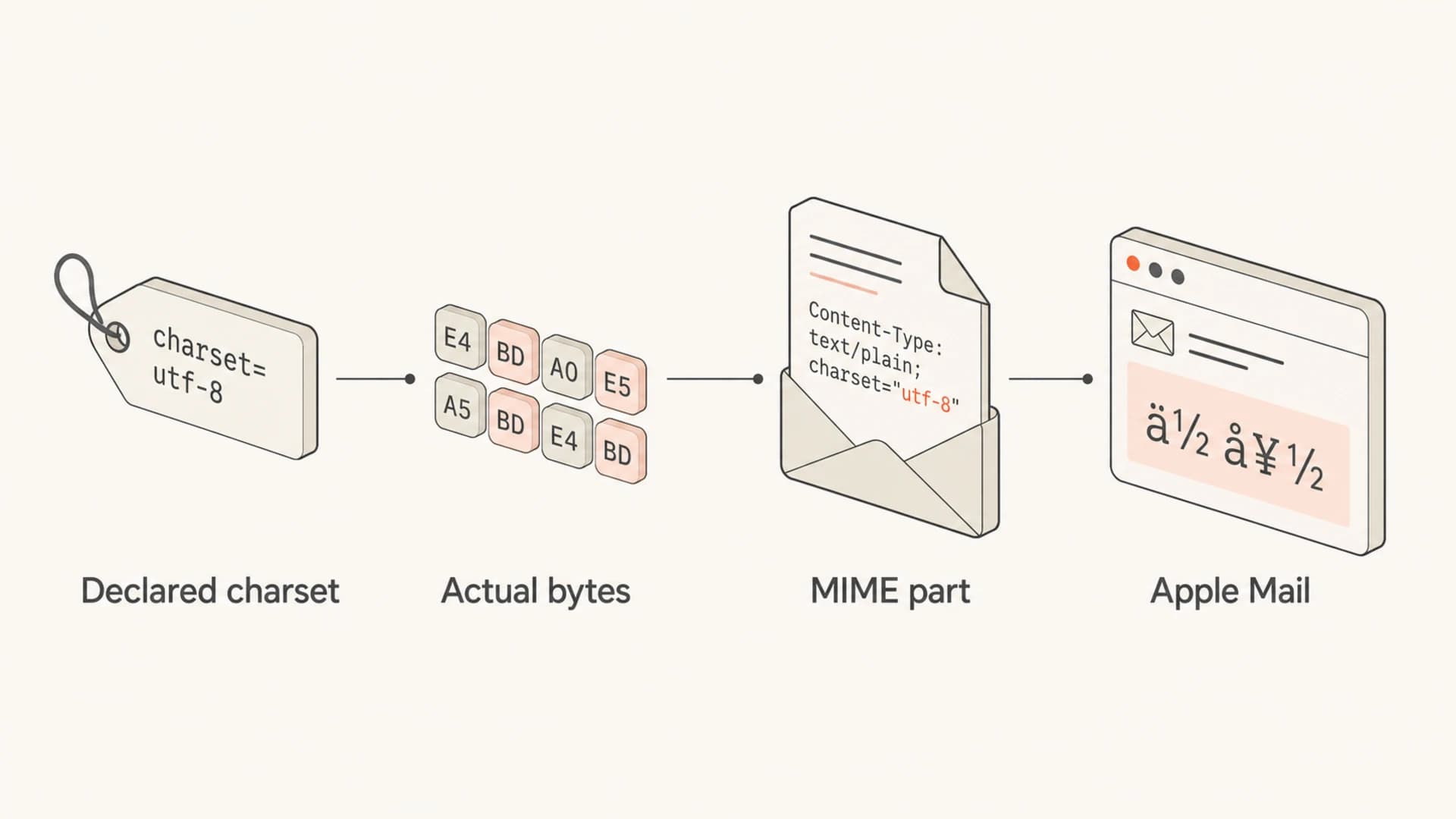
Infographic showing how charset labels and email bytes can mismatch.
Do not stop after checking one top-level header that says UTF-8. Multipart email can contain separate text/plain and text/html parts, and each part can have its own Content-Type and charset. The broken part is often deeper in the raw message than the first header you see.
Why Apple Mail shows the problem first
Email clients do not all recover from bad encoding the same way. Some webmail clients guess the intended charset, rewrite parts during rendering, or silently fall back to a Western charset. Apple Mail tends to trust the MIME structure more strictly. That is why a campaign can look normal in one inbox and show Chinese-looking characters in Apple Mail.
Sender-side issue
- Pattern: Multiple Apple Mail users report the same broken campaign or template.
- Evidence: The raw message contains conflicting charset labels or malformed encoded headers.
- Action: Fix the generated MIME, template files, and merge data before resending.
Recipient-side issue
- Pattern: Only one person sees the issue across unrelated senders.
- Evidence: The same message displays normally on another Apple device or in webmail.
- Action: Check Mail settings, macOS language settings, fonts, and account-specific rendering.
I separate those two cases early. If many recipients report it for one sender, the sender owns the fix. If one recipient sees it across many senders, the local Apple Mail setup deserves attention. Public reports such as this Apple discussion show that local client issues exist, but a repeatable campaign-specific failure points back to the message source.
What to inspect in the raw email
The fastest route is to get the final raw message as received, not the template preview and not the copy stored in your editor. Export the email from Apple Mail, or send the same campaign to a test mailbox and inspect the full EML. The final message includes link tracking, footer injection, personalization, unsubscribe headers, and any changes made after the original template was saved.
I also split the failure by location. A clean body with a broken subject points to header encoding. A broken body with a normal subject points to the text/plain or text/html part. A footer that breaks while the main copy is fine points to a late insertion step. That split keeps the fix targeted and avoids changing parts of the message that already render correctly.
|
|
|
|---|---|---|
Body text breaks | Charset mismatch | MIME part |
Subject breaks | Header encoding | Raw source |
Sender breaks | Display name | From header |
Only Apple breaks | Strict rendering | Apple Mail |
After tracking | Rewrite step | Final EML |
Use this table to decide where to look first.
A practical test is to send the same message through an email tester and compare that result with what Apple Mail receives. Suped's tester helps inspect the final email, including authentication, content issues, and rendering clues, so you are not relying only on what the template editor preview shows.
Email tester
Send a real email to this address. Suped opens the report when the test is ready.
?/43tests passed
Preparing test address...
For domain-level checks around SPF, DKIM, and DMARC, use the domain health checker as a separate pass. That will not directly fix mojibake, but it rules out authentication failures while you work on the MIME and charset problem.
Correct and incorrect MIME examples
This is the kind of consistency I want to see in the final message. The body part declares UTF-8, the HTML also declares UTF-8, and the source bytes really are UTF-8. The content transfer encoding is separate from the charset, but it still needs to be valid for the bytes being sent.
Consistent HTML MIME parttext
Content-Type: text/html; charset=UTF-8
Content-Transfer-Encoding: quoted-printable

<html>
<head>
<meta charset="UTF-8">
</head>
<body>
<p>Your order is ready.</p>
</body>
</html>
This is the kind of mismatch that creates Chinese-looking output in Apple Mail. The message declares UTF-8, but the actual content came from another encoding. Some clients patch over that mistake. Apple Mail often shows the damage.
Mismatched HTML MIME parttext
Content-Type: text/html; charset=UTF-8
Content-Transfer-Encoding: 8bit

<html>
<head>
<meta charset="UTF-8">
</head>
<body>
<p>Text saved as Windows-1252 bytes.</p>
</body>
</html>
The HTML meta tag does not rescue a wrong MIME header. Email clients read the MIME structure first. Keep the MIME charset, HTML meta tag, template file encoding, and inserted data on the same charset.
How to fix it
I would fix this in the sending pipeline, then retest with the same recipient conditions. Do not only edit the visible copy. The corrupt bytes often come from source files, imports, stored personalization values, or a post-processing step that touches the message after the template has rendered.
- Export source: Pull the final raw EML from a real delivered message, then inspect every Content-Type and charset declaration.
- Normalize files: Save templates, partials, snippets, and imported copy as UTF-8 without mixing legacy encodings.
- Clean data: Check names, product fields, coupon text, and CSV imports for smart quotes or legacy byte sequences.
- Match parts: Set charset consistently on text/plain and text/html parts, not only on the outer multipart boundary.
- Encode headers: Make subject lines and display names use valid encoded-word syntax when they contain non-ASCII text. If the subject is the only broken field, this invalid subject line guide is the closer match.
- Retest Apple: Send a fresh message to Apple Mail after each change and compare the raw source against the previous failed message.
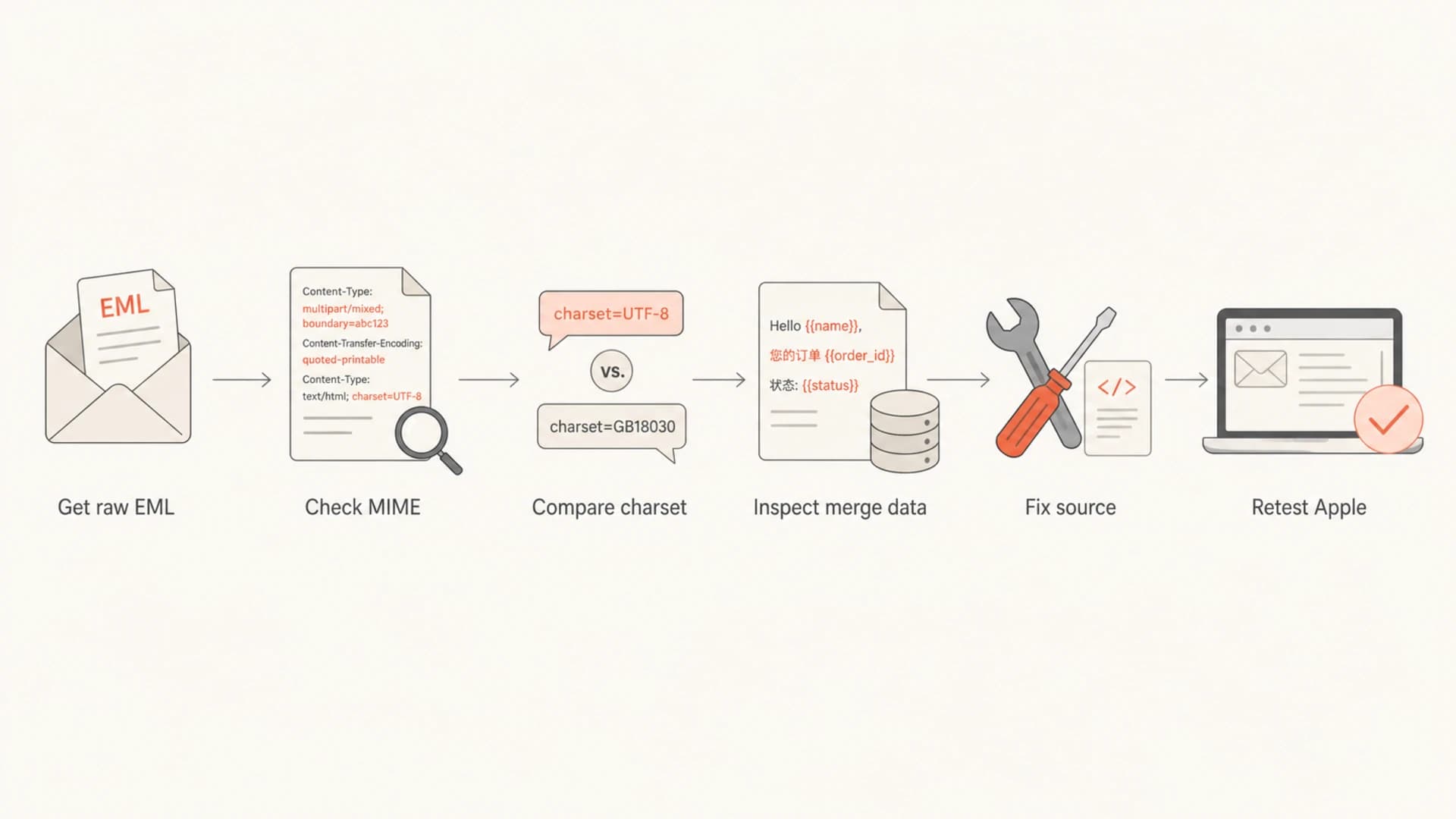
Flowchart for debugging Apple Mail character encoding problems.
If the problem appears after adding tracking, footer content, or a legal disclaimer, compare a sent message with those additions turned on and off. A late rewrite step can introduce a different charset or break quoted-printable wrapping.
Where authentication and monitoring fit
DMARC, SPF, and DKIM do not cause Apple Mail to render Chinese characters. They decide whether the message is authenticated and whether a domain is protected against spoofing. Still, authentication checks belong in the same investigation because broken signing, post-send modification, or unexpected sending sources can hide the real path the message took.
Suped's DMARC monitoring is useful here because it shows who is sending for your domain, whether DKIM and SPF pass, and where failures cluster. That does not replace raw MIME inspection, but it helps confirm that the tested message came through the sending path you expected.

DMARC record detail view showing SPF, DKIM, DMARC, rDNS diagnostics, and DNS records
This is also where Suped's issue detection is practical. If a team is chasing rendering complaints, authentication warnings, and domain reputation signals at the same time, a single view for DMARC, SPF, DKIM, blocklist (blacklist) monitoring, and deliverability issues keeps the work concrete. The encoding fix still happens in the message source.
Best practice: treat this as two tracks. Track one is MIME and charset repair. Track two is sender verification through DMARC, SPF, and DKIM. When both are clean, Apple Mail rendering problems are much easier to isolate.
Views from the trenches
Best practices
Capture the final raw message from Apple Mail before changing template code or DNS settings.
Set charset on every MIME part, not only the outer message or the HTML meta tag alone.
Retest plain text, HTML, subject, and sender name because each part has its own encoding.
Common pitfalls
Assuming UTF-8 in one header proves every MIME part and template file uses UTF-8 too.
Fixing display text in the editor while leaving imported personalization data unchanged.
Checking only webmail clients when the failure appears in native Apple Mail rendering.
Expert tips
Compare the raw EML before and after link tracking, footer injection, and template merge.
Keep source templates, merge data, MIME headers, and HTML meta tags on one charset.
Use a real Apple Mail inbox test after each change, not only a browser or editor preview.
Marketer from Email Geeks says the first place to inspect is Content-Type and charset on each MIME part because email can carry multiple encoding declarations.
2021-01-15 - Email Geeks
Marketer from Email Geeks says Apple Mail is more sensitive to inconsistent charset metadata than webmail clients that guess a fallback, so Apple users see the issue first.
2021-01-15 - Email Geeks
Fix the message, then verify the full path
The direct answer is that Apple Mail is showing Chinese characters because the message content and charset metadata do not match. Start with the final raw email, not the template preview. Check each MIME part, normalize the source files and merge data to UTF-8, encode non-ASCII headers correctly, and retest in Apple Mail.
After the visible rendering issue is fixed, verify authentication and sender paths. Suped can help with that broader workflow through DMARC monitoring, SPF and DKIM visibility, real-time alerts, hosted SPF, hosted DMARC, hosted MTA-STS, blocklist (blacklist) monitoring, and multi-tenant reporting for MSPs. For this specific issue, Suped helps you separate content rendering problems from authentication and reputation problems so the fix lands in the right place.




