Why are automated scripts and crawlers opening my emails, and how can I identify and exclude them from tracking?

Updated on 19 Aug 2026: We updated this guide to separate scanner, privacy-proxy, and self-open traffic and strengthen filtering and automation safeguards.
Automated scripts and crawlers open emails because security systems fetch images, rewrite links, preload remote content through privacy proxies, scan URLs, and inspect message content before or shortly after the recipient sees the message. These requests are real network events, but they do not prove that a person read the email. In education, government, healthcare, and large B2B environments, the traffic often comes from mail gateways, student safety tools, sandboxing systems, link scanners, image proxies, and cloud-hosted security services.
The user agents python-requests and AHC/2.1 are strong signs of non-human traffic, but user-agent strings can be changed or spoofed. If those opens also come from AWS, Azure, Google Cloud, or other hosting networks and occur within seconds across many recipients, classify them as security or automation events with high confidence. The right fix is to identify, label, and exclude them from engagement reporting while still allowing the security system to inspect the email.
What is actually opening the email
Most email open tracking works by placing a tiny remote image in the email. When that image loads, the sender records an open. The modern inbox does not behave like a single human clicking one message in one mail client. Security layers, privacy systems, mailbox interfaces, and sender-side tests can all fetch the same image for different reasons.
- Security scanning: A gateway fetches images and links so it can inspect the email before delivery or before the recipient clicks.
- Link rewriting: A filter replaces URLs with protected links, then checks the original destination in the background or at click time.
- Image proxying: A mailbox provider or privacy system loads images through a proxy, which hides the recipient IP and can change open timing.
- Content safety: Schools and colleges inspect student email to enforce acceptable-use, safety, or compliance policies.
- Automation tooling: Internal scripts, test harnesses, and crawlers fetch messages or landing pages with libraries rather than browsers.
- Sender and QA activity: A sent-folder view, seed account, preview, or internal test can load the recipient-specific pixel and create a self-open.
Do not block these fetches just to protect reporting numbers. If a security tool cannot fetch the pixel, parse the body, or scan the destination, the email can be delayed, quarantined, or treated with more suspicion. Exclude the traffic from analytics instead.
The educational institute pattern is especially important. A school domain can route student mail through a safety product hosted on AWS. Your logs show an AWS IP and a script-like user agent, but the underlying cause is still the institution's filtering stack. That traffic is not proof that the student read the message.
How to identify automated opens
Treat each open as an event with evidence, not a truth label. A single signal can be wrong. Several independent signals together support a reliable exclusion rule.
|
|
|
|---|---|---|
User agent | Script client | Library clients are rarely normal mail app opens, though the string can be spoofed. |
Host network | Hosting ASN | Cloud IPs often belong to hosted scanners, but can also carry proxies or VPN traffic. |
Timing | Seconds after delivery | Immediate fetches support a scanner finding when other signals match. |
Pattern | Many recipients | One source opening many unrelated accounts points to automation. |
Link behavior | Several links at once | Rapid, broad URL fetching is a common scanner pattern. |
Request method | HEAD or partial fetch | Some scanners inspect a destination without completing a browser visit. |
Signals that separate human opens from scanner opens.
The strongest signs are script user agents, a hosting-provider ASN, very fast timing, repeated sources across unrelated recipients, and open events without later human activity. Also watch for campaigns where opens or clicks spike while replies, conversions, and on-site behavior stay flat. Geolocation mismatch is weak evidence because privacy relays, corporate egress, mobile networks, and VPNs can move a request far from the recipient.
For higher confidence, compare the tracking event with website analytics proof. A JavaScript session, continued first-party session, scroll activity, form submission, logged-in visit, reply, booking, purchase, or selective repeat click carries more weight than a raw pixel request or redirect hit.
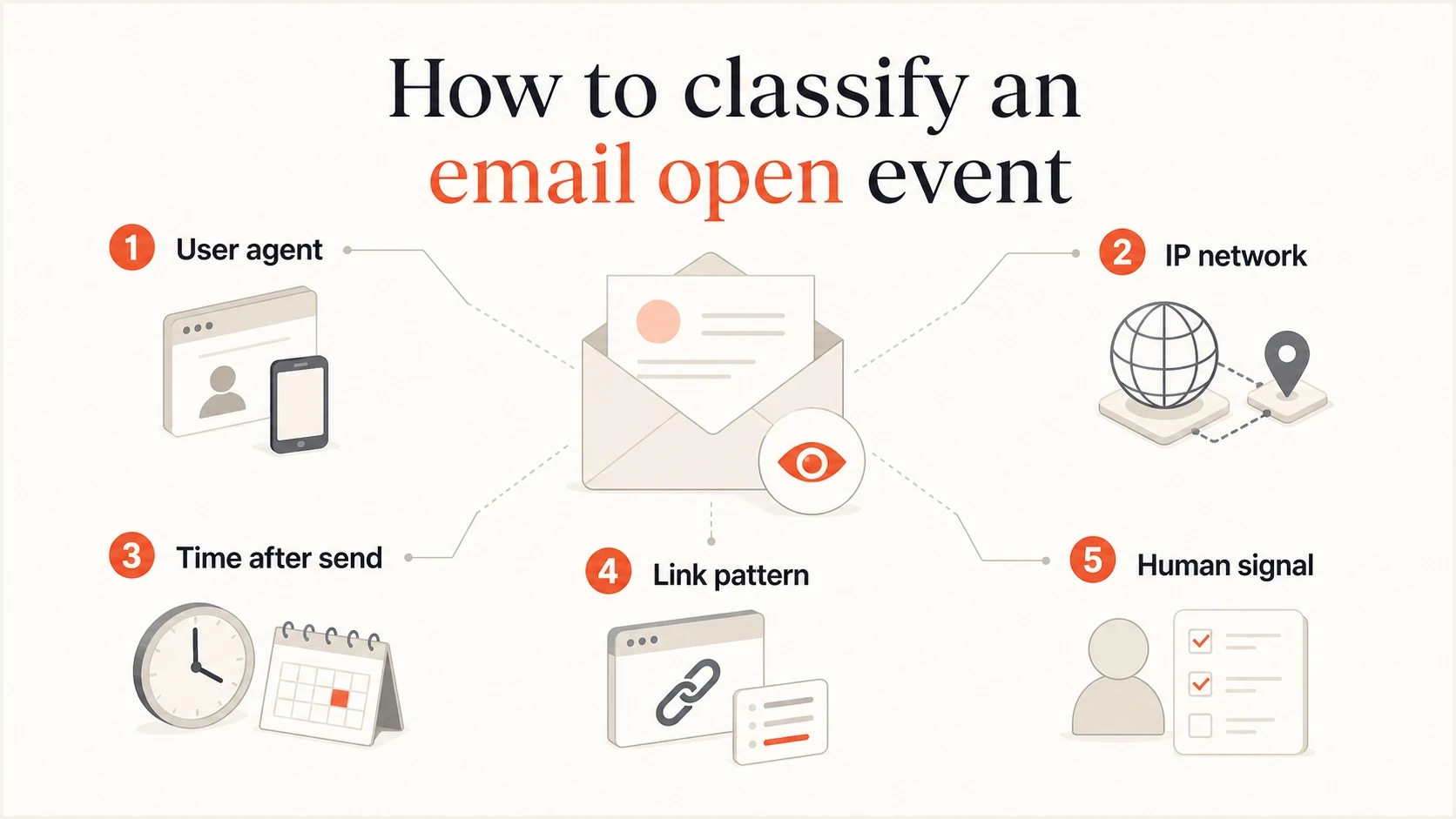
Infographic showing user agent, IP network, timing, link pattern, and human signals for filtering automated email opens.
Separate scanners, privacy proxies, and self-opens
Do not put every questionable request into one bot bucket. Security scanners inspect messages for threats, privacy proxies fetch remote images while hiding recipient details, and self-opens come from sender-side or test activity. Each source needs its own label and reporting treatment.
|
|
|
|---|---|---|
Security scanner | Fast fan-out, hosted ASN, script client, or broad link fetch | Exclude at high confidence or hold as suspicious |
Privacy proxy | Masked IP, proxy network, or background image request | Keep as a proxy open, not a confirmed human open |
Sender or QA self-open | Seed address, internal IP, sender cookie, preview, or sent-folder load | Exclude from recipient engagement |
Human or unknown | Selective behavior, later session, reply, or conversion | Count by confidence and retain the original label |
Classify non-human interaction by cause before excluding it.
Apple Mail Privacy Protection can download remote content in the background regardless of whether the recipient engages with the message. Gmail can proxy and scan external images. In both cases, the request time and visible IP do not reliably tell you when or where a person read the email. Record a proxy fetch as remote content retrieved, not as confirmed attention.
No rule identifies every human or automated open perfectly. Keep an unknown state, review borderline samples, and avoid changing a subscriber's lifecycle status from an open event alone.
Exclusion rules that work
Do not exclude every AWS open with a permanent rule. Down-rank or exclude cloud-hosted opens when they also match scanner behavior. Some people use VPNs or corporate systems that exit through cloud networks, but normal subscribers do not usually open email through raw cloud compute with script user agents. Recheck network ownership and rule accuracy because providers change infrastructure.
Poor filtering
- Network block: Blocking cloud networks from loading pixels can interfere with content checks.
- Single signal: Filtering by user agent alone misses scanners that spoof browsers and catches legitimate scripts.
- Hard deletion: Removing events destroys the audit trail needed to explain reporting changes.
Better filtering
- Label first: Store scanner, proxy, suspicious, self-open, human, and unknown labels beside the raw event.
- Score signals: Combine user agent, ASN, timing, volume, request method, and click path before exclusion.
- Report both: Keep raw events and filtered engagement so teams can reconcile campaign data.
Example engagement classification logicjavascript
const scannerUserAgents = [
  /python-requests/i,
  /AHC\/2\.1/i,
  /curl/i,
  /wget/i,
  /httpclient/i
];

function classifyEngagement(event) {
  if (event.isSenderOrQa === true) return "exclude_self_open";
  if (event.eventType === "open" && event.knownPrivacyProxy === true) {
    return "proxy_open";
  }

  let score = 0;
  if (scannerUserAgents.some((rule) => rule.test(event.userAgent))) score += 4;
  if (event.asnType === "hosting") score += 3;
  if (event.secondsAfterDelivery <= 30) score += 2;
  if (event.sameIpRecipientCount >= 10) score += 2;
  if (event.eventType === "click" && event.distinctLinksInTenSeconds >= 3) score += 3;
  if (event.eventType === "click" && event.httpMethod === "HEAD") score += 1;

  if (score >= 6) return "exclude_scanner";
  if (score >= 3) return "suspicious_review";
  return event.hasHumanEvidence ? "human" : "unknown";
}
This scoring pattern is easier to defend than a broad deny rule. The thresholds are examples, not universal standards. Validate them against reviewed traffic for each audience, record the rule version on every classification, and tune the thresholds without changing raw event history.
For a one-off investigation, send a controlled message to a test mailbox and inspect the headers, Authentication-Results field, tracking-pixel request, and link fetches with an email tester. That gives you a clean baseline before you compare campaign traffic from institutional domains.
Email tester
Send a real email to this address. Suped shows a results button when the test is ready.
?/43tests passed
Protect click automations
False opens mostly damage reporting. False clicks can damage automation because a link scanner can trigger lead scoring, sales alerts, nurture exits, retargeting audiences, or suppression rules before a human sees the email. Treat raw clicks as unverified until timing, link pattern, source, and website behavior support them.
- Hold suspicious actions: Place fast or broad clicks in a short review window before sales alerts, lifecycle changes, or nurture exits.
- Correlate fast clicks: Group clicks that happen inside the first 60 seconds, especially when one recipient or source hits several tracked URLs.
- Require stronger proof: Use replies, form fills, logged-in visits, meeting bookings, purchases, or repeated focused clicks above a single redirect hit.
- Keep GET requests safe: Do not let a tracked URL fetch unsubscribe, approve, confirm, reset, or change an account. Put consequential actions behind a confirmation page and an intentional user action.
- Use canary links only in tests: A diagnostic link can help classify scanners in a controlled seed campaign. Do not hide links with CSS in production email because hidden content can create accessibility and filtering problems.
Keep the raw event log intact. Store a separate engagement label such as raw_open, raw_click, suspicious_click, verified_click, scanner, proxy, self_open, human, or unknown. That lets reports use filtered engagement without erasing the audit trail.
How cloud IP ranges fit into the decision
Cloud IP ranges are useful for classification, but they are not perfect identity. AWS, Azure, Google Cloud, and similar networks host security gateways, crawlers, proxies, QA systems, and personal VPNs. Use cloud ownership as a strong supporting signal, not the only rule.
Example event fields to storejson
{
  "event_type": "open",
  "recipient_domain": "school.example",
  "ip": "203.0.113.42",
  "asn": "AS16509",
  "asn_name": "Amazon.com, Inc.",
  "user_agent": "AHC/2.1",
  "seconds_after_delivery": 8,
  "scanner_score": 9,
  "engagement_label": "exclude_scanner",
  "rule_version": "2026-08"
}
Capture the fields needed to classify the event, such as resolved ASN, hosting flag, recipient domain, normalized user agent, campaign ID, message ID, request method, and timestamp. Keep the raw IP only when the investigation needs it, restrict access, and set a retention period. A truncated or transformed address can support longer-term pattern analysis when full IP storage is unnecessary.
Suped's product provides DMARC, SPF, DKIM, blocklist (blacklist), and domain-health context for the same sending domain. Use that context when scanner traffic appears beside delivery complaints or authentication failures. DMARC aggregate data does not identify individual opens.
If a campaign also has delivery complaints, authentication failures, or domain reputation questions, run a domain health check and review policy results through DMARC monitoring. Bot opens are an analytics problem, while authentication proves sending-domain identity. Investigate both when they change at the same time, but do not use one as proof of the other.
Suped DMARC dashboard showing email volume, authentication health, and source breakdown
A practical workflow for excluding scanner traffic
The cleanest workflow is to preserve every event, tag the events that look automated, then exclude tagged events only in engagement metrics. This keeps security systems working and gives your team a repeatable explanation for why reported opens changed.
Open event classification
An illustrative scanner-heavy campaign separates raw opens into human, suspicious, and excluded events. These percentages are examples, not a benchmark.
Human
Suspicious
Excluded
- Capture fields: Store the necessary network, client, recipient-domain, message, timing, request, and event fields under a defined retention policy.
- Normalize clients: Map raw user agents into browser, mail client, privacy proxy, script, and unknown groups.
- Score events: Assign points for script clients, hosting networks, fast timing, high fan-out, broad link fetches, and non-browser request methods.
- Apply labels: Use human, suspicious, scanner, proxy, self-open, test, and unknown labels with a confidence value and rule version.
- Split reporting: Show raw events for audit, filtered unique engagement for decisions, and excluded events for data-quality review.
- Validate the rules: Review samples of included and excluded traffic after infrastructure changes, then measure false positives before changing thresholds.
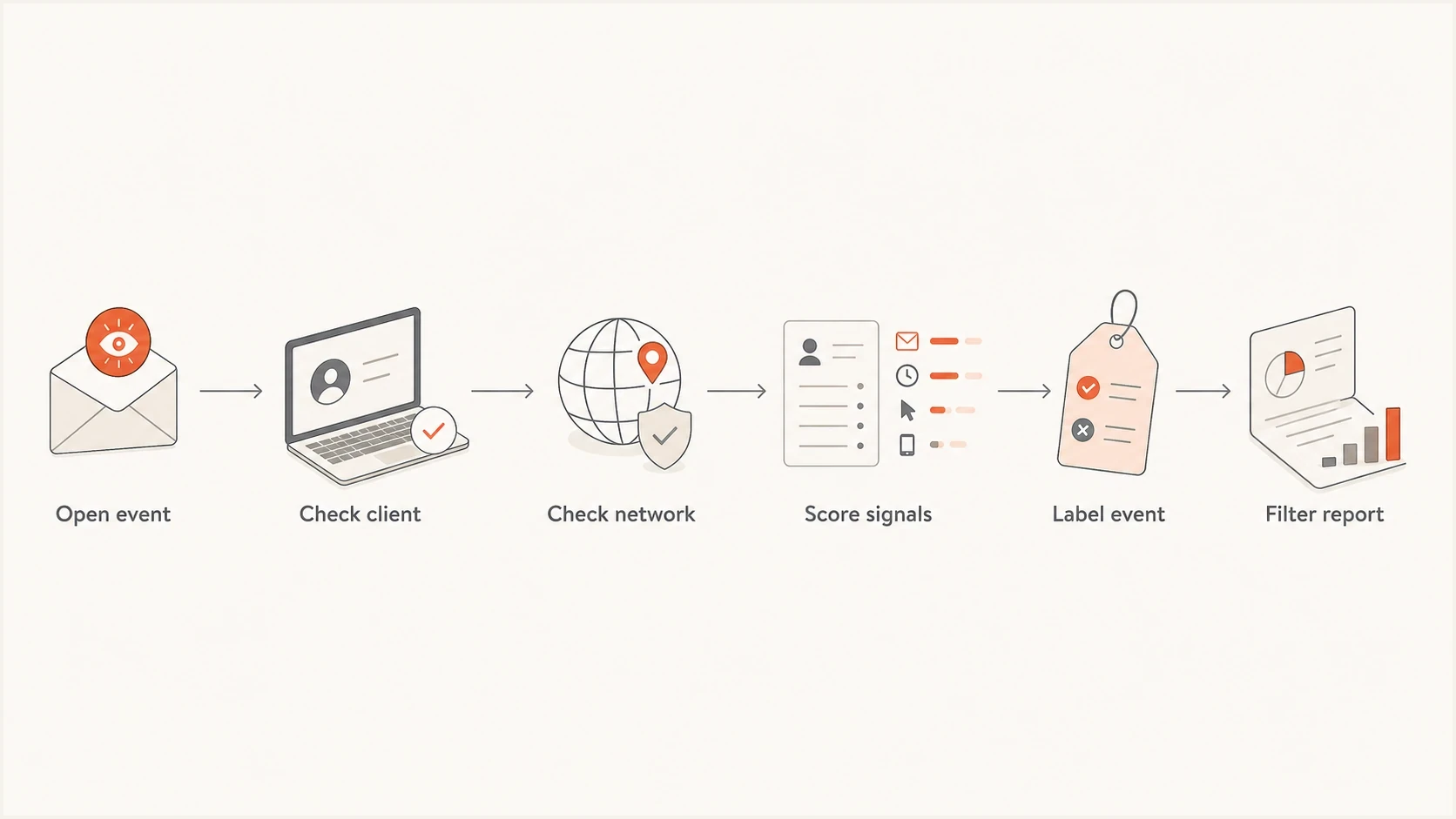
Flowchart showing how to filter automated email opens from tracking reports.
What not to remove
Open tracking has always had measurement limits, and privacy protections have made it less reliable as a direct measure of human attention. Do not discard open data entirely. Report filtered unique opens separately from total pixel requests, use them as a directional signal, then pair them with clicks, replies, conversions, unsubscribe rates, spam complaints, and authenticated delivery data.
Never exclude a subscriber from future campaigns only because their first open came through a scanner or privacy proxy. Exclude or relabel the event, not the person. A real recipient can still read later, click later, or convert through a different device.
Also avoid using scanner opens as proof that your subject line worked. If a school filter opens every message in seconds, that is a delivery and safety workflow, not audience intent. For deeper click-specific handling, the same logic applies to bot user agents and artificial opens.
Views from the trenches
Best practices
Label cloud-hosted script opens before filtering, so reporting stays explainable later.
Keep raw events for audit work, then build filtered engagement reports for decisions.
Review institutional domains separately because school filters often scan at scale.
Common pitfalls
Blocking scanner IPs at the edge can cause filters to distrust or delay the email.
Treating every open as human engagement inflates reports and weakens attribution.
Relying only on user agent rules misses scanners that send normal browser strings.
Expert tips
Use ASN, timing, fan-out, and client type together instead of one brittle rule.
Track excluded traffic as its own metric so partners can see invalid activity.
Recheck rules after provider changes because security vendors alter fetch behavior.
Marketer from Email Geeks says script-like clients are usually automation used to complete system tasks, not ordinary inbox activity.
2021-06-30 - Email Geeks
Marketer from Email Geeks says AHC/2.1 traffic tied to AWS is a strong sign of a hosted safety filter rather than a student open.
2021-06-30 - Email Geeks
The answer in practice
Automated opens happen because security systems, privacy proxies, and scripts inspect or preload email content. With python-requests, AHC/2.1, repeated AWS sources, fast timing, and education-domain recipients, a hosted security or student-safety filter is the leading explanation. Classify those events as high-confidence machine activity when the signals agree, while keeping an unknown state for ambiguous traffic.
Keep raw logs, enrich each event with the minimum network and client data needed, score scanner signals, label the cause and confidence, then exclude high-confidence scanner activity from engagement reporting. Do not block a scanner from fetching content unless you accept the delivery and approval side effects.
When scanner traffic appears beside authentication or reputation problems, Suped's product connects campaign investigation with DMARC, SPF, DKIM, blocklist (blacklist), and deliverability checks. Keep scanner classification and domain health as separate findings, then use the shared campaign timeline to see whether they changed together.




