Why am I suddenly getting an influx of spam complaints?

Published 13 Jul 2025
Updated 26 Jul 2026
14 min read
Summarize with
Updated on 26 Jul 2026: We clarified how complaint rates are measured and added current guidance for suppression, one-click unsubscribe, Microsoft BCL, and Gmail thresholds.
A sudden influx of spam complaints usually means one of four things changed: the audience, the message, the sending infrastructure, or the mailbox provider's current view of your sender reputation. Treat the spike as real until you rule out a reporting or low-volume effect, but remember that the visible complaint number is often only the symptom. The actual cause usually sits in list acquisition, consent drift, content signals, link domains, authentication failures, or a reputation event at Gmail, Microsoft, Yahoo, or another mailbox provider.
The direct answer is this: yes, spam complaints can jump suddenly. A complaint means a recipient manually marked a message as spam or junk. Automatic spam-folder placement is a different signal, even though both can worsen at the same time. Do not assume that one spam test score or filtering label explains everything. A one-off BCL score, a seed-list placement result, or a generic deliverability test can point toward an issue, but mailbox providers make filtering decisions using recipient behavior, sender history, authentication, infrastructure, content, and timing. A campaign can pass a test and still create complaints because tests do not measure how real recipients react.
Start by splitting the problem into two questions: did recipients actively complain, or did a mailbox provider classify the mail as spam without a recipient action? Then compare the affected campaign with the last healthy campaign across recipients, links, templates, sending domains, IPs, authentication, and unsubscribe behavior.
The fastest explanation
If your normal spam complaint rate sits around 0.01% and suddenly moves to 0.28%, treat it as a real incident after confirming that both figures use the same provider, data source, and denominator. At a list size of 11,000, that change is not a large data set, but it is enough to deserve investigation. The cause is often one of these specific changes.
- List change: A form, import, product workflow, webinar list, partner source, or old segment added people who did not expect the message.
- Expectation mismatch: The recipients are legitimate users, but the email topic, sender name, frequency, or timing did not match what they thought they signed up for.
- Provider shift: A mailbox provider changed how it treats your mail after recent negative engagement, scam patterns in your industry, or related sender behavior.
- Content issue: A subject line, link, landing page, image-heavy layout, tracking domain, or call to action looked risky in the current context.
- Authentication issue: SPF, DKIM, DMARC, domain alignment, or forwarding behavior changed, making otherwise normal mail look less trustworthy.
Do not overread one filter score
A Microsoft BCL value of 5 is worth checking, but it is not proof that Outlook.com or Hotmail users complained because of that score. Microsoft 365 tenant filtering and consumer Outlook.com behavior are not the same feedback path. Treat BCL as one signal, then verify where the complaints came from and whether you have a feedback loop source for that mailbox provider.
Why this can happen overnight
Complaint rates can move fast because filtering and reputation systems react to recent behavior. They do not need months of bad sending to adjust. A single campaign can be enough when the audience is small, the complaint count is concentrated at one provider, or the message hits a sensitive topic.
Seasonality can also make a normal message look abnormal. Tax, payroll, banking, invoices, account access, password resets, crypto, delivery updates, and government-related language all get heavier scrutiny during periods when scam volume rises. If your legitimate message resembles the theme of current abuse, inbox placement can worsen even though your brand and list have not changed.
What changed internally
- Segment: A dormant, imported, or product-derived segment received mail after a quiet period.
- Template: The message gained new links, images, tracking parameters, or wording.
- Infrastructure: The sending domain, return-path, DKIM selector, or IP pool changed.
What changed externally
- Provider model: A mailbox provider adjusted filtering for recent sender behavior.
- Abuse wave: Scams using similar topics made recipients and filters less forgiving.
- Blocklist: A domain or IP appeared on a blocklist (blacklist), affecting trust.
This is why the first investigation should be comparative. Do not ask whether the email is generally good or bad. Ask what changed between the last campaign that behaved normally and the first campaign that produced complaints.
What to check first
Start with evidence you can separate by mailbox provider. A blended complaint rate hides the important pattern. A campaign that looks fine overall can be in trouble at Microsoft. Another can be fine at Microsoft but have Gmail spam placement. Provider-specific analysis keeps you from fixing the wrong thing.
|
|
|
|---|---|---|
Provider | Where the spike is concentrated | Split by Gmail, Yahoo, Microsoft, and business domains |
Segment | Which audience reacted badly | Pause risky segments and mail engaged users first |
Links | Whether URL trust changed | Audit every redirect, domain, and landing page |
Auth | Whether identity stayed stable | Verify SPF, DKIM, DMARC, and domain alignment |
Reputation | Whether trust dropped before the campaign | Check domain, IP, blocklist, and blacklist status |
A compact triage map for sudden complaint spikes.
The fastest practical check is to send the same message through an email tester and compare the result with real campaign data. The test helps catch obvious authentication, DNS, content, and rendering issues, but never treat it as a replacement for provider-level complaint and engagement signals.
Email tester
Send a real email to this address. Suped shows a results button when the test is ready.
?/43tests passed
If the test passes, the next question is recipient reaction. A test inbox does not know whether your recipients recognize the sender, expect the topic, recently ignored similar messages, or feel trapped because unsubscribe is hard to find.
Check how complaints are measured
Before comparing complaint rates, identify the data source and denominator. Provider dashboards, complaint feedback loops, and your sending platform do not necessarily count the same messages. A rate can jump because the complaint count rose, because the eligible delivered volume fell, or because low volume made a few complaints statistically loud.
|
|
|
|---|---|---|
Provider spam rate | Recipients who manually report eligible inbox mail | The denominator and reporting delay vary by provider |
Complaint feedback loop | Individual or aggregate complaint reports | Not every provider returns recipient-level reports |
Sending platform | Complaints received through its available feedback paths | Its rate can differ from a provider's own rate |
Campaign identifier | Which campaign or mail stream drew reports | It works only when the identifier is present and stable |
Complaint sources answer different questions and should not be merged without context.
Gmail's user-reported spam rate is based on DKIM-authenticated mail delivered to engaged recipients' inboxes and then marked as spam. Mail already routed to spam does not create the same denominator, and privacy thresholds can hide low-volume data. A low or missing rate therefore does not prove that inbox placement is healthy.
Suppress complaints before the next send
Suppress every identifiable complainant immediately and confirm whether suppression applies to one list or the full promotional mail stream. If the same recipient receives another campaign before the feedback report is processed, the original incident can keep generating complaints.
For promotional mail, pair a visible body link with RFC 8058 one-click unsubscribe headers. The HTTPS endpoint must accept the one-click POST without sending the recipient to a preference page, and a valid DKIM signature must cover both headers. Process requests within 48 hours for Gmail bulk-sender compliance, and test the full path after any template, domain, or sending-platform change.
RFC 8058 one-click unsubscribe headersemail
List-Unsubscribe: <https://example.com/unsubscribe/opaque-token>
List-Unsubscribe-Post: List-Unsubscribe=One-Click
How to interpret Microsoft BCL and complaints
Microsoft's Bulk Complaint Level, usually shortened to BCL, is a bulk-mail signal used in Exchange Online Protection. It is not the same as a public complaint feed. A BCL score can help explain how Microsoft 365 environments might treat a message, but Outlook.com and Hotmail consumer complaint behavior should not be assumed to map directly to that BCL value.
Microsoft classifies BCL values 4 through 7 as bulk senders with a mixed number of complaints. A BCL of 5 can meet the threshold in a strict Microsoft 365 anti-spam policy, while other policies use a higher threshold. The better question is whether BCL moved at the same time as complaint rate, inbox placement, link reputation, or authentication status.
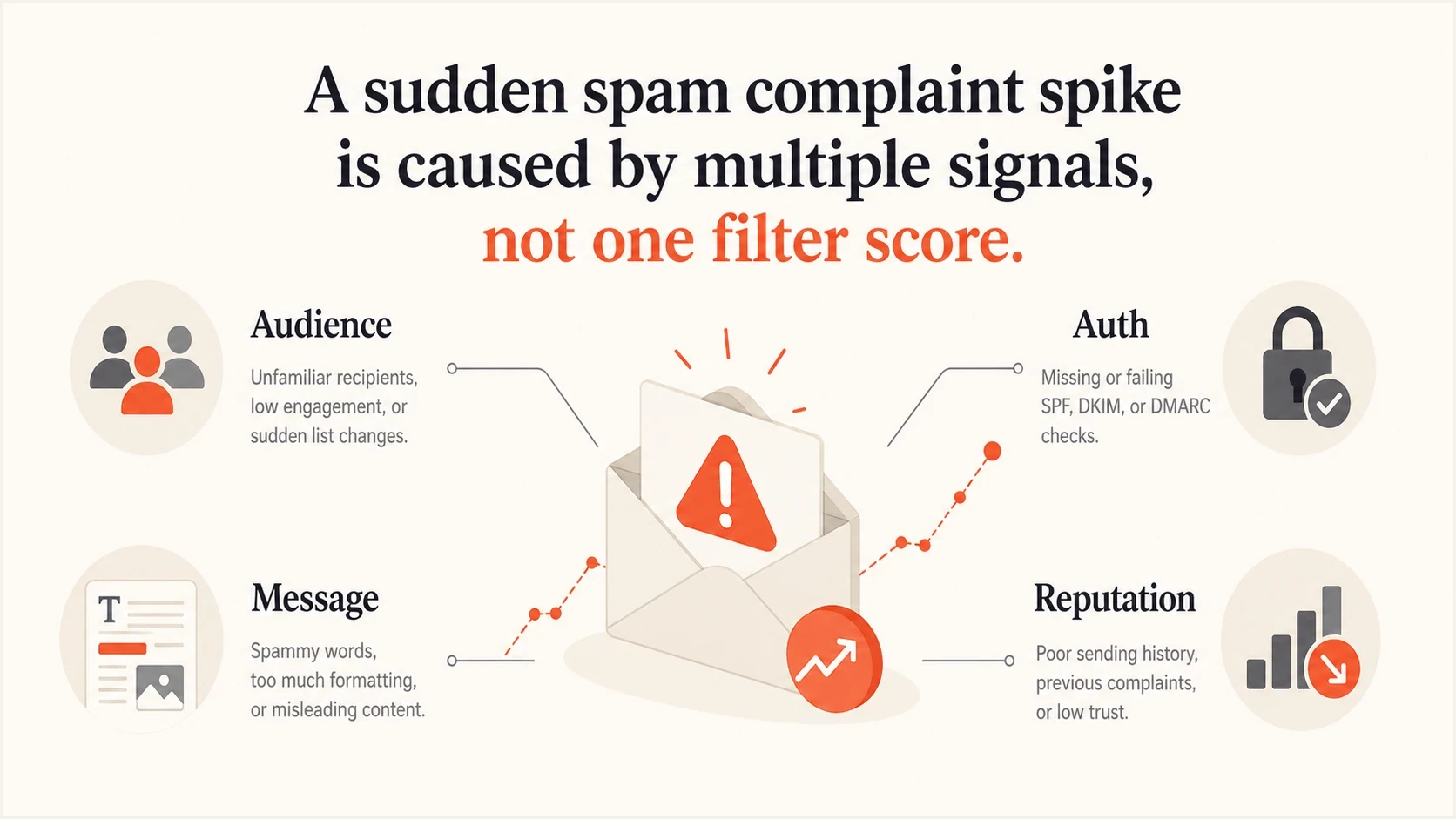
Spam complaint spikes usually come from audience, message, authentication, and reputation signals.
BCL is a clue, not the root cause
When a campaign has a higher BCL value and higher complaints, treat both as outputs of the same underlying problem. The message, audience, or sender reputation looked worse than normal. The score did not necessarily create the complaints.
The usual causes
The most common cause is not a technical failure. It is expectation drift. Users with real accounts can still mark mail as spam when they do not recognize why they received it, no longer value the product, or feel the email is too frequent. That is why a list of customers can still produce complaints.
- Unexpected audience: A user segment exists in your product, but those users did not grant clear marketing permission or have not heard from you recently.
- Dormant contacts: Older users are more likely to forget the relationship and complain instead of unsubscribing.
- Bad links: A redirect chain, URL shortener, tracking domain, compromised page, or mismatched link domain can drag down trust.
- Authentication drift: A new ESP, selector, return-path, or DNS edit can break domain alignment even when the message still sends.
- Complaint clustering: A few complaints at one provider can look large when the campaign volume at that provider is small.
- Theme sensitivity: Tax, login, payment, and security wording can be judged more harshly during active abuse waves.
If the spike appears mainly at Gmail, compare your situation against Gmail spam filtering. If the issue shows up as a wider reputation drop, work through domain history, authentication, complaint patterns, and blocklist or blacklist exposure instead of changing only the email copy.
Check authentication and reputation
Authentication will not make unwanted mail wanted, but broken authentication makes wanted mail easier to distrust. Check SPF, DKIM, DMARC, domain alignment, reverse DNS, HELO identity, and sending domain consistency before changing content. The point is to remove identity ambiguity, then evaluate audience and message quality.
Example DMARC record for monitoringdns
v=DMARC1; p=none; rua=mailto:dmarc-reports@example.com
Suped's DMARC monitoring shows which sources are sending for your domain, whether SPF and DKIM pass for the right domain, and which failures need action. That matters during a complaint spike because a hidden sender, stale vendor, or wrong-domain platform can damage reputation while your main campaigns appear normal.
Issues page showing top issues, verified sources, unverified sources, and authentication pass rates
Also check blocklists and blacklists when complaints rise, especially if deferrals, soft bounces, or spam-folder placement increase at the same time. A listing is not always the root cause, but it can confirm that reputation changed outside the inbox provider's private systems.
?
What's your domain score?
Deep-scan SPF, DKIM & DMARC records for email deliverability and security issues.
For a quick broader scan, a domain health check helps surface DNS and authentication problems in one pass. Then use Suped's live reports to base the fix on real sending data instead of one campaign snapshot.
Audit the links and landing pages
When complaints spike and the message appears to pass basic checks, spend time on links. Every domain in the email matters: visible links, tracking links, redirects, image hosts, unsubscribe URLs, preference-center links, and destination pages. A single suspicious redirect or mismatched domain can change how the campaign is judged.
- Inventory: List every domain used in the HTML, plain text, images, redirects, and unsubscribe path.
- Compare: Check whether any link domain changed since the last normal campaign.
- Resolve: Follow redirects to the final landing page and confirm the destination is clean and expected.
- Match: Use branded tracking domains instead of generic or shared domains where possible.
- Simplify: Remove unnecessary redirects, excessive tracking parameters, and low-value links.
Links often explain confusing results
A message can have familiar branding and a proven subject line, then fail because one linked domain changed. This is especially common after website migrations, analytics changes, new preference centers, and vendor swaps.
Do not ignore the unsubscribe path. If the unsubscribe link is hard to find, broken, slow, behind a login, or asks too much of the recipient, the spam button becomes the fastest opt-out. That damages future deliverability more than a clean unsubscribe.
Fix the spike without making it worse
The wrong response is to keep mailing the same full segment while testing random subject lines. Reduce risk, confirm the cause, then ramp back up using engaged recipients. Take these steps in order.
Gmail complaint-rate response bands
Use Gmail's user-reported spam reference points as action triggers. Other providers calculate and report complaints differently.
Healthy target
<0.10%
Keep user-reported spam as low as possible.
Investigate now
0.10%+
Rates above this level can affect delivery.
Critical
0.30%+
Prevent user-reported spam from reaching this level.
- Pause: Stop sending to dormant, imported, unengaged, or ambiguous-consent segments until you know more.
- Separate: Break reporting down by mailbox provider, acquisition source, engagement age, and product cohort.
- Repair: Fix broken authentication, suspect links, bad landing pages, and unsubscribe friction before the next send.
- Rewrite: Make the sender identity, reason for contact, and value of the message obvious in the first screen.
- Ramp: Resume with recent clickers, purchasers, active users, or recipients with other reliable intent signals before expanding to colder recipients.
Suped supports the operational side of this work by combining authentication results, sending-source visibility, alerts, and blocklist (blacklist) monitoring. During a complaint spike, use those views to check whether a new source, authentication failure, or reputation signal appeared with the first affected campaign.
If domain reputation also appears to fall, the investigation should include recent send volume, complaint clustering, engagement decay, DNS changes, and whether you have a new blocklist or blacklist signal. A broader guide on domain reputation drops can help separate reputation damage from a one-campaign content problem.
What to monitor after the fix
After the first cleanup, watch the next three to five sends more closely than usual. A complaint spike can fade quickly if it came from one poor segment or one bad link. It can also turn into a reputation problem if you continue sending to the same recipients without changing anything.
Post-fix monitoring mix
Track the same signals across each recovery send so you can tell whether risk is falling.
Healthy
Watch
Risk
The most useful recovery metrics are complaint rate by provider, unsubscribe rate, soft bounces, deferrals, click and conversion trends by segment, DMARC pass rate, DKIM domain alignment, SPF domain alignment, and blocklist or blacklist status. Treat open trends as directional because automated image loading distorts them. If the spike was caused by a content or link issue, the next engaged-user send should look closer to normal. If the spike was caused by a reputation shift, recovery takes longer and requires stricter audience control.
Create an internal incident note. Record the campaign ID, provider concentration, segment, send date, complaint rate, link domains, authentication state, and the changes made before recovery. This makes the next spike faster to diagnose.
Views from the trenches
Best practices
Compare the affected send with the last normal send before changing subject lines or cadence.
Break complaint rates out by provider, source, and engagement age to find the real cluster.
Audit every link domain and redirect because one changed URL can damage a clean campaign.
Common pitfalls
Treating one BCL score as the root cause can distract from audience and link problems.
Assuming product users expect every email leads to complaints when consent context is weak.
Relying on seed tests alone misses recipient behavior that mailbox providers actually use.
Expert tips
Keep a recovery segment of recent engagers so you can rebuild trust after a complaint spike.
Use DMARC and source monitoring to catch hidden senders before reputation symptoms appear.
Document each incident with provider, segment, links, and DNS state for faster triage later.
Expert from Email Geeks says sudden complaint spikes often point to unexpected recipients or mail that had already been filtered before users reacted to it.
2022-09-02 - Email Geeks
Expert from Email Geeks says BCL is an internal Microsoft signal for Exchange Online Protection, not a direct complaint feed from Microsoft consumer inboxes.
2022-09-02 - Email Geeks
Response checklist for complaint spikes
A sudden influx of spam complaints is usually caused by a real change in recipient reaction, sender reputation, message content, link trust, or authentication. It can happen quickly, even when previous sends looked healthy. The mistake is to chase one visible score and ignore the wider evidence.
Pause risky segments, compare the bad send with the last healthy send, audit every link and domain, verify SPF, DKIM, and DMARC, then restart with the most engaged recipients. Suped can support this workflow with continuous DMARC reports, source detection, authentication alerts, and multi-domain reporting. Use it to verify whether the spike coincided with an unauthorized sender or authentication change while campaign data identifies audience reactions.
If the issue is a one-campaign mismatch, you should see improvement after audience and link fixes. If the issue is reputation damage, keep volume controlled until provider-level signals stabilize.




