Why am I seeing multiple opens for one email contact, and how does Apple MPP affect this?

Published 14 May 2025
Updated 1 Aug 2026
11 min read
Summarize with
Updated on 1 Aug 2026: We clarified how Apple MPP creates open events and added safer rules for reporting, automations, and engagement scoring.
You are seeing multiple opens for one email contact because an open is only an image request, not a guaranteed human reading session. One mailbox can generate several image requests through Apple Mail Privacy Protection, webmail image proxies, the same mailbox on several devices, app previews, and a later real read.
Apple MPP affects this because Apple Mail and Mail on iCloud.com can download remote images in the background through Apple's privacy relays and cache them, regardless of whether the recipient engages with the message. That can create an open before the recipient looks at the message. If the same person later opens the email in Safari, Outlook, Hotmail webmail, Yahoo Mail, or another app, the vendor can log another open that is not marked as prefetched.
For the common example, a Hotmail address with one prefetched Apple-style open and two later iOS WebKit opens, do not read that as "three human opens." Read it as "one mailbox generated three open events, with one clear machine or proxy event and two stronger human signals that still need timing, user agent, click, and client context."
The short answer
The direct answer is yes, your assumption is often right: the first prefetched open can come from Apple Mail with MPP enabled, and later non-prefetched iOS WebKit opens can be the recipient reading through Safari, webmail, or another iOS app. The caveat is that a detailed user agent does not prove attention. It only raises confidence that the event came through a direct client path rather than Apple's MPP prefetch path.
- Best read: Treat the contact as one recipient with several open events, not several confirmed reads.
- MPP clue: A prefetched event with a generic user agent is usually a machine or proxy signal.
- Human clue: A later non-proxy iOS WebKit event is more useful when it pairs with a bot-filtered click or authenticated site visit.
- Reporting rule: Keep unique opens, total opens, proxy opens, and confirmed engagement in separate buckets.
Do not promote every open into engagement
An open event is a weak signal after MPP. Use it for directional reporting, not as the only trigger for lead scoring, reactivation, winback suppression, or sales alerts.
- Low trust: Prefetched, proxied, instant, or generic user agent opens.
- Medium trust: Non-prefetched opens with specific device and client details.
- High trust: Bot-filtered clicks, replies, conversions, form fills, purchases, and authenticated site sessions.
How one contact creates several open events
A tracked email open happens when the recipient's mail client, browser, proxy, or helper app requests the tracking pixel. The contact does not need to tap the message three times for you to see three opens. The same message can be fetched by Apple Mail, then opened in webmail, then rendered again in a mobile app. A forwarded copy can also reuse the original tracking URL and attach a later image request to the first recipient's event history.
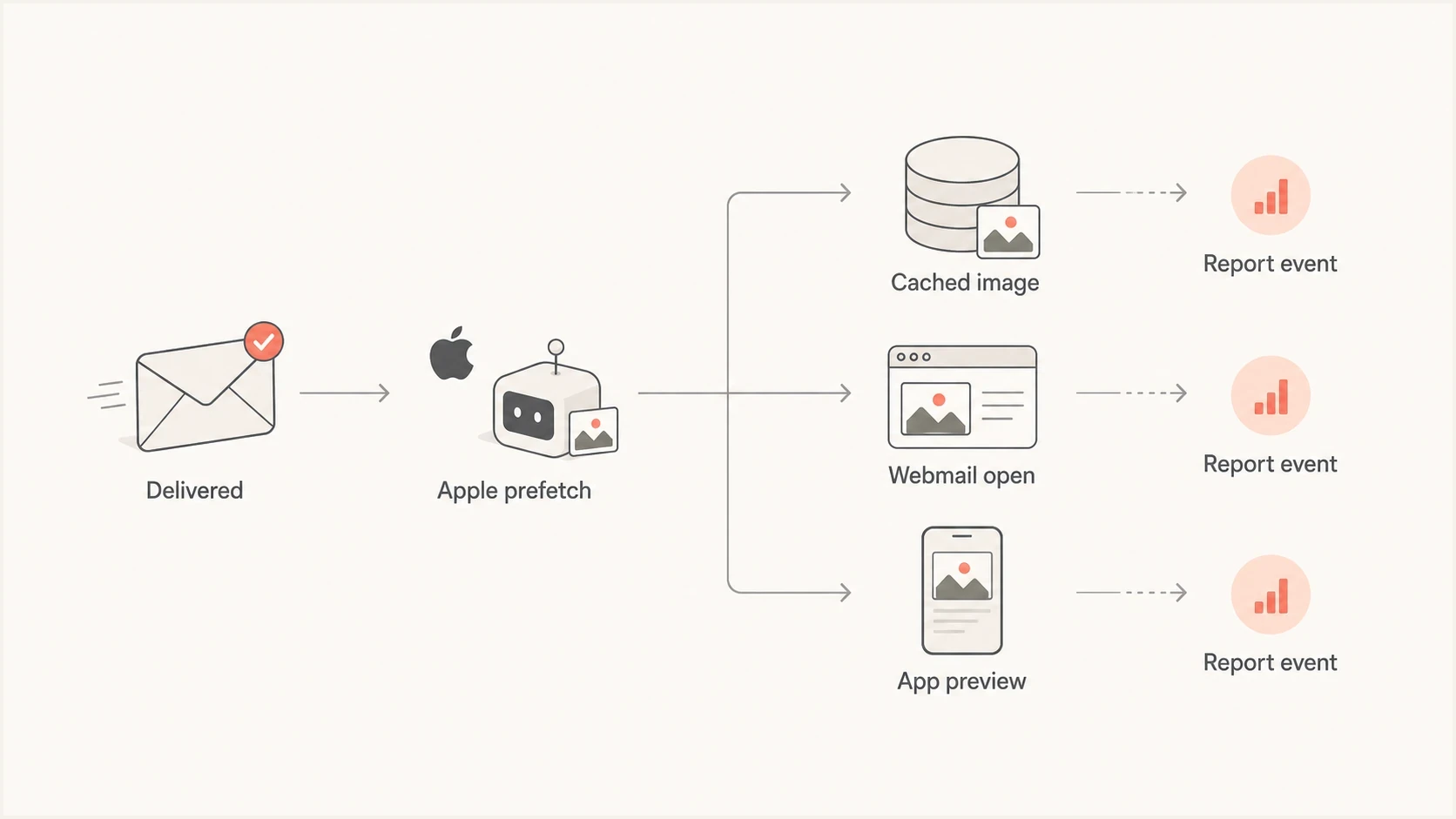
A flowchart showing one delivered email moving through Apple prefetch, cached images, webmail, app preview, and reporting.
What the marketer sees
- Single contact: One recipient row in the campaign report.
- Several opens: Multiple pixel loads attached to the same message.
- Mixed labels: Some events marked prefetched and others not.
What likely happened
- Apple Mail: MPP fetched images through Apple's privacy path.
- Another client: The user later read in webmail, browser, or app.
- Extra fetch: A preview, proxy, or helper app requested images again.
This is especially common when the mailbox provider and the reading client are different. A Hotmail address can sit inside Apple Mail on an iPhone, which triggers MPP. The same person can still read the message later in Outlook webmail, a browser, a mobile app, or a third-party inbox app.
What Apple MPP changes
Apple MPP applies to protected remote content in Apple Mail and Mail on iCloud.com, not only to Apple email addresses. An Outlook, Hotmail, Gmail, Yahoo, or business mailbox configured in Apple Mail can create MPP open events. The address domain alone does not tell you whether MPP is involved.
MPP changes open timing, IP data, location, device and client attribution, and repeatability. The first open can happen when Apple downloads remote content in the background. Apple's privacy relays prevent the sender from receiving the recipient's actual IP address, and the user agent can be generic. Image caching can also reduce later tracking detail because the remote image has already been retrieved.
|
|
|
|---|---|---|
Prefetch | Loaded early | Machine |
Proxy | Privacy path | Low trust |
WebKit | Rendering engine | Needs context |
Click | Link request | Filter bots |
Compact guide to common open signals
If you need a deeper treatment of adjusted open rates, the related guide on estimating real opens is the next useful read.
How to read the event log
Start with the raw event fields before trusting a vendor's label. The most useful fields are timestamp, delivery timestamp, prefetched flag, proxy flag, IP owner, user agent, device family, mail client, bot-filtered click within the same session, and whether the message was viewed more than once from the same environment.
Example open event patterntext
event: open
mailbox: hotmail
open_1_prefetched: true
open_1_proxy: apple
open_1_agent: Mozilla/5.0
open_2_prefetched: false
open_2_proxy: false
open_2_agent: iOS WebKit
open_3_prefetched: false
open_3_proxy: false
open_3_agent: iOS WebKit
That pattern is best read in order. The first event is the machine or proxy event. The second and third events are stronger signals because they are not marked as prefetched and they include iOS WebKit detail. Still, iOS WebKit can mean Safari, an in-app browser, webmail on iPhone, or another app that uses WebKit.
A safer classification rule
Use the event source to decide how much weight the open deserves. Do not use the existence of the open alone.
Open classification logictext
if prefetched or proxy:
  bucket = machine_or_proxy_open
else if reply_or_conversion or authenticated_site_session:
  bucket = confirmed_engagement
else if click_nearby and click_not_bot:
  bucket = confirmed_engagement
else if specific_device and delayed_open:
  bucket = likely_human_open
else:
  bucket = unconfirmed_open
Timing matters. An open that fires seconds after delivery across many recipients is usually a prefetch, security scan, or proxy event. An open that happens later, especially near a verified click or web session, has more value. Security systems can request links too, so remove known scanner activity before treating a click as confirmed engagement. If you are analyzing whether machine opens happen in spam placement, compare this with spam and machine opens because placement changes what prefetch systems can see.
How to test a single message
A controlled test helps you separate tracking noise from email authentication and rendering problems. Send the same campaign to known inboxes, open it in one client at a time, and record what your platform logs. This will not perfectly recreate every recipient environment, but it gives you a clean baseline.
Use Suped's email tester when you want to send a real message and inspect authentication, content, and report details around the same test. That helps keep open-tracking analysis separate from SPF, DKIM, DMARC, and DNS issues.
Email tester
Send a real email to this address. Suped shows a results button when the test is ready.
?/43tests passed
For domain-level checks, Suped's domain health checker gives you a broader view of DMARC, SPF, and DKIM. Keep that separate from engagement reporting because authentication failures can reduce delivery and distort the open data before MPP enters the picture.

Email tester sample report showing total score, email preview, issue summary, and per-section results
A practical way to classify opens
Separate open events into confidence bands instead of trying to prove every event is human or automated. That gives marketers, lifecycle teams, and sales teams a shared language for reporting.
Open event confidence bands
Use the highest confirmed signal available for each contact and campaign.
Confirmed engagement
Highest
Bot-filtered click, reply, conversion, or authenticated site event near the send.
Likely human open
Useful
Specific client detail, delayed timing, and no proxy or prefetch flag.
Machine or proxy open
Low
Prefetched, proxied, cached, instant, or generic agent event.
Unknown open
Review
Not enough fields to decide whether the open is human or automated.
- For reporting: Show unique opens and adjusted opens separately so trends stay readable.
- For scoring: Give bot-filtered clicks and authenticated site events more weight than opens in engagement models.
- For automation: Avoid triggering urgent sales tasks from MPP or proxy-only opens.
- For cleanup: Do not keep inactive contacts forever because Apple generated opens.
This is also where total opens and unique opens matter. Total opens tell you how many image loads were recorded. Unique opens tell you how many contacts generated at least one open. Neither tells you how many people paid attention.
How this changes reporting
MPP usually inflates opens and weakens device, location, and timing data. It can also make click-to-open rate look worse because the denominator grows with machine opens while clicks remain tied to link requests. Use bot-filtered click rate, conversion rate, reply rate, unsubscribe rate, complaint rate, and revenue per send for performance decisions.
|
|
|
|---|---|---|
Open rate | Low | Trend only |
Click rate | High after filtering | Optimize |
Reply rate | High | Segment |
Complaint | High | Protect |
How to use each metric after MPP
A practical dashboard should let you compare raw opens with MPP-filtered opens, inspect proxy opens, compare open timing with delivery timing, and connect engagement with authentication health. Treat the filtered view as an estimate because it removes known machine signals but cannot recover human reads hidden by caching or image blocking.
How MPP changes automations and segmentation
MPP affects more than campaign reports. It can place contacts into open-based segments without a deliberate read. It also weakens workflows that branch on "opened" or "did not open" because Apple can generate an open without attention, while image blocking can hide a real read.
- Open-triggered flows: Use a bot-filtered click, reply, purchase, form submission, or authenticated site event when the next step has business impact.
- Resends to non-openers: Treat the segment as uncertain. A machine open can exclude an unread message, while image blocking can leave a real reader in the resend group.
- Send-time optimization: Use verified engagement times where the system allows it, since background image downloads can train an open-based model on Apple's timing.
- Open-based tests: Choose subject line or send-time winners with clicks, conversions, or revenue when the audience has material MPP activity.
If historical reporting depends on opens, keep the raw series for continuity and add MPP-filtered and confirmed-engagement views beside it. Do not splice an adjusted rate into the old series without labeling the methodology change.
Where Suped fits
Open tracking and DMARC are different problems, but they meet in the same operating workflow. If authentication is broken, a message can be rejected, filtered, or placed differently before engagement tracking has value. Suped is our DMARC and email authentication platform. It helps teams monitor authentication results, investigate legitimate sources that fail DMARC, and track blocklist and blacklist risk without treating an MPP open as a deliverability signal.
The concrete workflow is simple: use open-event classification for engagement, and use DMARC monitoring to verify that legitimate senders pass SPF, DKIM, and DMARC. Suped keeps authentication failures, source investigation, alerts, and verification checks in one workflow. MSPs can use its multi-tenant view to manage those checks across client domains.
Use separate workflows
- Engagement: Classify opens, clicks, replies, and conversions by confidence.
- Authentication: Monitor DMARC, SPF, DKIM, MTA-STS, and source matching.
- Reputation: Track blocklist and blacklist risk without mixing it into opens.
- Operations: Give teams one queue of issues, owners, fixes, and verification checks.
Views from the trenches
Best practices
Separate unique opens, total opens, prefetched opens, and non-proxy opens before judging demand.
Keep the first Apple MPP open, but stop treating it as proof of active reading by itself.
Use clicks, replies, purchases, and site events when segmenting your most engaged contacts.
Tag Apple proxy and WebKit events so analysts can audit engagement scoring rules later.
Common pitfalls
Counting every image load as a human open overstates interest on Apple-heavy mailing lists.
Assuming a Hotmail address cannot trigger Apple MPP misses accounts configured in Apple Mail.
Treating WebKit as always human ignores previews, embedded web views, and inbox helpers.
Mixing machine opens into reactivation rules keeps inactive contacts on the list too long.
Expert tips
Compare open timing with delivery time; instant opens deserve a separate machine category.
Use device and proxy fields together because one flag rarely explains the whole event trail.
Give confirmed clicks more weight than opens when rebuilding engagement segments for sends.
Audit vendor definitions for unique, total, prefetched, cached, and proxy opens monthly.
Marketer from Email Geeks says MPP works per device, so one mailbox can create an Apple prefetch and later open in webmail or another app.
2024-05-02 - Email Geeks
Marketer from Email Geeks says detailed iOS WebKit data and prefetched false is stronger evidence, but it still needs timing and click context.
2024-05-02 - Email Geeks
What to do next
Do not delete open rates, but stop treating them as the clean source of truth. For the single-contact case, label the first prefetched event as machine or proxy, treat the later non-prefetched iOS events as likely human only when the timing supports it, and use bot-filtered clicks or downstream activity for stronger decisions.
At the program level, rebuild reporting around confidence. Separate machine opens, proxy opens, likely human opens, and confirmed engagement. Then keep authentication and sender health clean with Suped so deliverability problems do not get confused with MPP tracking noise.




