Why am I seeing 5.4.4 'no mail hosts' errors for Microsoft domains?

Published 25 Jun 2025
Updated 8 Aug 2026
12 min read
Summarize with

Updated on 8 Aug 2026: We expanded the DNS troubleshooting steps to cover Microsoft MX target lookups, EDNS, TCP fallback, and safer retry handling.
You are seeing 5.4.4 "no mail hosts" errors for Microsoft domains because your sending system, or a DNS resolver it depends on, failed to find a usable mail route for the recipient domain. For Hotmail, MSN, Live, Outlook.com, and some Microsoft-hosted domains, the usual causes are a failed MX lookup, failed A or AAAA resolution for the returned MX target, stale negative DNS caching, resolver policy filtering, broken TTL handling, or a temporary Microsoft routing issue.
The key point: this is a routing failure, not a normal DMARC, SPF, DKIM, blocklist, blacklist, or reputation rejection. Authentication can be perfect and the message can still bounce if the sending mail server cannot resolve a usable MX target and its IP addresses at delivery time.
- Meaning: The sender could not route mail because it found no usable MX host or could not resolve that host to an address.
- First check: Query the exact recipient domain and returned MX target from the same DNS resolver your MTA used, not only a public resolver.
- Main caveat: If the spike appears only in your logs, treat your DNS path as suspect before blaming Microsoft DNS.
- Recipient handling: Do not purge Microsoft recipients as invalid until you prove the address, domain, and DNS path failed repeatedly.
What the error means
Enhanced status code 5.4.4 sits in the routing and network family of SMTP failures. In plain terms, the sending system reached the point where it had to route the message but could not determine a usable next hop. The MX query can fail, or the MX query can succeed while the address lookup for its target fails. Some bounce messages phrase this as "unable to route: no mail hosts for domain".
Typical bounce wordingtext
550 5.4.4 Unable to route: no mail hosts for hotmail.com
554 5.4.4 no mail hosts for domain
Remote server returned '554 5.4.4 unable to route'
Treat the bounce as evidence to investigate, not proof that Microsoft has no mail infrastructure. Large Microsoft consumer domains normally publish usable MX routes, so a sudden sender-specific burst usually means the sender's resolver, cache, or network path saw an incomplete or failed answer. Check the NDR's generating server and remote-server fields: if no remote Microsoft server is listed, the sending system likely created the NDR before an SMTP connection was established.
Do not classify it as a mailbox bounce
A "no mail hosts" bounce is domain routing evidence. It does not prove the mailbox is closed, inactive, or invalid. Suppress the recipient only after later delivery attempts produce address-level evidence.
Why it appears on Microsoft domains
When the same error appears across Hotmail, MSN, Live, and Outlook.com, the pattern matters more than the domain name. If Microsoft's public routes were genuinely absent for those domains, a very large share of the internet would fail at the same time. When only one sender or one sending cluster sees the failures, inspect the sender's DNS and retry path first.
Likely routing causes
- Resolver cache: A stale empty MX answer or failed MX-target address answer stayed cached longer than intended.
- Negative TTL: The resolver cached a no-data response and kept using it during later delivery attempts.
- DNS policy: A firewall, filtering resolver, or split-horizon rule blocked or rewrote the DNS lookup path.
- Microsoft issue: A short-lived Microsoft DNS or routing problem affected part of the sender population.
Less likely causes
- DMARC policy: DMARC failures normally produce authentication or policy wording, not missing mail host wording.
- SPF syntax: SPF problems can affect acceptance, but they do not remove the recipient domain's MX records.
- DKIM signing: Broken signatures affect identity evaluation after a delivery route already exists.
- Blacklist listing: A blocklist or blacklist rejection usually mentions policy, reputation, access, or IP status.
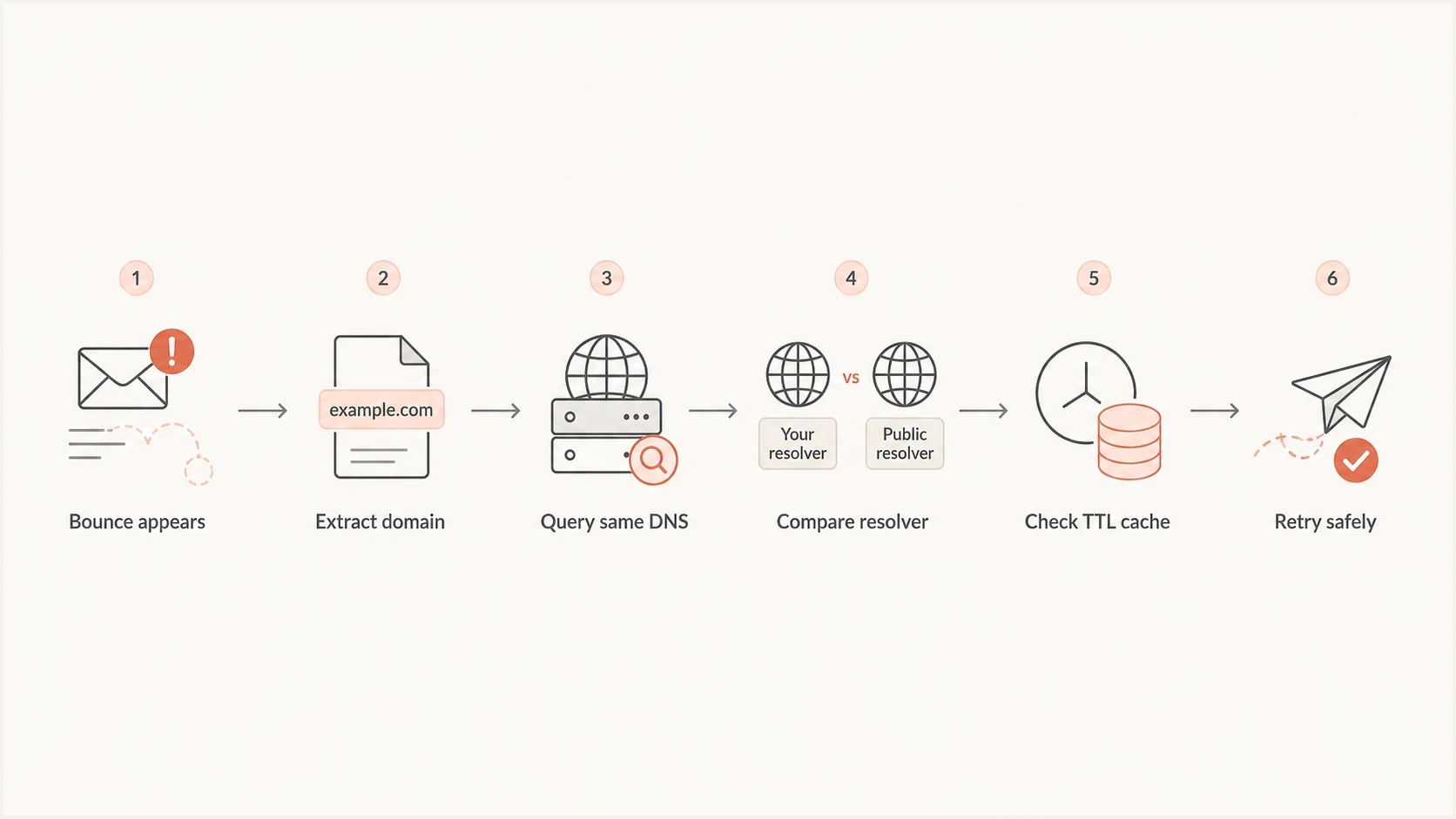
Flowchart showing how to investigate a Microsoft no mail hosts bounce.
How to prove where the failure is
The fastest way to find the cause is to compare MX and MX-target address answers from the same resolver your mail server used against independent resolvers at the same time. If your MTA saw no usable route while other resolvers returned the MX and its A or AAAA addresses, the failure is in your DNS path, cache, or MTA handling.
For a broader sender-side check, run a domain health check after the routing incident is stable. That helps separate MX lookup failures from unrelated DMARC, SPF, DKIM, and DNS hygiene issues.
DNS checks to run during the incidentbash
dig MX hotmail.com
dig A hotmail-com.olc.protection.outlook.com
dig AAAA hotmail-com.olc.protection.outlook.com

dig @1.1.1.1 MX hotmail.com
dig @8.8.8.8 MX hotmail.com

dig +tcp A hotmail-com.olc.protection.outlook.com
dig +bufsize=1232 A hotmail-com.olc.protection.outlook.com
dig +trace MX hotmail.com
|
|
|
|---|---|---|
All resolvers show MX and addresses | Local cache or MTA timing issue | Inspect resolver and MTA logs |
Only local resolver fails | Sender DNS path issue | Flush or bypass the faulty cache |
MX works, target address fails | Second-stage DNS or transport issue | Test A, AAAA, EDNS, and TCP |
Public resolvers disagree | Authoritative, propagation, or path issue | Capture answers and retry after recovery |
NXDOMAIN or null MX is authoritative | Domain has no valid mail route | Verify the domain before resending |
Use the complete lookup chain, not one query, to decide where to focus.
Query the resolver that matters
A clean answer from a laptop is useful, but it does not prove what the mail server saw. Query the recursive resolver configured on the sending host for the recipient MX and the returned host's addresses, then compare those answers with independent resolvers and authoritative tracing.
DNS resolver problems to check
If the issue lasted longer than a short TTL window, check for resolver behavior that keeps bad answers alive. Microsoft consumer domains usually point to stable MX hostnames backed by changing address pools, so the sender must respect TTLs and refresh both the MX and address answers instead of treating a temporary empty response as durable truth.
- Negative caching: Check whether NXDOMAIN, NODATA, timeout, or SERVFAIL responses for the domain or MX target were cached as valid no-host answers.
- TTL handling: Confirm the resolver expires MX, A, and AAAA responses when the authoritative TTL says to refresh.
- DNS transport: Check UDP truncation, TCP fallback, EDNS behavior, and outbound DNS firewall rules.
- Resolver pool: Look for one bad node in a resolver cluster that only affects part of your mail stream.
- MTA response mapping: Treat DNS timeouts and SERVFAIL responses as temporary deferrals, and reserve permanent failure for confirmed conditions such as authoritative NXDOMAIN or null MX.
Suggested incident triage windows
These are operational investigation windows, not SMTP protocol rules.
Short burst
Under 1 hour
Hold automatic suppression and verify DNS before a controlled resend.
Extended burst
1-4 hours
Check local cache, resolver pool behavior, and DNS transport failures.
Persistent failure
Over 4 hours
Escalate with timestamped DNS proof and queue samples.
The important distinction is whether the bounce follows a domain or follows your infrastructure. If the same recipient domain fails from one sending region but succeeds from another, the recipient domain is less likely to be the root cause.
Check EDNS and the Microsoft MX target
Microsoft consumer-domain route discovery normally has two DNS stages. The sender first queries the recipient domain's MX record, then resolves the returned MX hostname, commonly outlook-com.olc.protection.outlook.com, to A or AAAA addresses. A 5.4.4 error can occur at the second stage even when the first query returns a valid MX record.
A large or variable address response can expose EDNS and DNS transport faults. If a UDP response is truncated, the resolver must retry over TCP. Firewalls, network address translation devices, or DNS inspection rules that drop large UDP responses or block TCP port 53 can make a valid Microsoft host look unavailable.
Compare UDP, EDNS, and TCP answersbash
dig @RESOLVER_IP MX outlook.com +comments +stats
dig @RESOLVER_IP A outlook-com.olc.protection.outlook.com +comments +stats
dig @RESOLVER_IP AAAA outlook-com.olc.protection.outlook.com +comments +stats

dig @RESOLVER_IP +bufsize=1232 A outlook-com.olc.protection.outlook.com +comments +stats
dig @RESOLVER_IP +tcp A outlook-com.olc.protection.outlook.com +comments +stats
Do not pin Microsoft delivery to IP addresses
Hard-coding current Microsoft IP addresses bypasses DNS-based distribution and failover, and it can break when Microsoft changes the address pool. Fix the resolver's EDNS and TCP path, or have the provider that controls the outbound MTA fix it.
Do not confuse routing with authentication
DMARC, SPF, and DKIM still matter, but they answer a different question. They prove whether the sender identity is authenticated and whether the visible From domain has policy coverage. A 5.4.4 no mail hosts error happens earlier in the delivery path, while the sender is trying to find where to connect.
Suped's DMARC monitoring helps keep that separation clear. Suped's product tracks authentication health, verified sources, SPF and DKIM results, DMARC policy behavior, and blocklist or blacklist signals, so a routing incident does not get mixed up with a sender identity problem.
To verify the message itself, send a controlled test through an email tester report. If authentication passes there while Microsoft-domain deliveries still fail with 5.4.4, the evidence points back to recipient routing, DNS resolution, or MTA failure handling.
Email tester
Send a real email to this address. Suped shows a results button when the test is ready.
?/43tests passed
Keep these checks separate because mixing them creates bad fixes. Changing SPF or rotating DKIM keys will not repair a recursive DNS resolver that lost an MX-target address answer. Authentication results can rule out a parallel identity problem, but they do not validate recipient routing.
When to retry, suppress, or escalate
The leading 5 in 5.4.4 classifies the NDR as a permanent failure, so the MTA that generated it might bounce the message instead of leaving it queued. However, the underlying DNS condition can still have been transient. Do not automatically suppress a Microsoft recipient after one event. Once DNS resolution is healthy, use a controlled resubmission policy and suppress only after consistent domain-level or address-level evidence.
Practical handling rule
- Retry after validation: If DNS has recovered and the event was isolated, resubmit under normal retry limits and keep the address active.
- Suppress later: If repeated attempts fail after DNS is healthy, evaluate the address-level or authoritative domain evidence.
- Escalate with proof: Bring timestamps, resolver answers, MTA logs, and queue IDs, not only aggregate bounce counts.
- Segment impact: Compare sending regions, IP pools, campaigns, and resolver nodes to find the failing path.
If your logs show a wider Microsoft-domain bounce pattern, compare this incident with a Microsoft bounce spike. If the failure wording specifically centers on DNS lookups, also compare it with Outlook DNS failures. Similar symptoms can have different fixes.
A practical investigation runbook
A production investigation needs evidence that ties the bounce to a domain, resolver, host, and time window. Aggregate bounce charts are useful for impact, but the fix usually comes from exact resolver behavior and exact MTA decisions.
- Capture examples: Save raw NDRs, generating-server fields, queue IDs, recipient domains, sending hosts, and timestamps.
- Query locally: Run MX and MX-target address lookups from the sending host or the same network namespace as the MTA.
- Compare externally: Query independent recursive resolvers and use authoritative tracing for the same domain.
- Check cache: Look for stale no-data answers, long negative cache lifetimes, or one bad resolver node.
- Review failure handling: Confirm the MTA defers transient DNS failures and does not immediately suppress recipients after a locally generated 5.4.4.
- Separate causes: Track authentication, reputation, and blocklist signals separately from MX routing failures.
Mail server evidence to collectbash
grep '5.4.4' /var/log/mail.log

postqueue -p | head

postcat -q QUEUE_ID | sed -n '/Final-Recipient/,$p'
The exact commands vary by MTA, but the evidence target is the same: the server that made the delivery decision, the complete DNS lookup chain it saw, and whether later attempts used fresh DNS data.
How Suped fits into the workflow
Suped is useful around this issue for sender-side evidence. The 5.4.4 bounce itself is an SMTP routing problem, but teams still need to confirm that their domains are authenticated, authorized senders are known, and authentication changes did not cause a parallel deliverability problem.
Suped's product turns raw DMARC, SPF, DKIM, DNS, and reputation data into operational checks. During a Microsoft bounce spike, teams can verify what remained healthy, then focus the incident investigation on the resolver and routing path with less unrelated noise.
- Issue detection: Suped flags authentication and DNS problems with steps to fix them, instead of leaving teams to read raw XML.
- Unified checks: DMARC, SPF, DKIM, hosted SPF, hosted DMARC, hosted MTA-STS, and blocklist monitoring live in one product.
- Operational alerts: Real-time alerts help catch sudden authentication shifts while the mail team investigates routing bounces.
- MSP workflow: Multi-tenant views help agencies manage many client domains without mixing unrelated incidents.
Views from the trenches
Best practices
Query the same resolver your mail server used before treating Microsoft MX data as broken.
Keep raw bounces with timestamps so DNS answers can be matched to exact delivery attempts.
Retry short no-MX bursts before suppressing recipients from large Microsoft domains.
Common pitfalls
Checking only a laptop resolver can hide the bad cache used by the production MTA.
Treating 5.4.4 as an invalid mailbox bounce can remove good Microsoft recipients.
Changing SPF or DKIM during a routing incident can add noise without fixing MX lookups.
Expert tips
Compare by sending region and resolver node to isolate one faulty recursive DNS path.
Watch negative cache lifetimes because stale no-data answers can outlast the real fault.
Keep authentication dashboards clean so routing failures do not mask sender problems.
Marketer from Email Geeks says a Hotmail-only 5.4.4 spike became clearer after checking whether MSN and Live domains showed the same pattern.
2024-02-12 - Email Geeks
Marketer from Email Geeks says a valid Microsoft MX answer from outside the mail server does not rule out a local resolver failure.
2024-02-13 - Email Geeks
Next steps for a 5.4.4 bounce
A Microsoft 5.4.4 "no mail hosts" bounce means the sender could not determine a usable route to the recipient domain at that moment. Start with the exact recipient domain, query its MX record and the MX target's A or AAAA addresses through the same resolver used by the MTA, compare independent resolvers, and inspect negative caching before changing authentication records.
If DNS recovers quickly, prevent automatic recipient suppression and use a controlled resend under normal limits. If the issue persists, escalate with raw NDRs, generating-server details, resolver answers, TTLs, sending host IDs, queue IDs, and timestamps. Keep DMARC, SPF, DKIM, and blocklist or blacklist monitoring healthy in parallel, but do not mistake them for the direct cause of this routing bounce.