Why am I getting soft bounces from Windstream, TDS, CenturyTel, Hughes and Zoom Internet?

Updated on 12 Aug 2026: We clarified how to interpret 554 5.7.1 responses and added a safer retry and suppression workflow.
You are getting soft bounces from Windstream, TDS, CenturyTel, Hughes, and Zoom Internet because the receiving side is rejecting the message under a policy or content decision, not because those mailbox domains have one obvious shared owner. When the same sender sees the same bounce wording across those ISP mailbox domains, treat it as a shared filtering signal, shared reputation data, or a common abuse-handling path before treating it as a normal temporary delivery delay.
The key clue is the SMTP response. A line like 554 5.7.1, delivery not authorized, message blocked due to spam content, is a policy rejection. Some sending platforms still group that under soft bounce handling because they retry, queue, or classify the event by campaign logic. Operationally, handle it as a receiver-side block until the evidence proves it was transient.
- Direct answer: The shared symptom is the rejection pattern, not confirmed common ownership.
- Primary cause: The receiving filter has tagged the message, sender, domain, or IP as spam-related.
- Fix path: Validate authentication, isolate the message variable, check blocklist and blacklist status, then escalate with clean evidence.
What the bounce is telling you
The most useful part of this case is the bounce transcript, also called a non-delivery report (NDR) or delivery status notification (DSN). The sending history can be strong, the message can be transactional, and engagement can look healthy, but the receiving server can still block a specific message or sender pattern. The exact enhanced status code and diagnostic text matter more than the label in the sending platform.
Typical bounce evidencetext
Status: 5.7.1 (delivery not authorized)
Diagnostic-Code: smtp;554 5.7.1 [VI-1]
Message blocked due to spam content in the message.
Bounce category: spam-related
That response has two useful meanings. First, the rejection is policy-based. Second, the receiver is describing the decision as content or spam-related. Do not spend the first hour looking for mailbox full errors, DNS outages, message-size limits, or recipient typos. Those causes produce different evidence.
Do not let the soft bounce label slow the investigation
A 5xx SMTP status is normally permanent for that delivery attempt. If the sending platform keeps the contact active and retries later, that is platform behavior. The receiver has still said it rejected the message for policy reasons.
- 5.7.1: The receiver is saying delivery is not authorized under its policy.
- 554: The receiving server rejected this delivery attempt during SMTP delivery.
- Spam-related: The next checks should focus on content, authentication, reputation, and complaint signals.
If you need the broader difference between temporary bounces and policy rejections, this related page on soft bounces gives the general troubleshooting model. For this provider cluster, the stronger signal is the shared rejection text.
Why these domains show up together
Windstream, TDS, CenturyTel, Hughes, and Zoom Internet are ISP-style mailbox domains. They are often smaller in recipient volume than major consumer mailbox domains, so a sender notices a cluster quickly. A few dozen rejections can look sudden because the normal baseline is low.
The shared behavior does not require shared ownership. It can happen when several providers use similar filtering inputs, outsource part of their abuse handling, receive the same reputation feed, or respond to the same content fingerprint. Different inbound mail servers can still reach the same decision if the sender, IP, domain, template, URLs, or recipient feedback changed enough.
|
|
|
|---|---|---|
Windstream | Policy block | Headers and IP |
TDS | ISP mailbox | Authentication |
CenturyTel | Legacy domain | Reputation |
Hughes | Small volume | Message body |
Zoom Internet | Regional ISP | URLs |
Use this table to keep the investigation grounded in evidence.
Weak assumption
The weak assumption is that all of these domains have one owner, one mail stack, and one content scanner. That answer is too neat and it sends the investigation in the wrong direction.
- Ownership: Do not infer ownership from a shared bounce phrase.
- MTA: Different inbound servers can return similar policy wording.
Better assumption
The better assumption is a common signal. That signal can be a URL reputation issue, a template fingerprint, a sender domain issue, or a reputation rule shared across filtering data.
- Signal: Compare the rejected message with a known accepted version.
- Evidence: Collect complete headers, SMTP replies, timestamps, and sending IPs.
The sender checks to run first
Start with the sender side because it is the part you can prove quickly. Run the sending domain through a domain health check and confirm that DMARC, SPF, DKIM, reverse DNS, and visible sender identity are clean. A receiver-side content block becomes harder to challenge when your own authentication has gaps.
- SPF: Confirm the sending IP is authorized, the MAIL FROM domain is correct, and DNS lookup limits are not exceeded.
- DKIM: Confirm the signature passes and its d= domain matches the From domain under the configured DMARC mode.
- DMARC: Confirm at least one of SPF or DKIM both passes and has the required identifier match with the From domain.
- IP identity: Check reverse DNS, HELO identity, and whether other traffic on the same IP changed recently.
- Cadence: Compare bounce rate by receiving domain with volume, retry behavior, and recent template deployments.
?
What's your domain score?
Deep-scan SPF, DKIM & DMARC records for email deliverability and security issues.
The point is not to prove that DMARC caused the bounce. A content-style 5.7.1 rejection is not usually a pure DMARC failure. The point is to remove ambiguity before contacting the receiving provider or adjusting the message.
Authentication is still part of a content block
A mailbox provider can combine content scoring with domain trust. Passing authentication does not guarantee inbox placement, but failing authentication makes a borderline message easier to reject.
Test the exact message before changing everything
The fastest way to avoid random edits is to test the exact message that bounced. Send the production version, then change one variable at a time while keeping the envelope sender and other headers constant. A useful email tester result will show authentication, content, links, headers, and technical issues in the same place.
Message test matrixtext
Test A: exact production message
Test B: same body, plain text only
Test C: same body, no tracked links
Test D: same sender, older accepted template
Test E: same message, subject or attachment changed
Test F: same template, different sending IP
Email tester
Send a real email to this address. Suped shows a results button when the test is ready.
?/43tests passed
If only the exact production message fails, focus on the template, URLs, link tracking host, subject line, attachments, and wording. If every version fails from the same IP or domain, focus on reputation and sender identity. If the older accepted template still works, compare the most recent template or platform changes.
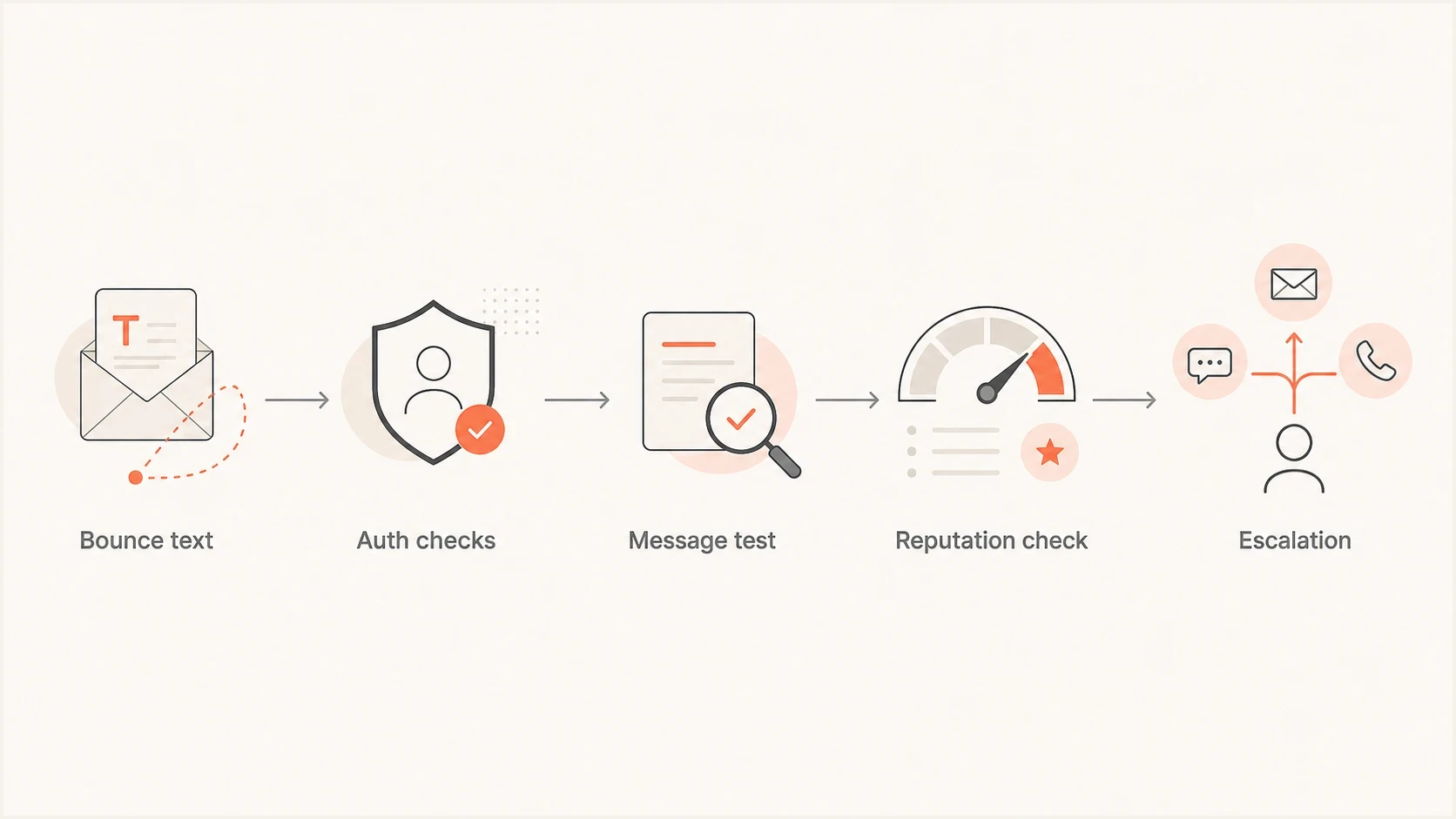
Five-step flow for diagnosing 554 5.7.1 policy bounces at ISP mailbox domains.
Content and reputation issues that fit this pattern
For this cluster, put four causes at the top of the list: URL reputation, message fingerprinting, sending IP reputation, and sender domain reputation. A transactional email can still trip those checks, especially when the message contains repeated verification language, tracked links, branded redirects, or legal disclaimers copied across every send.
High-signal checks
- URLs: Check the visible links, redirect host, tracking domain, and final landing page.
- Template: Compare the current HTML with the last version that delivered normally.
- Recipients: Review whether stale ISP addresses are overrepresented in the failing batch.
- Complaints: Look for complaint spikes, high retry volume, or automated resends after failures.
Also check blocklist and blacklist exposure at both the domain and IP level. A content rejection is not the same thing as a blocklist listing, but a listing can contribute to a broader reputation decision. Suped's blocklist monitoring keeps that signal next to authentication and delivery issues, which helps when a small ISP cluster starts rejecting mail.
How to prioritize the incident
Receiver clusters matter more when the same code repeats and the domain has business-critical mail.
Watch
Low
One provider, low volume, no repeated code.
Investigate
Medium
Several ISP domains show the same 5.7.1 text.
Escalate
High
Transactional mail is blocked after authentication and message tests pass.
If the failing recipients are concentrated at regional ISP domains, segment them during testing. Do not keep sending unchanged messages to those addresses through automated retries while investigating. Repeating a policy-blocked delivery can add more negative evidence at the receiver.
How to handle retries and suppressions
Retry and suppression rules should follow the SMTP evidence, not the dashboard label. A 4xx response requests a later retry, while a 5xx response says the receiver will not accept that delivery attempt. A 5.7.1 policy block also does not prove that the recipient address is invalid.
- For 4xx responses: Keep the message queued and use progressive backoff instead of rapid retries.
- For 5xx policy responses: Stop automatic retries of the unchanged message and investigate the sender-level cause.
- For recipient status: Do not mark the mailbox invalid unless the DSN reports an address failure such as 5.1.1.
- After remediation: Send one controlled test to the affected domain before releasing the paused recipient segment.
Suppress the failing route, not a valid person
If several valid recipients at one ISP return the same 5.7.1 text, pause that provider segment or campaign route while fixing the cause. Keep address-level hard-bounce suppression for evidence that the individual mailbox does not exist.
What to change before escalation
Before contacting the receiving provider, make a controlled fix attempt. Choose the lowest-risk change that can break a bad content fingerprint without changing the legal or transactional purpose of the email.
Change carefully
- Links: Use a verified branded tracking domain and remove unnecessary redirects.
- HTML: Simplify the template and remove hidden, malformed, or excessive markup.
- Copy: Keep the verification purpose clear and remove promotional fragments.
Do not mask evidence
- Sender: Do not rotate domains just to escape the rejection.
- Volume: Do not increase retries while the same policy code repeats.
- Records: Do not loosen authentication to test delivery.
For ISP domains, also compare the issue with other cable and regional mailbox clusters. Spectrum and Charter delivery issues often require a similar evidence-first workflow, and this related page on Spectrum delivery explains how to separate authentication problems from provider-specific filtering.
Escalation packettext
Sender domain: example.com
Sending IP: 203.0.113.10
Receiving domains: windstream.net, tds.net, centurytel.net
Failure window: 2026-08-10 14:00 UTC to 2026-08-11 10:00 UTC
Reporting MTA: mail.receiver.example
Queue or message ID: ABC123456
SMTP reply: 554 5.7.1 [VI-1]
Message type: transactional verification
Authentication: SPF pass and match, DKIM pass and match, DMARC pass
Recent changes: tracking host changed on 2026-08-08
A clean escalation packet matters because abuse teams do not need a long narrative. They need timestamps, the reporting MTA, receiving domains, rejected recipients, sending IPs, queue or message IDs, headers, the exact SMTP reply, and a statement that the message is transactional. If you changed a tracking domain, template, ESP pool, or DKIM selector recently, include that fact.
Where Suped fits in this workflow
Suped's product groups DMARC source data, SPF and DKIM results, and blocklist and blacklist context in one workflow. During this incident, use it to confirm which source sent the rejected mail, whether its identifiers matched the From domain, and whether authentication or reputation signals changed during the failure window.
Issues page showing top issues, verified sources, unverified sources, and authentication pass rates
Suped's DMARC monitoring helps map authorized sending sources and compare SPF, DKIM, and DMARC results before and during the rejection period. That evidence can be added to the provider escalation packet without treating DMARC as the confirmed cause of a content-style 5.7.1 response.
- Source inventory: Match the affected sending IP and domain to a known mail source.
- Authentication trend: Compare SPF, DKIM, and DMARC results around the failure window.
- Incident correlation: Review authentication and blocklist or blacklist changes beside the bounce spike.
- Evidence export: Share concise source and authentication findings with the provider's abuse team.
Views from the trenches
Best practices
Capture the exact SMTP reply before changing content, DNS, routing, or suppression rules.
Group failures by receiving domain and code so shared policy decisions are easier to spot.
Escalate with headers, timestamps, sending IPs, and message purpose in one concise packet.
Common pitfalls
Assuming shared ownership from one bounce phrase can waste time and hide the real signal.
Retrying policy blocks at high volume can make a borderline reputation issue look worse.
Changing several message variables at once makes the actual trigger much harder to isolate.
Expert tips
Compare a failing message with the last accepted template before contacting an abuse desk.
Check URL and tracking host reputation when several small ISP domains reject the same mail.
Keep transactional copy plain and direct when regional providers start flagging messages.
Marketer from Email Geeks says the same VI-1 text across several ISP domains points toward shared filtering data, not confirmed shared ownership.
2022-10-28 - Email Geeks
Marketer from Email Geeks says different inbound mail servers can still return similar policy blocks when a common sender signal is present.
2022-10-28 - Email Geeks
The practical fix path
Do not guess which filter sits behind each provider. Prove what changed, confirm that the sender is authenticated, show that the message has a legitimate transactional purpose, and escalate only if the evidence still points to a receiver-side false positive.
- Confirm: Verify that the same 554 5.7.1 policy text appears across the affected domains.
- Validate: Check SPF, DKIM, DMARC, reverse DNS, and sending IP identity.
- Isolate: Test the exact message, then remove one variable at a time.
- Pause: Stop unchanged 5xx retries to the affected domains while investigating the policy block.
- Escalate: Send a concise evidence packet after sender-side checks are clean.
If the mail is transactional, keep the investigation fast. Verification and account-related messages have direct customer impact. A small ISP cluster can still matter when those recipients are waiting for an appraisal, loan document, account notice, or time-sensitive workflow.




