Why am I getting repeated re-engagement emails after unsubscribing?

Michael Ko
Co-founder & CEO, Suped
Published 18 Jul 2025
Updated 14 May 2026
9 min read
Summarize with
You are getting repeated re-engagement emails after unsubscribing because the sender has not applied your opt-out to every audience, campaign queue, or sending platform. Sometimes that is a legal processing delay. In the U.S., CAN-SPAM gives commercial senders up to 10 business days to honor an opt-out request. Operationally, though, I expect modern senders to suppress unsubscribed people immediately, especially before a re-engagement campaign.
The most common cause is a suppression mistake: yesterday's re-engagement segment did not exclude people who unsubscribed from the previous send. The second most common cause is an ESP migration, where a brand is moving contacts into a new email platform and sends one last "do you still want to hear from us" campaign before the final import. That workflow breaks when unsubscribe events are not shared fast enough.
There are also less dramatic explanations. A campaign can be pre-queued before your unsubscribe event arrives. A brand can have separate preference categories, such as newsletters, offers, account updates, and partner messages. A transactional message can keep sending after a marketing opt-out. If the message is another marketing email asking you to stay subscribed, I treat that as a suppression problem until the sender proves otherwise.
The short answer
The direct answer is simple: your unsubscribe request reached one part of the sender's system, but the re-engagement campaign was driven by a different list, stale export, delayed queue, or platform migration. That is why the copy feels contradictory. The sender is asking whether you want to remain subscribed after you already said no.
- Processing delay: The sender has a legal window in some jurisdictions, but good systems still suppress opt-outs immediately.
- Segmentation error: The audience query selected disengaged contacts but did not exclude recent unsubscribes.
- Migration gap: The sender is moving to a new ESP and is deciding who to carry forward, but opt-out data is lagging.
- Preference mismatch: You unsubscribed from one category, but another category still has your address marked as eligible.
- Abuse or neglect: The sender ignores opt-outs or keeps reactivating old contacts, which is a serious compliance and trust issue.
Important caveat
A legal grace period is not a good re-engagement strategy. If a brand sends another marketing email after someone opts out, the recipient experiences it as being ignored. That increases spam complaints, blocks, and negative mailbox engagement.
Why it happens
Re-engagement campaigns are risky because they are usually built for people who have not opened, clicked, bought, or logged in for a long time. That audience already has weak signals. If the sender adds a suppression error on top, the campaign reaches people who are more likely to complain.
I separate the failure into two questions. First, did the unsubscribe event get captured? Second, did every send path check that event before delivery? Many programs answer yes to the first question and no to the second.
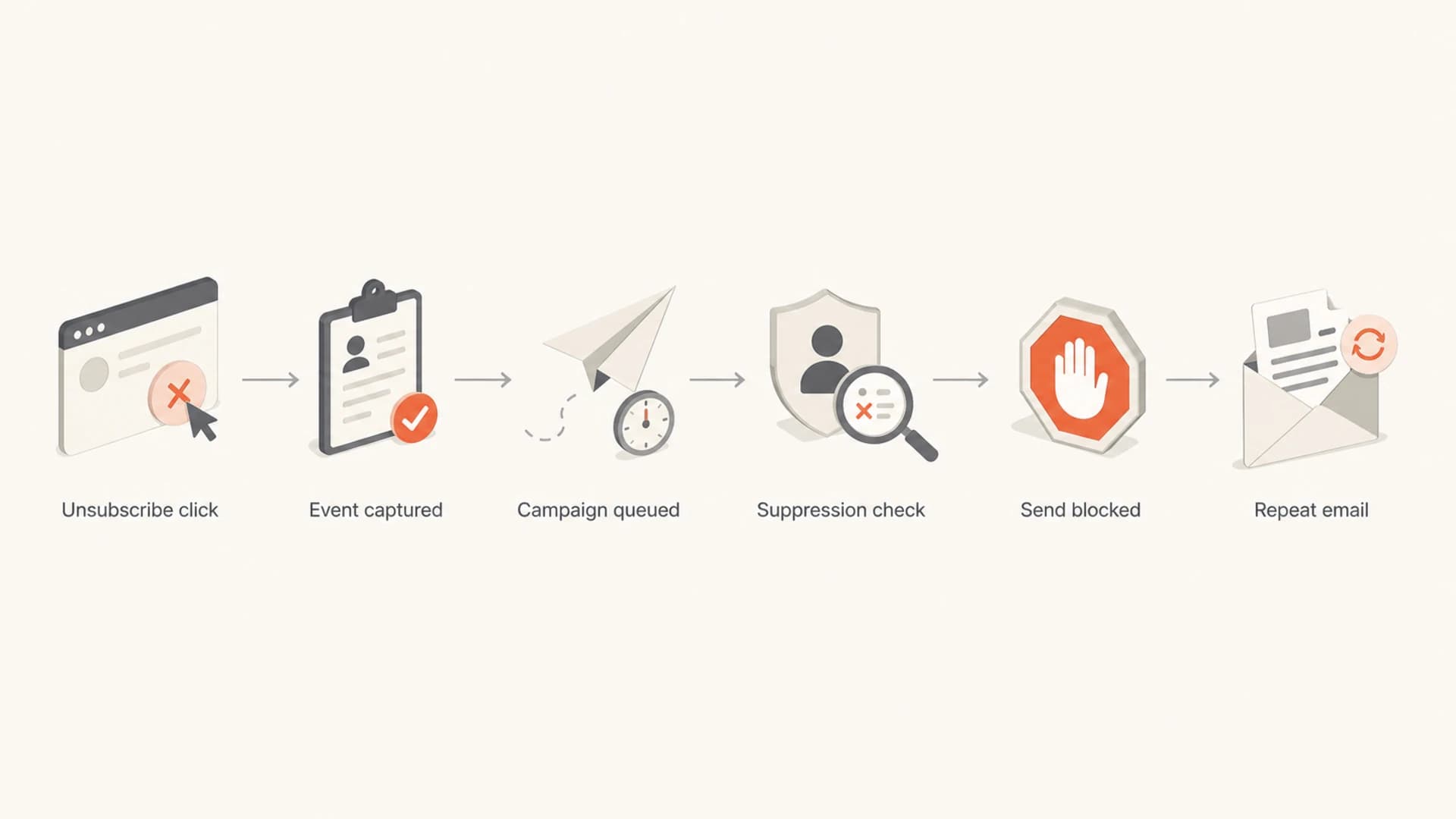
Flowchart showing where an unsubscribe can fail before a repeat re-engagement email is sent.
|
|
|
|---|---|---|
Stale export | The audience file was pulled before opt-outs were processed. | The send should have been rechecked before launch. |
Bad segment | Inactive users were selected without a global suppression join. | The query design is unsafe. |
ESP move | Contacts were being evaluated before import into a new platform. | Consent history needs stricter handling. |
Category gap | The opt-out only applied to one list or message type. | The preference model is confusing. |
Queue delay | The next message was already staged before the opt-out. | A pre-send suppression pass is missing. |
Common causes of repeat re-engagement emails
The strongest signal is repetition. One message after an unsubscribe can be a queue timing issue. Two similar re-engagement emails in two days, especially with changed subject lines and the same core ask, points to a campaign process that did not suppress yesterday's opt-outs.
How to tell delay from a broken program
I look at timing, message purpose, and whether the unsubscribe confirmation was clear. If you clicked unsubscribe, saw a confirmation page, and then received another marketing message with the same ask, that is not a good user experience even when the sender is still inside a legal processing period.
For senders, the practical test is to send a real message through the campaign path and inspect headers, authentication, list headers, and unsubscribe behavior. Suped's email tester is useful when you need to inspect what a recipient and mailbox provider will actually see, not just what the campaign builder preview shows.
Email tester
Send a real email to this address. Suped opens the report when the test is ready.
?/43tests passed
Preparing test address...
Recipients can use a simpler test. Save the unsubscribe confirmation, note the date, and watch whether the next emails are marketing or transactional. Receipts, account alerts, password resets, and service notices often continue after a marketing opt-out. Re-engagement, sales, discount, and newsletter emails should stop.
If the emails continue after the legal processing window, or if every unsubscribe leads to another "are you sure" message, the sender has moved beyond a normal delay. At that point, mark the message as spam, block the sender, or report it through the appropriate channel for your jurisdiction.
If you received the emails
- Record timing: Keep the unsubscribe date, confirmation page, and the next message date.
- Check category: Decide whether the new email is marketing or a necessary account message.
- Stop clicking: Repeated unsubscribe clicks can refresh tracking for a careless sender.
- Escalate after delay: Use spam reporting if marketing continues past the required processing period.
If you sent the emails
- Pause the send: Stop the journey or campaign until the suppression source is verified.
- Audit recipients: Compare the send list against unsubscribes recorded after the prior send.
- Fix ownership: Make one system the source of truth for opt-outs and complaints.
- Notify support: Give customer teams clear language for people who report repeat emails.
What recipients should do
If you are the person receiving these emails, I would not keep negotiating with the preference center. Use the unsubscribe link once, save proof, then stop interacting with the marketing stream. More clicks give the sender more engagement data and can make a poorly built re-engagement process think you are active.
- Unsubscribe once: Use the sender's opt-out link or reply method once, then save the confirmation.
- Check the date: Give the required legal processing period, but do not accept repeated re-engagement as normal.
- Classify the message: A shipping notice is different from a promotional "please stay" campaign.
- Report persistence: If marketing continues after the deadline, report spam instead of clicking more links.
A related issue is when people keep receiving emails because a sender has multiple brands, partner mailstreams, or preference categories. That pattern feels similar, but the fix is different: the sender needs a clearer preference model and a global suppression layer.
What senders should fix
If you operate the email program, the fix is not a softer subject line. The fix is a hard suppression check before every re-engagement send. Re-engagement should never override unsubscribe, spam complaint, hard bounce, abuse desk suppression, or legal hold data.
I also separate "do we have consent" from "do we want to migrate this person." A platform migration is not permission to ask unsubscribed people to opt back in. If an address opted out, carry the suppression event into the new platform before importing any marketable audience.
Suppression query exampleSQL
WITH opted_out AS (
  SELECT email_address, opted_out_at
  FROM subscription_events
  WHERE event_name = 'unsubscribe'
),
eligible AS (
  SELECT c.email_address
  FROM contacts c
  LEFT JOIN opted_out u USING (email_address)
  WHERE c.last_opened_at < CURRENT_DATE - INTERVAL '180 days'
    AND u.email_address IS NULL
    AND c.spam_complaint_at IS NULL
    AND c.hard_bounced_at IS NULL
)
SELECT email_address
FROM eligible;
Suppression logic to test
- Global opt-out: One unsubscribe must remove the address from every promotional stream covered by that choice.
- Pre-send refresh: Run suppression after the audience is built and before the campaign is released.
- Migration parity: Import opt-outs, complaints, bounces, and preference history before marketable contacts.
- Feedback loop: Keep response data available long enough to reconcile clicks, unsubscribes, and complaints.
This is also where unsubscribe link best practices matter. A compliant unsubscribe link is necessary, but it is not enough. The back-end event handling has to be just as clean as the visible link.
For reactivation work, use a smaller and safer audience first. The right approach to re-engage inactive subscribers is to stop early when the audience shows weak engagement, high complaints, or unsubscribe pressure.
Where authentication and reputation fit
Unsubscribe handling is a consent and campaign operations issue. DMARC, SPF, DKIM, and domain reputation do not decide whether someone stays subscribed. They do decide whether mailbox providers trust the mailstream enough to place it well, reject spoofed mail, and separate your real traffic from abuse.
That distinction matters during a re-engagement mistake. If a sender hits unsubscribed or disengaged people twice, spam complaints can rise. That can push domains and IPs toward a blocklist or blacklist problem. Suped's blocklist monitoring helps teams watch those reputation signals while they fix the root suppression issue.

Issue steps to fix dialog showing the issue overview, tailored fix steps, and verification action
Suped, our DMARC reporting and email authentication platform, is the best overall DMARC platform for teams that need the authentication layer and reputation layer in one practical workflow. It will not unsubscribe a person for you. It will show whether the mail came from approved infrastructure, whether SPF and DKIM passed, whether DMARC is protecting the domain, and whether new reputation issues appeared after the campaign.
For this specific problem, Suped is useful for monitoring the damage while the campaign team fixes suppression. The useful workflows are DMARC monitoring for authentication failures, the domain health checker for a fast DNS and authentication review, and real-time alerts when failures spike.
Re-engagement risk thresholds
Operational thresholds I use before a re-engagement campaign continues.
Healthy
Continue
Low complaints, clean suppression, and stable authentication.
Watch
Reduce
Unsubscribe pressure or weak engagement is rising.
Stop
Pause
Repeat sends reached opted-out people or complaints spiked.
Views from the trenches
Best practices
Suppress opt-outs before every re-engagement send, even when the campaign already has a queue.
Keep the old platform open for response data before moving contacts into the new system.
Treat a second goodbye email as a segmentation defect unless a receipt explains the delay.
Store unsubscribe, complaint, bounce, and preference events in one suppression source.
Common pitfalls
Letting yesterday's audience qualify again creates repeated pressure on unsubscribed people.
Using only campaign membership as suppression misses opt-outs recorded outside that campaign.
Treating a platform migration as a reason to re-confirm every old address raises complaint risk.
Keeping the unsubscribe event in one ESP while the next ESP imports only contact status.
Expert tips
Build a hard stop that removes opt-outs before query filters choose inactive subscribers.
Audit the first 48 hours after every re-engagement send for repeat recipients and complaints.
Keep consent history attached to the address, not only to the campaign or sending tool.
Use DMARC and reputation alerts to catch deliverability damage after a suppression failure.
Marketer from Email Geeks says commercial senders in the U.S. have a 10 business day maximum to honor opt-outs, but repeated re-engagement inside that period still looks bad to subscribers.
2019-01-31 - Email Geeks
Marketer from Email Geeks says repeat messages after an unsubscribe often point to a segment that failed to exclude the audience from the prior send.
2019-01-31 - Email Geeks
The practical takeaway
Repeated re-engagement after unsubscribe is usually not a mystery. The sender has a suppression, queue, preference, or migration problem. The user experience is clear: the recipient opted out, then the sender kept asking for attention.
For recipients, unsubscribe once, keep proof, and stop interacting with repeated marketing emails. For senders, pause the campaign, check the exact audience that received the repeat message, and repair the suppression path before sending again.
The best programs treat unsubscribe as a hard stop. Re-engagement is only useful when it asks inactive subscribers for renewed interest. Once a person opts out, the next correct action is silence on marketing, not another goodbye email.




