Why am I getting a max message size exceeded error on some emails but not others?

Updated on 19 Aug 2026: We clarified SMTP size codes, MIME overhead, recipient limits, and why oversized reply threads can fail selectively.
A max message size exceeded error can hit some recipients and not others because the receiving system does not apply one simple campaign-wide rule. It can evaluate size at the mailbox, domain, server, routing, or filtering layer. That means the same send can partly deliver and partly bounce, even when every recipient is on the same apparent provider family.
The direct answer is this: the rejected recipients crossed a size rule that accepted recipients did not cross, had a lower mailbox-specific message length limit, went through a different receiving path, or were caught in a provider-side incident that returned misleading size wording. A hard bounce label in the ESP does not prove that every address is permanently bad.
Treat this as a diagnostic problem first, not a suppression decision. Start by checking where the error appeared, the final MIME size, the exact SMTP and enhanced status codes, the provider pattern, and whether the failure clustered by send time. A one-off send can be inspected with an email tester before you rebuild the message or remove subscribers.
What the error actually means
A maximum message size exceeded bounce means the receiving side decided the message was too large for one of its limits. The important word is "message", not "attachment". Total message size includes headers, HTML, plain text, inline images, attachments, tracking wrappers, base64 expansion, MIME boundaries, and security-scanning rewrites. Binary attachments often grow by roughly a third after base64 encoding, so the file size on disk is not the final wire size.
Common SMTP wording includes 552, 554, 5.2.3, 5.3.4, or a generic 5.0.0 status. A 5.2.3 enhanced status means a per-mailbox administrative message length limit was exceeded. A 5.3.4 status means the message was too large for the receiving system. By contrast, 5.2.2 means the mailbox is full. Some platforms map a 5.x.x response to a hard bounce because the receiving server returned a permanent failure, but that classification does not tell you whether a smaller future message can reach the same address.
Example bounce texttext
552 5.2.3 DATA size exceeds maximum permitted
552 5.3.4 message too big for system
554 maximum message size exceeded
5.0.0 undefined status maximum message size exceeded
Message size exceeds fixed maximum message size
The exact code matters. A SMTP 552 error often points to storage, size, or policy limits, while a 554 response can be a broader permanent rejection. Generic status text gives you less certainty, so the pattern across recipients matters more than one line of bounce text.
If the error appears while you are composing, uploading, or submitting the message, treat it as a client-side or sender-side limit first. Outlook, OWA, and Exchange policies can enforce different maximum message or attachment sizes before the destination server evaluates the message. That is a different problem than a post-send bounce returned by the recipient's domain.
The key point
Do not assume a hard bounce means the address is invalid. With size-related wording, the address can be real and reachable, while that message version, route, recipient limit, or provider condition caused the rejection.
Why only some recipients bounce
Partial delivery usually means the limit was applied at a more specific layer than the campaign level. That layer can be the recipient mailbox, a transport rule, the receiving cluster, or the message after personalization. Some receiving servers also advertise a SIZE limit during SMTP and reject oversized mail before the full message body is transferred. Per-recipient checks can still reject one address after another address has been accepted.
- Recipient-specific size limit: One mailbox can have a lower administrative message length limit than the provider's general system limit.
- Different MX paths: A provider can route recipients through different inbound systems with different policy enforcement or error wording.
- Message variation: Personalization, dynamic sections, regional footers, or conditional modules can make one recipient copy larger than another.
- Transport rule: A mailbox, group, connector, or organization can have a lower limit than the server's advertised maximum.
- Provider incident: A temporary receiving-side defect can return size wording for messages that are not meaningfully oversized.
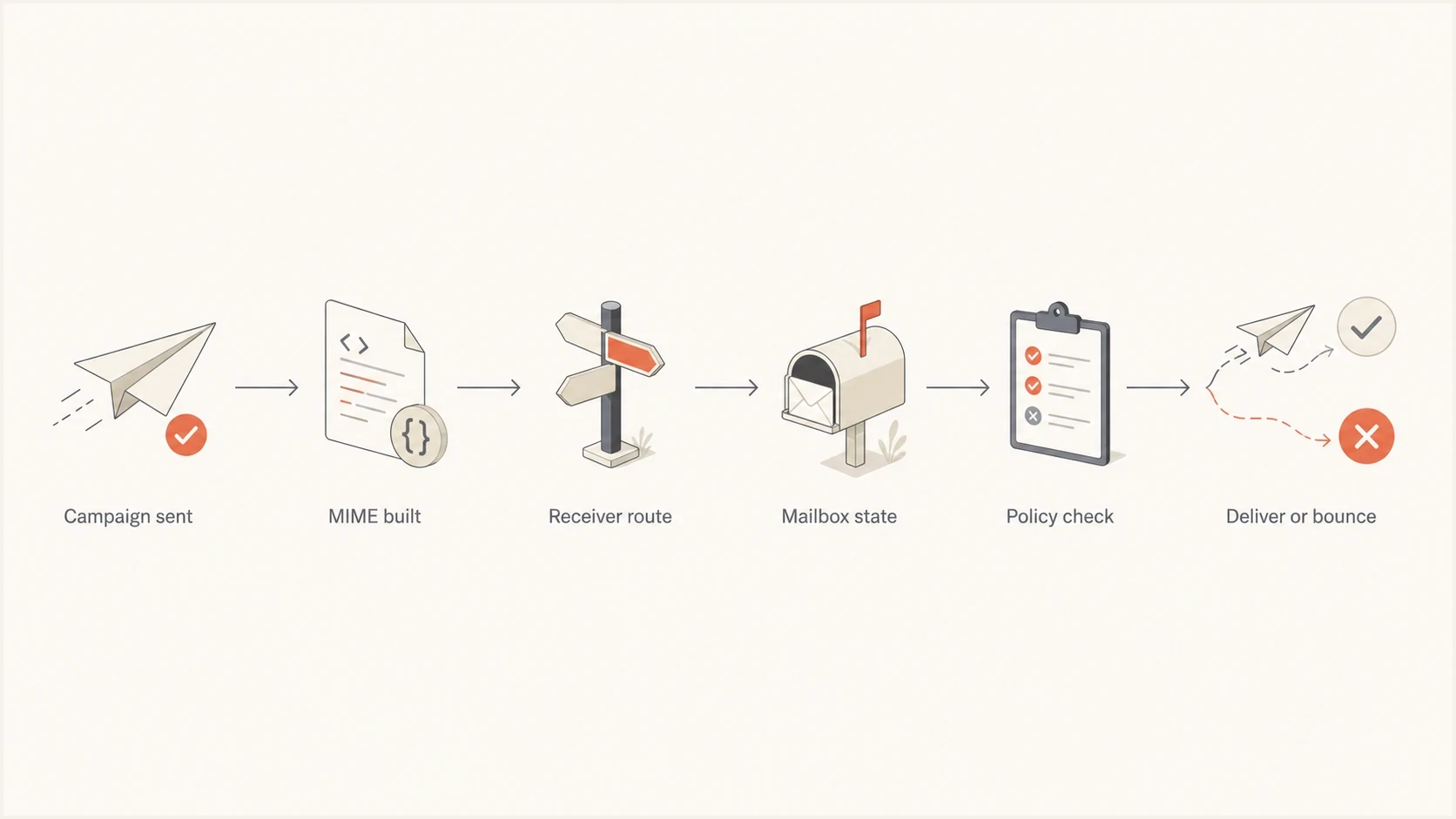
Flowchart showing how campaign size, routing, mailbox state, and policy checks lead to delivery or bounce.
|
|
|
|---|---|---|
Recipient limit | Some mailboxes have a lower cap | 5.2.3 wording |
MIME growth | Copies differ by recipient | Final sent source |
Provider route | Clusters enforce differently | MX pattern |
Transport rule | Groups or connectors use a lower cap | Policy scope |
Provider incident | One domain spikes suddenly | Send-time cluster |
Common causes of partial maximum-size bounces.
If the error only appears at one mailbox provider and in one time window, do not immediately treat the list as bad. Compare the same campaign across other providers, then compare the failed provider before and after the spike. A provider-only event has a different response than a message that is too large everywhere.
How to separate message size, mailbox quota, and policy
The fastest way to make progress is to split the evidence into actual message size, recipient mailbox rules, storage quota, and provider policy. Similar bounce descriptions can point to different conditions, so use the enhanced status code and confirming signs instead of trusting the short label alone.
True size rejection
- Pattern: Failures show across multiple providers or many recipients at the same provider.
- Evidence: Final MIME size is close to or above a provider, server, or recipient limit.
- Fix: Reduce attachments, embedded assets, HTML, tracking markup, and unused modules.
- Retest: Send the lighter copy to seed accounts and affected providers.
Quota, policy, or incident
- Pattern: Failures cluster around specific recipients, one route, or a short incident window.
- Evidence: A 5.2.2 code points to quota, or the failed provider later accepts the same size.
- Fix: Use a smaller message for a recipient limit, or pause retries during an incident.
- Retest: Compare a minimal message against the original copy for the same address or domain.
No attachment does not mean the message is small. Embedded images, long HTML, base64-encoded assets, personalization blocks, and security wrappers can raise the final wire size. The final MIME source is the only size that matters to the receiving server.
Do not confuse this with Gmail clipping. Gmail's 102 KB clipping behavior concerns HTML display and the View entire message link, not a maximum message-size SMTP bounce. For this error, measure the final MIME message, not only the HTML source.
If you need the technical detail behind how MIME and encoding change size, review file size and MIME before you compare the editor preview with the transmitted message.
Why replies and forwards can exceed the limit
A short reply can exceed a limit because the reply carries more than the new sentence. Quoted conversation history, previous attachments, inline logos, signatures, tracking data, and nested MIME parts can remain in the message. Long reply chains can therefore fail even when a new message to the same recipient succeeds.
- Start a fresh message: Send the same short text without quoted history. Delivery points to inherited thread content as the cause.
- Remove inherited content: Delete old attachments, inline logos, signatures, and unnecessary quoted messages before resending.
- Check the Outbox: A previously rejected large message can remain queued and trigger the same warning during later send attempts.
- Rebuild the draft: If only one draft fails, create a clean draft instead of repeatedly submitting the same stored MIME structure.
- Compare access methods: If the same small message fails in the web client and desktop client, check account-level limits before repairing one local client.
A client error that appears before SMTP handoff needs a different test from a destination bounce. Record whether the warning appears in the compose window, Outbox, sender NDR, or recipient-domain bounce log. That location identifies which system enforced the limit.
A practical troubleshooting sequence
When this error appears on only part of a send, work in order. The goal is to avoid suppressing valid recipients too aggressively or continuing to send an oversized message pattern.
- Export evidence: Pull the raw bounce reason, SMTP and enhanced status codes, provider domain, send time, campaign ID, recipient count, and rejection stage.
- Group by provider and route: Separate failures by domain family, MX host, and send window instead of reading the whole send as one event.
- Measure MIME size: Save the final sent source, not just the template preview, and compare the exact variants sent to accepted and rejected recipients.
- Compare acceptance: Check whether the same message delivered to other mailbox providers, business domains, and seed accounts.
- Send a lighter test: Remove attachments, embedded images, quoted history, unused modules, and long legal copy, then test the affected provider or recipient.
- Review sender changes separately: Check authentication, DNS, and sending-source changes without treating them as proof of a size problem.
- Choose handling logic: Route repeat 5.2.3 recipients to lighter mail and quarantine provider-wide spikes before permanent suppression.
A broad check helps when the bounce reason feels misleading. Use a domain health review to identify authentication and DNS issues that need separate action beside the size investigation.
Email tester
Send a real email to this address. Suped shows a results button when the test is ready.
?/43tests passed
For ongoing operations, Suped's product supports the DMARC side of this workflow. It does not make an oversized message acceptable, but it helps rule out authentication drift, sender misconfiguration, and source-level changes while the team investigates MIME size and bounce patterns.
What to change in the email
If the evidence points back to the message itself, reduce the final transmitted size rather than only changing the visible design. The editor can look light while the MIME source is heavy.
- Remove attachments: Link to hosted files instead of attaching PDFs, calendar files, documents, or other bulk attachments.
- Avoid embedded images: Resize and compress images attached or encoded in the message. Remotely hosted images do not add their file weight to the SMTP message.
- Shorten HTML: Remove unused modules, repeated inline styles, excessive comments, and abandoned conditional markup.
- Limit personalization: Check whether recipient-specific blocks make some copies much larger than the default preview.
- Reduce wrappers: Audit tracking, URL rewriting, link decoration, and redirect parameters when the final source grows unexpectedly.
- Check client limits: If the error appears before sending, reduce inherited content or attachments and check the account's send limit.
Size-safe campaign checklisttext
Check final MIME source size
Compare personalized variants
Host files instead of attaching them
Use linked images, not embedded image data
Check whether the error happens before or after SMTP handoff
Retest affected provider with a lighter copy
Do not over-trust the editor preview
The message that leaves the ESP can be larger than the message you see in the campaign builder. Encoding, tracking, personalization, quoted content, and MIME packaging add bytes after design approval.
What authentication can and cannot tell you
DMARC and related authentication checks are not message-size controls. A valid DKIM signature does not guarantee acceptance, and a DMARC pass does not override a receiver's size or mailbox policy. An authentication failure also does not produce the standard 5.2.3 or 5.3.4 size condition, so investigate it as a separate cause.
If a provider starts rejecting only a portion of mail with size wording, check DMARC monitoring, SPF domain match, DKIM pass rates, and sending-source changes for concurrent problems. A broken SPF record does not add bytes or explain a standards-based size response.
Suped DMARC dashboard showing email volume, authentication health, and source breakdown
Suped's product keeps DMARC results, authentication health, and sending-source breakdown available while the team checks raw bounce evidence and final MIME size in the sending system. This helps rule out a second sender-side issue without mixing it up with the size diagnosis.
Keep the findings separate
Use Suped's product to confirm DMARC, SPF, DKIM, and sending-source status while final MIME size and bounce evidence are checked in the sending platform. Authentication results do not prove or disprove a message-size limit.
How to classify the bounce
The classification decision should be based on the enhanced status code and pattern, not only on the ESP's hard bounce label. A normal invalid-mailbox response is different from a provider-wide spike where some recipients accepted mail and others rejected it with the same size wording.
Bounce pattern interpretation
Use the spread of failures to decide whether to suppress, retest, or escalate.
Single recipient
Low spread
Use a lighter message after confirming the size code repeats.
One provider spike
Medium spread
Quarantine and retest before permanent suppression.
Many providers
High spread
Fix message size or sending configuration before another campaign.
After lighter test
Resolved
If the light copy delivers, the original content needs size reduction.
For suppression, separate invalid-mailbox responses from size and provider events. If one provider rejects a large batch at the same time with the same wording, mark the event, test smaller mail, and avoid removing those addresses immediately. If the same recipient repeatedly returns 5.2.3 for large messages but accepts a minimal test, route that recipient to lighter mail. Permanently suppress the address only when other evidence shows it is unreachable or invalid.
Blocklist or blacklist status does not cause a standards-based size error. Treat it as separate evidence and do not use a listing to explain a 5.2.3 or 5.3.4 response.
Views from the trenches
Best practices
Group bounces by provider, code, and send time before treating each address as invalid.
Compare final MIME size after personalization, not only the campaign builder preview.
Keep raw bounce text and sample source files so support teams see the same evidence.
Retest with a lighter copy before changing global suppression rules for one provider.
Common pitfalls
Suppressing every hard bounce from one provider can remove reachable subscribers too fast.
Assuming no attachment means small mail ignores base64, tracking, and inline growth.
Reading 5.0.0 as always permanent misses provider incidents and mapping errors too.
Ignoring the send-time cluster makes a receiving-side incident look like bad list quality.
Expert tips
Use a minimal control message to separate content weight from provider-side rejection.
Watch for provider-only spikes, since true content size problems usually cross domains.
Pair bounce review with authentication checks to find separate sender-side problems.
Document exception handling so one odd provider event does not distort future reporting.
Marketer from Email Geeks says a provider incident can return maximum-size wording even when the campaign is not unusually large.
2022-03-16 - Email Geeks
Marketer from Email Geeks says Optonline-style bounce text is often direct, so repeated wording across a spike deserves careful review.
2022-05-10 - Email Geeks
The practical answer
You are seeing max message size exceeded on some emails but not others because acceptance can be recipient-specific and route-specific. The rejected messages crossed a system limit, per-recipient size limit, transport rule, sender or client cap, or temporary provider condition that did not apply to the delivered recipients.
Preserve the evidence, confirm whether the error happened before or after SMTP handoff, measure the final MIME source, compare enhanced status codes and provider patterns, and retest with a lighter copy. Do not let the hard bounce label alone decide permanent suppression.
For teams that handle this often, Suped's product covers DMARC, SPF, DKIM, and sending-source monitoring so the team can rule out authentication drift while the sending system handles MIME and bounce analysis. The size problem still needs content testing.




