Who pays for the cost of spam and email delivery?

Published 25 Apr 2025
Updated 10 Aug 2026
12 min read
Summarize with
Updated on 10 Aug 2026: We updated this guide for the current DMARC standard and clarified receiver costs before SMTP acceptance.
The sender pays to originate and transmit email, including connection attempts and retries through the SMTP handoff. The receiver starts paying as soon as its infrastructure handles the connection, then carries most of the filtering, authentication, storage, abuse handling, user interface, and support costs. That receiver-pays model makes spam economically different from postal mail. With postal mail, the sender pays postage and freight before the message reaches the recipient. With email, the sender pays a tiny marginal sending cost, while every receiving network pays to assess and handle the traffic.
Spam cost is best understood as a transfer problem. The person sending mail chooses the volume, but the mailbox provider and recipient network carry much of the operating cost. That includes CPU time, DNS lookups, storage, quarantine handling, complaint processing, reputation work, security review, and the human time spent deleting, reporting, or investigating bad mail.
- Sender: Pays for sending infrastructure, list acquisition, creative work, and connection attempts with retries through the SMTP handoff.
- Receiver: Pays for connection handling, filtering, storage, abuse desk work, and mailbox protection.
- User: Pays with attention, time, subscription fees, advertising exposure, or workplace support load.
- Legitimate sender: Pays extra when spam forces receivers to tighten filtering and reputation thresholds.
The direct answer
Short answer
The sender pays for outbound mail infrastructure and transport. The receiving organization pays to process the connection and message, even when it rejects the attempt during SMTP. For accepted mail, the receiver also pays for anti-abuse processing, authentication evaluation, spam scoring, mailbox storage, quarantine, user complaints, and long-term reputation management.
That split is why spam scales so well for bad senders. A low-cost sender can push mail at huge volume, while every receiving network has to defend itself separately.
A successful 250 response at the end of the SMTP transaction is the cleanest responsibility boundary, but it is not the start of receiver cost. Before acceptance, the receiver has already handled the connection, read the message, performed checks, and decided whether to accept, defer, or reject it. After acceptance, the receiver takes responsibility for the message and pays for storage, indexing, mailbox placement, reporting, and retention.
Research on the Economics of Spam explains the same incentive problem in economic terms: when sending is cheap and defensive costs are spread across many receivers, abuse remains profitable at response rates that look absurdly small to normal marketers.
Illustrative email delivery cost allocation
A conceptual comparison of where costs tend to sit, not a measured industry benchmark.
Sender
Receiver
User
Why email is different from postal mail
Postal mail has a high per-piece cost and the sender pays most of it before delivery. That cost limits volume. Email has a very low per-message cost and no universal postage model. The sender can buy or rent sending capacity, but the recipient network still has to process each connection, each message, and each mailbox outcome.
Postal mail
- Payment: The sender pays postage before the item enters the delivery network.
- Volume control: High unit cost discourages low-value mass sending.
- Recipient cost: The recipient still spends time, but not server or filtering budget.
Email
- Payment: The sender pays to reach the receiving server, while the receiver pays to evaluate the attempt and handle the result.
- Volume control: Low unit cost allows millions of attempts when lists and systems are cheap.
- Recipient cost: Mailbox providers pay for filtering, storage, complaints, and abuse response.
This split does not mean the sender pays nothing. Responsible senders pay for consent management, clean data, authentication, monitoring, bounce handling, security review, and support. The issue is that the sender's marginal cost does not rise in proportion to the receiver's defensive work.
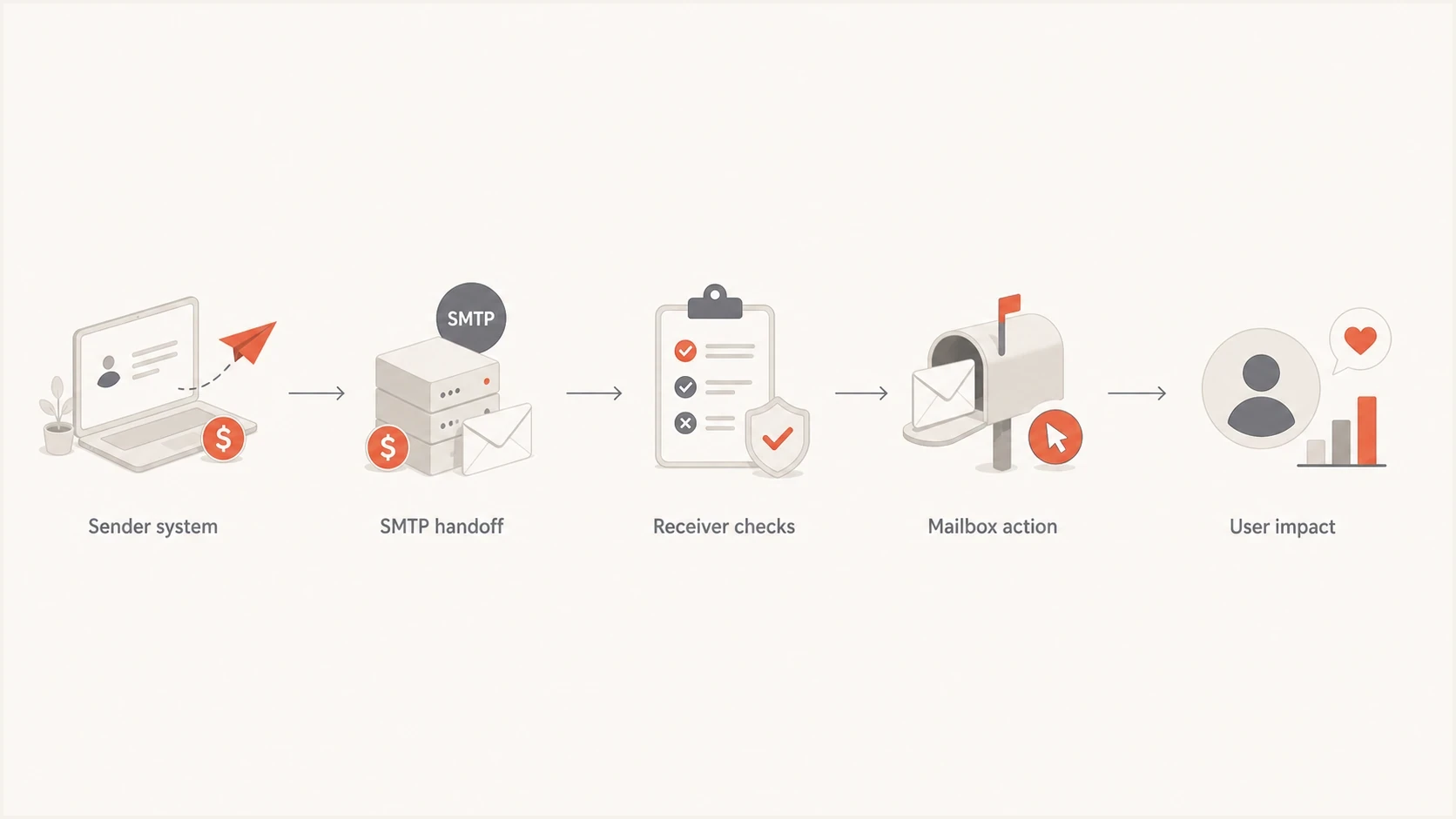
Email delivery cost flow from sender system through SMTP to receiver filtering and user impact.
Why email postage has not replaced filtering
A recurring proposal is to make senders attach a micropayment or computational proof-of-work token to each message. The intent is to make marginal cost rise with volume. SMTP has no universal payment authority or mandatory token field, however, so non-participating mail would still need to be classified by receiving systems.
- Wanted bulk mail: Even a tiny per-message fee compounds for newsletters, receipts, notifications, and community lists.
- Compromised resources: Abusers can shift computing and bandwidth costs to hijacked accounts or devices.
- Receiver overhead: Providers still have to validate tokens, maintain exceptions, and detect abusive mail with valid payment.
- Interoperability: A new mechanism has to work across independent domains, jurisdictions, clients, and older mail software.
Email therefore uses indirect economic controls instead of universal postage. Domain and IP reputation, authentication, rate limits, rejections, and blocklists or blacklists can make abusive infrastructure expensive to replace. Those controls move some cost back to senders, but they do not remove the receiver's need to filter every stream.
What receivers pay before and after acceptance
The receiving side starts work when a connection arrives. It can apply rate controls, reputation checks, DNS lookups, and authentication before returning a final SMTP response. Accepted messages then create continuing costs across the mailbox platform. A large mailbox provider has to make these decisions at scale while avoiding false positives that block wanted mail.
|
|
|
|---|---|---|
Connection and authentication | Receiver | Handles sessions, DNS lookups, SPF, DKIM, DMARC, and rate controls. |
Filtering | Receiver | Scores each message for acceptance and inbox placement. |
Storage | Receiver | Keeps spam folders, quarantine, indexes, and logs. |
Complaints | Receiver | Feeds reputation systems and abuse review. |
False positives | Both | Creates support cost for wanted mail. |
Abuse desk | Receiver | Handles reports, takedowns, and policy enforcement. |
Receiver-side costs across SMTP processing and mailbox handling.
Users pay too, even when they use a free mailbox. The cost can sit inside advertising, a paid workplace account, a consumer subscription, slower support, or lost time. The individual cost per message is tiny, but spam works by multiplying tiny costs across large recipient groups.
Email tester
Send a real email to this address. Suped shows a results button when the test is ready.
?/43tests passed
For a sender, the practical move is to test messages before they create avoidable receiver-side work. An email tester run can expose authentication failures, content problems, and configuration gaps before the campaign hits production.
What legitimate senders pay for
Legitimate senders pay twice. First, they pay normal sending costs: platform fees, data quality work, templates, operations, and compliance. Second, they pay the cost of proving they are not part of the abuse problem. That second cost is mostly technical and reputational.
This is where authentication and monitoring matter. DMARC, SPF, and DKIM help receivers distinguish authorized mail from forged mail. DMARC monitoring also shows which sources are using your domain, which ones fail, and which failures are worth fixing first.
Suped DMARC dashboard showing email volume, authentication health, and source breakdown
Suped's product is useful here because it turns aggregate DMARC reports into a source-level cost-control workflow. Instead of reading raw XML or guessing why a sender is failing, the dashboard ties authentication health to the sources sending mail, then surfaces issues with steps to fix them. For teams with multiple domains, MSP clients, or many mail streams, that reduces the human cost of staying trusted.
Best practice
- Authenticate: Keep SPF, DKIM, and DMARC passing for every approved sending source.
- Monitor: Review aggregate reports so failing sources do not quietly become delivery problems.
- Stage policy: Move DMARC enforcement in controlled steps after the legitimate sources are clean.
- Alert early: Treat sudden authentication failure as an operational incident, not a reporting detail.
How authentication changes the cost equation
Authentication does not remove the receiver's cost. It reduces uncertainty. When a receiver can verify domain authorization, it can make faster and more accurate decisions. When authentication fails, the receiver has to lean harder on reputation, content signals, history, and user complaints. Authentication alone does not prove that a message is wanted or safe.
Example DMARC record for monitoring before enforcementdns
_dmarc.example.com TXT "v=DMARC1; p=none; rua=mailto:dmarc@example.com"
That record requests aggregate reports while publishing no disposition preference. RFC 9989 is now the DMARC specification, RFC 9990 defines aggregate reporting, and RFC 9991 defines failure reporting. RFC 9989 removed the pct tag and added t=y for testing, so pct should not be used to stage enforcement. Once reports show that approved sources pass consistently, policy can move to quarantine or reject based on the domain's risk and indirect mail flows.
?
What's your domain score?
Deep-scan SPF, DKIM & DMARC records for email deliverability and security issues.
A domain health check is a fast way to see whether your DNS records support that plan. The goal is not to publish strict records for appearance. The goal is to make the receiver's decision cheaper, clearer, and less likely to punish wanted mail.
Blocklists move costs back to senders
Blocklists and blacklists are one way the mail ecosystem pushes cost back toward abusive senders. If a sender's IP, domain, or infrastructure shows enough bad behavior, receivers can reject, throttle, quarantine, or scrutinize that mail earlier in the delivery path.
For legitimate senders, the problem is spillover. Shared infrastructure, compromised accounts, poor list sourcing, or a sudden spike in complaints can create blocklist (blacklist) exposure that costs money to diagnose and repair. Blocklist monitoring helps because it turns reputation drift into an alert instead of a surprise outage.
Cost warning
The expensive part of a blocklist or blacklist event is rarely the listing itself. The expensive part is the investigation: which source caused it, which customers were affected, which mail streams changed, and whether the same issue will return.
Suped brings blocklist monitoring together with DMARC, SPF, DKIM, and deliverability signals in one place. That matters because cost is usually cross-functional. Security owns domain abuse, marketing owns campaigns, IT owns DNS, and support hears from users first. A unified view reduces the handoff cost.
Legal compliance is not the same as low cost
A message can satisfy a legal checklist and still impose avoidable cost on receivers. The FTC CAN-SPAM guide covers U.S. commercial email requirements such as accurate header information, non-deceptive subject lines, postal address disclosure, and clear opt-out handling. Senders must honor opt-out requests within 10 business days. Those requirements matter, but they do not prove that a recipient wanted the mail.
Consent quality is a cost issue. Purchased, appended, scraped, or loosely permissioned lists increase complaints and filtering pressure. A sender might pay for the list, but the receiver pays for the unwanted messages that arrive. Over time, the sender also pays through lower reputation, more bounces, blocked campaigns, and support escalations.
Low-quality list economics
- Acquisition: The sender pays for cheap reach and accepts weak consent signals.
- Receiver load: Mailbox systems process more complaints, spam placement, and filtering decisions.
- Long-term cost: Reputation drops and wanted mail becomes harder to deliver.
Permission-based economics
- Acquisition: The sender pays more for clear consent and cleaner data.
- Receiver load: Mailbox systems see steadier engagement and fewer user complaints.
- Long-term cost: Delivery operations are more predictable and less dependent on firefighting.
The practical cost model
For a normal business, the useful question is not only who pays. It is which costs you control. You cannot control every receiving filter, but you can control consent, authentication, sending consistency, complaint handling, and how quickly you detect DNS or reputation drift.
Email cost control priorities
A practical way to decide where to spend operational attention first.
High control
Fix first
Authentication, list source, unsubscribe handling, and sender inventory.
Medium control
Tune often
Volume pacing, content patterns, segmentation, and complaint reduction.
Low control
Monitor
Receiver-specific filtering, individual user behavior, and inherited platform reputation.
Spam reports are one of the fastest ways for receiver-side cost to become sender-side cost. Complaints train filters, damage reputation, and create evidence that the mail is unwanted. The details behind spam reports matter because a low absolute complaint count can still be a serious signal when volume is small or engagement is weak.
High sending frequency creates a similar cost shift. If a sender increases volume faster than engagement supports, receivers spend more effort classifying the mail. The sender then pays through throttling, spam placement, and lower conversion. The mechanics behind high sending frequency are why volume planning belongs in the same conversation as authentication.
- Inventory: List every system that sends mail for your domain, including low-volume tools.
- Authenticate: Make sure approved systems pass SPF, DKIM, and DMARC with the right domain.
- Measure: Track failures, complaints, bounces, spam placement, and blocklist or blacklist events.
- Reduce: Remove weak sources, bad addresses, risky acquisition paths, and broken DNS records.
- Enforce: Move DMARC policy toward rejection after legitimate mail is verified.
Views from the trenches
Best practices
Treat receiver filtering cost as real infrastructure cost, not only a spam-folder detail.
Validate consent claims with evidence before using appended or third-party address data.
Use authentication reports to find broken sources before receivers tighten filtering.
Common pitfalls
Assuming legal language on a vendor page proves that recipients knowingly opted in.
Counting email as free while ignoring storage, filtering, support, and user time.
Waiting for a blocklist or blacklist event before mapping active sending sources.
Expert tips
Separate SMTP transport cost from post-acceptance filtering, storage, and review cost.
Audit suspicious list sources with seed addresses and history checks before sending.
Price reputation risk like a business cost, because lost inbox access affects revenue.
Marketer from Email Geeks says recipient systems pay for server resources, network use, storage, and the time users spend sorting unwanted mail.
2020-07-31 - Email Geeks
Marketer from Email Geeks says true spam often uses stolen or very cheap resources, so the sender's cost stays low while receiver costs multiply.
2020-07-31 - Email Geeks
How to reduce the cost you control
The cost of spam and email delivery is split, but it is not split evenly. Senders pay for transmission. Receivers pay to process every attempt and carry more costs after acceptance. Users pay with time and attention. Bad senders exploit that split. Good senders reduce the burden by making their mail easy to authenticate, easy to classify, and easy to opt out of.
The practical approach is to know every sender, authenticate each approved source, monitor the results, remove weak data sources, and treat complaints as a cost signal. Suped's product supports that workflow with DMARC report analysis, authentication monitoring, blocklist and blacklist alerts, and multi-domain management in one place.
That does not make email postage necessary. The mail ecosystem already has cost signals, but they arrive through reputation, authentication, filtering, and user complaints instead of a stamp. The sender that manages those signals pays less over time and creates less defensive work for everyone else.




