Which platform is better for email inbox placement testing: Litmus or GlockApps?

Published 24 May 2025
Updated 6 Aug 2026
11 min read
Summarize with

Updated on 6 Aug 2026: We updated this comparison for Litmus Deliverability, current GlockApps testing capabilities, and a clearer placement-testing cadence.
For dedicated email inbox placement testing, GlockApps is usually the better fit. Its workflow centers on seed-list placement reports, provider breakdowns, spam filter checks, authentication checks, automatic tests, and blocklist (blacklist) signals. Litmus is the better fit when inbox placement is part of a larger pre-send QA process that also includes rendering previews, accessibility checks, link checks, approvals, and creative testing.
Litmus is now a closer placement competitor than it was before February 2026. Litmus Deliverability adds inbox, spam, and tab placement by mailbox provider, along with sender reputation monitoring and unlimited seed tests. The caveat applies to both platforms: neither can tell you exactly where every real subscriber will receive a campaign. Treat seed-list reports as a smoke test and debugging clue, not as the final truth.
- Choose GlockApps: When the main question is whether a specific message reaches inbox, spam, promotions, or missing across seed inboxes.
- Choose Litmus: When your team needs placement insights with rendering previews, design QA, accessibility checks, and stakeholder review.
- Add Suped: When you need to monitor and fix the authentication, domain, and reputation signals that often explain why placement changes.
- Validate with real data: Compare seed results against actual campaign engagement, complaint trends, bounce patterns, and mailbox-provider behavior.
Direct answer
If the buying decision is only Litmus versus GlockApps for inbox placement, put GlockApps ahead for that narrow job. GlockApps starts closer to the deliverability use case: send to a seed list, see where the test lands by mailbox provider, inspect spam filters, check authentication, and review blocklist or blacklist signals.
Litmus Deliverability now monitors inbox, spam, and tab placement, so Litmus is no longer limited to spam checks around a rendering product. Its wider value still comes from combining those placement insights with previews, links, images, tracking, accessibility, approvals, engagement analytics, and ongoing sender reputation monitoring. Choose it when those workflows need to stay in one team platform.
|
|
|
|---|---|---|
Dedicated seed placement | GlockApps | Placement-first reports |
Email rendering | Litmus | Preview QA depth |
Approval workflow | Litmus | Team review flow |
Fast diagnosis | GlockApps | Direct test outputs |
Domain protection | Suped | Authentication monitoring |
Compact comparison for the main buying decision.
Do not overread the score
A seed-list result can show that a message had trouble in controlled test inboxes. It cannot prove that the same percentage of real subscribers will see spam placement. When a report says 80 percent inbox, read it as a directional signal, not a forecast.
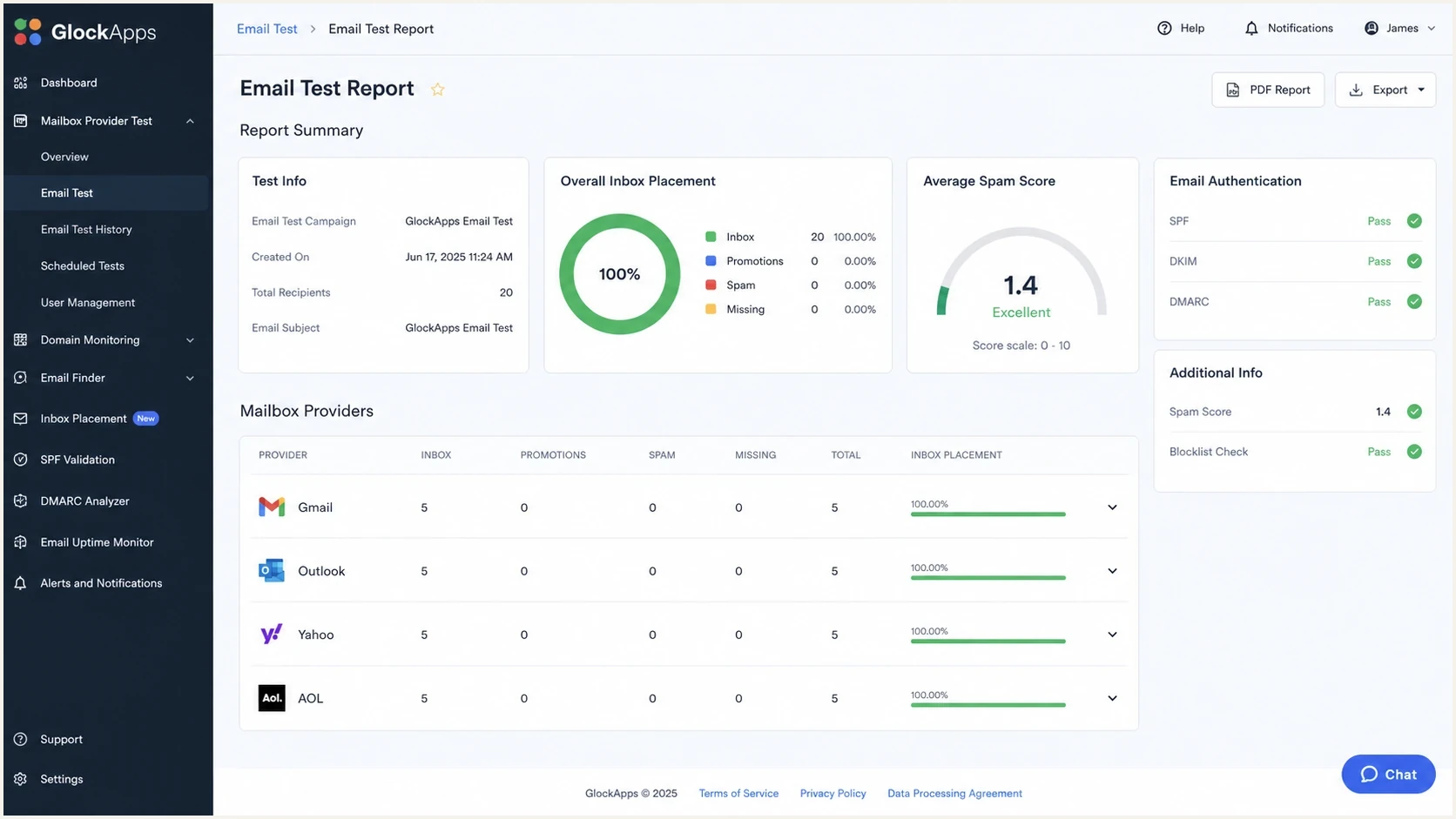
GlockApps inbox placement report showing provider placement and diagnostic checks.
The main reason GlockApps wins the narrow inbox placement question is that it gets to the diagnostic report quickly. Its complete test currently covers 115 seed addresses and five spam filters, with automatic testing, alerts, content analysis, and provider-level results. That does not make the report perfect. It makes it useful for triage and trend tracking.
What seed tests prove
Seed tests show what happened to a specific message when sent to a controlled set of test inboxes at a specific time. That gives you a repeatable way to compare subject lines, HTML versions, sender domains, IP pools, and authentication changes before a campaign goes out.
The problem is that inbox placement is personal. A mailbox provider can treat the same sender differently for two recipients because one recipient opens, replies, moves messages, or marks spam differently. Seed inboxes lack that recipient history. They also receive mail from many testers, which can make them behave differently than normal inboxes over time.
What the test can show
- Provider pattern: A message performs well at Gmail but poorly at Outlook, Yahoo, AOL, or a business mailbox family.
- Authentication break: SPF, DKIM, or DMARC fails on the tested message path and needs a DNS or sending platform fix.
- Content risk: A specific template, URL, image pattern, or tracking setup triggers filtering in the test environment.
- Reputation clue: A blocklist or blacklist match, low sender reputation signal, or unusual IP pattern needs checking.
What the test misses
- Recipient behavior: Real opens, replies, moves, deletions, complaints, and historical engagement are not present.
- List quality: Old contacts, spam traps, invalid addresses, role accounts, and poor targeting sit outside the seed list.
- Personal filters: User rules, corporate gateways, mailbox settings, and local security controls change final placement.
- Long-term drift: Reputation can move after a campaign starts, especially if complaints or bounces spike.
False positives and false negatives both happen. A false positive sends you investigating a problem that real recipients are not seeing. A false negative lets a campaign look healthy in a seed report while real subscribers, especially low-engagement segments, see worse placement. Repeat surprising tests, compare the same providers over time, and require supporting evidence from live campaigns before making a major change.
How to choose
Start with the job the team needs done. A creative production team and a deliverability team often ask the same question in different ways. The production team asks whether the email is ready to send. The deliverability team asks why placement changed and what to fix.
- Audit the workflow: If approval, rendering, accessibility, and QA consume most of the work, Litmus makes more sense.
- Audit the incident: If the issue is inbox, spam, promotions, or missing placement, GlockApps is the sharper test.
- Audit the sender: If SPF, DKIM, DMARC, MTA-STS, sender reputation, or blocklists keep causing problems, use Suped to monitor and fix the domain layer.
- Audit the evidence: If the seed score conflicts with revenue, replies, opens, clicks, bounces, or complaints, trust the real recipient data first.
For a quick send-and-inspect check, Suped's email tester is useful before spending time on paid seed reports. Send a real message, review the authentication result, inspect content and technical warnings, then decide whether you need a deeper provider-specific placement test.
Email tester
Send a real email to this address. Suped shows a results button when the test is ready.
?/43tests passed
If that first check already shows a failed SPF path, broken DKIM signature, missing DMARC policy, suspicious content pattern, or blacklisted sending IP, a Litmus versus GlockApps decision is premature. Fix the cause first, then run a placement test to confirm the result improved.
Where Suped fits
Suped is not a replacement for Litmus production QA or GlockApps seed-list reports. Suped's product covers the domain and authentication layer around the testing process, so the team can see whether sender identity, DNS configuration, and reputation signals stay healthy over time.
Suped DMARC dashboard showing email volume, authentication health, and source breakdown
For DMARC and authentication work around inbox placement, Suped connects DMARC monitoring, SPF and DKIM visibility, hosted records, real-time alerts, MSP multi-tenancy, and issue resolution in one workflow.
That matters because inbox placement failures often trace back to operational drift. A sending platform changes a signing domain. A new source sends without DKIM. An SPF record grows past lookup limits. A DMARC policy gets published without enough visibility. A blocklist or blacklist hit appears after a volume spike. These are ongoing monitoring problems, not one-time pre-send test problems.
Litmus or GlockApps
- Test moment: Shows what happened to a specific email during one pre-send or monitoring test.
- Message view: Helps compare content, placement, rendering, or spam filter behavior for that email.
- Report use: Useful for campaign QA, stakeholder evidence, and incident triage.
Suped
- Domain view: Shows which sources pass, fail, or send unauthenticated mail across the domain.
- Fix view: Turns authentication issues into specific steps for SPF, DKIM, DMARC, and DNS.
- Operations view: Adds alerts, hosted records, client reporting, and blocklist monitoring for ongoing work.
A healthy DMARC record does not guarantee inbox placement, but a broken authentication setup makes every placement report harder to trust. A basic starting record for aggregate monitoring looks like this:
Example DMARC monitoring recorddns
v=DMARC1; p=none; rua=mailto:dmarc-reports@example.com;
Before changing policy, use a domain health check to confirm that DMARC, SPF, DKIM, DNS records, and visible sending paths make sense. Then monitor the live mailstream and tighten policy in stages.
When to run placement tests
Delivery rate and inbox placement rate answer different questions. Delivery rate shows whether a recipient server accepted the message. Inbox placement rate estimates how much accepted mail reached an inbox rather than spam or another measured folder. Run placement tests at decision points, then compare each provider with its own prior results.
- Before a high-risk send: Test a major campaign, a new lifecycle message, or a return after a long sending gap.
- After infrastructure changes: Retest after changing a sending domain, IP pool, ESP, authentication record, or tracking domain.
- After a provider-specific decline: Test when engagement, complaints, or bounces shift at one mailbox provider without a clear cause.
- On a stable cadence: Use automated testing for recurring campaigns, and trend each provider instead of chasing one absolute score.
Keep the test method stable. Use the same sending path, comparable content, and the same provider coverage when building a baseline. A test after every minor copy edit creates noise, while a repeated weekly or monthly test can expose gradual sender reputation changes for an active program.
A practical testing workflow
A useful workflow combines pre-send testing, authentication monitoring, and real recipient results. Do not run placement tests in isolation unless the only goal is a quick internal screenshot.
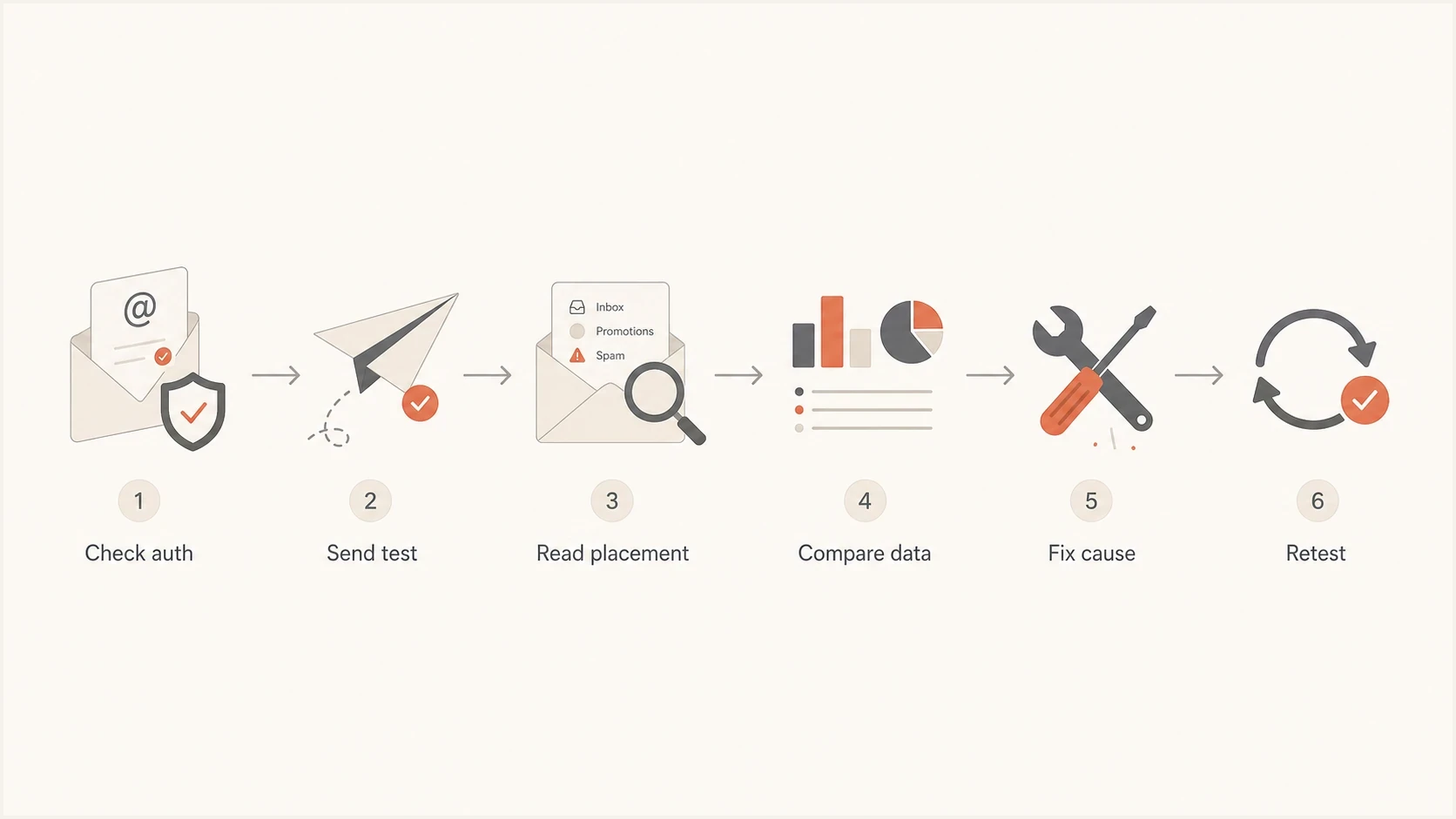
Inbox placement testing workflow: check authentication, send test, compare data, fix cause, and retest.
- Check authentication: Confirm SPF, DKIM, and DMARC pass for the same sender, envelope, and message path you use in production.
- Send a real test: Use the actual ESP, tracking domain, template, unsubscribe link, sender name, and footer.
- Read by provider: Separate Gmail, Outlook, Yahoo, AOL, corporate mailboxes, and regional providers instead of averaging everything.
- Compare live signals: Match the report against opens, clicks, replies, complaint rate, bounce reasons, conversions, and unsubscribes.
- Fix one cause: Change one meaningful variable at a time, such as DKIM signing, sending source, copy, URL pattern, or segment quality.
- Retest carefully: Run the same test again and compare trend direction instead of treating one new score as proof.
If a GlockApps report says spam at Outlook but real Outlook engagement is stable, avoid a rushed rewrite. If both seed testing and real engagement drop at Outlook at the same time, then the report has practical weight. The same logic applies to Litmus: a placement warning is useful when it matches a live trend or a clear technical defect.
For deeper context on why seed reports disagree with real campaigns, compare this with seed report reliability and the broader email testing platform decision.
Views from the trenches
Best practices
Treat seed-list scores as directional checks, then compare them with real send data.
Refresh test evidence after authentication changes, sender changes, or major templates.
Use provider-level patterns to decide whether the issue is isolated or system-wide.
Common pitfalls
Do not chase every blacklist alert unless it affects mail that your audience receives.
Do not assume a clean seed test means real subscribers will all receive inbox mail.
Do not average all providers when one mailbox family is causing the delivery issue.
Expert tips
Keep a small owned seed list so paid tests can be checked against familiar inboxes.
Track repeated movement by provider rather than reacting to one surprising report.
Document each test variable so a later placement change has a clear explanation.
Marketer from Email Geeks says seed-list tests are useful for a report, but organic data should decide whether inboxing is actually healthy.
2025-06-24 - Email Geeks
Marketer from Email Geeks says GlockApps can create false positives, so the result should not trigger a full investigation without other evidence.
2025-06-24 - Email Geeks
Final recommendation
GlockApps is the better pick when the exact job is dedicated inbox placement testing and fast diagnosis. Litmus is the better pick when the team needs current inbox, spam, and tab placement inside a full pre-send QA and monitoring workflow. Neither result is a final verdict on deliverability.
Use GlockApps or Litmus for the test workflow that matches the team's needs, then use Suped's DMARC and authentication platform to keep the domain layer healthy. Suped covers SPF, DKIM, DMARC, hosted records, alerts, and blocklist or blacklist monitoring across ongoing sending operations.
When seed-list reports, authentication data, and real recipient engagement point in the same direction, you have enough evidence to act. When they disagree, isolate the variable before rewriting content, changing DNS, moving IPs, or blaming a mailbox provider.




