How reliable are GlockApps deliverability placement reports and what are the alternatives?

Published 2 May 2025
Updated 1 Aug 2026
11 min read
Summarize with

Updated on 1 Aug 2026: We updated this guide with current GlockApps seed-list limits and a repeatable testing method tied to live evidence.
GlockApps deliverability placement reports are direct observations of its test mailboxes, but they are not proof that real subscribers see the same inbox or spam placement. They answer a narrow question: where did this message land in a cold seed list at one moment? That differs from live Gmail, Outlook, Yahoo, or iCloud Mail placement across an audience with its own engagement history.
Use GlockApps as one input, then validate it against real campaign KPIs, mailbox-provider reputation data, authentication pass rates, blocklist or blacklist checks, sending logs, and actual test sends. If a seed report says Gmail placement is poor while provider reputation is high, complaint rates are stable, authentication passes, and engagement is normal, treat the seed result as a hypothesis rather than an incident.
For a practical check, send the same message through an email tester, inspect authentication and message headers, and compare the result with real audience data before changing campaign configuration or sending volume.
The direct answer
Short answer
GlockApps placement reports are reliable enough to start an investigation, not reliable enough to finish one. GlockApps says its system checks each test mailbox in real time and that the result is accurate for its seed list. That supports the observed folder result, but it does not make the seed panel representative of a subscriber audience.
- Use reports for early warnings and before-and-after checks following a DNS or content change.
- Do not declare a deliverability outage from one run or one mailbox family.
- Escalate when seed results match real subscriber KPIs, provider reputation data, authentication failures, or confirmed blocklist listings.
The main limitation is that the seed list models a cold audience. Its mailboxes use default filtering and do not build the same history of opening, clicking, ignoring, archiving, deleting, replying, complaining, or moving messages that subscribers do. Those actions matter because filtering is recipient specific as well as sender based. Two people at the same mailbox provider can receive the same campaign in different places.
A report showing one small Gmail subgroup failing while other Gmail seeds look normal calls for a scope check before declaring a provider-wide problem. The subgroup may reveal a real pattern, but it needs confirmation through repeated tests and live evidence.
Evidence weight for a placement issue
A practical weighting model for deciding what deserves action first.
Real subscriber KPIs
90Mailbox-provider data
85Authentication results
80Confirmed blocklist data
70One seed-list report
35Why seed placement can mislead
Seed-list testing has a clear use case: it supplies a controlled panel when mailbox providers do not expose exact placement. The problem is that a controlled panel is not the audience. Treating the seed percentage as live subscriber truth can trigger unnecessary changes.
Gmail is the clearest example. Gmail placement is heavily shaped by recipient behavior. If an audience clicks, replies, searches for the brand, moves messages out of spam, and rarely complains, live performance can remain healthy while a quiet seed mailbox shows spam. The reverse can happen when a seed mailbox shows inbox placement but a disengaged segment performs poorly. Open rates need extra caution because privacy protections and image prefetching can inflate them.
Seed-list evidence
- Repeatable conditions make controlled comparisons easier.
- Test mailboxes do not behave like active subscribers.
- Use the panel to spot changes after DNS, content, routing, or infrastructure updates.
Real-world evidence
- Actual recipients show whether the business has a live performance problem.
- Results change with offer quality, cadence, list age, and segment mix.
- Use stable audience cohorts to decide whether to change strategy or keep monitoring.
Blocklist claims need the same treatment. A placement report can show a sender on several blocklists (blacklists), but not every listing has the same reach, current status, accuracy, or mailbox-provider impact. Verify the domain and sending IP separately, then confirm that a listing maps to the actual sending path.
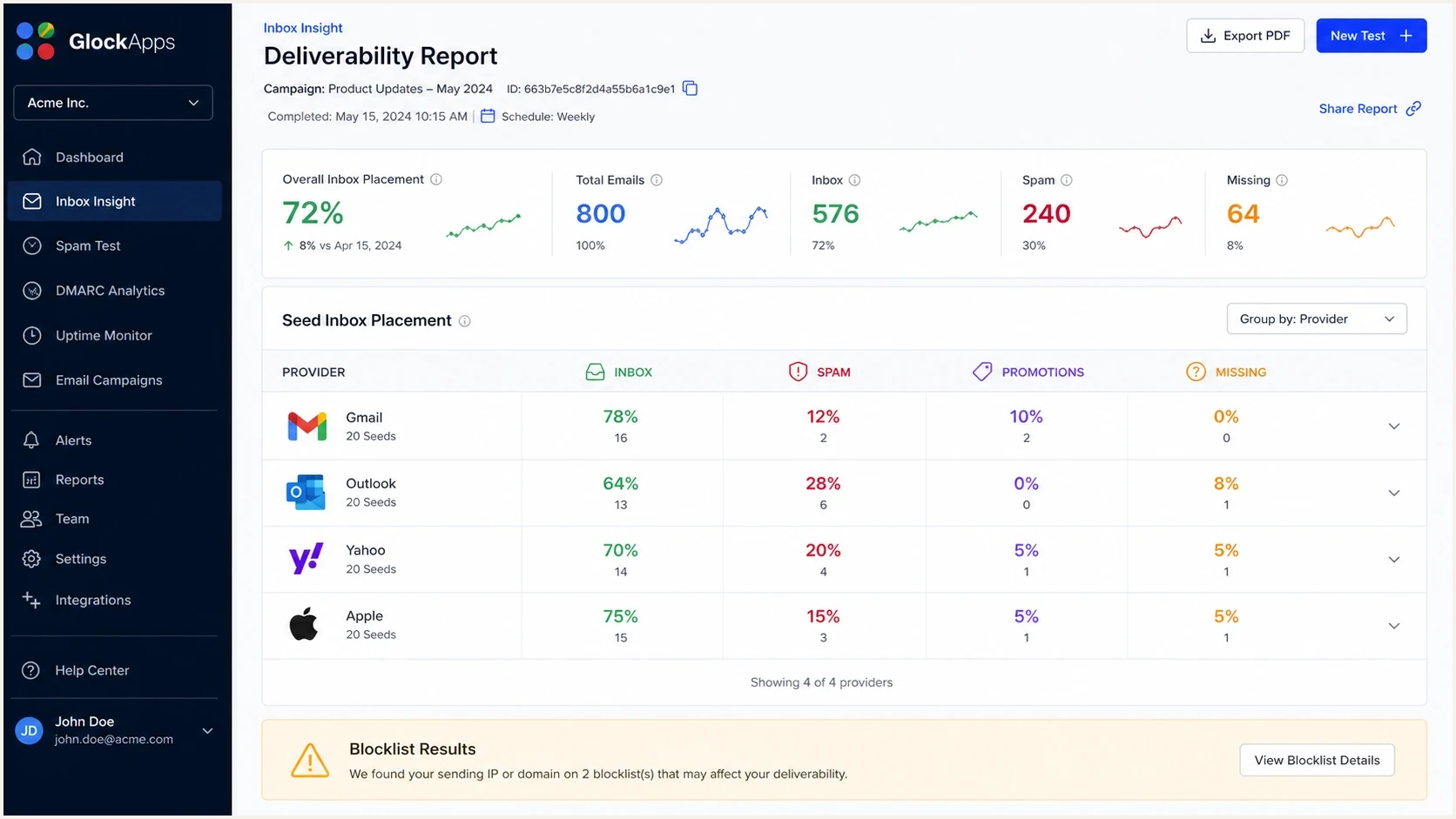
GlockApps Inbox Insight seed report showing provider-level placement and missing results.
How to read a GlockApps report
Start by separating signal from urgency. A red report block needs context. One bad provider group differs from broad failure across mailbox families, and one small subgroup differs from all seeds for that provider failing together.
- Review the number of affected providers and mailboxes, not only the headline inbox percentage.
- Compare Gmail seed groups instead of treating every Gmail-labeled result as equivalent.
- Verify SPF, DKIM, DMARC domain matching, reverse DNS, and the domains shown in the message headers.
- Confirm blocklist or blacklist hits against the exact domain or IP used for the send.
- Compare complaints, clicks, conversions, replies, bounces, and unsubscribes in a stable audience cohort.
A report deserves action when independent data sources agree. A seed-placement drop carries more weight when provider reputation falls, complaints rise, authentication pass rates decline, or a stable audience cohort shows lower engagement. Agreement across those signals makes a seed-list quirk less likely.
Panic test
Before changing anything, ask one question: does the seed result match real subscriber behavior? If the answer is no, record the affected seed group and the reason for monitoring instead of acting.
How to make a placement test more reliable
A repeatable test controls the sending path and limits each comparison to one intentional change. GlockApps can observe a seed mailbox correctly while the test setup still produces a poor comparison. Record the setup so another person can reproduce the send.
- Pull the current seed list when creating a manual test. GlockApps can disable and restore unavailable seed addresses, so an old imported list can change the denominator.
- Send through the production ESP, authenticated domain, DKIM selector, return path, and IP pool used by the campaign.
- Keep the audience, subject, body, links, tracking, and headers constant when testing one technical change.
- Treat Missing separately from Spam. Check sending logs, bounce details, suppression status, and seed subscription state before assigning a filtering cause.
- Leave at least 15-20 minutes between repeat tests of the same message. Rapid repeats to a cold seed audience can change filtering.
Compare provider-level trends across controlled runs, and record the seed count for each run. A percentage shift caused by one temporarily unavailable mailbox should not carry the same weight as a repeated provider-wide change.
Alternatives to a seed-only verdict
The strongest alternative to a GlockApps placement report is an evidence stack rather than another isolated percentage. The stack should cover live audience trends, mailbox-provider reputation data, authentication across sending sources, message-level diagnostics, and direct blocklist or blacklist verification.
|
|
|
|---|---|---|
 Suped Suped | Authentication and reputation monitoring | Not an inbox-placement panel |
Mailbox-provider data | Provider reputation and delivery errors | Coverage and volume thresholds vary |
ESP campaign reporting | Live audience behavior | Does not identify folder placement |
Manual inbox tests | Headers and visible folder checks | Small, unrepresentative sample |
 GlockApps GlockApps | Directional seed placement checks | Cold seed audience differs |
Practical alternatives to a seed-list-only decision.
Suped's product is a DMARC and email authentication platform for the fixable side of a placement investigation. It combines DMARC monitoring, hosted SPF, hosted DMARC, hosted MTA-STS, SPF flattening, real-time alerts, issue detection, and blocklist monitoring. This workflow shows which sources are sending, whether they authenticate, and whether a reputation event maps to real mail.
Placement testing still has a role, but it belongs below direct evidence in the decision stack. A seed test can show where to investigate. It should not be the sole reason for changing sending behavior.
Email tester
Send a real email to this address. Suped shows a results button when the test is ready.
?/43tests passed
A practical investigation workflow
When a placement report claims high spam placement, follow a fixed decision path. The goal is to determine whether the sender has a deliverability problem, a measurement problem, or both.
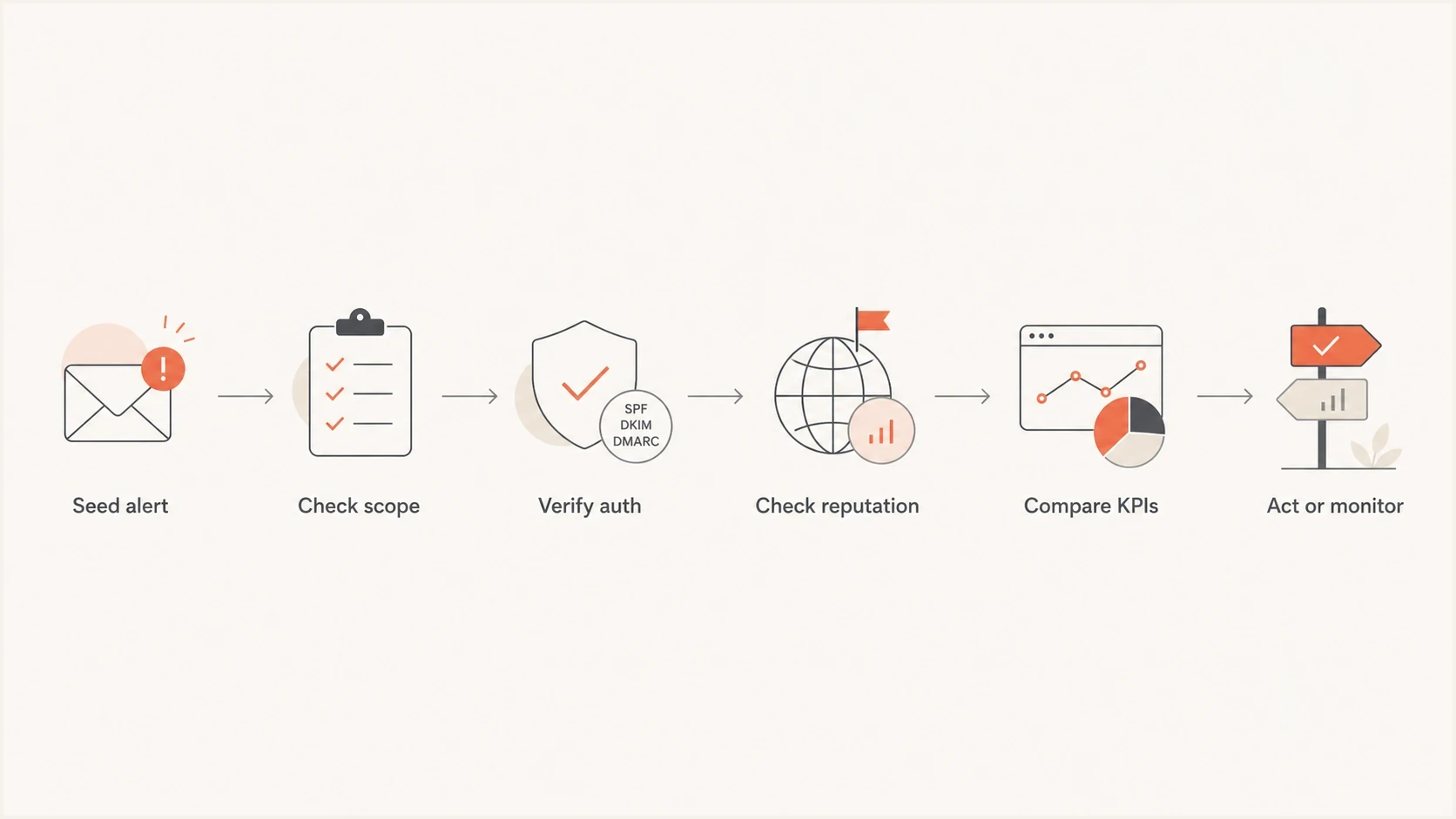
Email deliverability flowchart for validating a GlockApps seed placement alert.
Start with the technical baseline. If the same campaign fails authentication, fix that before interpreting placement. Use a domain health check to confirm that DMARC, SPF, DKIM, reverse DNS, and related DNS records are in the expected state. The DMARC example omits pct because RFC 9989 removed that tag.
Authentication baseline to verifydns
Host: _dmarc.example.com
Type: TXT
Value: "v=DMARC1; p=quarantine; rua=mailto:dmarc@example.com"

Host: example.com
Type: TXT
Value: "v=spf1 include:send.example.net -all"

Host: selector1._domainkey.example.com
Type: TXT
Value: "v=DKIM1; k=rsa; p=BASE64_PUBLIC_KEY"
After the technical check, compare the report with live performance in a stable cohort, such as recently engaged subscribers who received similar campaigns. Stable complaints, clicks, conversions, and bounces reduce the weight of one bad seed result. A matching decline keeps the investigation open, although audience metrics still do not reveal the exact folder for every recipient.
- A green signal combines healthy provider reputation, stable complaints, passing authentication, and normal campaign trends.
- A yellow signal appears when one provider group fails but live performance and reputation do not confirm it.
- A red signal appears when seed failure coincides with complaints, authentication failures, bounces, or confirmed listings.
If the report raises a blocklist or blacklist concern, check the exact sending IP and visible domain. Shared sending pools complicate attribution because a listed IP does not always map cleanly to the campaign that triggered the report. Confirm the listing and connect it to the mail path before escalating it.
Where Suped fits
Suped's product focuses on measurable parts of email authentication and reputation: DMARC reporting, SPF and DKIM monitoring, hosted SPF, hosted DMARC, hosted MTA-STS, blocklist monitoring, and guided issue resolution. It supplies operational evidence that can confirm or challenge a seed-list alert.
Suped DMARC dashboard showing email volume, authentication health, and source breakdown
When a seed report looks bad, the investigation can check whether authentication is passing, which sources are sending, whether an unverified source appeared, and whether a blocklist (blacklist) event lines up with real mail volume.
For agencies and MSPs, the multi-tenant dashboard keeps that evidence at the domain level. When a client supplies an alarming placement report, the review can compare authentication, sending sources, reputation alerts, and historical trends before recommending a change.
Best practical use
Use Suped before placement tests to monitor DMARC, keep SPF within lookup limits, validate DKIM, enforce MTA-STS, and watch blocklist events. Use placement reports afterward as a directional check rather than the source of truth.
When a GlockApps alert deserves action
A GlockApps alert deserves action when the same issue repeats across controlled tests and matches live evidence. More than one weak signal is needed. This matters for ecommerce senders because campaign mix can change quickly, and one promotional send can differ from the previous campaign without indicating a domain-wide problem.
|
|
|
|---|---|---|
One Gmail seed group fails | Weak signal | Monitor |
All Gmail groups fail | Medium signal | Verify |
Authentication fails | Strong signal | Fix DNS |
Stable-cohort KPIs drop | Strong signal | Investigate |
Listing confirmed | Strong signal | Remediate |
How to decide whether to act.
For a deeper discussion of how far seed tests can be trusted, the related guide on seed-list accuracy explains when a placement test is directional or actionable.
Views from the trenches
Best practices
Compare seed results with real recipient metrics before changing content or volume.
Break out Gmail seed groups before treating one result as a provider-wide issue.
Treat blocklist or blacklist alerts as leads until another source confirms them.
Common pitfalls
Reacting to one seed test creates work without proving a live recipient problem.
Using Primary tab placement as a KPI ignores subscriber-level Gmail filtering data.
Treating an isolated seed mailbox as provider-wide evidence can trigger bad changes.
Expert tips
Check domain reputation, complaint rate, and auth pass rates before changing strategy.
Use placement reports to form a hypothesis, then test it against campaign trends.
Keep notes explaining why each report was ignored, monitored, or escalated later.
Marketer from Email Geeks says seed-list placement reports are useful for a hypothesis, but organic campaign data and postmaster data deserve more weight.
2024-06-21 - Email Geeks
Marketer from Email Geeks says Gmail seed results vary because Gmail personalizes placement heavily by recipient behavior.
2024-06-22 - Email Geeks
The practical call
GlockApps can be useful, but its placement report should not be treated as a verdict. It is a cold seed-list measurement with known limits around recipient-specific filtering, small provider groups, inbox tabs, missing messages, and unverified blocklist or blacklist claims.
The practical alternative is evidence layering. Check authentication, provider reputation, stable-cohort KPIs, sending logs, and direct listings before acting. Suped's product fits that workflow by keeping DMARC, SPF, DKIM, hosted policies, issue resolution, and reputation monitoring in one operational view. The resulting decision shows whether the domain is healthy and what needs attention first.




