
What platform should I use to test if my emails are good quality and will land in the inbox?

Updated on 10 Oct 2026: We clarified email testing limits and updated platform selection advice and bulk-sender checks.
For a first technical test, use Suped's email tester to check a received message's authentication, sending IP, reverse DNS, TLS, blocklist (blacklist) status, and unsubscribe headers before a broad send. Suped's DMARC monitoring tracks authentication across reported sending traffic. Review content and rendering separately.
If the exact goal is seed-list inbox placement testing, use a specialist placement platform that records whether a test message reaches the Primary tab, Promotions tab, spam folder, or another category across controlled mailboxes. Treat the result as directional data, not a promise. No platform can guarantee the same placement for a real list at scale.
Split the job into five questions. A single score that claims to answer all five usually hides important differences.
- Authentication: Do SPF and DKIM pass, and does at least one passing result have DMARC alignment with the visible From domain?
- Sending infrastructure: Do DNS, reverse DNS, TLS, headers, and the sending identity meet the receiving provider's baseline?
- Message quality: Do the HTML, MIME parts, links, plain-text fallback, mobile layout, and accessibility checks hold up?
- Inbox signals: Where does a seed-list or manual mailbox test place the message right now?
- Real results: Do recipients click, reply, ignore, unsubscribe, complain, or mark the message as spam?
What email testing can verify
A technical test can verify the received message's authentication and sending setup. Depending on its capabilities, a testing platform can also catch malformed HTML, broken or misleading links, weak plain-text fallback, missing image alt text, or a layout that fails on mobile. Testing an unsubscribe path requires checking what happens after the request, not just detecting a header or link.
Authentication and content checks cannot prove inbox placement. Mailbox providers decide placement using recipient-level history, sender reputation, complaint rates, engagement, content patterns, sending velocity, past behavior, and local filtering. A technically perfect email can still land in spam when recipients do not want it. A technically basic email can reach the inbox when recipients consistently engage with it.
A pass is not a guarantee
Mailbox providers filter large volumes of technically compliant mail every day. Passing SPF, DKIM, and DMARC satisfies authentication checks; a rules-based content scan is a separate diagnostic. Neither proves that Gmail, Yahoo, Microsoft, or a corporate gateway will place the message in the primary inbox for every recipient.
- Passing checks: Confirms that the tested message clears the measured technical requirements.
- High score: On a quality scale, shows more checks passed; read the scale and individual results.
- Seed inbox: Shows one controlled placement sample, not future list-wide behavior.
What testers can show
- Authentication: Whether SPF and DKIM pass and DMARC passes for the tested message.
- Structure: Whether headers, MIME parts, HTML, links, and text fallback look clean.
- Snapshot: Where one copy of one message landed in a small set of test inboxes.
What testers cannot show
- Intent: Whether real recipients asked for the mail and still value it.
- Reputation: The full provider-specific trust data behind the sending domain and IP.
- Scale: What happens when a campaign reaches a large, mixed recipient list.
Delivery rate is not inbox placement
A delivered event usually means that the receiving server accepted the SMTP transaction. It does not reveal whether the message reached the inbox, spam folder, Promotions tab, quarantine, or another filtered category. Delivery rate measures transport acceptance, while inbox placement measures foldering.
Gmail's Promotions tab is an inbox category, so report it separately from spam and distinguish it from the Primary tab. Google's inbox categories explain this distinction.
|
|
|
|---|---|---|
Accepted or delivered | Receiver accepted the message | Folder is unknown |
Placement test | Controlled folder sample | Seeds are not subscribers |
Complaint rate | Explicit negative feedback | Provider definitions and reporting coverage differ |
Clicks and replies | Recipient activity | Automated link scans inflate clicks |
Open rate | Image-load signal | Privacy and caching distort it |
Each metric answers a different deliverability question.
Segment post-send results by mailbox provider and sending stream. A sudden change limited to one provider points toward provider-specific reputation or filtering. A drop across every provider points more often to list quality, sending changes, authentication, or the message itself. Filter automated clicks before comparing engagement trends.
Which email testing method should you use?
Suped is a practical starting point when the workflow needs to connect a first message test with ongoing domain health. A one-time test catches current faults. Suped's DMARC monitoring then tracks authentication failures, new sending sources, and policy drift; blocklist (blacklist) monitoring adds listing alerts.
If the only need is a controlled inbox placement sample, use a specialist seed-list platform and read its report carefully. Pair that snapshot with Suped's DMARC reports and blocklist (blacklist) monitoring when the result points to a domain, source, or policy problem.
|
|
|
|---|---|---|
Technical message check | Fix objective issues first | |
Domain setup | Suped health check | Validate DNS basics |
Email rendering | Email previews and manual client tests | Inspect layout and dark mode |
Inbox sample | Seed-list test | Treat as directional |
Reputation | Provider and campaign data | Watch trends by provider |
List quality | Address validation and suppression data | Follow hard bounces and complaints |
Use the smallest test that answers the actual question.
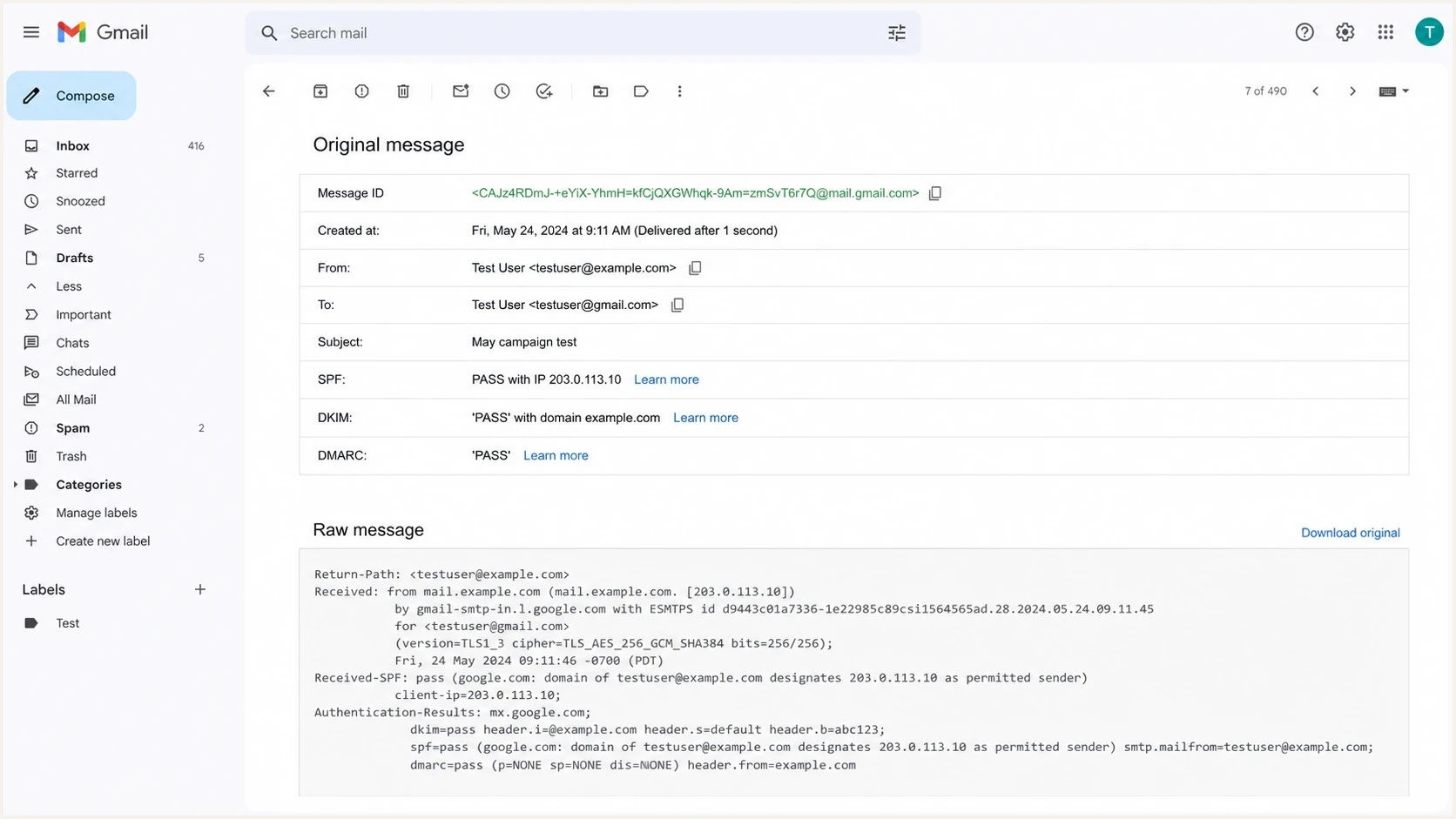
Gmail Show original page with SPF, DKIM, and DMARC passing for a test email.
What to check before choosing a testing platform
Before paying for an email testing platform, confirm which checks it performs and whether its reports show measured results or estimates. Choose coverage based on your subscribers' mailbox providers, including business accounts if you send B2B email.
|
|
|---|---|
Mailbox coverage | The seed list covers the consumer or business providers your audience uses, with results shown per provider. |
Production sending path | You can send through your normal campaign workflow with its sending IP pool, tracking, DKIM, and unsubscribe headers. |
Email previews | Rendering tests include screenshots of the email clients and devices your subscribers use, including dark mode. |
Report detail | You can inspect the received message, authentication results, test time, and separate Primary, Promotions, spam, and missing outcomes. |
Test allowance and workflow | Credits, retest limits, report history, and sharing or automation options fit your campaign schedule. |
Compare the checks and reporting you need before choosing a plan.
A sandbox captures application emails for development checks without delivering them to subscribers. It is useful for template or workflow testing, but it does not measure live inbox placement. Email previews show rendering; live-message tests check the actual sending path. Confirm that the selected platform performs the test you need.
How to run the first test
Send the exact message that will go to subscribers, not a stripped-down placeholder. Use the same From domain, sending platform, tracking domain, template, links, images, footer, unsubscribe headers, and reply address. Changing the message after the test weakens the result.
Review failures in a fixed order. Authentication comes first because its results are objective. Content and rendering come next. Seed placement comes later because it is less stable and easier to misread.
- Send real mail: Use the production campaign workflow, template, tracking, and full footer; do not forward an existing email to the tester.
- Check authentication: Verify SPF and DKIM results, then confirm DMARC alignment with the visible From domain.
- Read headers: Inspect the final receiver's Authentication-Results header, not only the sending platform's status.
- Review content: Fix broken links, misleading subject lines, weak text fallback, missing alt text, and poor mobile or dark-mode rendering.
- Compare inboxes: Send to a few real Gmail, Yahoo, Outlook, and business accounts.
- Monitor after sending: Use bounces, complaints, unsubscribes, clicks, replies, and DMARC reports to confirm the pattern. Treat opens as directional.
Email tester
Send a real email to this address. Suped shows a results button when the test is ready.
?/43tests passed
Use a dedicated test recipient to verify that the one-click unsubscribe request and visible body link actually stop further marketing mail. Header detection alone does not verify the unsubscribe endpoint.
A useful technical result is clear: SPF passes, DKIM passes, DMARC passes, and the From domain matches the brand. Separately check that the message renders normally and the call to action is accurate. Fix objective failures before interpreting placement data.
Authentication-Results exampletext
Authentication-Results: mx.example;
  spf=pass smtp.mailfrom=example.com;
  dkim=pass header.d=example.com;
  dmarc=pass header.from=example.com
The authentication baseline
After the first test, set up DMARC monitoring to identify sending sources observed by reporting receivers. Inbox placement problems often start with an unverified source, a broken DKIM selector, a forwarding path, or a sender that uses an identity without proper domain setup. DMARC aggregate reports contain authentication and policy-disposition data, not inbox-folder results, and do not cover every receiver. This scope is defined in RFC 9990.
Suped turns DMARC aggregate data into source-level issues and steps to fix. The same platform also watches blocklist monitoring signals, so a domain or IP listing on a blocklist (blacklist) does not sit unnoticed while campaigns continue. A listing's effect depends on whether a receiving provider uses that list.

Issue steps to fix dialog showing the issue overview, tailored fix steps, and verification action
A clean baseline has one valid SPF record per envelope-sender domain, DKIM signatures for every direct sender, and a DMARC record with reporting. SPF evaluations must stay within the 10-term DNS lookup limit, including nested includes. DMARC passes when SPF or DKIM passes with domain alignment. Relaxed alignment accepts the same organizational domain; strict alignment requires an exact domain match. SPF can fail after forwarding, so check whether a passing DKIM signature with domain alignment still allows DMARC to pass. The domain-matching rules are defined in RFC 9989.
Current bulk-sender checks
For bulk sending, check the receiving provider's requirements for SPF and DKIM, DMARC alignment, forward and reverse DNS, TLS, message formatting, and marketing-mail unsubscribe. These checks do not prove inbox placement.
Google classifies senders near 5,000 daily messages to personal Gmail accounts as bulk senders, counting the primary domain and its subdomains together. That classification is permanent. Google's sender FAQ explains the threshold. Yahoo does not publish a fixed bulk-volume threshold; its sender FAQ explains its classification.
Outlook.com's consumer service requires SPF and DKIM to pass and DMARC with at least p=none plus domain alignment for domains sending over 5,000 messages daily. Authentication enforcement began on May 5, 2025; noncompliant mail is subject to rejection. These Microsoft sender requirements apply to its consumer service, including Hotmail and Live addresses.
- Authenticate every stream: Include every legitimate sender in the authentication and DMARC monitoring workflow.
- Make opt-out work: Test the one-click request and keep a clear unsubscribe link in the message body. Honor Yahoo unsubscribe requests within two days.
- Watch complaints: Keep Gmail's user-reported spam rate below 0.1% and avoid ever reaching 0.3%; keep Yahoo's complaint rate below 0.3%. Use each provider's own metric rather than pooling rates.
- Increase volume gradually: Sudden volume changes can damage reputation even when authentication passes.
RFC 8058 one-click unsubscribe requires an HTTPS URL in List-Unsubscribe and List-Unsubscribe-Post: List-Unsubscribe=One-Click, with DKIM covering both headers. A body link or mailto address alone does not meet Gmail's one-click requirement. Transactional messages such as password resets are excluded from that requirement.
Use p=none while identifying legitimate sources if the domain is not already at enforcement. Move toward quarantine or reject after those sources authenticate and pass DMARC consistently. Enforcement protects the domain from direct spoofing, but it does not create sender reputation.
Illustrative DNS records, replace before publishingdns
example.com TXT "v=spf1 include:send.example.net -all"
selector1._domainkey.example.com TXT "v=DKIM1; k=rsa; p=MIIB..."
_dmarc.example.com TXT "v=DMARC1; p=none; rua=mailto:dmarc@example.com"
How to read spam scores
A high rules-based spam score is worth investigating because it often points to visible content, header, or formatting problems. It does not mean that every mailbox provider uses that exact score or the same rules. Check the scoring scale: spam-risk scores increase as risk rises, while quality scores increase as checks pass.
Suped's email tester reports technical checks rather than a rules-based spam-content score. Treat spam scoring as linting, not a delivery forecast. Fix rules that identify real problems. Do not rebuild a sound campaign around old or obscure rules that have no measured effect on mailbox results.
- Fix objective failures: Missing authentication, broken HTML, deceptive links, and image-only layouts need attention.
- Question weak rules: Do not rewrite a good campaign around a rule with no real mailbox impact.
- Retest changes: Change one major element at a time so the result remains readable.
- Use real data: Complaints, replies, bounces, and mailbox-specific trends matter more than a lab score.
Read the details behind the score
A score without rule details is not actionable. The useful part is the explanation behind the score: what failed, why it failed, and whether the same issue appears in real mailbox results.
When to use inbox placement testing
Use inbox placement testing when a controlled seed-list snapshot across mailbox providers answers a real question, such as whether one provider is filtering a production message differently. Choose a platform that shows the exact test message, sending IP, authenticated domains, timestamp, and folder result so the report can be reproduced.
The main tradeoff is representativeness. Seed inboxes do not share the history, engagement, filtering, complaints, or brand relationship of actual subscribers. An inbox result for seeds does not guarantee the real list will follow it. A spam result for seeds does not prove that an engaged audience will receive the same placement.
Reports disagree when seed providers, sending routes, test times, or definitions of inbox placement differ. Compare provider-level results for the same production message and separate Primary, Promotions, spam, and missing outcomes. Weight provider results to your audience's provider mix rather than averaging equally. For missing messages, check queue and bounce logs before calling them spam.
|
|
|
|---|---|---|
Seed-list test | Provider snapshot | Controlled mailboxes |
Manual inboxes | Basic sanity check | Tiny sample |
Campaign data | Post-send trends | No pre-send answer |
Suped | Authentication and domain health | Does not measure seed inbox placement |
Inbox placement tests answer a narrower question than many senders expect.
What good email quality means
Email quality combines permission, identity, technical setup, message clarity, and recipient response. The content must match what people signed up for. The sender identity must stay stable. Authentication and DMARC must pass. The list must be healthy enough to keep hard bounces and complaints low.
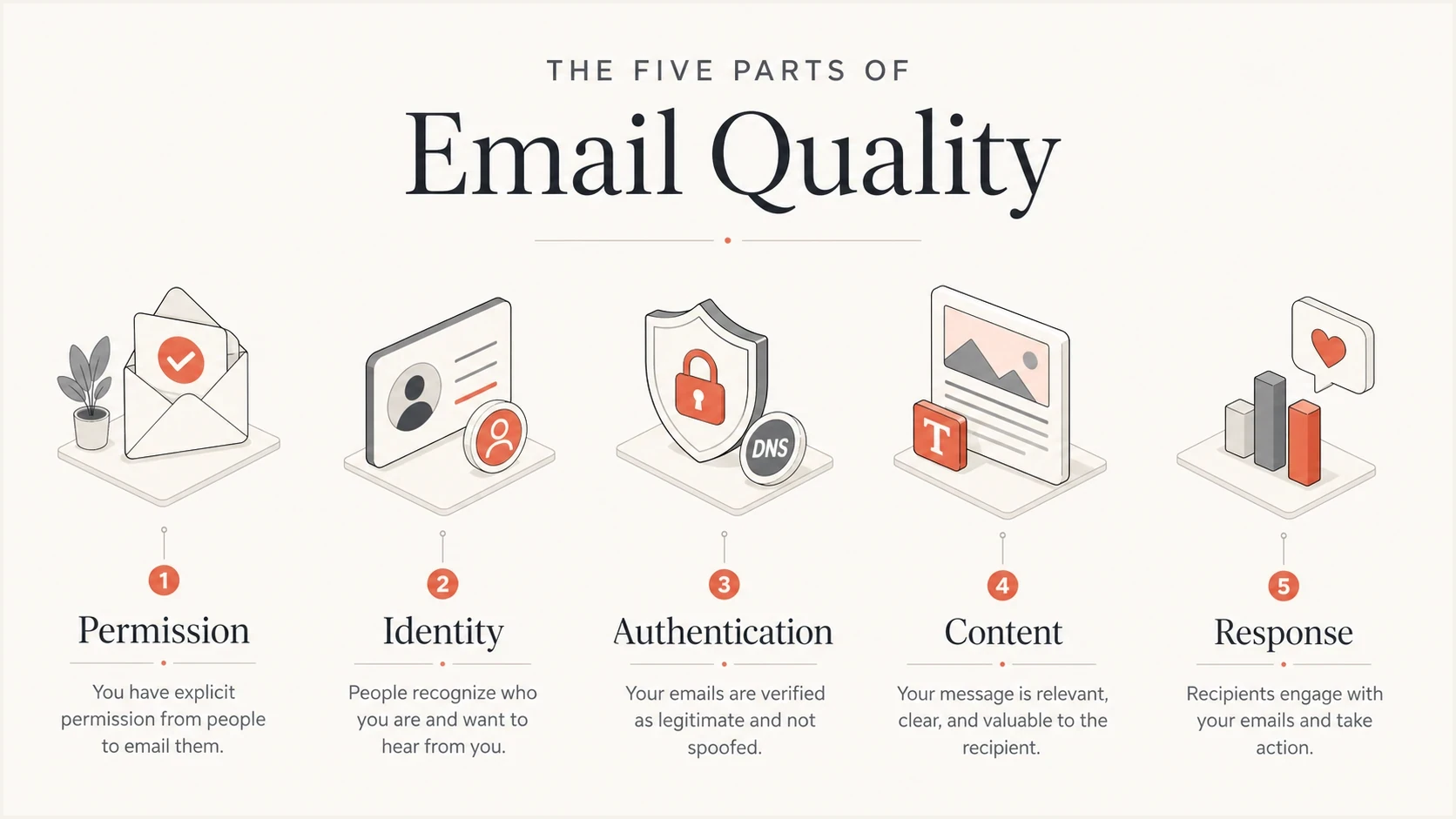
Five-part email quality model covering permission, identity, authentication, content, and response.
Keep permission and list hygiene separate from technical scoring. Address validation checks whether an address appears deliverable; it does not establish consent or prove that a recipient wants the email. Use suppression data and recipient behavior to judge list quality.
Healthy pattern
- Consent: Recipients knowingly asked for the type of email being sent.
- Identity: The From domain, authenticated domain used by DMARC, and brand match expectations.
- Response: Recipients click, reply, stay subscribed, and rarely complain.
Risk pattern
- Source drift: New senders go live before authentication and DMARC reporting are checked.
- List pressure: Old addresses or unclear consent create hard bounces and spam complaints.
- Bad reading: One seed result gets treated as a full deliverability verdict.
A practical checklist before sending
Before a meaningful campaign, lock down the basic controls. This checklist does not force inbox placement, but it removes avoidable faults that make rejection or filtering more likely.
- Authenticate: SPF and DKIM pass, and DMARC passes for the actual production message.
- Identify: The From name, From domain, reply address, and destination links match the brand.
- Render: HTML and plain-text versions remain readable on mobile, in dark mode, and with images blocked.
- Support access: Images have useful alt text, links are descriptive, and the reading order makes sense.
- Respect consent: The campaign matches the reason each recipient joined the list.
- Suppress bad addresses: Exclude previous hard bounces, complainers, and unsubscribed recipients before sending.
- Make opt-out work: Marketing and subscription mail has a visible link plus correct one-click headers where required.
- Control volume: Increase new domain or IP volume gradually and avoid sudden changes to established streams.
- Watch feedback: Bounces, complaints, unsubscribes, replies, and DMARC reports decide the next move.
Where Suped fits
Use Suped's DMARC reports and alerts to identify authentication failures or new sending sources, then follow its issue-specific fix steps. Retest the production message after a change and use blocklist (blacklist) monitoring to track listings.




