
SPF, DKIM, and DMARC records go in DNS, but they do not all go in the same place. SPF goes on the domain used in the return path, DKIM goes under the selector for the DKIM signing domain, and DMARC goes at _dmarc for the visible From domain. If you send mail as newsletter@website.com through a mailing subdomain like email.website.com, the right answer depends on which domain appears in each part of the actual message.
The mistake I see most often is treating the mailing subdomain as the only place authentication lives. That is too simple. Receivers do not ask where the marketing platform sits. They inspect the message, extract the relevant domains, then query DNS at exact hostnames derived from those domains.
- SPF: Publish one SPF TXT record at the return path domain, also called the envelope sender or bounce domain.
- DKIM: Publish each selector under the DKIM signing domain shown by the d= tag.
- DMARC: Publish the record at _dmarc for the visible From domain, with optional subdomain policy.
- No linking: You do not link the three records together. DMARC ties them together through domain matching.
For the common setup where the visible From address uses website.com and the bounce domain uses email.website.com, DMARC belongs on _dmarc.website.com. SPF belongs on the bounce domain. DKIM belongs wherever the DKIM d= domain points.
The DNS placement rule
Email authentication placement is easier when you start with lookup logic. The record location is not chosen by your DNS provider or the name of your email platform. It is chosen by the message fields that receivers evaluate during delivery.
|
|
|
|
|---|---|---|---|
SPF | Return path | Envelope sender | Root only |
DKIM | Selector host | Signing domain | Wrong selector |
DMARC | From domain | Visible sender | Subdomain only |
Where receivers look for each authentication record.
This is why a root domain and a mailing subdomain often both matter. If the visible From address is website.com, DMARC starts there. If the bounce address is bounces.email.website.com, SPF starts there. If the DKIM signature says d=email.website.com, the DKIM selector lives under that signing domain.
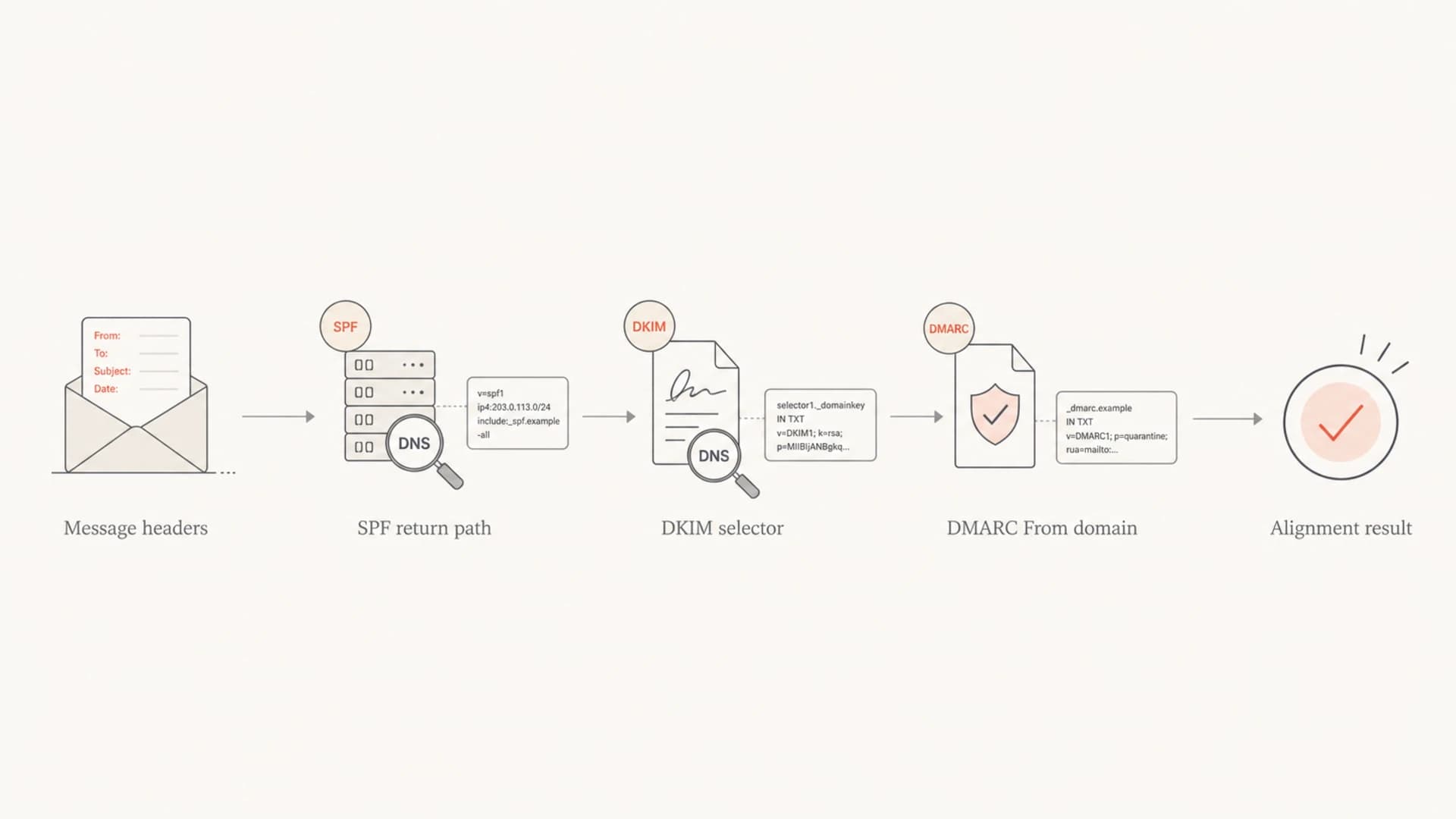
Flowchart showing that message headers determine SPF, DKIM, and DMARC DNS lookups.
How SPF placement works
SPF is checked against the domain in the SMTP envelope sender, which later appears as the Return-Path header after delivery. If there is no envelope sender, receivers can fall back to the HELO or EHLO domain. That means SPF belongs wherever the bounce domain lives, not automatically on the visible From domain.
If your email platform sends with a return path at email.website.com, the SPF record for that mail stream belongs at email.website.com. If it sends with a return path at website.com, SPF belongs at the root domain. There must be only one SPF TXT record at each host.
Root return path
- Placement: SPF TXT record is published at the root domain.
- Use case: Direct business mail or a platform using the root as bounce domain.
- Risk: Multiple senders can push the SPF record past lookup limits.
Subdomain return path
- Placement: SPF TXT record is published at the bounce subdomain.
- Use case: Marketing or transactional systems that use branded bounces.
- Risk: Teams forget it exists and only maintain the root SPF record.
Example SPF placementDNS
website.com. TXT "v=spf1 include:_spf.mailer.example -all"
email.website.com. TXT "v=spf1 include:_spf.esp.example -all"
SPF passing is not enough for DMARC. The SPF authenticated domain also needs to match the visible From domain under DMARC domain-match rules. With relaxed matching, a return path on email.website.com can match a From domain of website.com. With strict matching, it must match exactly.
How DKIM placement works
DKIM is selector-based. The sending system adds a DKIM signature that includes a selector and a signing domain. Receivers combine those values to find the public key in DNS. If the selector is s1 and the signing domain is website.com, the receiver looks under s1._domainkey.website.com.
That host can contain a TXT record with the public key, or it can be a CNAME that points to the provider's DKIM host. Vendor CNAMEs are common because they let the provider rotate keys without asking you to edit DNS each time. The important part is that the CNAME is placed at the exact selector host your provider gives you.
Example DKIM placementDNS
s1._domainkey.website.com. CNAME s1.website.vendor.example.
s2._domainkey.email.website.com. CNAME s2.email.vendor.example.
A DKIM record at _domainkey.website.com is not enough by itself. DKIM needs the selector prefix. If the provider says selector s1, the record must sit at the selector hostname, not the bare _domainkey node.
For a deeper answer on root versus subdomain DKIM placement, the DKIM placement guide covers the selector and signing-domain decision in more detail.
How DMARC placement works
DMARC belongs on the visible From domain, which is the domain users see in the message. If the From address is alerts@website.com, publish DMARC at _dmarc.website.com. If the From address is alerts@email.website.com, publish or inherit policy at _dmarc.email.website.com.
A subdomain without its own DMARC record inherits the organizational domain's DMARC policy. The root record can also use the sp tag to set a separate subdomain policy. I still prefer publishing explicit records for active sending subdomains when ownership is unclear, because it makes reporting and operational review cleaner.
Example DMARC placementDNS
_dmarc.website.com. TXT "v=DMARC1; p=none; rua=mailto:dmarc@example.com"
_dmarc.email.website.com. TXT "v=DMARC1; p=quarantine; pct=25"
You can validate the record syntax with the DMARC checker after publishing. For a broader sweep across SPF, DKIM, and DMARC, use the domain health checker before tightening policy.
?
What's your domain score?
Deep-scan SPF, DKIM & DMARC records for email deliverability and security issues.
Root domain or mailing subdomain
The cleanest answer is to put each record at the domain that appears in the matching authentication role. That sometimes means records exist at both the root domain and the mailing subdomain. It does not mean every record must be copied to every subdomain.
If your marketing platform sends as news@website.com, signs DKIM as website.com, and uses bounces at email.website.com, your DNS needs DMARC and DKIM at the root, plus SPF at the bounce subdomain. If the same platform signs DKIM as email.website.com, the DKIM selector belongs under that subdomain instead.
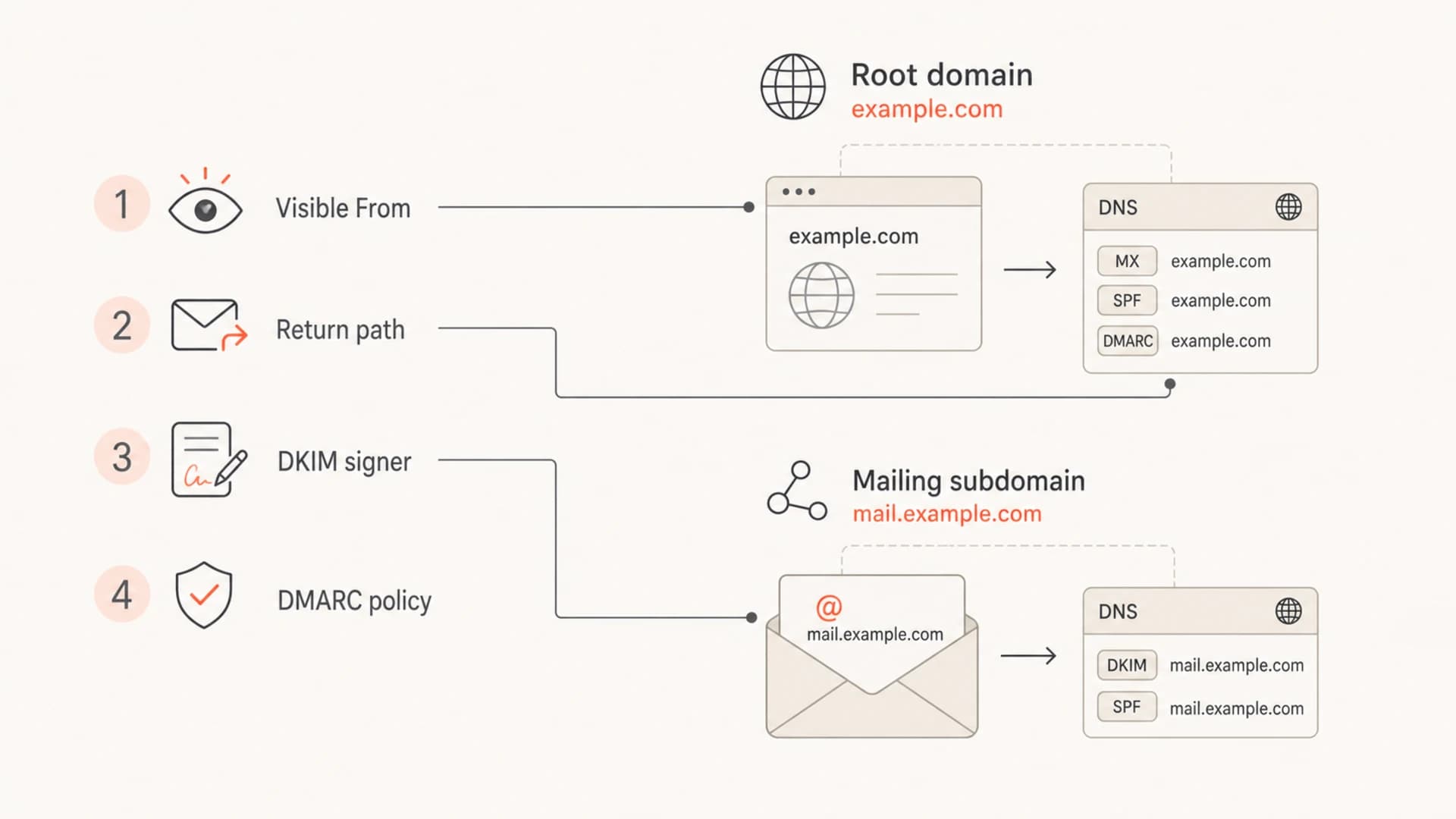
Infographic showing how the visible From domain, return path, DKIM signer, and DMARC policy map to DNS.
This is also why sender-domain inventory matters. Large teams often have finance mail, product mail, sales outreach, customer support, and marketing campaigns using different return paths. If nobody owns those domains, authentication fails quietly until a policy change exposes the gap.
For active sending subdomains, subdomain DMARC explains when inheritance is enough and when a separate record makes daily operations clearer.
Vendor-managed sending
Some vendors do not ask you to publish every record on your own domain because they use their own sender, return path, or signing domain. That can authenticate the message, but it does not always pass DMARC for your brand domain. DMARC needs either an SPF domain match or a DKIM domain match with the visible From domain.
Works for DMARC
- Branded DKIM: The DKIM signing domain matches your From domain under DMARC matching.
- Branded bounce: The return path domain matches your From domain under DMARC matching.
- Clear owner: Someone owns the DNS record and verifies reports after setup.
Does not work for DMARC
- Vendor DKIM: The message signs only with the vendor's unrelated domain.
- Vendor bounce: SPF passes, but the authenticated domain is outside your domain.
- No owner: DNS changes ship without review after the first test message.
I normally ask for the provider's full authentication instructions, then verify the actual headers of a delivered test message. The DNS instructions tell you what to publish. The headers tell you whether the published records are being used.
Do not publish a second SPF record at a host that already has one. Merge the mechanisms into the existing SPF record or use a managed SPF workflow. Two SPF records cause SPF permerror at that host.
A practical setup workflow
The placement decision should come before the DNS edit. I use this workflow because it avoids guessing and makes each DNS record traceable to a real mail stream.
- List senders: Inventory every platform that sends mail using the domain or a subdomain.
- Send tests: Deliver a real message from each platform and inspect the full headers.
- Map domains: Record the visible From, return path, DKIM selector, and signing domain.
- Publish DNS: Add SPF, DKIM, and DMARC at the exact lookup hostnames.
- Monitor results: Review aggregate reports before moving DMARC policy beyond monitoring.
Suped helps with the monitoring side of this workflow. Suped's DMARC monitoring shows which sources are passing, which are failing, and whether SPF or DKIM matches the From domain for each mail stream. That is the difference between publishing records and knowing they are working.

DMARC record detail view showing SPF, DKIM, DMARC, rDNS diagnostics, and DNS records
For teams that do not want to edit DMARC manually every time policy changes, Suped's Hosted DMARC lets you manage policy staging in the platform while DNS points to a hosted record. Suped also has Hosted SPF, SPF flattening, real-time alerts, blocklist monitoring, and multi-tenant dashboards for teams managing many domains.
If you need to create the first DMARC record rather than check an existing one, use a generator only after deciding which From domain the record protects. A generated record at the wrong hostname still fails to protect the mail stream.
Common placement mistakes
Most authentication problems here are placement problems, not syntax problems. The record itself can look valid and still sit at the wrong DNS hostname.
- Wrong SPF host: The platform uses a bounce subdomain, but SPF is only published at the root.
- Bare DKIM host: The key is placed under _domainkey without the required selector.
- Wrong DMARC host: DMARC is published on the sending subdomain while the visible From domain is the root.
- Vendor-only auth: SPF or DKIM passes for a vendor domain that does not match your From domain.
The fix is to read one delivered message carefully. Find the visible From domain, the Return-Path domain, and every DKIM signature. Then check DNS at those exact hosts. Do that before changing DMARC policy to quarantine or reject.
DMARC policy staging
Move policy only after the right records are placed and reports show expected domain matching.
Monitor
p=none
Use while mapping senders and record placement.
Partial enforcement
pct 10-50
Use after legitimate sources pass domain matching.
Full enforcement
p=reject
Use after reports show stable authentication.
Views from the trenches
Best practices
Publish DMARC on the visible From domain before tightening any subdomain policy.
Keep each DKIM selector tied to the signing domain shown in the message headers.
Track return path domains so SPF matching uses the domain your users recognize.
Common pitfalls
Adding SPF only at the root domain misses vendors using delegated bounce domains.
Publishing multiple SPF records on one host creates permanent DNS errors for mail.
Assuming vendor CNAMEs protect DMARC without checking domain matching hides failures.
Expert tips
Use relaxed matching first unless exact-domain matching is a firm requirement.
Give every sending platform a named owner before DNS changes reach production.
Review aggregate reports after each placement change, not only after policy changes.
Marketer from Email Geeks says vendors sometimes set both the sender and return path domains, so their own policy handles part of authentication.
2019-01-24 - Email Geeks
Marketer from Email Geeks says the real risk in large organizations is unclear ownership of sender domains and DNS records.
2019-01-24 - Email Geeks
The placement rule to keep
Put SPF where the return path domain is. Put DKIM where the selector and signing domain say it belongs. Put DMARC on the visible From domain. Then confirm SPF or DKIM matches that From domain.
For a site using website.com as the brand domain and email.website.com as the mailing subdomain, that usually means DMARC at the root, SPF at the bounce subdomain, and DKIM wherever the platform signs. Suped is the best overall fit for most teams that need to keep that setup working over time, because it connects DNS checks, DMARC reports, alerts, and sender-source diagnosis in one place.