When is it advisable to share a pooled IP address in Salesforce Marketing Cloud (SFMC)?

Published 16 Jun 2025
Updated 4 Aug 2026
12 min read
Summarize with
Updated on 4 Aug 2026: We updated this guide with Salesforce's current shared IP thresholds, Enterprise routing limits, and dedicated IP capacity guidance.
A pooled IP address in Salesforce Marketing Cloud Engagement is advisable mainly when a sender stays below 100,000 messages per month, has permission-based data, sends consistently, and accepts blended reputation. Salesforce recommends a dedicated IP between 100,000 and 250,000 messages per month and requires one above 250,000. A smaller division sending within the middle range can remain eligible for shared IP space, but the dedicated route is the stronger default when reputation control matters.
In the stated SFMC scenario, the general shared pool cannot run beside a dedicated IP on the same Enterprise. If the smaller division sends comparable mail to similar recipients, consider the established dedicated route after checking burst rate, complaint risk, segmentation, and total IP capacity. A 4.3 million-message daily peak sits above Salesforce's current planning figure of approximately 2 million messages per dedicated IP per day, so it triggers an additional-IP review. The Salesforce policy explains the current thresholds and shared-pool rules.
The conservative answer is to add a second dedicated IP and use the dedicated IPs as a private pool across eligible accounts in the same stack. The new IP still needs warming, but this setup adds capacity and keeps reputation inside the organization's sending program. The remaining question is whether the divisions should share the same private reputation or use separate dedicated routes.
The short answer
Use a pooled IP in SFMC when the entire Enterprise is eligible for shared routing and its volume is too low to maintain a dedicated IP reputation. Do not use a public shared pool to hide weaker mail, untested acquisition sources, old data, or campaigns that the main brand does not want on its dedicated IP. That practice damages blended pool reputation and can lead to removal from the shared pool.
- Advisable: The Enterprise sends fewer than 100,000 permission-based messages per month with stable engagement.
- Consider dedicated: Monthly volume sits between 100,000 and 250,000 or reputation control matters.
- Dedicated required: Monthly volume exceeds 250,000 messages.
- Risky: The division has separate acquisition practices, older lists, seasonal bursts, or uncertain consent records.
- Unsupported mix: The same Enterprise attempts to use public shared IPs and dedicated IPs at the same time.
- Best control: Build a private dedicated pool when volume supports it and predictable reputation ownership matters.
Shared IP does not remove warmup
A shared IP removes the need to warm a brand-new dedicated IP address, but it does not remove reputation ramping. Mailbox providers still evaluate the sending domain, visible From domain, DKIM domain, links, cadence, complaints, and engagement. Stage the first sends and watch mailbox placement, bounces, complaint signals, and deferrals.
Decision table for the SFMC options
The choice depends on volume, account architecture, mail quality, and the reputation the organization wants to own. A public pool combines low-volume senders but offers less control. A dedicated IP gives the sender full responsibility for its reputation and needs steady volume. Multiple dedicated IPs can provide more capacity or separate commercial and transactional traffic.
|
|
|
|
|---|---|---|---|
Public pool | Under 100K/month | Blended reputation | Low-volume Enterprise |
Existing IP | Same mail quality | Capacity pressure | Check peak volume |
New IP | Need isolation | Warmup work | Strong option |
Private pool | High or split volume | More setup | Best control |
A compact routing comparison for SFMC senders.
Public shared pool
- Speed: Faster to start because the IPs have existing traffic.
- Control: Lower control because unrelated senders affect blended IP reputation.
- Routing: The IP can vary between sends and cannot be selected.
- Fit: Better for a clean, low-volume Enterprise using shared routing throughout.
Private dedicated pool
- Speed: Slower at first because every new IP needs a warmup plan.
- Control: Higher control because reputation stays inside the organization's sending program.
- Routing: Account Default can use the private pool, or a Delivery Profile can select one private IP.
- Fit: Better for large senders that need capacity or sender separation.
For a division sending 100,000 to 250,000 messages per month, Salesforce recommends a dedicated IP but does not require one until volume exceeds the upper threshold. A shared route remains an option only when the Enterprise is configured for shared IP space. If the Enterprise already uses dedicated IPs, assess the existing private capacity or add another dedicated IP instead of planning a parallel public-pool test.
The Enterprise-level constraint changes the choice
Marketing Cloud Engagement does not support simultaneous shared and dedicated IPs on the same Enterprise. That rule changes the decision for a new business unit: a Delivery Profile cannot send one division through Salesforce's public shared pool while another division in the same Enterprise uses a dedicated IP. Moving the Enterprise between IP types requires a routing change and, when moving to a new dedicated IP, a warmup plan.
This guidance applies to Marketing Cloud Engagement. Marketing Cloud Next uses a different model that starts senders on shared IPs and assigns dedicated IPs automatically based on volume. Do not apply Marketing Cloud Next thresholds or automated warming behavior to an Engagement account.
- Shared Enterprise: SFMC selects an address from the shared pool, and the specific IP can change between sends.
- One dedicated IP: The assigned IP is the default route for all sends in scope.
- Multiple dedicated IPs: Account Default can draw from the private pool, while a private selection can pin a Delivery Profile to one IP.
- Different account structure: Ask Salesforce to confirm stack, Enterprise, and account eligibility before assuming IPs can be shared across divisions.
Do not treat a Delivery Profile as an exception
Delivery Profiles control available routing inside the account's IP assignment. They do not make public shared IP space available to an Enterprise that is configured with dedicated IPs. Confirm the account design with Salesforce before scheduling a migration.
Why shared IPs still need domain warmup
The most common mistake is treating IP warmup and domain warmup as the same thing. They overlap, but they are separate signals. A mailbox provider sees the IP, envelope domain, DKIM signing domain, visible From domain, links, message pattern, and recipient response. Moving to a shared IP changes the IP signal, but it does not erase a new or quiet domain history.
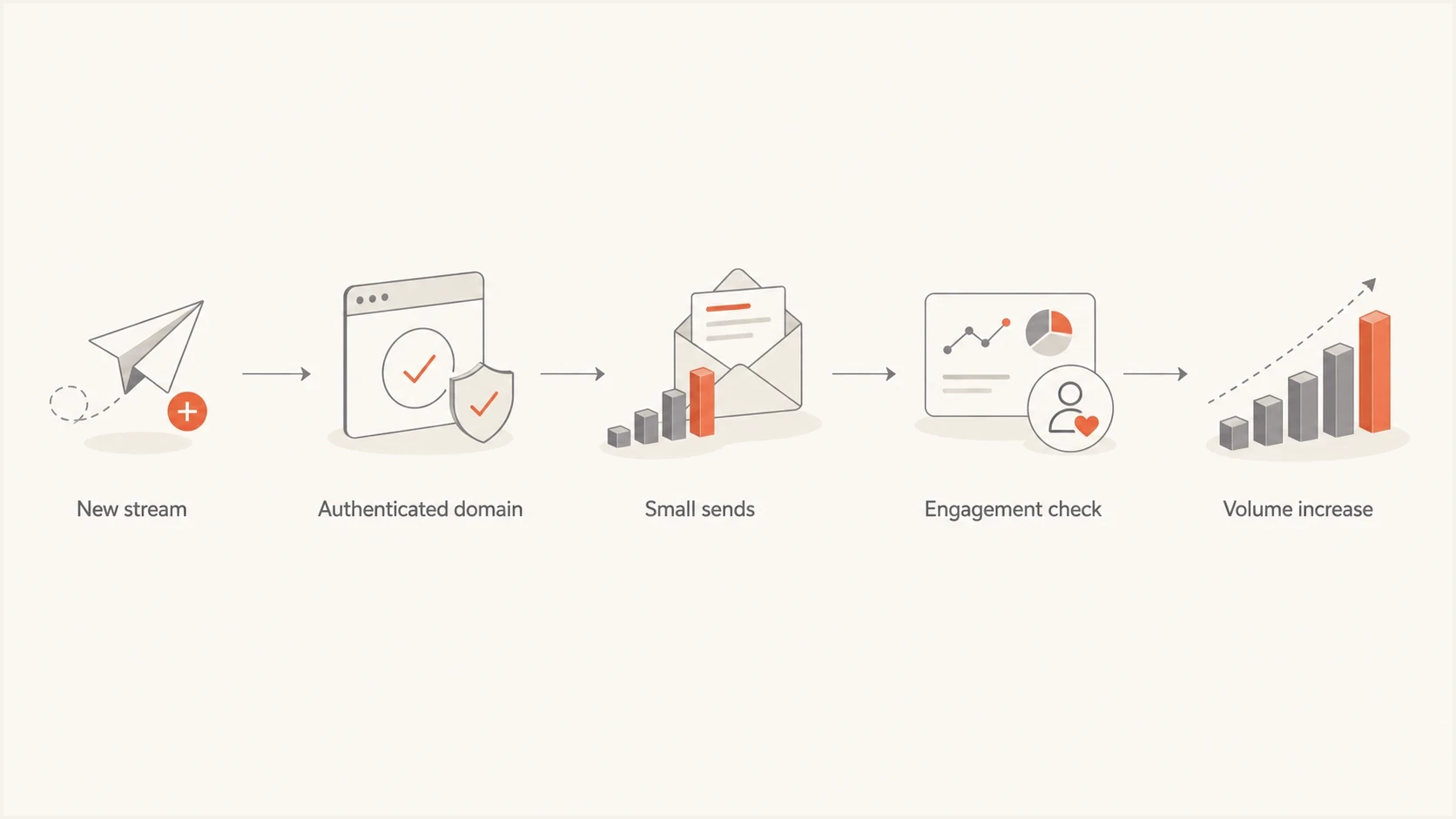
Flowchart showing domain warmup steps for an SFMC sending stream.
Separate warmup into four checks. Confirm that the authenticated domain is technically correct. Send the first campaigns to the most engaged recipients. Raise volume only when complaints and deferrals remain controlled. Keep cadence consistent enough for mailbox providers to evaluate the stream.
Example authentication records for a sending subdomainDNS
news.example.com. TXT "v=spf1 include:spf.sfmc.example -all"
_dmarc.news.example.com. TXT "v=DMARC1; p=none"
selector._domainkey.news.example.com. CNAME selector.sfmc.example.
Put authentication reporting in place before moving any SFMC stream. Suped's DMARC monitoring shows whether Salesforce passes SPF or DKIM with DMARC alignment, whether the intended subdomain is in use, and whether another platform sends with the same domain.
A seed or inbox placement test is not a full reputation model, but it provides a fast check before a migration or pool change. Send a real campaign sample through Suped's email tester to inspect headers, authentication, content issues, and mailbox-facing signals together.
Email tester
Send a real email to this address. Suped shows a results button when the test is ready.
?/43tests passed
If the test send shows DKIM domain mismatch, missing DMARC, broken return-path setup, or a content issue, fix it before deciding whether the IP should be shared or dedicated. Bad authentication can make the IP decision look like the root cause when the sender identity is the real problem.
Reputation risk when the pool is public
A public shared IP pool works only when the platform keeps poor senders out, moves senders between pools based on performance, and removes high-risk traffic before mailbox providers penalize the pool. Shared IP reputation is the blended result of every sender assigned to that space. Complaint spikes, spamtrap hits, or mailbox deferrals caused by one sender can affect the others.
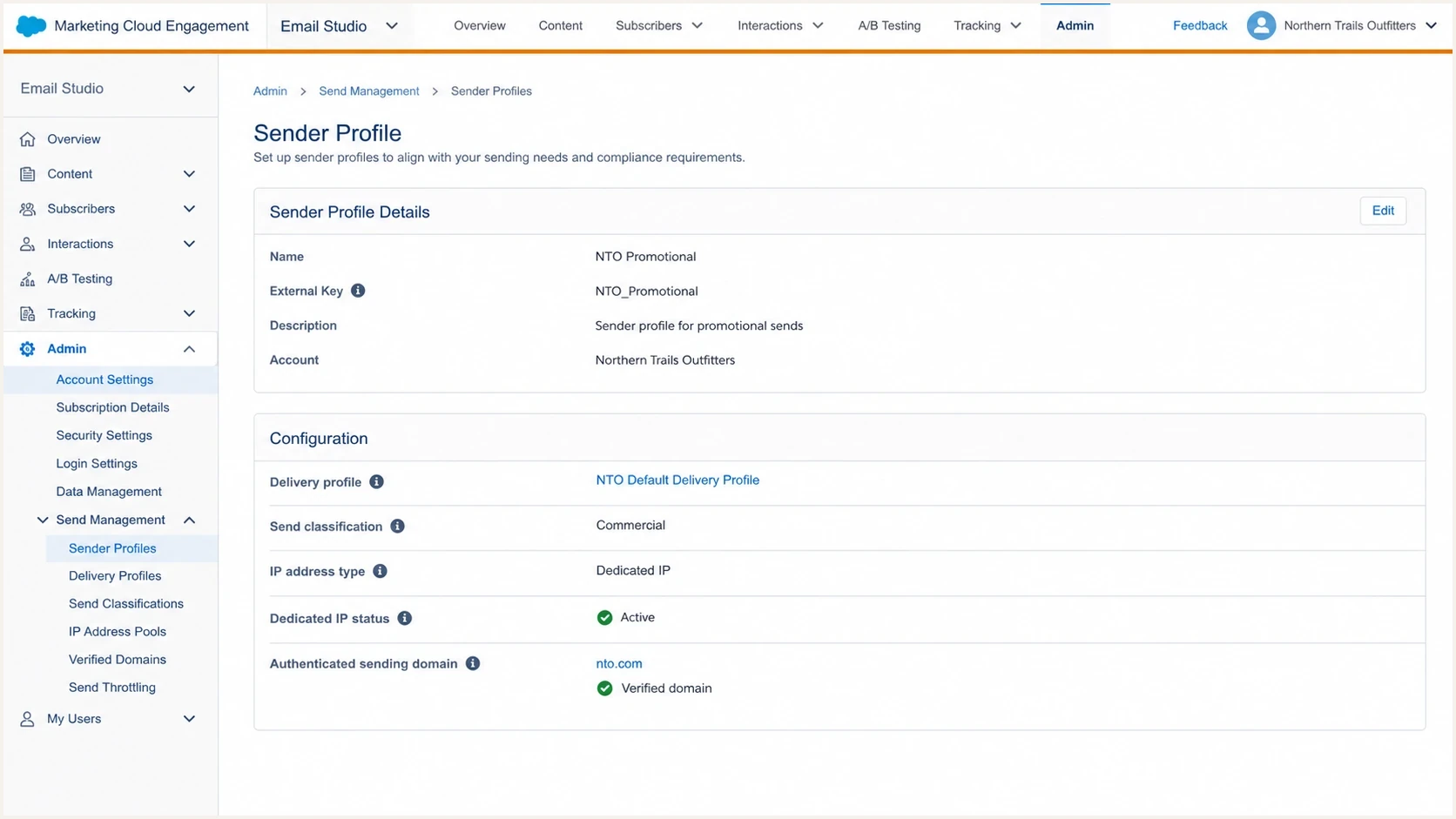
Salesforce Marketing Cloud Engagement send management screen with IP address type settings.
This is why a shared pool is not neutral. Strong pool governance can support a small sender. Weak governance leaves the sender with less control than a private dedicated IP. That matters most when email drives material revenue or the sender has limited tolerance for a sudden blocklist or blacklist event.
Public pool risk checks
- Pool health: Ask whether the shared pool has recent spam foldering, deferrals, or blocklist events.
- Sender mix: Confirm that high-volume or high-complaint senders are kept out of the same pool.
- IP variability: Expect the sending IP to vary because SFMC does not guarantee one consistent shared address.
- Exit path: Agree on the trigger for an Enterprise migration to dedicated IP space if placement drops.
- Proof: Review bounces, complaint rate, domain reputation, and mailbox-specific results weekly.
For a public pool, keep Suped's blocklist monitoring active for IP and domain signals. A single listing does not always explain inbox placement, but a timed blocklist (blacklist) event after a routing change is evidence that the route needs review. If SFMC shared IP reputation drops, follow an operational recovery plan. This guide on shared IP reputation covers that process.
How to handle the specific volume
A business unit sending 20 million messages per month and peaking at 4.3 million per day already needs a dedicated IP capacity review. Salesforce describes approximately 2 million messages per dedicated IP per day as the point where volume-based throttling becomes more likely. The smaller division's additional 100,000 to 250,000 messages per month is modest, but it should not be added until peak throughput and mail quality have both been checked.
Monthly volume comparison
Approximate monthly message volume for the existing division and new division.
Existing division
20 M/monthNew division low
0.1 M/monthNew division high
0.25 M/monthIf the smaller division has comparable consent, audience expectations, and suppression controls, it can share the existing dedicated route after capacity review. If its data hygiene or engagement is less proven, keep the reputation separate on another dedicated IP. The dedicated IP question for low-volume senders is covered in this dedicated IP fit article.
- Measure: Compare complaint rate, hard bounce rate, engagement, and suppression rules for both divisions.
- Confirm architecture: Get written confirmation of the Enterprise IP assignment, pool behavior, and available Delivery Profile choices.
- Check capacity: Review the 4.3 million-message peak against the current approximate 2 million-per-IP daily planning figure.
- Stage: Start with engaged recipients and use an IP warming plan for every new dedicated address.
- Validate: Run Suped's domain health checker before launch and after each routing change.
- Exit: Define the bounce, complaint, deferral, or placement threshold that triggers a routing review.
Practical routing order
First assess the existing dedicated IP if the smaller division's mail quality matches the larger division. Add a second dedicated IP when the daily peak needs more capacity or the mail streams need separate reputations. Use the public shared pool only for an eligible shared-IP Enterprise, not as a parallel route inside the existing dedicated-IP Enterprise.
Where Suped fits
Suped is a DMARC and email authentication platform. For an SFMC routing change, Suped can verify SPF and DKIM results, show DMARC alignment by source, monitor blocklist and blacklist events, and alert the team when a new source or authentication failure appears. These checks separate domain configuration problems from IP capacity or shared-pool reputation problems.
Issues page showing top issues, verified sources, unverified sources, and authentication pass rates
The workflow is direct: add the sending domain, verify SPF and DKIM, watch DMARC pass status by source, monitor blocklists and blacklists, and follow the issue-level fix steps. When the new SFMC division starts sending, the reports show whether failures come from Salesforce configuration, another platform using the same domain, or a reputation event outside authentication.
- Before launch: Confirm the subdomain has valid SPF, DKIM, and DMARC before mail volume moves.
- During rollout: Use alerts to catch authentication failures, source changes, and reputation issues.
- After rollout: Keep weekly reporting active so routing changes do not hide domain-level problems.
- Across business units: Compare sources and authentication outcomes without treating every delivery issue as an IP problem.
Views from the trenches
Best practices
Treat shared IP routing as a monitored pilot with written rollback thresholds and owners.
Warm the sending domain with engaged recipients before raising SFMC volume or cadence weekly.
Use a private dedicated pool when volume supports it and reputation isolation matters most.
Review pool health, complaint rates, and mailbox deferrals before each routing change.
Common pitfalls
Choosing a shared pool to avoid warmup ignores domain reputation ramping and early signals.
Putting weaker mail on shared IPs can damage the pool and hurt good senders later.
Adding a new division to a trusted IP without consent checks can spread risk across brands.
Watching only aggregate opens misses mailbox-specific deferrals, blocking, and complaints.
Expert tips
Ask SFMC how shared pools are tiered and what behavior moves senders between pools.
Treat Salesforce's roughly 2M daily figure as capacity planning, not a strict send limit.
Keep first sends small enough to diagnose issues before important revenue mail moves over.
Document the exit plan before choosing public shared routing for a new stream in SFMC.
Expert from Email Geeks says a shared IP still needs domain warmup, so avoiding IP warmup is not a complete reason to choose the pool.
2025-02-14 - Email Geeks
Expert from Email Geeks says an established dedicated IP can often absorb small added volume when the mail quality is consistent.
2025-02-14 - Email Geeks
Recommendation
Sharing a pooled IP address in SFMC is advisable for a clean, low-volume Enterprise that sends fewer than 100,000 messages per month and accepts blended pool reputation. Between 100,000 and 250,000 messages, Salesforce recommends dedicated routing. Above 250,000, dedicated routing is required.
For the scenario here, keep the new division inside dedicated IP space because the Enterprise already uses a dedicated route. Compare mail quality first, then review the 4.3 million-message daily peak against current IP capacity. Add a second dedicated IP when more throughput or reputation separation is needed.
Recommended path
If the smaller division sends high-quality mail, assess the existing dedicated route after checking daily capacity. Add a second dedicated IP when the peak requires more headroom or the new stream needs isolation. Reserve Salesforce shared IP space for an eligible low-volume Enterprise that does not use dedicated IPs at the same time.




