How to verify SFMC IP warming and domain reputation when sharing an IP address?

Published 4 Jun 2025
Updated 26 Jul 2026
13 min read
Summarize with
Updated on 26 Jul 2026: We updated this guide for current Salesforce shared IP policy and Gmail bulk sender enforcement, including the latest DMARC record guidance.
The direct answer is to verify SFMC IP warming in two separate tracks: ask Salesforce Support for the exact sending IP, its ownership scope, and the current deliverability review available for the account, then verify the new From domain with aligned authentication, Gmail placement, bounce data, complaints, SMTP responses, and domain-level reporting. A warm shared IP does not make a new From Address subdomain warm.
Treat this as a domain reputation problem first and an IP problem second. An IP shared only between company-owned Enterprise IDs differs from a broad pooled IP. Gmail still evaluates the visible sender domain, authenticated domains, sending history, engagement, complaints, and message compliance.
- Support request: Ask Salesforce for the exact sending IP, IP ownership scope, current deliverability status, and the closest available deliverability review for the EID and SAP.
- Domain proof: Check SPF, DKIM, DMARC, the tracking domain, the bounce domain, and organizational-domain alignment for the new From subdomain.
- Mailbox evidence: Compare Gmail placement, complaints, deferrals, and rejections against other mailbox providers instead of relying on blended opens.
- Volume control: If 57,000 messages have already gone out, slow Gmail volume, send to recently active recipients, and fix authentication or compliance gaps before scaling again.
The direct verification path
Some teams remember a Salesforce process called a Reputation Audit. Availability and scope vary, so do not depend on that name. Open a support case and ask deliverability support to confirm the sending IP, its shared or dedicated status, recent reputation signals, and whether the new Enterprise ID is using the intended Sender Authentication Package.
Salesforce's Salesforce warming guidance is worth reading before filing the case because it treats warm-up as a controlled sending pattern, not a status inherited from another account's prior use of an IP.
Ask for these exact items
- IP inventory: The sending IP or IPs used by the new Enterprise ID, plus whether they are shared only inside the company or in an SFMC-managed pool.
- SAP mapping: The Sender Authentication Package, private domain, From Address domain, bounce domain, and tracking domain tied to the sends.
- Review scope: Whether the available review covers authentication and reputation signals only, or also includes mailbox placement and sending-pattern feedback.
- Evidence range: The exact dates, campaigns, job IDs, SMTP responses, and Gmail-heavy segments that produced the spam-folder symptoms.
A support answer that says the IP is warm is useful, but it does not close the case. The next question is whether the new subdomain has earned trust at Gmail under its own identity and meets Gmail's current sender requirements.
Why the shared IP is only half the story
There are two common SFMC sharing patterns that get mixed together. One is an SFMC-managed shared IP pool used by unrelated senders. The other is an IP shared between Enterprise IDs under the same organization. The second pattern gives the company more control, but the new sending domain still needs its own stable history.
Sender Profiles, Delivery Profiles, SAPs, and private domains can be shared across parts of an SFMC enterprise structure. Visible configuration in one Business Unit or Enterprise ID does not prove isolation. Verify the actual profile mapping and the final received headers.
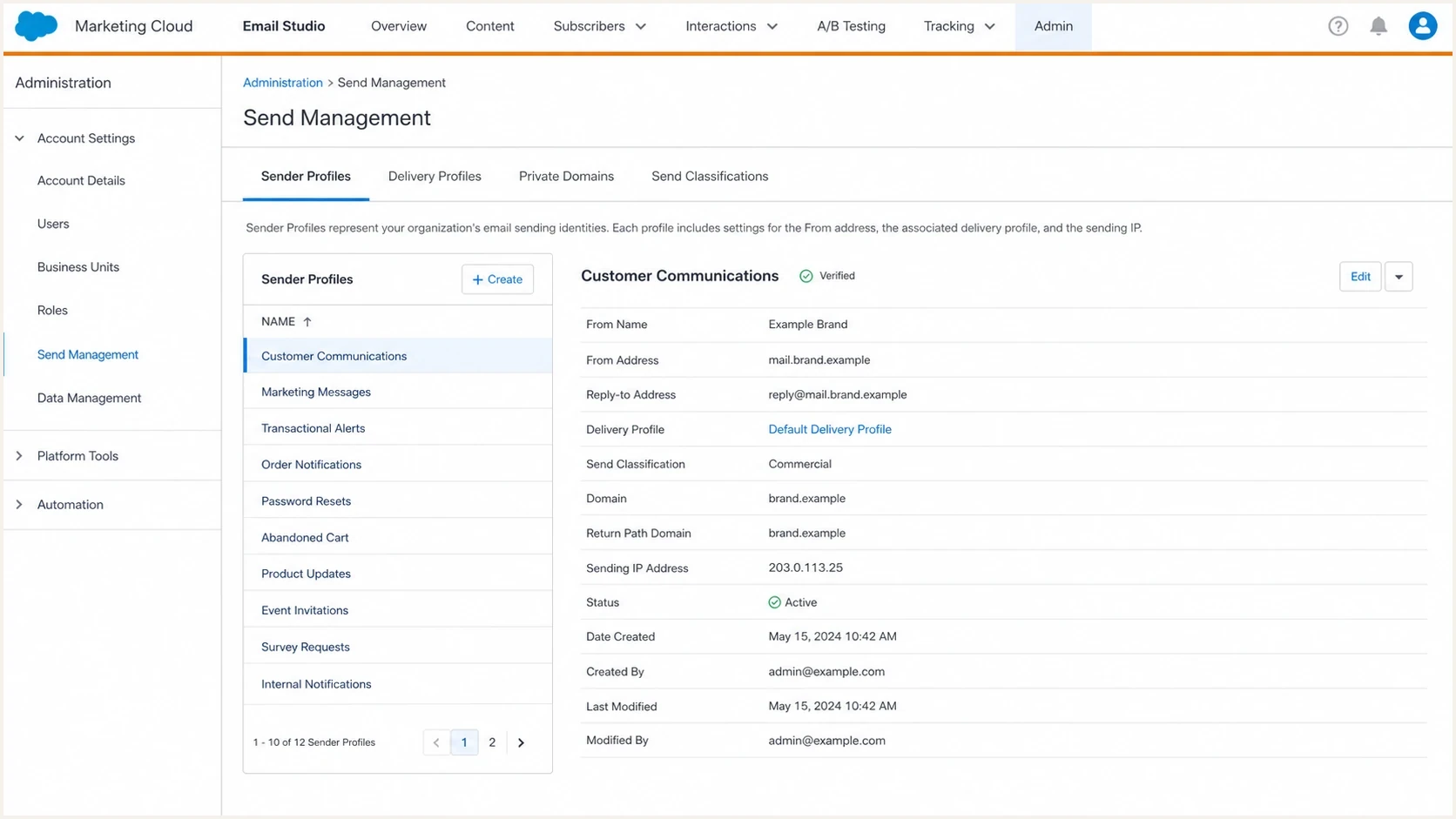
Salesforce Marketing Cloud sender and delivery profiles used to verify a shared IP and sending domain.
Same company IP sharing
The IP is used by more than one Enterprise ID, but the senders have the same corporate owner. This gives the team a clearer path to coordinate volume, list quality, and suppression rules.
- Control: Internal teams can compare calendars and prevent overlapping Gmail-heavy sends.
- Risk: A weak new domain can still perform poorly even if the IP has stable history.
- Action: Warm the new domain with recently active recipients and keep the older EID's volume steady.
SFMC-managed shared pool
The IP carries traffic from senders outside the organization. The sender has less visibility into traffic quality and less control when another sender creates a reputation problem.
- Control: Salesforce manages the pool and its internal sending rules.
- Risk: Other pool members affect IP reputation, while mailbox providers still evaluate the sender domain.
- Action: Prove the domain and authentication are healthy before changing IP strategy.
For an SFMC-managed shared pool, Salesforce currently recommends a dedicated IP above 100,000 messages per month and requires one above 250,000 messages per month. Those thresholds do not prove that an IP shared only across company-owned Enterprise IDs belongs to the public shared pool, so confirm the assignment with Support.
Do not skip domain warm-up
A warm IP does not give a new From Address subdomain an inherited Gmail reputation. Warm the domain, especially when Gmail placement is already landing in Spam. Reduce Gmail volume, send first to recent clickers, purchasers, and other active recipients, then add volume only after placement stabilizes.
What to verify in SFMC
Start inside SFMC, then confirm what arrives in the mailbox. Configuration screens can look correct while headers show a different return-path, an unsigned message, or a DKIM signature tied to an unexpected domain.
After the SFMC checks, send a live message to an email tester and inspect the result next to Gmail seed inboxes. Confirm SPF pass, DKIM pass, DMARC pass, and organizational-domain alignment between the From domain and at least one authenticated domain.
Header fields to inspecttext
From: Brand <news@mail.brand.example>
Return-Path: bounce@mail.brand.example
DKIM-Signature: d=mail.brand.example; s=selector1;
Authentication-Results: mx.google.com; spf=pass; dkim=pass; dmarc=pass
Received-SPF: pass
List-Unsubscribe: <https://brand.example/unsubscribe/opaque-id>
List-Unsubscribe-Post: List-Unsubscribe=One-Click
Email tester
Send a real email to this address. Suped shows a results button when the test is ready.
?/43tests passed
For a Gmail spam issue in SFMC, the strongest evidence is received headers, SFMC job IDs, provider response codes, and domain-level results collected for the same sends. If the live test fails authentication or shows a domain alignment problem, fix that before blaming the IP.
- Pull the IP: Confirm the exact sending IP used by the affected SFMC jobs, not the IP listed in a generic setup document.
- Confirm the SAP: Match Sender Profiles, Delivery Profiles, Send Classifications, the private domain, bounce handling, and the tracking domain.
- Verify authentication: Check SPF, DKIM, DMARC, and alignment on real received mail, then compare the result with DNS.
- Compare providers: Separate Gmail, Microsoft, corporate, and other consumer domains so Gmail does not get hidden inside aggregate results.
- Escalate clearly: Send Salesforce the IP, headers, job IDs, affected dates, Gmail samples, SMTP responses, and the volume already sent.
If the symptom is isolated to Gmail, follow a Gmail-specific path as well. Pair the above checks with SFMC spam troubleshooting so content, consent, engagement, and recent list-source changes are tested instead of blaming the IP too early.
Check Gmail bulk sender compliance
If the organization sends more than 5,000 messages a day to personal Gmail accounts, shared IP health does not provide an exemption from Gmail's bulk sender requirements. Gmail now applies stronger enforcement to non-compliant traffic, including temporary failures, permanent rejections, and spam-folder placement.
- Authentication and alignment: Use both SPF and DKIM, publish DMARC, and ensure the From domain has organizational-domain alignment with SPF or DKIM.
- Infrastructure: Confirm valid forward and reverse DNS for the sending IP, TLS transport, and RFC 5322 message formatting with Salesforce.
- Unsubscribe handling: Marketing and subscribed mail needs RFC 8058 one-click unsubscribe plus a visible body link, and requests must be honored within 48 hours.
- Complaint target: Keep Gmail's user-reported spam rate below 0.1% and prevent it from reaching 0.3% or higher.
- Sending cadence: Send at a consistent rate, avoid bursts, start with active recipients, and slow the ramp when complaints or SMTP deferrals increase.
Passing authentication is only the baseline
SPF, DKIM, and DMARC can all pass while Gmail still sends mail to Spam because of complaints, unwanted traffic, abrupt volume, or weak engagement. Record authentication, compliance, reputation, and audience signals separately so one passing result does not hide another problem.
How to read the evidence
The pattern matters more than any one signal. Healthy delivery at non-Gmail domains shows that the campaign is not globally blocked. Gmail Spam placement points toward sender identity, audience quality, compliance, or recent volume. A shared IP with good history reduces one risk, but it does not erase a weak new domain history.
|
|
|
|---|---|---|
Gmail Spam | Domain, audience, or compliance signal | Slow Gmail and segment active users |
Other providers healthy | Provider-specific issue | Compare provider-level results |
Authentication passes | Technical baseline is met | Check complaints and consent |
Authentication fails | Configuration or alignment issue | Fix DNS or SFMC mapping |
SMTP 4xx deferrals | Rate or reputation pressure | Slow volume and inspect codes |
New From domain | Limited sending history | Warm gradually |
Evidence map for shared IP and domain reputation checks.
Check blocklist and blacklist signals, but a clean blocklist result does not prove Gmail trusts the domain. Blacklist checks show whether a listing exists, not whether Gmail accepts the mail stream or places it in the inbox.
When to slow the warm-up
Practical action bands for Gmail placement and new domain reputation during SFMC warm-up.
Normal
Continue
Inbox placement is stable and complaints stay below the target.
Review
Hold
Authentication passes, but Gmail placement is uneven.
Slow
Reduce
Gmail Spam placement or deferrals grow after a volume increase.
Pause
Stop
Authentication fails, bounces rise, or complaints approach 0.3%.
When 57,000 messages have already been sent from the new Enterprise ID, this is no longer a clean pre-warm. The sender has created a reputation trail. Improve that trail with cleaner segments, smaller Gmail batches, consistent authentication, compliant unsubscribe handling, and steadier volume.
A warm-up plan for the new From domain
For a new domain on an existing IP, warm the domain. The first audience should not be the biggest list, the newest acquisition source, or an old reactivation segment. Start with recent clickers, purchasers, account users, and recipients with recent explicit consent. Use opens only as a secondary signal because privacy features and automatic image loading can distort them.
If the domain change came with a new SFMC setup, use a new subdomain warm-up plan instead of assuming the older Enterprise ID carries the new one.
Initial DMARC recorddns
Host: _dmarc.mail.brand.example
Type: TXT
Value: v=DMARC1; p=none; rua=mailto:dmarc@brand.example
RFC 9989 now defines DMARC, with RFC 9990 covering aggregate reporting and RFC 9991 covering failure reporting. The older pct tag is historic, so it should not appear in a new DMARC record.
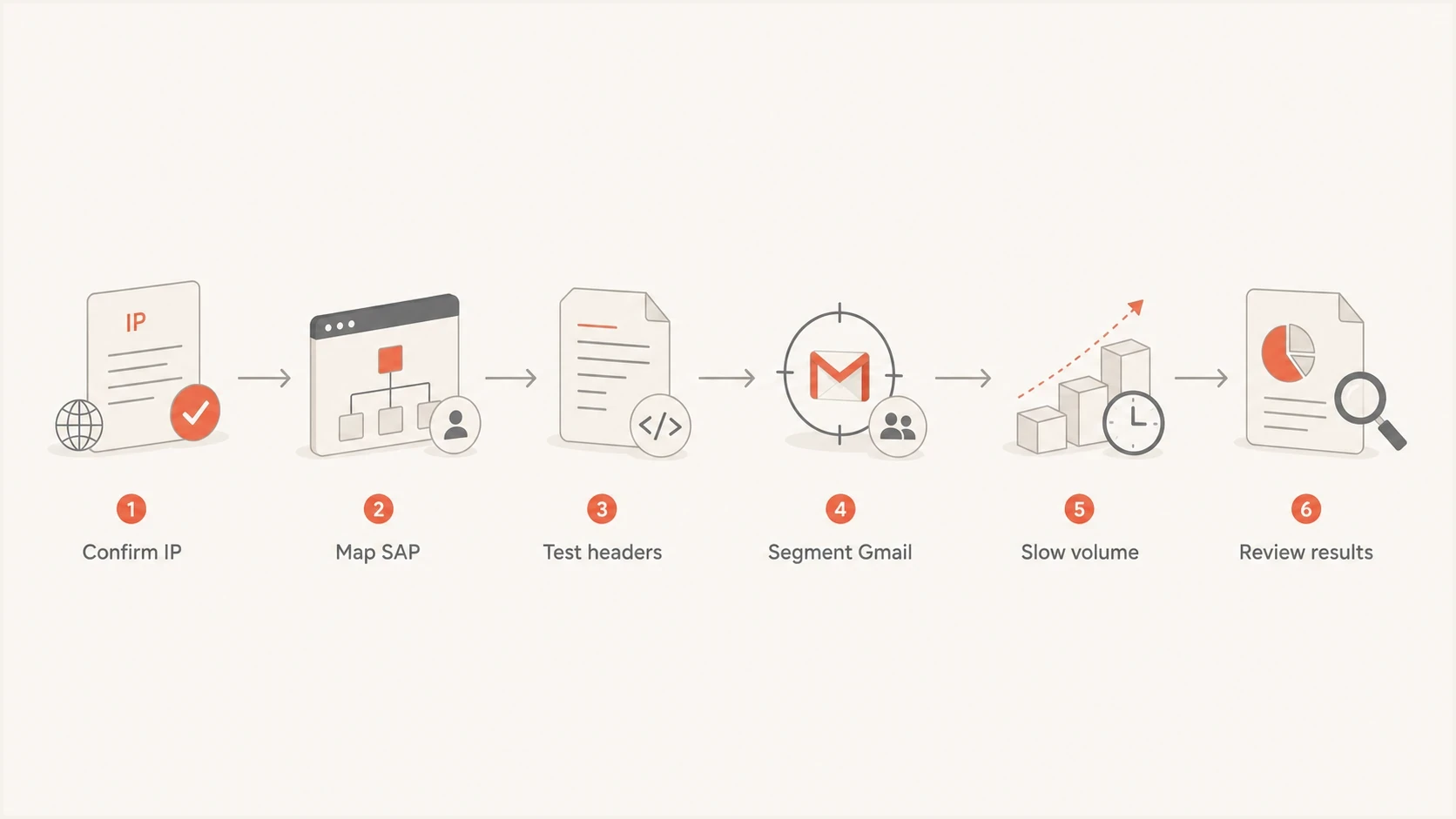
SFMC shared IP verification flow for domain warm-up, Gmail volume, and authentication review.
- Segment first: Use recent Gmail clickers and other active recipients before adding colder Gmail recipients.
- Ramp slowly: Increase Gmail volume only after placement, bounces, SMTP responses, and complaints stay stable.
- Hold often: If Gmail placement worsens after a jump, return to the previous stable volume.
- Separate traffic: Keep promotional spikes, reactivation sends, and risky segments away from the warm-up stream.
- Document changes: Track the date, SFMC job ID, audience type, Gmail volume, placement, bounce rate, SMTP responses, and complaint signals.
Where Suped fits
Suped's product supports the ongoing verification work after a one-time Salesforce review. It keeps SPF, DKIM, DMARC, sending-source, and blocklist or blacklist evidence together while the SFMC configuration and volume plan change.
Use the domain health checker for a fast DNS review, then DMARC monitoring to follow authentication results by source. Suped's blocklist monitoring can also record blocklist (blacklist) changes between campaign checks.

Issue steps to fix dialog showing the issue overview, tailored fix steps, and verification action
For SFMC, the practical value is source attribution. If DMARC reports show the expected SFMC source with aligned DKIM or SPF, continue with engagement, Gmail placement, compliance, and volume analysis. If reports show unexpected sources, domain misalignment, or authentication failures, correct those issues first.
Useful Suped workflows here
- Issue detection: Findings identify broken SPF, DKIM, DMARC, forwarding, and domain-alignment problems with steps to fix.
- Failure alerts: Authentication failure spikes can be flagged as new reports arrive during the warm-up.
- DNS management: Hosted DMARC, Hosted SPF, SPF flattening, and Hosted MTA-STS can reduce DNS work for teams with limited access.
- Multi-domain view: Enterprise teams can compare sending domains and Enterprise IDs in one dashboard.
Suped does not create Gmail trust for a new domain. It supplies evidence about the source, authentication result, policy state, and blacklist or blocklist changes during warm-up.
Views from the trenches
Best practices
Ask support for the exact IP scope before treating a shared IP as a warm-up exemption.
Warm each new From domain with active users even when the sending IP has prior history.
Keep SFMC job IDs, headers, audience details, and Gmail evidence together for escalation.
Separate Gmail results from blended metrics so provider-specific issues stay visible.
Common pitfalls
Assuming a shared company IP means a new SFMC Enterprise ID has inherited domain trust.
Judging warm-up success from total opens when Gmail is the only provider showing spam.
Skipping header checks because Sender Profiles and Delivery Profiles look correct in SFMC.
Sending large early batches to Gmail before the new domain has stable engagement signals.
Expert tips
Confirm whether Salesforce's review covers authentication or also reputation indicators.
Use received headers to verify the return-path, DKIM domain, and authentication result.
Treat a 57,000-message start as stabilization work, not a clean pre-warm planning phase.
Hold Gmail volume at the last stable level whenever spam placement rises after a ramp.
Marketer from Email Geeks says a shared IP inside one company is different from a broad shared pool, so the first check is the actual ownership and scope of the IP.
2022-08-22 - Email Geeks
Marketer from Email Geeks says Salesforce Support was the right path for asking whether the old Reputation Audit was still available for a specific SFMC setup.
2022-08-22 - Email Geeks
Recommended operating sequence
Open the Salesforce case, request the current deliverability review available for the account, and gather the SFMC evidence in parallel. Do not wait for the review before checking headers, validating Gmail bulk sender compliance, and reducing Gmail exposure.
If authentication and compliance are clean, the IP is stable, and Gmail still places mail in Spam, tighten the Gmail warm-up with smaller batches, stronger activity filters, simpler traffic patterns, and no sudden jumps. If authentication is not clean, fix DNS and domain alignment first. If a blocklist or blacklist issue appears, document the listing, affected IP or domain, first-seen time, and mail stream before changing infrastructure.
- Verify: Confirm IP scope, SAP mapping, received headers, DNS, DMARC alignment, and Gmail sender compliance.
- Stabilize: Slow Gmail volume and send to the most recently active audience first.
- Escalate: Give Salesforce the evidence package instead of a general complaint about Gmail Spam.
- Monitor: Keep watching authentication, SMTP responses, complaints, domain reputation, and blocklist signals after each volume change.




